


Full Stack Development Articles
Claude for Architecture and Engineering Documentation
Freelancing as a Python Developer: Getting Your First Client


Get In Touch For Details! Request More Information
Git Advanced: Rebasing, Cherry-Picking, and Bisect Explained
Sep 22, 2026 4 Min Read 284 Views
(Last Updated)
Advanced Git commands such as rebase, cherry-pick, and bisect help developers manage code changes more efficiently. Git rebase creates a cleaner commit history, cherry-pick applies specific commits to another branch, and bisect helps identify bugs by locating the commit that introduced an issue. Mastering these advanced Git commands can improve collaboration and streamline development workflows.
Table of contents
- TL;DR
- What Are Advanced Git Commands?
- What Is Git Rebase?
- What Is Git Cherry-Pick?
- What Is Git Bisect?
- Git Rebase vs Cherry-Pick vs Bisect
- Best Practices for Using Advanced Git Commands
- Key Takeaways
- Conclusion
- FAQs
- What are advanced Git commands?
- What does Git rebase do?
- When should I use Git cherry-pick?
- How does Git bisect help with debugging?
- Is Git rebase better than Git merge?
TL;DR
- Git rebase helps create a cleaner and more linear commit history.
- Git cherry-pick allows you to apply specific commits without merging entire branches.
- Git bisect helps locate the exact commit that introduced a bug.
- These advanced Git commands improve productivity and repository management.
- Understanding when to use each command is just as important as knowing how to use it.
Advanced Git commands such as rebase, cherry-pick, and bisect help developers manage code changes more efficiently. Git rebase creates a cleaner commit history, cherry-pick applies specific commits to another branch, and bisect helps identify bugs by locating the commit that introduced an issue. Mastering these advanced Git commands can improve collaboration and streamline development workflows.
What Are Advanced Git Commands?
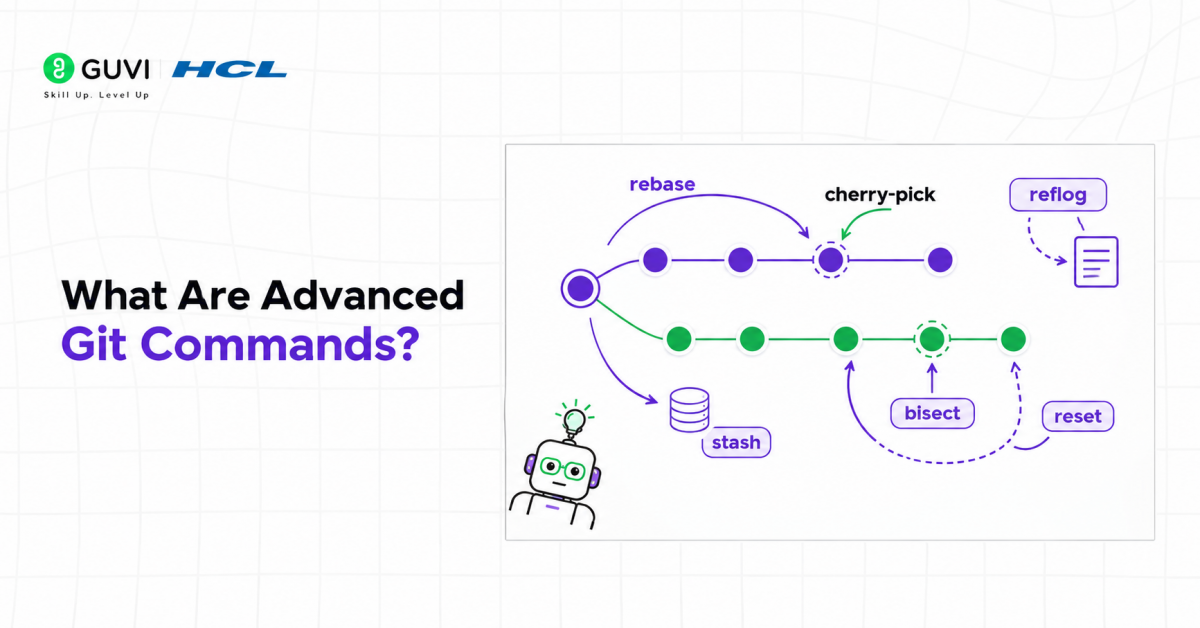
Git offers far more than basic commands like git add, git commit, and git push. As projects grow larger and teams become more collaborative, developers often need more powerful tools to manage code changes efficiently.
This is where advanced Git commands come into play. Commands such as rebase, cherry-pick, and bisect help developers maintain clean commit histories, move changes between branches, and identify bugs faster.
Some benefits of learning advanced Git commands include:
- Cleaner project history.
- Easier collaboration among team members.
- Faster debugging and issue resolution.
- Better control over code changes.
Git bisect uses a binary search algorithm to find the commit that introduced a bug. Instead of checking every commit manually, Git bisect repeatedly halves the search space, allowing developers to identify a faulty commit in a repository with 100 commits in as few as 7 checks, making debugging significantly faster.
Read More: Mastering Advanced Git: An In-Depth Guide to Efficient Version Control
What Is Git Rebase?
Git rebase is a command that allows you to move or combine commits from one branch onto another. Instead of creating a merge commit, rebasing rewrites commit history to create a linear timeline.
In simple terms, Git rebase takes your branch’s commits and reapplies them on top of another branch.
For example, if your feature branch was created from an older version of the main branch, rebasing can update your branch with the latest changes while keeping the history clean.
- Basic Git Rebase Syntax
git checkout feature-branch
git rebase main
This command moves all commits from feature-branch and reapplies them on top of the latest version of main.
- Benefits of Git Rebase
- Creates a cleaner commit history.
- Removes unnecessary merge commits.
- Makes project history easier to understand.
- Simplifies code reviews.
- When Should You Use Git Rebase?
Git rebase is useful when:
- Updating feature branches with recent changes.
- Cleaning up commit history before merging.
- Working on personal branches that have not yet been shared.
Warning: Avoid rebasing commits that have already been pushed and shared with other developers — rewriting public history can create conflicts and confusion.
Want to go beyond basic Git commands and master professional version control workflows? Explore HCL GUVI’s Advanced AI Cloud Computing & DevOps Course, designed to help you learn Git, GitHub, CI/CD, automation, cloud technologies, and industry-standard development practices through hands-on projects and real-world scenarios.
What Is Git Cherry-Pick?
Git cherry-pick allows you to select a specific commit from one branch and apply it to another branch. Unlike merging, cherry-picking transfers only the chosen commit rather than the entire branch history.
This makes it useful when you need a particular fix or feature without bringing in unrelated changes.
- Basic Git Cherry-Pick Syntax
git cherry-pick commit-hash
For example:
git cherry-pick a1b2c3d
Git will apply the specified commit to your current branch.
- Benefits of Git Cherry-Pick
- Transfers specific changes between branches.
- Avoids unnecessary merges.
- Useful for hotfixes and urgent patches.
- Provides greater control over code movement.
- Common Use Cases
You might use cherry-pick when:
- Applying a bug fix from one branch to another.
- Moving a specific feature without merging everything.
- Recovering accidentally deleted commits.
Pro Tip: Before cherry-picking, review the commit carefully to ensure it doesn’t depend on changes from other commits.
What Is Git Bisect?

Git bisect is a debugging tool that helps identify the exact commit that introduced a bug. Instead of manually checking dozens of commits, Git performs a binary search through your commit history.

This significantly reduces the time required to locate problematic changes.
- Basic Git Bisect Workflow
Start bisect mode:
git bisect start
Mark the current version as bad:
git bisect bad
Mark a known working commit as good:
git bisect good commit-hash
Git will automatically move through commits until it identifies the problematic one.
- How Git Bisect Works
Suppose your repository contains 100 commits. Rather than checking all 100 individually, Git bisect repeatedly divides the search space in half.
This binary search approach dramatically reduces the number of checks required.
- Benefits of Git Bisect
- Speeds up debugging.
- Identifies bugs accurately.
- Saves significant development time.
- Works well for large repositories.
Data Point: A binary search through 100 commits may require only about 7 checks to identify the problematic commit.
Git Rebase vs Cherry-Pick vs Bisect
Although these commands serve different purposes, understanding their differences helps you choose the right tool for the job.
| Command | Purpose | Common Use Case |
| Rebase | Rewrite commit history | Updating feature branches |
| Cherry-Pick | Copy specific commits | Applying fixes across branches |
| Bisect | Find problematic commits | Debugging bugs |
| Merge | Combine branch histories | Integrating completed work |
Each command addresses a different challenge in software development.
- Rebase focuses on maintaining a clean history.
- Cherry-pick focuses on transferring specific changes.
- Bisect focuses on debugging and issue tracking.
Best Practices for Using Advanced Git Commands
Advanced Git commands are powerful, but they should be used carefully.
Some best practices include:
- Understand the command before using it on production repositories.
- Create backups before performing major history modifications.
- Communicate with team members before rebasing shared branches.
- Test cherry-picked commits after applying them.
- Use Git bisect whenever debugging becomes time-consuming.
Best Practice: Practice advanced Git commands in a personal repository before using them in collaborative projects.
Want to go beyond basic Git commands and master professional version control workflows? Explore HCL GUVI’s Advanced AI Cloud Computing & DevOps Course, designed to help you learn Git, GitHub, CI/CD, automation, cloud technologies, and industry-standard development practices through hands-on projects and real-world scenarios.
Key Takeaways
- Advanced Git commands provide greater control over repository management.
- Git rebase creates a cleaner and more linear commit history.
- Git cherry-pick allows you to transfer specific commits between branches.
- Git bisect helps locate the exact commit responsible for a bug.
- Each command solves a different problem in the development workflow.
- Understanding when to use these commands is critical for effective version control.
Conclusion
As you progress from beginner to professional developer, mastering advanced Git commands becomes increasingly important. Commands such as rebase, cherry-pick, and bisect can improve collaboration, simplify debugging, and help maintain cleaner repositories.
The key is understanding the purpose of each command and using it appropriately. With practice, these advanced Git commands will become valuable tools that improve both your productivity and your confidence when working with Git.
FAQs
What are advanced Git commands?
Advanced Git commands are powerful tools that help developers manage repositories more effectively. Examples include rebase, cherry-pick, bisect, stash, and reflog.
What does Git rebase do?
Git rebase moves or reapplies commits onto another branch to create a cleaner commit history. It is commonly used to update feature branches with the latest changes.
When should I use Git cherry-pick?
Git cherry-pick is useful when you need to transfer a specific commit from one branch to another. It allows you to move individual changes without merging entire branches.
How does Git bisect help with debugging?
Git bisect performs a binary search through commit history to identify the commit that introduced a bug. This significantly reduces debugging time.
Is Git rebase better than Git merge?
Neither is universally better — they serve different purposes. Rebase creates a cleaner history, while merge preserves the complete branch history.
Success Stories

About the Author
Vishalini Devarajan
An Aerospace Engineer turned content writer, I focus on making complex concepts easy to understand through well-structured, reader-friendly blogs. Whether it’s a technical topic or a non-technical one, I love creating content that is clear, engaging, and impactful.
View all posts by Vishalini Devarajan
Connect with me @





































Did you enjoy this article?