


Artificial Intelligence and Machine Learning Articles
Skills Required to Become a Speech Recognition Engineer in 2026
Computer Vision Engineer Skills Roadmap: A Step-by-Step Guide
What is Replit’s New Database Editor? A Beginner-Friendly Guide


Get In Touch For Details! Request More Information
Experiment: Figma to Replit Plugin
Jun 26, 2026 7 Min Read 37 Views
(Last Updated)
Design and development have always lived in separate worlds. Designers work in Figma, creating layouts, components, and prototypes that represent exactly what a product should look and feel like. Developers work in code editors and environments, translating those designs into working applications. The gap between these two worlds costs time, creates misunderstandings, and produces implementations that diverge from the original design intent.
The Figma to Replit plugin is an experiment aimed directly at closing this gap. It allows a designer or developer to select a Figma design and send it to Replit, where an AI agent uses the design as the basis for generating a working application. The design becomes the specification, and the agent builds from it.
This article covers what the Figma Replit plugin experiment does, how it works technically, what it gets right, where its current limitations are, and what this kind of integration means for the future of design-to-development workflows.
Table of contents
- TL;DR
- How Design to Development Works Today
- The Real Problem: Manual Translation Between Design and Code
- The Shift: Design as Agent Context
- How the Figma to Replit Plugin Works
- Example: Design context passed to Replit Agent
- Hidden Architecture: What the Plugin Extracts and Why
- An Example: A Full Figma to Replit Workflow
- Why Design-as-Context Is More Effective Than Design-to-Code Conversion
- Design Fidelity as a Crucial Enabler
- Why This Enables Faster Design and Development Iteration
- The Real Innovation: Collapsing the Handoff
- Conclusion
- FAQs
- What is the Figma to Replit plugin?
- What design data does the plugin extract from Figma?
- What kind of output does the plugin produce?
- Is the output production-ready?
- What types of Figma designs work best with the plugin?
- Can the plugin replace a developer in the design-to-development process?
TL;DR
1. The Figma Replit plugin is an experimental integration that sends Figma designs directly to Replit Agent for code generation.
2. The plugin exports design data, including layout, component structure, styles, and assets, and passes it to Replit as agent context.
3. Replit Agent uses the design context to generate a frontend application that reflects the visual structure and styling of the original design.
4. The experiment demonstrates that design-to-code workflows can be compressed significantly when the design tool and development environment are directly connected.
5. The plugin is experimental and produces results that require developer review and refinement rather than production-ready output.
What Is the Figma to Replit Plugin?
The Figma to Replit plugin is an experimental integration that allows users to export a selected Figma design directly into a Replit project, where the Replit Agent uses the design as context to generate a working frontend application.
How Design to Development Works Today
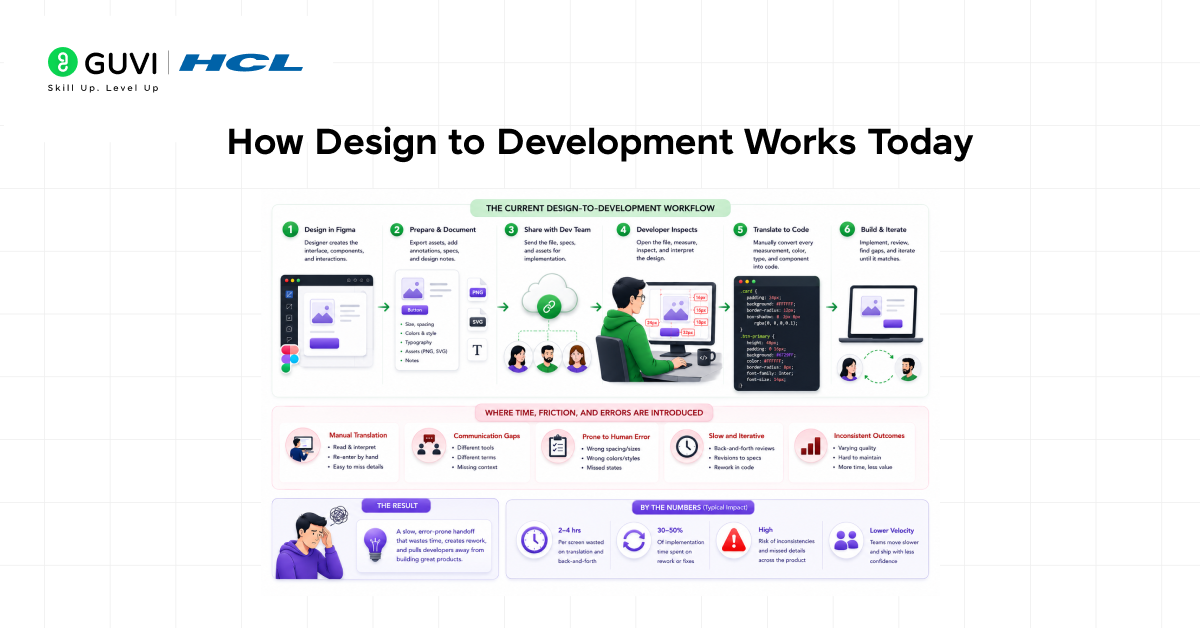
The current design-to-development handoff follows a consistent and consistently slow pattern. A designer creates a design in Figma, exports assets, writes a specification or adds annotations, and shares the file with the development team.
A developer opens the file, inspects the components, notes the spacing, colors, typography, and layout, and begins writing code that attempts to match what the design shows.
This process involves a significant amount of manual translation. Every measurement the developer reads from Figma is a number they type into CSS. Every color they copy is a value they paste into a style file.
Every component they see in the design is a structure they recreate in code from scratch. The fidelity of the final implementation depends entirely on how carefully the developer reads the design and how accurately they translate it.
The handoff itself is a source of friction and error. Designers and developers use different tools, different terminology, and different mental models for the same interface.
Details that are obvious in the design are ambiguous in the specification. Interactions that are implicit in a prototype require explicit discussion before they can be coded. The result is an implementation cycle that is slower and more error-prone than it needs to be.
The Real Problem: Manual Translation Between Design and Code
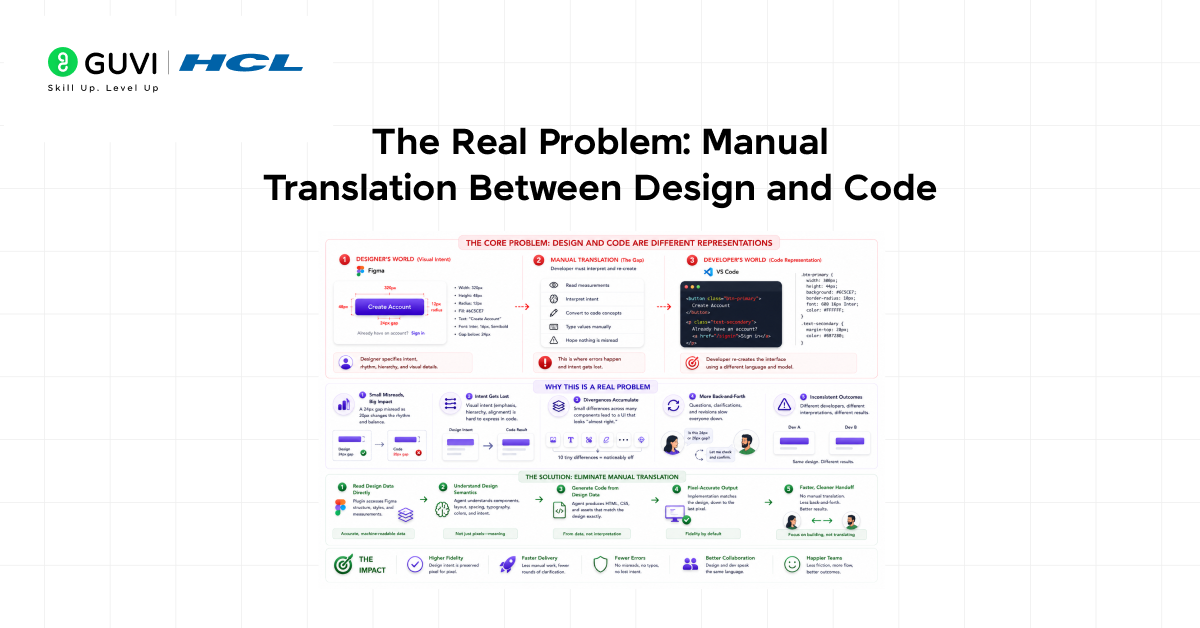
The core problem in design to development is that the design and the code represent the same thing in two completely different formats. A designer describes a button as a rectangle with specific dimensions, corner radius, fill color, and text style. A developer describes the same button as a set of HTML and CSS properties.
Neither format is a direct translation of the other, and the conversion between them is done manually every time.
This manual translation is where design intent gets lost. A designer who specifies a 24 pixel gap between elements intends a specific visual rhythm. A developer who misreads that as 20 pixels produces a layout that looks slightly off without either party being able to identify why.
These small divergences accumulate across a full design until the implementation and the design are visually related but not visually identical.
The Figma Replit plugin attacks this problem at its source by eliminating the manual translation step entirely. The plugin reads the design data directly and passes it to an agent that generates code from that data rather than from a developer’s manual interpretation of it.

The Shift: Design as Agent Context
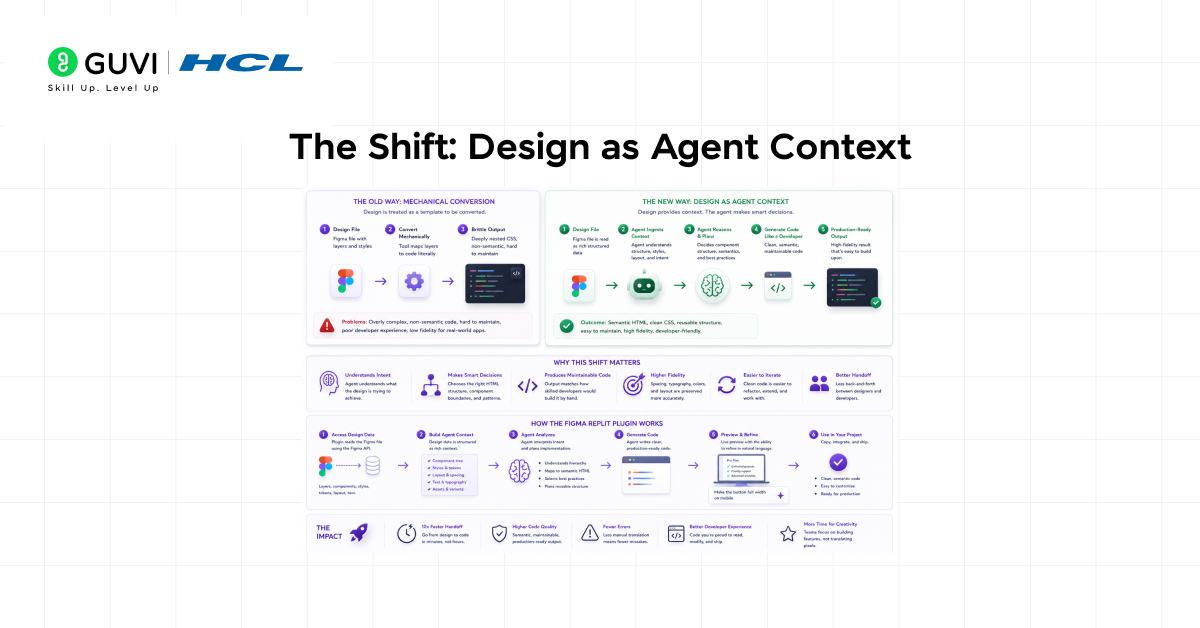
Traditional design-to-code tools have tried to automate code generation from design files for years with limited success. The outputs were typically brittle, producing deeply nested CSS that was difficult to maintain and markup that did not reflect how a developer would actually structure the component.
The Figma Replit plugin takes a different approach by treating the design not as a template to be mechanically converted but as context for an AI agent. The agent receives the design structure and uses it to generate code the way a skilled developer would, applying judgment about component hierarchy, reusable patterns, and appropriate implementation choices rather than producing a literal translation of every layer.
This shift from mechanical conversion to agent-informed generation is what makes the Figma Replit plugin experiment distinct from previous design-to-code attempts.
How the Figma to Replit Plugin Works
The plugin operates in two phases. In the first phase, the plugin reads the selected Figma frame or component and extracts the design data: the layer structure, dimensions, spacing, colors, typography, images, and component names. This data is serialized into a format that Replit Agent can interpret as context.
In the second phase, the plugin sends this context to Replit, where it opens a new project and passes the design data to Replit Agent as the starting prompt. The agent uses the design context to generate the application, making implementation decisions based on what the design describes.
Example: Design context passed to Replit Agent
| // Serialized design context from Figma plugin{ “frame”: “Landing Page Hero”, “dimensions”: { “width”: 1440, “height”: 800 }, “components”: [ { “name”: “Navbar”, “type”: “frame”, “layout”: “horizontal”, “padding”: { “top”: 24, “bottom”: 24, “left”: 80, “right”: 80 }, “children”: [“Logo”, “NavLinks”, “CTAButton”] }, { “name”: “HeroSection”, “type”: “frame”, “layout”: “vertical”, “alignment”: “center”, “children”: [“Headline”, “Subheading”, “PrimaryButton”] } ], “styles”: { “primaryColor”: “#1A1A2E”, “accentColor”: “#E94560”, “fontFamily”: “Inter”, “baseFontSize”: 16 }} |
The agent receives this context alongside an instruction to generate a working frontend that matches the design. It uses the component names, layout properties, and style values to produce HTML, CSS, and, where relevant, JavaScript that reflects the design structure.
Hidden Architecture: What the Plugin Extracts and Why
The quality of the generated output depends entirely on the quality of the design context that the plugin extracts. The plugin prioritizes structured data that translates directly to code properties: auto layout settings become flexbox or grid, fill colors become CSS color values, text styles become font-size and font-weight declarations, and component names become class names and component identifiers.
Figma designs that use auto layout and named components give the plugin significantly more useful context than designs built from manually positioned absolute elements. A frame with auto layout has explicit spacing, direction, and alignment rules that map cleanly to CSS layout properties. A frame with manually positioned layers has only absolute coordinates, which produce brittle positioning code that does not respond correctly to different viewport sizes.
The plugin also extracts component relationships. A design that uses Figma components consistently allows the agent to identify which elements are repeated and should be built as reusable code components rather than duplicated markup.
An Example: A Full Figma to Replit Workflow
A designer has completed a landing page design in Figma. The design uses auto layout throughout, has named components for the navbar, hero section, feature cards, and footer, and uses a defined set of color and typography styles. They select the top-level frame and activate the Figma Replit plugin.
| // Agent prompt generated from plugin export Build a responsive landing page based on this design context. Page structure: Navbar: Logo left, navigation links center, CTA button right Hero: Full-width, centered headline and subheading, two action buttons Features: Three-column grid of feature cards with icon, title, description Footer: Logo, navigation links, social icons, copyright Design tokens: Primary: #1A1A2E | Accent: #E94560 | Background: #FFFFFF Font: Inter | Base size: 16px | Heading weight: 700 Card border radius: 12px | Section padding: 80px vertical Use semantic HTML, CSS custom properties for design tokens,and ensure the layout is responsive at 768px and 375px breakpoints. |
The agent generates the full page structure, applies the design tokens as CSS custom properties, and produces a responsive layout that reflects the component hierarchy from the Figma design. The designer and developer can review the output in Replit immediately without a separate setup step.
Figma designs built with auto layout and consistently named components produce significantly better code generation results when used with the Figma–Replit plugin.
This is because auto layout properties map directly to CSS flexbox and grid rules, giving the AI precise layout instructions instead of forcing it to interpret absolute coordinates.
Why Design-as-Context Is More Effective Than Design-to-Code Conversion
Previous design-to-code tools treated the design as a blueprint to be mechanically translated. Every layer became a div, every style became an inline rule, and every absolute position became a fixed coordinate. The output was technically accurate to the design file, but practically unusable as a codebase.
Treating the design as an agent context produces different output. The agent applies judgment about what the design describes and generates code the way a developer familiar with the design would write it. Components are structured correctly, styles are extracted into reusable tokens, and layout is implemented with the appropriate CSS approach rather than with the most literal translation of Figma’s layer coordinates.
Design Fidelity as a Crucial Enabler
The closer the generated code is to the original design, the less time a developer spends on visual corrections after generation. Every pixel of drift between the design and the implementation is a correction the developer must make manually. The Figma Replit plugin reduces this drift by giving the agent precise design values rather than asking a developer to read and transcribe them.
Design fidelity in the output depends on how completely and accurately the plugin captures the design intent. Color values, spacing measurements, and typography settings that are explicitly defined in the Figma design transfer correctly. Implicit design decisions, such as the intended hover state of a button or the behavior of a component on mobile, require the agent to make assumptions that may or may not match the designer’s intent.
This is why the plugin works best as a starting point for a conversation between the generated code and the design rather than as a one-shot translation. The agent gets the structure and the tokens right. The developer and designer refine the interactions and edge cases.
Why This Enables Faster Design and Development Iteration
The most valuable property of the Figma Replit plugin is the speed it brings to early iteration. A designer can explore three different layout approaches in Figma in the morning and have working code versions of all three in Replit by the afternoon. The development team can evaluate which approach holds up in code before any significant implementation investment has been made.
This feedback loop between design and implementation changes how design decisions get made. Instead of committing to a design direction based on how it looks in a prototype, the team can base decisions on how it works in a real application. The cost of exploring a direction drops dramatically when moving from Figma to a working prototype that takes minutes rather than days.
The Real Innovation: Collapsing the Handoff
The Figma Replit plugin experiment’s real contribution is not code generation quality, though that is important. It is the elimination of the handoff as a distinct phase in the development process. When a designer can send a design directly to an AI agent that generates working code in the same environment where the code will be developed and deployed, the handoff is not improved. It is removed.
This removal changes the relationship between design and development. Designs are no longer specifications that developers interpret. They are inputs that agents act on. The designer and developer collaborate around the agent’s output rather than around a document that one party produces and the other translates. The Figma Replit plugin is an early experiment in what that collaboration looks like in practice.
If you want to learn more about building skills for Claude Code and automating your procedural knowledge, do not miss the chance to enroll in HCL GUVI’s Intel & IITM Pravartak Certified Artificial Intelligence & Machine Learning courses. Endorsed with Intel certification, this course adds a globally recognized credential to your resume, a powerful edge that sets you apart in the competitive AI job market.
Conclusion
The Figma to Replit plugin experiment demonstrates that the gap between design and development can be closed meaningfully when the design tool and the development environment are directly connected. By treating the Figma design as context for Replit Agent rather than as a document for manual translation, the plugin collapses the handoff phase and produces working frontend code from a visual design in a fraction of the time a manual implementation would require.
Through its approach of extracting structured design data and using it as agent context, the Figma Replit plugin produces output that reflects the design’s component hierarchy, layout structure, and visual tokens. The experiment is not finished, and the output is not production-ready, but it demonstrates a model of design-to-development workflow that is faster, more direct, and more faithful to design intent than the manual handoff it replaces. Real collaboration between designers and developers starts when the tools they use can speak directly to each other.
FAQs
1. What is the Figma to Replit plugin?
It is an experimental integration that allows users to send a selected Figma design directly to Replit, where the Replit Agent uses the design data as context to generate a working frontend application.
2. What design data does the plugin extract from Figma?
The plugin extracts layer structure, dimensions, spacing, colors, typography, auto layout properties, component names, and asset references. Designs that use auto layout and named components provide the most useful context for code generation.
3. What kind of output does the plugin produce?
The plugin produces a frontend application that reflects the visual structure and styling of the original Figma design, including HTML, CSS with design tokens, and a responsive layout. It handles visual structure rather than application logic.
4. Is the output production-ready?
No. The plugin is experimental, and the output is a starting point that requires developer review, refinement, and testing. Edge cases, accessibility, and application logic all require additional work after the initial generation.
5. What types of Figma designs work best with the plugin?
Designs built with auto layout, named components, and defined color and typography styles produce the best results. Designs with manually positioned absolute elements, unnamed layers, and inconsistent styling produce lower quality output.
6. Can the plugin replace a developer in the design-to-development process?
No. The plugin eliminates the manual translation of visual design into code structure but does not replace the developer judgment required for application logic, state management, performance, accessibility, and production quality refinement.
Success Stories

About the Author
Vishalini Devarajan
An Aerospace Engineer turned content writer, I focus on making complex concepts easy to understand through well-structured, reader-friendly blogs. Whether it’s a technical topic or a non-technical one, I love creating content that is clear, engaging, and impactful.
View all posts by Vishalini Devarajan
Connect with me @










Did you enjoy this article?