


Artificial Intelligence and Machine Learning Articles
Claude for Code Documentation with JSDoc
How to Integrate Claude into a Next.js App with App Router


Get In Touch For Details! Request More Information
ToolUniverse Claude Extension: Complete Guide for Scientific Research
Jul 06, 2026 6 Min Read 831 Views
(Last Updated)
The ToolUniverse Claude extension gives Claude access to a library of 600+ vetted scientific tools to explore large hypothesis spaces, compare competing hypotheses, and iterate through fast-to-slow cycles of analysis. This article explains how to set up and use the ToolUniverse integration with Claude.
The ToolUniverse integration is available as a desktop extension in the Claude Desktop App and relies on Claude’s ability to use local connectors. It is open source under the Apache License 2.0.
This tutorial covers what ToolUniverse is, which datasets and services it connects to, who it is for, how to set it up for individual users and organisations, five example use cases with sample prompts and workflows, and where to find documentation and community resources.
Quick TL;DR Summary
- What it is: An MCP-based desktop extension that gives Claude access to 600+ vetted scientific tools across biological databases, chemical databases, literature sources, genomic data, and AI models for scientific research.
- Who it is for: Research scientists, pharmaceutical and biotech companies, healthcare organisations, data scientists and ML engineers, and government and regulatory agencies.
- How to install (individual): Download the Claude Desktop App, go to Settings > Extensions, click Browse extensions, find ToolUniverse, and click Install.
- How to install (Claude Code): Run /plugin marketplace add anthropics/life-sciences, then /plugin install tool-universe@life-sciences, restart Claude Code, and verify with /mcp.
- Five use case areas: Drug discovery and therapeutic development, human genetics and genomic research, literature and multimodal evidence synthesis, chemical and molecular analysis, and scientific discovery automation.
- Open source: ToolUniverse is open source under the Apache License 2.0. Source code is on GitHub with 797+ stars. Documentation at the ToolUniverse Documentation site.
Table of contents
- About the ToolUniverse Integration
- Datasets and Services Available
- Biological Databases and Foundation Models
- Chemical and Drug Databases
- Literature and Knowledge Bases
- Genomic and Health Data
- Research Tools and APIs
- AI Models, Foundation Models, and Visualisation Tools
- Who Should Use the ToolUniverse Integration
- Setting Up the ToolUniverse Integration
- For Organisation Owners, Team, and Enterprise
- For Individual Claude Users
- For Claude Code Users
- Example Use Cases
- Drug Discovery and Therapeutic Development
- Human Genetics and Genomic Research
- Literature and Multimodal Evidence Synthesis
- Chemical and Molecular Analysis
- Scientific Discovery and Automation for Multi-Tool Studies
- Demos and Documentation
- Live Demonstrations
- Documentation and Tutorials
- Community Resources
- Conclusion
- FAQs
- What is the ToolUniverse Claude extension?
- How do I install the ToolUniverse extension in Claude?
- Is ToolUniverse free to use?
- Which scientific databases does ToolUniverse connect to?
- What types of research can ToolUniverse support in Claude?
About the ToolUniverse Integration
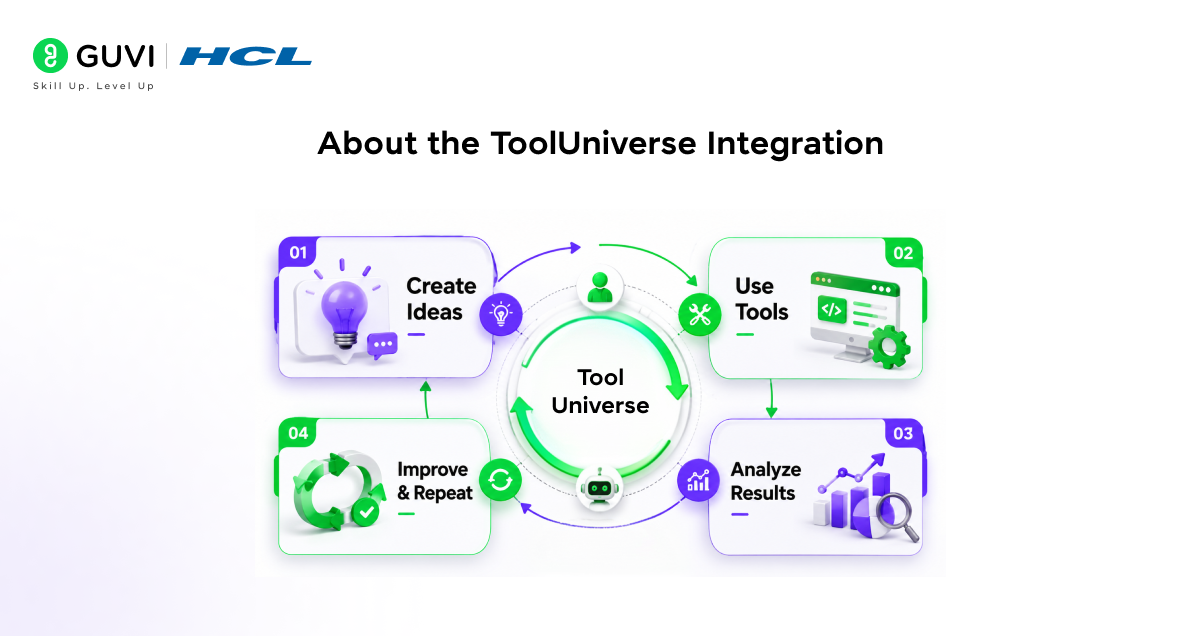
ToolUniverse is an ecosystem for building AI scientists and AI agents for science that work with researchers to generate hypotheses, turn them into executable research plans, run scientific tools, and continually update analyses.
It targets research at scale to reimagine scientific discovery: AI scientists explore large hypothesis spaces, compare competing hypotheses, and iterate through fast-to-slow cycles of analysis, rather than producing one-off summaries. This is the distinction that makes the ToolUniverse Claude extension different from standard AI-assisted research. It is designed for systematic, multi-step investigation, not single-query answers.
ToolUniverse standardises tool use. It lets AI scientists discover and execute tools via local Python functions and remote services served through MCP. This design makes every step inspectable: AI scientists compose end-to-end workflows that connect datasets, models, and analysis pipelines, and record inputs and outputs before they choose the next action.
In human-AI collaboration, ToolUniverse supports a continuous loop of hypothesis generation, information-seeking tool calls, execution of research objectives, and refinement of internal models as new experimental data arrive and insights are generated.
ToolUniverse was developed at Harvard’s Zitnik Lab and MIMS (Machine Intelligence in Medicine and Science). The project has earned over 797+ GitHub stars and supports an active Slack community. Its documentation, hosted on the Zitnik Lab site, includes a 5-minute quick-start tutorial for immediate experimentation with scientific tools.
Datasets and Services Available
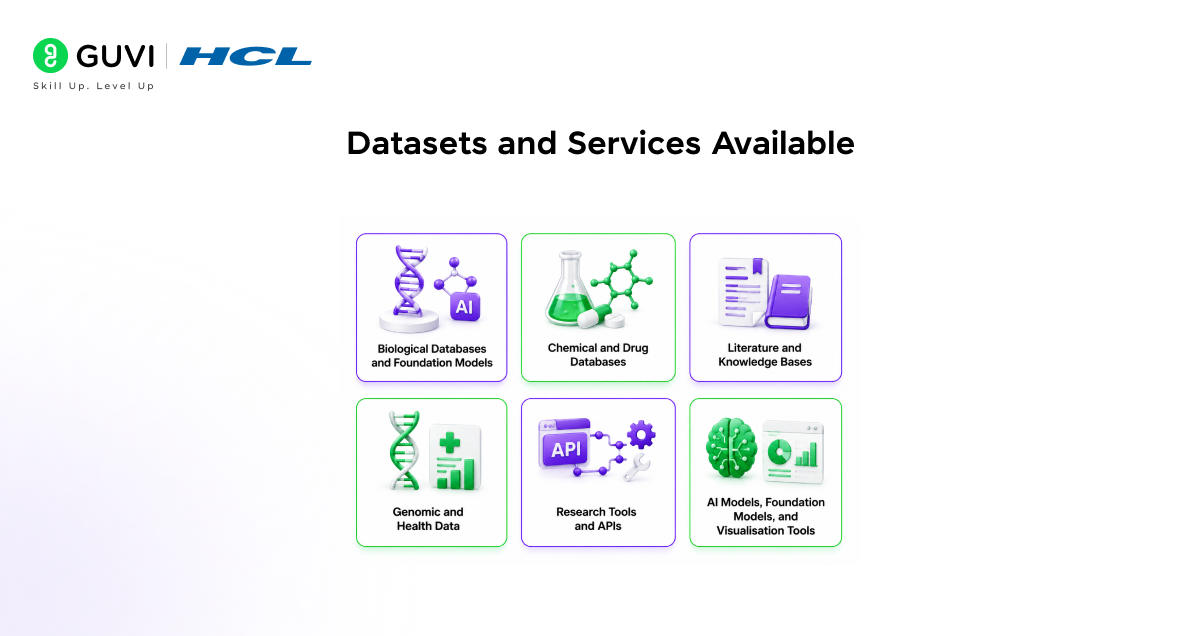
ToolUniverse provides access to a comprehensive ecosystem of scientific resources across six categories. Note: ToolUniverse provides access to third-party scientific databases and services. All copyrights and intellectual property rights for the data, content, and services listed below belong to their respective sources and owners.

Biological Databases and Foundation Models
- UniProt complete protein knowledge database
- Ensembl genomic data and annotations
- RCSB PDB protein structure database
- ChEMBL bioactive molecules and drug discovery database
- NCBI databases GenBank, RefSeq, SNP database
- Gene Ontology biological process, function, and location annotations
- ESM protein language models
- Transcript: Former single-cell foundation models
Chemical and Drug Databases
- PubChem chemical structures and biological activities
- DrugBank drug and drug target database
- FDA databases drug approval, prescribing information, adverse events, drug indications, contraindications, and interactions
- ClinicalTrials.gov clinical trial information
Literature and Knowledge Bases
- PubMed biomedical literature database
- Semantic Scholar AI-powered literature analysis
- Europe PMC open access biomedical literature
- OpenAlex comprehensive scholarly works database
- Crossref DOI registration and metadata
- OpenTargets insights for systematic drug target selection
Genomic and Health Data
- GTEx tissue-specific gene expression
- GWAS Catalog: genome-wide association studies
- ClinVar genetic variation and disease relationships
- OMIM Online Mendelian Inheritance in Man
- TCGA cancer genomics data
Research Tools and APIs
- STRING protein-protein interaction networks
- KEGG pathway and disease information
- Reactome biological pathway database
- InterPro protein families and domains
AI Models, Foundation Models, and Visualisation Tools
- AlphaFold protein structure prediction
- BLAST sequence similarity searching
- ADMET-AI drug property prediction models
- ChemTools chemical informatics utilities
- Visualisation tools, molecular and data visualisation
Explore: Mastering the 10x Genomics Extension in Claude
Who Should Use the ToolUniverse Integration
The ToolUniverse Claude extension is built for professionals working at the intersection of AI and scientific research. Five primary user groups are identified:
- Research Scientists and Academics accelerate hypothesis generation, automate literature reviews, perform complex multi-database analyses, and scale research capabilities to emerging experimental and AI-human collaboration platforms.
- Pharmaceutical and Biotech Companies streamline drug development pipelines, enhance target identification, improve compound design and optimisation, enable virtual drug screening, and accelerate report generation, target assessment, de-risking, and validation.
- Healthcare Organisations power precision medicine initiatives, support clinical trial design and optimisation with patient selection, facilitate pharmacogenomics research, improve patient stratification strategies, and extract prognostic and predictive biomarkers from multimodal healthcare datasets.
- Data Scientists, ML Engineers, Platform and Infrastructure Engineers access domain-specific tools without custom development, rapid prototyping of AI agents for science, and integration of scientific data into ML workflows.
- Government and Regulatory Agencies enhanced regulatory decision-making, improved adverse event analysis, accelerated drug approval processes, and implemented comprehensive safety monitoring.
ToolUniverse integrates over 700 machine learning models, datasets, APIs, and scientific packages across domains like bioinformatics, genomics, proteomics, structural biology, and drug discovery. Its live interface at AIScientist.Tools lets users explore and execute tools before committing to a full installation.
Setting Up the ToolUniverse Integration
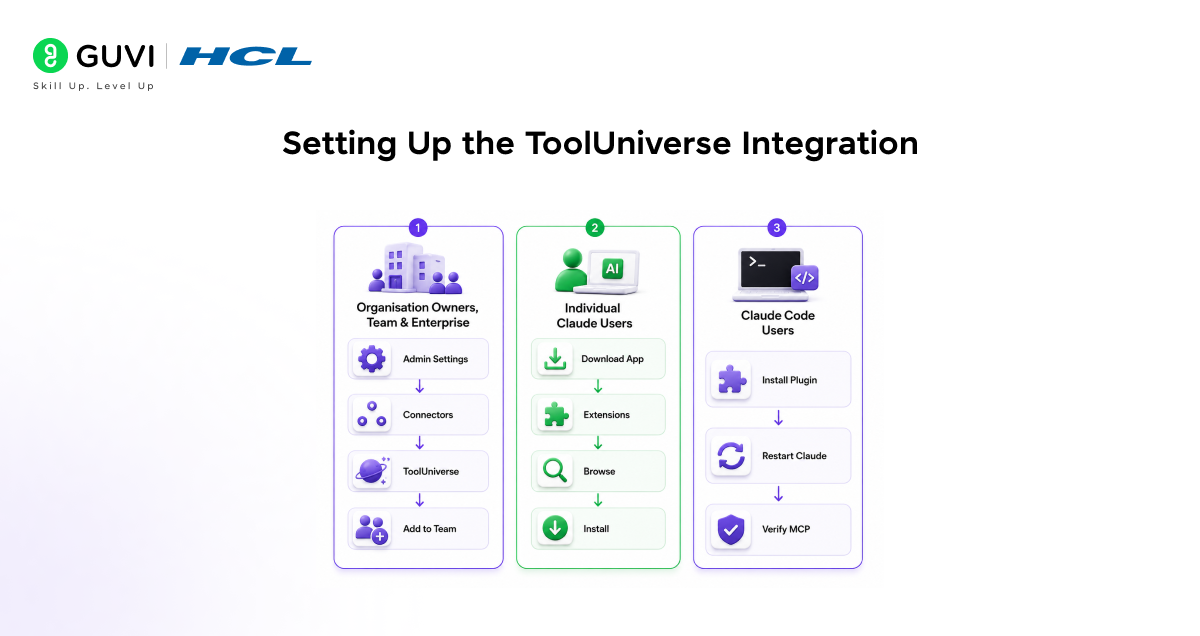
For Organisation Owners, Team, and Enterprise
If your organisation uses the Desktop Extension Allowlist (which restricts which extensions users can access):
1. Navigate to Admin settings > Connectors
2. Click the “Desktop” tab at the top
3. Confirm that “Allowlist” is toggled on
4. Click the “Browse” button
5. In the search field, type ToolUniverse
6. Click on ToolUniverse
7. Click “Add to your team.”
8. Instruct your team to download the Claude Desktop App to access the integration using the individual user instructions below
If your organisation does not use the Desktop Extension Allowlist:
9. Navigate to Admin settings > Connectors
10. Click the “Desktop” tab at the top
11. Confirm that “Allowlist” is toggled off
If the Allowlist is toggled off, all users in your organisation will already be able to access the Desktop Extension directory using the individual user instructions below.
For Individual Claude Users
12. Download the Claude Desktop App from claude.ai/download
13. In the Claude Desktop App, navigate to Settings > Extensions
14. Click “Browse extensions.”
15. Click “ToolUnivers.e.”
16. Click “Insta.ll.”
For Claude Code Users
/plugin marketplace add anthropics/life-sciences
/plugin install tool-universe@life-sciences
Restart Claude Code, then verify that the server is connected:
/mcp
Example Use Cases
Here are five documented workflows demonstrating how the ToolUniverse Claude extension handles real scientific research tasks, each with a sample prompt and the sequence of tool calls that Claude executes:
1. Drug Discovery and Therapeutic Development
Therapeutic discovery and target-to-candidate workflows
Sample Prompt: Identify targets for hypercholesterolemia; prioritize one using evidence from OpenTargets and the literature; then screen known drugs and close analogs; and rank candidates by predicted binding and ADMET trade-offs. Provide intermediate evidence and a final shortlist.
Workflow ToolUniverse-powered AI scientists:
• Query disease-target associations using the OpenTargets API
• Retrieve protein structures from RCSB PDB
• Analyse molecular interactions with ChEMBL compound data
• Predict binding affinities using integrated ML models
• Generate research hypotheses for therapeutic development
2. Human Genetics and Genomic Research
Human genetics to the mechanism variant-to-gene-to-pathway
Sample Prompt: From GWAS hits for type 2 diabetes, map variants to candidate genes, summarize functional annotations and tissue expression, and return enriched pathways with supporting references and links to primary sources.
Workflow ToolUniverse-powered AI scientists:
• Search GWAS catalog for disease-associated genetic variants
• Map SNPs to genes using Ensembl and NCBI databases
• Retrieve functional annotations from Gene Ontology
• Analyse tissue-specific expression using GTEx data
• Identify biological pathways using KEGG and Reactome
3. Literature and Multimodal Evidence Synthesis
Sample Prompt: Search PubMed and Europe PMC for recent CRISPR off-target detection methods, extract key experimental settings and reported failure modes, and produce a structured comparison table with citations.
Workflow ToolUniverse-powered AI scientists:
• Multi-database literature searches across PubMed, Europe PMC, and bioRxiv
• Automated paper summarisation and key finding extraction
• Citation network analysis using Semantic Scholar
• Trend identification through temporal analysis
• Cross-referencing with clinical trial data from ClinicalTrials.gov
4. Chemical and Molecular Analysis
Sample Prompt: Using ToolUniverse’s OpenFDA and ADMET-AI tools, analyze the molecular properties of FDA-approved drugs for hypertension, predict their ADMET profiles, and identify potential side effect patterns.
Workflow ToolUniverse-powered AI scientists:
• Query FDA drug databases for approved medications
• Calculate molecular descriptors and properties
• Predict pharmacokinetic profiles using ADMET-AI models
• Analyse structure-activity relationships
• Identify potential drug repurposing opportunities
5. Scientific Discovery and Automation for Multi-Tool Studies
Sample Prompt: Build a reusable workflow that runs multiple literature searches in parallel, consolidates results, and produces a reproducible report. Return the workflow as a composed tool with clear inputs and outputs. Using ToolUniverse’s UniProt, PRIDE, and KEGG pathway tools, design a complete proteomics workflow: from protein identification using mass spectrometry data to functional analysis and pathway mapping.
Workflow ToolUniverse-powered AI scientists:
• Integrate multimodal proteomics databases UniProt and PRIDE
• Automate data processing and quality control of proteomics readouts
• Annotate protein functions and perform pathway analysis
• Complete statistical analyses and generate interactive visualisations
• Generate reports with summaries
Demos and Documentation
ToolUniverse provides multiple resources for getting started and going deeper:
Live Demonstrations
- Interactive Web Platform: AIScientist.Tools live tool discovery and execution interface for exploring 700+ scientific tools without installation.
- Video Demonstrations: Available on YouTube show the integration in action with real scientific workflows.
- GitHub Repository: ToolUniverse on GitHub at mims-harvard/ToolUniverse, complete source code, documentation, and community with 797+ stars.
Documentation and Tutorials
Full documentation is available at the ToolUniverse Documentation site, covering installation, usage, and advanced features. This includes a quick-start tutorial for 5-minute setup and immediate experimentation with scientific tools, and guides for integration with large language models, AI agents, and reasoning models.
Community Resources
- Slack Community: Join the ToolUniverse HQ Slack for peer support and collaboration with other researchers and developers using the platform.
- GitHub Issues: Report bugs and request features at the ToolUniverse GitHub repository.
If you want to learn more about building skills for Claude Code and automating your procedural knowledge, do not miss the chance to enroll in HCL GUVI’s Intel & IITM Pravartak Certified Artificial Intelligence & Machine Learning courses. Endorsed with Intel certification, this course adds a globally recognized credential to your resume, a powerful edge that sets you apart in the competitive AI job market.
Conclusion
In conclusion, the ToolUniverse Claude extension transforms Claude from a general-purpose AI assistant into a capable AI scientist with direct access to 600+ vetted scientific tools across every major biological, chemical, and genomic database. For researchers, this means moving from single-query answers to systematic multi-step investigation, hypothesis generation, tool execution, and continuous analysis updates in a single connected workflow.
The integration is open source, available in the Claude Desktop App with a five-step install, and ready for Claude Code users with three terminal commands. Five documented use case areas, drug discovery, genomic research, literature synthesis, chemical analysis, and multi-tool scientific automation, show the range of what becomes possible once the extension is connected.
Install the Claude Desktop App, add the ToolUniverse extension, and start with any of the sample prompts in this guide to see what systematic AI-powered scientific research looks like in practice.
FAQs
1. What is the ToolUniverse Claude extension?
ToolUniverse is an MCP-based desktop extension that gives Claude access to 600+ vetted scientific tools across biological databases, chemical databases, literature sources, genomic data, and AI models. It allows Claude to compose end-to-end research workflows, generating hypotheses, running scientific tools, and updating analyses continuously rather than producing one-off summaries.
2. How do I install the ToolUniverse extension in Claude?
Download the Claude Desktop App from claude.ai/download. Open it, navigate to Settings > Extensions, click Browse extensions, find ToolUniverse, and click Install. For Claude Code, run /plugin marketplace add anthropics/life-sciences, then /plugin install tool-universe@life-sciences, restart Claude Code, and verify the connection with /mcp.
3. Is ToolUniverse free to use?
Yes. ToolUniverse is open source under the Apache License 2.0, allowing free access to all features. The source code is available on GitHub at mims-harvard/ToolUniverse. You do need a Claude account and the Claude Desktop App to use the integration with Claude.
4. Which scientific databases does ToolUniverse connect to?
ToolUniverse connects to over 700 resources, including UniProt, Ensembl, RCSB PDB, ChEMBL, NCBI (GenBank, RefSeq, SNP), PubChem, DrugBank, FDA databases, ClinicalTrials.gov, PubMed, Semantic Scholar, Europe PMC, GTEx, GWAS Catalog, ClinVar, TCGA, STRING, KEGG, Reactome, AlphaFold, BLAST, and ADMET-AI, among others.
5. What types of research can ToolUniverse support in Claude?
ToolUniverse supports five documented research areas: drug discovery and therapeutic development, human genetics and genomic research, literature and multimodal evidence synthesis, chemical and molecular analysis, and scientific discovery automation for multi-tool studies. It covers bioinformatics, cheminformatics, genomics, structural biology, proteomics, and drug discovery.
Success Stories

About the Author
Vishalini Devarajan
An Aerospace Engineer turned content writer, I focus on making complex concepts easy to understand through well-structured, reader-friendly blogs. Whether it’s a technical topic or a non-technical one, I love creating content that is clear, engaging, and impactful.
View all posts by Vishalini Devarajan
Connect with me @







Did you enjoy this article?