


Data Science Articles
Accountant vs Data Analyst Salary in India After Switching Careers - Best Guide
Finance Managers: Could Data Science Be Your Next Career Move?
Insurance Claims Executive to Data Analyst: Is It a Good Switch?
Banking Executive (Loans, KYC) to Data Analyst: Skills and Career Path


Get In Touch For Details! Request More Information
Data Visualization with Seaborn in 2026: Complete Beginner’s Guide + Examples
Oct 13, 2026 7 Min Read 3179 Views
(Last Updated)
Raw numbers in a spreadsheet rarely tell a story on their own. Data Visualization with Seaborn turns that same data into charts that make trends, outliers, and relationships obvious at a glance, without the heavy setup that plotting libraries usually demand.
Seaborn sits on top of Matplotlib and adds built-in statistical support, so a scatter plot with a trend line or a correlation heatmap takes a single line of code instead of a dozen. That’s a big part of why it’s become the go-to choice for exploratory analysis in Python.
This guide walks through what Data Visualization with Seaborn actually looks like in practice, the chart types available, working code for each one, and how to decide which chart fits a given dataset.
Table of contents
- TL;DR Summary
- Importance Of Data Visualization
- What Is Seaborn?
- Key Features Of Seaborn
- Types Of Visualizations In Seaborn
- Relational Plots — Show Relationships Between Variables
- Categorical Plots — Compare Categories or Groups
- Distribution Plots — Understand Data Spread and Shape
- Matrix Plots — Visualize Relationships Between Multiple Variables
- Regression Plots — Explore Relationships With Trend Lines
- Hands-On: Working With A Dataset Using Seaborn
- Step 1: Installing And Importing Seaborn
- Step 2: Using A Pre-Made Dataset
- Step 3: Plotting With Seaborn
- Which Seaborn Chart Should You Use?
- Advantages Of Using Seaborn
- Complete Seaborn Data Visualization Guide for India in 2026
- Challenges Or Limitations
- Conclusion
- FAQs
- Is Seaborn better than Matplotlib in 2026?
- Can Seaborn Handle Large Datasets Efficiently?
- What Type Of Plots Are Best For Correlation Analysis?
- Do I Need Pandas To Use Seaborn Effectively?
- Is Seaborn Suitable For Beginners In Data Visualization?
TL;DR Summary
- What it is: Data Visualization with Seaborn means turning a dataset into statistical charts using Python’s Seaborn library, with far less code than Matplotlib alone.
- Chart families covered: Relational, categorical, distribution, matrix, and regression plots, 11 chart types in total.
- Code included: A working example for every chart type, plus the dataset setup the article’s existing examples were missing.
- How to choose a chart: A quick-reference table matching each chart type to the question it answers best.
Importance Of Data Visualization
Data visualization is not just about making charts; it’s about revealing the story hidden within your data. It helps simplify complex information, making it easier to understand and analyze.
It allows you to:
- Identify Trends and Relationships: Spot how variables interact and uncover hidden correlations in your data.
- Detect Outliers: Quickly find unusual or unexpected data points that might affect your analysis.
- Summarize Complex Data: Convert large datasets into clear visuals that are easier to interpret and present.
- Support Data Storytelling: Turn raw numbers into visual insights that make your message more impactful and convincing.
In short, visualization bridges the gap between raw data and decision-making. Data visualization with Seaborn makes this process smooth and efficient, helping you focus on insights instead of struggling with complex code.
What Is Seaborn?
Seaborn is a powerful Python library designed for statistical data visualization, built on top of Matplotlib. It helps create clean, professional, and visually appealing charts with minimal code.
Unlike traditional plotting tools, Seaborn integrates smoothly with pandas DataFrames, making it ideal for analyzing real-world datasets. It automatically manages colors, themes, and layouts, allowing you to focus on understanding the data rather than adjusting visuals.
Data visualization with Seaborn is especially useful for exploratory data analysis (EDA), helping you quickly identify trends, relationships, and patterns that might not be obvious in raw data.
Seaborn vs Matplotlib vs Plotly: Quick Comparison
| Feature | Seaborn | Matplotlib | Plotly |
|---|---|---|---|
| Best for | Statistical & exploratory plots | Full custom control | Interactive dashboards |
| Learning curve | Low | Moderate–High | Moderate |
| Default styling | Attractive out of the box | Basic, needs manual styling | Modern, interactive by default |
| Interactivity | Static only | Static only | Fully interactive (zoom/hover) |
| Built-in statistical plots | Yes (regression, distributions) | No (manual) | Limited |
| Pandas integration | Native, seamless | Manual | Good |
| Ideal use case | Quick EDA & statistical storytelling | Publication-grade custom figures | Web dashboards & interactive reports |
Key Features Of Seaborn
Seaborn comes with a range of features that make it one of the best tools for creating clear and visually appealing charts in Python:
- Built-in Themes: Comes with attractive default themes that improve the look and readability of your charts.
- Seamless Integration with Pandas: Works directly with DataFrames, making it easy to plot real-world datasets.
- Statistical Support: Automatically adds statistical insights like confidence intervals, trends, and distributions.
- Wide Variety of Plots: Supports multiple chart types such as scatter plots, bar plots, box plots, and heatmaps.
- Customizable Colors and Styles: Offers rich color palettes and style options to personalize your visuals.
These features make Seaborn a go-to choice for anyone who wants to create meaningful, professional-quality visualizations with minimal effort.
If you want to build a solid foundation in data visualization and analytics,do check out the Data Science eBook is a perfect start. It covers key topics like Python basics, Seaborn data visualization, data cleaning, machine learning concepts, and real-world case studies. With clear explanations and examples, this eBook helps you move from beginner to confident data explorer.
Types Of Visualizations In Seaborn
Seaborn data visualization offers many chart types to explore distributions, relationships, categories, and patterns. Below are the most popular kinds, explained in simple terms with when to use each and example functions.
1. Relational Plots — Show Relationships Between Variables
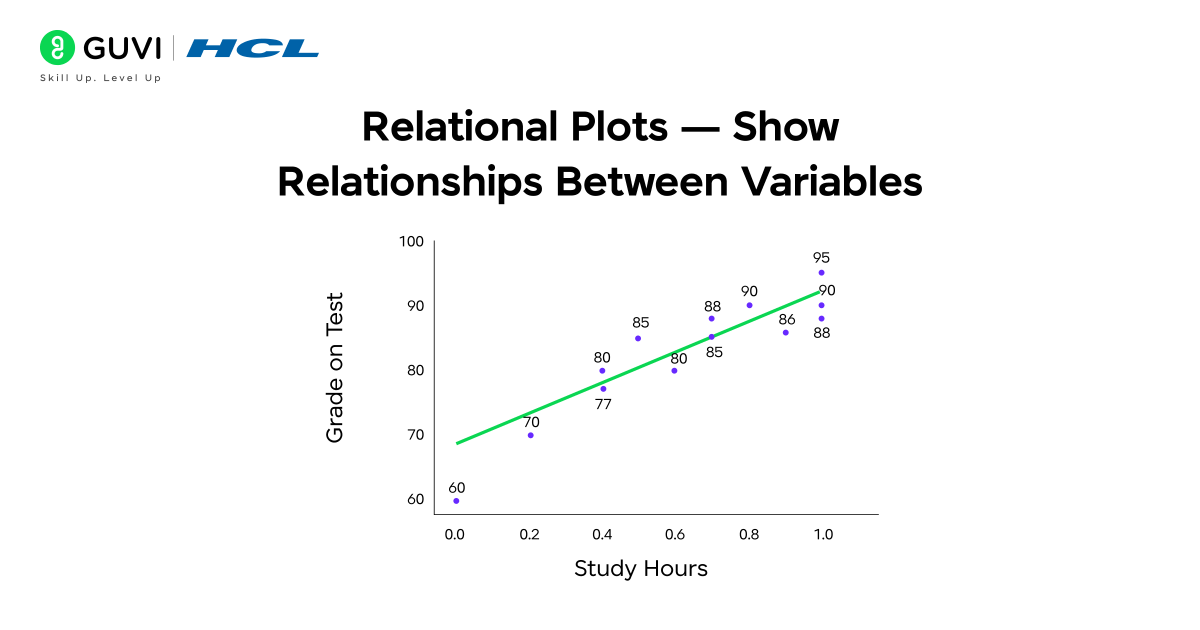
Relational plots let you see how two (or more) numeric variables change together. They are great for spotting trends, clusters, or correlations.
- Common functions: scatterplot(), lineplot()
- When to use: Use a scatterplot to check if two variables move together (for example, hours studied vs test score). Use a line plot when one variable is ordered (usually time) to show trends.
- What you learn: strength and direction of relationships, possible outliers, basic trend shape.
- Quick tip: Add hue to color points by category (e.g., gender) to compare groups in one chart.
2. Categorical Plots — Compare Categories or Groups
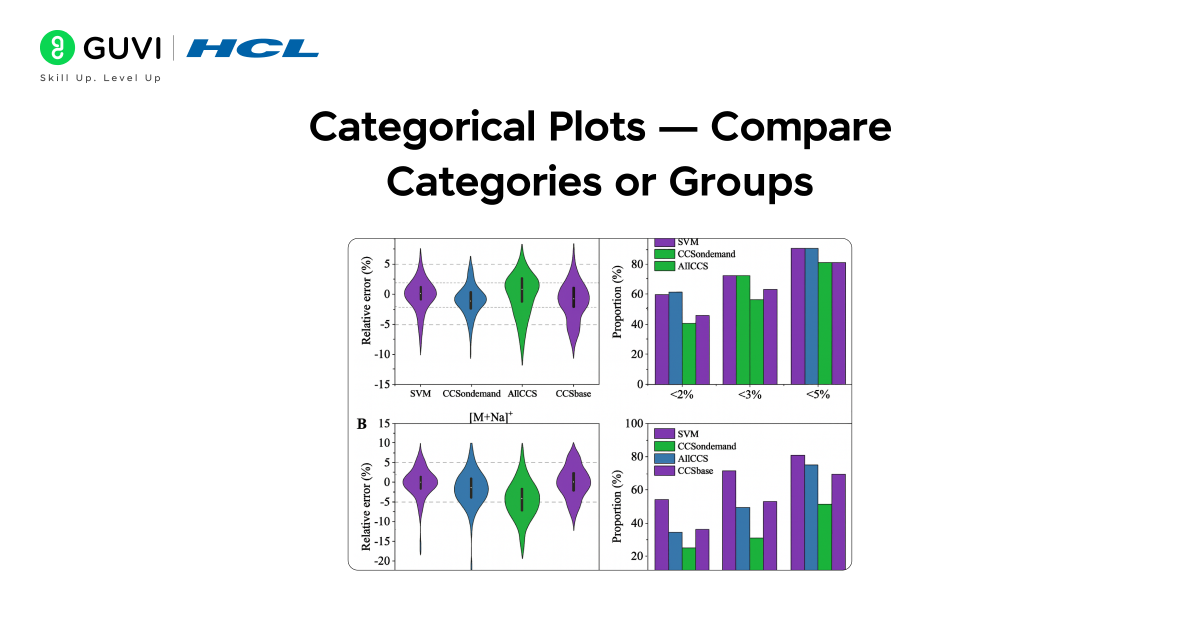
Categorical plots compare values across different groups or categories so you can see differences and spreads.
- Common functions: barplot(), countplot(), boxplot(), violinplot()
- When to use: Use a barplot to compare average values by group (e.g., average tip by day). Use countplot to show the frequency of categories. Use a boxplot or violin plot to see the distribution and spread inside each category.
- What you learn: group averages, distribution shape per group, and whether groups differ significantly.
- Quick tip: violinplot combines distribution and density information — useful when you want to see the full distribution shape for each category.
3. Distribution Plots — Understand Data Spread and Shape
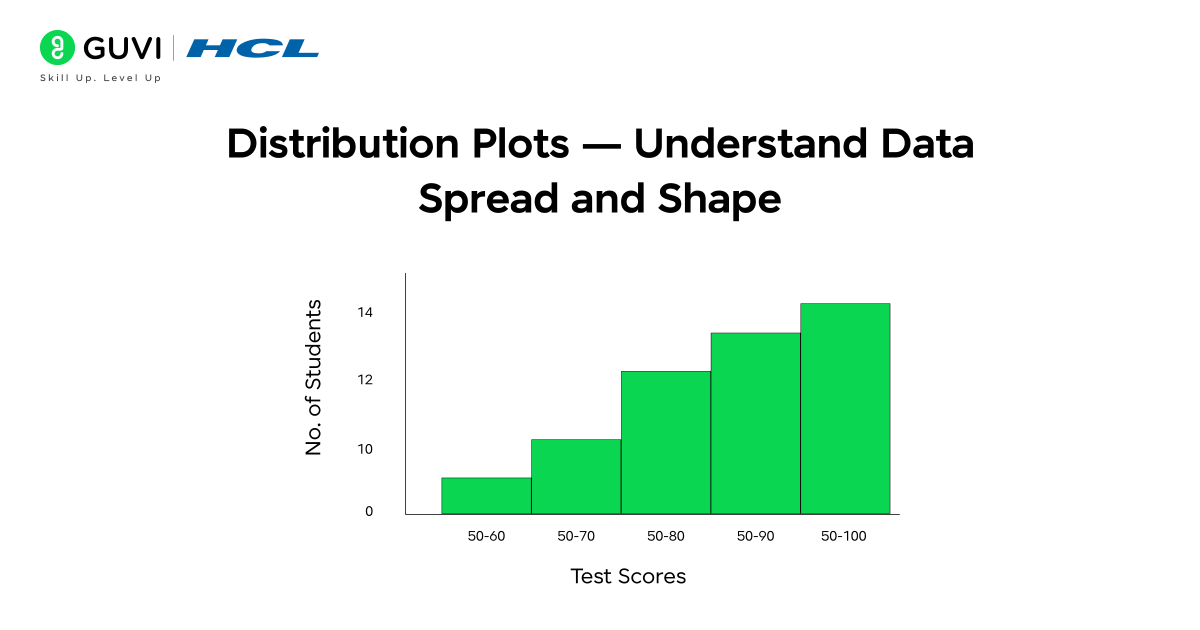
Distribution plots show how values are spread across a single variable — useful for understanding skew, peaks, and fullness.
- Common functions: histplot(), kdeplot()
- When to use: Use histplot to view frequency counts across bins. Use kdeplot for a smooth estimate of the distribution. Combine both to get counts and smooth shape.
- What you learn: where most values lie, whether the data is skewed, and if there are multiple modes (peaks).
- Quick tip: Overlay distributions for multiple groups using hue or plot separate KDE lines to compare shapes.
4. Matrix Plots — Visualize Relationships Between Multiple Variables
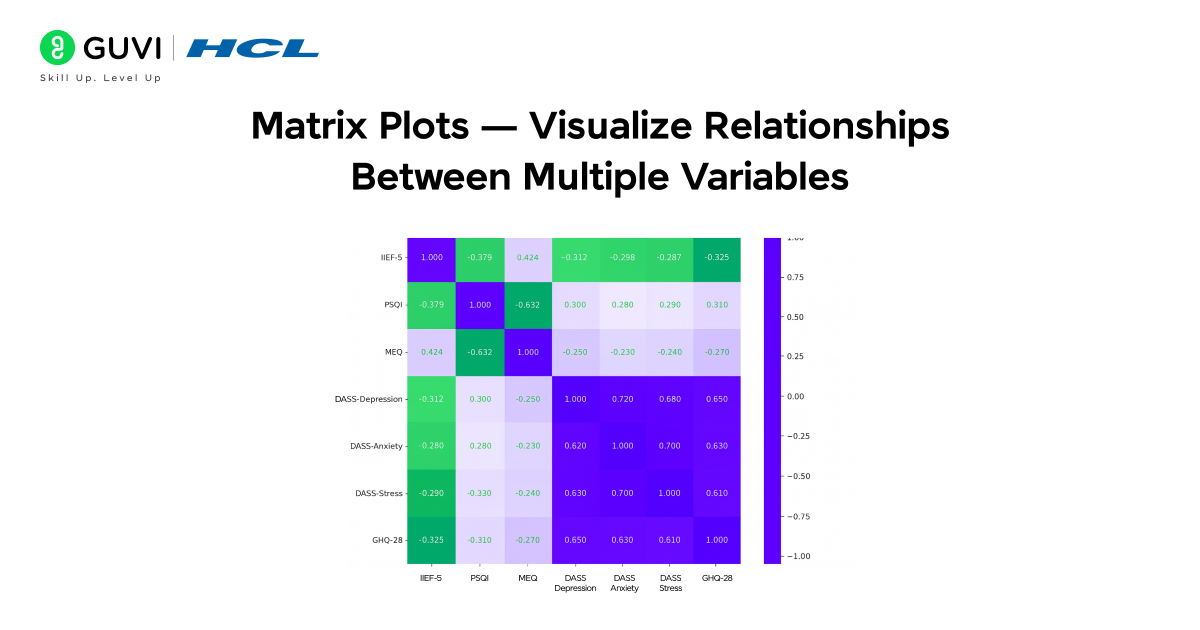
Matrix plots summarize pairwise relationships or correlations among many variables in one view.
- Common function: heatmap() (also clustermap() for clustered matrices)
- When to use: Use a heatmap to show correlation matrices or intensity tables (for example, correlation between features in a dataset). Use clustermap to group similar rows/columns visually.
- What you learn: which variable pairs are strongly related, clusters of similar features, and where to focus feature engineering.
- Quick tip: Annotate values (annot=True) in the heatmap when precise numbers are important.
5. Regression Plots — Explore Relationships With Trend Lines
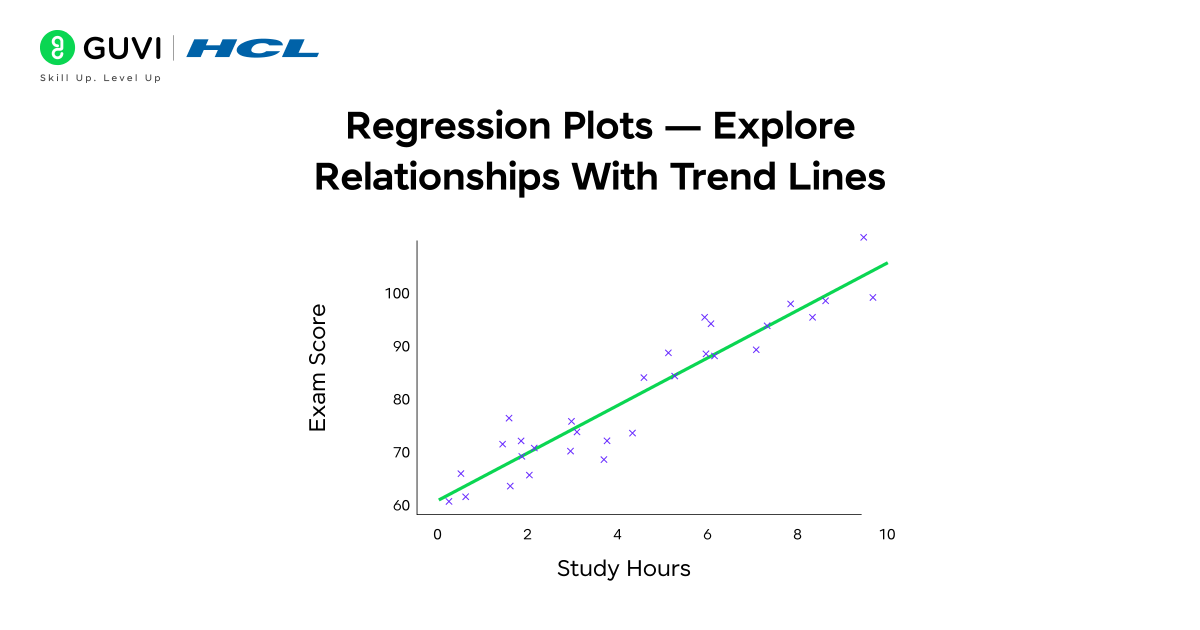
Regression plots combine scatter/points with fitted trend lines and confidence intervals to show predictive relationships.
- Common functions: regplot(), lmplot()
- When to use: Use regression plots when you want to quantify the linear (or low-degree) trend between two variables and see the confidence band around the fit.
- What you learn: slope and direction of the relationship, strength of fit, and estimated uncertainty.
- Quick tip: Use order in regplot to fit polynomial trends when relationships are non-linear.
Hands-On: Working With A Dataset Using Seaborn
Now, let’s put everything into practice and see how Seaborn data visualization works step by step.
Step 1: Installing And Importing Seaborn
As of 2026, the current stable release is Seaborn 0.13.2, and it requires Python 3.10 or later. If you’re on an older Python version, upgrade first Seaborn will not install cleanly on unsupported versions.
pip install seabornOnce installed, import it along with pandas and matplotlib:
import seaborn as sns
import pandas as pd
import matplotlib.pyplot as plt
Step 2: Using A Pre-Made Dataset
For a simple example, let’s use a small dataset that represents students’ performance in a test.
| Student | Hours_Studied | Sleep_Hours | Test_Score | Gender |
| A | 2 | 6 | 45 | F |
| B | 4 | 7 | 65 | M |
| C | 5 | 5 | 70 | F |
| D | 6 | 8 | 75 | M |
| E | 8 | 6 | 85 | F |
| F | 3 | 5 | 55 | M |
| G | 7 | 7 | 80 | F |
| H | 9 | 6 | 90 | M |
| I | 4 | 8 | 68 | F |
| J | 5 | 7 | 72 | M |
Step 3: Plotting With Seaborn
Now that we have our data, let’s visualize it using Seaborn.
Example 1: Scatter Plot
A scatter plot helps visualize the relationship between two variables.
sns.scatterplot(x='Hours_Studied', y='Test_Score', data=df)
plt.title('Study Hours vs Test Score')
plt.show()
You’ll see that as study hours increase, test scores generally improve — showing a positive relationship.
Example 2: Heatmap
A heatmap is great for showing correlations between variables.
sns.heatmap(df.corr(), annot=True, cmap='coolwarm')
plt.title('Correlation Between Study Factors')
plt.show()
This visualization helps you see which factors (like sleep or study hours) have the strongest impact on test scores.
Example 3: Box Plot
Box plots show the distribution of data and help detect outliers.
sns.boxplot(x='Gender', y='Test_Score', data=df)
plt.title('Test Scores by Gender')
plt.show()
You can quickly compare average scores and score spread between genders.
Example 4: Line Plot
A line plot works best when you want to see how a numeric value trends across an ordered variable, here, test scores as study hours increase.
sns.lineplot(x="Hours_Studied", y="Test_Score", data=df)
plt.title("Test Score Trend by Hours Studied")
plt.show()
Example 5: Count Plot
A count plot is the quickest way to see how many records fall into each category, useful before you dig into any deeper comparison between groups.
sns.countplot(x="Gender", data=df)
plt.title("Count of Students by Gender")
plt.show()
Example 6: Violin Plot
A violin plot shows the same group comparison as a box plot, but adds the shape of the underlying distribution, so it’s worth using when you want to see more than just the median and quartiles.

sns.violinplot(x="Gender", y="Test_Score", data=df)
plt.title("Score Distribution by Gender")
plt.show()
Example 7: Histogram With KDE
A histogram with a KDE overlay shows how a single numeric column is distributed, whether it’s skewed, and where most values cluster.
sns.histplot(df["Test_Score"], kde=True)
plt.title("Distribution of Test Scores")
plt.show()
Example 8: Regression Plot
A regression plot adds a trend line and confidence band on top of a scatter plot, making it easy to see whether two numeric variables move together.
sns.regplot(x="Sleep_Hours", y="Test_Score", data=df)
plt.title("Sleep Hours vs Test Score, With Trend Line")
plt.show()
Example 9: Bar Plot
A bar plot compares a numeric average across categories, useful when you want to see which group scores highest rather than how scores are spread within each group.
sns.barplot(x="Gender", y="Test_Score", data=df)
plt.title("Average Test Score by Gender")
plt.show()
Example 10: Clustermap
A clustermap takes the same correlation matrix as the heatmap example but reorders rows and columns so that similar variables sit next to each other, which makes patterns in larger matrices easier to spot.
sns.clustermap(df.corr(), annot=True, cmap="coolwarm")
plt.show()
Example 11: lmplot
lmplot does the same job as regplot, a trend line over a scatter plot, but works at the figure level, so it can split the same regression across multiple panels by a category like gender.
sns.lmplot(x="Sleep_Hours", y="Test_Score", data=df, col="Gender")
plt.show()
Which Seaborn Chart Should You Use?
Seaborn has a function for almost every chart type, and picking the right one comes down to how many variables you’re comparing and whether they’re numeric or categorical.
| Chart Type | Seaborn Function | Best For |
|---|---|---|
| Scatter Plot | scatterplot() | Relationship between two numeric variables |
| Line Plot | lineplot() | Trends over time or an ordered sequence |
| Bar Plot | barplot() | Comparing a numeric value across categories |
| Count Plot | countplot() | Counting occurrences of a categorical variable |
| Box Plot | boxplot() | Comparing distributions and spotting outliers across groups |
| Violin Plot | violinplot() | Comparing distributions with more shape detail than a box plot |
| Histogram | histplot() | Distribution of a single numeric variable |
| KDE Plot | kdeplot() | Smoothed distribution of a single numeric variable |
| Heatmap | heatmap() | Correlation or matrix-style data at a glance |
| Clustermap | clustermap() | Grouping similar rows/columns in matrix data |
| Regression Plot | regplot() / lmplot() | Relationship between two variables plus a trend line |
A simple way to decide: start with a scatter or line plot to see the raw relationship, move to a box or violin plot once you need to compare groups, and reach for a heatmap once you’re looking at more than two variables at once.
Do check out HCL GUVI’s Data Science Course and take your career to the next level. It covers Python, data analytics and statistics, machine learning, deep learning, and NLP, along with computer vision basics, MLOps and production-ready workflows, and generative AI fundamentals including RAG pipelines, with a capstone project to pull it all together, backed by placement support through 1000+ hiring partners.
Advantages Of Using Seaborn
Seaborn offers several advantages that make it a preferred visualization library for data analysts and scientists. Here’s a detailed look at why it stands out:
- Simplifies complex visualizations:
Seaborn allows you to create advanced statistical plots with just a few lines of code. Tasks like visualizing distributions, correlations, or relationships that might take several steps in Matplotlib can be achieved easily with Seaborn’s built-in functions. - Automatic handling of aesthetics:
It automatically manages color palettes, grid styles, and layouts to make your graphs look professional without manual styling. This saves time and ensures your visualizations maintain consistency and clarity. - Seamless integration with pandas and NumPy:
Seaborn works directly with pandas DataFrames, so you can use column names in plots without needing to extract arrays manually. This makes it extremely convenient for exploratory data analysis (EDA). - Built-in support for statistical plots:
Many Seaborn plots, like regression, distribution, and categorical plots, come with statistical summaries by default (e.g., confidence intervals or trend lines). This makes it easier to interpret patterns and relationships in your data. - Enhances storytelling through visuals:
Seaborn’s attractive styles, intuitive syntax, and powerful functions make it ideal for presenting findings to non-technical audiences. Whether you’re exploring data trends or preparing stakeholder reports, it helps communicate insights clearly and visually.
Complete Seaborn Data Visualization Guide for India in 2026
For students and job seekers in India, Seaborn is one of the fastest ways to build a portfolio-ready data visualization skill without a heavy programming background. It’s used across data analyst, data scientist, and business analyst roles, and it pairs directly with the pandas and Python skills most Indian data science courses already teach.
- Students: pair Seaborn with a real dataset (Kaggle or your college project data) to build 2–3 portfolio charts.
- Job seekers: interviewers frequently ask “Seaborn vs Matplotlib” and “which plot for correlation” — both are covered in the FAQs below.
- Working professionals: Seaborn is often the fastest way to turn a pandas analysis into a stakeholder-ready chart without learning a full BI tool.
In short, Seaborn turns complex data relationships into elegant, easy-to-understand visual stories, making it a must-have tool for anyone working with data.
Start your learning with HCL GUVI’s 5-Day Free Data Science Email Series. Each day, you’ll receive interactive lessons covering Python essentials, data visualization using Seaborn, data preprocessing, and an introduction to machine learning. This series helps you understand the workflow of data science step-by-step — right in your inbox.
Challenges Or Limitations
While Seaborn is an amazing tool for creating beautiful charts, it does have a few limitations to keep in mind:
- Limited interactivity: Seaborn creates static charts, meaning you can’t click, zoom, or hover like you can with tools such as Plotly. This makes it less suitable for interactive dashboards.
- Requires Matplotlib for extra changes: If you want to make very specific design changes, you may need to use Matplotlib commands, which can be tricky for beginners.
- Slow with very large datasets: When working with huge datasets, Seaborn may take longer to load or display visuals, especially for detailed plots like heatmaps.
- Less control over styling: Seaborn automatically applies themes and colors, but sometimes you might find it harder to fully customize every small detail.
Still, for most data visualization tasks, Seaborn offers the perfect mix of simplicity, beauty, and functionality, making it one of the best tools for Seaborn data visualization in Python.
Conclusion
Learning Seaborn data visualization is a powerful step toward becoming confident in data science and analytics. It helps you turn numbers into clear, meaningful visuals that reveal patterns and insights hidden within your data.
By mastering Seaborn, you not only improve your ability to analyze data but also learn how to communicate findings effectively through visuals — an essential skill for any data professional.
If you’re ready to take your data visualization skills further, explore the Data Science Course by HCL GUVI. This program offers mentor-led sessions, hands-on projects, and practical training in key areas like Python, data visualization, machine learning, and statistics — helping you build a solid, job-ready foundation in data science.
FAQs
1. Is Seaborn better than Matplotlib in 2026?
Neither replaces the other. Seaborn is faster for statistical and exploratory charts with attractive defaults, while Matplotlib gives finer control for fully custom, publication-grade figures. Most data professionals use Seaborn for quick analysis and fall back to Matplotlib when they need precise, manual customization.
2. Can Seaborn Handle Large Datasets Efficiently?
Yes, but for extremely large datasets, performance might slow down. In such cases, consider sampling or using libraries like Plotly.
3. What Type Of Plots Are Best For Correlation Analysis?
Heatmaps and pair plots are excellent for showing relationships and correlations between multiple variables.
4. Do I Need Pandas To Use Seaborn Effectively?
While not mandatory, using pandas DataFrames makes Seaborn more efficient and easier to use.
5. Is Seaborn Suitable For Beginners In Data Visualization?
Absolutely! Seaborn’s easy syntax and built-in styling make it ideal for beginners learning data visualization in Python.
Success Stories

About the Author
Jebasta
I translate the language of data into stories that anyone can understand. As a writer with a data science background, I simplify analytics, AI, and decision-making so beginners and enthusiasts can confidently explore the world of data.
View all posts by Jebasta
Connect with me @














Did you enjoy this article?