


Artificial Intelligence and Machine Learning Articles
AI/ML Skills Gap 2026: Why Companies Can't Find Job-Ready Talent
20 AI/ML Interview Questions Recruiters Can Use Without a Tech Background - Best Guide
How Industry-Backed AI/ML Bootcamps Are Changing the AI/ML Hiring Pipeline - Best Guide 2026
From IT Support to AI Engineer: A Realistic Career Switch Guide 2026


Get In Touch For Details! Request More Information

Crafting Video Magic by Faking Browser Time
Jun 24, 2026 5 Min Read 726 Views
(Last Updated)
Turning web pages into videos seems simple: open a browser, record, and export MP4. Reality hits hard: browsers are real-time renderers, not deterministic recorders. They skip frames under load, tie animations to wall-clock time, and deliver stuttery, unreliable output at scale.
Replit Animation crashed into this building’s video export for web content. Screenshots took 200ms while animations demanded 16ms frames, creating unwatchable messes. Their fix? Lie to the browser about time, a brilliantly creative 2026 engineering breakthrough.
In this article, we will walk through entire architecture. Replit was built to solve this problem: how they virtualized time inside the browser, why video elements required a five-layer workaround, how they captured audio without a microphone, and what it took to make the whole system truly deterministic across arbitrary web content.
TL;DR
- Replit built a video rendering engine by “lying to the browser” about time, replacing clock APIs (setTimeout, requestAnimationFrame, Date.now()) with a fake clock they control for deterministic frame capture.
- Browsers are real-time systems that skip frames and tie animations to wall-clock time; naive screen recording produces stuttery output, so they virtualize time to advance exactly 1000/fps per frame.
- Key workarounds: The compositor warmup loop prevents stale buffers; a five-layer video pipeline (MutationObserver → FFmpeg → mp4box.js → WebCodecs → canvas) for frame-perfect sync.
- Audio captured by “wiretapping” Web Audio API sources instead of speakers; mixes files server-side with FFmpeg while disabling non-deterministic features like OffscreenCanvas.
- Inspired by WebVideoCreator but production-hardened for arbitrary web content, AI agents, and cloud scale; plans to open-source for ecosystem benefit
Table of contents
- What Does It Mean to "Lie to the Browser About Time"?
- Why Not Just Use an Existing Tool Like Remotion?
- The Virtual Clock: How Time Virtualization Works
- Virtual Clock Patching
- Deterministic Frame Loop
- The Compositor Warmup Problem
- The Video Element Problem: A Five-Layer Workaround
- Audio: Wiretapping Instead of Recording
- The Audio Capture Challenge
- Intercepting Playback Intent
- Server-Side Mixing with FFmpeg
- Limitations and Coverage
- Determinism Is a Full-Time Job
- Standing on Shoulders: WebVideoCreator
- Inspired by WebVideoCreator
- Chrome Headless Mode Evolution
- Cloud Infrastructure Integration
- Enhanced Security and Pipelines
- Open-Source Future
- Why This Engineering Approach Matters
- Final Thoughts
- FAQ
- Why can't browsers reliably record video of web animations?
- How does time virtualization work?
- What’s the video element workaround?
- How do they capture audio without microphones?
- Why build custom instead of Remotion?
What Does It Mean to “Lie to the Browser About Time”?
Replit replaced the browser’s clock APIs with a fake clock they control, so every frame advances by exactly the right amount, regardless of how long it actually takes to capture
The heart of Replit’s video renderer is a JavaScript file of roughly 1,200 lines that gets injected into every page they capture. Its job is simple and audacious: replace the main time-related APIs in the browser with a fake clock they control. They replace setTimeout, setInterval, requestAnimationFrame, Date, Date.now(), and performance. now().
With these APIs replaced, the page thinks time is passing normally, but time only advances when Replit says it does, by exactly the right amount for each frame.
Why Not Just Use an Existing Tool Like Remotion?
Before getting into the architecture, it is worth understanding why Replit did not reach for an existing solution.
- Remotion is a well-regarded library that solves the deterministic video rendering problem for React applications, and the Replit team seriously considered it.
- Replit’s video renderer takes a URL and produces an MP4. The page behind that URL might use framer-motion, plain CSS animations, raw canvas, or some obscure confetti library. They don’t control what’s on the page.
- They just need to capture it perfectly. Remotion gives you determinism by design but requires you to build inside its component framework. Replit needed determinism from the outside, applied to arbitrary web content.
- The second constraint was equally important. Their videos are generated by an AI agent. Constraining the agent to Remotion’s component model would mean teaching it one library’s idioms instead of letting it use the entire web platform.
- The less framework surface area the agent has to reason about, the better the output. So they needed a system that could capture any web page, built with any library, without requiring the page’s author to do anything special.
- That meant building the hard thing, making an arbitrary browser environment deterministic from the outside.
The Virtual Clock: How Time Virtualization Works
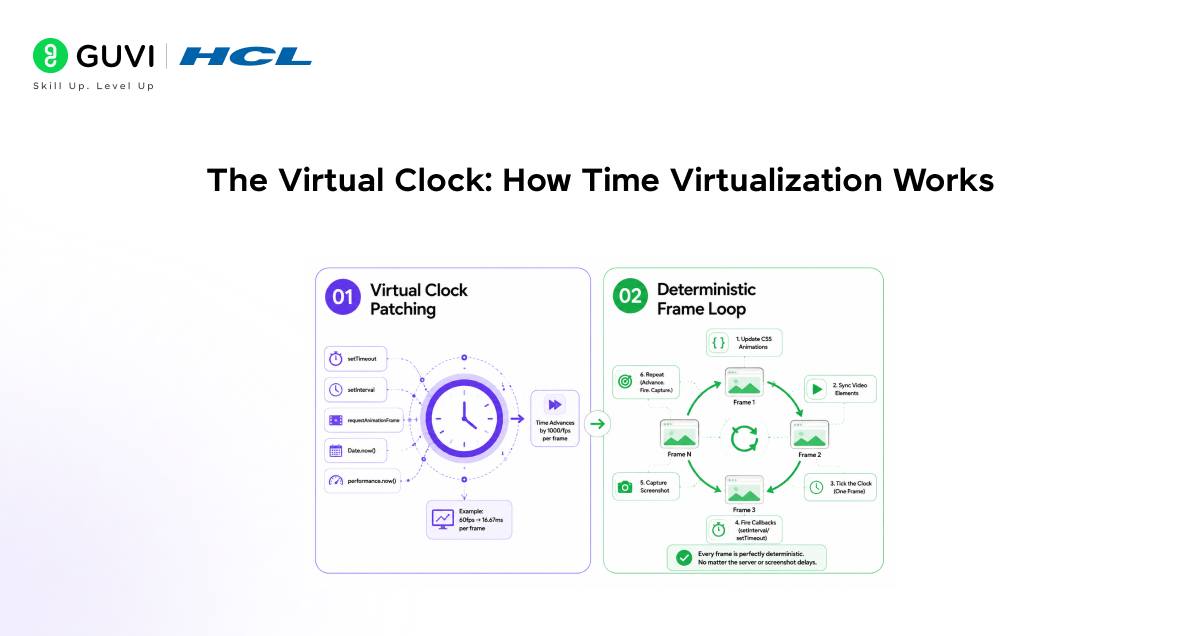
1. Virtual Clock Patching
The injected JavaScript patches major timing APIs like setTimeout, setInterval, requestAnimationFrame, Date.now(), and performance. now(). The page believes time flows normally, but it only advances by exactly 1000/fps milliseconds per frame when Replit commands it. A 60fps animation taking 500ms per frame still outputs buttery 16.67ms frames; the page never notices the difference.
2. Deterministic Frame Loop
The core loop is elegantly simple: seek CSS animations to virtual time, sync video elements, tick the clock by one frame, fire due setInterval/setTimeout callbacks, trigger requestAnimationFrame, capture a screenshot, and repeat. Advance. Fire. Capture. Every frame stays perfectly deterministic, no matter the server screenshot delays.
The Compositor Warmup Problem
- Time virtualization alone is not enough. Replit discovered a subtle but serious bug during development that had nothing to do with the fake clock.
- If there’s any delay between loading the page and starting the recording, Chrome’s compositor gets into a bad state.
- The root cause is that Replit drives Chrome’s rendering loop frame-by-frame rather than letting it render freely. If no frames are issued for a while, internal buffers go stale.
- The fix they landed on is genuinely counterintuitive. A warmup loop continuously issues “skip frames” at roughly 30fps while waiting for the page to signal it’s ready to record.
- They render dozens of frames that nobody will ever see, just to keep Chrome’s compositor from going stale. This is a perfect example of the gap between understanding a system conceptually and actually running it in production.
- The browser’s internal state management creates problems that no amount of time virtualization alone can solve.
The Video Element Problem: A Five-Layer Workaround
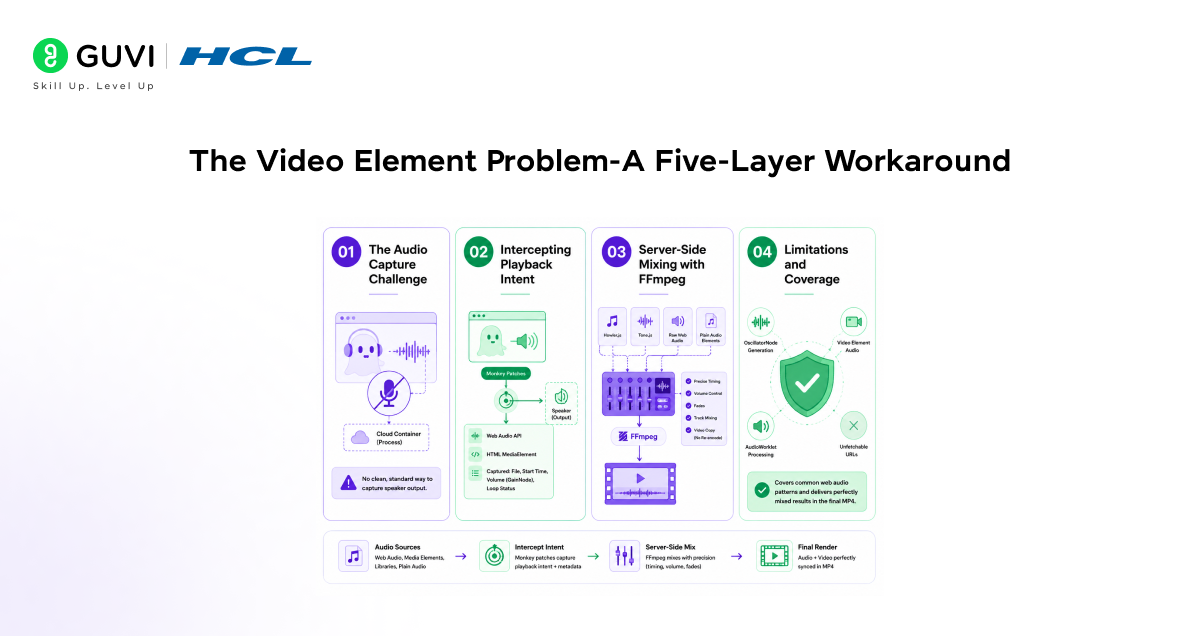
- Headless Video Playback Issues
Standard video elements in headless browsers are fragile and non-deterministic. Replit needed frame-perfect seeking tied to their virtual clock, which native playback couldn’t deliver. Their fix stacks five specialized layers for full control.
- The Five-Layer Processing Pipeline
A MutationObserver detects video elements and posts sources to a Puppeteer-intercepted endpoint. Server-side FFmpeg transcodes to fragmented MP4, returned for mp4box.js demuxing into chunks. WebCodecs decodes (native first, WASM libav.js fallback), replacing the original element with a canvas painting synced frames.
- Why Fragmented MP4 + Lookahead Wins
Fragmented MP4 enables incremental parsing without end-file seeks. A 10-frame lookahead balances low latency and memory. Each layer tackles what the one above can’t, delivering browser-native-impossible virtual clock sync.
Audio: Wiretapping Instead of Recording
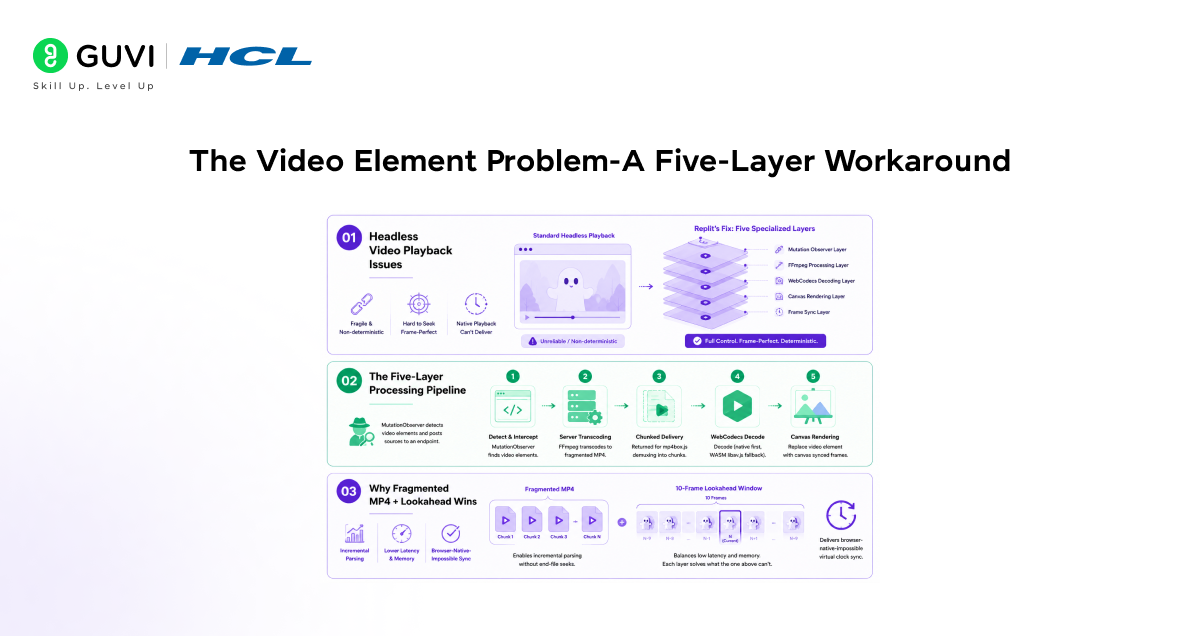
1. The Audio Capture Challenge
Capturing audio from a headless browser has no clean standard solution. You can’t reliably record speaker output from cloud container processes. Replit took an architectural approach by changing what they capture entirely.
2. Intercepting Playback Intent
Instead of speaker output, they spy on playback intent through monkey patches. Key Web Audio API and HTML MediaElement entry points get intercepted at the source before audio reaches speakers. This reveals the audio file, start time, volume (via GainNode graph), and loop status.
3. Server-Side Mixing with FFmpeg
The approach handles Howler.js, Tone.js, raw Web Audio, and plain audio elements. Replit downloads original files server-side, then runs a second FFmpeg pass. It mixes tracks with precise timing, volume, and fades; video streams copy without re-encoding while audio gets muxed in.

4. Limitations and Coverage
Gaps exist: OscillatorNode generation, video element audio, and AudioWorklet processing can’t be captured without fetchable URLs. For common web animation audio patterns, though, it delivers perfectly mixed results in the final MP4.
Determinism Is a Full-Time Job
- After solving the time, video, and audio, you might expect the system to be done. It is not. The browser has many ways to be non-deterministic. OffscreenCanvas, for example, lets pages render on a web worker thread that bypasses the main-thread capture pipeline.
- So Replit disables it entirely by overriding the window property to undefined and making it non-writable. Security is another layer of the problem.
- Since they’re rendering arbitrary URLs in a headless browser on cloud infrastructure, subresource requests are validated against SSRF patterns: cloud metadata endpoints, private IPs, localhost, and internal hostnames. For server-side media fetches, redirect targets are also re-validated.
- The service itself is intentionally single-flight: one active render at a time in the app, with concurrency set to 1. Video rendering is resource-hungry enough that isolation is worth more than throughput.
- Chrome uses gigabytes of RAM, FFmpeg maxes out the CPU, and memory pressure causes frame corruption. Running multiple renders simultaneously would create resource contention that would undermine the determinism the entire system is built around.
Replit’s animation engine optimizes AI-generated web animations by using a “skip frames” warm-up loop, preventing Chrome’s compositor from wasting resources rendering invisible frames.
Combined with SSRF-protected subresource fetches and single-flight concurrency, this approach transforms the browser into a deterministic video factory, enabling scalable features like Replit Animation exports.
Standing on Shoulders: WebVideoCreator
1. Inspired by WebVideoCreator
Replit is built on WebVideoCreator, Vinlic’s open-source project. It pioneered time virtualization plus BeginFrame capture in headless Chrome. That core insight, monkey-patching time APIs with deterministic rendering, deserves full credit for enabling frame-by-frame web page capture.
2. Chrome Headless Mode Evolution
WebVideoCreator targeted Chrome’s old main-binary headless mode. Chrome 120 split it into chrome-headless-shell with new APIs. Full removal from the main binary hit Chrome 132, forcing Replit to adapt to modern headless architecture.
3. Cloud Infrastructure Integration
Replit needed tight ties to Cloud Run, GCS uploads, and Datadog tracing. Their setup handles untrusted URL rendering at scale. This production infrastructure went beyond the original project’s scope.
4. Enhanced Security and Pipelines
Stricter SSRF protection secures subresource fetches for arbitrary content. Replit added precise control over video element processing and audio extraction. These layers make it enterprise-ready.
5. Open-Source Future
Replit plans to open-source its TypeScript/Puppeteer rewrite. It contributes time virtualization, BeginFrame capture, and video pipeline techniques back to the ecosystem. Builders get a battle-tested reference implementation.
Why This Engineering Approach Matters
The reason this system is interesting beyond Replit’s specific use case is what it reveals about the browser as a platform. Browsers were designed as interactive, real-time environments.
- Treating them as deterministic rendering machines requires fighting against almost every assumption baked into how they work, from the way animations are tied to wall-clock time to the way video decoding is handled natively to the way audio output is routed to hardware.
- Replit needed to make the browser believe time moves only when they say it does. That single insight that the solution was not to record what the browser does but to control when the browser thinks is the conceptual breakthrough that the entire architecture rests on.
- Everything else, the five-layer video pipeline, the audio wiretapping, the OffscreenCanvas disabling, and the warmup loop, is engineering work to handle the specific ways the browser resists being controlled.
If you want to master AI-powered research workflows, build deterministic video engines with time virtualization, and integrate browser automation in your projects, explore HCL GUVI’s AI and ML Course and accelerate your technical career.
Final Thoughts
Replit’s video rendering engine is a lesson in what it takes to build reliable infrastructure on top of a platform that was never designed for your use case. The naive approach of recording the screen fails immediately. The slightly smarter approach is patch time and screenshotting frame by frame gets you most of the way there, and then breaks in increasingly subtle ways.
The production-grade approach requires understanding every source of non-determinism in the browser and systematically eliminating them, one by one.
For developers interested in browser internals, programmatic video generation, or the gap between how platforms were designed and what you can make them do, the full technical write-up on the Replit blog is worth reading carefully.
The techniques, particularly time virtualization and the BeginFrame capture approach, apply to anyone building video generation from web content, and the forthcoming open-source release will give the ecosystem a well-tested, production-hardened reference implementation to build from.
FAQ
1. Why can’t browsers reliably record video of web animations?
They’re real-time renderers that skip frames under load and tie timing to actual wall-clock time, causing stutter when capture lags.
2. How does time virtualization work?
Injected JS patches timing APIs; clock only ticks forward by exact frame intervals (e.g., 16.67 ms at 60 fps) when Replit commands are used, making slow renders produce smooth output.
3. What’s the video element workaround?
Five layers: detect videos, transcode to fragmented MP4 via FFmpeg, and demux/decode with mp4box.js/WebCodecs, paint to canvas synced to virtual clock, bypassing native fragility.
4. How do they capture audio without microphones?
Monkey-patch Web Audio/HTMLMediaElement to intercept source files, timing, and volume; download originals and FFmpeg-mix server-side for precise sync.
5. Why build custom instead of Remotion?
Remotion requires React/framework constraints; Replit needed to render arbitrary URLs/pages (CSS, Canvas, any lib) without author changes, for AI-generated content.
Success Stories

About the Author
Vishalini Devarajan
An Aerospace Engineer turned content writer, I focus on making complex concepts easy to understand through well-structured, reader-friendly blogs. Whether it’s a technical topic or a non-technical one, I love creating content that is clear, engaging, and impactful.
View all posts by Vishalini Devarajan
Connect with me @











Did you enjoy this article?