


Java Articles
Kafka Streams Tutorial: Build Your First Data Pipeline
What is ArrayList in Java: A Complete Guide
What is HashMap in Java: How It Works, Methods, and Examples


Get In Touch For Details! Request More Information
Access Modifiers in Java: Types, Examples, and Best Practices
Aug 18, 2026 4 Min Read 647 Views
(Last Updated)
Java access modifiers are crucial in object-oriented programming. They determine how classes, methods, variables, and constructors can be accessed. Understanding access modifiers helps developers create secure, maintainable, and scalable Java applications.
If you are learning Java, access modifiers are key to writing clean code and protecting sensitive data within applications.
In this article, you will learn about access modifiers in Java, the different types available, real-world examples, best practices, common mistakes, and how to use them effectively in Java programs.
Table of contents
- TL;DR
- Why Are Access Modifiers Important?
- Types of Access Modifiers in Java
- Public
- Private
- Protected
- Default
- Public Access Modifier
- Example of Public Access Modifier
- When to Use Public Access Modifier
- Private Access Modifier
- Example of Private Access Modifier
- Why Private Access Matters
- Protected Access Modifier
- Example of Protected Access Modifier
- When to Use the Protected Access Modifier
- Default Access Modifier
- Example of Default Access Modifier
- When Default Access Is Useful
- Access Modifier Comparison Table
- Real World Example of Access Modifiers
- Best Practices for Using Access Modifiers
- Prefer Private for Variables
- Use Public Only When Necessary
- Use Protected Carefully
- Keep Package Utilities Default
- Follow Encapsulation Principles
- Common Mistakes Beginners Make
- Making All Variables Public
- Confusing Protected and Default Access
- Overusing Public Methods
- Ignoring Encapsulation
- Conclusion
- FAQs
- What are access modifiers in Java?
- How many access modifiers are available in Java?
- What is the difference between private and protected in Java?
- Which access modifier is the most secure?
- Why are access modifiers important in Java?
TL;DR
- Access modifiers in Java define the visibility and accessibility of classes, methods, variables, and constructors.
- Java provides four access modifiers: public, private, protected, and default.
- Using the right access modifier enhances code security, encapsulation, and maintainability.
- Private members can only be accessed within the same class, while public members are accessible everywhere.
- Protected members allow specific inheritance access, and default access works within the same package.
- Access modifiers are widely used in real-world Java applications, APIs, frameworks, and enterprise systems.
What Are Access Modifiers in Java?
Access modifiers in Java are keywords that control the visibility and accessibility of classes, methods, variables, and constructors. They determine which parts of a program can access specific class members, helping developers enforce encapsulation and protect data from unintended access. Java provides four access levels: public, protected, default (package-private), and private, each offering a different scope of accessibility within packages and inheritance hierarchies.
Why Are Access Modifiers Important?
Access modifiers are essential for writing secure and maintainable Java applications.
Without access control, any part of a program could modify important variables or methods, complicating debugging and increasing security risks.
Here are some key benefits of access modifiers:
- Improve encapsulation
- Protect sensitive data
- Reduce unnecessary dependencies
- Enhance code maintainability
- Enable controlled inheritance
- Prevent accidental changes to program logic
They are widely used in enterprise Java applications, Android development, backend systems, APIs, and frameworks.
Understanding access modifiers also helps developers implement Java design patterns more effectively in scalable applications.
Types of Access Modifiers in Java
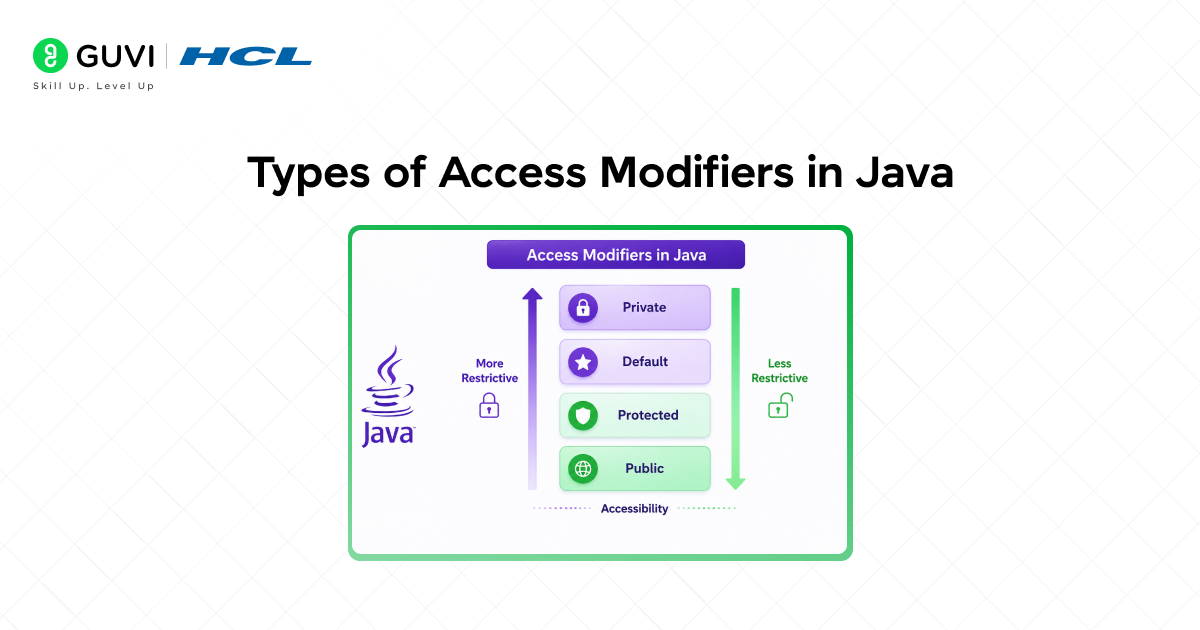
Java has four main access modifiers.
Public
The public access modifier allows a class member to be accessed from anywhere in the program.
Private
The private access modifier limits access to the same class only.
Protected
The protected access modifier lets access occur within the same package and through inheritance.
Default
If no access modifier is specified, Java applies default access. Members are only accessible within the same package.
Public Access Modifier
The public access modifier offers the highest level of accessibility.
A public class, method, or variable can be accessed from any other class in the project.
Example of Public Access Modifier
public class Student {
public String name = “Harini”;
public void displayName() {
System.out.println(name);
}
}
In this case, both the variable and method can be accessed from any class.
When to Use Public Access Modifier
Use public when:
- A method should be available globally
- APIs need external access
- Utility methods are shared across applications
- Framework components require public visibility
Private Access Modifier
The private access modifier restricts access to the same class only.
Private members cannot be accessed directly outside the class.
This is commonly used to protect sensitive data.
Example of Private Access Modifier
In this example, the balance variable cannot be modified directly outside the class.
public class BankAccount {
private double balance = 5000;
public double getBalance() {
return balance;
}
}
The public getter method provides controlled access.
Why Private Access Matters
Private access improves:
- Data hiding
- Encapsulation
- Application security
- Controlled updates to variables
This is one of the most commonly used access modifiers in enterprise applications.
Protected Access Modifier
The protected access modifier allows access:
- Within the same package
- Inside subclasses through inheritance
This modifier is primarily used with inheritance.
Example of Protected Access Modifier
class Animal {
protected void sound() {
System.out.println(“Animal makes sound”);
}
}
class Dog extends Animal {
void bark() {
sound();
}
}
The Dog class can access the protected method inherited from Animal.
When to Use the Protected Access Modifier
Protected access is useful when:
- Building reusable parent classes
- Supporting inheritance
- Creating framework base classes
- Allowing subclass customization
Default Access Modifier
If no access modifier is specified, Java automatically applies default access.

Default members are only accessible within the same package.
Example of Default Access Modifier
class Employee {
String department = “Engineering”;
}
Here, the department variable can only be accessed inside the same package.
You can strengthen your Java fundamentals further by exploring HCL GUVI’s Java Programs Handbook, which includes commonly asked Java coding programs to improve logic building and programming skills.
When Default Access Is Useful
Default access is commonly used for:
- Package-level utilities
- Internal helper classes
- Shared package functionality
- Restricting external package access
Access Modifier Comparison Table
| Access Modifier | Same Class | Same Package | Subclass | Everywhere |
| Public | Yes | Yes | Yes | Yes |
| Private | Yes | No | No | No |
| Protected | Yes | Yes | Yes | No |
| Default | Yes | Yes | No | No |
Java access modifiers play a crucial role in large-scale software frameworks such as Spring Boot, Hibernate, and the Android SDK, where controlling the visibility of classes, methods, and fields helps maintain clean, secure, and modular architectures. A common enterprise design pattern is to declare fields as private and expose them through public getter and setter methods. This approach supports encapsulation, one of the core principles of object-oriented programming, by preventing direct modification of internal state while allowing developers to validate, monitor, or restrict access to critical business data.
Real World Example of Access Modifiers

Imagine an online banking application.
- Account balance should be private to prevent direct modification.
- Transaction methods may be public for access across the application.
- Internal helper methods may utilize default access.
- Protected methods can support specialized account types through inheritance.
This layered access control improves both security and maintainability.
Best Practices for Using Access Modifiers
Choosing the right access modifier is crucial for writing professional Java applications.
Prefer Private for Variables
Most class variables should stay private.
This prevents direct access and protects application data.
Use Public Only When Necessary
Avoid making everything public.
Excessive public access increases coupling and reduces maintainability.
Use Protected Carefully
Protected access should mainly support inheritance.
Avoid unnecessary exposure to subclasses.
Keep Package Utilities Default
Internal helper classes can use default access to minimize external exposure.
Follow Encapsulation Principles
Use private fields with public getter and setter methods whenever necessary.
Using proper access modifiers is an important part of following Java clean coding practices and building maintainable applications.
Common Mistakes Beginners Make
Many beginners misuse access modifiers while learning Java.
Making All Variables Public
This undermines encapsulation and increases security risks.
Confusing Protected and Default Access
Protected allows subclass access, while default does not.
Overusing Public Methods
Too many public methods make APIs challenging to maintain.
Ignoring Encapsulation
Directly exposing variables can cause unpredictable application behavior.
If you want to improve your Java skills, HCL GUVI’s Java courses can help you learn object-oriented programming, collections, multithreading, Spring Boot, and backend development with hands-on projects.
Conclusion
Access modifiers in Java are vital for controlling visibility, enhancing security, and implementing encapsulation.
By understanding public, private, protected, and default access modifiers, developers can create cleaner and more maintainable applications.
Using the correct access modifier helps prevent accidental misuse of data and supports scalable software design.
Whether you are building beginner Java projects or enterprise applications, mastering access modifiers is essential for becoming a strong Java developer.
FAQs
1. What are access modifiers in Java?
Access modifiers in Java are keywords that control the visibility and accessibility of classes, methods, variables, and constructors.
2. How many access modifiers are available in Java?
Public
Private
Protected
Default
3. What is the difference between private and protected in Java?
Private members are accessible only within the same class, while protected members are accessible within the same package and through inheritance.
4. Which access modifier is the most secure?
Private is considered the most secure because access is limited to the same class only.
5. Why are access modifiers important in Java?
Access modifiers enhance encapsulation, application security, maintainability, and controlled access to program components.
Success Stories

About the Author
Vishalini Devarajan
An Aerospace Engineer turned content writer, I focus on making complex concepts easy to understand through well-structured, reader-friendly blogs. Whether it’s a technical topic or a non-technical one, I love creating content that is clear, engaging, and impactful.
View all posts by Vishalini Devarajan
Connect with me @


























Did you enjoy this article?