


Javascript Articles
GraphQL with Strawberry Tutorial: Build Your First Python API
gRPC Tutorial: A Beginner's Guide to Building Fast, Modern APIs
Temporal Workflow Engine Tutorial: Build Reliable Workflows
Tauri 2.0 Desktop App Tutorial: Build Your First App Without the Bloat


Get In Touch For Details! Request More Information
What is a Promise in JavaScript? A Complete Guide
Sep 26, 2026 7 Min Read 2519 Views
(Last Updated)
A promise in JavaScript is an object that represents a future value, either resolved (success) or rejected (failure). If you have ever written code that depends on data from an API, a file, or a timer, you have already run into the problem promises were built to solve.
Before promises, developers stacked callbacks inside callbacks to keep things running in order, and it got messy fast. Promises cleaned that up, giving your code a cleaner way to say “do this, then this, then this” without losing your mind.
Table of contents
- TL;DR Summary
- What is a Promise in JavaScript?
- Why Do We Need Promises in JavaScript?
- States of a Promise in JavaScript (Pending, Fulfilled, Rejected)
- How to Create a Promise in JavaScript
- How to Use a Promise in JavaScript
- Promise.then(), catch(), and finally() Explained
- How to Chain Promises in JavaScript
- Promise vs Callback in JavaScript
- Async/Await vs Promise in JavaScript
- How to Handle Errors in a Promise
- Combining Multiple Promises in JavaScript
- Promise.all()
- Promise.allSettled()
- Promise.race()
- Promise.any()
- Common Promise Mistakes to Avoid
- Conclusion
- FAQs
- What is a promise in JavaScript?
- What's the difference between a promise and a callback in JavaScript?
- Is async/await better than using .then() with a promise in JavaScript?
- What happens if you don't handle a promise rejection in JavaScript?
- When should I use Promise.allSettled() instead of Promise.all()?
- Can a promise in JavaScript be cancelled once it's created?
- Does a promise in JavaScript run synchronously or asynchronously?
TL;DR Summary
- A promise in javascript is an object that stands in for a future value, either resolved on success or rejected on failure, and this blog breaks down exactly how that works from the ground up.
- You’ll see the three states a promise in JavaScript moves through (pending, fulfilled, rejected), how to actually create one with the
Promiseconstructor, and how to consume it using.then(),.catch(), and.finally(). - Chaining, callbacks vs promises, and async/await are all covered side by side, so you know exactly when to reach for which one instead of guessing.
- If you’re dealing with multiple promises at once, this blog walks through
Promise.all(),Promise.allSettled(),Promise.race(), andPromise.any(), with real code for each. - By the end, you’ll know the common mistakes developers make with a promise in JavaScript.
What is a Promise in JavaScript?
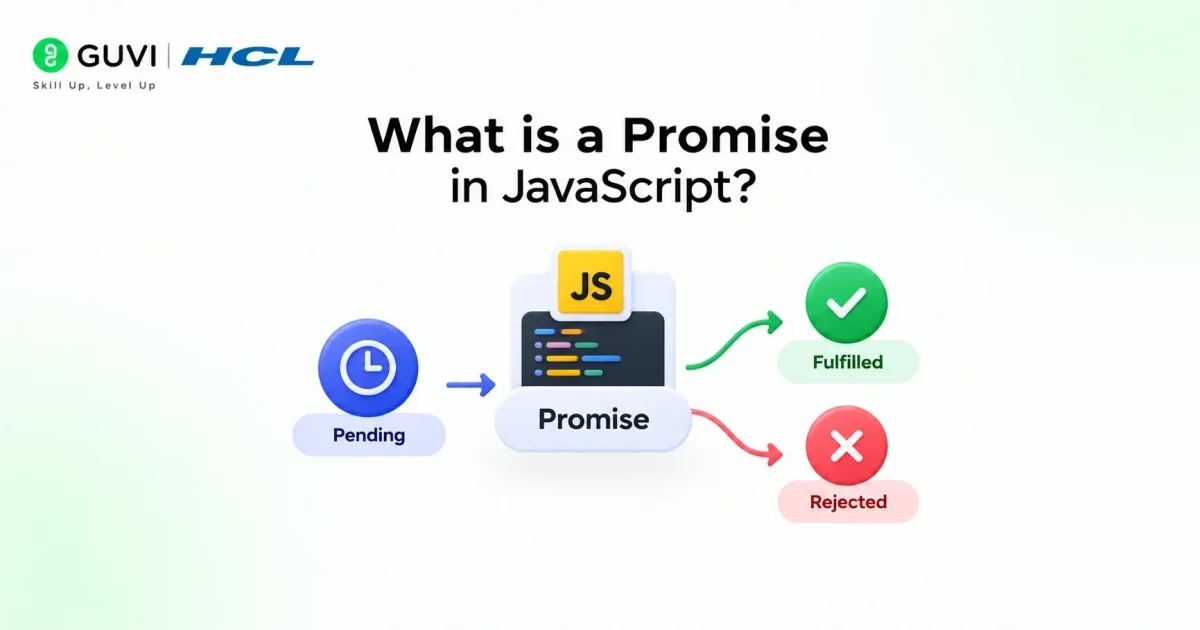
A promise in JavaScript is an object that represents the eventual result of an asynchronous operation (tasks that run in the background instead of blocking your code while they finish), either a resolved value on success or a reason for rejection on failure.
Example: Online Food Ordering. You place an order and get a receipt instead of the food itself. That receipt is a promise in JavaScript. The promise doesn’t give you the result right away, but it guarantees you’ll get an outcome: either the food arrives (resolved) or the order gets cancelled (rejected).
const order = new Promise((resolve, reject) => {
  resolve("Food delivered!");
});

order.then((result) => console.log(result));
You place the order (create the promise), and .then() you’re waiting to see what happens once it resolves. No freezing, no blocking; your code just moves on and reacts when the result shows up.
Build the Skills to Land a Software Engineering Job. HCL GUVI’s Software and AI Engineer Programme takes you from programming fundamentals to full-stack and backend development, with mentor support, real projects, and dedicated interview prep, so you come out job-ready for the roles top companies are hiring for.
Promises were officially added to JavaScript in ES6 (2015) to fix the “callback hell” problem developers had struggled with for years.
Why Do We Need Promises in JavaScript?
Before promises, JavaScript developers had one real tool for async work: callbacks.
And callbacks work fine until your code needs to do three or four things in order; then you end up with nested functions inside functions inside functions, impossible to read and even harder to debug. This is exactly the mess a promise in JavaScript was built to clean up.
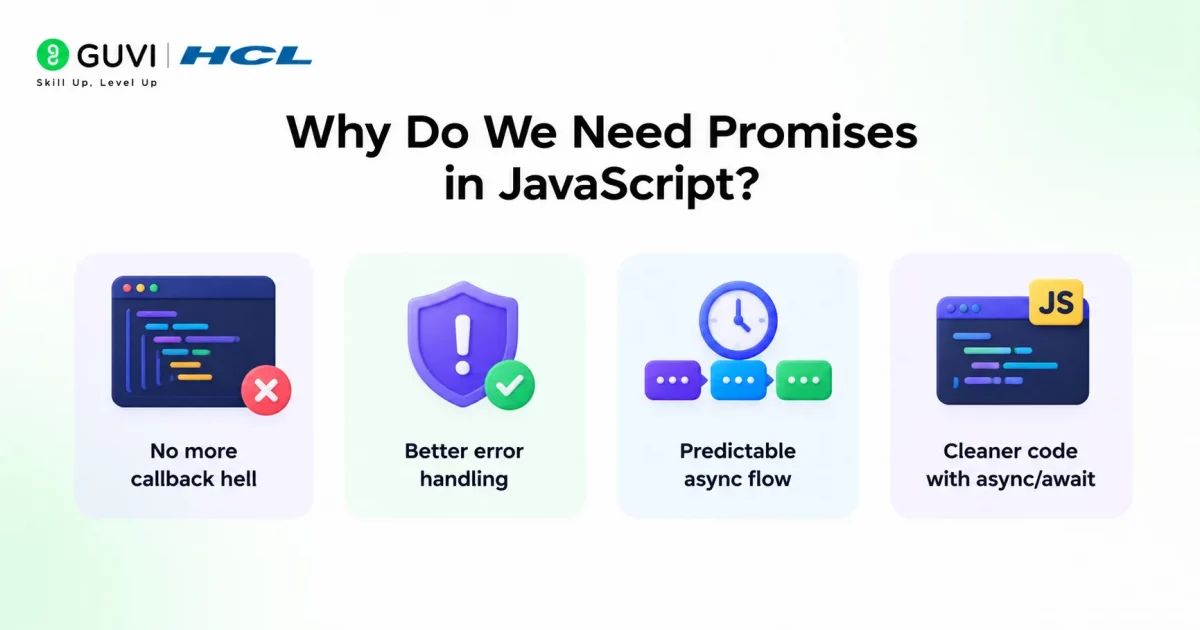
Here’s what promises actually solve:
- No more callback hell: Instead of nesting functions inside each other, you chain steps one after another in a flat, readable line.
- Better error handling: One
.catch()can handle errors from an entire chain, instead of checking for errors at every single step. - Predictable async flow: You always know whether an operation succeeded or failed; no guessing or manual flag checks.
- Cleaner code with async/await: Promises are the foundation that makes async/await possible, which reads almost like normal, synchronous code.
Grab HCL GUVI’s free React eBook and go from JSX basics to hooks and reusable components, built for anyone leveling up their React skills.
States of a Promise in JavaScript (Pending, Fulfilled, Rejected)
Every promise in JavaScript moves through one of three states, and it can only ever be in one at a time. Once it settles into fulfilled or rejected, that’s final; it won’t change again.
- Pending: The starting point. The async operation hasn’t finished yet, so there’s no result to give you.
- Fulfilled: The operation completed successfully, and you now have the value you were waiting for.
- Rejected: Something went wrong, and instead of a value, you get a reason for the failure.
Think of it like tracking a package. It’s pending while it’s still on the way, fulfilled once it lands on your doorstep, and rejected if it gets lost or returned to sender.
How to Create a Promise in JavaScript
Creating a promise in JavaScript comes down to the Promise constructor, which takes a function with two parameters: resolve and reject. You call one or the other depending on how the operation turns out.
const myPromise = new Promise((resolve, reject) => {
  const success = true;

  if (success) {
    resolve("Task completed!");
  } else {
    reject("Task failed.");
  }
});
Inside the function, you run whatever async logic you need, then call resolve(value) when it works or reject(error) when it doesn’t.
How to Use a Promise in JavaScript
Creating a promise in JavaScript is only half the job; you also need a way to actually get the result out of it once it settles. That’s where consuming methods like .then(), chaining, and async/await come in. Below are the core ways you’ll use promises in real code.
1. Promise.then(), catch(), and finally() Explained
Once you have a promise, .then() is how you consume it; it runs when the promise resolves and hands you the value. .catch() does the same thing but for when the promise rejects, and .finally() runs no matter what happened, success or failure.
const order = new Promise((resolve, reject) => {
  const isAvailable = true;

  if (isAvailable) {
    resolve("Pizza is on the way!");
  } else {
    reject("Sorry, pizza is out of stock.");
  }
});

order
  .then((result) => {
    console.log(result);
  })
  .catch((error) => {
    console.log(error);
  })
  .finally(() => {
    console.log("Order process finished.");
  });
Code Explanation:
- The
orderpromise checks ifisAvailableis true. - Since it’s true, it calls
resolve("Pizza is on the way!"). - That resolved value is exactly what
.then()receives as itsresultparameter. - This is why
console.log(result)prints “Pizza is on the way!”. - If
isAvailablehad been false,reject()would run instead, and.catch()would catch that error message. .finally()fires at the end no matter which branch ran; since it doesn’t care about success or failure, it just marks the promise as settled.
2. How to Chain Promises in JavaScript
A promise in JavaScript can be chained when one async step depends on the result of a previous one. Each .then() returns a new promise, so you can keep stacking them instead of nesting callbacks inside each other.
function getUser() {
  return new Promise((resolve) => {
    resolve({ id: 1, name: "Alex" });
  });
}

function getOrders(user) {
  return new Promise((resolve) => {
    resolve(`Orders for ${user.name}`);
  });
}

getUser()
  .then((user) => getOrders(user))
  .then((orders) => console.log(orders));
Code Explanation:
getUser()returns a promise that resolves with a user object.- The first
.then()receives that object asuser. - It passes
userstraight intogetOrders(user), which itself returns another promise. - Since
.then()automatically waits for whatever promise you return inside it, the second.then()doesn’t run untilgetOrders()resolves. - That second
.then()receives the resolved value asorders. - The result is a flat, readable sequence instead of one function buried inside another.
3. Promise vs Callback in JavaScript
A callback is just a function passed into another function to run later, and it was the original way JavaScript handled async code before promises existed. The problem shows up once you need multiple async steps in a row.
// Callback style
getUser(function (user) {
  getOrders(user, function (orders) {
    console.log(orders);
  });
});

// Promise style
getUser()
  .then((user) => getOrders(user))
  .then((orders) => console.log(orders));
Code Explanation:
- In the callback version, each step is nested inside the previous one.
- As you add more steps, the code drifts further to the right; this is the “callback hell” problem.
- The promise version does the exact same job but keeps everything in a flat, linear structure.
- Errors are also easier to manage with promises, since one
.catch()at the end can handle failures from any step in the chain. - With callbacks, you’d need to add error checks inside every single one instead.
4. Async/Await vs Promise in JavaScript
async/await isn’t a replacement for promises; it’s built directly on top of them. async marks a function as one that returns a promise, and await pauses that function until the promise it’s waiting on settles.

async function getOrderDetails() {
  const user = await getUser();
  const orders = await getOrders(user);
  console.log(orders);
}
Code Explanation:
await getUser()pauses execution insidegetOrderDetails()until thegetUser()promise resolves.- Once resolved, that value is assigned directly to
user, no.then()needed. - The next line does the same thing with
getOrders(user). - The result reads almost like regular, synchronous code, even though everything happening is still fully asynchronous behind the scenes.
- This is why most developers reach for
async/awaitover chained.then()calls once a sequence has more than one or two steps.
5. How to Handle Errors in a Promise
Errors in promises are handled with .catch() in chains, or try/catch when you’re using async/await. Skipping this step is one of the most common reasons apps crash silently or fail without explanation.
async function getOrderDetails() {
  try {
    const user = await getUser();
    const orders = await getOrders(user);
    console.log(orders);
  } catch (error) {
    console.log("Something went wrong:", error);
  }
}
Code Explanation:
- The
tryblock runs the normal async logic,awaiting each promise one after another. - If either
getUser()orgetOrders()rejects at any point, execution immediately jumps to thecatchblock instead of continuing. - The rejection reason gets passed in as
error. - This is the
async/awaitequivalent of chaining a single.catch()at the end of a.then()sequence. - It gives you one place to handle failure no matter which step actually caused it.
Combining Multiple Promises in JavaScript
Sometimes you’re dealing with several promises at once, like fetching data from three different APIs at the same time. JavaScript gives you four built-in methods for this, each handling multiple promises a little differently.
1. Promise.all()
Promise.all() takes an array of promises and waits for all of them to resolve. If even one of them rejects, the whole thing rejects immediately, without waiting for the others to finish.
const p1 = Promise.resolve("User data");
const p2 = Promise.resolve("Order data");
const p3 = Promise.resolve("Payment data");

Promise.all([p1, p2, p3])
  .then((results) => console.log(results))
  .catch((error) => console.log(error));
Code Explanation:
Promise.all()receives an array containingp1,p2, andp3.- It waits until every single promise in that array resolves.
- Once they’re all done,
.then()receivesresultsas an array, in the same order as the input, holding each resolved value. - If any one of
p1,p2, orp3had rejected instead,.catch()would run immediately with that rejection reason, and it would ignore the results from the other promises entirely.
2. Promise.allSettled()
Promise.allSettled() also waits for every promise to finish, but unlike Promise.all(), it never short-circuits on a rejection. It gives you the outcome of every promise, whether it succeeded or failed.
const p1 = Promise.resolve("User data");
const p2 = Promise.reject("Order failed");

Promise.allSettled([p1, p2]).then((results) => console.log(results));
Code Explanation:
Promise.allSettled()waits for bothp1andp2to settle, regardless of outcome.- The
resultsarray contains one object per promise, each with astatusfield set to either"fulfilled"or"rejected". - For
p1, the object includes avaluefield holding"User data". - For
p2, the object includes areasonfield holding"Order failed". - Nothing gets skipped or thrown away, you get a full picture of every promise’s result.
3. Promise.race()
Promise.race() doesn’t wait for every promise, it settles as soon as the first one settles, whether that’s a resolve or a reject.
const slow = new Promise((resolve) => setTimeout(() => resolve("Slow result"), 2000));
const fast = new Promise((resolve) => setTimeout(() => resolve("Fast result"), 500));

Promise.race([slow, fast]).then((result) => console.log(result));
Code Explanation:
- Both
slowandfastare set up to resolve after a delay, usingsetTimeout. slowtakes 2000ms,fasttakes only 500ms.Promise.race()doesn’t care about the rest; it settles the instant the first promise settles.- Since
fastfinishes first,.then()receives"Fast result", and whatever happens withslowafterwards is ignored.
4. Promise.any()
Promise.any() resolves as soon as the first promise fulfills, and it ignores rejections completely, unless every single promise rejects.
const p1 = Promise.reject("Server 1 failed");
const p2 = Promise.resolve("Server 2 responded");

Promise.any([p1, p2]).then((result) => console.log(result));
Code Explanation:
p1rejects andp2resolves.Promise.any()ignores the rejection fromp1completely.- As soon as
p2fulfills,.then()receives"Server 2 responded". - If every promise passed in had rejected instead,
Promise.any()would reject too, with anAggregateErrorcontaining all the rejection reasons.
Common Promise Mistakes to Avoid
Even developers who understand JavaScript promises well still trip over the same mistakes. Here are the ones that actually matter:
- Forgetting to return a promise inside a chain: If you don’t return the promise from inside a
.then(), the next.then()runs immediately instead of waiting, and you lose the whole point of chaining. - Not handling rejections at all: Skipping
.catch()or atry/catchmeans errors fail silently or crash your app with an unhandled rejection warning nobody notices until it becomes a production problem. - Nesting promises instead of chaining them: Wrapping a
.then()inside another.then()recreates the exact callback hell promises were meant to fix. - Mixing async/await with .then() in the same function: Bouncing between the two styles in one place makes the flow confusing and makes bugs harder to trace.
- Using Promise.all() when one failure shouldn’t kill everything: If you actually need the result of every promise regardless of failures,
Promise.all()is the wrong tool,Promise.allSettled()is.
Conclusion
Working with a promise in JavaScript stops feeling confusing once you see it for what it is: a way to wait for something without stopping everything else. From creating one to chaining, combining multiple at once, or reaching for async/await, it’s all built around that same simple idea. Once it clicks, async code in JavaScript just stops feeling like a fight.
FAQs
1. What is a promise in JavaScript?
A promise in JavaScript is an object that represents the eventual result of an async operation, either resolved with a value or rejected with a reason.
2. What’s the difference between a promise and a callback in JavaScript?
A callback is a function passed in to run later; a promise in JavaScript gives you a cleaner, chainable way to handle the same async flow without nesting functions inside each other.
3. Is async/await better than using .then() with a promise in JavaScript?
Not better, just different. Async/await reads more like synchronous code and is easier to follow when a promise chain has more than one or two steps.
4. What happens if you don’t handle a promise rejection in JavaScript?
A promise in JavaScript that isn’t handled throws an unhandled rejection warning, and the error fails silently instead of being caught, which usually causes bugs that are hard to trace later.
5. When should I use Promise.allSettled() instead of Promise.all()?
Use it when you need the outcome of every promise in JavaScript even if some fail, Promise.all() stops and rejects the moment one promise fails.
6. Can a promise in JavaScript be cancelled once it’s created?
No, a promise in JavaScript cannot be cancelled or paused once it starts; it will always settle as either resolved or rejected.
7. Does a promise in JavaScript run synchronously or asynchronously?
The executor function inside a promise in JavaScript runs synchronously, but .then(), .catch(), and .finally() always run asynchronously, even if the promise resolves instantly.
Success Stories
















Did you enjoy this article?