


AWS Kubernetes Articles
Istio Service Mesh Tutorial for Beginners
Crossplane Tutorial: A Practical Guide for Learners


Get In Touch For Details! Request More Information
7 Popular Hands-on Labs for AWS To Get You Started!
Jun 08, 2026 5 Min Read 9651 Views
(Last Updated)
Table of contents
- TL;DR Summary
- Why Hands-on Labs for AWS Are Important?
- 7 Popular Hands-on Labs for AWS:
- AWS Cloud Practitioner Essentials
- Launch an EC2 Instance
- Introduction to Amazon S3
- Build a Serverless Application with AWS Lambda
- Deploy a Web Application with AWS Elastic Beanstalk
- Configure VPC and Subnets
- Set Up IAM Users and Policies
- Common Mistakes When Doing AWS Hands-on Labs
- Conclusion
- FAQs
- Are AWS hands-on labs suitable for complete beginners?
- Which hands-on lab should I start with for AWS certification?
- Do AWS hands-on labs cost money?
- How long does it take to complete the 7 labs in this list?
- Can I add AWS hands-on lab experience to my resume?
TL;DR Summary
- AWS hands-on labs let you build and deploy real cloud infrastructure without the risk of breaking production systems
- The 7 most valuable labs cover EC2, S3, Lambda, Elastic Beanstalk, VPC, IAM, and Cloud Practitioner fundamentals
- Practicing these labs directly prepares you for AWS certifications like the AWS Certified Cloud Practitioner and AWS Solutions Architect exams
- Most labs require zero prior experience and can be completed in 1 to 2 hours each
- Employers actively look for candidates with hands-on AWS project experience, not just theoretical knowledge
What’s the fastest way to actually get good at AWS? Reading documentation will only take you so far. The real learning happens when you roll up your sleeves and start building.
Hands-on labs for AWS give you a controlled environment where you can deploy servers, configure networks, and manage cloud security without worrying about costs or consequences. These labs are the most practical shortcut to getting job-ready.
Why Hands-on Labs for AWS Are Important?
AWS has over 200 services. Trying to memorize all of them without ever using them is a recipe for forgetting everything by next week. Hands-on practice activates a different kind of learning, one that sticks.
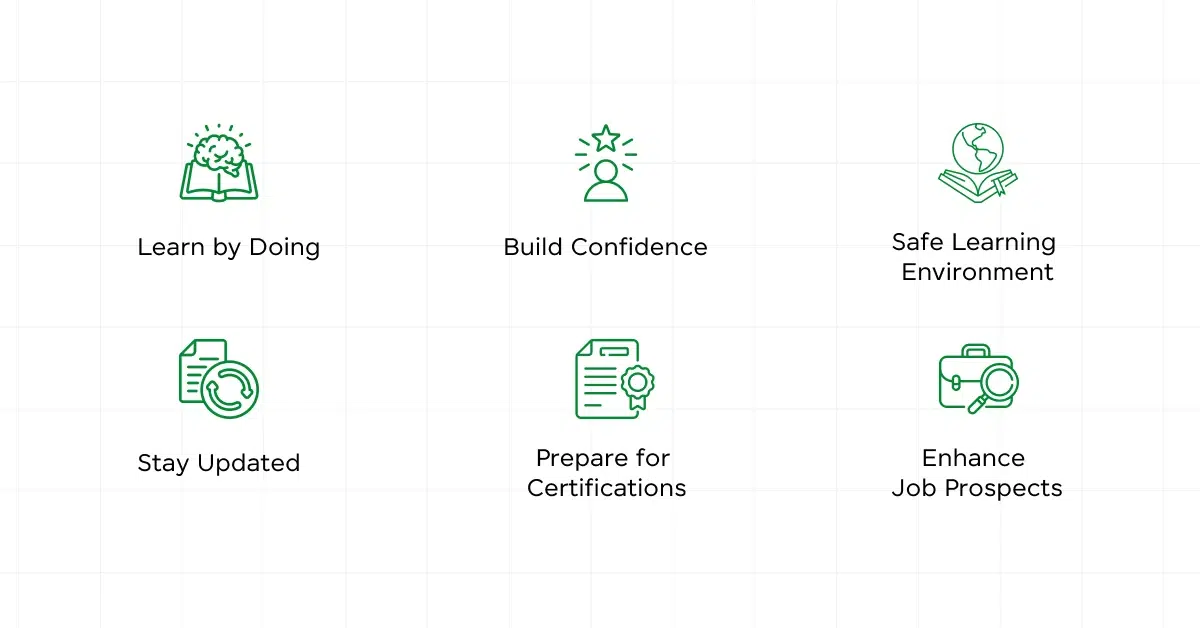
Here’s why you should prioritize labs over passive study:
- Learn by doing: You apply concepts in real scenarios, not just read about them. When you actually launch an EC2 instance or configure a VPC, the process gets ingrained in your memory.
- Build real confidence: There’s a big difference between knowing what S3 is and knowing how to create a bucket, set permissions, and upload objects. Labs close that gap.
- Safe to experiment: You can break things, misconfigure settings, and try again, all without affecting a live system or racking up unexpected AWS bills.
- Certification preparation: AWS certification exams are heavily scenario-based. Labs expose you to the exact situations those exams test.
- Job readiness: Hiring managers for cloud roles increasingly ask candidates to demonstrate practical skills, not just certifications.
AWS holds over 31% of the global cloud infrastructure market share, more than Microsoft Azure and Google Cloud combined. Companies across every industry are actively hiring cloud professionals, making AWS one of the most in-demand skill sets of 2026.
7 Popular Hands-on Labs for AWS:
These seven labs cover the core AWS services that appear most frequently in job roles and certification exams. If you’re starting from zero, work through them in this order.
1. AWS Cloud Practitioner Essentials
This is your starting point. The AWS Cloud Practitioner Essentials lab introduces you to the foundational concepts of AWS, including its core services, global infrastructure, pricing models, and basic security features.
Think of it as your orientation tour before you start working in the actual environment.
What you’ll learn:
- Core AWS services including EC2, S3, and RDS
- How AWS pricing and support plans work
- Basic security and compliance concepts
- The AWS global infrastructure and availability zones
Why it matters: This lab directly aligns with the AWS Certified Cloud Practitioner exam, which is the recommended first certification for anyone entering the cloud field.
2. Launch an EC2 Instance
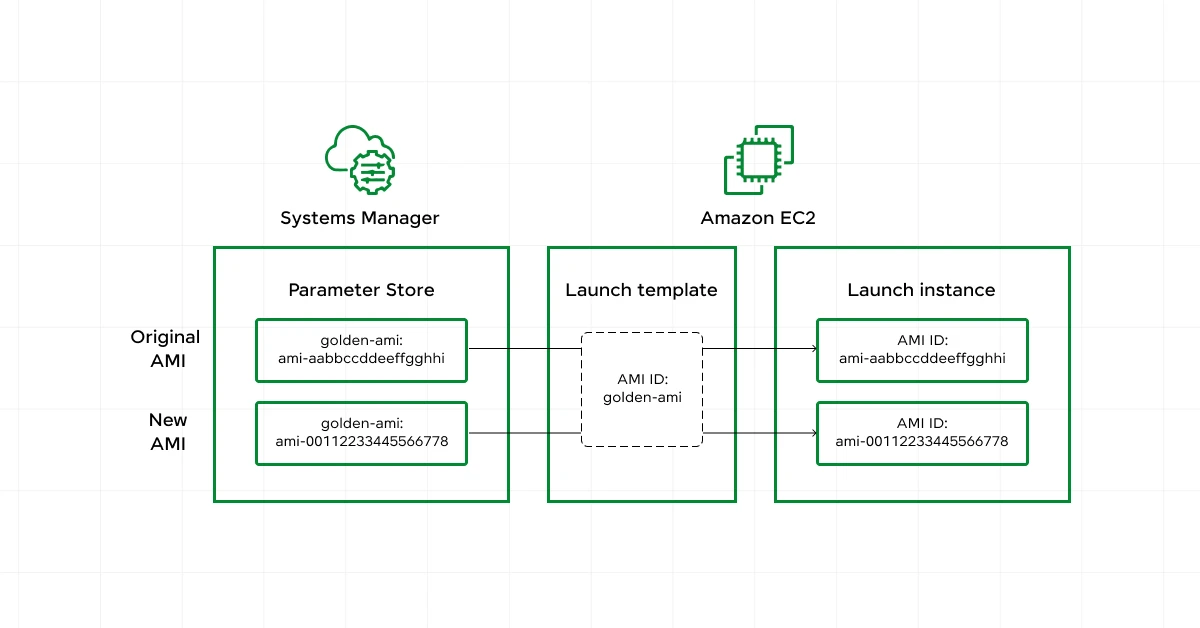
EC2 (Elastic Compute Cloud) is the backbone of AWS. In this lab, you spin up a virtual server in the cloud, configure it, connect to it, and manage it.
It’s the cloud equivalent of setting up a computer, except this computer lives in Amazon’s data center and can be scaled up or down in minutes.
What you’ll learn:
- How to launch and configure an EC2 instance from the AWS Console
- Connecting to your instance via SSH
- Managing security groups and key pairs
- Understanding EC2 pricing models (On-Demand, Reserved, Spot)
Why it matters: EC2 knowledge is listed in over 60% of cloud engineer job descriptions. You cannot call yourself AWS-proficient without understanding it.
Netflix runs its entire streaming infrastructure on AWS EC2. At peak hours, Netflix scales its EC2 fleet dynamically to serve over 230 million subscribers worldwide, all without manual intervention.
3. Introduction to Amazon S3
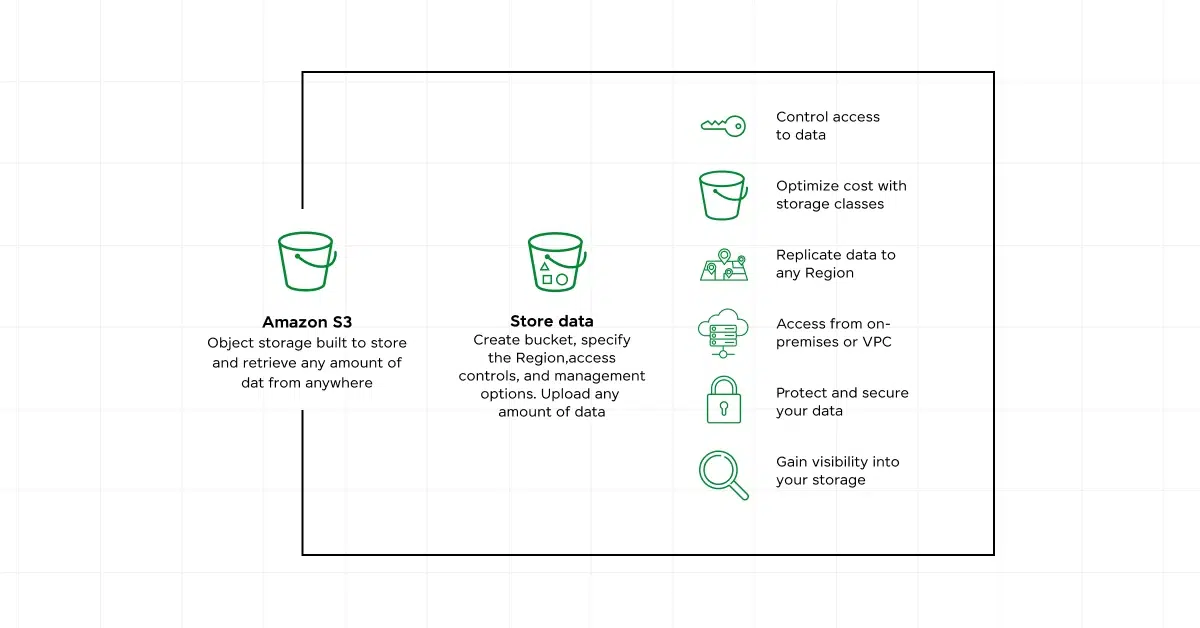
Amazon S3 (Simple Storage Service) is AWS’s object storage solution. In this lab, you create storage buckets, upload files, configure access permissions, and set lifecycle policies.
If EC2 is your cloud computer, S3 is your cloud hard drive, except it scales to petabytes without you managing a single disk.
What you’ll learn:
- Creating and configuring S3 buckets
- Uploading, organizing, and managing objects
- Setting permissions and bucket policies
- Understanding versioning and data lifecycle rules
Why it matters: S3 is used in nearly every AWS architecture, from hosting static websites to storing machine learning datasets and application backups.
4. Build a Serverless Application with AWS Lambda
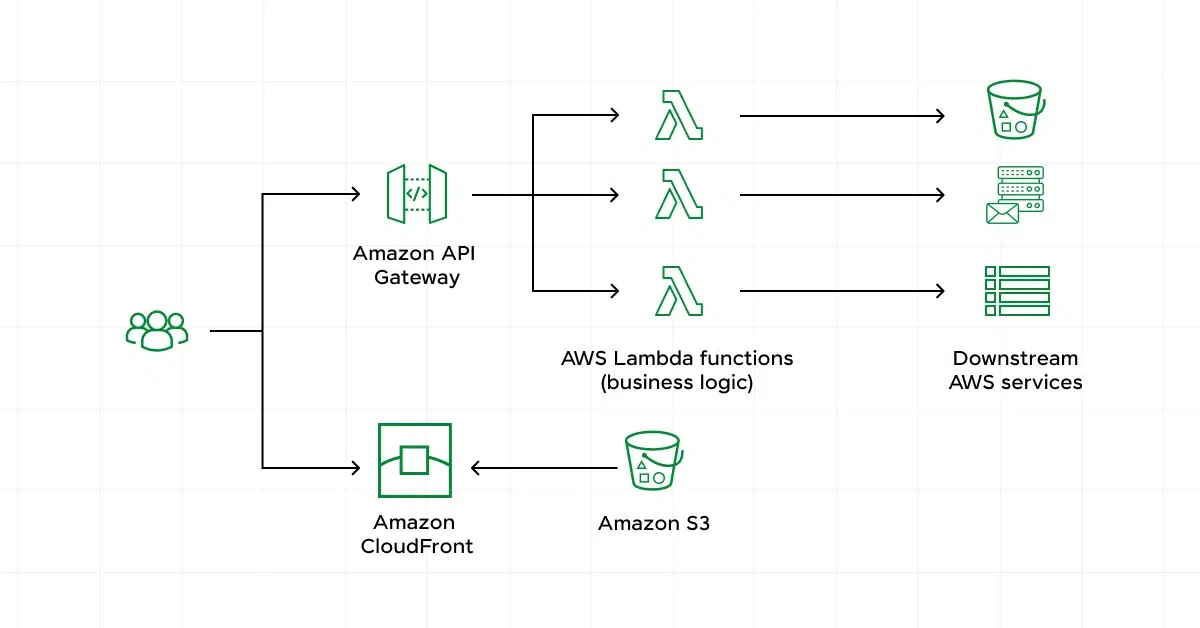
This lab is where things get genuinely exciting. AWS Lambda lets you run code in response to events without provisioning or managing any servers. You write the function, AWS handles everything else.
In this lab, you build a serverless application by connecting Lambda with API Gateway (to trigger the function via HTTP requests) and DynamoDB (to store data).
What you’ll learn:
- Writing and deploying Lambda functions
- Triggering Lambda via API Gateway
- Connecting Lambda to DynamoDB for data storage
- Monitoring function performance with AWS CloudWatch
Why it matters: Serverless architecture is growing rapidly because it reduces infrastructure costs and operational overhead. Knowing Lambda makes you significantly more valuable to any cloud team.
5. Deploy a Web Application with AWS Elastic Beanstalk
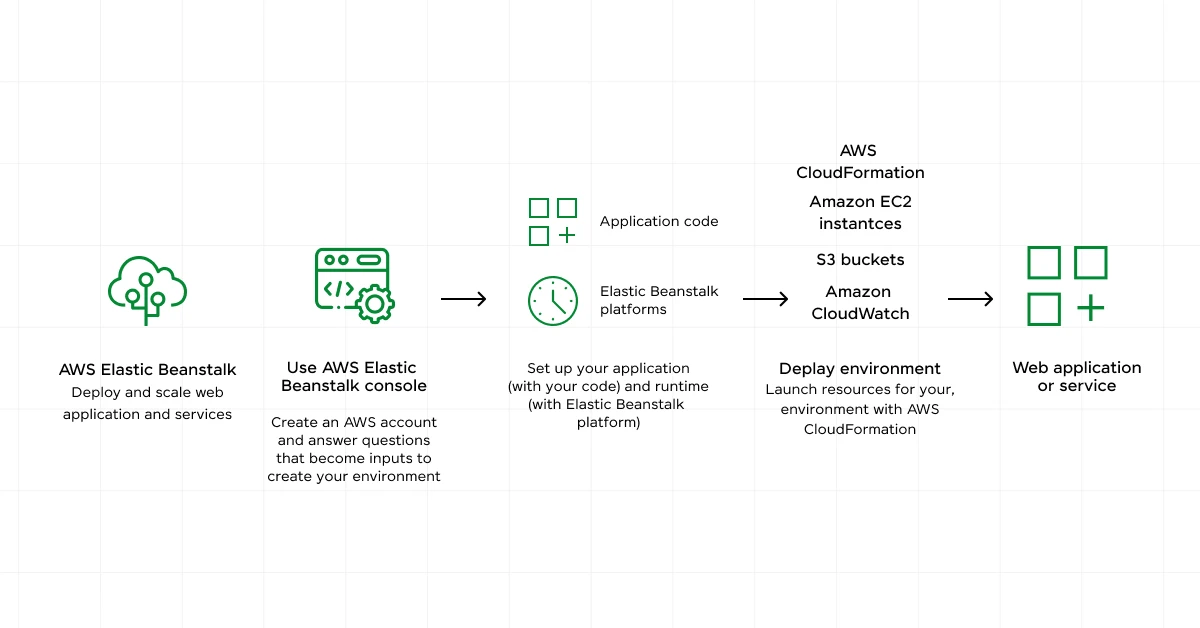
Got a web app you want to deploy? Elastic Beanstalk takes your code and automatically handles provisioning, load balancing, scaling, and monitoring. You focus on the application; AWS handles the infrastructure.
In this lab, you deploy a functioning web application end-to-end using Elastic Beanstalk’s PaaS environment.
What you’ll learn:
- Deploying and managing a web application on Elastic Beanstalk
- Configuring environments and application versions
- Setting up auto-scaling and health monitoring
- Rolling back deployments when needed
Why it matters: This lab is ideal for developers who want to deploy applications on AWS without deep infrastructure knowledge. It bridges the gap between development and DevOps.
According to AWS, Elastic Beanstalk supports applications built in Java, .NET, PHP, Node.js, Python, Ruby, Go, and Docker, making it one of the most versatile deployment tools on the platform.

6. Configure VPC and Subnets
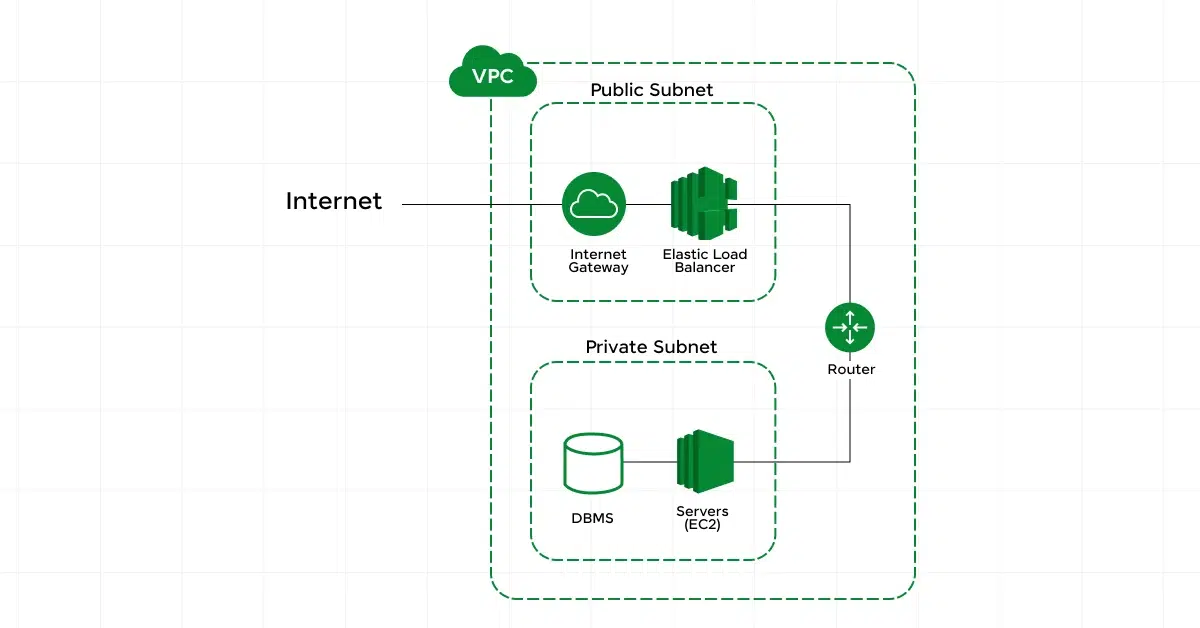
This lab dives into AWS networking. A VPC (Virtual Private Cloud) is your own private network within AWS where you control IP ranges, subnets, route tables, and network gateways.
Understanding VPCs is what separates cloud beginners from cloud professionals. Every production AWS environment uses a custom VPC.
What you’ll learn:
- Creating and configuring a custom VPC
- Setting up public and private subnets
- Configuring route tables and internet gateways
- Implementing network access control lists (ACLs) and security groups
Why it matters: Misconfigured VPCs are one of the top causes of cloud security breaches. Mastering this lab directly builds the skills that keep production systems secure.
7. Set Up IAM Users and Policies
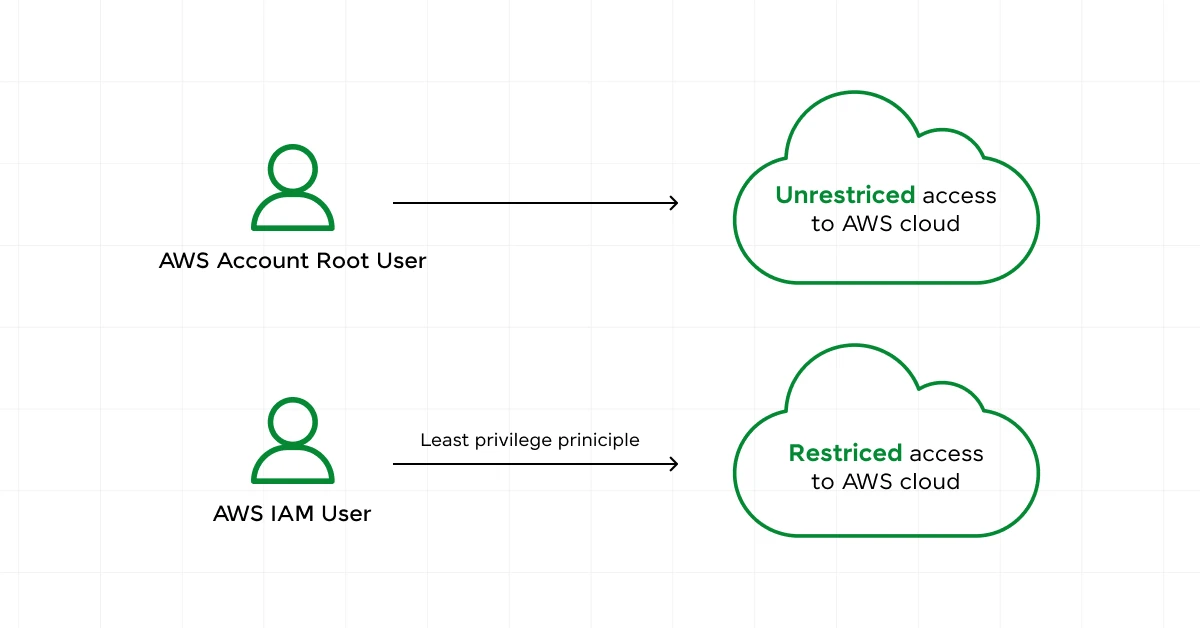
IAM (Identity and Access Management) controls who can access your AWS resources and what they can do. This lab teaches you to create users, assign roles, write permission policies, and enforce multi-factor authentication.
Think of IAM as the security guard of your AWS environment. Without it properly configured, your entire cloud setup is vulnerable.
What you’ll learn:
- Creating IAM users, groups, and roles
- Writing and applying permission policies
- Setting up Multi-Factor Authentication (MFA)
- Understanding the principle of least privilege
Why it matters: IAM knowledge is mandatory for any AWS role. It’s also heavily tested in every AWS certification exam at every level.
Common Mistakes When Doing AWS Hands-on Labs
Most beginners make the same few mistakes when starting out. Here’s what to watch out for.
- Skipping IAM setup before anything else: Many beginners log in with the root account and start building. This is a serious security risk. Always create an IAM user with limited permissions before doing anything else in AWS.
- Forgetting to terminate resources after a lab: EC2 instances and RDS databases continue to incur costs even when you’re not using them. Always terminate or stop resources after finishing a lab to avoid unexpected charges.
- Treating each lab in isolation: The real power of AWS comes from connecting services together. After completing individual labs, try building a mini-project that combines EC2, S3, and IAM. This is what employers actually want to see.
- Ignoring CloudWatch logs: When something breaks during a lab (and it will), beginners often guess at the problem. CloudWatch logs tell you exactly what went wrong. Get into the habit of checking them early.
- Not documenting what you build: Your hands-on lab work is portfolio material. Take screenshots, write short summaries, and add completed lab projects to your resume or LinkedIn. It demonstrates real experience.
If you want to improve your knowledge in Cloud Computing and apply it in various workplaces, then consider enrolling in any one of HCL GUVI’s Cloud Computing Courses where you have a range of courses from basics to advanced.
Conclusion
AWS hands-on labs are the most direct path to building cloud skills that actually hold up in real job environments. The seven labs covered here, from EC2 and S3 to Lambda and IAM, give you a solid foundation across the most in-demand areas of the platform.
Start with the Cloud Practitioner Essentials if you’re completely new, then work through EC2 and S3 before moving into networking and serverless. Document everything you build. The cloud job market rewards people who can show what they’ve done, not just what they know.
FAQs
Are AWS hands-on labs suitable for complete beginners?
Yes. Most foundational labs, especially the Cloud Practitioner Essentials and Introduction to S3, are designed for zero prior experience. You just need a free AWS account and willingness to follow the steps.
Which hands-on lab should I start with for AWS certification?
Start with the AWS Cloud Practitioner Essentials lab if you’re targeting the CCP exam. For Solutions Architect, prioritize EC2, VPC, and IAM labs first since they form the bulk of scenario-based questions.
Do AWS hands-on labs cost money?
Many labs can be completed within the AWS Free Tier, which gives you 750 hours of EC2 usage, 5 GB of S3 storage, and free Lambda invocations per month. Always remember to terminate resources after each lab to stay within the free tier limits.
How long does it take to complete the 7 labs in this list?
Each lab typically takes 1 to 2 hours to complete. Working through all seven at a comfortable pace, you can finish in about 2 weeks while balancing other commitments.
Can I add AWS hands-on lab experience to my resume?
Absolutely. List the specific services you worked with and what you built, for example “Deployed a serverless application using AWS Lambda, API Gateway, and DynamoDB.” Specific descriptions carry far more weight than simply listing “AWS” as a skill.
Success Stories

About the Author
Lukesh S
A professional content writer who has experience in freelancing and now working as a Technical Content Writer at HCL GUVI having sound knowledge in Blog Writing and Creative Writing!
View all posts by Lukesh S
Connect with me @












Did you enjoy this article?