


AWS Kubernetes Articles
Istio Service Mesh Tutorial for Beginners
Crossplane Tutorial: A Practical Guide for Learners
FluxCD Tutorial: An Effective Beginner's Guide
ArgoCD GitOps Tutorial: A Complete Beginner's Guide to Continuous Delivery


Get In Touch For Details! Request More Information

Pulumi Infrastructure as Code Tutorial: A Beginner’s Guide
Sep 12, 2026 4 Min Read 644 Views
(Last Updated)
Manual cloud deployments can break production in seconds and take days to trace back. That’s why the Pulumi Infrastructure as Code Tutorial has become essential for teams building repeatable, version-controlled infrastructure in 2026.
If you’ve ever managed resources through endless cloud console tabs, you know it doesn’t scale. With Pulumi, you write infrastructure as code, making deployments easier to review, track, and automate.
By the end of this guide, you’ll know what Pulumi is, how to install it, deploy your first infrastructure project, and see how it compares with Terraform.
Table of contents
- TL;DR Summary
- What Is Pulumi?
- Why Teams Are Adopting Pulumi in 2026
- Pulumi Working Mechanism
- State, Stacks, and Why They Matter
- Setting Up Pulumi: Step-by-Step
- Step 1: Install the Pulumi CLI
- Step 2: Choose Your Language and Cloud
- Step 3: Create Your First Project
- Writing Your First Pulumi Program
- Understanding Stacks and Configuration
- Pros and Cons of Pulumi
- Key Takeaways
- What to Do Next
- FAQs
- Is Pulumi free to use?
- Does Pulumi replace Terraform?
- What programming languages does Pulumi support?
- How does Pulumi store infrastructure state?
- Can a single Pulumi program manage multiple clouds at once?
TL;DR Summary
- Pulumi is an infrastructure-as-code platform that lets you define cloud infrastructure in TypeScript, Python, Go, C#, Java, or YAML, rather than a domain-specific language like HCL.
- You define resources as code, Pulumi computes a plan, and the CLI applies changes safely with full state tracking.
- Stacks let you manage separate environments — dev, staging, production — from the same codebase with different configurations.
- As of 2026, Pulumi can run existing Terraform/HCL modules natively, so adopting it no longer means rewriting everything you already have.
- This guide walks you through installation, your first deployment, core concepts, and a side-by-side comparison with Terraform.
As of early 2026, Pulumi added native support for running existing Terraform and HCL modules directly inside its orchestration engine — meaning teams don’t have to rewrite legacy Terraform code to start using Pulumi alongside it.
What Is Pulumi?
Pulumi is an open-source infrastructure-as-code (IaC) platform that lets you define, deploy, and manage cloud resources using general-purpose programming languages — TypeScript, Python, Go, C#, Java, or YAML — rather than a separate DSL.
You write a program, Pulumi computes the difference between your desired state and what’s actually deployed, then applies just the changes needed.
In practice, this means your infrastructure gets the same testing, code review, and IDE support as your application code.
Ready to build scalable, resilient, and automated cloud infrastructure? Enroll in HCL GUVI’s AWS Infrastructure Course and gain the hands-on AWS and DevOps skills needed to power modern cloud environments and accelerate your career in cloud computing.
Why Teams Are Adopting Pulumi in 2026
The shift toward programmable infrastructure isn’t happening in a vacuum. HashiCorp moved Terraform to a Business Source License, restricting its use in competing SaaS products, and OpenTofu forked it under Apache 2.0 as a community-maintained alternative—prompting many platform teams to re-evaluate their tooling entirely.
Pulumi capitalized on that moment by doubling down on its core pitch: bring infrastructure into the same workflow as application code.
- Familiar tooling, lower learning curve. Your team already knows Python or TypeScript, which means there’s no new syntax to memorize before anyone can ship a deployment — they apply what they already know to a new domain.
- Reusable components as real packages. Teams can publish a compliant VPC module to npm or PyPI, and other teams can install it like any other dependency, keeping platform standards consistent without copy-pasted YAML.
- Testing infrastructure like software. Because programs are written in general-purpose languages, you can run unit and integration tests against your infrastructure code with the same frameworks you already use for application tests.
Pulumi Working Mechanism
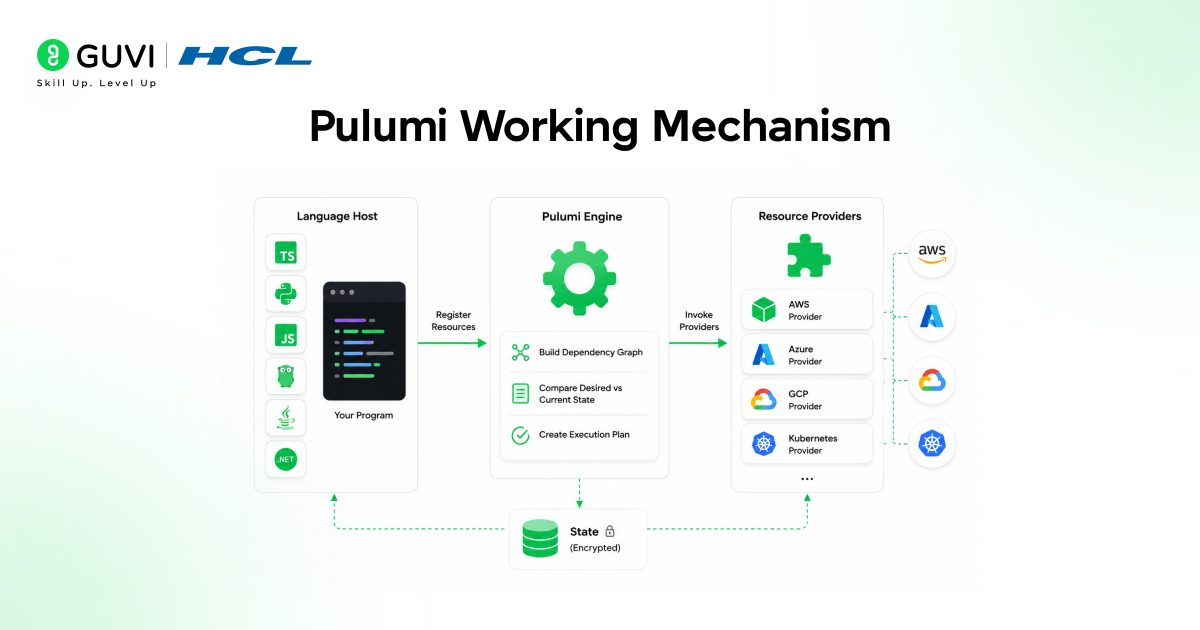
Understanding the architecture helps you reason about what happens when you run a deployment command, instead of treating Pulumi as a black box.
Three components do the heavy lifting. A language host is a process running your chosen language runtime — Node.js, Python, the JVM, and so on — that executes your program and calls the Pulumi SDK to register resources.
The Pulumi engine is the core orchestration process that receives those registration requests, computes the dependency graph, compares the desired state against the last-known state, and generates a plan.
Resource providers are plugins that translate Pulumi resource declarations into actual API calls against AWS, Azure, GCP, Kubernetes, and similar platforms, with each provider running as a separate downloaded binary.
✅ Best Practice: Always run a preview (pulumi preview) before applying changes in a shared environment. It shows the exact difference between the current and desired state, catching accidental resource deletions before they happen—not after.
State, Stacks, and Why They Matter
Pulumi needs a place to store what it deployed last time, so it knows what’s actually changed. Pulumi stores state in Pulumi Cloud by default, but also supports S3, Azure Blob Storage, Google Cloud Storage, and local filesystem backends — so teams with strict data residency rules aren’t locked into a single hosted option.
A stack is Pulumi’s word for an isolated, independently configurable instance of your program — think dev, staging, and production, all running the same code with different inputs.
Setting Up Pulumi: Step-by-Step
You don’t need a complex environment to get started — just a terminal, a supported language runtime, and a cloud account.
Step 1: Install the Pulumi CLI
On macOS or Linux, you can install via the official script. On Windows, Pulumi ships a Chocolatey package and a PowerShell installer. Once installed, run pulumi version to confirm it’s on your path.
Step 2: Choose Your Language and Cloud
Pick the language your team already uses for application code—that consistency is the whole point. Supported languages include TypeScript, Python, Go, .NET, Java, and YAML.
You’ll also need provider credentials for whichever cloud you’re targeting (AWS, Azure, GCP, or Kubernetes are the most common starting points).
Step 3: Create Your First Project
Run pulumi new and select a starter template for your language and cloud combination. This scaffolds a working project with a sample resource already wired up, which is the fastest way to see a real deployment without writing boilerplate from scratch.

💡 Pro Tip: Run your very first pulumi up against a throwaway sandbox account, not a shared environment. It builds your confidence in reading the preview output without risking clobbering a teammate’s resources.
Writing Your First Pulumi Program
Here’s where the “real programming language” pitch becomes concrete. A minimal AWS S3 bucket in TypeScript looks like this:
import * as aws from “@pulumi/aws”;
const bucket = new aws.s3.Bucket(“my-first-bucket”, {
website: { indexDocument: “index.html” },
});
export const bucketName = bucket.id;
Run pulumi up, review the preview, confirm, and Pulumi will provision the bucket and print the exported name. That export line matters more than it looks — it’s how one stack hands values to another, which becomes essential once you start splitting networking, compute, and application layers into separate projects.
Understanding Stacks and Configuration
Once your first resource is live, the next question is almost always: how do I do this for staging and production without duplicating code?
Stacks solve exactly that. Each stack shares the same program but carries its own configuration values, secrets, and state file — so promoting a change from dev to prod is a configuration change, not a rewrite.
- Per-stack configuration lets you set different instance sizes, region, or replica counts for dev versus prod, which means your code stays identical while your environments stay appropriately sized.
- Built-in secrets encryption keeps API keys and credentials out of plaintext config files, because anything marked as a secret gets encrypted before it ever touches disk or state storage.
- Stack outputs as cross-stack references let one stack (say, networking) expose values that another stack (say, the application layer) consumes — thereby keeping large infrastructure codebases modular rather than monolithic.
Tying that back to the bigger picture: stacks are what make Pulumi viable for real organizations, not just demos. Without them, every environment promotion would mean hand-editing values and hoping nothing drifts.
Pros and Cons of Pulumi
| Pros | Cons |
| Full IDE support — autocomplete, type checking, inline docs | General-purpose language bugs can creep into infrastructure code |
| Real testing frameworks for infrastructure | Smaller community than Terraform’s, though growing fast |
| Reusable components distributable via standard package managers | Some teams without strong dev skills face a steeper org-level shift |
| Native HCL support reduces migration friction in 2026 | Multi-language flexibility can fragment internal standards if ungoverned |
Key Takeaways
- Pulumi lets you write infrastructure in TypeScript, Python, Go, C#, Java, or YAML instead of a separate DSL, which removes the learning curve for teams that already code.
- The Pulumi engine computes a dependency graph and diffs desired state against the last-known state before applying anything, giving you a preview before every change.
- Stacks let one codebase serve dev, staging, and production with different configurations and isolated state.
- As of 2026, Pulumi can run existing Terraform/HCL modules natively, reducing switching costs for teams with legacy Terraform investments.
- Choosing between Pulumi and Terraform today is mostly an organizational decision about who’s writing the code, not a pure feature comparison.
- Testing infrastructure with standard unit and integration test frameworks is one of Pulumi’s biggest practical advantages over DSL-based tools.
What to Do Next
- Install the CLI and run pulumi new with a starter template in the language your team already uses for application code.
- Deploy a single low-risk resource to a sandbox account to read a preview and apply it without any production risk.
- Map out your stack structure (dev/staging/prod) before writing your first real project, so configuration boundaries are clear from day one.
FAQs
Is Pulumi free to use?
Yes — the core Pulumi engine and CLI are open source under the Apache 2.0 license. Pulumi Cloud offers a free tier for state management and secrets, with paid plans that include enterprise features such as RBAC and SSO.
Does Pulumi replace Terraform?
Not necessarily. Pulumi now runs HCL natively, so it can sit alongside existing Terraform-authored modules within the same orchestration layer, rather than requiring a full migration.
What programming languages does Pulumi support?
Pulumi supports TypeScript, Python, Go, .NET, Java, and YAML, and every supported language can provision and manage resources across all major cloud providers.
How does Pulumi store infrastructure state?
By default, Pulumi stores state in Pulumi Cloud, but it also supports self-managed backends including S3, Azure Blob Storage, Google Cloud Storage, and local filesystem storage.
Can a single Pulumi program manage multiple clouds at once?
Yes. A single Pulumi program can provision resources across AWS, Azure, GCP, Kubernetes, and hundreds of other providers simultaneously, making multi-cloud topologies manageable from a single codebase.
Success Stories









Did you enjoy this article?