


Forward Deployed Engineer Articles
Excalidraw and Whiteboarding: How FDEs Communicate Technical Solutions
How to Fine-Tune Open-Source Models as a Forward Deployed Engineer
Rate Limiting, Retries, and Caching: Production AI Patterns for FDEs
How to Run a Great Client Demo as a Forward Deployed Engineer


Get In Touch For Details! Request More Information
Handling a Failed Deployment: A Forward Deployed Engineer’s Recovery Playbook
Sep 28, 2026 4 Min Read 35 Views
(Last Updated)
A failed deployment recovery playbook helps Forward Deployed Engineers respond systematically when a software release does not go as planned. Deployment failures can happen because of configuration errors, dependency problems, infrastructure issues, authentication failures, database changes, or unexpected differences between environments.
For FDEs, deployment failures can be particularly challenging because the affected system may belong to a customer environment with unique infrastructure, integrations, and operational constraints. The engineer must restore service while communicating clearly with the customer and internal teams.
A structured recovery process helps reduce confusion during an incident. Instead of immediately making random changes, FDEs can assess the impact, identify the failure, stabilize the environment, roll back when necessary, and document what happened.
Table of contents
- TL;DR Summary
- Why Do Deployments Fail for FDEs?
- What Should You Do Immediately After a Failed Deployment?
- Stop Further Changes
- Assess the Impact
- Check the Deployment Status
- How Do You Troubleshoot the Failure?
- Check Recent Changes
- Check Logs and Metrics
- Verify Environment Configuration
- Reproduce the Problem
- When Should You Roll Back a Deployment?
- How Should FDEs Communicate During Recovery?
- What Should You Do After Recovery?
- How Can You Prevent Future Deployment Failures?
- Start Your Learning Journey with HCL GUVI
- Conclusion
- FAQs
- What is a failed deployment recovery playbook?
- What are common causes of deployment failures?
- When should an FDE roll back a deployment?
- How should FDEs communicate a deployment failure to customers?
- What should an FDE check when troubleshooting a failed deployment?
- How can FDEs prevent deployment failures?
TL;DR Summary
- A failed deployment recovery playbook provides a structured process for responding to deployment failures.
- Start by assessing the impact instead of immediately changing the system.
- Check logs, deployment events, configuration, dependencies, infrastructure, and recent changes.
- Roll back to a known-good version when restoring service is safer than fixing the failed release immediately.
- Communicate clearly with customers and internal teams throughout the incident.
- After recovery, document the root cause, corrective actions, and preventive measures.
Why Do Deployments Fail for FDEs?
Deployment failures occur when a new application version cannot start, function correctly, or integrate with the surrounding environment.
For FDEs, failures can be caused by both the application and the customer’s infrastructure.
Common causes include:
- Incorrect environment variables
- Missing configuration
- Authentication or permission errors
- API integration failures
- Database migration problems
- Dependency conflicts
- Container or image issues
- Infrastructure failures
- Network or DNS problems
- Differences between staging and production
Strengthen your AI engineering skills with HCL GUVI’s Artificial Intelligence & Machine Learning Course. Develop practical knowledge of AI, machine learning, and real-world application development through hands-on projects and industry-focused training.
What Should You Do Immediately After a Failed Deployment?
The first priority is to understand the impact and stabilize the environment.
1. Stop Further Changes
Avoid making multiple untracked changes at once. Record what happened and identify the release or change that triggered the problem.
2. Assess the Impact
Determine:
- Is the application completely unavailable?
- Are only specific features affected?
- Are customer integrations failing?
- Is data being affected?
- Is there a security concern?
- Is there a workaround?
This determines how urgently you need to restore the previous state.
3. Check the Deployment Status
Review the deployment pipeline and identify where it failed.
Look at:
- Build logs
- Deployment logs
- Container status
- Health checks
- Application logs
- Infrastructure events
The first error in the sequence is often more useful than the final error message.
A deployment can appear successful from the deployment system’s perspective while the application itself is unhealthy. Health checks, application logs, and functional testing are therefore important after every release.
How Do You Troubleshoot the Failure?
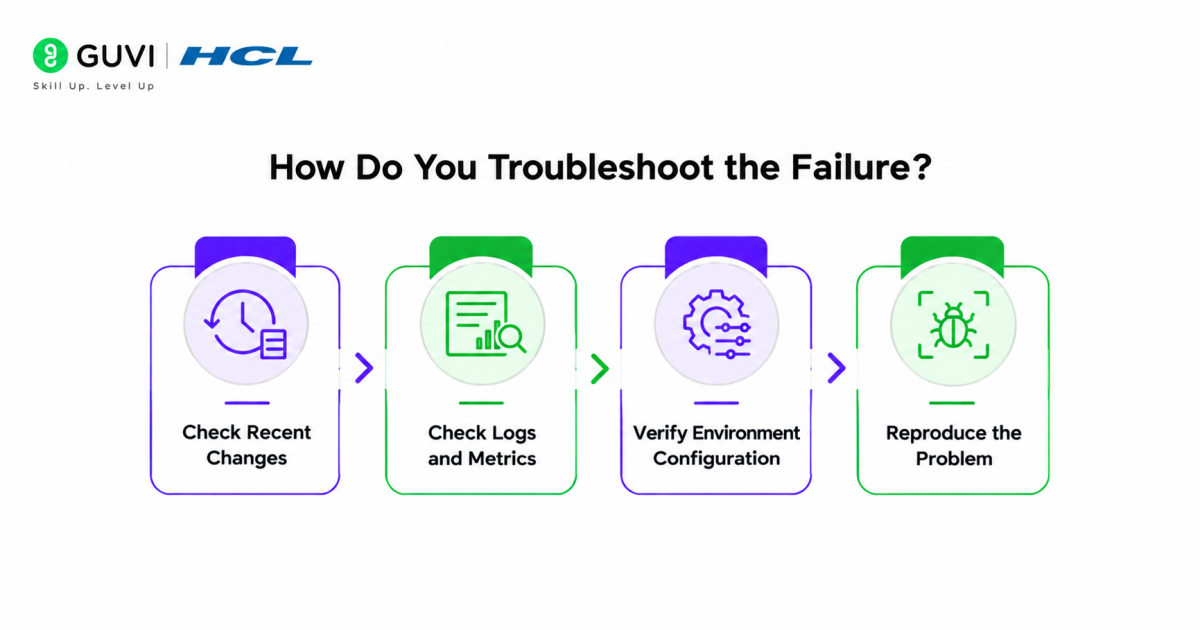
Once the environment is stable, investigate systematically.
1. Check Recent Changes
Compare the failed release with the previous working version.
Look for changes involving:
- Application code
- Dependencies
- Configuration
- Infrastructure
- Database schemas
- API credentials
2. Check Logs and Metrics
Application logs can reveal startup errors, authentication failures, exceptions, and integration problems.
Monitoring data can also help identify changes in:
- Error rates
- Response times
- CPU usage
- Memory usage
- Request volume
3. Verify Environment Configuration
A common deployment problem is configuration mismatch.
Check whether the target environment has the required:
- Environment variables
- Secrets
- API endpoints
- Certificates
- Permissions
- Network access
4. Reproduce the Problem
If possible, reproduce the failure in a controlled environment. This allows you to test a fix without repeatedly modifying the customer’s production system.
Best Practice: Change one variable at a time during troubleshooting. This makes it easier to understand which change actually resolves the problem.
When Should You Roll Back a Deployment?
Rollback is often appropriate when the new release is causing significant problems and a known-good version is available.
A rollback can restore service while the team investigates the underlying issue.
Consider rolling back when:
- The application is unavailable.
- Critical customer workflows are failing.
- The new release introduces severe errors.
- The cause cannot be resolved quickly.
- A tested previous version is available.
However, rollback is not always safe. Database schema changes, irreversible migrations, or data transformations may make returning to the previous version more complicated.
Before rolling back, understand what the release changed and whether the previous version is compatible with the current database and infrastructure.
How Should FDEs Communicate During Recovery?
Technical recovery is only one part of an FDE’s responsibility. Customer communication is equally important.

Keep updates concise and factual.
A useful incident update should explain:
- What happened.
- What is affected.
- What the team is currently doing.
- Whether a workaround or rollback is available.
- When the next update will be provided.
Avoid making assumptions about the root cause before investigating.
For example, instead of saying that a customer’s database caused the failure, explain that the team is investigating a database-related error observed during deployment.
Pro Tip: Assign communication and technical investigation separately when possible. This allows one person to keep stakeholders informed while engineers focus on recovery.
What Should You Do After Recovery?
Restoring the application is not the final step.
After the system is stable, document the incident.
Capture:
- Deployment version
- Failure symptoms
- Timeline
- Root cause
- Recovery actions
- Rollback details
- Customer impact
- Final resolution
Then conduct a short post-incident review.
Ask:
- Why did the deployment fail?
- Why was the issue not detected earlier?
- Which monitoring or tests were missing?
- What should change before the next deployment?
Warning: Avoid treating a rollback as the root-cause fix. A rollback restores the previous state, but the underlying deployment problem still needs to be understood and addressed.
How Can You Prevent Future Deployment Failures?
Recovery becomes easier when deployments are designed with failure in mind.
FDEs can reduce deployment risk by using:
- Automated testing
- Staging environments
- Deployment checklists
- Infrastructure validation
- Health checks
- Automated rollback mechanisms
- Monitoring and alerting
- Versioned configurations
- Smaller releases
- Clear runbooks
For customer environments, also document environment-specific requirements before deployment. This is especially important when customers use different cloud platforms, network configurations, authentication systems, or legacy infrastructure.
Start Your Learning Journey with HCL GUVI
Strengthen your AI engineering skills with HCL GUVI’s Artificial Intelligence & Machine Learning Course. Develop practical knowledge of AI, machine learning, and real-world application development through hands-on projects and industry-focused training.
Conclusion
A failed deployment recovery playbook gives Forward Deployed Engineers a repeatable way to handle deployment incidents without losing focus or making unnecessary changes. The process should begin with impact assessment, followed by systematic troubleshooting, safe recovery, and clear customer communication.
For FDEs, successful recovery is not only about getting an application running again. It also means understanding the failure, documenting what happened, and improving the deployment process so the same problem is less likely to happen again. A disciplined recovery approach helps engineers protect customer environments while building stronger deployment and incident-response skills.
FAQs
What is a failed deployment recovery playbook?
A failed deployment recovery playbook is a documented process for identifying, troubleshooting, and recovering from deployment failures. It typically includes impact assessment, troubleshooting, rollback procedures, communication steps, and post-incident actions.
What are common causes of deployment failures?
Common causes include configuration errors, dependency conflicts, authentication problems, database issues, infrastructure failures, network problems, and differences between development, staging, and production environments.
When should an FDE roll back a deployment?
An FDE may consider a rollback when a deployment causes significant customer impact and a known-good version is available. The engineer should first verify that the previous version is compatible with database and infrastructure changes.
How should FDEs communicate a deployment failure to customers?
Communication should be concise, factual, and transparent. Explain the impact, current recovery action, available workaround, and when the next update will be provided without speculating about an unconfirmed root cause.
What should an FDE check when troubleshooting a failed deployment?
Check deployment logs, application logs, health checks, infrastructure events, configuration, dependencies, permissions, network connectivity, and recent code or infrastructure changes. Comparing the failed release with the last working version can also help isolate the problem.
How can FDEs prevent deployment failures?
FDEs can reduce deployment risk through automated testing, staging validation, health checks, monitoring, deployment checklists, versioned configurations, smaller releases, and documented customer-specific deployment requirements.
Success Stories

About the Author
HCL GUVI
This article was selected and published as part of the HCL GUVI AI Blogathon 2026, an initiative designed to encourage students, AI enthusiasts, and aspiring tech writers to simplify complex AI concepts through impactful technical content. The contest recognized high-quality, original, and insightful AI-focused blogs, with selected authors receiving publication opportunities on the HCL GUVI blog platform along with official author credits and recognition.
View all posts by HCL GUVI
Connect with me @










Did you enjoy this article?