


Artificial Intelligence and Machine Learning Articles
AI/ML Skills Gap 2026: Why Companies Can't Find Job-Ready Talent
20 AI/ML Interview Questions Recruiters Can Use Without a Tech Background - Best Guide
How Industry-Backed AI/ML Bootcamps Are Changing the AI/ML Hiring Pipeline - Best Guide 2026
From IT Support to AI Engineer: A Realistic Career Switch Guide 2026


Get In Touch For Details! Request More Information
Claude for Accessibility: Plain Language and Alt Text
Aug 19, 2026 3 Min Read 259 Views
(Last Updated)
Creating accessible content isn’t just about meeting compliance requirements—it’s about ensuring everyone can understand and interact with your content. From simplifying complex text to writing meaningful image descriptions, accessibility improves the experience for people with diverse needs. Claude can assist by generating plain language content, creating descriptive alt text, and improving readability while preserving your original message. In this guide, you’ll learn how claude accessibility can support more inclusive content creation.
Table of contents
- TL;DR
- What Is Claude for Accessibility?
- Why Is Accessibility Important?
- How Can Claude Improve Accessible Content?
- Rewrite Content in Plain Language
- Generate Alt Text
- Improve Content Structure
- Where Can You Use Claude for Accessibility?
- Accessibility Tips Beyond AI
- Limitations of Using Claude
- How to Write Better Accessibility Prompts for Claude
- Key Takeaways
- Conclusion
- FAQs
- Can Claude generate alt text for images?
- Can Claude rewrite content in plain language?
- Does Claude ensure accessibility compliance?
- Who can benefit from Claude accessibility features?
- Why is plain language important for accessibility?
TL;DR
- Claude helps rewrite complex content into plain language.
- AI can generate descriptive alt text for images.
- Accessibility improvements benefit all users, not just people with disabilities.
- Human review ensures accessibility guidelines are properly followed.
- Claude speeds up accessibility-related writing tasks.
What Is Claude for Accessibility?
Claude is an AI assistant that helps writers, marketers, educators, and developers create content that is easier to understand and more accessible. It can simplify technical language, improve sentence clarity, and generate alt text that helps screen reader users understand images.
Rather than replacing accessibility expertise, Claude supports content creators by reducing the time spent on repetitive editing tasks.
Common use cases include:
- Writing plain language content
- Creating image alt text
- Simplifying technical documentation
- Improving website accessibility
- Editing educational materials
Read More: Claude Web Search Unleashed: Real-Time AI for Everyone, Everywhere
Design inclusive digital experiences with HCL GUVI’s UI/UX Design Course. Learn accessibility principles, user-centered design, and industry-standard tools through practical projects.
Why Is Accessibility Important?
Accessible content allows more people to understand information regardless of their abilities, reading level, or the device they use. Clear writing and descriptive image text make websites, documents, and digital products more inclusive.
Some key benefits include:
- Improve readability. Simple language makes information easier to understand.
- Support screen readers. Well-written alt text provides meaningful image descriptions for visually impaired users.
- Reach a wider audience. Accessible content benefits people with disabilities, language learners, and mobile users.
- Enhance user experience. Clear communication reduces confusion and improves engagement.
Data Point: Many accessibility best practices, including plain language and descriptive headings, also improve overall user experience and content usability.
How Can Claude Improve Accessible Content?
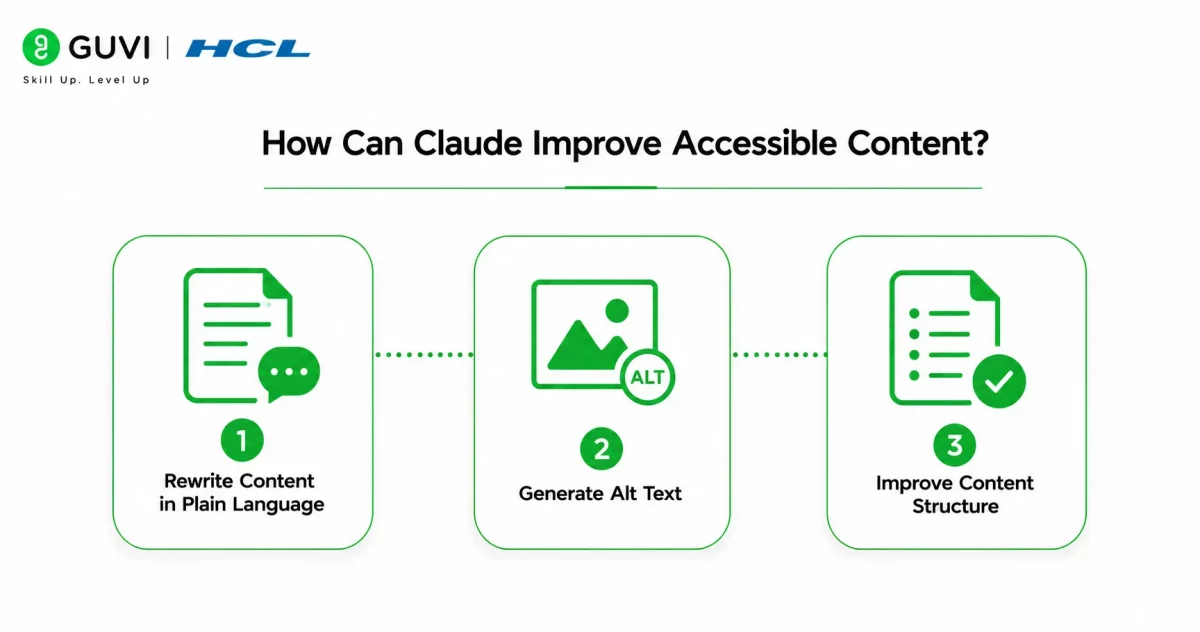
Claude can assist throughout the content creation process by identifying areas that may be difficult to understand and suggesting clearer alternatives.
1. Rewrite Content in Plain Language
Claude can simplify lengthy sentences, explain technical terms, and improve readability without changing the original meaning.
This makes content easier for a broader audience to understand.
2. Generate Alt Text
Claude can create descriptive alt text that explains the important elements of an image.
Writers should review the generated descriptions to ensure they accurately represent the image and its purpose.
3. Improve Content Structure
Claude can recommend clearer headings, shorter paragraphs, and better content organization.
A well-structured document is easier to navigate for both readers and assistive technologies.
Pro Tip: Ask Claude to rewrite content for a general audience if you’re unsure whether your writing is clear enough for readers with different literacy levels.
Design inclusive digital experiences with HCL GUVI’s UI/UX Design Course. Learn accessibility principles, user-centered design, and industry-standard tools through practical projects.
Where Can You Use Claude for Accessibility?
Claude can improve accessibility across many types of digital content.
Popular examples include:
- Blog articles
- Website content
- Educational resources
- User guides
- Product documentation
- Marketing materials
- Online courses
- Internal documentation
Improving accessibility across these materials creates a more inclusive experience for every audience.
Accessible writing often improves readability for every reader—not just people who rely on assistive technologies.
Accessibility Tips Beyond AI
Claude is a helpful assistant, but accessibility involves more than well-written text.
Consider these additional practices:
- Use meaningful headings.
- Maintain sufficient color contrast.
- Add captions to videos.
- Ensure keyboard navigation works correctly.
- Test content using screen readers.
Combining these practices with Claude-generated content creates a stronger accessibility strategy.
Best Practice: Use Claude to improve readability, but validate your content against recognized accessibility standards before publishing.

Limitations of Using Claude
Although Claude can simplify accessibility tasks, it cannot guarantee full compliance with accessibility standards or accurately interpret every visual context.
Some limitations include:
- AI may overlook image context.
- Generated alt text may require refinement.
- Accessibility compliance still needs manual testing.
- Complex diagrams often need expert descriptions.
- Human review remains essential.
Warning: Always review AI-generated alt text and accessibility recommendations to ensure they accurately represent your content and meet your organization’s accessibility requirements.
How to Write Better Accessibility Prompts for Claude
The quality of Claude’s accessibility suggestions depends on the prompts you provide. Giving clear instructions helps the AI generate content that is easier to understand and more useful for people with different accessibility needs.
When writing prompts, consider including:
- Specify the audience. Mention whether the content is for beginners, children, professionals, or a general audience so Claude can adjust the reading level appropriately.
- Define the task clearly. Ask Claude to simplify text, generate descriptive alt text, improve readability, or explain technical terms in plain language instead of using a broad prompt.
- Provide context for images. If you’re requesting alt text, describe the image’s purpose and where it will be used so Claude can generate more meaningful descriptions.
- Request accessibility improvements. Ask Claude to shorten long paragraphs, improve heading structure, or replace complex words with simpler alternatives while preserving the original meaning.
Pro Tip: Instead of asking Claude to “make this accessible,” specify exactly what you need—for example, “Rewrite this at an eighth-grade reading level,” or “Generate concise alt text that focuses on the most important visual details.”
Key Takeaways
- Claude helps create more accessible written content.
- AI simplifies complex language and generates descriptive alt text.
- Accessibility improves usability for a wider audience.
- Human review remains essential for accessibility compliance.
- Combining AI with accessibility best practices produces better results.
- Inclusive content creates a better experience for every reader.
Conclusion
Claude is a valuable tool for improving digital accessibility by simplifying language, generating descriptive alt text, and helping organize content more clearly. These capabilities allow writers, educators, developers, and marketers to create content that reaches a broader audience with less manual effort.
However, accessibility is an ongoing process rather than a one-time task. By combining Claude’s writing assistance with accessibility standards, user testing, and manual review, you can create digital experiences that are both inclusive and effective.
FAQs
Can Claude generate alt text for images?
Yes. Claude can create descriptive alt text based on image content, but the descriptions should always be reviewed before publication.
Can Claude rewrite content in plain language?
Yes. Claude can simplify complex sentences and technical language while preserving the original meaning.
Does Claude ensure accessibility compliance?
No. Claude supports accessibility efforts, but manual testing and recognized accessibility standards are still necessary.
Who can benefit from Claude accessibility features?
Writers, educators, developers, marketers, and businesses can all use Claude to create clearer and more inclusive content.
Why is plain language important for accessibility?
Plain language makes information easier to understand, helping people with different reading abilities, language backgrounds, and accessibility needs.
Success Stories

About the Author
HCL GUVI
This article was selected and published as part of the HCL GUVI AI Blogathon 2026, an initiative designed to encourage students, AI enthusiasts, and aspiring tech writers to simplify complex AI concepts through impactful technical content. The contest recognized high-quality, original, and insightful AI-focused blogs, with selected authors receiving publication opportunities on the HCL GUVI blog platform along with official author credits and recognition.
View all posts by HCL GUVI
Connect with me @












Did you enjoy this article?