


Artificial Intelligence and Machine Learning Articles
AI/ML Skills Gap 2026: Why Companies Can't Find Job-Ready Talent
20 AI/ML Interview Questions Recruiters Can Use Without a Tech Background - Best Guide
How Industry-Backed AI/ML Bootcamps Are Changing the AI/ML Hiring Pipeline - Best Guide 2026
From IT Support to AI Engineer: A Realistic Career Switch Guide 2026


Get In Touch For Details! Request More Information
Claude for Real-Time Meeting Summarization
Aug 05, 2026 4 Min Read 278 Views
(Last Updated)
Meetings are essential for collaboration, project planning, and decision-making, but documenting every discussion, action item, and outcome can quickly become overwhelming. Whether you’re a project manager, business analyst, consultant, team leader, or operations professional, learning how to use Claude for meeting summarization can significantly improve collaboration and workplace efficiency.
Table of contents
- TL;DR
- 📊 Data Point
- Why Use Claude for Real-Time Meeting Summarization?
- How to Use Claude for Real-Time Meeting Summarization
- Step 1: Capture the Meeting Conversation
- Step 2: Upload the Meeting Transcript
- Step 3: Generate a Structured Meeting Summary
- Step 4: Identify Action Items
- Step 5: Highlight Key Decisions
- Step 6: Create Shareable Meeting Notes
- Step 7: Review and Verify the Summary
- Step 8: Store and Track Follow-ups
- Meeting Tasks Claude Can Assist With
- Meeting Tasks Claude Cannot Replace
- ⚠️ Warning
- Best Practice
- Conclusion
- FAQs
- What is Claude meeting summarization?
- Can Claude summarize meetings in real time?
- How does Claude improve meeting productivity?
- Can Claude identify action items from meetings?
- Can Claude replace meeting participants or managers?
- Is Claude suitable for remote and hybrid teams?
- What are the best practices for using Claude for meeting summarization?
TL;DR
- Claude helps professionals automatically summarize meetings, capture action items, and organize discussions into structured notes.
- It identifies key decisions, follow-up tasks, and important discussion points, making meetings easier to review and share.
- Businesses can use Claude as an AI-powered meeting assistant to reduce manual note-taking and improve team collaboration.
- AI streamlines meeting documentation and saves time, but human review is still essential to ensure accuracy and context.
- Every meeting summary should be verified before being shared with stakeholders or used for decision-making.
HCL GUVI’s Business Analytics Course equips learners with decision-making skills that complement AI-powered workplace productivity tools.
📊 Data Point
According to Microsoft’s Work Trend Index, employees spend a significant portion of their workweek in meetings, making AI-powered meeting summarization increasingly valuable for improving productivity and reducing administrative workload.
Source: Microsoft Work Trend Index
Why Use Claude for Real-Time Meeting Summarization?
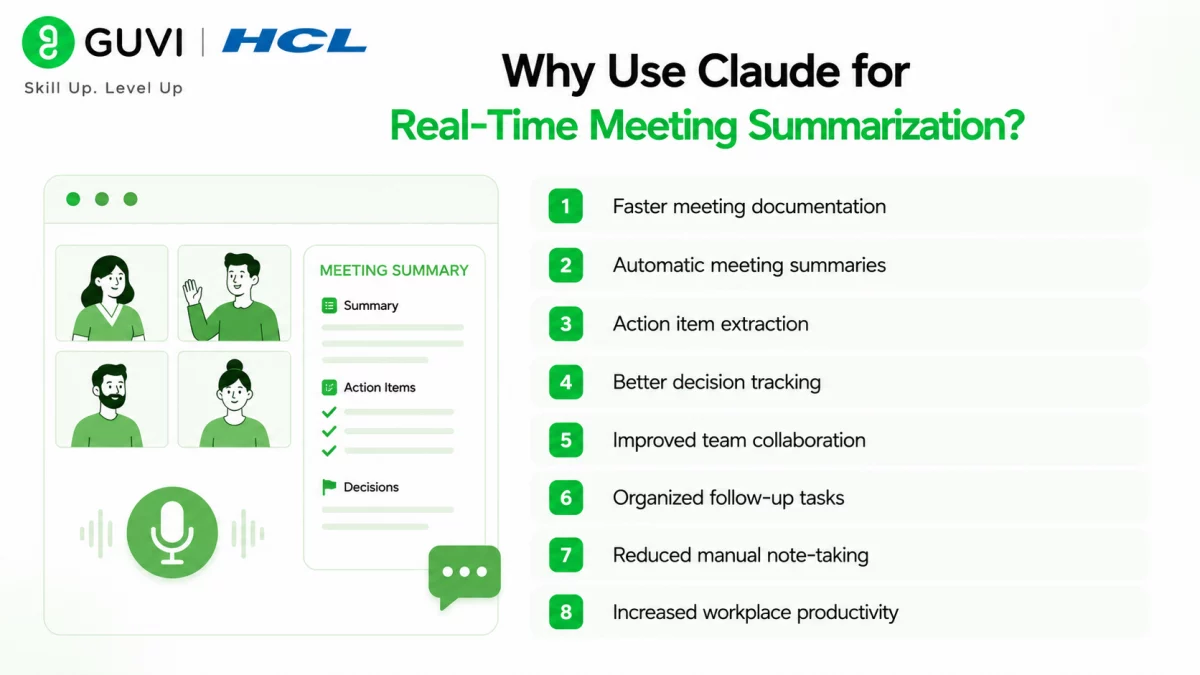
Modern workplaces rely on meetings to coordinate projects, share updates, and make strategic decisions. However, manually documenting discussions can be time-consuming and often leads to missed information. Claude simplifies meeting management by organizing conversations into clear, structured summaries that everyone can easily understand and reference later.
Some major advantages include:
- Faster meeting documentation
- Automatic meeting summaries
- Action item extraction
- Better decision tracking
- Improved team collaboration
- Organized follow-up tasks
- Reduced manual note-taking
- Increased workplace productivity
Claude enables teams to spend less time documenting meetings and more time collaborating, executing projects, and making informed business decisions.
Leading platforms like Netflix, Amazon, Facebook, and Spotify use distributed caching systems such as Redis and Memcached to handle millions of requests with low latency. By serving frequently accessed data directly from memory instead of repeatedly querying databases, these caching strategies improve response times, reduce server load, and deliver faster, more scalable user experiences.
How to Use Claude for Real-Time Meeting Summarization
Step 1: Capture the Meeting Conversation
Record the meeting or obtain a transcript using your preferred meeting platform. Ensure the discussion includes all participants, agenda items, and key conversations so Claude can generate a comprehensive summary.
Step 2: Upload the Meeting Transcript
Paste the meeting transcript or notes into Claude and specify the type of output you need, such as executive summaries, detailed meeting notes, action items, or project updates.
Step 3: Generate a Structured Meeting Summary
Ask Claude to organize the meeting into logical sections, including the agenda, discussion highlights, decisions made, challenges discussed, and next steps. This creates an easy-to-read summary that stakeholders can review quickly.
Step 4: Identify Action Items
Claude can automatically extract tasks discussed during the meeting, identify responsible team members when mentioned, and organize action items into a clear checklist for easier project tracking.
Step 5: Highlight Key Decisions
Instead of reviewing lengthy discussions, ask Claude to separate final decisions from brainstorming conversations so teams can quickly understand meeting outcomes.
Step 6: Create Shareable Meeting Notes
Generate professional meeting notes that can be shared with team members, clients, managers, or stakeholders. Claude formats information into concise summaries that improve communication across the organization.
Step 7: Review and Verify the Summary
Always compare Claude’s summary with the original meeting transcript to ensure important context, decisions, deadlines, and responsibilities have been captured accurately.
Step 8: Store and Track Follow-ups
Archive finalized meeting summaries and use them to monitor project progress, revisit decisions, prepare future meetings, and ensure action items are completed on time.
Meeting Tasks Claude Can Assist With
Claude supports professionals throughout the entire meeting documentation workflow.
It can help with:
- Real-time meeting summarization
- Meeting transcript summarization
- Action item extraction
- Decision tracking
- Executive meeting summaries
- Discussion highlights
- Follow-up task organization
- Project meeting documentation
- Client meeting recaps
- Team meeting notes
- Presentation summary creation
- Meeting agenda organization
The HCL GUVI AI eBook also introduces practical AI concepts, prompt engineering techniques, and real-world AI applications that help professionals automate repetitive documentation, improve workplace productivity, and use generative AI more effectively across meetings, collaboration, and everyday business workflows.

Meeting Tasks Claude Cannot Replace
While Claude is a powerful AI assistant for meeting summarization, certain responsibilities require human judgment, communication skills, and business expertise. AI can improve efficiency, but it cannot replace the context, collaboration, and strategic thinking needed for effective meetings.
Claude should not replace:
- Leading important business discussions
- Making strategic business decisions
- Negotiating with clients or stakeholders
- Resolving conflicts between team members
- Interpreting sensitive conversations without human context
- Confirming project priorities and deadlines
- Approving final meeting decisions
- Building relationships through meaningful communication
Using Claude alongside human expertise allows organizations to automate meeting documentation while ensuring discussions, decisions, and action plans remain accurate and contextually relevant.
⚠️ Warning
Claude should support meeting documentation—not replace professional judgment. Always review AI-generated meeting summaries to verify decisions, deadlines, responsibilities, and discussion context before sharing them with team members or stakeholders. Human oversight remains essential for ensuring accuracy and preventing misunderstandings.
Professionals looking to strengthen their analytical and reporting skills can also benefit from HCL GUVI’s Business Analytics Course, which covers business intelligence, dashboards, data visualization, and data-driven decision-making, all of which complement AI-powered workplace collaboration and reporting.
Best Practice
To maximize the benefits of Claude’s meeting summarization:
- Use high-quality meeting transcripts or recordings.
- Review every AI-generated meeting summary.
- Confirm action items and assigned responsibilities.
- Verify important business decisions before sharing.
- Organize summaries in a centralized knowledge base.
- Protect confidential meeting information.
- Combine AI-generated summaries with human review for the best results.
Conclusion
Claude is transforming how organizations document meetings by automatically summarizing discussions, capturing action items, organizing decisions, and generating professional meeting notes. Instead of spending valuable time taking notes and preparing summaries manually, professionals can use Claude to streamline meeting documentation and focus on meaningful collaboration.
However, successful meetings rely on effective communication, strategic thinking, and informed decision-making. While AI can automate repetitive documentation tasks, human expertise remains essential for interpreting conversations, making business decisions, and ensuring accountability. When used responsibly, Claude meeting summarization helps teams improve productivity, strengthen collaboration, and keep projects moving forward with clear, organized meeting records.
FAQs
1. What is Claude meeting summarization?
Claude meeting summarization uses Claude to automatically summarize meetings, capture key discussion points, identify action items, and organize decisions into structured meeting notes.
2. Can Claude summarize meetings in real time?
Yes. Claude can process meeting transcripts or conversation notes to generate organized summaries, action items, discussion highlights, and follow-up tasks quickly.
3. How does Claude improve meeting productivity?
Claude reduces manual note-taking, creates structured meeting summaries, highlights decisions, extracts action items, and makes it easier for teams to review important discussions.
4. Can Claude identify action items from meetings?
Yes. Claude can extract action items, responsibilities, deadlines, and next steps discussed during meetings, making follow-up activities easier to manage.
5. Can Claude replace meeting participants or managers?
No. Claude assists with documentation and summarization, but human participants remain responsible for discussions, decision-making, leadership, and stakeholder communication.
6. Is Claude suitable for remote and hybrid teams?
Yes. Remote, hybrid, and distributed teams can use Claude to create consistent meeting summaries, improve collaboration, and ensure everyone stays informed regardless of location.
7. What are the best practices for using Claude for meeting summarization?
Use accurate meeting transcripts, verify AI-generated summaries, confirm action items and decisions, protect confidential information, organize meeting records effectively, and combine AI assistance with human review for the most reliable results.
Success Stories

About the Author
Vishalini Devarajan
An Aerospace Engineer turned content writer, I focus on making complex concepts easy to understand through well-structured, reader-friendly blogs. Whether it’s a technical topic or a non-technical one, I love creating content that is clear, engaging, and impactful.
View all posts by Vishalini Devarajan
Connect with me @











Did you enjoy this article?