


Artificial Intelligence and Machine Learning Articles
How to Evaluate LLM Outputs in Production Deployments
AI/ML Skills Gap 2026: Why Companies Can't Find Job-Ready Talent
20 AI/ML Interview Questions Recruiters Can Use Without a Tech Background - Best Guide
How Industry-Backed AI/ML Bootcamps Are Changing the AI/ML Hiring Pipeline - Best Guide 2026


Get In Touch For Details! Request More Information

Sklearn Metrics Explained: The Complete Guide with Code Examples (2026)
Sep 19, 2026 6 Min Read 4324 Views
(Last Updated)
Sklearn Metrics is a module in the scikit-learn library that checks how well a machine learning model is performing. It compares the model’s predictions with the actual results and gives you a clear score.
Without these metrics, you’re just guessing whether your model is good. Sklearn Metrics gives you the exact numbers you need, whether you’re working on classification, regression, or clustering.
Table of contents
- TL;DR Summary
- What is Sklearn Metrics?
- Classification Metrics in Sklearn Metrics
- Confusion Matrix: The Big Picture
- Accuracy Score: The First Metric Everyone Checks
- Precision: How Many of Your Positives Were Correct?
- Recall: How Many Positives Did You Actually Find?
- F1 Score: The Balance Between Precision and Recall
- ROC Curve and AUC: How Well Can You Rank?
- Matthews Correlation Coefficient (MCC): The Balanced One
- Classification Report: The All-in-One View
- Quick Recap of Classification (Cheat Sheet)
- Regression Metrics in Sklearn Metrics
- Mean Squared Error (MSE) and Root Mean Squared Error (RMSE)
- Mean Absolute Error (MAE)
- R² Score (Coefficient of Determination)
- Median Absolute Error
- Mean Squared Logarithmic Error (MSLE)
- Putting Metrics to Work: Examples & Best Practices
- Example: Predicting House Prices
- Example: Forecasting Delivery Times
- Best Practices When Choosing Metrics
- Tips for Using Sklearn Metrics
- Best Sklearn Metric for Each ML Problem
- Conclusion
- FAQs
- What is sklearn.metrics used for?
- What is the difference between accuracy and precision in sklearn?
- Which sklearn metric should I use for regression?
- Is a higher F1 score always better?
- Can sklearn metrics be used for clustering?
TL;DR Summary
- Sklearn Metrics is a scikit-learn module used to check how well your ML model performs.
- For classification, common Sklearn Metrics include accuracy, precision, recall, F1 score, and ROC-AUC.
- For regression, MSE, RMSE, MAE, and R² Score help measure prediction error.
- Imbalanced data? Skip plain accuracy — use F1 Score or ROC-AUC instead.
- Choosing the right Sklearn Metrics depends on your problem, not just the model you’re using.
scikit-learn’s matthews_corrcoef (MCC) is a highly reliable metric for binary classification, especially with imbalanced datasets, as it considers all four confusion-matrix outcomes: TP, TN, FP, and FN.
What is Sklearn Metrics?
Sklearn Metrics is a module inside the scikit-learn library, used to check how good a machine learning model’s predictions are. It gives you ready-made functions to measure accuracy, error, and overall model performance — whether you’re working on classification, regression, or clustering problems.
Instead of writing your own evaluation code from scratch, you simply import the metric you need and apply it to your model’s results.
You’ll see two general categories:
- Classification metrics (for categorical / discrete targets)
- Regression metrics (for continuous numeric targets)
Some metrics are “scores” (higher is better), others are “losses” (lower is better). In scikit-learn’s design, functions ending with _score generally return values you want to maximize, while ones with _error or _loss are minimization metrics.
As you apply these, always ask:
- What errors are more critical in your domain? (false positives vs false negatives)
- Is your data imbalanced?
- Do you need a single summary metric or multiple perspectives?
Master model evaluation and 25+ other ML skills with HCL GUVI’s Intel & IITM Pravartak Certified AI/ML Course. Build 20+ real projects and land your AI career with 1000+ hiring partners backing you. Enroll today and transform your career from data curious to AI-ready!
Classification Metrics in Sklearn Metrics
When your machine learning model predicts categories, like spam vs. not spam, or cat vs. dog vs. rabbit, you’re dealing with classification. The burning question then is: how well is my model classifying things?
That’s exactly where classification metrics come in. They don’t just give you a single score; they provide different “lenses” to evaluate your model’s performance. And trust me, choosing the right lens is critical, because a single metric (like accuracy) can easily fool you.
Let’s break down the key classification metrics that Sklearn Metrics provides.
1. Confusion Matrix: The Big Picture
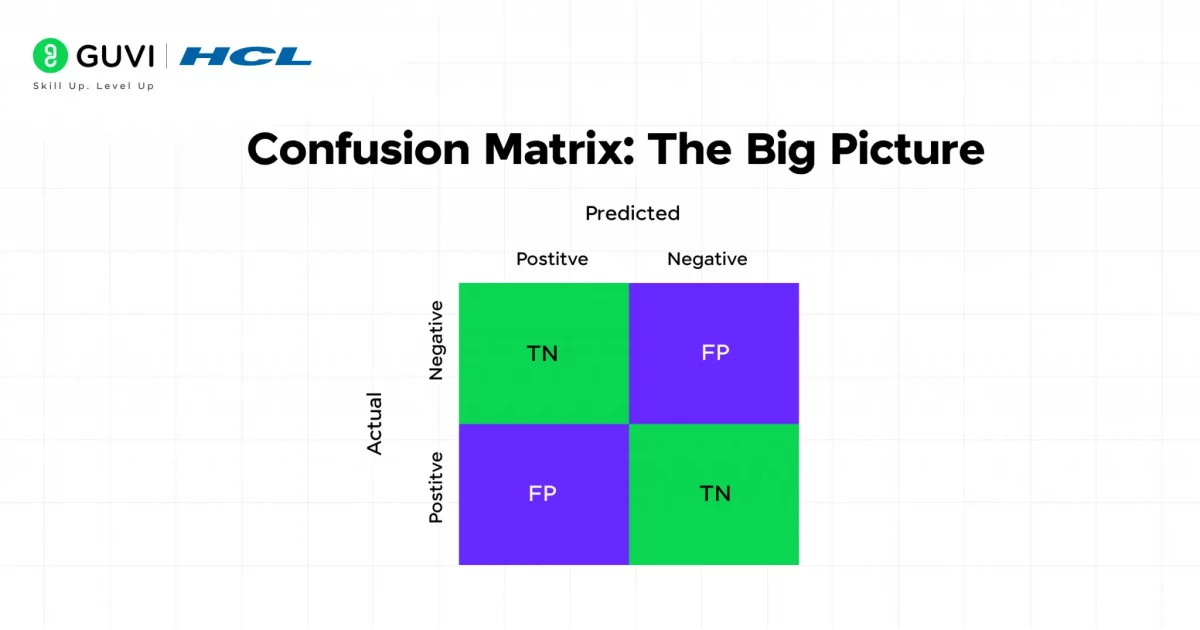
Think of the confusion matrix as the “truth table” of classification. It lays out predictions vs. actual labels so you can literally see where the model is getting things right or wrong.
For binary classification (say, positive vs. negative):
| Predicted \ Actual | Positive | Negative |
| Positive | TP | FP |
| Negative | FN | TN |
- TP (True Positives): correctly predicted positives
- FP (False Positives): incorrectly predicted positives
- FN (False Negatives): incorrectly predicted negatives
- TN (True Negatives): correctly predicted negatives
In sklearn:
from sklearn.metrics import confusion_matrix

cm = confusion_matrix(y_true, y_pred)

print(cm)
Why it matters: The confusion matrix isn’t a final metric, but it’s the foundation for everything else – precision, recall, F1, MCC, and more all come out of it.
2. Accuracy Score: The First Metric Everyone Checks
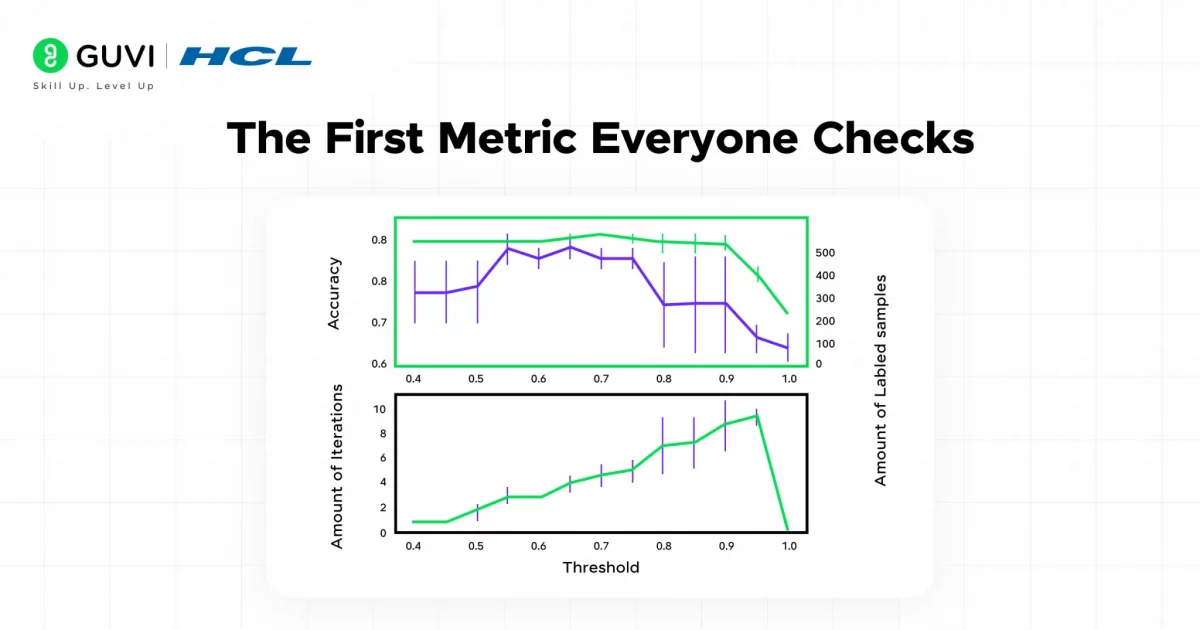
Accuracy is the simplest metric: the fraction of correct predictions.
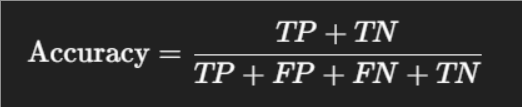
In sklearn:
from sklearn.metrics import accuracy_score

accuracy_score(y_true, y_pred)
It’s quick and intuitive – “what percentage did I get right?”
But here’s the catch: accuracy can be misleading. Imagine a dataset where 95% of emails are “not spam.” A model that predicts everything as “not spam” gets 95% accuracy, but it’s actually useless at finding spam. That’s why you need other metrics.
3. Precision: How Many of Your Positives Were Correct?
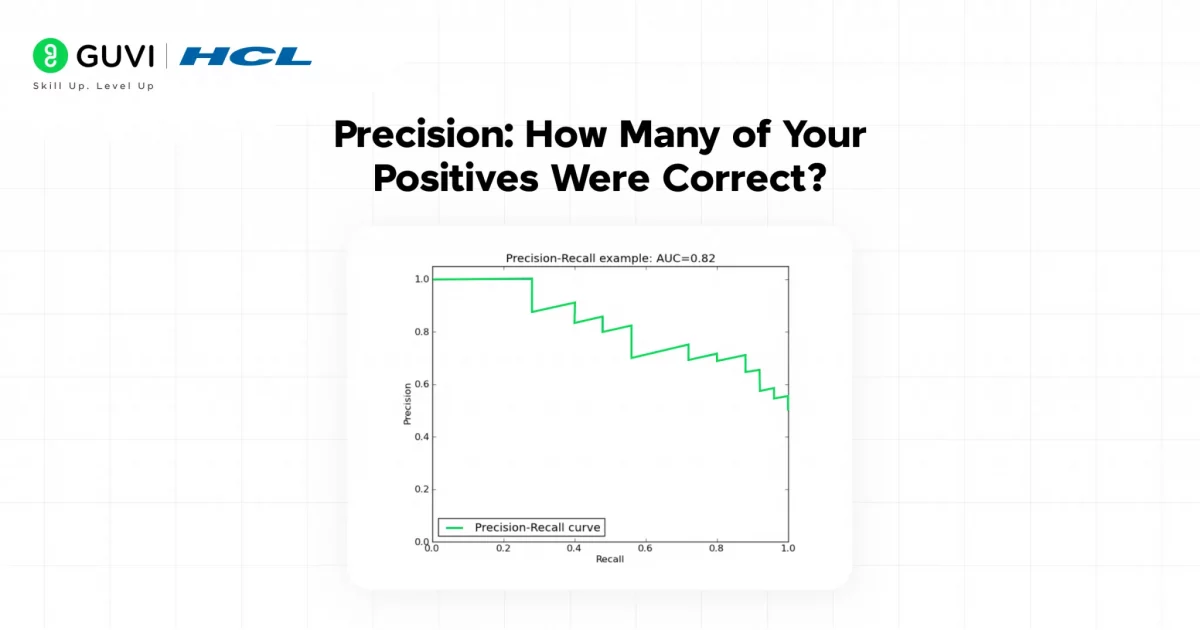
Precision answers: Of all the items I labeled as positive, how many were truly positive?

- High precision = your positive predictions are trustworthy
- Low precision = you’re calling too many false alarms
In sklearn:
from sklearn.metrics import precision_score

precision_score(y_true, y_pred)
Use precision when the cost of a false positive is high.
Example: Predicting whether a tumor is malignant, you don’t want to incorrectly scare patients with false positives.
4. Recall: How Many Positives Did You Actually Find?
Recall answers: Of all the actual positives, how many did I catch?

- High recall = you’re catching most positives
- Low recall = you’re missing a lot
In sklearn:
from sklearn.metrics import recall_score

recall_score(y_true, y_pred)
Use recall when missing positives is costly.
Example: In fraud detection, you’d rather flag too many transactions (false positives) than miss actual fraud (false negatives).
5. F1 Score: The Balance Between Precision and Recall
Sometimes you don’t want to maximize just precision or just recall. You want a balance. That’s where F1 score comes in.
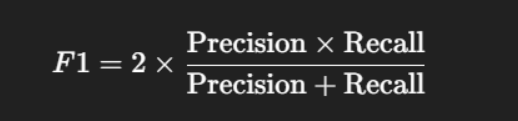
It’s the harmonic mean of precision and recall, which means it penalizes extreme imbalances.
In sklearn:
from sklearn.metrics import f1_score

f1_score(y_true, y_pred)
Why harmonic mean? Because if precision is high but recall is near zero, F1 drops sharply — telling you your model isn’t balanced.
6. ROC Curve and AUC: How Well Can You Rank?
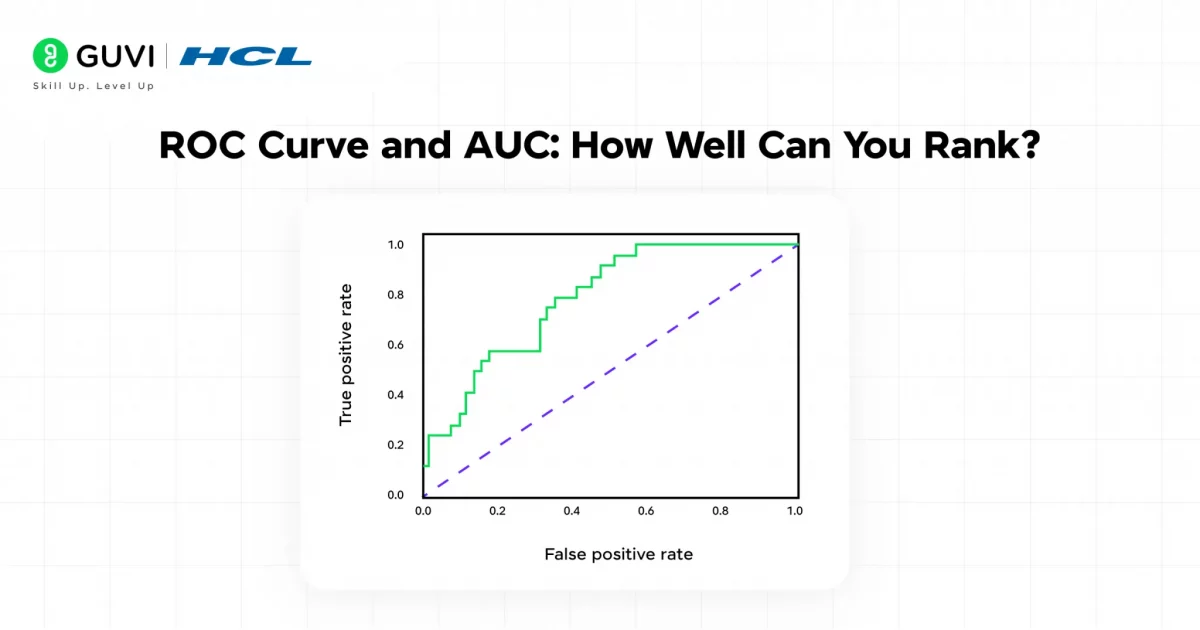
Sometimes you want to know how well your model distinguishes between classes across all possible thresholds. That’s what the ROC curve and AUC (Area Under Curve) measure.
- ROC curve plots True Positive Rate (Recall) vs. False Positive Rate at different thresholds.
- AUC summarizes it: 1.0 = perfect, 0.5 = random guessing.
In sklearn:
from sklearn.metrics import roc_auc_score, roc_curve

auc = roc_auc_score(y_true, y_pred_proba)

fpr, tpr, thresholds = roc_curve(y_true, y_pred_proba)
Use ROC-AUC when you want to evaluate ranking quality, not just a fixed decision boundary.
7. Matthews Correlation Coefficient (MCC): The Balanced One
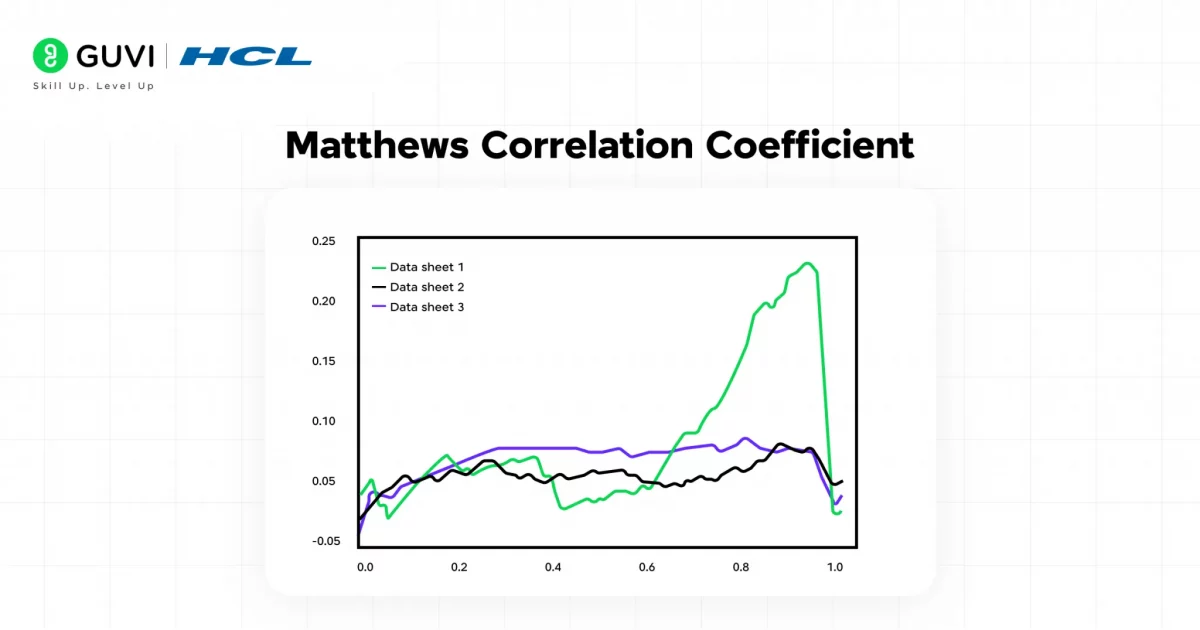
Accuracy is misleading with an imbalance. Precision and recall focus only on positives. F1 helps balance them, but MCC is often considered the most balanced metric for binary classification.
It uses all four confusion matrix terms and outputs a number between –1 and +1:
- +1 = perfect prediction
- 0 = random
- –1 = total opposite
In sklearn:
from sklearn.metrics import matthews_corrcoef

matthews_corrcoef(y_true, y_pred)
Use MCC when classes are very imbalanced, like rare disease detection.
8. Classification Report: The All-in-One View
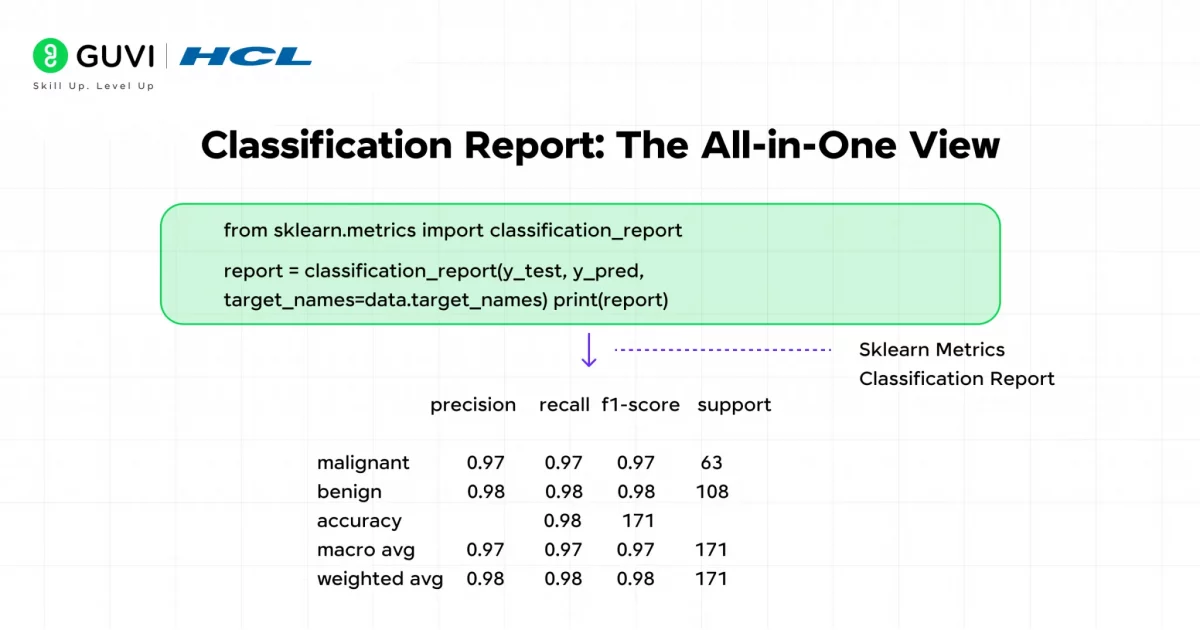
If you’re working with multiple classes, printing each metric one by one is painful. That’s where the classification report shines:
from sklearn.metrics import classification_report

print(classification_report(y_true, y_pred))
It gives you precision, recall, F1, and support for each class in a single table. Perfect for quick summaries.
Quick Recap of Classification (Cheat Sheet)
- Confusion matrix: the raw truth table
- Accuracy: overall correctness (be careful with imbalance)
- Precision: of predicted positives, how many were right?
- Recall: of actual positives, how many did I catch?
- F1 score: balance of precision and recall
- ROC-AUC: how well the model separates classes across thresholds
- MCC: balanced summary, especially for imbalanced classes
- Classification report: your one-stop shop summary
Regression Metrics in Sklearn Metrics
When your model predicts continuous values, house prices, temperatures, sales forecasts, you name it, you’re in regression land. Evaluating these models is a bit different from classification: instead of asking “did I get it right?” you ask “how close was I?”.
The Sklearn Metrics module has several ways to measure this closeness, and each one emphasizes a slightly different perspective on error. Let’s go through them.
1. Mean Squared Error (MSE) and Root Mean Squared Error (RMSE)
MSE is probably the most commonly reported metric in regression. It calculates the average of squared differences between actual and predicted values:

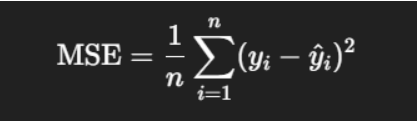
Why squared? Because it punishes big errors more than small ones. Predict a house price off by 100,000? The square of that error really hurts your score.
In sklearn:
from sklearn.metrics import mean_squared_error

mse = mean_squared_error(y_true, y_pred)        # MSE

rmse = mean_squared_error(y_true, y_pred, squared=False)  # RMSE
RMSE just takes the square root of MSE so your errors are in the same units as your target (e.g., “dollars” instead of “dollars squared”).
Use MSE/RMSE when you want to highlight large mistakes more strongly.
2. Mean Absolute Error (MAE)
Sometimes you don’t want to punish big mistakes disproportionately. MAE is the average of absolute differences:
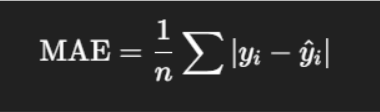
It’s more “forgiving” of outliers.
In sklearn:
from sklearn.metrics import mean_absolute_error

mae = mean_absolute_error(y_true, y_pred)
Think of MAE as answering: on average, how far off am I?
If you’re building a forecasting tool for delivery times, MAE gives you a sense of the “typical” miss.
3. R² Score (Coefficient of Determination)
R² measures how much of the variation in your target variable your model explains compared to a simple baseline (always predicting the mean).
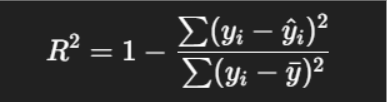
In sklearn:
from sklearn.metrics import r2_score
r2 = r2_score(y_true, y_pred)- R² = 1 → perfect fit
- R² = 0 → no better than predicting the mean
- R² < 0 → worse than predicting the mean (ouch!)
It’s a great “quick diagnostic,” but don’t use it alone, a high R² doesn’t always mean your model is good.
4. Median Absolute Error
Instead of the mean, it uses the median of absolute errors:
from sklearn.metrics import median_absolute_error

medae = median_absolute_error(y_true, y_pred)
This is robust to outliers, one giant error won’t dominate the metric.
5. Mean Squared Logarithmic Error (MSLE)
MSLE is designed for targets that span several orders of magnitude. Instead of comparing absolute differences, it compares log-transformed values.
from sklearn.metrics import mean_squared_log_error

msle = mean_squared_log_error(y_true, y_pred)- It penalizes underestimates more than overestimates.
- Perfect for problems where relative error matters more than absolute error (e.g., predicting population growth where numbers vary widely).
Putting Metrics to Work: Examples & Best Practices
Okay, so you’ve got this toolbox of metrics. How do you actually use them? Here’s how I recommend approaching it.
Example: Predicting House Prices
Say you’ve trained a regression model to predict house prices.
from sklearn.metrics import mean_squared_error, mean_absolute_error, r2_score

y_true = [300000, 150000, 200000, 350000, 500000]

y_pred = [310000, 140000, 220000, 330000, 490000]

mse = mean_squared_error(y_true, y_pred)

mae = mean_absolute_error(y_true, y_pred)

r2 = r2_score(y_true, y_pred)

print(f"MSE: {mse:.2f}")

print(f"MAE: {mae:.2f}")

print(f"R²: {r2:.2f}")- MSE tells you how badly your model punishes those $20,000 mistakes.
- MAE shows you that, on average, you’re off by about $14,000 (an intuitive number).
- R² reveals how much of the price variation your model explains.
Together, they give you a complete story.
Example: Forecasting Delivery Times
Suppose you’re predicting delivery times in minutes. Outliers happen (traffic accidents, bad weather).
- MAE gives you the average miss → “We’re usually about 5 minutes off.”
- Median AE gives you the typical miss → “Half the time we’re within 3 minutes.”
- Max error warns you about those occasional disasters → “But sometimes, we’re off by 45 minutes.”
This matters more to customers than a single global metric.
Best Practices When Choosing Metrics
- Don’t rely on a single metric: Each one tells only part of the story. Use a mix (e.g., MSE + MAE + R²).
- Think about your domain.
- If big errors are unacceptable → prefer MSE/RMSE.
- If outliers are common and tolerable → MAE or Median AE.
- If relative error matters → MSLE.
- If big errors are unacceptable → prefer MSE/RMSE.
- Watch out for scale: Metrics like MSE are scale-dependent (predicting house prices vs. predicting interest rates produce vastly different values). Normalize or compare models on the same dataset only.
Tips for Using Sklearn Metrics
- Always look at the confusion matrix as it grounds all derived metrics.
- Be careful with average settings (micro, macro, weighted) in multiclass.
- Watch out for metric saturation in trivial classifiers (e.g., accuracy → 0.95 but model is worthless).
- When using probabilistic classifiers, always work with predicted probabilities for ROC, log loss, etc.
- Scale and preprocess data consistently, as metrics are meaningful only if input and target align properly.
- For regression, don’t rely on a single metric. Consider both MSE and MAE, and check residuals.
Best Sklearn Metric for Each ML Problem
Choosing the right Sklearn Metric depends on whether you’re solving a classification or regression problem:
| Problem Type | Best Metric | Why It’s Used | Examples |
|---|---|---|---|
| Balanced Classification | Accuracy | Works well when classes are roughly equal in size | Cat vs dog image classification, Handwritten digit recognition, Sentiment (positive/negative) classification |
| Imbalanced Classification | F1 Score | Balances precision and recall when one class is rare | Fraud detection, Disease diagnosis, Spam email detection |
| Classification (ranking confidence) | ROC-AUC | Measures how well the model separates classes across thresholds | Credit risk scoring, Customer churn prediction, Loan default prediction |
| Regression (general) | RMSE | Penalizes large errors more, useful when big mistakes are costly | House price prediction, Stock price forecasting, Demand forecasting |
| Regression (with outliers) | MAE | Less sensitive to outliers than RMSE | Delivery time prediction, Salary prediction, Energy consumption prediction |
| Regression (explaining variance) | R² Score | Shows how much of the outcome the model explains | Sales forecasting, Marketing spend vs revenue analysis, Crop yield prediction |
Conclusion
In conclusion, there’s no single “best” regression metric. MSE and RMSE tell you how painful big errors are, MAE gives you an intuitive sense of typical mistakes, R² shows how much variance you’ve explained, and other metrics like max error or MSLE address special cases.
The real skill isn’t in memorizing them, but in knowing which ones matter for your problem. So the next time you evaluate a regression model, don’t just report one score, look at multiple angles, connect them to your domain, and you’ll have a far clearer picture of how your model is really performing.
FAQs
1. What is sklearn.metrics used for?
It’s used to check how well a machine learning model is performing — by comparing its predictions to the actual results.
2. What is the difference between accuracy and precision in sklearn?
Accuracy shows how many predictions were correct overall. Precision shows how many of the positive predictions were actually correct.
3. Which sklearn metric should I use for regression?
Use MSE or RMSE if large errors matter most, and MAE if you want a simpler, more forgiving measure of error.
4. Is a higher F1 score always better?
Yes, a higher F1 score means a better balance between precision and recall. It’s most useful when your classes are imbalanced.
5. Can sklearn metrics be used for clustering?
Yes, metrics like the silhouette score help you check how well data points are grouped when there are no true labels.
Success Stories













Did you enjoy this article?