


Data Engineering Articles
Apache Iceberg Tutorial: A Practical Guide for Data Engineers
12 Important Data Architect Roles and Responsibilities
Mage AI Tutorial: A Practical Guide for Data Engineers
Azure Data Engineer Roadmap: A Step-by-Step Guide to Becoming an Azure Data Engineer


Get In Touch For Details! Request More Information
Delta Lake Tutorial: A Practical Guide for Data Engineers
Oct 06, 2026 6 Min Read 680 Views
(Last Updated)
Data lakes are useful, but they can become messy very quickly. Files arrive from different systems. Schemas change without warning. Batch jobs fail midway. Streaming pipelines write new data while analysts are still querying old data. One bad write can break trust in the entire dataset.
Delta Lake is an open-source storage layer that adds reliability, transaction control, version history, and better data management on top of data lake storage. It turns a raw data lake into the foundation of a lakehouse.
This tutorial explains what Delta Lake is, how it works, how to create Delta tables, how to read and write data, how to use time travel, and how to manage updates with MERGE. It is written for beginners who already understand basic data engineering, Apache Spark, SQL, or PySpark.
Table of contents
- TL;DR Summary
- What is Delta Lake?
- Why is Delta Lake Used?
- Key Benefits
- Common Use Cases
- Delta Lake Architecture
- Main Components
- Delta Lake Tutorial: Step-by-Step Guide
- Install Delta Lake
- Create a Spark Session
- Create a Delta Table
- Read a Delta Table
- Append New Data
- Use Schema Enforcement
- Use Schema Evolution
- Update Records in Delta Lake
- Delete Records in Delta Lake
- Use MERGE for Upserts
- Use Time Travel
- View Delta Table History
- Optimize Delta Tables
- Clean Old Files with VACUUM
- Stream Data Into a Delta Table
- Enforce Data Quality with Constraints
- Conclusion
- FAQs
- What is Delta Lake in simple words?
- Is Delta Lake a database?
- What is the difference between Delta Lake and Parquet?
- Why do data engineers use Delta Lake?
- Is Delta Lake only used with Databricks?
TL;DR Summary
- What it is: an open-source storage layer for reliable data lakes
- Core features: ACID transactions, schema enforcement, time travel, and scalable metadata handling
- How it’s stored: Delta tables keep data as Parquet files with a transaction log
- Where it’s used: batch pipelines, streaming jobs, CDC, data warehousing, and lakehouse architecture
- Key commands: write, read, update, delete, merge, vacuum, optimize, and time travel
- Works best with: Apache Spark, and widely used in Databricks lakehouse environments
What is Delta Lake?
Delta Lake is an open-source storage layer that brings reliability to data lakes. It stores data in Parquet format and maintains a transaction log that records every change made to the table. This log is what enables ACID transactions, schema enforcement, time travel, updates, deletes, and merges.
Traditional data lakes often store raw files in cloud storage such as Amazon S3, Azure Data Lake Storage, or Google Cloud Storage. That works well for scale, but it can create problems when multiple jobs read and write at the same time.
It adds a structured table layer over those files so data teams can manage large datasets with more control.
Why is Delta Lake Used?
Raw data lakes can become hard to trust when data volume grows. A normal data lake may have duplicate files, incomplete writes, schema mismatches, and no clear version history. Delta Lake gives teams a safer way to build analytics, machine learning, and reporting pipelines.
Key Benefits
- Supports ACID transactions for reliable reads and writes
- Prevents bad data with schema enforcement
- Allows table rollback through time travel
- Supports updates, deletes, and merges
- Works with batch and streaming data pipelines
- Improves data quality in lakehouse architecture
- Stores data in open Parquet format
- Helps data teams manage large metadata at scale
Common Use Cases
- Data lakehouse implementation
- ETL and ELT pipelines
- Change data capture pipelines
- Real-time analytics
- Slowly changing dimensions
- Machine learning feature stores
- Data warehouse modernization
- Streaming and batch pipeline unification
Delta Lake Architecture
Delta Lake has two main parts: Parquet data files and the Delta transaction log.
The Parquet files store the actual table data. The transaction log, stored inside the _delta_log folder, records table actions such as inserts, updates, deletes, schema changes, and file versions.
Every transaction creates a new log entry. This helps Delta Lake understand which files are valid for each table version.
Main Components
- Parquet Files: Store the actual data in columnar format.
- Delta Log: Stores transaction history and table metadata.
- Table Metadata: Tracks schema, partitions, properties, and versions.
- Snapshot: Represents the table state at a specific version.
- Checkpoint Files: Help Delta Lake read large transaction logs faster.
Build industry-ready expertise in modern data engineering with HCL GUVI’s Big Data Engineering Course. Learn in-demand technologies like Spark, Hadoop, ETL pipelines, cloud platforms, and data lakes through hands-on projects and real-world use cases.
Develop the skills needed to design scalable data systems and succeed in high-growth data engineering roles.
Delta Lake Tutorial: Step-by-Step Guide
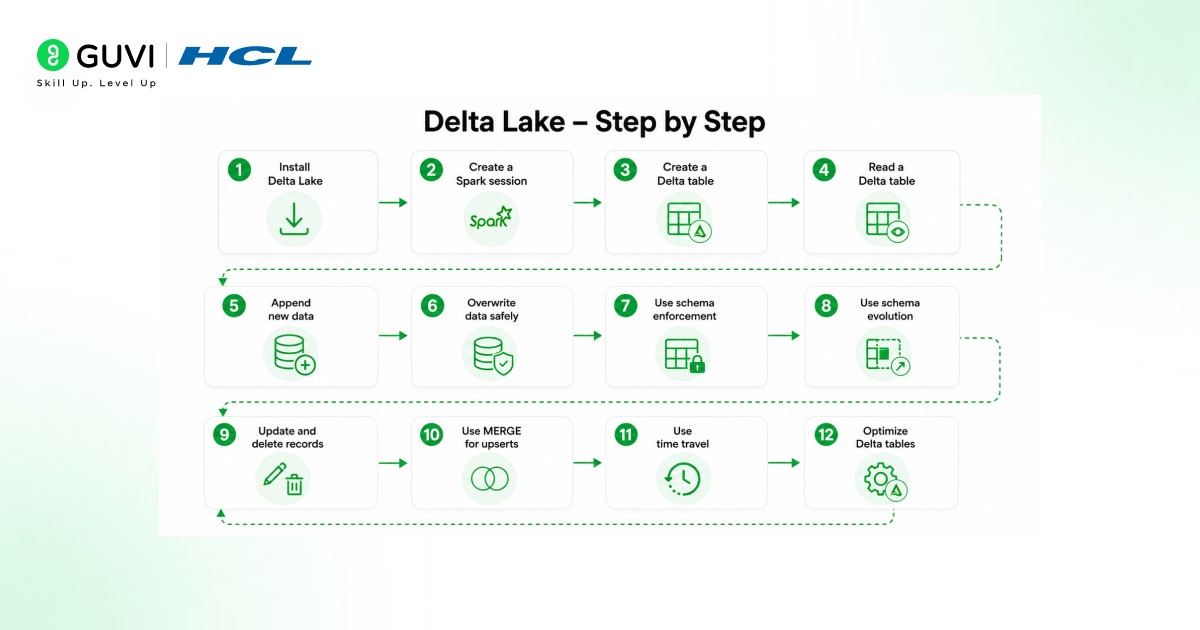
1. Install Delta Lake
Delta Lake is commonly used with Apache Spark. The simplest way to start locally is to install the Delta Lake package for PySpark.
pip install pyspark delta-sparkData engineers working on Databricks usually do not need separate installation because Delta Lake is already integrated into the platform. For open-source Spark, the Delta Lake package must match the Apache Spark version being used.
2. Create a Spark Session
A Spark session is needed before working with Delta tables in PySpark. The Delta package must be configured with Spark so Delta Lake commands can run properly.
from pyspark.sql import SparkSession
from delta import configure_spark_with_delta_pip

builder = (
    SparkSession.builder
    .appName("DeltaLakeTutorial")
    .config("spark.sql.extensions", "io.delta.sql.DeltaSparkSessionExtension")
    .config("spark.sql.catalog.spark_catalog", "org.apache.spark.sql.delta.catalog.DeltaCatalog")
)

spark = configure_spark_with_delta_pip(builder).getOrCreate()
This setup allows Spark to read and write Delta tables, use Delta SQL syntax, and manage table metadata through the Delta catalog.
3. Create a Delta Table
A Delta table can be created by writing a Spark DataFrame in Delta format. The following example creates a small customer dataset and saves it as a Delta table.
data = [
    (1, "Aarav", "Delhi", 2500),
    (2, "Naina", "Mumbai", 4200),
    (3, "Rohan", "Bengaluru", 3100)
]

columns = ["customer_id", "name", "city", "spend"]

df = spark.createDataFrame(data, columns)

df.write.format("delta").mode("overwrite").save("/tmp/delta/customers")
This command creates a Delta table at the given path. The table stores Parquet files and a _delta_log folder.
4. Read a Delta Table
Delta tables can be read using the Delta format option.
customers_df = spark.read.format("delta").load("/tmp/delta/customers")

customers_df.show()
Data teams can also register Delta tables in a metastore and query them using SQL. This makes Delta Lake useful for analysts, data engineers, and BI teams working on the same dataset.
5. Append New Data
New records can be added to an existing Delta table using append mode.
new_data = [
    (4, "Meera", "Pune", 3900),
    (5, "Kabir", "Hyderabad", 2800)
]

new_df = spark.createDataFrame(new_data, columns)

new_df.write.format("delta").mode("append").save("/tmp/delta/customers")
Append mode is useful for daily ingestion pipelines, event data, transaction logs, and incremental data loading.
6. Use Schema Enforcement
Schema enforcement prevents data with the wrong structure from being written into a Delta table. This matters because data pipelines often fail when new files contain missing columns, wrong data types, or unexpected fields.
bad_data = [(6, "Vikram", "Jaipur")]
bad_columns = ["customer_id", "name", "city"]

bad_df = spark.createDataFrame(bad_data, bad_columns)

bad_df.write.format("delta").mode("append").save("/tmp/delta/customers")
# Raises AnalysisException: schema mismatch, "spend" column is missing
For example, if a Delta table expects customer_id, name, city, and spend, a write operation with mismatched columns will fail unless schema evolution is allowed. This protects downstream reports, dashboards, and machine learning pipelines from silent data quality issues.
7. Use Schema Evolution
Schema evolution allows the table schema to change when new columns are added. This is useful when data sources grow over time.
new_schema_data = [
    (6, "Isha", "Chennai", 5000, "Gold")
]

new_schema_columns = ["customer_id", "name", "city", "spend", "customer_tier"]

new_schema_df = spark.createDataFrame(new_schema_data, new_schema_columns)

new_schema_df.write.format("delta") \
    .mode("append") \
    .option("mergeSchema", "true") \
    .save("/tmp/delta/customers")
Schema evolution should be used carefully. It is helpful for controlled schema changes, but teams should still review data contracts and pipeline dependencies before allowing frequent changes.

8. Update Records in Delta Lake
Delta Lake supports update operations, which are difficult to manage safely in a raw file-based data lake.
from delta.tables import DeltaTable

delta_table = DeltaTable.forPath(spark, "/tmp/delta/customers")

delta_table.update(
    condition = "city = 'Delhi'",
    set = { "spend": "spend + 500" }
)
This command updates records where the city is Delhi. The Delta log records the change and creates a new table version.
9. Delete Records in Delta Lake
Delta Lake also supports delete operations.
delta_table.delete("spend < 3000")This command removes records where spend is less than 3000. In production, deletes are often used for privacy requests, data correction, retention rules, and compliance workflows.
10. Use MERGE for Upserts
MERGE is one of the most important Delta Lake features for data engineering. It allows teams to update existing records and insert new records in one operation. This is commonly called an upsert.
updates_data = [
    (2, "Naina", "Mumbai", 4600),
    (7, "Arjun", "Jaipur", 2200)
]

updates_df = spark.createDataFrame(updates_data, columns)

delta_table.alias("target").merge(
    updates_df.alias("source"),
    "target.customer_id = source.customer_id"
).whenMatchedUpdateAll() \
 .whenNotMatchedInsertAll() \
 .execute()
MERGE is useful for customer tables, transaction pipelines, CDC workloads, inventory data, and slowly changing dimension tables.
11. Use Time Travel
Time travel allows users to query earlier versions of a Delta table. This is useful when a bad data load happens, a report needs historical validation, or a model needs reproducible training data.
old_version_df = spark.read.format("delta") \
    .option("versionAsOf", 0) \
    .load("/tmp/delta/customers")

old_version_df.show()
A table can also be queried using timestamp-based time travel.
old_timestamp_df = spark.read.format("delta") \
    .option("timestampAsOf", "2026-06-01") \
    .load("/tmp/delta/customers")
Time travel gives data teams a practical recovery path without manually restoring old files.
12. View Delta Table History
It keeps operation history for each table.
delta_table.history().show()This helps data engineers audit table changes, check who changed the table, review operation types, and debug pipeline issues.
13. Optimize Delta Tables
As data grows, Delta tables may contain many small files. Small files can slow down queries because Spark has to read too many file fragments. Delta Lake supports optimization methods to improve file layout and query performance.
On Databricks, the OPTIMIZE command is commonly used.
OPTIMIZE delta.`/tmp/delta/customers`;For queries that consistently filter on a specific column, Z-ORDER clustering co-locates related data in the same files, which further reduces the amount of data Spark needs to scan.
OPTIMIZE delta.`/tmp/delta/customers`
ZORDER BY (city);
Teams can also use partitioning, compaction, and data skipping techniques based on query patterns. The right optimization strategy depends on table size, read frequency, write frequency, and filter columns.
14. Clean Old Files with VACUUM
Delta Lake keeps old data files for time travel and rollback. Over time, unused files can increase storage cost. The VACUUM command removes old files that are no longer needed.
VACUUM delta.`/tmp/delta/customers`;VACUUM should be used carefully because removing old files can limit time travel. Production teams should align retention settings with audit, compliance, and recovery needs.
15. Stream Data Into a Delta Table
Delta Lake works natively with Spark Structured Streaming, which is why it fits so well into real-time lakehouse pipelines. A streaming write continuously appends new micro-batches to a Delta table as data arrives.
streaming_df = (
    spark.readStream
    .format("rate")
    .option("rowsPerSecond", 1)
    .load()
)

query = (
    streaming_df.writeStream
    .format("delta")
    .option("checkpointLocation", "/tmp/delta/checkpoints/customers_stream")
    .outputMode("append")
    .start("/tmp/delta/customers_stream")
)
Readers can query a Delta table while a stream is actively writing to it, since the transaction log ensures they only ever see complete, committed versions, never a half-written file.
16. Enforce Data Quality with Constraints
Delta Lake supports CHECK constraints, which reject writes that violate a defined rule before they ever reach the table. This catches bad data earlier than schema enforcement alone.
spark.sql("""
    ALTER TABLE delta.`/tmp/delta/customers`
    ADD CONSTRAINT positive_spend CHECK (spend >= 0)
""")
Once added, any insert, update, or merge that would produce a negative spend value fails immediately, instead of silently corrupting downstream reports.
Conclusion
A good Delta Lake tutorial should not stop at creating a table. The real value comes from understanding how it protects pipelines, supports recovery, manages change, and improves trust in analytics data.
For anyone working in data engineering, lakehouse architecture, Spark, Databricks, or cloud analytics, this is a practical skill that connects raw data storage with production-ready data systems.
Want to build this skill properly, with mentorship and real projects instead of tutorials alone? Explore HCL GUVI’s Big Data Engineering Course and start building job-ready data engineering skills.
FAQs
What is Delta Lake in simple words?
Delta Lake is an open-source storage layer that makes data lakes more reliable. It stores data in Parquet format and adds a transaction log so teams can manage updates, deletes, time travel, schema changes, and ACID transactions.
Is Delta Lake a database?
Delta Lake is not a traditional database. It is a storage layer that sits on top of data lake storage. It helps tools like Apache Spark and Databricks read and write data with stronger reliability.
What is the difference between Delta Lake and Parquet?
Parquet is a file format used to store data efficiently. Delta Lake uses Parquet files but adds a transaction log, ACID transactions, schema enforcement, time travel, and support for updates and deletes.
Why do data engineers use Delta Lake?
Data engineers use Delta Lake to build reliable ETL pipelines, manage changing data, recover older table versions, support streaming and batch workloads, and prevent bad writes from breaking analytics systems.
Is Delta Lake only used with Databricks?
No, Delta Lake is open source and can be used with Apache Spark outside Databricks. Databricks provides strong built-in support for Delta Lake, but Delta Lake itself is not limited to Databricks.
Success Stories

About the Author
Jebasta
I translate the language of data into stories that anyone can understand. As a writer with a data science background, I simplify analytics, AI, and decision-making so beginners and enthusiasts can confidently explore the world of data.
View all posts by Jebasta
Connect with me @












Did you enjoy this article?