


Python Articles
Go vs Python for Forward Deployed Engineering Workloads
Python for Forward Deployed Engineers: What You Actually Need to Know
Freelancing as a Python Developer: Getting Your First Client


Get In Touch For Details! Request More Information

PySpark Tutorial: A Complete Beginner’s Guide
Jul 07, 2026 7 Min Read 1029 Views
(Last Updated)
Data is growing at an unprecedented rate. Datasets that once filled hard drives now fill data lakes. Traditional single-machine tools like pandas work brilliantly for datasets that fit in memory, but when data reaches the scale of gigabytes, terabytes, or beyond, a fundamentally different approach is required.
That is where PySpark comes in.
PySpark is the Python API for Apache Spark the leading open-source framework for large-scale distributed data processing. It brings the power of a distributed computing engine to Python developers, enabling them to process massive datasets across clusters of machines using a familiar, expressive programming interface.
This tutorial covers everything a beginner needs to get started with PySpark — from understanding what it is and how it works, to writing real data processing code with DataFrames, performing aggregations, working with SQL, and understanding how Spark executes your code under the hood.
Table of contents
- TL;DR
- What Is Apache Spark and How Does PySpark Fit In?
- The Spark Ecosystem
- Where PySpark Fits
- PySpark Architecture: How It Works
- Driver Program
- Executors and Workers
- Lazy Evaluation and the DAG
- Installing and Setting Up PySpark
- Prerequisites
- Installation
- Creating a SparkSession
- RDDs: The Foundation of PySpark
- PySpark DataFrames: The Core API\
- Creating a DataFrame
- Reading External Data
- Transformations and Actions in PySpark
- Common Transformations
- Common Actions
- GroupBy and Aggregations in PySpark
- PySpark SQL: Querying with SQL
- Joining DataFrames in PySpark
- PySpark Performance Best Practices
- PySpark vs. Pandas: When to Use Which
- Conclusion
- FAQs
- What is PySpark used for?
- Is PySpark different from Apache Spark?
- Should I use RDDs or DataFrames in PySpark?
- How is PySpark different from pandas?
- How do I run PySpark in the cloud?
TL;DR
- PySpark is the Python interface to Apache Spark, enabling distributed processing of large-scale datasets.
- The SparkSession is the entry point; the DataFrame is the primary data abstraction.
- Transformations are lazy; they build a logical plan. Actions trigger actual computation.
- PySpark SQL allows SQL queries directly on DataFrames, combining Python and SQL workflows.
- PySpark integrates with pandas, MLlib, and cloud storage, making it a full-stack big data tool.
What Is PySpark?
PySpark is the Python API for Apache Spark, an open-source distributed computing framework used for large-scale data processing. It allows Python developers to build and run Spark applications using Python syntax while leveraging Spark’s high-performance engine for processing data across clusters. PySpark supports batch processing, real-time streaming, machine learning through MLlib, and graph processing, making it a powerful tool for big data analytics and data engineering workflows. It also integrates with tools like Hadoop, cloud storage systems, and popular Python libraries such as pandas and NumPy.
What Is Apache Spark and How Does PySpark Fit In?
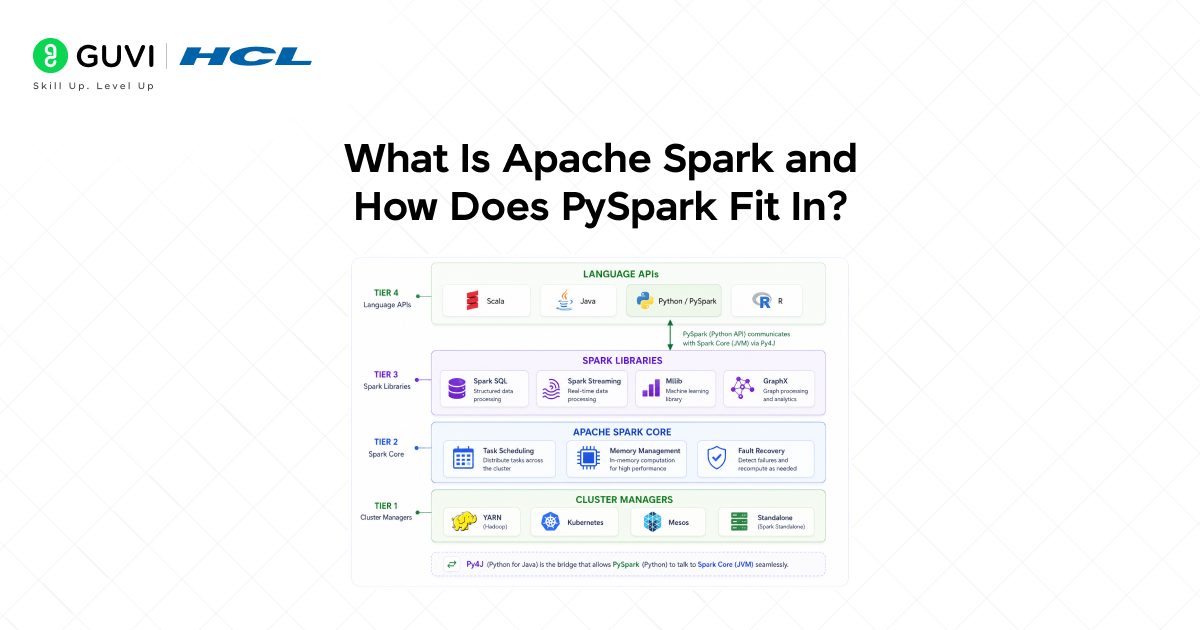
Apache Spark is a distributed computing engine originally developed at UC Berkeley’s AMPLab in 2009 and open-sourced in 2010. It was designed to overcome the limitations of Hadoop MapReduce, specifically its reliance on disk I/O between processing stages, by performing computations in memory, making it 10 to 100 times faster for many workloads.
The Spark Ecosystem
Spark is not a single tool but a unified engine with multiple built-in libraries:
- Spark Core: The foundational layer handling task scheduling, memory management, fault recovery, and I/O.
- Spark SQL: Provides a programming interface for structured data using DataFrames and SQL queries.
- Spark Streaming / Structured Streaming: Enables real-time processing of data streams from Kafka, Kinesis, or file systems.
- MLlib: A scalable machine learning library with algorithms for classification, regression, clustering, and recommendation.
- GraphX: A distributed graph computation framework for graph analytics and graph-parallel computation.
Where PySpark Fits
PySpark is the Python API for Spark. It uses a bridge library called Py4J to communicate between the Python process and the JVM-based Spark engine. From a developer’s perspective, PySpark feels like writing Python, but under the hood, the heavy computation runs on the distributed Spark engine, parallelised across the cluster.
This gives Python developers access to the full power of Spark without having to learn Scala or Java, the languages in which Spark was originally written.
PySpark Architecture: How It Works
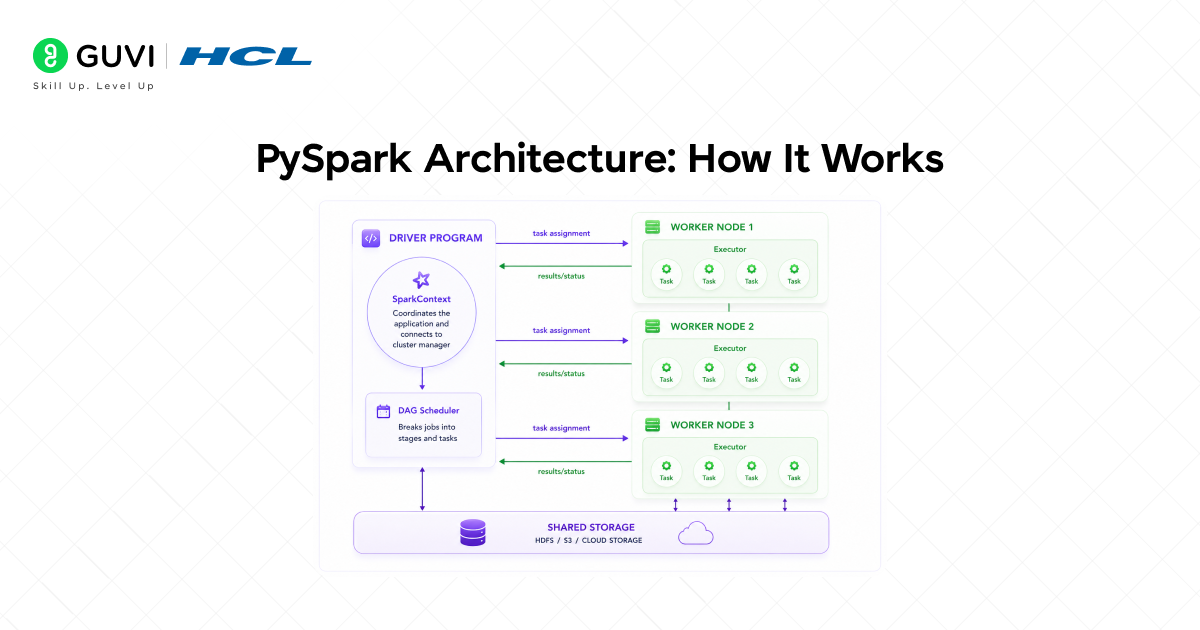
Understanding PySpark’s architecture helps you write better code and diagnose performance problems. A PySpark application runs in a master-worker architecture.
Driver Program
The driver is the process that runs your Python script. It contains the SparkContext (or SparkSession), coordinates your application’s execution, and communicates with the cluster manager to request resources. The driver is responsible for:
• Converting your code into a Directed Acyclic Graph (DAG) of stages.
• Scheduling tasks and distributing them to executors.
• Collecting results and returning them to the Python environment.
Executors and Workers
Executors are JVM processes that run on worker nodes in the cluster. Each executor:
• Runs the tasks assigned by the driver.
• Stores data partitions in memory or on disk.
• Returns results and status updates to the driver.
Data in Spark is divided into partitions, smaller chunks that are processed in parallel across executors. The number and size of partitions directly affect parallelism and performance.
Lazy Evaluation and the DAG
One of Spark’s most important design principles is lazy evaluation. When you write a transformation (such as filtering rows or selecting columns), Spark does not execute it immediately. Instead, it builds a logical plan, a DAG of transformations that is only executed when an action is called (such as collecting results or writing to disk).
This allows Spark’s optimiser (Catalyst) to inspect the entire plan and apply optimisations such as predicate pushdown, projection pruning, and join reordering before any computation begins.
Installing and Setting Up PySpark
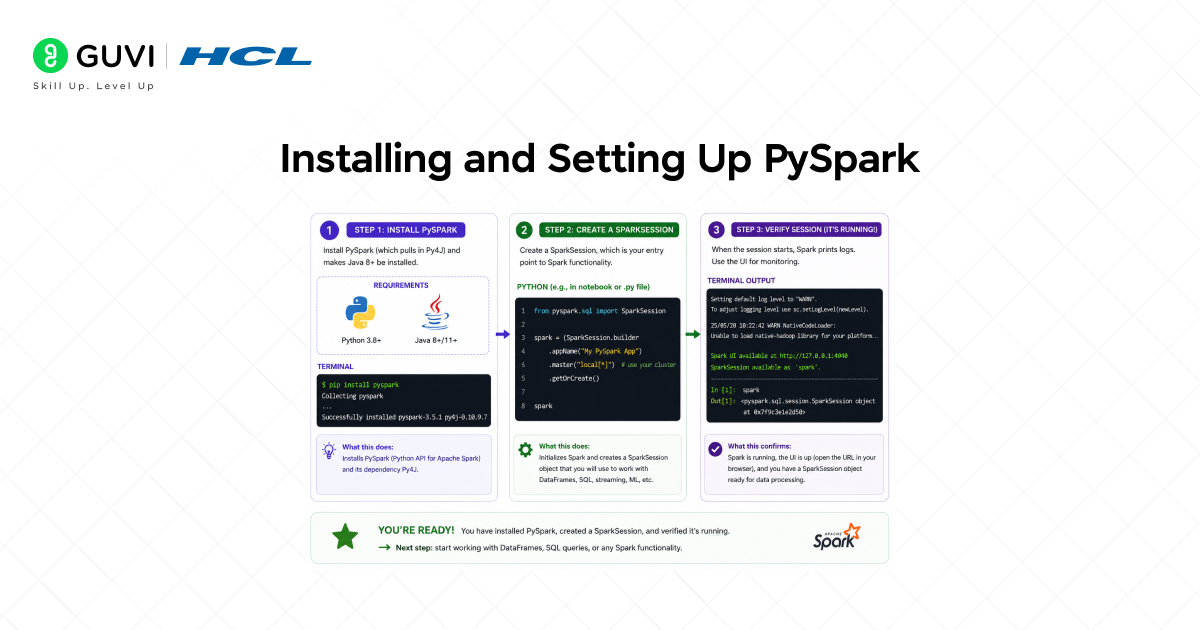
Prerequisites
• Python 3.7 or higher installed.
• Java 8 or Java 11 installed (Spark runs on the JVM; check with java -version).
• pip package manager available.
Installation
The simplest way to install PySpark is via pip:
| pip install pyspark |
For Jupyter Notebook users, install the findspark library to locate the Spark installation:
| pip install findspark import findsparkfindspark.init() |
Creating a SparkSession
SparkSession is the unified entry point for all PySpark functionality. Every PySpark application starts by creating one:
| from pyspark.sql import SparkSession spark = SparkSession.builder \ .appName(“MyPySparkApp”) \ .master(“local[*]”) \ .getOrCreate() print(spark.version) # Confirm Spark is running |
The .master(“local[*]”) setting runs Spark locally using all available CPU cores, ideal for development and learning. In production, this is replaced with a cluster URL (e.g., yarn or spark://host:7077).
RDDs: The Foundation of PySpark
Resilient Distributed Datasets (RDDs) are the foundational data abstraction in Apache Spark. Although most modern PySpark code uses the higher-level DataFrame API, understanding RDDs clarifies how Spark works under the hood.
An RDD has three defining properties:
- Resilient: Fault-tolerant if a partition is lost due to a node failure, Spark can recompute it from the original data source using the lineage graph.
- Distributed: Data is split into partitions, stored and processed across multiple nodes in the cluster in parallel.
- Dataset: A collection of records that can be any Python objects — integers, strings, tuples, or custom objects.
| # Create an RDD from a Python listrdd = spark.sparkContext.parallelize([1, 2, 3, 4, 5, 6, 7, 8]) # Transformation (lazy)squared = rdd.map(lambda x: x ** 2) # Action (triggers execution)result = squared.collect()print(result) # [1, 4, 9, 16, 25, 36, 49, 64] |
In practice, the DataFrame API is preferred over RDDs for structured data because it benefits from Spark’s Catalyst optimiser and Tungsten execution engine, producing significantly faster and more memory-efficient code.
Apache Spark was originally developed by Matei Zaharia as a research project at UC Berkeley in 2009 and later open-sourced in 2010. It was designed to overcome key performance limitations of Hadoop MapReduce, which required writing intermediate results to disk between processing stages, significantly slowing iterative workloads. Spark instead introduced in-memory computation, allowing data to be reused across steps without repeated disk I/O. This design led to performance improvements of up to 100× faster for certain iterative algorithms, especially in machine learning and graph processing tasks.
PySpark DataFrames: The Core API\
A PySpark DataFrame is a distributed collection of data organised into named columns conceptually identical to a relational database table or a pandas DataFrame, but distributed across a cluster and capable of processing data at any scale.
DataFrames are the recommended API for structured data in PySpark. They provide:
• A schema defines column names and data types.
• SQL-like operations select, filter, groupBy, join, and aggregate.
• Automatic optimisation through the Catalyst query optimiser.
• Interoperability with pandas, SQL, and file formats including CSV, JSON, Parquet, and ORC.
Creating a DataFrame
| # From a Python list of tuplesdata = [(“Alice”, 29, “Engineering”), (“Bob”, 34, “Marketing”), (“Carol”, 27, “Engineering”), (“David”, 41, “Finance”)] columns = [“name”, “age”, “department”] df = spark.createDataFrame(data, columns)df.show() # Output:# +—–+—+———–+# | name|age| department|# +—–+—+———–+# |Alice| 29|Engineering|# | Bob| 34| Marketing|# |Carol| 27|Engineering|# |David| 41| Finance|# +—–+—+———–+ |
Reading External Data
In practice, DataFrames are most commonly created by reading from files or databases:
| # Read a CSV filedf_csv = spark.read.csv(“data/employees.csv”, header=True, inferSchema=True) # Read a JSON filedf_json = spark.read.json(“data/products.json”) # Read a Parquet file (preferred format for big data)df_parquet = spark.read.parquet(“data/transactions.parquet”) # Print schemadf_csv.printSchema() |
Transformations and Actions in PySpark
Common Transformations
Transformations are lazy operations that define what should be done but do not execute immediately. They return a new DataFrame.
| # select: choose specific columnsdf.select(“name”, “department”).show() # filter / where: keep rows matching a conditiondf.filter(df.age > 30).show() # withColumn: add or replace a columnfrom pyspark.sql.functions import coldf.withColumn(“senior”, col(“age”) >= 35).show() # orderBy: sort rowsdf.orderBy(col(“age”).desc()).show() # drop: remove a columndf.drop(“age”).show() |
Common Actions
Actions trigger the execution of the DAG and return a result to the driver or write data to storage.
| # show: print the first n rowsof df.show(5) # count: return the number of rowsprint(df.count()) # collect: return all rows as a Python listrows = df.collect() # take: return the first n rows as a listfirst_two = df.take(2) # write: save DataFrame to storagedf.write.mode(“overwrite”).parquet(“output/employees”) |

GroupBy and Aggregations in PySpark
Aggregations are one of the most common big data operations, summarising millions of rows into meaningful statistics by group. PySpark’s groupBy().agg() pattern handles this efficiently across distributed data.
| from pyspark.sql.functions import count, avg, max, min, sum # Count employees and average age per departmentdf.groupBy(“department”) \ .agg( count(“name”).alias(“employee_count”), avg(“age”).alias(“avg_age”), max(“age”).alias(“max_age”) ) \ .orderBy(“department”) \ .show() # Output:# +———–+————–+——-+——-+# | department|employee_count|avg_age|max_age|# +———–+————–+——-+——-+# |Engineering| 2| 28.0| 29|# | Finance| 1| 41.0| 41|# | Marketing| 1| 34.0| 34|# +———–+————–+——-+——-+ |
Common aggregate functions in pyspark.sql.functions include count(), sum(), avg(), max(), min(), stddev(), and collect_list(). Multiple aggregations can be combined in a single agg() call.
PySpark SQL: Querying with SQL
PySpark SQL allows you to run standard SQL queries directly on DataFrames by registering them as temporary views. This is particularly useful for analysts comfortable with SQL, for migrating existing SQL workloads to Spark, and for combining Python logic with SQL expressions.
| # Step 1: Register the DataFrame as a temporary viewdf.createOrReplaceTempView(“employees”) # Step 2: Run a SQL queryresult = spark.sql(“”” SELECT department, COUNT(*) AS headcount, ROUND(AVG(age), 1) AS avg_age FROM employees WHERE age > 25 GROUP BY department ORDER BY headcount DESC”””) result.show() |
The SQL query returns a standard PySpark DataFrame that can be further transformed, joined with other DataFrames, or written to storage. The Catalyst optimiser applies the same optimisations to SQL queries as to DataFrame API code; the two interfaces share the same execution engine.
Joining DataFrames in PySpark
Joining two DataFrames in PySpark is straightforward using the .join() method. PySpark supports all standard SQL join types.
| # Create a departments reference tabledept_data = [(“Engineering”, “San Francisco”), (“Marketing”, “New York”), (“Finance”, “Chicago”)] dept_df = spark.createDataFrame(dept_data, [“department”, “location”]) # Inner join: only matching rows from both DataFramesjoined = df.join(dept_df, on=”department”, how=”inner”)joined.show() # Left join: all rows from df, matched rows from dept_dfleft_joined = df.join(dept_df, on=”department”, how=”left”) # Available join types: inner, left, right, full, cross, semi, anti |
For large-scale joins, performance is significantly affected by data skew and shuffle behaviour. Broadcast joins, where a small DataFrame is copied to every executor, avoid the shuffle entirely and are one of the most impactful PySpark optimisations available.
| from pyspark.sql.functions import broadcast # Broadcast the small departments tableoptimised_join = df.join(broadcast(dept_df), on=”department”, how=”inner”)optimised_join.show() |
PySpark Performance Best Practices
Writing PySpark code that runs correctly is the first step. Writing code that runs efficiently at scale requires understanding how Spark executes your plan.
- Use Parquet format: Parquet is a columnar storage format that enables predicate pushdown and column pruning — Spark reads only the columns and rows it needs, dramatically reducing I/O.
- Broadcast small DataFrames: When joining a large DataFrame with a small one (typically under 10 MB), use broadcast() to avoid a full shuffle across the cluster.
- Cache reused DataFrames: If a DataFrame is used multiple times in your pipeline, call .cache() or .persist() to store it in memory after the first computation, avoiding redundant recomputation.
- Avoid collecting () on large data: Calling collect() returns all data to the driver. On large datasets, this causes out-of-memory errors. Use show(), take(), or write results to storage instead.
- Tune partition count: The default number of shuffle partitions is 200. For small datasets, this creates unnecessary overhead; for large datasets, it may be too few. Tune with spark.conf.set(“spark.sql.shuffle.partitions”, n).
- Use built-in functions: Functions from pyspark.sql.functions run on the JVM and are far faster than Python UDFs (User Defined Functions), which require serialisation between Python and the JVM for every row.
PySpark vs. Pandas: When to Use Which
PySpark and pandas serve different use cases. Choosing the right tool depends primarily on data size and infrastructure.
• Use pandas when: your data fits comfortably in a single machine’s memory (typically under a few gigabytes), you need rich exploratory data analysis tools, or you are working on a local development environment.
• Use PySpark when: your data exceeds available memory, you need to process data across a distributed cluster, or your pipeline runs in a production big data environment (Databricks, EMR, Dataproc).
• Use pandas API on Spark: Since Spark 3.2, PySpark includes pyspark. pandas — a pandas-compatible API that runs on the Spark engine. It allows teams to write pandas-style code that scales to big data without rewriting their entire codebase.
| # pandas API on Spark (Spark 3.2+)import pyspark. pandas as ps # Works like pandas but runs on Sparkpsdf = ps.read_csv(“data/large_dataset.csv”)psdf[“age”].mean() |
If you want practical experience working with activation functions, neural networks, and deep learning models, HCL GUVI’s AI and ML programs can help you understand how concepts like sigmoid, backpropagation, and gradient descent are implemented using frameworks such as TensorFlow and PyTorch through hands-on projects.
Conclusion
PySpark is the essential tool for Python developers working with data at scale. By combining Python’s expressive, accessible syntax with Apache Spark’s distributed computing engine, it enables engineers and data scientists to process gigabytes, terabytes, and even petabytes of data using code that feels familiar and readable.
This tutorial has covered the full arc of PySpark fundamentals: from understanding Spark’s architecture and the role of the SparkSession, to creating and transforming DataFrames, running aggregations and SQL queries, performing joins, and applying performance best practices that matter at production scale.
The most important principles to carry forward are: embrace the DataFrame API over raw RDDs; understand that transformations are lazy and actions trigger execution; use Parquet for storage; broadcast small tables; and always prefer built-in functions over Python UDFs.
PySpark is not just a big data tool;l it is a gateway to the entire modern data engineering stack, integrating with cloud platforms, ML pipelines, streaming systems, and SQL engines. Mastering it equips you to build scalable, production-grade data pipelines that run reliably on data of any size.
FAQs
1. What is PySpark used for?
PySpark is used for large-scale data processing, ETL pipelines, data analytics, and machine learning on datasets too large to fit in a single machine’s memory. It distributes computation across a cluster of machines, making it the standard tool for production big data workloads in Python.
2. Is PySpark different from Apache Spark?
Apache Spark is the core distributed computing engine, written in Scala and running on the JVM. PySpark is a Python API that allows Python developers to write Spark applications using Python syntax. Under the hood, PySpark communicates with the Spark engine via the Py4J bridge library.
3. Should I use RDDs or DataFrames in PySpark?
Use DataFrames for almost all structured data work. DataFrames benefit from the Catalyst optimiser and Tungsten execution engine, making them significantly faster and more memory-efficient than RDDs. Use RDDs only when working with unstructured data or when you need fine-grained control over distributed data.
4. How is PySpark different from pandas?
Pandas runs on a single machine and requires all data to fit in memory. PySpark distributes data across a cluster and can process datasets of any size. For small datasets, pandas is faster and more feature-rich; for large datasets, PySpark is the appropriate tool.
5. How do I run PySpark in the cloud?
The major cloud platforms all provide managed Spark services: AWS offers Amazon EMR, Google Cloud offers Dataproc, Microsoft Azure offers Azure HDInsight and Azure Databricks, and Databricks runs on all three clouds. These services handle cluster provisioning, Spark configuration, and scaling, allowing you to focus on writing PySpark code.
Success Stories

About the Author
Vishalini Devarajan
An Aerospace Engineer turned content writer, I focus on making complex concepts easy to understand through well-structured, reader-friendly blogs. Whether it’s a technical topic or a non-technical one, I love creating content that is clear, engaging, and impactful.
View all posts by Vishalini Devarajan
Connect with me @










Did you enjoy this article?