


Python Articles
What Is GUI in Python? A Beginner's Guide
Probability Basics: A Clear Introduction
How to Use Python in Excel: A Step-by-Step Guide for Beginners


Get In Touch For Details! Request More Information
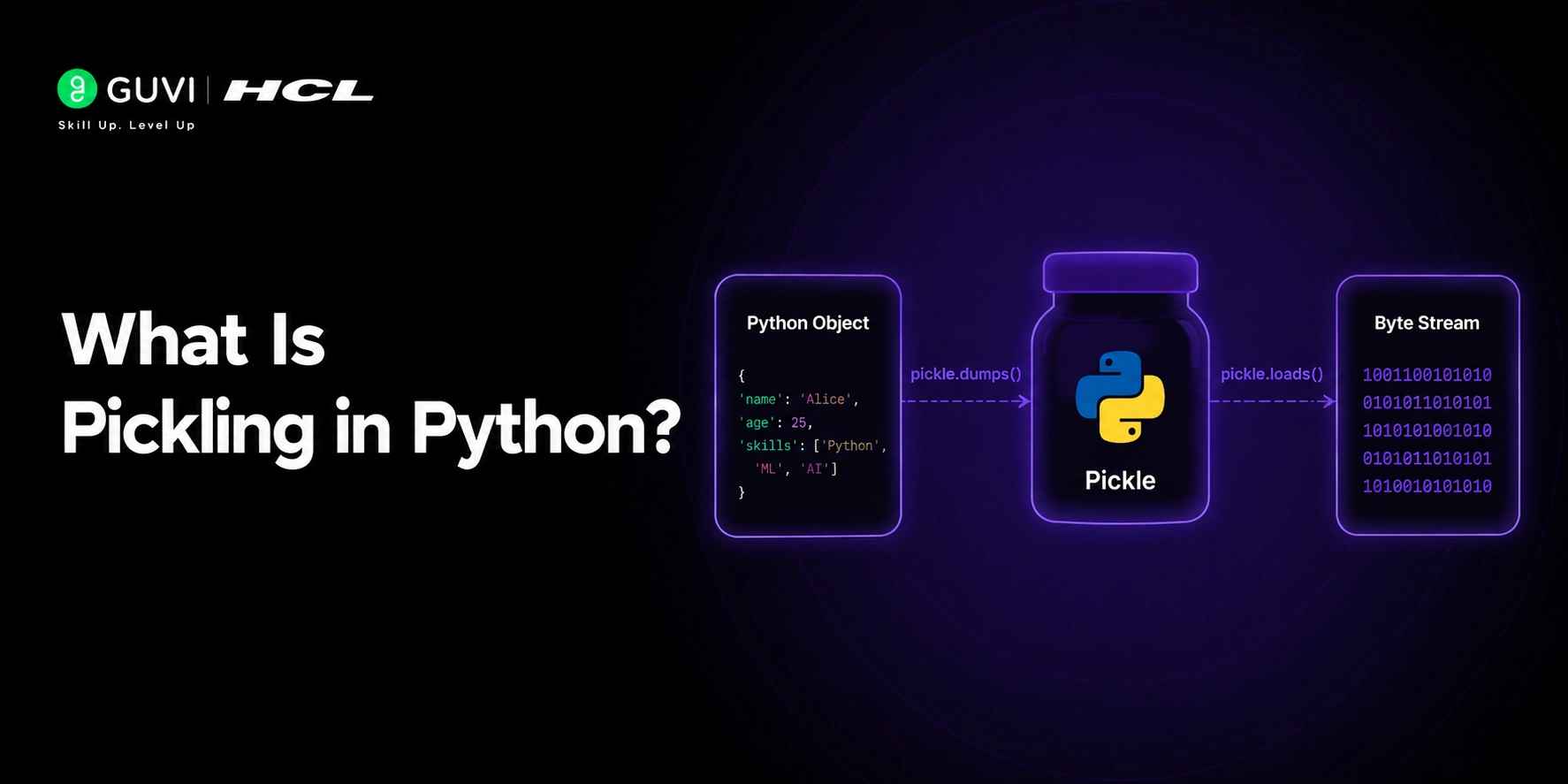
Many Python developers reach a point where they need to save a complex object, like a trained machine learning model or a parsed data structure, and retrieve it later without rebuilding it from scratch. Pickling in Python solves exactly this problem by converting any Python object into a storable byte format. Understanding how pickling works, when to use it, and its security limitations is essential for any backend or data science developer working with Python in 2026.
Table of contents
- TL;DR Summary
- What Is Pickling in Python?
- How to Use the pickle Module
- Pickle Protocols
- Pickling Custom Classes
- Pickling in Machine Learning: Saving Trained Models
- Conclusion
- FAQs
- What is pickling in Python?
- What is the difference between pickling and unpickling?
- Is it safe to unpickle data from unknown sources?
- What objects cannot be pickled in Python?
- What is the difference between pickle and JSON in Python?
- How do I save a machine learning model using pickle?
- What is the dill library and how does it relate to pickle?
- When should I use joblib instead of pickle in Python?
TL;DR Summary
Pickling in Python is the process of serialising a Python object into a byte stream so it can be saved to a file, sent over a network, or stored in a database. The reverse process, converting the byte stream back into a Python object, is called unpickling. Python’s built-in pickle module handles both operations. Pickling is widely used in machine learning for saving trained models, in distributed systems for passing objects between processes, and in caching for storing computed results.
Want to build real-world Python skills covering serialization, data handling, and backend development? Explore HCL GUVI’s Python Programming Course, designed for developers ready to go beyond the basics.
What Is Pickling in Python?
Pickling is the process of converting a Python object into a binary byte stream using the pickle module. This byte stream can be written to a file, stored in a database, or transmitted over a network.
Unpickling is the reverse: reading the byte stream and reconstructing the original Python object from it.
Objects that can be pickled include:
- Integers, floats, strings, booleans
- Lists, tuples, dictionaries, sets
- Functions and classes defined at the module level
- Instances of most user-defined classes
- Trained machine learning models like scikit-learn estimators
Read More: What is Python Packages Explained & How to use them
How to Use the pickle Module
Python’s pickle module comes built into the standard library. No installation is needed.
- Pickling an Object to a File
| import pickle data = { “name”: “Priya”, “scores”: [95, 88, 91], “active”: True } with open(“data.pkl”, “wb”) as file: pickle.dump(data, file) |
pickle.dump writes the serialised byte stream directly to a file. The file must be opened in binary write mode using “wb”.
- Unpickling an Object from a File
| import pickle with open(“data.pkl”, “rb”) as file: loaded_data = pickle.load(file) print(loaded_data) # Output: {‘name’: ‘Priya’, ‘scores’: [95, 88, 91], ‘active’: True} |
pickle.load reads the byte stream and reconstructs the original dictionary exactly. The file must be opened in binary read mode using “rb”.
- Pickling to a Byte String in Memory
Use pickle.dumps and pickle.loads when you want to work with the byte stream in memory rather than writing to a file:
| import pickle model_data = {“weights”: [0.5, 0.3, 0.8], “bias”: 0.1} byte_stream = pickle.dumps(model_data) print(type(byte_stream)) # Output: bytes restored = pickle.loads(byte_stream) print(restored) # Output: {‘weights’: [0.5, 0.3, 0.8], ‘bias’: 0.1} |
This is useful when passing objects between processes or storing them in Redis or a database without intermediate files.
Want to build real-world Python skills covering serialisation, data handling, and backend development? Explore HCL GUVI’s Python Programming Course, designed for developers ready to go beyond the basics.

Pickle Protocols
Python’s pickle module supports multiple protocol versions that affect compatibility and performance.
| Protocol | Python Version | Notes |
| 0 | All versions | Human-readable ASCII format |
| 1 | All versions | Binary format, backward compatible |
| 2 | Python 2.3+ | Better support for new-style classes |
| 3 | Python 3.0+ | Default in Python 3, bytes support |
| 4 | Python 3.4+ | Supports very large objects |
| 5 | Python 3.8+ | Out-of-band data buffers for efficiency |
Specify a protocol explicitly when compatibility matters:
| pickle.dump(data, file, protocol=4) |
Use the highest protocol your Python version supports for best performance. Use protocol 2 if you need Python 2 and Python 3 compatibility.
Joblib, a popular library in the Python machine learning ecosystem, is built on top of pickle and adds features such as compression and parallel processing for efficiently storing large NumPy arrays and machine learning models. It is the default serialization tool commonly used with scikit-learn model persistence workflows and can save and load array-heavy objects significantly faster than raw pickle, making it a preferred choice for production machine learning applications.
Pickling Custom Classes
Pickling works with user-defined classes as long as they are importable at unpickling time.
| import pickle class Student: def __init__(self, name, grade): self.name = name self.grade = grade def __repr__(self): return f“Student({self.name}, {self.grade})” student = Student(“Arun”, “A”) byte_stream = pickle.dumps(student) restored = pickle.loads(byte_stream) print(restored) # Output: Student(Arun, A) print(restored.name) # Output: Arun |
The class definition must be available when you unpickle. If the Student class is missing or has changed, unpickling will fail with an AttributeError or ModuleNotFoundError.
Pickling in Machine Learning: Saving Trained Models
One of the most common uses of pickling in Python is saving trained scikit-learn models so they can be reused without retraining.
| import pickle from sklearn.linear_model import LogisticRegression import numpy as np X = np.array([[1, 2], [3, 4], [5, 6]]) y = np.array([0, 1, 0]) model = LogisticRegression() model.fit(X, y) with open(“model.pkl”, “wb”) as file: pickle.dump(model, file) with open(“model.pkl”, “rb”) as file: loaded_model = pickle.load(file) print(loaded_model.predict([[3, 4]])) # Output: [1] |
The trained model with all its learned weights is saved to disk and restored later. This is a core pattern in ML pipelines and API serving workflows where model training and inference run at different times.
Joblib, a popular library in the Python machine learning ecosystem, is built on top of pickle and adds features such as compression and parallel processing for efficiently storing large NumPy arrays and machine learning models. It is the default serialization tool commonly used with scikit-learn model persistence workflows and can save and load array-heavy objects significantly faster than raw pickle, making it a preferred choice for production machine learning applications.
Conclusion
Understanding how to use the pickle module correctly, choosing the right protocol, and recognising its security limitations ensures you apply it safely and effectively.
As you work on more advanced Python projects involving ML pipelines, distributed task queues like Celery, or high-performance data workflows, you will encounter pickling at every layer.
FAQs
What is pickling in Python?
Pickling is the process of serialising a Python object into a binary byte stream using the pickle module so it can be saved, transmitted, or stored and later restored.
What is the difference between pickling and unpickling?
Pickling converts a Python object into a byte stream. Unpickling converts the byte stream back into the original Python object.
Is it safe to unpickle data from unknown sources?
No. Unpickling untrusted data is a serious security risk because a malicious pickle file can execute arbitrary code. Only unpickle data from sources you fully control.
What objects cannot be pickled in Python?
Lambda functions, locally defined functions, file handles, database connections, and some built-in types like generators cannot be pickled with the standard pickle module.
What is the difference between pickle and JSON in Python?
Pickle supports almost all Python objects but is binary and Python-specific. JSON supports only basic types but is human-readable, cross-language, and much safer for untrusted data.
How do I save a machine learning model using pickle?
Open a file in binary write mode and use pickle.dump(model, file) to save. Use pickle.load(file) in binary read mode to restore the model later with all its trained parameters intact.
What is the dill library and how does it relate to pickle?
dill extends Python’s pickle module to handle objects that standard pickle cannot serialise, including lambda functions, closures, and locally defined classes.
When should I use joblib instead of pickle in Python?
Use joblib when serialising large numpy arrays, pandas DataFrames, or scikit-learn models. Joblib handles compression and memory-mapped files automatically, making it significantly faster than raw pickle for numerical data.
Success Stories

About the Author
Vishalini Devarajan
An Aerospace Engineer turned content writer, I focus on making complex concepts easy to understand through well-structured, reader-friendly blogs. Whether it’s a technical topic or a non-technical one, I love creating content that is clear, engaging, and impactful.
View all posts by Vishalini Devarajan
Connect with me @








Did you enjoy this article?