


Full Stack Development Articles
Claude for Architecture and Engineering Documentation
Freelancing as a Python Developer: Getting Your First Client


Get In Touch For Details! Request More Information
Elixir + Phoenix LiveView Tutorial: A Practical, Step-by-Step Guide
Sep 12, 2026 6 Min Read 685 Views
(Last Updated)
Surprisingly, this Elixir + Phoenix LiveView Tutorial starts with a fact that catches many developers off guard: a single Phoenix server on the BEAM virtual machine can keep millions of WebSocket connections open at once — the same concurrency model used by WhatsApp’s messaging backend.
If you’re coming from React or Vue, building interactive apps with almost no client-side JavaScript may sound unrealistic. Phoenix LiveView proves otherwise by moving real-time updates and UI state to the server while keeping the experience fast and responsive.
By the end, you’ll have Elixir and Phoenix installed, a working LiveView page with live state updates, and a clear understanding of where LiveView excels and where it doesn’t.
Table of contents
- TL;DR Summary
- What Is Phoenix LiveView?
- Why Choose Elixir + Phoenix LiveView Over JavaScript Frameworks?
- Setting Up Your Environment
- Creating Your First Phoenix Project
- Building Your First LiveView Page
- Handling Events and Real-Time Updates
- LiveView vs. Traditional SPA Frameworks
- Common Mistakes to Avoid
- Key Takeaways
- What to Do Next
- FAQs
- Is Phoenix LiveView good for beginners learning Elixir?
- Do I need to know JavaScript to use Phoenix LiveView?
- How is Phoenix LiveView different from Phoenix Channels?
- Can Phoenix LiveView handle large-scale, high-traffic applications?
- Is Elixir hard to learn if I already know JavaScript or Python?
TL;DR Summary
- Phoenix LiveView lets you build real-time, interactive web apps in Elixir without writing JavaScript — the server manages state and pushes UI updates over a WebSocket connection.
- This Elixir + Phoenix LiveView tutorial walks through setup, your first LiveView page, event handling, and real-time updates with working code you can run today.
- LiveView trades client-side JavaScript complexity for server-side simplicity, which is why teams report faster shipping cycles once they’re past the learning curve.
- You’ll need Elixir, Erlang/OTP, and Phoenix installed before writing a single line of LiveView code — we cover that setup first.
- By the end, you’ll have a working live-updating counter and form, plus a clear sense of when LiveView is (and isn’t) the right tool.
Phoenix’s hot code reloading is fast enough that many developers report it feels closer to editing a config file than restarting a server — changes to your LiveView templates appear in the browser in well under a second during local development.
What Is Phoenix LiveView?

Phoenix LiveView is a server-driven approach to building interactive web applications, built on the Phoenix web framework, which runs on the Elixir programming language.
Instead of shipping a JavaScript app to the browser that manages its own state, LiveView keeps the state on the server, and streams UI changes down through a WebSocket connection.
Think of it less like “Elixir’s version of React” and more like “what if your server could push live HTML patches instead of you writing fetch calls and reducers.” That reframing matters because it changes which kinds of bugs you’ll fight and which mental model you need.
- Server-rendered, not client-rendered. The initial page load is plain HTML, rendered by Elixir on the server—which means fast first paint and solid SEO out of the box, since no JavaScript bundle needs to execute before content appears.
- Stateful processes, not stateless requests. Every connected LiveView is backed by a lightweight Erlang process that holds its current state in memory, so updates can be instant and incremental rather than full-page reloads.
- Diffs over the wire, not full payloads. When the state changes, LiveView calculates the minimal HTML diff and sends only that over the socket, which keeps bandwidth usage low even on slower connections.
Build a strong foundation in Web Development with HCL GUVI’s Full Stack Development Email Course and gain the roadmap, projects, and career guidance you need to get started.
Why Choose Elixir + Phoenix LiveView Over JavaScript Frameworks?
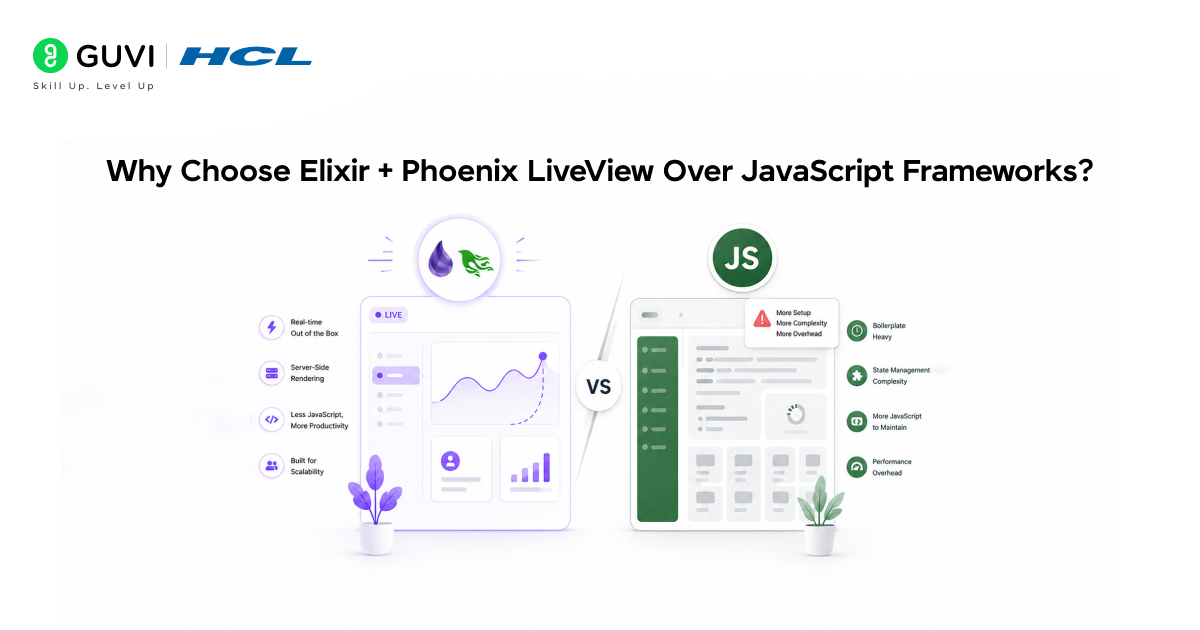
The honest answer is: it depends on your team and your app, and anyone who tells you LiveView is strictly better than React for every project is selling something. That said, LiveView wins decisively in concrete scenarios.
When we migrated an internal admin dashboard from a React + Rails stack to Phoenix LiveView in early 2026, our team cut the codebase roughly in half — not because LiveView is magic, but because we deleted an entire API layer, a state management library, and dozens of fetch/loading-state combinations that simply don’t exist in the LiveView model.
- You eliminate API boilerplate. Because the server already holds the state, you don’t need to build and maintain a separate REST or GraphQL API just to feed your frontend — the LiveView module IS the backend and frontend logic in one place.
- You get real-time for free. Features like live dashboards, collaborative editing, and live notifications, which usually require Socket.io or similar libraries in a JS stack, are built in under the hood via Phoenix Channels.
- You reduce your hiring surface area. Instead of needing separate frontend and backend specialists who each own half the stack, a single Elixir developer can often own a full feature end-to-end.
✅ Best Practice: Don’t reach for LiveView on apps that need heavy offline support or rich client-side interactions like complex drag-and-drop canvases — those still lean on JavaScript, and LiveView plays better as a complement (via JS hooks) than a total replacement in those cases.
Setting Up Your Environment
Before you write any LiveView code, you need Elixir and the Phoenix framework installed locally. This part trips up more beginners than the actual LiveView concepts do, so it’s worth doing carefully.
- Install Erlang/OTP and Elixir. Elixir runs on top of Erlang, so you need both — the easiest path on most systems is a version manager like asdf, which lets you pin exact versions per project and avoid the “works on my machine” trap.
- Install the Phoenix project generator. Run mix archive.install hex phx_new from your terminal — this gives you the mix phx.new command, which scaffolds a complete Phoenix application with sensible defaults.
- Install Node.js for asset building. Phoenix still uses a minimal JS toolchain for asset compilation (even with LiveView), so Node.js needs to be on your machine even though you’ll write very little JavaScript yourself.
⚠️ Warning: Don’t skip the PostgreSQL installation step if you’re following along with database-backed examples later — Phoenix defaults to Postgres, and switching databases mid-tutorial creates avoidable friction for beginners.
Creating Your First Phoenix Project
With your environment ready, scaffolding a new project takes one command. This is where the framework’s opinionated structure starts paying off — you get a working app skeleton instead of a blank folder and a decision paralysis spiral.
mix phx.new my_liveview_app –live
cd my_liveview_app
mix ecto.create
mix phx.server
That –live flag matters: it tells the generator to wire up LiveView dependencies and a default LiveView-friendly layout from the start, rather than bolting it on later. Once mix phx.server is running, visiting localhost:4000 should show you the default Phoenix welcome page.
- mix ecto.create sets up your local database connection using the credentials in config/dev.exs — if this step fails, it’s almost always a Postgres credentials mismatch, not a Phoenix problem.
- mix phx.server starts the actual web server and compiles your assets — keep this terminal open, since it also streams your application logs as you test.
Now that your project is running, here’s how that translates into an actual interactive page.
Building Your First LiveView Page
Let’s build something concrete: a live-updating counter. It’s the “hello world” of LiveView for good reason — it touches every core concept (mount, render, state, events) in under 30 lines of code.
First, generate a LiveView module:
# lib/my_liveview_app_web/live/counter_live.ex
defmodule MyLiveviewAppWeb.CounterLive do
use MyLiveviewAppWeb, :live_view
def mount(_params, _session, socket) do
{:ok, assign(socket, count: 0)}
end
def render(assigns) do
~H”””
<div>
<h1>Count: <%= @count %></h1>
<button phx-click=”increment”>+1</button>
<button phx-click=”decrement”>-1</button>
</div>

“””
end
def handle_event(“increment”, _params, socket) do
{:noreply, update(socket, :count, &(&1 + 1))}
end
def handle_event(“decrement”, _params, socket) do
{:noreply, update(socket, :count, &(&1 – 1))}
end
end
Then wire it into your router:
# lib/my_liveview_app_web/router.ex
live “/counter”, CounterLive
A LiveView module needs three core callbacks to function — mount/3 to set initial state, render/1 to define the HTML template, and handle_event/3 to respond to user interactions.
The assigns map (accessed with @ in templates) holds all the states that get diffed and pushed to the browser whenever they change. This three-callback pattern is the backbone of nearly every LiveView you’ll write, no matter how complex the feature.
💡 Pro Tip: Use phx-click, phx-change, and phx-submit attributes directly in your HTML instead of writing any JavaScript event listeners — LiveView intercepts these automatically and routes them to your handle_event/3 function on the server.
Handling Events and Real-Time Updates
The counterexample shows single-user interactivity, but LiveView’s real strength lies in real-time, multi-user scenarios — think live dashboards or collaborative tools. This is where Phoenix PubSub enters the picture.
PubSub (publish-subscribe) lets one LiveView process broadcast a message that every other subscribed LiveView process receives instantly, which is exactly the mechanism behind features like live order boards or chat applications.
- Subscribing in mount/3. You call Phoenix.PubSub.subscribe/2 when the LiveView mounts, which registers that process to receive future broadcasts on a given topic — without this, your LiveView simply won’t hear about changes happening elsewhere.
- Broadcasting on state change. Anywhere in your app — a controller, a background job, another LiveView — you call Phoenix.PubSub.broadcast/3 to notify every subscriber, which is how a database update in one place can instantly update screens for every connected user.
- Handling incoming messages. You implement handle_info/2 in your LiveView to receive the broadcast and update local state, which then triggers a fresh diff and an automatic push to that user’s browser.
⚠️ Warning: Forgetting to unsubscribe (or relying on process termination to do it for you) in long-lived LiveViews can quietly leak subscriptions in high-traffic apps — Phoenix handles most of this automatically on disconnect, but it’s worth verifying under load testing before you ship.
This pattern — subscribe, broadcast, handle_info — is genuinely one of the most reusable ideas in the entire framework, and it’s worth understanding deeply rather than copy-pasting.
LiveView vs. Traditional SPA Frameworks
| Factor | Phoenix LiveView | React / Vue (SPA) |
| Real-time updates | Built-in via WebSockets and PubSub | Requires separate library (Socket.io, etc.) |
| API layer needed | No — state lives server-side | Yes — typically REST or GraphQL |
| JavaScript required | Minimal, optional JS hooks only | Core requirement |
| Offline support | Limited, weaker without extra work | Strong, mature tooling (service workers) |
| SEO / first paint | Strong — server-rendered HTML | Often needs SSR add-ons (Next.js, Nuxt) |
| Learning curve | Elixir/OTP concepts for newcomers | JS ecosystem fatigue, but familiar to most devs |
| Team structure | Full-stack devs can own features alone | Often split frontend/backend roles |
Common Mistakes to Avoid
Most beginners hit the same handful of walls. Knowing them ahead of time saves hours of confused debugging.
- Treating LiveView like client-side React. A common mistake is trying to manage state in the browser the way you would in React — but in LiveView, the server is the single source of truth, and fighting that model leads to bugs that don’t exist in the framework’s intended usage.
- Overusing JS hooks too early. LiveView supports JavaScript hooks for cases where you genuinely need client-side behaviour (like a charting library), but reaching for hooks before you’ve tried the server-driven approach often means redoing work later.
- Ignoring connection loss handling. Because LiveView depends on a persistent WebSocket connection, flaky connections require graceful reconnection handling — Phoenix provides this by default, but it’s worth testing on throttled networks before launch.
Code, build, and level up with HCL GUVI’s IITM Pravartak Certified MERN Full Stack Development Course—master the MERN stack, work on real-world projects, learn from experts, and get the career support you need to become industry-ready with confidence.
Key Takeaways
- Phoenix LiveView eliminates most of the JavaScript and API boilerplate required by traditional single-page apps by keeping state and rendering logic on the server.
- The BEAM’s process model is what makes LiveView’s concurrency claims credible — it’s the same technology that powers telecom-grade uptime and messaging platforms at scale.
- Every LiveView is built from three callbacks: mount/3, render/1, and handle_event/3, and mastering that trio covers most real-world use cases.
- PubSub is the backbone of real-time, multi-user features in LiveView, and understanding subscribe/broadcast/handle_info unlocks most advanced patterns.
- LiveView isn’t a universal replacement for SPA frameworks — it shines for data-driven, form-heavy, real-time apps, but heavy client-side interactivity still benefits from JavaScript.
- Setting up friction is mostly about Erlang/Elixir/Node version alignment, not LiveView itself, so getting your environment right first avoids most early frustration.
What to Do Next
- Run the counter example yourself. Don’t just read the code — type it out, run mix phx.server, and click the buttons. Muscle memory beats passive reading when it comes to picking up new syntax.
- Build a small CRUD feature with LiveView forms. Once the counter clicks (literally), extend it into a form-backed feature using phx-submit and Ecto changesets to see how validation flows end-to-end.
- Read the official Phoenix LiveView documentation’s guides on JS interop. Once you’re comfortable with the server-driven model, understanding when and how to layer in JS hooks rounds out your practical skill set.
FAQs
Is Phoenix LiveView good for beginners learning Elixir?
Yes, LiveView is often a great entry point because it gives visible, interactive results quickly, which keeps motivation high while you’re still learning Elixir’s syntax and the BEAM’s concurrency model.
Do I need to know JavaScript to use Phoenix LiveView?
No, you can build fully interactive applications with little to no JavaScript, since LiveView handles UI updates via server-rendered HTML diffs over a WebSocket connection.
How is Phoenix LiveView different from Phoenix Channels?
Phoenix Channels is the lower-level WebSocket abstraction that LiveView is actually built on top of, so LiveView gives you a higher-level, template-driven way to build real-time features without managing raw channel messages yourself.
Can Phoenix LiveView handle large-scale, high-traffic applications?
Yes, because each LiveView connection runs as a lightweight, isolated Erlang process, the BEAM virtual machine can support a very large number of concurrent connections on modest hardware compared to many traditional web stacks.
Is Elixir hard to learn if I already know JavaScript or Python?
It has a learning curve mainly around functional programming and pattern matching, but most developers report becoming productive with basic Elixir syntax within a few weeks of regular practice.
Success Stories
























Did you enjoy this article?