


Full Stack Development Articles
Elixir + Phoenix LiveView Tutorial: A Practical, Step-by-Step Guide
RabbitMQ Tutorial: An Introductory Guide with Examples


Get In Touch For Details! Request More Information
NGINX Reverse Proxy Tutorial: Step-by-Step Guide
Jun 29, 2026 4 Min Read 59 Views
(Last Updated)
Most modern websites don’t expose their backend servers directly to the internet. Instead, they use a reverse proxy to handle incoming traffic, improve security, and manage requests efficiently.
NGINX is one of the most popular tools for this job, but a small configuration mistake can quickly lead to frustrating errors like 502 Bad Gateway.
This tutorial guides you through setting up an NGINX reverse proxy from scratch, explains what each configuration does, and shows you how to troubleshoot common issues with confidence.
Table of contents
- TL;DR Summary
- What Is an NGINX Reverse Proxy?
- Why Use a Reverse Proxy?
- Prerequisites Before Setting Up NGINX Reverse Proxy
- Step-by-Step Guide to Configure NGINX Reverse Proxy
- Step 1: Install NGINX
- Step 2: Confirm Your Backend App Is Running
- Step 3: Create a New Server Block Config
- Step 4: Enable the Site
- Step 5: Test It
- Adding SSL/TLS to Your Reverse Proxy
- Reverse Proxy vs. Forward Proxy vs. Load Balancer
- Common Errors and How to Fix Them
- What to Do Next
- Key Takeaways
- FAQs
- What does a reverse proxy do in NGINX?
- Is NGINX reverse proxy free to use?
- Why am I getting a 502 Bad Gateway error?
- Can NGINX reverse proxy multiple domains on one server?
- Do I need SSL for a reverse proxy?
- What's the difference between proxy_pass and upstream in NGINX?
TL;DR Summary
- An NGINX reverse proxy sits between clients and your backend servers, forwarding requests and returning responses.
- It’s used for load balancing, SSL termination, caching, and hiding internal server architecture.
- Setup takes about 15–20 minutes if you already have NGINX installed and a backend app running.
- This guide walks through installation, configuration, SSL setup, and common troubleshooting steps.
- You’ll finish with a working proxy you can adapt for production.
NGINX powers about 33% of all identifiable web servers globally, making it the world’s most widely used web server software.
What Is an NGINX Reverse Proxy?
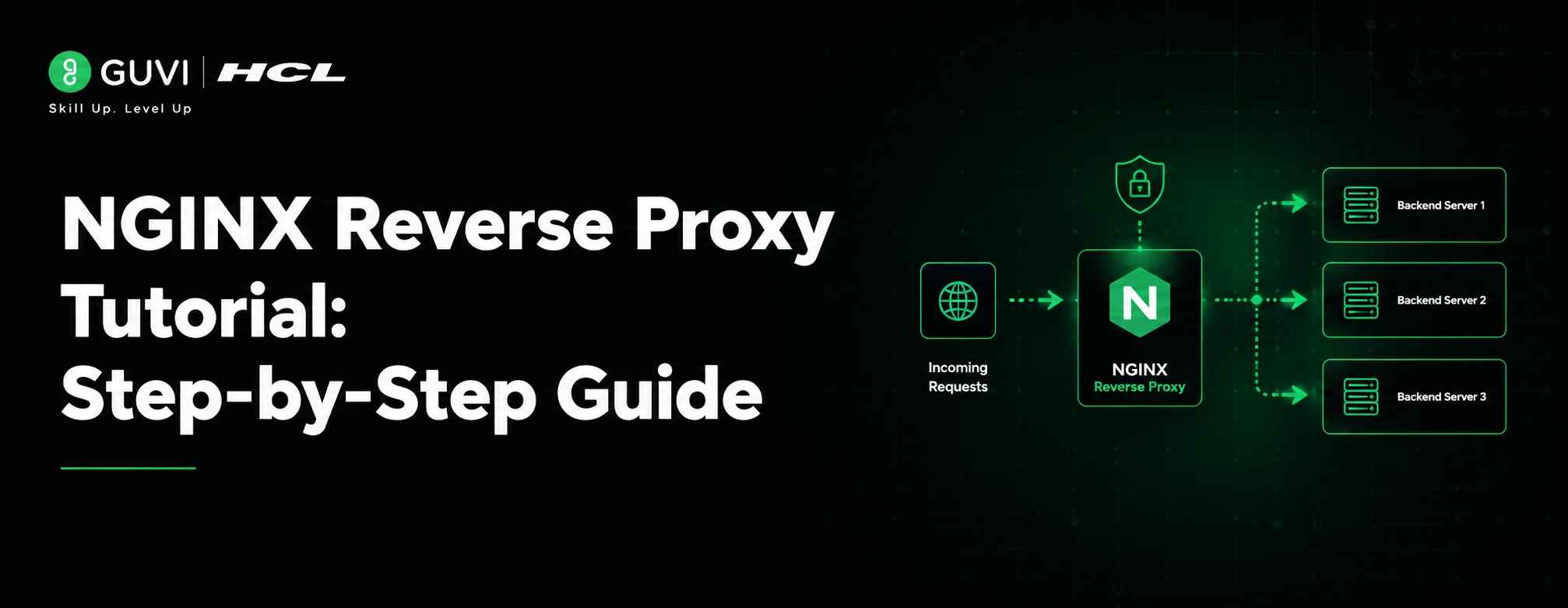
An NGINX reverse proxy is a server configuration in which NGINX receives client requests, forwards them to one or more backend servers, and returns the response to the client.
In simple terms, a reverse proxy is a server that sits in front of one or more backend servers. It intercepts client requests and decides where to send them.
NGINX, when configured as a reverse proxy, accepts incoming HTTP/HTTPS requests on behalf of your backend application (like a Node.js, Python, or Java server).
It then forwards the request internally, waits for a response, and sends that response back to the client. The client never talks directly to your app server — it only ever sees NGINX. This is why reverse proxies are a core piece of almost every production web architecture today.
Also Read: Proxy: A Detailed Guide on its Overview and Types
Build job-ready NGINX skills with HCL GUVI’s NGINX Certification Course. Learn to configure NGINX, implement reverse proxies and load balancers, secure websites with HTTPS, optimize performance, and monitor applications with confidence. Enroll today and gain hands-on experience with one of the most widely used web servers!
Why Use a Reverse Proxy?
A reverse proxy isn’t just a nice-to-have — it solves real operational problems.
- Security: Hides your backend’s IP address, ports, and stack details.
- Load balancing: Distributes traffic across multiple backend instances.
- SSL termination: Handles HTTPS encryption/decryption so your app doesn’t have to.
- Caching: Serves repeated requests faster without hitting the backend.
- Single entry point: Lets you run several apps on one server using different paths or subdomains.
Prerequisites Before Setting Up NGINX Reverse Proxy
Before starting, make sure you have:
- A Linux server (Ubuntu 22.04/24.04 examples used here)
- Root or sudo access
- A backend application running on a local port (e.g., localhost:3000)
- A domain name pointed to your server’s IP (optional, but needed for SSL)
Step-by-Step Guide to Configure NGINX Reverse Proxy
Step 1: Install NGINX
sudo apt update
sudo apt install nginx -y
sudo systemctl enable nginx
sudo systemctl start nginx
Verify it’s running:
sudo systemctl status nginx

Step 2: Confirm Your Backend App Is Running
For this example, assume an app is running on port 3000:
curl http://localhost:3000
You should get a response from your app. If not, fix that first — NGINX can’t proxy to a service that isn’t running.
Step 3: Create a New Server Block Config
Create a new config file instead of editing the default one:
sudo nano /etc/nginx/sites-available/myapp
Add this configuration:
server {
listen 80;
server_name example.com www.example.com;
location / {
proxy_pass http://127.0.0.1:3000;
proxy_set_header Host $host;
proxy_set_header X-Real-IP $remote_addr;
proxy_set_header X-Forwarded-For $proxy_add_x_forwarded_for;
proxy_set_header X-Forwarded-Proto $scheme;
}
}
- The proxy_pass directive tells NGINX where to send the request.
- The proxy_set_header lines preserve important information (the original host, client IP, and protocol) that would otherwise be lost since the backend only sees NGINX’s internal IP.
- Without these headers, your app’s logs and security checks will show the wrong client IP for every request.
Step 4: Enable the Site
sudo ln -s /etc/nginx/sites-available/myapp /etc/nginx/sites-enabled/
sudo nginx -t
sudo systemctl reload nginx
⚠️ Warning: Always run nginx -t before reloading. It catches syntax errors before they take down your live site.
Step 5: Test It
Visit your domain or run:
curl -H “Host: example.com” http://localhost
If you see your app’s response, the proxy is working.
Adding SSL/TLS to Your Reverse Proxy
Running HTTP-only in 2026 is a non-starter for most real traffic. Use Certbot for free, automated certificates:
sudo apt install certbot python3-certbot-nginx -y
sudo certbot –nginx -d example.com -d www.example.com
Certbot edits your NGINX config automatically, adding a listen 443 ssl block and redirecting HTTP to HTTPS.
✅ Best Practice: Set up auto-renewal with sudo certbot renew –dry-run to confirm it’ll renew without manual intervention.
Reverse Proxy vs. Forward Proxy vs. Load Balancer
| Feature | Reverse Proxy | Forward Proxy | Load Balancer |
| Sits in front of | Servers | Clients | Multiple servers |
| Main Purpose | Protect/manage backend | Anonymize/filter client traffic | Distribute traffic |
| Common Tool | NGINX, HAProxy | Squid | NGINX, HAProxy, AWS ELB |
| Client Awareness | The client is unaware of the backend | The server is unaware of the real client | The client is unaware of which server responds |
In practice, NGINX often does all three jobs at once — which is part of why it’s so widely adopted.
Common Errors and How to Fix Them
- 502 Bad Gateway: Usually means your backend app isn’t running or is on the wrong port. Check with curl localhost:PORT directly.
- 413 Request Entity Too Large: Add client_max_body_size 20M; inside your server block.
- Connection refused: Confirm your backend is bound to 127.0.0.1 and not blocked by a firewall rule.
- Mixed content warnings after SSL: Make sure proxy_set_header X-Forwarded-Proto $scheme; is present so your app knows it’s behind HTTPS.
What to Do Next
Before wrapping up, here’s how to keep moving:
- Add a second backend instance and configure basic load balancing with upstream.
- Set up logging (access_log / error_log) to monitor proxy traffic.
- Harden your config with rate limiting (limit_req) to prevent abuse.
Key Takeaways
- An NGINX reverse proxy forwards client requests to backend servers and returns the response.
- Use proxy_pass plus the standard proxy_set_header lines to avoid losing client info.
- Always run nginx -t before reloading configs in production.
- SSL termination at the proxy layer (via Certbot) is now standard practice, not optional.
- Common errors like 502s almost always trace back to the backend app, not NGINX itself.
FAQs
What does a reverse proxy do in NGINX?
It receives incoming client requests, forwards them to one or more backend servers, and returns the backend’s response to the client.
Is NGINX reverse proxy free to use?
Yes. NGINX (the open-source version) is free under a BSD-style license; only NGINX Plus, the commercial edition, requires a paid license.
Why am I getting a 502 Bad Gateway error?
This almost always means your backend application isn’t running, is on the wrong port, or NGINX can’t reach it — check with a direct curl to the backend port.
Can NGINX reverse proxy multiple domains on one server?
Yes. You can create separate server blocks for each domain, each with its own proxy_pass target, all on the same NGINX instance.
Do I need SSL for a reverse proxy?
It’s strongly recommended. Terminating SSL at the proxy layer with a tool like Certbot secures traffic without requiring changes to your backend app.
What’s the difference between proxy_pass and upstream in NGINX?
proxy_pass points to a single backend address, while upstream defines a named pool of backend servers that NGINX can load-balance across.
Success Stories






















Did you enjoy this article?