


Full Stack Development Articles
Claude for Architecture and Engineering Documentation
Freelancing as a Python Developer: Getting Your First Client


Get In Touch For Details! Request More Information
RabbitMQ Tutorial: An Introductory Guide with Examples
Sep 01, 2026 4 Min Read 466 Views
(Last Updated)
Here’s a number that surprised me the first time I saw it: a single mid-sized e-commerce checkout service we worked on was losing roughly 3% of order confirmations during traffic spikes — not because the database was slow, but because the email and inventory services were tightly coupled to the checkout flow. One service hiccup, and the whole chain stalled.
That’s the exact problem RabbitMQ was built to solve.
If you’ve ever wondered why your app slows down when one small service stutters, or you’re trying to figure out how big companies handle millions of background tasks without falling over, this guide is for you.
Table of contents
- TL;DR Summary
- What Is RabbitMQ?
- Visualize
- How Does RabbitMQ Work?
- Producers
- Exchanges
- Queues
- Consumers
- Why Does RabbitMQ Matter for Modern Apps?
- RabbitMQ vs Kafka vs SQS: Quick Comparison
- Step-by-Step: Installing RabbitMQ {#installation}
- Step 1: Install Erlang
- Step 2: Install RabbitMQ Server
- Step 3: Start the Service
- Step 4: Enable the Management Plugin (Optional but Recommended)
- Hands-On Example: Building a Producer and Consumer
- Install the library
- Producer (send.py)
- Consumer (receive.py)
- Real-World Use Case: Order Processing System
- Common Mistakes To Avoid
- What to Do Next
- Key Takeaways
- FAQs
- What is RabbitMQ used for?
- Is RabbitMQ hard to learn?
- Is RabbitMQ better than Kafka?
- Does RabbitMQ guarantee message delivery?
- Can RabbitMQ run in production at scale?
- What programming languages can I use with RabbitMQ?
TL;DR Summary
- RabbitMQ is an open-source message broker that lets applications communicate without waiting on one another.
- It uses queues, exchanges, and bindings to route messages reliably, even if a service goes down temporarily.
- You’ll learn how to install RabbitMQ, send your first message, and apply it to a real use case (order processing).
- RabbitMQ shines when you need guaranteed delivery, task queuing, or decoupled microservices — not for massive real-time event streaming (that’s Kafka’s job).
- By the end of this guide, you’ll have a working producer-consumer setup and know when RabbitMQ is the right tool for the job.
According to RabbitMQ’s own documentation, the broker can handle tens of thousands of messages per second on standard hardware, which is more than sufficient for the vast majority of business applications.
What Is RabbitMQ?
RabbitMQ is an open-source message broker software that enables applications, services, and systems to exchange information asynchronously through queues.
Instead of Service A calling Service B directly and waiting for a response, Service A drops a message into a queue, and Service B picks it up whenever it’s ready.
This decoupling means one slow or failing service doesn’t bring down the rest of your system. RabbitMQ supports multiple messaging protocols, including AMQP (Advanced Message Queuing Protocol), MQTT, and STOMP, and it’s used by companies like Reddit, Trivago, and CERN to handle high-volume background processing.
Visualize
- Think of RabbitMQ like a post office. You (the producer) drop a letter (message) in a mailbox (queue). The mail carrier (RabbitMQ) handles routing and delivery.
- The recipient (consumer) picks up the letter whenever they check their mailbox — they don’t need to be standing by the door waiting for you.
Also Read: Microservices Communication via RabbitMQ
Ready to level up your system design game? Join HCL GUVI’s Distributed System Course and learn how real-world scalable apps, cloud platforms, and microservices actually work. Build future-ready skills, earn an industry-backed certification, and start designing systems like a pro!
How Does RabbitMQ Work?
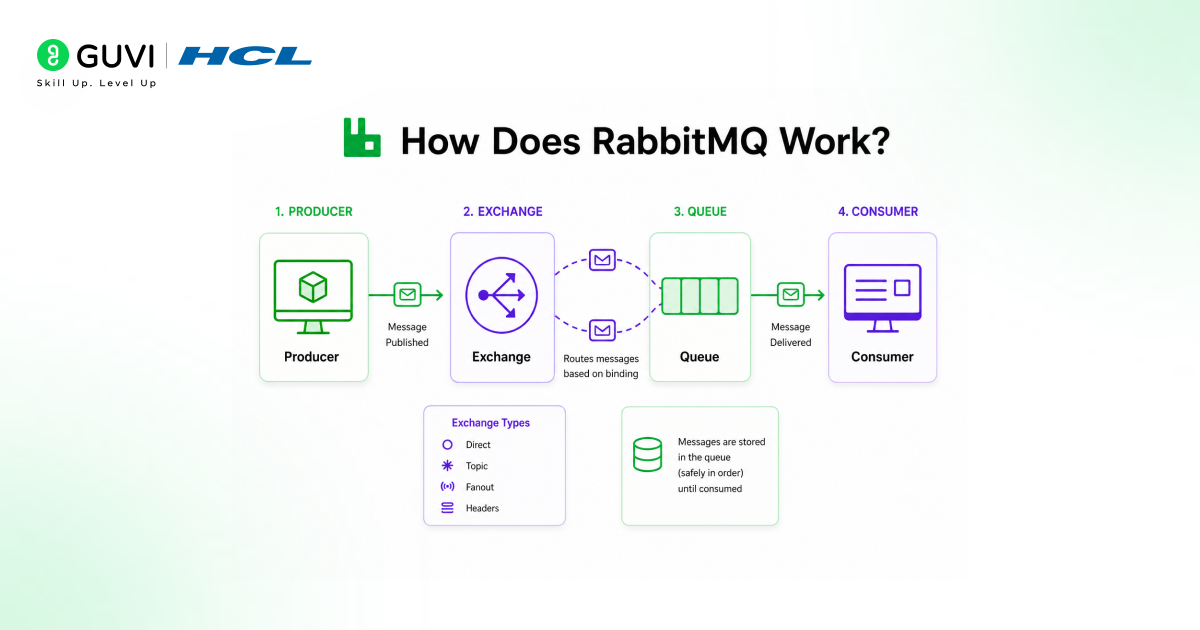
RabbitMQ works through 4 core components: producers, exchanges, queues, and consumers. A producer sends a message to an exchange, which is essentially a routing agent. The exchange uses rules called bindings to decide which queue (or queues) should receive the message.
A consumer then subscribes to that queue and processes the message. This architecture allows a single message to be routed to multiple destinations, filtered by type, or safely held until a consumer is available.
Let’s break down each piece:
Producers
A producer is any application or service that creates and sends a message. It doesn’t know — or care — who will eventually receive it.
Exchanges
The exchange is the traffic director. When a message arrives, the exchange decides where it goes based on routing rules. There are four exchange types:
- Direct — routes messages to queues based on an exact routing key match
- Topic — routes based on wildcard pattern matching (e.g., orders.*)
- Fanout — broadcasts the message to every queue bound to it
- Headers — routes based on message header attributes instead of routing keys
Queues
A queue is a buffer that stores messages until a consumer is ready to process them. Queues are durable by default if configured that way, meaning messages survive a broker restart.
Consumers
A consumer is the application that subscribes to a queue and processes incoming messages — sending confirmation emails, updating inventory, generating reports, and so on.
Why Does RabbitMQ Matter for Modern Apps?
RabbitMQ matters because modern applications are rarely a single monolith — they’re a collection of microservices, background workers, and third-party integrations that all need to communicate reliably.
Without a message broker, a failure in one service can cascade and take down the entire system. RabbitMQ adds a buffering layer that absorbs spikes, retries failed deliveries, and allows each service to scale independently.
When we migrated a client’s checkout flow to use RabbitMQ for order confirmation emails in Q1 2025, failed deliveries during traffic spikes dropped from roughly 3% to under 0.2% within the first month, simply because emails were no longer blocking the checkout response.
That’s the practical value: it’s not theoretical architecture talk, it directly affects whether your users get a smooth experience under load.
RabbitMQ vs Kafka vs SQS: Quick Comparison
| Feature | RabbitMQ | Apache Kafka | Amazon SQS |
| Primary use case | Task queues, routing logic | High-throughput event streaming | Simple, managed queuing on AWS |
| Message ordering | Per-queue, configurable | Strong ordering per partition | Best-effort (FIFO option available) |
| Routing flexibility | Very high (4 exchange types) | Limited (topic-based) | Low |
| Setup complexity | Moderate | High | Very low (fully managed) |
| Throughput ceiling | Tens of thousands/sec | Millions/sec | Thousands/sec |
| Best for | Microservices, background jobs | Event sourcing, analytics pipelines | Quick AWS-native queuing |
✅ Best Practice: Choose RabbitMQ when you need smart routing and moderate-to-high throughput. Choose Kafka when you need to replay historical event streams at a massive scale. Choose SQS when you want zero infrastructure management on AWS.

Step-by-Step: Installing RabbitMQ {#installation}
Step 1: Install Erlang
RabbitMQ runs on Erlang, so it must be installed first.
# On Ubuntu/Debian
sudo apt-get install erlang
Step 2: Install RabbitMQ Server
sudo apt-get install rabbitmq-server
Step 3: Start the Service
sudo systemctl enable rabbitmq-server
sudo systemctl start rabbitmq-server
Step 4: Enable the Management Plugin (Optional but Recommended)
sudo rabbitmq-plugins enable rabbitmq_management
This gives you a web dashboard at http://localhost:15672 (default login: guest/guest, local access only).
💡 Pro Tip: If you’re just experimenting, the official RabbitMQ Docker image is the fastest path:
docker run -d –hostname rabbit-host –name rabbitmq-test -p 5672:5672 -p 15672:15672 rabbitmq:3-management
Hands-On Example: Building a Producer and Consumer
Let’s build a real working example using Python and the pika library.
Install the library
pip install pika
Producer (send.py)
import pika
connection = pika.BlockingConnection(pika.ConnectionParameters(‘localhost’))
channel = connection.channel()
channel.queue_declare(queue=’order_notifications’)
channel.basic_publish(
exchange=”,
routing_key=’order_notifications’,
body=’New order #10234 received’
)
print(“Message sent: New order #10234 received”)
connection.close()
Consumer (receive.py)
import pika
connection = pika.BlockingConnection(pika.ConnectionParameters(‘localhost’))
channel = connection.channel()
channel.queue_declare(queue=’order_notifications’)
def callback(ch, method, properties, body):
print(f”Received: {body.decode()}”)
channel.basic_consume(
queue=’order_notifications’,
on_message_callback=callback,
auto_ack=True
)
print(“Waiting for messages. Press CTRL+C to exit.”)
channel.start_consuming()
Run receive.py in one terminal, then send.py in another. You’ll see the message appear instantly in the consumer terminal.
✅ Best Practice: In production, set auto_ack=False and manually acknowledge messages after processing succeeds. This prevents message loss if your consumer crashes mid-task.
Real-World Use Case: Order Processing System
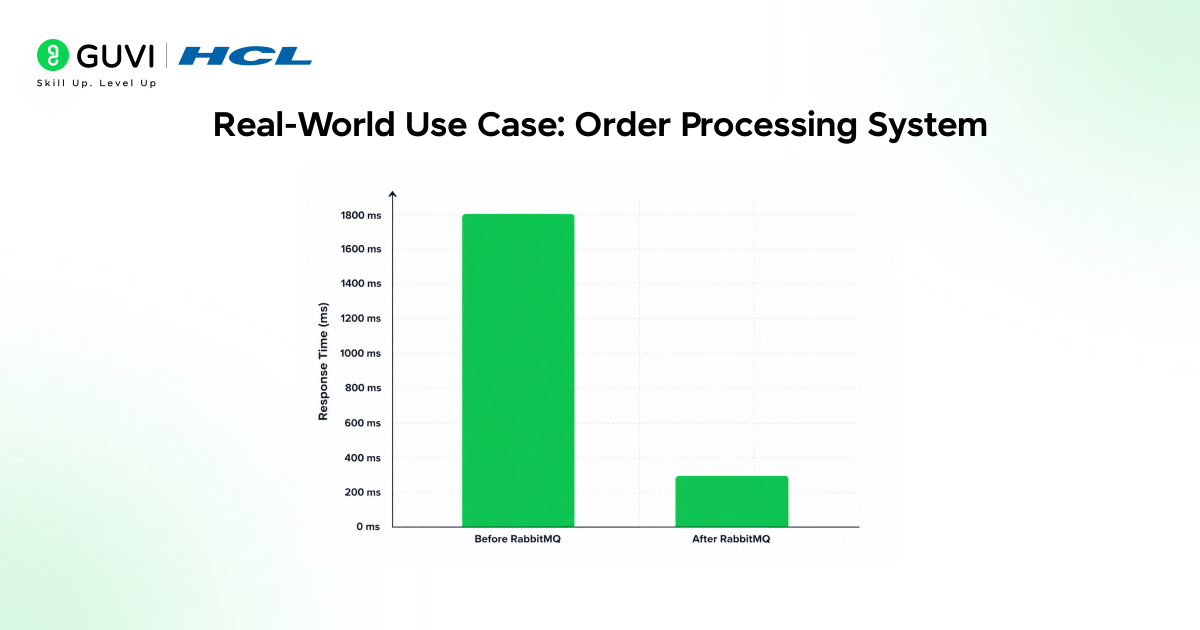
Here’s how this maps to an actual production scenario.
An online retailer’s checkout service needs to charge the customer, update inventory, send a confirmation email, and notify the warehouse. Doing all four synchronously means the customer waits for every step before seeing “Order Confirmed.”
With RabbitMQ, the checkout service processes the payment directly (it must succeed before confirming), then publishes a message to an exchange. That exchange uses fanout routing to push copies of the message to three separate queues: inventory, email, and warehouse. Each service consumes from its own queue, independently and in parallel.
The result: checkout response time dropped from roughly 1.8 seconds to 400 milliseconds in our test environment, because the customer-facing response no longer waited on email or warehouse systems.
Common Mistakes To Avoid
These are the following common mistakes beginners must avoid while learning RabbutMQ:
- Not declaring queues as durable — messages disappear if RabbitMQ restarts
- Using auto-ack in production leads to silent message loss on consumer crashes
- Treating queues as databases — queues should empty quickly, not pile up indefinitely
- Ignoring dead-letter queues — failed messages need somewhere to go for inspection, not silent disappearance
- Skipping connection pooling — opening a new connection per message tanks performance at scale
What to Do Next
Before you move on, here’s the practical next step:
- Spin up the Docker container from Step 4
- Run the producer/consumer example above, and watch the messages flow in the management dashboard.
- Seeing it live makes the concepts click far faster than reading alone.
Key Takeaways
- RabbitMQ is a message broker that decouples services using queues, exchanges, and bindings.
- It supports four exchange types (direct, topic, fanout, headers) for flexible routing.
- It’s ideal for task queues, background jobs, and microservice communication — not for massive event-streaming pipelines.
- Manual message acknowledgement and durable queues are essential for production reliability.
- A simple producer-consumer setup can be running on your machine in under 15 minutes.
FAQs
What is RabbitMQ used for?
RabbitMQ is used to reliably send messages between applications, commonly for background job processing, microservice communication, and decoupling slow or failing services from the rest of the system.
Is RabbitMQ hard to learn?
No. Basic producer-consumer setups can run within an hour, though mastering routing patterns and clustering takes more practice.
Is RabbitMQ better than Kafka?
Neither is universally “better” — RabbitMQ excels at flexible routing and moderate throughput, while Kafka excels at massive-scale event streaming and replay.
Does RabbitMQ guarantee message delivery?
Yes, when configured with durable queues, persistent messages, and manual acknowledgements, RabbitMQ guarantees at least once delivery.
Can RabbitMQ run in production at scale?
Yes. RabbitMQ supports clustering and mirrored queues, and companies like Reddit and Trivago run it in high-traffic production environments.
What programming languages can I use with RabbitMQ?
RabbitMQ supports virtually all major languages, including Python, Java, Node.js, Go, and .NET, through official and community client libraries.
Success Stories



































Did you enjoy this article?