


Python Articles
Excel SQL Python for BPO Professionals Best Guide to Move Into Data Science
Go vs Python for Forward Deployed Engineering Workloads
Python for Forward Deployed Engineers: What You Actually Need to Know
Freelancing as a Python Developer: Getting Your First Client


Get In Touch For Details! Request More Information

How to Create an API in Python? A Beginner’s Guide
Aug 18, 2026 4 Min Read 714 Views
(Last Updated)
Table of contents
- TL;DR Summary
- What is an API and Why Does it Matter?
- Choosing the Right Framework: FastAPI vs Flask
- Step 1: Set Up Your Development Environment
- Step 2: Create Your First API File
- Running Your API Locally
- Step 3: Add More Routes and Handle Data
- Step 4: Test Your API
- Real-World Example: Serving a Machine Learning Model
- Common Mistakes to Avoid
- Conclusion
- FAQs
- What is the easiest way to create an API in Python?
- Do I need to know web development to build a Python API?
- Is Flask still good for building APIs in 2026?
- What is Uvicorn used for?
- Can I use Python APIs to connect a machine learning model to a website?
- How do I test my API without writing extra code?
TL;DR Summary
To create an API in Python, you need to pick a framework (FastAPI or Flask), set up a virtual environment, define routes that handle requests, and run a local server to test your endpoints. This guide walks you through each step using FastAPI, the framework most recommended for new projects in 2026, while also showing how Flask compares.
Building your first API can feel intimidating if you’re new to backend development. But once you understand the core idea, it becomes one of the most useful skills you can add to your developer toolkit.
What is an API and Why Does it Matter?
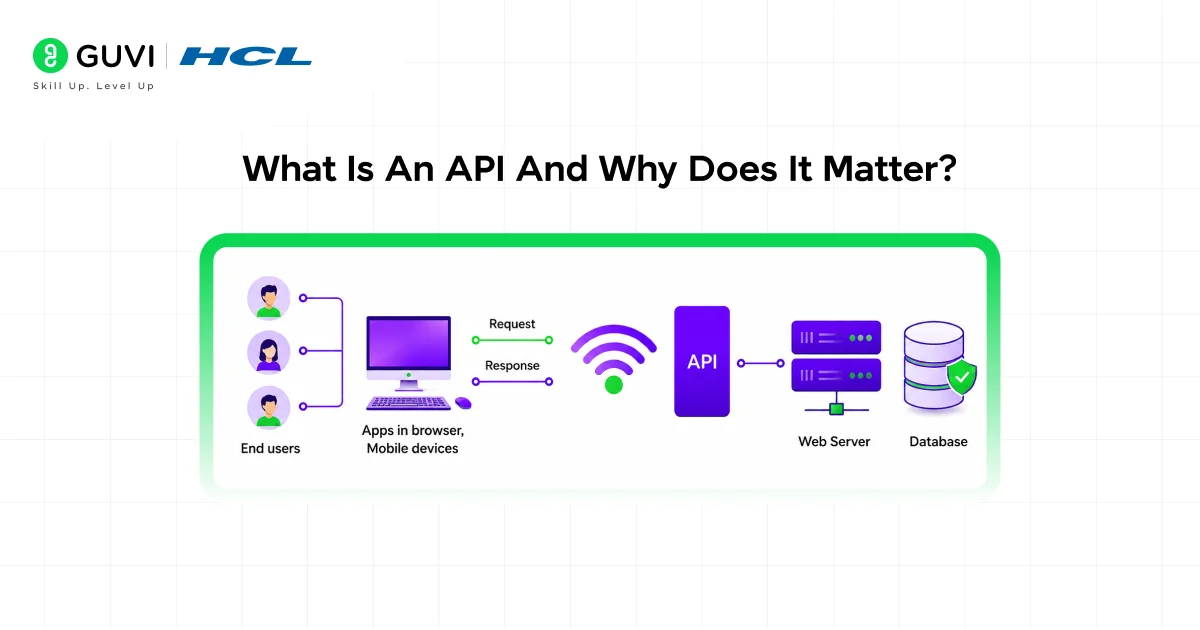
An API, or Application Programming Interface, is a set of rules that lets two programs talk to each other. When you check the weather on your phone, an API fetches that data from a server and sends it back to your app.
As a Python developer, you’ll often need to build APIs to connect your code to a website, mobile app, or another service. This is especially common in data science, machine learning, and full stack development, where models or databases need to “talk” to a front end.
Python is currently the most popular programming language, largely because it supports everything from web frameworks like Django, Flask, and FastAPI to machine learning tools and LLM integrations. This makes it one of the most versatile languages for building real-world APIs.
Choosing the Right Framework: FastAPI vs Flask
Before you write a single line of code, you need to choose a framework. The two most common choices for Python APIs are FastAPI and Flask.
If you’re building a new REST service that doesn’t need Django’s admin panel, FastAPI tends to be the more productive choice, while Flask remains a solid option for a small webhook or a quick proof of concept.
For this guide, you’ll use FastAPI, since it’s the most recommended option for beginners building APIs in 2026.
Step 1: Set Up Your Development Environment
You’ll need a few things ready before you start coding.
- Python 3.9 or higher installed on your system
- A code editor such as VS Code
- Basic familiarity with Python functions and decorators
Once Python is installed, create a new project folder and set up a virtual environment. This keeps your project’s dependencies separate from other Python projects on your machine.
mkdir my-first-api

cd my-first-api

python -m venv venv

venv\Scripts\activate
Now install FastAPI along with Uvicorn, the server that will run your API.
pip install fastapi uvicorn
Step 2: Create Your First API File
Create a new file called main.py inside your project folder. This file will hold the core logic of your API.
Add the following code to define your first endpoint.
from fastapi import FastAPI

app = FastAPI()

@app.get("/")

def read_root():

    return {"message": "Welcome to your first API"}
This small block of code does three things. It creates an instance of your FastAPI application, defines a route for the homepage, and returns a simple JSON response when someone visits that route.
Running Your API Locally
To see your API in action, run this command in your terminal.
uvicorn main:app --reload
Once your server is running, you can head over to your project’s automatically generated API documentation to test endpoints directly in the browser. This is one of the biggest advantages FastAPI offers over older frameworks.
Step 3: Add More Routes and Handle Data
Most real APIs need to do more than return a static message. They need to accept data, process it, and return a response based on that input.
Here’s how you can add a route that accepts a parameter from the URL.
@app.get("/students/{student_id}")

def get_student(student_id: int):

    return {"student_id": student_id, "status": "active"}

You can also create a route that accepts data sent by the user through a POST request.

python

from pydantic import BaseModel

class Student(BaseModel):

    name: str

    course: str

@app.post("/students")

def create_student(student: Student):

    return {"message": f"{student.name} enrolled in {student.course}"}
This second example introduces Pydantic, a library FastAPI uses to automatically validate incoming data. If someone sends incorrect or missing fields, FastAPI returns a clear error without you writing extra validation code.

Step 4: Test Your API
Testing makes sure your API behaves the way you expect before you connect it to a real application.
- Use the auto-generated documentation page to send test requests
- Try tools like Postman or Thunder Client for more control
- Check both successful responses and error cases
Building a REST API in FastAPI essentially involves decorating Python functions to handle specific HTTP methods, so most of your testing will focus on confirming that each decorated function returns the correct response for the given input.
Real-World Example: Serving a Machine Learning Model
A common use case for Python APIs is connecting a trained machine learning model to a web application. For example, a healthcare startup might train a model that predicts patient risk scores, then wrap that model inside a FastAPI endpoint so a hospital dashboard can send patient data and receive a prediction in real time.
This is exactly how many ML-powered products move from a notebook experiment to a usable tool.
Common Mistakes to Avoid
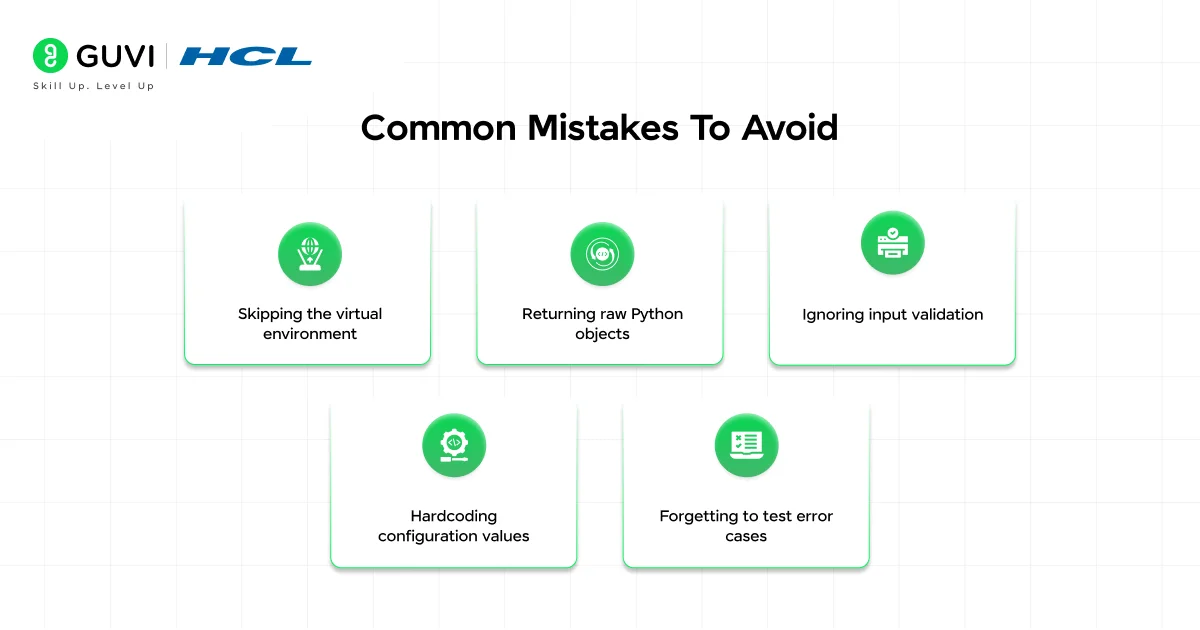
- Skipping the virtual environment: Installing packages globally can cause version conflicts across projects. Always create a virtual environment for each new API project.
- Returning raw Python objects: FastAPI expects JSON-serializable data. Use dictionaries, lists, or Pydantic models instead of custom Python objects.
- Ignoring input validation: Beginners often assume users will send correct data. Use Pydantic models to catch bad input automatically before it reaches your logic.
- Hardcoding configuration values: Avoid writing database URLs or secret keys directly in your code. Use environment variables instead.
- Forgetting to test error cases: Many learners only test the “happy path.” Always check what happens when required fields are missing or invalid.
If you are just starting out on Python and want to learn thoroughly at your own pace, then consider enrolling for HCL GUVI’s Zero to Hero Python Course, which is designed for absolute beginners to advanced professionals.
Conclusion
Creating an API in Python is far more approachable than it sounds once you break it into steps. With FastAPI, you can set up a working API, define routes, validate data, and test everything through an automatically generated interface, all within a single Python file.
As you grow more comfortable, you can expand into databases, authentication, and deployment. Start small, test often, and build on top of your first working endpoint, this foundation will serve you well as you move into more advanced backend projects.
FAQs
1. What is the easiest way to create an API in Python?
FastAPI is widely considered the easiest framework for beginners because it includes automatic documentation and built-in data validation, reducing the amount of code you need to write.
2. Do I need to know web development to build a Python API?
No, you only need a basic understanding of Python functions. Frameworks like FastAPI handle most of the web-related complexity for you.
3. Is Flask still good for building APIs in 2026?
Yes, Flask remains a good choice for small projects, prototypes, or simple webhooks, though FastAPI is generally recommended for new, larger projects.
4. What is Uvicorn used for?
Uvicorn is the server that runs your FastAPI application. Without it, your API code won’t be accessible through a browser or another program.
5. Can I use Python APIs to connect a machine learning model to a website?
Yes, this is one of the most common use cases. You wrap your trained model inside an API endpoint so other applications can send data and receive predictions.
6. How do I test my API without writing extra code?
FastAPI automatically generates an interactive documentation page where you can test every endpoint directly from your browser.
Success Stories

About the Author
Lukesh S
A professional content writer who has experience in freelancing and now working as a Technical Content Writer at HCL GUVI having sound knowledge in Blog Writing and Creative Writing!
View all posts by Lukesh S
Connect with me @










Did you enjoy this article?