


Python Articles
Freelancing as a Python Developer: Getting Your First Client
Common Python Mistakes Beginners Make And How to Fix Them
Python Best Practices: Writing Clean, Maintainable Code Like a Pro
How to Build a Python Developer Portfolio That Gets You Hired


Get In Touch For Details! Request More Information
Building a PDF Question-Answering Bot with Python
Aug 17, 2026 4 Min Read 305 Views
(Last Updated)
Businesses, researchers, students, and professionals often work with lengthy PDF documents containing valuable information. Finding specific answers within hundreds of pages can be time-consuming and inefficient.
A PDF Question-Answering Bot solves this challenge by allowing users to upload a PDF and ask questions in natural language. Instead of manually searching through documents, the AI retrieves relevant content and generates accurate responses based on the document’s information.
Table of contents
- TL;DR
- What Is a PDF Question-Answering Bot?
- Key Components of a PDF QA Bot
- Why Learn PDF Question-Answering Development with Python?
- Benefits of Building PDF QA Applications
- Turn PDFs into an AI Assistant with Python
- Step 1: Install Required Libraries
- Step 2: Load the PDF Document
- Step 3: Split the Text into Chunks
- Step 4: Create Vector Embeddings
- Step 5: Store Embeddings in FAISS
- Step 6: Create the Retrieval Pipeline
- Step 7: Ask Questions About the PDF
- How Does a PDF Question-Answering Bot Work?
- Key Stages
- Real-World Applications of PDF QA Systems
- Research Paper Analysis
- Legal Document Review
- Enterprise Knowledge Management
- Educational Learning Assistants
- Financial Report Analysis
- Key Takeaways
- What To Do Next
- Conclusion
- FAQs
- What is a PDF Question-Answering Bot?
- Can PDF QA systems work with multiple PDFs?
- Do I need machine learning knowledge to build a PDF QA bot?
- Which vector databases can be used for PDF QA systems?
- Can PDF QA systems work with scanned PDFs?
- Is LangChain required for building PDF QA applications?
- Are PDF question-answer systems still relevant in 2026?
TL;DR
- A PDF Question-Answering Bot is an AI application that allows users to ask questions and receive answers from PDF documents.
- Python and LangChain help developers build PDF QA systems using document retrieval and large language models (LLMs).
- PDF text is converted into embeddings and stored in a vector database for efficient similarity search.
- Retrieval-Augmented Generation (RAG) enables the system to retrieve relevant document content before generating answers.
- Building a PDF Question-Answering Bot helps developers learn document intelligence, vector databases, embeddings, LangChain, and Generative AI application development.
For learners looking to strengthen their Python skills beyond this project, HCL GUVI’s Python Course offers hands-on training in Python programming, automation, data handling, and real-world projects that help build a strong foundation for AI, machine learning, and software development.
Data Point: According to Gartner, nearly 80% of enterprise data exists in unstructured formats such as PDFs, documents, emails, and reports, creating a growing demand for intelligent document search and retrieval solutions.
What Is a PDF Question-Answering Bot?
A PDF Question-Answering (QA) Bot is an AI application that enables users to ask natural language questions about PDF documents and receive accurate, context-aware answers. It works by extracting text from one or more PDF files, converting the content into vector embeddings, retrieving the most relevant sections based on a user’s query, and passing that context to a large language model (LLM) to generate responses grounded in the document. This retrieval-augmented approach improves factual accuracy and makes PDF QA bots ideal for applications such as document search, research assistance, customer support, and enterprise knowledge management.
Source: https://python.langchain.com/docs/concepts/rag/
What Is a PDF Question-Answering Bot?
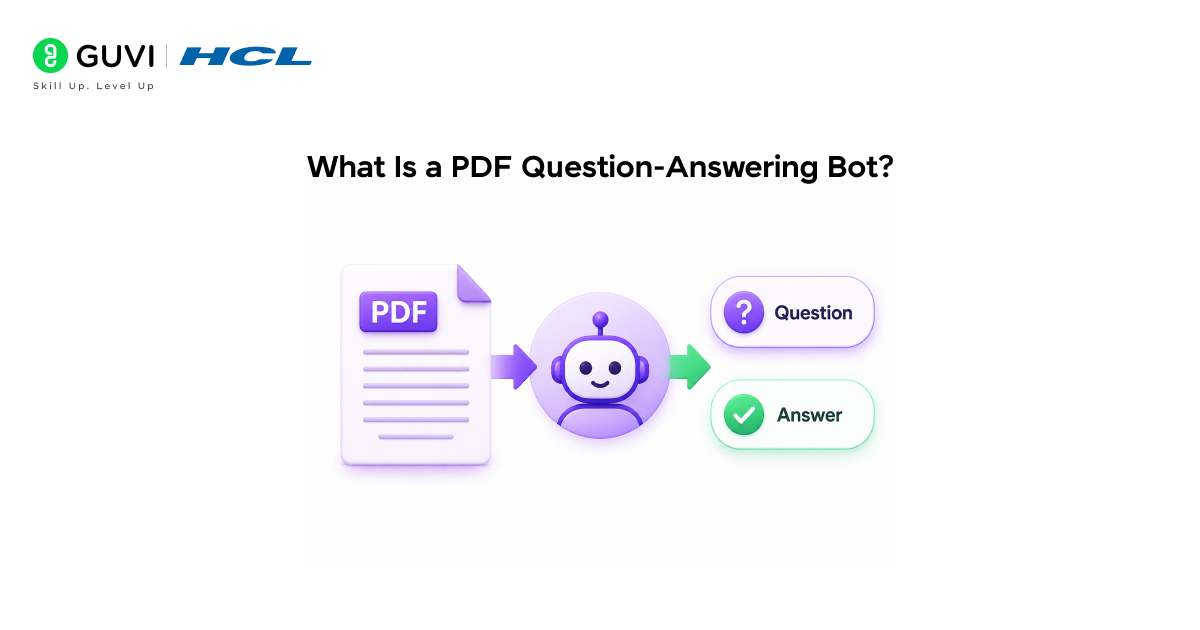
A PDF Question-Answering Bot is an AI-powered application that understands the content of PDF documents and answers user questions based on that content.
Instead of relying solely on pre-trained knowledge, the system retrieves relevant sections from uploaded PDFs before generating responses. This retrieval-first approach improves factual accuracy and makes the application useful for document-heavy tasks.
Python is widely used for PDF QA development because it offers powerful libraries for PDF processing, vector search, embeddings, and AI integration.
Key Components of a PDF QA Bot
- PDF Loader – Extracts text from PDF documents.
- Text Splitter – Breaks large documents into manageable chunks.
- Embedding Model – Converts text into vector representations.
- Vector Database – Stores embeddings for similarity search.
- Retriever – Finds relevant content for a user query.
- Large Language Model (LLM) – Generates answers using retrieved information.
Many modern enterprise AI assistants are powered by document retrieval systems that enable employees to search company reports, policies, contracts, technical documentation, and internal knowledge bases without retraining the underlying AI model. By retrieving relevant information in real time, these systems help deliver more accurate, up-to-date, and context-aware responses while reducing the cost and complexity of maintaining enterprise AI applications.

Why Learn PDF Question-Answering Development with Python?
Python makes it easy to build intelligent document search applications without requiring extensive machine learning expertise.
Benefits of Building PDF QA Applications
| Benefit | Why It Matters |
| Practical AI Project | Builds real-world development skills |
| Python Ecosystem | Access to powerful AI libraries |
| Enterprise Relevance | Useful across multiple industries |
| RAG Experience | Teaches retrieval-based AI development |
| Portfolio Value | Demonstrates applied AI knowledge |
Data Point: According to LangChain documentation, retrieval-based systems significantly improve response quality by supplying external context during answer generation.
If you’re new to Python, HCL GUVI’s Python eBook can help strengthen the programming fundamentals needed to build AI-powered document applications with confidence.
Turn PDFs into an AI Assistant with Python
Let’s build a simple PDF Question-Answering application.
Step 1: Install Required Libraries
pip install langchain

pip install langchain-community

pip install langchain-huggingface

pip install pypdf

pip install faiss-cpu

pip install sentence-transformers

Verify installation:

import langchain

print("LangChain Installed Successfully")
Step 2: Load the PDF Document
from langchain_community.document_loaders import PyPDFLoader

loader = PyPDFLoader("sample.pdf")

documents = loader.load()
Step 3: Split the Text into Chunks
from langchain.text_splitter import RecursiveCharacterTextSplitter

splitter = RecursiveCharacterTextSplitter(

   chunk_size=1000,

   chunk_overlap=200

)

chunks = splitter.split_documents(documents)
Step 4: Create Vector Embeddings
from langchain_huggingface import HuggingFaceEmbeddings

embeddings = HuggingFaceEmbeddings()
Step 5: Store Embeddings in FAISS
from langchain_community.vectorstores import FAISS

vector_store = FAISS.from_documents(

   chunks,

   embeddings

)
Step 6: Create the Retrieval Pipeline
retriever = vector_store.as_retriever()Step 7: Ask Questions About the PDF
query = “What are the key findings in this document?” results = retriever.get_relevant_documents(query) for doc in results: print(doc.page_content)⚠️ Warning
Always use clean and properly formatted PDF documents when learning document retrieval systems. Poor formatting, scanned images, and corrupted PDFs can negatively impact retrieval accuracy and answer quality.
Once you’ve built a basic PDF QA bot, you can explore advanced techniques such as hybrid search, metadata filtering, citation generation, and conversational memory.
How Does a PDF Question-Answering Bot Work?
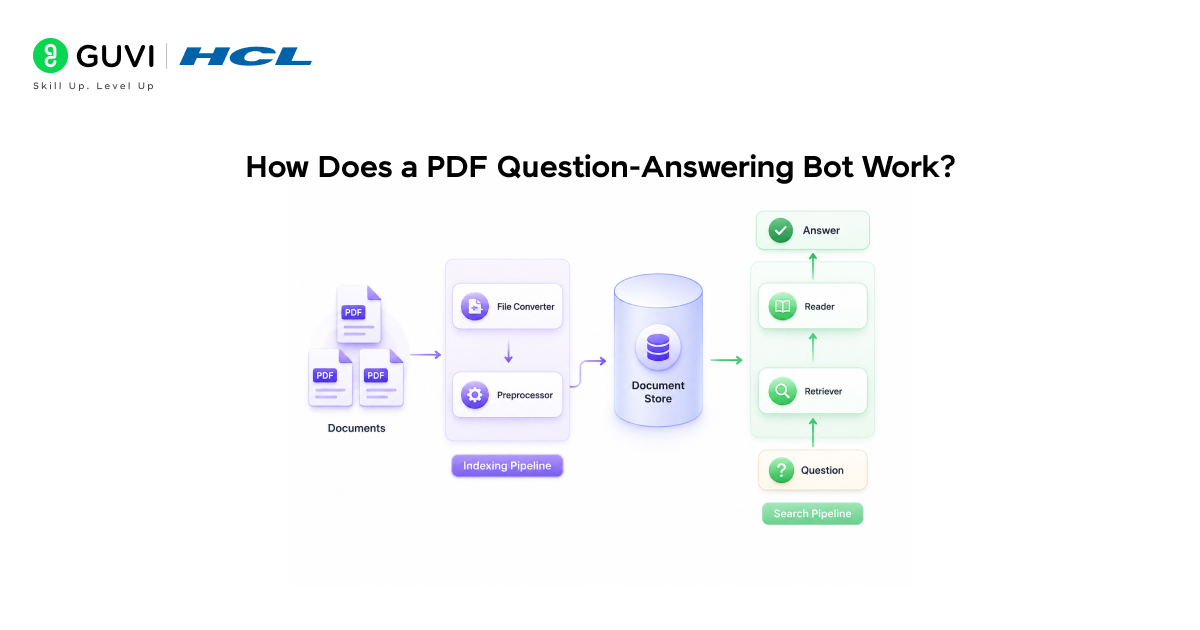
A PDF QA Bot retrieves relevant information from documents before generating answers.
Instead of immediately responding to a query, the system first searches the document collection, identifies relevant sections, and then provides those sections as context to the language model.
Key Stages
- Document Upload
- Text Extraction
- Text Chunking
- Embedding Generation
- Vector Storage
- Similarity Search
- Context Injection
- Response Generation
Data Point: Meta’s RAG research demonstrated that retrieval-enhanced language models can significantly improve performance on knowledge-intensive natural language processing tasks.
Real-World Applications of PDF QA Systems
PDF Question-Answering systems are used across industries where large volumes of documents need to be searched efficiently.
1. Research Paper Analysis
Researchers use PDF QA systems to quickly identify findings, methodologies, and conclusions from academic publications.
2. Legal Document Review
Law firms can retrieve specific clauses, obligations, and legal terms from lengthy contracts and agreements.
3. Enterprise Knowledge Management
Organizations use document-based AI assistants to help employees search policies, reports, and internal documentation.
4. Educational Learning Assistants
Students can ask questions about textbooks, lecture notes, and study materials without manually reviewing entire documents.
5. Financial Report Analysis
Analysts can retrieve key financial metrics, trends, and insights from annual reports and earnings statements.
✅ Best Practice
Organize documents consistently and use meaningful file names and metadata. A well-maintained document repository improves retrieval accuracy and makes AI systems easier to scale.
To strengthen your Python skills, HCL GUVI’s Python Course offers hands-on learning and practical projects for real-world application development.
Key Takeaways
- PDF QA Bots enable natural-language interaction with documents.
- Python provides powerful tools for document intelligence applications.
- Vector databases improve retrieval efficiency and relevance.
- Retrieval-based systems reduce hallucinations and improve accuracy.
- PDF QA projects help build practical Generative AI development skills.
What To Do Next
After completing this tutorial, explore:
- Conversational PDF chatbots
- Multi-document retrieval systems
- Hybrid search architectures
- Enterprise knowledge assistants
- Citation-aware document AI systems
Building increasingly complex document-based applications will strengthen your Generative AI skills and help create portfolio-ready projects.
Conclusion
PDF Question-Answering Bots showcase how retrieval and Generative AI can work together to make information more accessible. By learning how to process documents, generate embeddings, and retrieve relevant content, you gain hands-on experience with technologies that power many modern AI applications. This project serves as a practical stepping stone toward building more advanced AI-driven solutions.
FAQs
1. What is a PDF Question-Answering Bot?
A PDF Question-Answering Bot is an AI application that allows users to ask questions about PDF documents and receive answers generated from the document’s content.
2. Can PDF QA systems work with multiple PDFs?
Yes. Most modern systems can process and search across multiple documents simultaneously.
3. Do I need machine learning knowledge to build a PDF QA bot?
No. Basic Python knowledge is usually sufficient for building beginner-level PDF QA applications using frameworks like LangChain.
4. Which vector databases can be used for PDF QA systems?
Popular options include FAISS, Pinecone, Chroma, Weaviate, and Milvus.
5. Can PDF QA systems work with scanned PDFs?
Yes, but scanned PDFs typically require Optical Character Recognition (OCR) before text can be extracted and indexed.
6. Is LangChain required for building PDF QA applications?
No. However, LangChain simplifies document processing, retrieval workflows, and LLM integration.
7. Are PDF question-answer systems still relevant in 2026?
Yes. They remain one of the most valuable enterprise AI applications because they improve document accessibility, enhance productivity, and reduce the time required to locate critical information.
Success Stories

About the Author
Vishalini Devarajan
An Aerospace Engineer turned content writer, I focus on making complex concepts easy to understand through well-structured, reader-friendly blogs. Whether it’s a technical topic or a non-technical one, I love creating content that is clear, engaging, and impactful.
View all posts by Vishalini Devarajan
Connect with me @












Did you enjoy this article?