


AWS Kubernetes Articles
Istio Service Mesh Tutorial for Beginners
Crossplane Tutorial: A Practical Guide for Learners


Get In Touch For Details! Request More Information
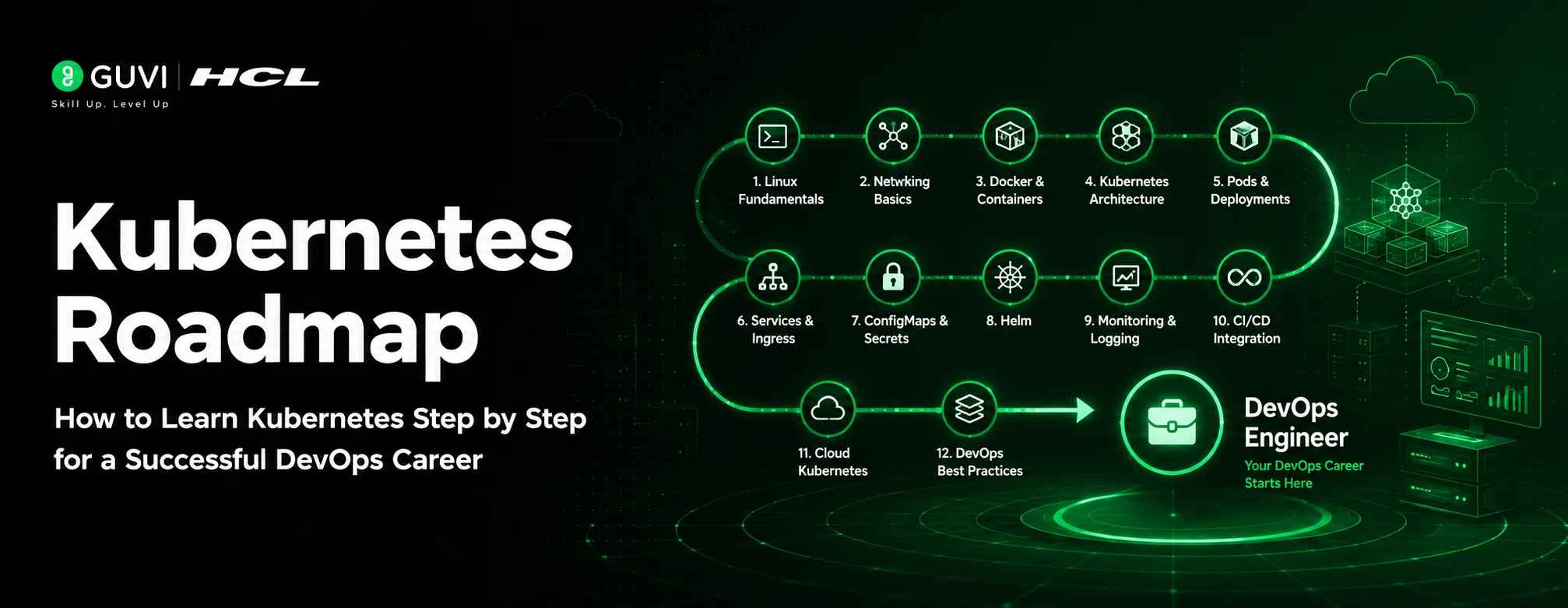
Kubernetes Roadmap 2026: How to Learn Kubernetes Step by Step for a Successful DevOps Career
Jun 01, 2026 9 Min Read 1729 Views
(Last Updated)
Modern applications don’t fail because developers can’t write code. They fail because running that code reliably at scale is hard.
A single container is easy to manage. But what happens when you have dozens of services, thousands of users, unpredictable traffic spikes, and deployments happening every day? Suddenly, manually managing containers becomes a full-time job. That’s the problem Kubernetes was designed to solve.
Originally developed by Google and later open-sourced in 2014, Kubernetes has become the industry standard for container orchestration. Today, it powers everything from streaming platforms and financial systems to cloud-native startups and enterprise applications. Whether you’re deploying a simple web application or managing hundreds of microservices, Kubernetes provides the automation, scalability, and resilience needed to keep modern infrastructure running smoothly.
The demand for Kubernetes skills has grown just as rapidly as its adoption. Companies are actively hiring DevOps Engineers, Site Reliability Engineers (SREs), Cloud Engineers, and Platform Engineers who can build and manage Kubernetes-powered environments. Yet many aspiring professionals struggle with one challenge: knowing what to learn and in what order.
Most Kubernetes tutorials either focus on isolated concepts or assume knowledge that beginners haven’t developed yet. As a result, learners often jump between topics without building a solid foundation.
This Kubernetes roadmap is designed to help developers, DevOps engineers, and cloud professionals learn Kubernetes in the right order, from container fundamentals to production-ready cluster management.
Whether you’re a developer looking to move into DevOps, a cloud professional preparing for the CKA certification, or someone starting a career in cloud infrastructure, this guide provides a structured path from fundamentals to production-ready Kubernetes skills. You’ll learn what to focus on, what projects to build, and how to progress through each stage without getting overwhelmed.
By the end, you’ll have a clear roadmap, realistic timelines, and the confidence to work with Kubernetes in real-world environments, not just in tutorials.
Table of contents
- TL;DR
- What Is Kubernetes and Why It Matters in a Kubernetes Roadmap for 2026
- What Kubernetes does for you:
- Is Kubernetes only for large companies?
- Who This Kubernetes Roadmap Is For (And Who It Isn't)
- Primary audience: Mid-level developers (2–5 years experience):
- Secondary audience: DevOps engineers preparing for CKA:
- Tertiary audience: Students, bootcamp graduates, and tech leads:
- How Long Does It Take to Learn Kubernetes? The Honest Timeline
- Phase 0: Prerequisites Before You Write Your First kubectl Command
- Phase 1: Kubernetes Core Concepts Every Developer Must Know
- How a Kubernetes Cluster Works
- The 5 Kubernetes Objects Every Developer Must Know
- Setting Up Your First Cluster
- Phase 2: Kubernetes Workloads, Storage, and Networking Explained
- Kubernetes Workload Types Beyond Deployments
- Kubernetes Networking: What You Actually Need to Know
- Kubernetes Storage: PVs, PVCs, and StorageClasses
- Phase 3: Kubernetes Security, RBAC, Secrets, and Pod Hardening
- Kubernetes RBAC Explained
- Kubernetes Security Best Practices Checklist
- Phase 4: Helm -The Package Manager Every Kubernetes Engineer Uses
- Key Helm Concepts
- Phase 5: Monitoring Kubernetes with Prometheus and Grafana
- The Standard Kubernetes Observability Stack
- Phase 6: Kubernetes CI/CD and GitOps with Argo CD
- What Is GitOps?
- GitOps and CI/CD Tools Compared
- Phase 7: Advanced Kubernetes - CRDs, Operators, and Service Mesh
- Custom Resource Definitions (CRDs) and Operators
- CKA Certification: Is It Worth It and How Do You Pass It?
- Kubernetes Certifications Compared
- The One Kubernetes Project That Covers Everything
- What to build:
- Conclusion
- FREQUENTLY ASKED QUESTIONS
- What is Kubernetes in simple terms?
- Is Kubernetes difficult to learn?
- Do I need to learn Docker before Kubernetes?
- How long does it take to learn Kubernetes?
- Is Kubernetes only useful for large companies?
- What are the most important Kubernetes objects to learn first?
- What is kubectl?
- What is the difference between a Pod and a Deployment?
- Why is Kubernetes used in production environments?
- What is Helm in Kubernetes?
- What is GitOps and why is it important?
- Which monitoring tools are commonly used with Kubernetes?
- Is Kubernetes certification worth it?
- What is the difference between CKA and CKAD?
- What project should beginners build to learn Kubernetes?
TL;DR
- Kubernetes is the industry-standard platform for deploying, scaling, and managing containerized applications.
- Before learning Kubernetes, build a strong foundation in Linux, networking, and Docker.
- Most learners become job-ready in 5–6 months by practicing 7–10 hours per week.
- Start with core concepts such as Pods, Deployments, Services, ConfigMaps, Secrets, and Namespaces.
- Learn Kubernetes workloads, networking, and storage before moving into advanced topics.
- Security is essential, master RBAC, Secrets management, Network Policies, and Pod security early.
- Learn Helm to simplify application deployment and configuration management.
- Build observability skills using Prometheus, Grafana, logging, and autoscaling tools.
- Adopt modern deployment practices through CI/CD pipelines and GitOps with Argo CD.
- Explore advanced topics such as CRDs, Operators, Service Meshes, and Kubernetes for AI/ML workloads.
- The most valuable learning strategy is building a real-world multi-tier application that includes Ingress, Secrets, Helm, monitoring, autoscaling, and GitOps.
- If certification is your goal, focus on the CKA (Certified Kubernetes Administrator) after completing the core roadmap.
- Consistent hands-on practice matters more than watching tutorials, break things, troubleshooting them, and learning how Kubernetes recovers.
- By the end of this roadmap, you’ll have the skills required for DevOps, SRE, Platform Engineering, and Cloud Engineering roles.
Explore: 15 DevOps Engineer Skills You Need to Have
What Is Kubernetes and Why It Matters in a Kubernetes Roadmap for 2026
Kubernetes (K8s) is an open-source container orchestration platform that automates the deployment, scaling, and management of containerized applications. Originally developed by Google and now maintained by the Cloud Native Computing Foundation (CNCF), it is the industry standard for running applications at scale in cloud-native environments.
What Kubernetes does for you:
- Self-healing: automatically restarts failed containers without manual intervention
- Auto-scaling: scales applications up or down based on real-time traffic
- Load distribution: spreads workloads across multiple servers
- Config and secrets management: centralises environment variables, credentials, and config files
- Zero-downtime deployments: Roll out updates gradually, with automatic rollback on failure
Also Read: Tech Upskilling Roadmap 2026: Top Skills, Tools, and Platforms You Need
Is Kubernetes only for large companies?
No. With managed services like Google GKE, Amazon EKS, and Azure AKS, even small teams run production Kubernetes clusters effectively. The tooling has matured enough that the complexity no longer outweighs the benefit at almost any scale.
Who This Kubernetes Roadmap Is For (And Who It Isn’t)
This roadmap is built for three specific groups:
Primary audience: Mid-level developers (2–5 years experience):
- You know Docker and want a structured path into DevOps or cloud-native roles
- You’re tired of piecing together tutorials that assume either too much or too little
Secondary audience: DevOps engineers preparing for CKA:
- You need a learning structure alongside your exam preparation
- You want to fill gaps in storage, security, and cluster administration
Tertiary audience: Students, bootcamp graduates, and tech leads:
- Bootcamp grads entering cloud infrastructure who need a clear on-ramp
- Engineering managers evaluating Kubernetes adoption for their teams
What this roadmap assumes:
- You’re comfortable with the Linux command line
- You’ve used Docker at a basic level
- You’re willing to practice with real clusters, not just read
If you haven’t touched Docker yet, spend 2–3 weeks there first. Kubernetes orchestrates containers; without that foundation, everything here will be harder than it needs to be.
Still wondering how to transition into DevOps? The HCL GUVI Zen Class DevOps Course provides a structured learning path, practical projects, and placement support to help you build job-ready skills with confidence.
How Long Does It Take to Learn Kubernetes? The Honest Timeline
With consistent practice at 7–10 hours per week, most learners reach job-ready competency in 3–5 months.
| Phase | Focus | Duration |
| Phase 0 | Prerequisites – Linux, Docker, Networking | 3–5 weeks |
| Phase 1 | K8s Core Concepts + kubectl | 4–5 weeks |
| Phase 2 | Workloads, Storage, Networking | 5–6 weeks |
| Phase 3 | Security- RBAC, Secrets, Pod hardening | 3–4 weeks |
| Phase 4 | Helm & Package Management | 2–3 weeks |
| Phase 5 | Observability- Prometheus, Grafana | 3–4 weeks |
| Phase 6 | CI/CD & GitOps with Argo CD | 3–4 weeks |
| Phase 7 | Advanced — CRDs, Operators, Service Mesh | 4–6 weeks |
| Total | Beginner → Job-Ready | ~5–6 months |
The single biggest factor that compresses this timeline: building real projects instead of following tutorials passively. The biggest factor that extends it: skipping Docker fundamentals.
Also Explore: What to Learn to Become a DevOps Engineer in 2026?
Phase 0: Prerequisites Before You Write Your First kubectl Command
Skipping prerequisites is the number one reason beginners get stuck and quit. Before writing your first kubectl command, you need solid footing in three areas.
1. Linux Command Line Basics
Kubernetes clusters run on Linux. You need to be comfortable with:
- File navigation: ls, cd, cat, grep, find
- Process management: ps, kill, top
- File permissions: chmod, chown, sudo
- Basic text editors: Vim or Nano
- SSH into remote machines
Recommended resource: Linux Journey (free) or The Linux Command Line by William Shotts
2. Networking Fundamentals
Kubernetes networking is one of the hardest areas to debug. Build this foundation now:
- IP addresses, subnets, and CIDR notation
- How DNS resolves domain names
- HTTP vs HTTPS, TCP vs UDP
- What a load balancer and reverse proxy do
- Ports and basic firewall concepts
3. Docker – The Real Prerequisite
This is non-negotiable. Before starting Kubernetes, you must be able to:
- Write a Dockerfile and build an image
- Run, stop, and inspect containers with docker run, exec, and logs
- Push and pull images from Docker Hub
- Use Docker Compose for multi-container applications
- Understand Docker volumes and basic networking
Phase 0 checkpoint: Containerize a simple Node.js or Python app, run it locally with Docker, and push it to Docker Hub. If you can do this without looking anything up, you’re ready for Phase 1.
Phase 1: Kubernetes Core Concepts Every Developer Must Know
How a Kubernetes Cluster Works
A Kubernetes cluster has two main parts:
- Control Plane: the brain of the cluster. Includes the API server (entry point for all commands), etcd (key-value store holding all cluster state), the scheduler (assigns Pods to nodes), and the controller manager (runs control loops to maintain desired state).
- Worker Nodes: where your application containers actually run. Each node runs a kubelet (the node agent), kube-proxy (handles network routing), and a container runtime like containerd.
The key mental model: you don’t tell Kubernetes where to run things. You declare what you want, three replicas of this app, always, and Kubernetes continuously makes it so. This is called the desired-state model.
The 5 Kubernetes Objects Every Developer Must Know
1. Pod
- The smallest deployable unit in Kubernetes
- Wraps one or more containers that share networking and storage
- Ephemeral by nature, don’t store data directly in Pods
2. Deployment
- Manages a set of identical Pods (replicas)
- Handles rolling updates when you change your application image
- Automatically restarts Pods that crash or fail health checks
3. Service
- Gives Pods a stable network endpoint (Pods get new IPs when they restart; Services don’t)
- Three main types: ClusterIP (internal), NodePort (node-level exposure), LoadBalancer (cloud load balancer)
4. ConfigMap and Secret
- ConfigMap stores non-sensitive configuration, environment variables, and config files
- Secret stores sensitive data, passwords, API keys, TLS certificates
- Both are injected into Pods as environment variables or mounted as files
5. Namespace
- Logically divides a cluster into isolated environments
- Common pattern: separate namespaces for dev, staging, and production
Setting Up Your First Cluster
| Option | Best For | Notes |
| Minikube | Absolute beginners | Single-node, runs locally |
| Kind | Multi-node testing | Uses Docker containers as nodes |
| Play with Kubernetes | No-install practice | Free 4-hour browser session |
| GKE / EKS / AKS free tier | Real cloud exposure | Recommended after Phase 1 |
Phase 1 checkpoint: Deploy an Nginx Pod, expose it with a Service, view its logs, shell into it, and delete it, all from the CLI. Add alias k=kubectl to your shell config immediately. You will type this command thousands of times.
Phase 2: Kubernetes Workloads, Storage, and Networking Explained
Kubernetes Workload Types Beyond Deployments
| Workload | Use Case |
| StatefulSet | Databases, Kafka, Zookeeper, and apps needing a stable identity and persistent storage |
| DaemonSet | One Pod per node, log collectors, monitoring agents, network plugins |
| Job | Run a task to completion, batch processing, and database migrations |
| CronJob | Scheduled tasks, report generation, data cleanup, periodic jobs |
Kubernetes Networking: What You Actually Need to Know
Kubernetes networking follows a flat model: every Pod gets its own IP address and can communicate with any other Pod without NAT. The CNI plugin (Calico, Cilium, or Flannel) handles the actual implementation.
The three networking concepts to master:
Ingress
- Manages external HTTP/HTTPS access to services inside the cluster
- A single Ingress Controller routes traffic by hostname or URL path
- Eliminates the need to provision a separate load balancer per service
- Common controllers: Nginx Ingress, Traefik, AWS ALB Ingress
Network Policies
- Kubernetes-native firewall rules between Pods
- By default, every Pod can talk to every other Pod
- Network Policies restrict this, defining exactly which Pods can communicate and on which ports
CoreDNS
- Internal DNS server that resolves service names automatically
- Every Service gets a DNS entry: <service-name>.<namespace>.svc.cluster.local
Kubernetes Storage: PVs, PVCs, and StorageClasses
The three storage objects:
- PersistentVolume (PV): a piece of storage provisioned by an admin or dynamically by a StorageClass
- PersistentVolumeClaim (PVC): a request for storage from a Pod; Kubernetes binds it to a PV automatically
- StorageClass: defines the type of storage (SSD, cloud block storage) and the provisioner
The golden rule: for any database on Kubernetes, always use StatefulSets with PVCs, never store data in plain Deployment Pods. Pods are ephemeral and will take your data with them when deleted.
Phase 3: Kubernetes Security, RBAC, Secrets, and Pod Hardening
Security is where many self-taught Kubernetes engineers have the biggest gaps — and where production incidents tend to originate.
Kubernetes RBAC Explained
RBAC (Role-Based Access Control) controls who can do what in your cluster. Without it, every user and application has unlimited access, a critical risk in any production or multi-team environment.
RBAC works through four objects:
| Object | Scope | Purpose |
| Role | Namespace | Defines permissions within one namespace |
| ClusterRole | Cluster-wide | Defines permissions across all namespaces |
| RoleBinding | Namespace | Assigns a Role to a user or service account |
| ClusterRoleBinding | Cluster-wide | Assigns a ClusterRole cluster-wide |
The principle to apply from day one: give every service account only the permissions it actually needs, nothing more.
Kubernetes Security Best Practices Checklist
Pod security:
- Never run containers as root, set runAsNonRoot: true
- Use read-only root filesystems where possible
- Drop unnecessary Linux capabilities from containers
- Set CPU and memory limits on all containers
Image security:

- Use minimal base images, Distroless or Alpine
- Scan images for CVEs with Trivy or Snyk before deploying
- Never use the latest tag in production, pin specific versions
Secrets management:
- Never commit plain Secrets to Git
- Use Kubernetes External Secrets with HashiCorp Vault or AWS Secrets Manager
- Enable etcd encryption at rest
Network security:
- Implement Network Policies to restrict Pod-to-Pod communication
- Use mTLS with a service mesh (Istio or Linkerd) for encrypted inter-service traffic
Phase 4: Helm -The Package Manager Every Kubernetes Engineer Uses
Helm is the package manager for Kubernetes. Think of it like apt for Ubuntu or npm for Node.js, but for Kubernetes applications.
Key Helm Concepts
| Term | What It Means |
| Chart | A packaged Kubernetes application, a collection of YAML templates |
| Release | An installed instance of a Chart in your cluster |
| Values | Configuration parameters that customise a Chart for a specific environment |
| Repository | A collection of Charts (browse them at Artifact Hub) |
When to Use Helm
Use Helm when:
- Deploying any third-party application, Prometheus, Grafana, Cert-Manager, and Argo CD all have official Charts
- Managing multiple environments (dev/staging/prod) with the same application at different configurations
- Sharing deployment packages across teams with consistent, repeatable installs
Phase 5: Monitoring Kubernetes with Prometheus and Grafana
A cluster you can’t observe is a cluster you can’t debug. Observability in Kubernetes covers three layers: metrics, logs, and traces.
The Standard Kubernetes Observability Stack
| Layer | Tool | What It Does |
| Metrics | Prometheus | Scrapes and stores time-series metrics from Pods and cluster components |
| Dashboards | Grafana | Visualises Prometheus metrics in customisable dashboards |
| Logging | Loki or ELK Stack | Aggregates and queries logs from all Pods across the cluster |
| Tracing | Jaeger or Tempo | Traces requests across microservices |
| Alerting | Alertmanager | Routes alerts to Slack, PagerDuty, or email |
Where to start: install Prometheus and Grafana via Helm, get comfortable reading cluster metrics, and set up your first CPU or memory alert before expanding the stack.
Kubernetes Autoscaling: Three Mechanisms to Know
- Horizontal Pod Autoscaler (HPA) scales replica counts based on CPU, memory, or custom metrics
- Vertical Pod Autoscaler (VPA) adjusts CPU and memory requests on running Pods automatically
- Cluster Autoscaler adds or removes nodes based on pending Pods that can’t be scheduled
Phase 6: Kubernetes CI/CD and GitOps with Argo CD
What Is GitOps?
GitOps is a practice in which Git is the single source of truth for your cluster’s state. All infrastructure and deployment changes are submitted via a pull request. An automated operator, Argo CD being the most widely adopted, continuously syncs the cluster to match the repository.
Benefits of GitOps:
- Every change is auditable, with a full history in Git
- Rollbacks are a single git revert
- No manual kubectl apply in production
- Consistent environments across dev, staging, and production
The Standard Kubernetes CI/CD Pipeline
- Developer pushes code to GitHub
- CI pipeline (GitHub Actions) runs tests and builds a Docker image
- Image is pushed to a container registry (Docker Hub, ECR, or GCR)
- CI updates the Kubernetes manifest in Git with the new image tag
- Argo CD detects the change and syncs the cluster automatically
GitOps and CI/CD Tools Compared
| Tool | Type | Best For |
| Argo CD | GitOps operator | Best UI, large community, easiest to start |
| Flux | GitOps operator | Lightweight, CNCF-graduated, more config-driven |
| GitHub Actions | CI/CD | Easiest CI starting point for Kubernetes |
| Tekton | CI/CD | Kubernetes-native pipelines for advanced use |
Explore: Top DevOps Tools You Should Know in 2026
Phase 7: Advanced Kubernetes – CRDs, Operators, and Service Mesh
Custom Resource Definitions (CRDs) and Operators
CRDs extend Kubernetes with custom resource types. You can define a Database, MLModel, or RedisCluster resource the same way Kubernetes defines a Deployment or Service.
Operators are controllers that watch CRDs and reconcile state automatically. This is how complex stateful applications, databases, Kafka, and Elasticsearch are managed in Kubernetes at enterprise scale. Understanding the Operator pattern is what separates engineers who use Kubernetes from engineers who extend it.
Service Mesh: Istio vs Linkerd
A service mesh manages service-to-service communication inside the cluster. Both Istio and Linkerd provide:
- Mutual TLS (mTLS): encrypted communication between all services automatically
- Traffic management: canary deployments, traffic splitting, A/B testing
- Observability: distributed tracing built into the mesh
- Resilience: circuit breaking, retries, and timeouts
| Istio | Linkerd | |
| Complexity | High | Low |
| Features | Extensive | Focused |
| Best for | Large, complex deployments | Teams new to service meshes |
Recommendation: Start with Linkerd if you’re new to service meshes. Move to Istio when you need its advanced traffic management capabilities.
Kubernetes for AI/ML Workloads
Kubernetes is increasingly the platform of choice for machine learning infrastructure:
- GPU node pools: dedicated nodes for training and inference workloads
- Kubeflow: ML workflow orchestration on Kubernetes
- KEDA: event-driven autoscaling based on queue depth, Kafka lag, or custom metrics
- Ray on Kubernetes: distributed Python workloads for large-scale ML
Ready to turn your Kubernetes knowledge into a career advantage? Learn DevOps, Cloud, Docker, Kubernetes, Jenkins, and AWS through expert-led training and hands-on practice with HCL GUVI Zen Class DevOps Course.
CKA Certification: Is It Worth It and How Do You Pass It?
Kubernetes Certifications Compared
| Certification | Level | Focus | Best For |
| CKAD | Beginner–Mid | Deploying and managing app | Developers |
| CKA | Intermediate | Cluster administration | DevOps / SRE engineers |
| CKS | Advanced | Security hardening | Security engineers (requires active CKA) |
Why the CKA Is Worth It
- Performance-based exam -live terminal, real cluster, real problems under time pressure
- No multiple choice – you either know how to do it or you don’t
- Widely recognised by employers in DevOps and SRE hiring
How to Pass the CKA: Practical Tips
- Practice on killer.sh: the official simulator, deliberately harder than the real exam
- Use kubectl –help freely: it’s available during the exam, use it
- Bookmark kubernetes.io/docs: the official docs are available during the exam; practice navigating them quickly
- Master imperative kubectl commands: faster than writing YAML from scratch under time pressure
- Focus on high-weight topics: troubleshooting cluster components, RBAC configuration, networking (CNI, Services, Ingress), storage (PV/PVC), and cluster upgrades
If your goal is to become a DevOps Engineer, Cloud Engineer, or SRE, don’t learn alone. Join the HCL GUVI Zen Class DevOps Course and accelerate your journey with live mentorship, project-based learning, and career support.
The One Kubernetes Project That Covers Everything
Deploy a multi-tier application on Kubernetes. This single project covers roughly 80% of what you’ll do in a real production job.
What to build:
- Ingress: For external routing by hostname or path
- ConfigMaps: For environment-specific configuration
- Secrets: For database credentials and API keys
- HPA: To autoscale the backend based on CPU
- Helm chart: To package the whole application
- Argo CD: To deploy it via a GitOps pipeline
How to learn faster:
- Break things on purpose: kill Pods mid-request, drain nodes, delete Services under load. Kubernetes’s self-healing mechanisms make sense when you’ve watched them respond.
- Read the official docs: kubernetes.io/docs is excellent, and you’ll use it in the CKA exam
- Track everything: for each phase, write down what you built, what broke, and what you learned. That log becomes your portfolio.
- Join the community: Kubernetes Slack at slack.kubernetes.io has beginner-friendly channels; the CNCF community is one of the most welcoming in open source
Conclusion
Kubernetes can feel overwhelming when you first look at it. Pods, Deployments, Services, Ingress, Helm, GitOps, it often seems like there’s too much to learn and no clear place to start. But the reality is that every Kubernetes engineer started exactly where you are: with a single container and a lot of questions.
The secret isn’t learning everything at once. It’s learning one concept at a time, building small projects, making mistakes, and gradually connecting the pieces together. Every Pod you deploy, every issue you troubleshoot, and every application you scale teaches lessons that no tutorial can fully replicate.
By following this Kubernetes roadmap, you’ll develop the practical skills needed to deploy, manage, secure, and scale modern cloud-native applications with confidence. Stay consistent, focus on hands-on practice, and trust the process.
Six months from now, you’ll either wish you had started learning Kubernetes today or you’ll be glad you did. Open your terminal, launch your first cluster, and begin with a simple Pod. One small step is all it takes to get started.
FREQUENTLY ASKED QUESTIONS
1. What is Kubernetes in simple terms?
Kubernetes is an open-source platform that automates the deployment, scaling, networking, and management of containerized applications.
2. Is Kubernetes difficult to learn?
Kubernetes has a learning curve, but developers with Linux, Docker, and networking fundamentals can become job-ready within 5–6 months of consistent practice.
3. Do I need to learn Docker before Kubernetes?
Yes. Docker is the foundation of Kubernetes. You should understand containers, Dockerfiles, images, volumes, and Docker Compose before starting Kubernetes.
4. How long does it take to learn Kubernetes?
Most learners reach production-ready Kubernetes skills in 3–6 months when studying 7–10 hours per week and building hands-on projects.
5. Is Kubernetes only useful for large companies?
No. Managed services like Google Cloud GKE, Amazon Web Services EKS, and Microsoft AKS make Kubernetes accessible for startups and small teams as well.
6. What are the most important Kubernetes objects to learn first?
Start with Pods, Deployments, Services, ConfigMaps, Secrets, and Namespaces. These form the foundation of most Kubernetes workloads.
7. What is kubectl?
kubectl is the command-line tool used to interact with Kubernetes clusters, manage resources, troubleshoot applications, and perform administrative tasks.
8. What is the difference between a Pod and a Deployment?
A Pod runs one or more containers, while a Deployment manages Pods, handles scaling, updates, and self-healing automatically.
9. Why is Kubernetes used in production environments?
Kubernetes provides self-healing, auto-scaling, load balancing, service discovery, rolling updates, and high availability for applications.
10. What is Helm in Kubernetes?
Helm is the package manager for Kubernetes that simplifies application deployment through reusable templates called Charts.
11. What is GitOps and why is it important?
GitOps uses Git as the source of truth for infrastructure and application configurations, enabling automated deployments, auditing, and easy rollbacks.
12. Which monitoring tools are commonly used with Kubernetes?
The most popular observability stack includes Prometheus for metrics, Grafana for dashboards, and Loki or ELK for logging.
13. Is Kubernetes certification worth it?
Yes. Certifications like Certified Kubernetes Administrator (CKA) can validate practical skills and improve opportunities in DevOps, SRE, and cloud engineering roles.
14. What is the difference between CKA and CKAD?
CKA focuses on cluster administration and operations, while CKAD focuses on deploying and managing applications within Kubernetes.
15. What project should beginners build to learn Kubernetes?
A multi-tier application with a frontend, backend API, database, Ingress, Secrets, Helm, autoscaling, monitoring, and GitOps deployment is one of the best end-to-end Kubernetes projects for learning.
Success Stories

About the Author
Salini Balasubramaniam
A curious, information-savvy writer loves to turn deep insights into authentic and engaging content that connects. With experience in writing for brands and driving audience engagement, I believe that words can make a powerful difference.
View all posts by Salini Balasubramaniam
Connect with me @








Did you enjoy this article?