


Interview Articles
InfyTQ Interview Experience 2026: Process, Questions, Preparation & Tips
Deloitte NLA Interview Experience 2026: Rounds, Questions and Preparation - Best Guide
Capgemini Exceller Interview Questions 2026: Coding, Technical, HR, and AI Prep - Best Guide
Wipro Elite NTH Interview Experience 2026: What Candidates Say


Get In Touch For Details! Request More Information
Express.js Interview Questions: Beginner to Advanced Guide
Aug 23, 2026 10 Min Read 2260 Views
(Last Updated)
Quick Answer: Express.js interview questions test your understanding of Node.js backend development, routing, middleware, APIs, error handling, authentication, authorization, databases, project structure, and production-ready coding. Beginners should learn core concepts, while experienced developers should practice real-world API patterns.
Express.js remains one of the most widely used Node.js frameworks, with the Express npm package recording over 86 million weekly downloads. This shows how deeply it is used in backend development, REST API creation, and server-side application building. That is why Express.js interview questions are common in backend developer interviews. Recruiters usually test your understanding of routing, middleware, request handling, REST APIs, authentication, error handling, databases, and security.
Read this blog to explore the most important Express.js interview questions and answers for freshers, intermediate developers, and experienced backend engineers.
Table of contents
- Beginner-Level Express.js Interview Questions and Answers
- What is Express.js?
- Why is Express.js used?
- Is Express.js a framework or a library?
- What is the difference between Node.js and Express.js?
- How do you install Express.js?
- What is routing in Express.js?
- What are request and response objects in Express.js?
- What is middleware in Express.js?
- What is app.use() in Express.js?
- What is app.listen() in Express.js?
- Intermediate-Level Express.js Interview Questions and Answers
- What is the purpose of express.Router()?
- What is the difference between req.params and req.query?
- How do you handle errors in Express.js?
- What is the role of next() in Express.js?
- How do you handle JSON data in Express.js?
- What is CORS in Express.js?
- How do you connect Express.js with a database?
- What is the Difference Between Authentication and Authorization in Express.js?
- How do you protect routes in Express.js?
- How do you structure a medium-sized Express.js project?
- Advanced-Level Express.js Interview Questions and Answers
- How do you create a global error handler in Express.js?
- How do you create a custom error class in Express.js?
- How do you handle 404 errors in Express.js?
- How do you validate request data in Express.js?
- How do you create reusable authentication middleware?
- How do you implement role-based access control in Express.js?
- How do you create a clean controller in Express.js?
- How do you use environment variables in Express.js?
- How do you create API versioning in Express.js?
- How do you create a health check route in Express.js?
- Scenario-Based Express.js Interview Questions and Answers
- A user submits a form, but req.body is showing undefined. How will you fix it?
- An API is returning the same response slowly every time. How will you improve it?
- A user tries to access another user’s profile by changing the ID in the URL. How will you prevent this?
- A login API is getting too many failed requests. How will you protect it?
- A route works locally but fails in production. What will you check?
- A frontend app cannot access your Express.js API. What could be the issue?
- A user uploads a very large file and the server crashes. How will you handle it?
- An API should return only 10 records at a time. How will you design it?
- A database query fails inside an async route. How will you prevent the server from crashing?
- You need to build a search API for products. How will you design it?
- Conclusion
Beginner-Level Express.js Interview Questions and Answers
1. What is Express.js?
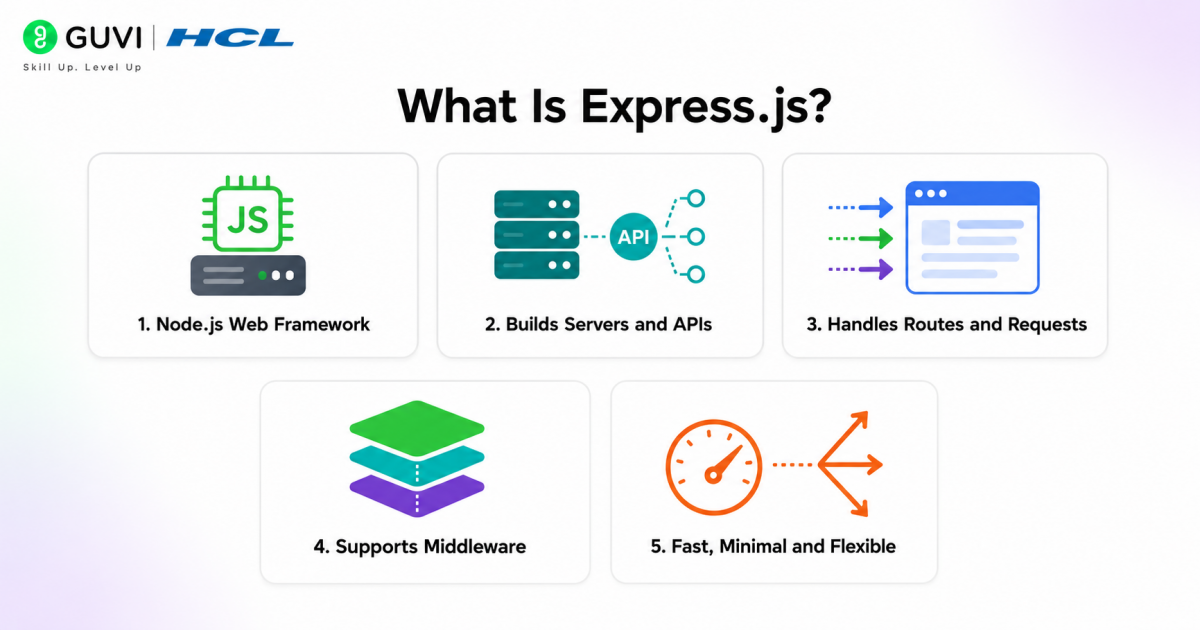
Express.js is a lightweight web application framework built on top of Node.js. It helps developers create web servers, REST APIs, and backend applications more easily.
Instead of writing everything from scratch using only Node.js, Express provides simple methods for routing, middleware, request handling, and response management.
2. Why is Express.js used?
Express.js is used to build backend applications quickly and efficiently. It simplifies server creation, API routing, middleware handling, and HTTP request processing.
Developers use Express.js because it is fast, flexible, easy to learn, and works well with databases like MongoDB, MySQL, and PostgreSQL.
3. Is Express.js a framework or a library?
Express.js is a web application framework for Node.js. It gives developers a structured way to build server-side applications and APIs.
A library usually provides specific functions, while a framework provides a broader structure for building applications. Express.js provides routing, middleware, request handling, and response handling, which makes it a framework.
4. What is the difference between Node.js and Express.js?
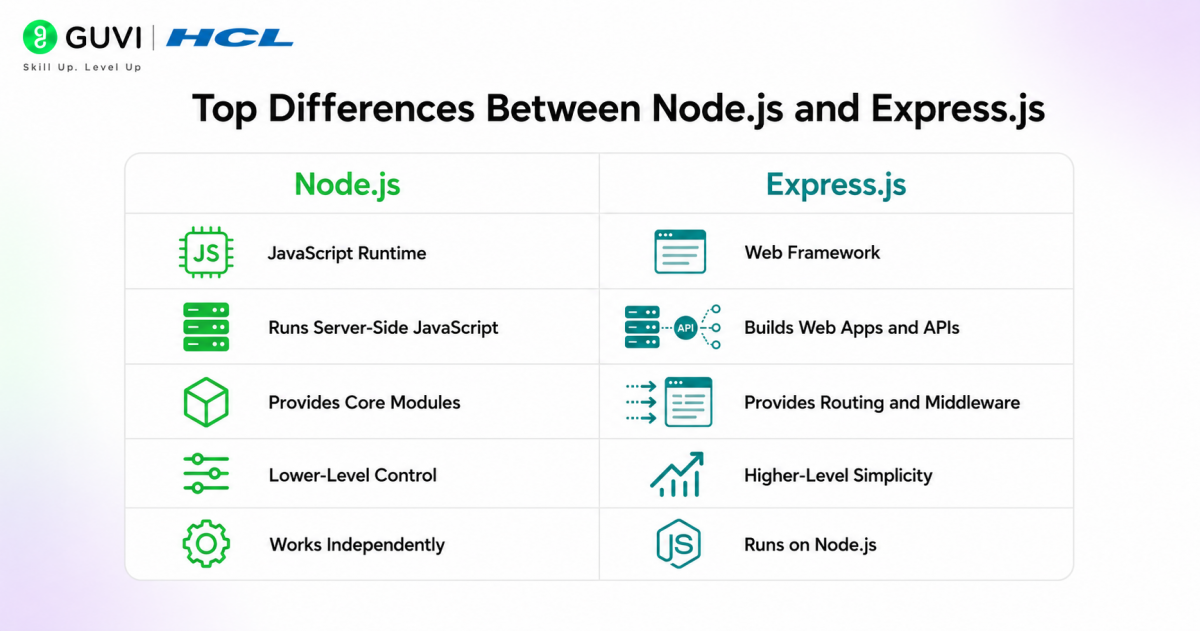
Node.js is a runtime environment that allows JavaScript to run outside the browser. Express.js is a framework built on top of Node.js that makes backend development easier.
In simple words, Node.js gives the environment to run server-side JavaScript, while Express.js provides tools to build web applications and APIs faster. Here are the key differences:
| Node.js | Express.js |
| JavaScript runtime environment | Web framework built on Node.js |
| Runs JavaScript outside the browser | Helps build web apps and APIs faster |
| Provides core server-side features | Provides routing, middleware, and API tools |
| Requires more manual coding | Reduces boilerplate code |
| Used to create servers and backend logic | Used to build REST APIs and web applications |
5. How do you install Express.js?
Express.js can be installed using npm, which is the package manager for Node.js.
npm install express
After installation, you can import Express into your project and use it to create a server.
6. What is routing in Express.js?
Routing in Express.js means defining how the application responds to different URLs and HTTP methods.
For example:
app.get('/home', (req, res) => {

  res.send('Welcome to Home Page');

});
In this example, when a user visits /home, Express sends the response “Welcome to Home Page”.
7. What are request and response objects in Express.js?
In Express.js, the request object is usually written as req, and the response object is written as res.
The req object contains information about the incoming request, such as URL parameters, query data, headers, and body data. The res object is used to send a response back to the client.
8. What is middleware in Express.js?
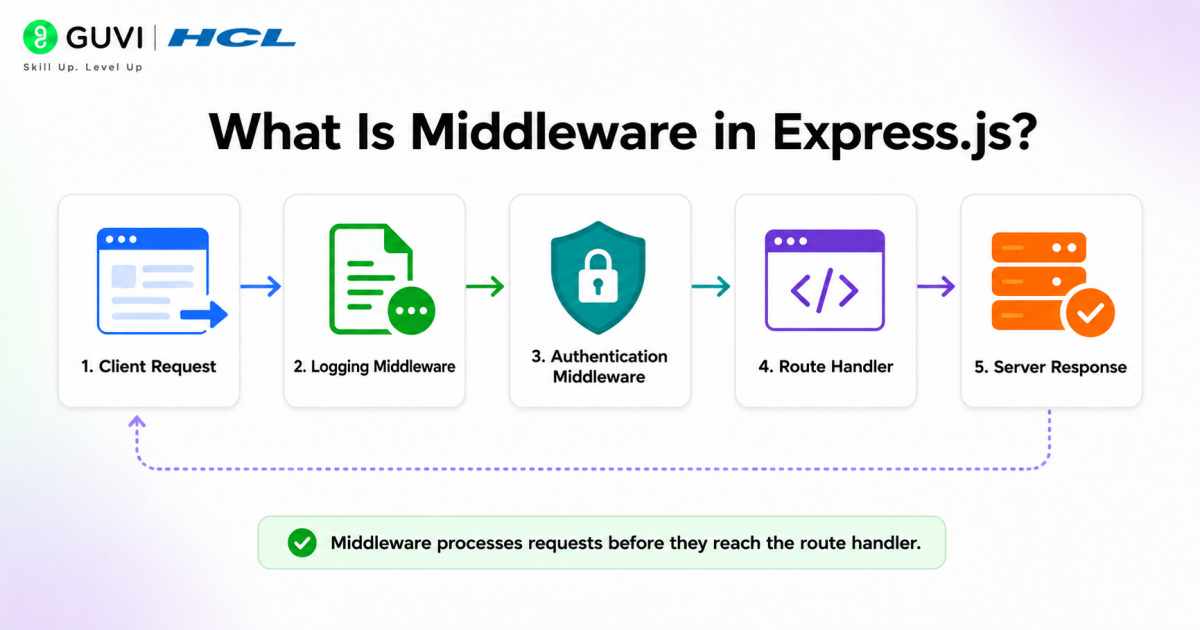
Middleware is a function that runs between the request and the final response. It can modify the request, check authentication, log details, validate data, or handle errors.
For example, middleware can check whether a user is logged in before allowing access to a protected route.
9. What is app.use() in Express.js?
app.use() is used to apply middleware in an Express.js application. It allows middleware functions to run for every request or for a specific route.
For example, app.use(express.json()) allows the application to read JSON data sent in the request body.
10. What is app.listen() in Express.js?
app.listen() is used to start the Express.js server. It tells the application to listen for incoming requests on a specific port.
For example:
app.listen(3000, () => {

  console.log('Server is running on port 3000');

});
This means the server will run on port 3000 and wait for requests.
Intermediate-Level Express.js Interview Questions and Answers
11. What is the purpose of express.Router()?
express.Router() is used to create modular route handlers in an Express.js application. Instead of writing all routes inside one main file, developers can separate routes into different files based on features.
For example, user routes can be placed in a separate userRoutes.js file, while product routes can be placed in a productRoutes.js file. This makes the application easier to manage as it grows.
12. What is the difference between req.params and req.query?
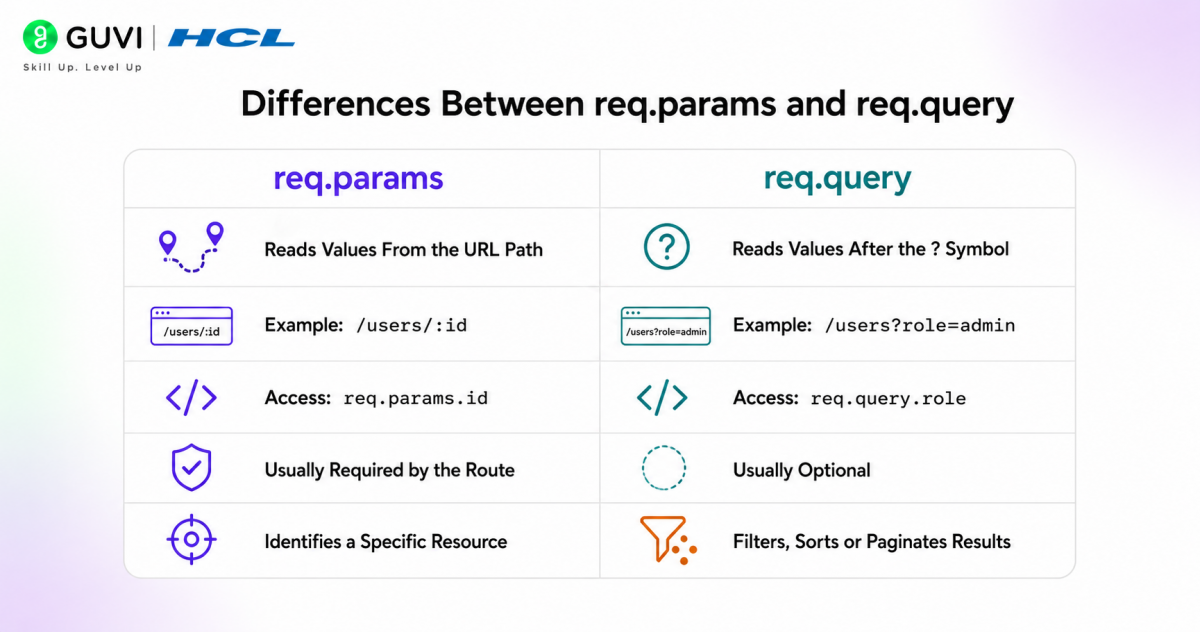
req.params is used to access route parameters that are part of the URL path. For example, in /users/:id, the value of idcan be accessed using req.params.id.
req.query is used to access query string values from the URL. For example, in /users?role=admin, the value of rolecan be accessed using req.query.role.
13. How do you handle errors in Express.js?
Errors in Express.js are handled using centralized error-handling middleware. This keeps error responses consistent and avoids repeating the same error logic in every route.
Here are the key steps:
- Identify where the error can occur, such as routes, middleware, database calls, or async functions.
- Use try-catch blocks for asynchronous code.
- Pass errors to Express using next(error).
- Create a global error-handling middleware with err, req, res, next.
- Set proper HTTP status codes like 400, 401, 404, or 500.
- Send a clean error response to the client.
- Avoid exposing sensitive error details in production.
- Log errors for debugging and monitoring.
14. What is the role of next() in Express.js?
next() is used to pass control from one middleware function to the next middleware or route handler.
If next() is not called and no response is sent, the request may remain pending. This is why next() is important when multiple middleware functions are used in the request-response cycle.
15. How do you handle JSON data in Express.js?
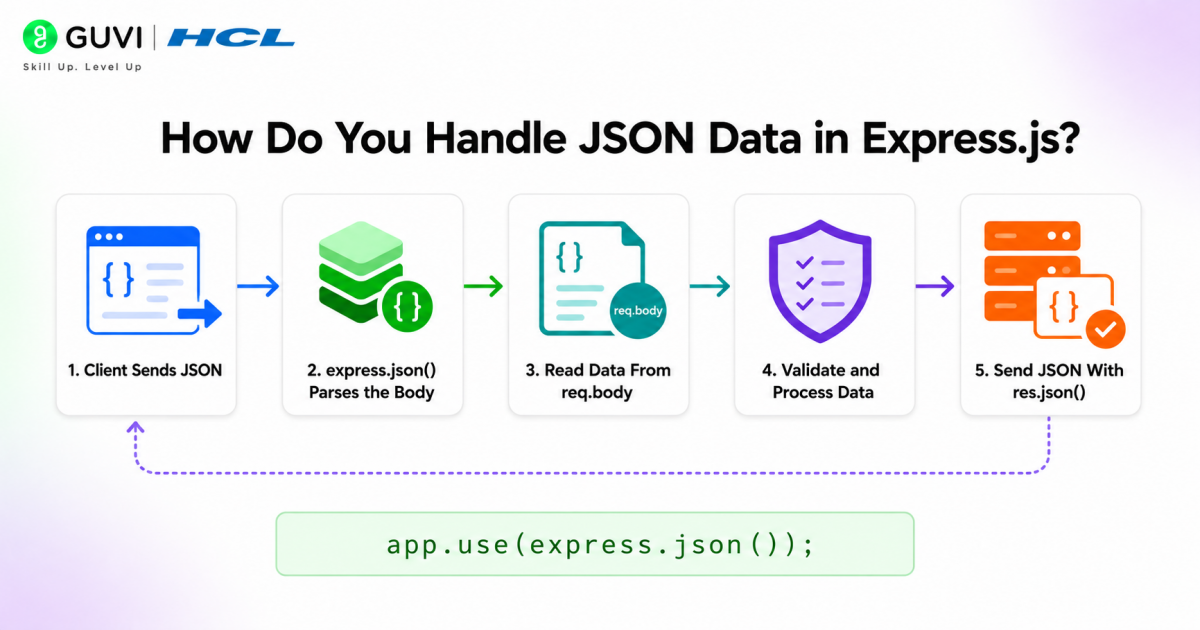
JSON data in Express.js is handled using the built-in express.json() middleware. It parses incoming JSON request bodies and makes the data available inside req.body.
Here are the key steps:
- Add express.json() middleware before defining routes.
- Send JSON data from the client using the application/json content type.
- Access the submitted JSON data using req.body.
- Validate required fields before processing the request.
- Send a proper JSON response using res.json().
Example:
app.use(express.json());

app.post('/users', (req, res) => {

 const { name, email } = req.body;

 res.json({

   success: true,

   message: 'User data received',

   data: { name, email }

 });

});
16. What is CORS in Express.js?
CORS stands for Cross-Origin Resource Sharing. It controls whether a frontend application from one domain can access resources from a backend server on another domain.
In Express.js, CORS is usually handled using the cors middleware. It is commonly used when a React, Angular, or Vue frontend communicates with an Express.js API.
17. How do you connect Express.js with a database?
Express.js does not come with a built-in database. You connect it to a database using a database driver, ORM, or ODM, depending on the database you choose.
Here are the key steps:
- Choose a database such as MongoDB, MySQL, PostgreSQL, or SQLite.
- Install the required package, such as mongoose, mysql2, pg, or prisma.
- Store the database URL in a .env file.
- Create a separate database configuration file.
- Connect to the database before starting the server.
- Use models or queries to read, create, update, and delete data.
- Handle database errors using try-catch and global error middleware.
Example with MongoDB and Mongoose:
const mongoose = require('mongoose');

mongoose.connect(process.env.MONGO_URI)

 .then(() => {

   console.log('Database connected successfully');

 })

 .catch((error) => {

   console.log('Database connection failed:', error.message);

 });
Build stronger backend development skills with HCL GUVI’s Express.js Authentication API Course and learn how to design secure, scalable authentication systems using Node.js and Express.js. Gain hands-on experience with real-world backend concepts while learning through a flexible self-paced format with globally recognised certification, lifetime content access, dedicated forum support, and gamified practice platforms.
18. What is the Difference Between Authentication and Authorization in Express.js?
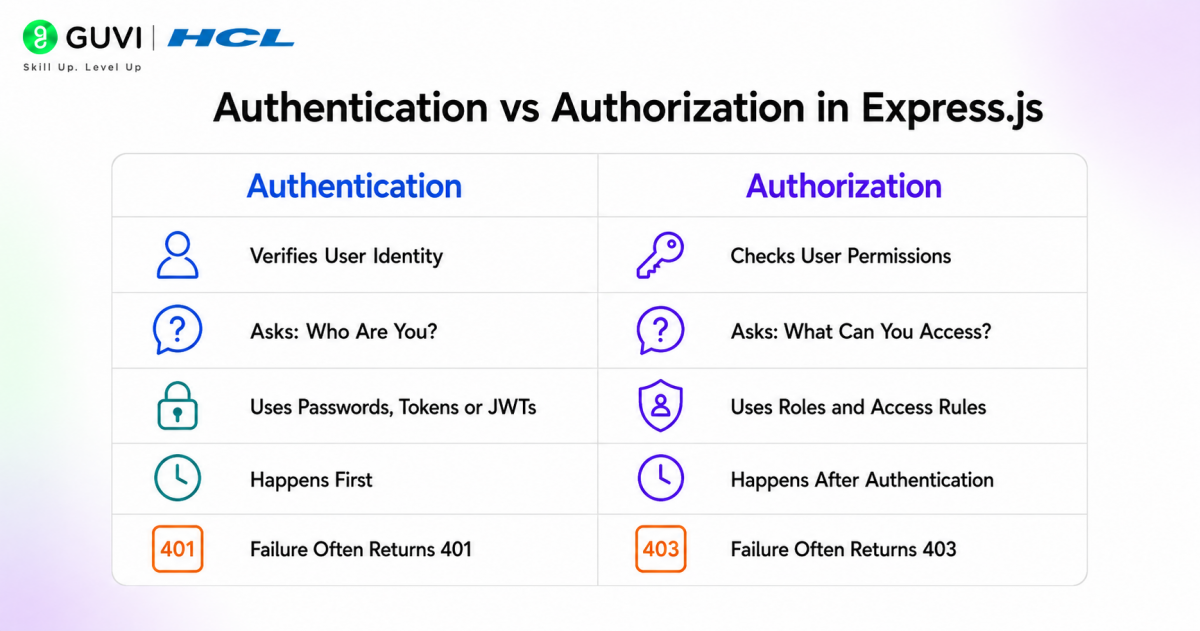
Authentication checks who the user is, while authorization checks what the user is allowed to access.
Here are the key differences:
| Authentication | Authorization |
| Verifies user identity | Verifies user permissions |
| Happens during login | Happens after login |
| Uses credentials like email, password, OTP, or token | Uses roles, permissions, or access rules |
| Example: User logs in with email and password | Example: Only admin can delete users |
| Returns 401 Unauthorized if identity is not verified | Returns 403 Forbidden if access is not allowed |
19. How do you protect routes in Express.js?
Routes can be protected using authentication middleware. This middleware checks whether the request contains a valid token, session, or login proof before allowing access.
For example, a dashboard route should only be available to logged-in users. If the user is not authenticated, the middleware can return a 401 Unauthorized response.
20. How do you structure a medium-sized Express.js project?
Here are the steps to structure a medium-sized Express.js project:
- Create the main project folder: Start by creating one root folder for the Express.js application.
- Create an app.js or server.js file: Use this file to initialize Express, apply global middleware, connect routes, and start the server.
- Create a routes folder: Keep all route files inside this folder. Each route file should handle endpoints for a specific feature, such as users, products, orders, or authentication.
- Create a controllers folder: Controllers should handle request and response logic. They receive data from routes, call services, and send the final response.
- Create a services folder: Services should contain the main business logic of the application. This keeps controllers clean and avoids writing complex logic directly inside routes.
- Create a models folder: Keep database schemas or models inside this folder. For example, Mongoose models for MongoDB or ORM models for SQL databases.
- Create a middleware folder: Store reusable middleware here, such as authentication checks, validation middleware, error handlers, logging middleware, and role-based access control.
- Create a config folder: Use this folder for configuration files, such as database connection, environment variables, CORS settings, and third-party service setup.
- Create a utils folder: Keep reusable helper functions inside this folder, such as token generation, email helpers, response formatters, or date utilities.
- Create a tests folder: Add unit tests and API tests here to check routes, controllers, services, and middleware.
- Use environment variables: Store sensitive values like database URLs, JWT secrets, API keys, and port numbers inside a .env file.
- Keep error handling centralized: Use one common error-handling middleware instead of repeating error logic in every route.
Advanced-Level Express.js Interview Questions and Answers
21. How do you create a global error handler in Express.js?
A global error handler is used to manage all application errors from one place. This avoids repeating error responses inside every route.
app.use((err, req, res, next) => {

  const statusCode = err.statusCode || 500;

  res.status(statusCode).json({

    success: false,

    message: err.message || 'Internal Server Error'

  });

});
This middleware should be placed after all routes. Whenever an error is passed using next(err), Express sends it to this global error handler.
22. How do you create a custom error class in Express.js?
A custom error class helps create consistent error messages and status codes across the application.
class AppError extends Error {

  constructor(message, statusCode) {

    super(message);

    this.statusCode = statusCode;

    this.status = `${statusCode}`.startsWith('4') ? 'fail' : 'error';

  }

}

module.exports = AppError;
This is useful when handling errors like invalid input, unauthorized access, missing records, or duplicate data.
23. How do you handle 404 errors in Express.js?
A 404 error occurs when the user requests a route that does not exist. In Express.js, this can be handled using a fallback middleware.
app.use((req, res, next) => {

  res.status(404).json({

    success: false,

    message: 'Route not found'

  });

});
This middleware should be placed after all valid routes. If no route matches, Express will return this 404 response.
24. How do you validate request data in Express.js?
Request validation checks whether the data sent by the client is correct before it reaches the main business logic.
const validateUser = (req, res, next) => {

  const { name, email, password } = req.body;

  if (!name || !email || !password) {

    return res.status(400).json({

      success: false,

      message: 'Name, email, and password are required'

    });

  }

  next();

};

app.post('/register', validateUser, (req, res) => {

  res.json({

    success: true,

    message: 'User registered successfully'

  });

});
This keeps invalid data away from controllers and databases.

25. How do you create reusable authentication middleware?
Authentication middleware checks whether the user is logged in before allowing access to protected routes.
const authMiddleware = (req, res, next) => {

  const token = req.headers.authorization;

  if (!token) {

    return res.status(401).json({

      success: false,

      message: 'Access denied. Token missing.'

    });

  }

  next();

};

app.get('/profile', authMiddleware, (req, res) => {

  res.json({

    success: true,

    message: 'Welcome to your profile'

  });

});
In real projects, this middleware usually verifies a JWT token before allowing access.
26. How do you implement role-based access control in Express.js?
Role-based access control allows only specific users to access certain routes. For example, only admins should access admin routes.
const allowRoles = (...roles) => {

  return (req, res, next) => {

    const userRole = req.user?.role;

    if (!roles.includes(userRole)) {

      return res.status(403).json({

        success: false,

        message: 'You are not allowed to access this resource'

      });

    }

    next();

  };

};

app.delete('/admin/user/:id', allowRoles('admin'), (req, res) => {

  res.json({

    success: true,

    message: 'User deleted successfully'

  });

});
This pattern is useful for admin panels, dashboards, SaaS apps, and enterprise APIs.
27. How do you create a clean controller in Express.js?
Controllers should handle request and response logic. They should not contain too much business logic.
const getUsers = async (req, res, next) => {

  try {

    const users = await User.find();

    res.status(200).json({

      success: true,

      data: users

    });

  } catch (error) {

    next(error);

  }

};

module.exports = { getUsers };
This makes routes cleaner and allows business logic to be moved into services when the application grows.
28. How do you use environment variables in Express.js?
Environment variables are used to store sensitive or environment-specific values such as database URLs, JWT secrets, API keys, and port numbers.
require('dotenv').config();

const express = require('express');

const app = express();

const PORT = process.env.PORT || 3000;

app.listen(PORT, () => {

  console.log(`Server running on port ${PORT}`);

});
This prevents sensitive values from being hardcoded directly inside the source code.
29. How do you create API versioning in Express.js?
API versioning helps manage changes without breaking older clients. A common method is to use version numbers in route prefixes.
const express = require('express');

const app = express();

const userRoutesV1 = require('./routes/v1/userRoutes');

const userRoutesV2 = require('./routes/v2/userRoutes');

app.use('/api/v1/users', userRoutesV1);

app.use('/api/v2/users', userRoutesV2);
This allows developers to improve the API while keeping older versions available for existing users.
30. How do you create a health check route in Express.js?
A health check route is used to confirm whether the server is running properly. It is often used by monitoring tools, load balancers, and deployment platforms.
app.get('/health', (req, res) => {

  res.status(200).json({

    success: true,

    message: 'Server is healthy',

    uptime: process.uptime(),

    timestamp: new Date()

  });

});
This is a small but important production feature. It helps teams monitor server availability and detect downtime quickly.
Scenario-Based Express.js Interview Questions and Answers
31. A user submits a form, but req.body is showing undefined. How will you fix it?
This usually happens when the body-parsing middleware is missing. Express cannot read incoming JSON or form data unless the correct middleware is added before the routes.
For JSON data, use:
app.use(express.json());

For form data, use:
app.use(express.urlencoded({ extended: true }));
These middleware functions should be added before defining routes. After this, Express can read submitted data using req.body.
32. An API is returning the same response slowly every time. How will you improve it?
If an API returns the same data repeatedly, caching can reduce server load and improve response time. Instead of querying the database every time, the application can store the result temporarily.
For example, product lists, category data, public profiles, and dashboard summaries can be cached using Redis or an in-memory cache.
The basic approach would be:
- Check whether the data already exists in cache
- If yes, return cached data
- If no, fetch data from the database
- Store the result in cache
- Send the response to the client
This reduces repeated database calls and improves API speed.
33. A user tries to access another user’s profile by changing the ID in the URL. How will you prevent this?
This is an authorization issue. Even if the user is logged in, they should not be allowed to access another user’s private data.
The API should compare the logged-in user’s ID with the requested profile ID. If both do not match, the server should return a 403 Forbidden response.
app.get('/users/:id', authMiddleware, (req, res) => {

  if (req.user.id !== req.params.id) {

    return res.status(403).json({

      success: false,

      message: 'You cannot access this profile'

    });

  }

  res.json({

    success: true,

    message: 'Profile access granted'

  });

});
This ensures users can only access resources they are allowed to view.
34. A login API is getting too many failed requests. How will you protect it?
A login API can be protected using rate limiting. This prevents one user or IP address from sending too many login attempts in a short time.
Rate limiting helps reduce brute-force attacks, password guessing, and API abuse.
const rateLimit = require('express-rate-limit');

const loginLimiter = rateLimit({

  windowMs: 15 * 60 * 1000,

  max: 5,

  message: 'Too many login attempts. Please try again later.'

});

app.post('/login', loginLimiter, loginController);
This allows only a limited number of login attempts within a fixed time window.
35. A route works locally but fails in production. What will you check?
When an Express.js route works locally but fails in production, the issue is usually related to environment differences.
The first things to check are:
- Environment variables
- Database connection URL
- Port configuration
- CORS settings
- API base URL
- Missing npm packages
- Server logs
- File path differences
- Production build or deployment settings
In real projects, checking logs is the fastest way to identify whether the issue is from code, configuration, database access, or deployment.
36. A frontend app cannot access your Express.js API. What could be the issue?
This is commonly caused by CORS restrictions. Browsers block frontend requests when the frontend and backend are running on different origins and the server does not allow that origin.
For example, if React runs on localhost:3000 and Express runs on localhost:5000, CORS must be configured properly.
const cors = require('cors');

app.use(cors({

  origin: 'http://localhost:3000',

  credentials: true

}));
This allows the frontend application to communicate with the Express.js backend.
37. A user uploads a very large file and the server crashes. How will you handle it?
Large file uploads should be controlled using file size limits. Without limits, users may upload very large files that consume server memory and crash the application.
Using Multer, developers can restrict file size and allowed file types.
const multer = require('multer');

const upload = multer({

  limits: {

    fileSize: 2 * 1024 * 1024

  }

});

app.post('/upload', upload.single('file'), (req, res) => {

  res.json({

    success: true,

    message: 'File uploaded successfully'

  });

});
This example limits file size to 2 MB. In production, files are often stored in cloud storage instead of keeping them directly on the server.
38. An API should return only 10 records at a time. How will you design it?
This can be handled using pagination. Pagination prevents the server from returning too much data in one response.
A common approach is to use page and limit query parameters.
app.get('/products', async (req, res) => {

  const page = Number(req.query.page) || 1;

  const limit = Number(req.query.limit) || 10;

  const skip = (page - 1) * limit;

  const products = await Product.find().skip(skip).limit(limit);

  res.json({

    success: true,

    page,

    limit,

    data: products

  });

});
This keeps the API faster and improves the frontend user experience.
39. A database query fails inside an async route. How will you prevent the server from crashing?
Async route errors should be handled using try-catch or passed to centralized error middleware. This prevents unhandled errors from breaking the request flow.
app.get('/orders', async (req, res, next) => {

  try {

    const orders = await Order.find();

    res.json({

      success: true,

      data: orders

    });

  } catch (error) {

    next(error);

  }

});
The next(error) call sends the error to the global error handler, where a proper response can be returned.
40. You need to build a search API for products. How will you design it?
A product search API can use query parameters such as keyword, category, price range, page, and limit. This makes the API flexible for frontend filters.
For example:
app.get('/products/search', async (req, res) => {

  const { keyword, category } = req.query;

  const filter = {};

  if (keyword) {

    filter.name = { $regex: keyword, $options: 'i' };

  }

  if (category) {

    filter.category = category;

  }

  const products = await Product.find(filter);

  res.json({

    success: true,

    data: products

  });

});
This allows users to search products by name and filter them by category. In larger applications, search can be improved using indexes, full-text search, or search engines like Elasticsearch.
Conclusion
Express.js interview preparation becomes easier when you understand how backend applications work in real projects. Instead of memorizing only definitions, focus on routing, middleware, APIs, error handling, authentication, databases, and security. These topics form the foundation of most Express.js interviews.
A strong understanding of Express.js also improves your overall Node.js backend development skills. Practice by building small APIs, securing routes, handling errors properly, and structuring your code like a production-ready application.
Success Stories

About the Author
Vaishali
I'm a seasoned writer with four years of experience across technical, non-technical, and just about every genre or niche you can imagine. Adaptable and curious, I enjoy exploring new topics and making information engaging and easy to understand. Fueled by a steady stream of tea, I approach each project with creativity, reliability, and genuine enthusiasm for storytelling.
View all posts by Vaishali
Connect with me @















Did you enjoy this article?