


Artificial Intelligence and Machine Learning Articles
How Generative AI in Business is Changing Operations
Claude + Obsidian: AI-Powered Note-Taking Setup


Get In Touch For Details! Request More Information
Support Vector Regression (SVR) Using Linear and Non-Linear Kernels in Scikit-Learn
Jul 09, 2026 8 Min Read 1050 Views
(Last Updated)
Support Vector Regression (SVR) extends Support Vector Machines to continuous prediction by seeking a function that fits training points within an epsilon-wide tube and penalizes only errors beyond that tube. This epsilon‑insensitive loss makes the model indifferent to small deviations, which reduces the influence of noisy labels and outliers.
SVR also incorporates regularization and slack variables to balance model complexity against tolerance violations, yielding good generalization. With kernel functions (linear, polynomial, RBF, etc.) SVR captures non-linear relationships while retaining the robustness and geometric intuition of SVMs.
In this article, we will walk through everything a beginner needs to know about support vector regression. We will cover the core idea of the epsilon tube, how the C and epsilon hyperparameters work, what kernel functions do, and why they matter, and then build complete, working SVR models in Python using scikit-learn with linear, RBF, and polynomial kernels.
Table of contents
- TL;DR
- The Core Idea: The Epsilon-Insensitive Tube In SVR
- Key Hyperparameters: C and Epsilon In SVR
- What Are Support Vectors in SVR?
- The Kernel Trick: Handling Non-Linearity
- The Linear Kernel
- The RBF Kernel (Radial Basis Function)
- The Polynomial Kernel
- Complete Comparison: All Three Kernels Together
- How to Choose the Right Kernel
- Advantages of SVR
- Limitations to Keep in Mind
- Real-World Applications
- Wrapping Up
- FAQ
- When should I use SVR over other regressors?
- How do I choose a kernel?
- How important is feature scaling?
- What hyperparameters need tuning?
- Why does SVR feel slow on big data?
TL;DR
- SVR fits a function that keeps most training points inside an epsilon‑wide tube and penalizes only errors outside it, making it robust to small noise.
- C (regularization) controls the trade-off between fitting training errors and model smoothness: large C → tighter fit (risk overfitting); small C → smoother model.
- Epsilon (ε) sets tube width: large ε → simpler model with fewer support vectors; small ε → more complex model with more support vectors.
- The kernel trick lets SVR handle nonlinearity efficiently; common choices are linear (fast, interpretable), RBF (default, flexible), and polynomial (controlled degrees).
- Always scale features, tune C/ε/(gamma) with cross-validation, and prefer LinearSVR or other methods for very large datasets.
What Is Support Vector Regression?
Support Vector Regression (SVR) is a regression algorithm based on Support Vector Machines that predicts continuous values by fitting a function within an epsilon-insensitive margin around the training data. Instead of minimizing prediction errors for every point, SVR focuses on keeping errors within a specified tolerance range while maximizing model generalization. It can model both linear and non-linear relationships using kernel functions, and only the data points outside the margin, known as support vectors, influence the final regression model.
The Core Idea: The Epsilon-Insensitive Tube In SVR

The most distinctive concept in SVR is the epsilon-insensitive tube, and understanding it is key to understanding how the algorithm works.
- In standard linear regression, every single training point contributes to the error that the model tries to minimize, regardless of how small the prediction error is. SVR works differently. In SVR, there are two margin lines around the main regression line, which form the epsilon-insensitive tube.
- SVR wants as many observations to be located inside this tube as possible, and the observations left outside of this tube become the support vectors.
- Epsilon specifies the epsilon-tube within which no penalty is associated in the training loss function with points predicted within a distance epsilon from the actual value. In practical terms, if a prediction is within epsilon of the true value, the model treats that prediction as perfect and applies zero loss. Only predictions that fall outside the tube receive a penalty.
- This creates a powerful property: the model focuses all its learning energy on the hardest cases, the points that fall outside the acceptable tolerance band, while completely ignoring small errors that fall within it. Adding more training instances within the margin does not affect the model’s predictions. Thus, the model is said to be epsilon-insensitive.
- Think of it like judging a dart throw. If the dart lands anywhere within the bullseye region, the score is the same. Only throws that miss the bullseye entirely incur a penalty. The darts that determine the shape of the “acceptable zone” are the support vectors, and they are all that matter for the final model.

Key Hyperparameters: C and Epsilon In SVR

- Regularization parameter (C)
The C parameter controls regularization strength (must be > 0). It sets how much the model penalizes slack (errors outside the epsilon tube): a larger C means weaker regularization and a stronger penalty on errors, so the model fits more training points, and the regression function becomes more complex (risking overfitting).
Smaller C increases regularization, yielding a smoother, simpler function that may ignore some training points but typically generalizes better.
- Epsilon parameter (ε)
The epsilon parameter sets the width of the insensitive tube around the regression function. A larger ε treats more deviations as acceptable (no penalty), producing a simpler model with fewer support vectors. A smaller ε narrows the tube, causing more points to fall outside it and become support vectors, which produces a more complex model that fits the training data more tightly.
What Are Support Vectors in SVR?
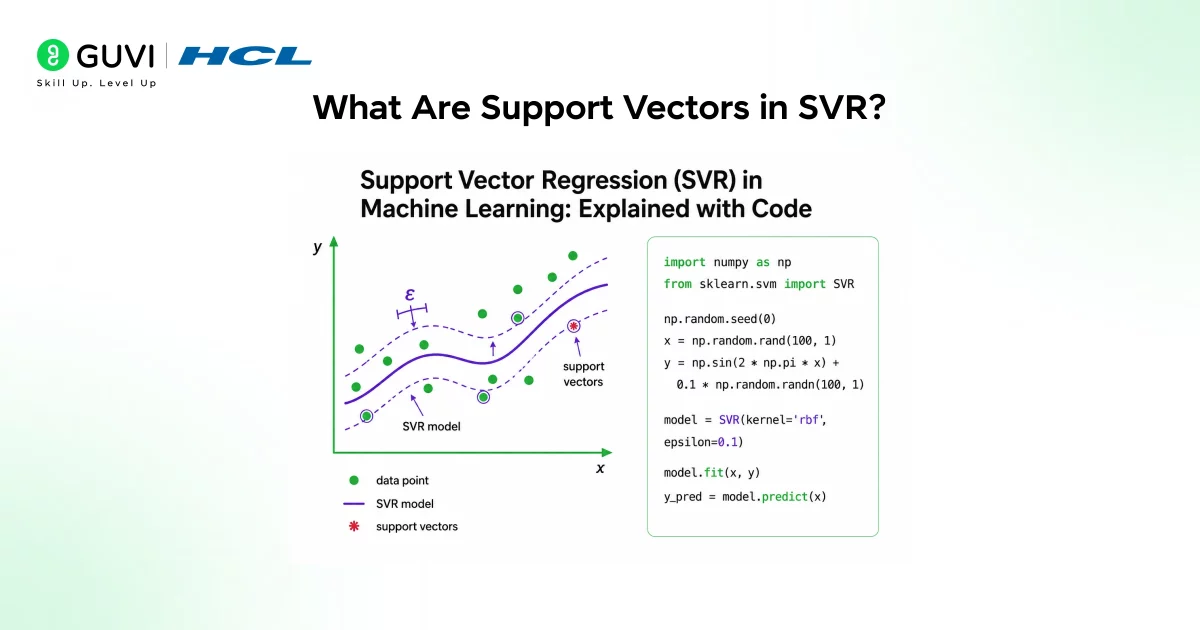
- The support vectors in SVR are the training points that lie on the boundary of or outside the epsilon tube. These are the only data points that directly influence the shape of the regression function. Points inside the tube do not affect the model at all.
- This property has an important practical consequence: SVR is inherently sparse. Even in a large dataset, only a subset of points actually determines the model. This makes SVR relatively robust to noise and outliers, because noisy points inside the tube are completely ignored, and even outliers outside the tube influence the model in a controlled way through the C parameter.
- In the case of SVR, the regression function has the form where the sum is taken over N support vectors, and the parameters are optimized with respect to the epsilon-insensitive loss. The final prediction for any new input is a weighted combination of kernel evaluations between the new point and each support vector, which is why knowing which points are support vectors fully describes the model.
The Kernel Trick: Handling Non-Linearity

- Why kernels matter
Standard linear SVR fits a straight line, which fails when the feature–target relationship is nonlinear. The kernel trick lets SVR handle such cases by implicitly mapping data into a higher-dimensional space where a linear separator (or regression) can capture nonlinear patterns in the original space. This avoids explicitly creating extra features while enabling much richer models.
- How the kernel trick works and common kernels
A kernel function computes similarity between pairs of points as if they were in a high-dimensional space but does so implicitly no need to calculate those high-dimensional coordinates, which is computationally efficient. Scikit-learn’s SVR supports four main kernels: linear, polynomial, RBF, and sigmoid. The three most commonly used are the following:
- Linear: no implicit mapping; equivalent to standard linear SVR.
- Polynomial: models interactions and curved relationships up to a chosen degree.
- RBF (radial basis function): maps to an infinite-dimensional space and handles many smooth, local nonlinearities effectively.
1. The Linear Kernel

- The linear kernel is the simplest option. It computes the dot product between two input vectors directly, without any transformation. The result is a linear regression function in the original feature space.
- The official scikit-learn SVR example uses a linear kernel alongside polynomial and RBF to demonstrate their differences on the same dataset.
- The linear kernel works best when the relationship between the features and target is approximately linear, when the dataset has many features relative to the number of samples, or when you need a fast, interpretable model. Linear SVR is also available as LinearSVR in scikit-learn, which uses a different solver under the hood and scales better to large datasets.
Here is how to use the linear kernel with SVR:
from sklearn.svm import SVR
from sklearn.preprocessing import StandardScaler
from sklearn.pipeline import make_pipeline
import numpy as np
# Generate sample data
np.random.seed(42)
X = np.sort(5 * np.random.rand(80, 1), axis=0)
y = np.sin(X).ravel() + 0.1 * np.random.randn(80)
# Linear SVR – always scale data first
svr_linear = make_pipeline(
StandardScaler(),
SVR(kernel=’linear’, C=100, epsilon=0.1)
)
svr_linear.fit(X, y)
y_pred_linear = svr_linear.predict(X)
print(“Linear SVR – Support vectors:”, svr_linear.named_steps[‘svr’].n_support_)
- Feature scaling is essential before applying SVR. Because SVR is distance-based, features with larger scales will dominate the computation. Always apply StandardScaler before fitting any SVR model.
2. The RBF Kernel (Radial Basis Function)
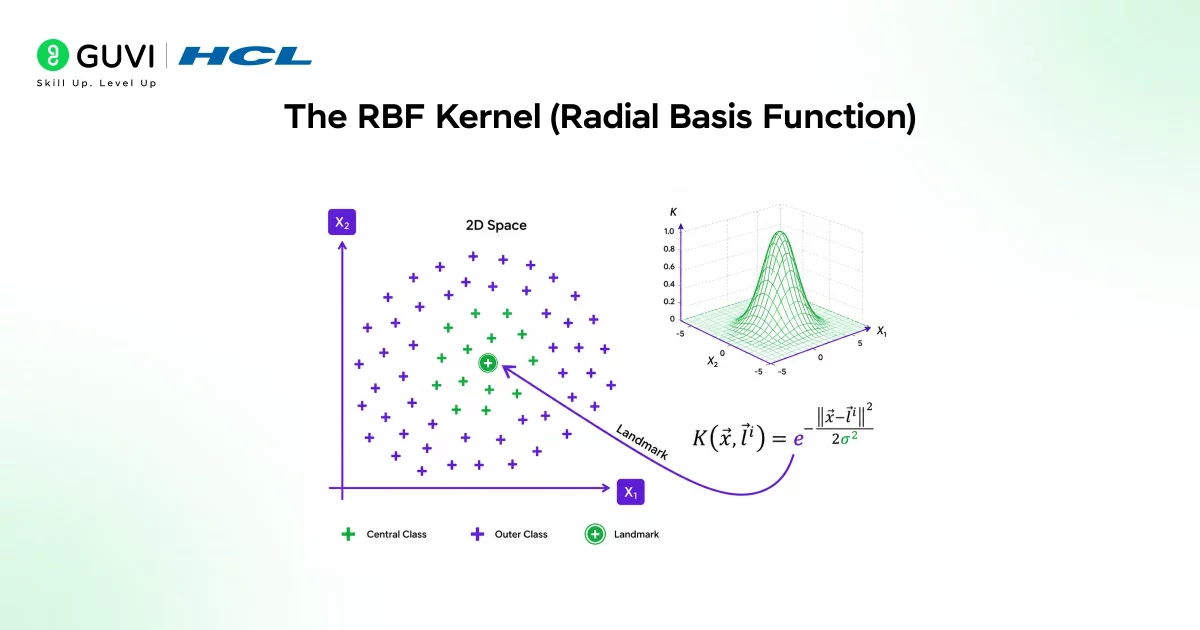
- The RBF kernel, also called the Gaussian kernel, is the default and most widely used kernel in SVR. It measures the similarity between two points based on the distance between them, with a Gaussian decay: very close points receive a high similarity score, while distant points receive a score close to zero.
- The Gaussian Radial Basis Function calculates the distance between a fixed landmark point and an observation, multiplies it by negative gamma, and takes the exponent. The landmark is calculated by the algorithm and gamma is a hyperparameter.
- The gamma hyperparameter controls how far the influence of a single training point reaches. A small gamma means each point has a wide influence, creating a smoother, more generalized function.
- A large gamma means each point has a narrow influence, which can create very wiggly functions that overfit. The default value of gamma changed from auto to scale in version 0.22 of scikit-learn. Using gamma=’scale’ computes gamma as 1 / (number of features × variance of X), which is a sensible data-driven default.
from sklearn.svm import SVR
from sklearn.preprocessing import StandardScaler
from sklearn.pipeline import make_pipeline
from sklearn.metrics import mean_squared_error
import numpy as np
np.random.seed(42)
X = np.sort(5 * np.random.rand(80, 1), axis=0)
y = np.sin(X).ravel() + 0.1 * np.random.randn(80)
# RBF SVR
svr_rbf = make_pipeline(
StandardScaler(),
SVR(kernel=’rbf’, C=100, gamma=0.1, epsilon=0.1)
)
svr_rbf.fit(X, y)
y_pred_rbf = svr_rbf.predict(X)
rmse = np.sqrt(mean_squared_error(y, y_pred_rbf))
print(f”RBF SVR RMSE: {rmse:.4f}”)
print(f”Number of support vectors: {svr_rbf.named_steps[‘svr’].n_support_}”)
The RBF kernel is typically the first choice when the relationship between features and the target is complex and non-linear, because it makes no assumptions about the shape of that relationship.
3. The Polynomial Kernel

The polynomial kernel applies a polynomial transformation to the input features, enabling SVR to explicitly fit polynomial relationships. The official scikit-learn SVR example applies a degree-3 polynomial kernel with parameters C=100, gamma=’auto’, degree=3, epsilon=0.1, and coef0=1.
The degree parameter controls the degree of the polynomial. A degree of 2 fits quadratic relationships, a degree of 3 fits cubic relationships, and so on. Higher degrees make the model more flexible but also more prone to overfitting.
from sklearn.svm import SVR
from sklearn.preprocessing import StandardScaler
from sklearn.pipeline import make_pipeline
import numpy as np
np.random.seed(42)
X = np.sort(5 * np.random.rand(80, 1), axis=0)
y = np.sin(X).ravel() + 0.1 * np.random.randn(80)
# Polynomial SVR
svr_poly = make_pipeline(
StandardScaler(),
SVR(kernel=’poly’, C=100, gamma=’auto’,
degree=3, epsilon=0.1, coef0=1)
)
svr_poly.fit(X, y)
y_pred_poly = svr_poly.predict(X)
print(“Polynomial SVR – Support vectors:”, svr_poly.named_steps[‘svr’].n_support_)
The coef0 parameter is the independent term in the polynomial kernel. It controls how much higher-degree terms versus lower-degree terms influence the model in the feature transformation.
Support Vector Regression (SVR) naturally produces sparse models because only the training points that lie on or outside the epsilon-insensitive tube become support vectors and influence the final prediction function. Points that fall inside the tube are effectively ignored since their prediction errors are treated as insignificant. This sparsity not only makes prediction more computationally efficient, but also gives SVR built-in robustness to small amounts of noise and minor fluctuations in the training data.
Complete Comparison: All Three Kernels Together
Here is a complete, self-contained example that trains all three SVR variants on the same dataset and evaluates them for comparison:
import numpy as np
import matplotlib.pyplot as plt
from sklearn.svm import SVR
from sklearn.preprocessing import StandardScaler
from sklearn.pipeline import make_pipeline
from sklearn.metrics import mean_squared_error, mean_absolute_error
from sklearn.model_selection import train_test_split
# Generate non-linear data
np.random.seed(42)
X = np.sort(5 * np.random.rand(100, 1), axis=0)
y = np.sin(X).ravel()
y[::5] += 0.5 * (0.5 – np.random.rand(20)) # add noise
X_train, X_test, y_train, y_test = train_test_split(
X, y, test_size=0.2, random_state=42
)
# Define all three SVR models
models = {
‘Linear’: make_pipeline(StandardScaler(),
SVR(kernel=’linear’, C=100, epsilon=0.1)),
‘RBF’: make_pipeline(StandardScaler(),
SVR(kernel=’rbf’, C=100, gamma=0.5, epsilon=0.1)),
‘Polynomial’: make_pipeline(StandardScaler(),
SVR(kernel=’poly’, C=100, gamma=’auto’,
degree=3, epsilon=0.1, coef0=1))
}
print(f”{‘Kernel’:<12} {‘RMSE’:<10} {‘MAE’:<10} {‘Support Vectors’}”)
print(“-” * 50)
for name, model in models.items():
model.fit(X_train, y_train)
y_pred = model.predict(X_test)
rmse = np.sqrt(mean_squared_error(y_test, y_pred))
mae = mean_absolute_error(y_test, y_pred)
n_sv = model.named_steps[‘svr’].n_support_[0] \
if hasattr(model.named_steps[‘svr’], ‘n_support_’) else ‘N/A’
print(f”{name:<12} {rmse:<10.4f} {mae:<10.4f} {n_sv}”)
This structured comparison lets you see exactly how the three kernels perform on the same data, which is the right way to choose between them in practice.
How to Choose the Right Kernel
Choosing the right kernel depends on the nature of your data and the relationship you expect between features and the target.
Step 1: Use the linear kernel when you have many features relative to the number of samples, when you have reason to believe the relationship is approximately linear, or when computational speed is important. The linear kernel is the fastest and most interpretable.
Step 2: Use the RBF kernel as your default starting point for most regression problems with complex, non-linear relationships. It is the most flexible and typically produces strong results without needing to specify the degree of non-linearity explicitly.
Step 3: Use the polynomial kernel when you have domain knowledge suggesting the relationship follows a polynomial pattern or when you want to control the degree of non-linearity explicitly. Be careful with high degrees, as they increase the risk of overfitting.
Advantages of SVR
- SVR has good generalization because margin-based learning helps it perform well on unseen data. It handles non-linearity through kernel functions that allow it to model complex relationships.
- It is robust to noise because the epsilon-insensitive loss reduces sensitivity to small errors and noise.SVR is particularly effective in high-dimensional spaces and performs well even when the number of dimensions exceeds the number of samples.
- The sparsity of the solution, where only support vectors matter, also makes SVR memory-efficient at prediction time.
Limitations to Keep in Mind
- SVR does have meaningful limitations. Training time grows significantly with the size of the dataset because the optimization problem requires computing kernel values between all pairs of training points.
- For very large datasets with more than a few tens of thousands of samples, LinearSVR or other regression algorithms may be more practical choices.
- Hyperparameter tuning is also non-trivial. C, epsilon, and gamma each meaningfully affect the model, and the best values depend heavily on the dataset.
- Grid search with cross-validation is the standard approach for finding good values, but it multiplies the computational cost.
- Feature scaling is not optional with SVR. Forgetting to scale your features is one of the most common mistakes beginners make, and it will consistently produce poor results.
Real-World Applications
- SVR is used in medical prediction to estimate disease progression and patient health outcomes from clinical data. It is applied in financial forecasting to predict stock prices, returns, and market trends with non-linear behavior.
- It helps forecast electricity load and energy consumption patterns in energy demand estimation.
- It is used to predict product demand and future sales in business analytics, and applied in modeling physical systems and scientific regression problems in engineering.
- In biomedical applications, SVR is extensively used for blood glucose prediction and modeling, leveraging kernel functions such as the RBF kernel to manage non-linear relationships between physiological variables.
If you’re serious about mastering Support Vector Regression (SVR) using linear and non‑linear kernels in Scikit‑Learn, understanding how to apply SVR for real‑world regression problems with RBF, polynomial, and linear kernels, don’t miss the chance to enroll in HCL GUVI’s Artificial Intelligence & Machine Learning Course, co‑designed by Intel.
Wrapping Up
Support Vector Regression brings the mathematical elegance of SVM-based learning to prediction problems. The epsilon-insensitive tube is what sets it apart from standard regression: by ignoring small errors and focusing only on the violations of the tolerance band, SVR produces models that are robust to noise, generalize well, and can handle both linear and highly non-linear relationships through the choice of kernel.
The linear kernel is your tool for interpretable, fast models on approximately linear data. The RBF kernel is your workhorse for complex, non-linear problems. The polynomial kernel gives you explicit control over the degree of non-linearity. In all cases, scaling your features and tuning C and epsilon through cross-validation are the two most important practices to get the most out of SVR in scikit-learn.
FAQ
1. When should I use SVR over other regressors?
Use SVR when you need robustness to noise, have moderate dataset sizes, and expect complex relationships that kernels can capture. For very large datasets, consider LinearSVR or tree/ensemble methods.
2. How do I choose a kernel?
Start with RBF for general nonlinearity. Use linear if the relationship is roughly linear or if you need interpretability and speed. Use a polynomial when you believe the relationship follows a polynomial pattern.
3. How important is feature scaling?
Essential. SVR is distance-based; unscaled features will bias the model and produce poor results.
4. What hyperparameters need tuning?
At minimum tune C and epsilon; for RBF and polynomial kernels, also tune gamma (and degree/coef0 for polynomial). Use grid/random search with cross‑validation.
5. Why does SVR feel slow on big data?
Training requires computing kernel values across pairs of training points, so complexity grows at least quadratically with sample size. For tens of thousands of points, SVR becomes computationally expensive.
Success Stories

About the Author
Vishalini Devarajan
An Aerospace Engineer turned content writer, I focus on making complex concepts easy to understand through well-structured, reader-friendly blogs. Whether it’s a technical topic or a non-technical one, I love creating content that is clear, engaging, and impactful.
View all posts by Vishalini Devarajan
Connect with me @













Did you enjoy this article?