


Artificial Intelligence and Machine Learning Articles
Finance Manager to Data Analytics: Career Growth, Salary and Seniority
How to Evaluate LLM Outputs in Production Deployments
AI/ML Skills Gap 2026: Why Companies Can't Find Job-Ready Talent
20 AI/ML Interview Questions Recruiters Can Use Without a Tech Background - Best Guide


Get In Touch For Details! Request More Information
Build a Custom Knowledge RAG Chatbot using n8n
Aug 04, 2026 5 Min Read 606 Views
(Last Updated)
Most data never gets used the way it should.
Your documents, campaign reports and knowledge bases, but when you need a simple, quick answer, you still have to search for it. It’s not that we don’t have information, it’s how we access it.
Old-school chatbots won’t help. They either have a rigid script or the AI knowledge is generic and therefore doesn’t connect with the business.
A Custom Knowledge RAG Chatbot changes that.
This chatbot doesn’t make your customers search; it finds the right information in your knowledge base and uses it to quickly provide answers. And with n8n, you can turn this into an automated system that integrates your data, workflows and AI together.
In this blog, you will learn how to create this system and more importantly, how to make your data work for you.
Quick Answer
A Custom Knowledge RAG Chatbot is an AI chatbot that doesn’t rely only on pre-trained knowledge.It also looks for information in your own data (documents, PDFs, databases, etc.) and incorporates it to provide highly relevant answers.
Table of contents
- What is a Custom Knowledge RAG Chatbot?
- Why Traditional Chatbots Fail
- Why Use n8n?
- How RAG Works (A Step-by-Step Procedure)
- Data Ingestion Phase
- Retrieval Phase
- Generation Phase
- Build Step-by-Step with n8n
- Step 1: Install n8n
- Step 2: Linking Your Knowledge Base
- Step 3: Preprocessing the Data
- Step 4: Generating Embeddings
- Step 5: Store in Vector Database
- Step 6: Processing a User's Query
- Step 7: Generate the Response
- Step 8: Sending the Response
- Real-World Use Case: Marketing Campaign Intelligence
- Why Create a Knowledge RAG Chatbot?
- Tools You’ll Use
- Wrapping it up:
- FAQs
- What is a RAG Chatbot?
- Do I need coding skills to use n8n?
- What Types of Data Can I Utilize?
- What is a vector database?
What is a Custom Knowledge RAG Chatbot?
The chatbot is simply the interface, iit allows users to ask questions in natural language. On its own, it doesn’t guarantee accuracy.
The knowledge base is the key to success. It’s all your data – not just your structured data, but your unstructured data, such as internal documents, marketing reports, FAQs, customer questions and so on. But this data isn’t helpful unless you can search it smartly.
This is where RAG (Retrieval-Augmented Generation) comes in. Rather than the AI relying solely on its “knowledge”, it first searches the knowledge base for relevant information. That retrieved data is then used as the foundation for generating the final response.
The result is a chatbot that:
- Doesn’t guess
- Has fewer hallucinations
- Generates more factual responses
So, when we talk about “Custom Knowledge RAG Chatbot”, we mean a system that is trained on your data but without the traditional model training,using retrieval instead.
Why Traditional Chatbots Fail
Most traditional chatbots fail because of the poor design and not because of flawed ideas.
The majority of rule-based chatbots use scripts. As a result, they can only answer questions they are programmed to answer. When users ask a question in a different way, the chatbot fails.This creates a rigid experience that frustrates users.
Even AI powered chatbots without RAG are not perfect. They have improved language comprehension skills, but they still do not have access to your data. That’s why they are either generic or even wrong.
Scalability is another problem. As a business scales, updating and managing chatbot responses is a challenge. Without automation, the system becomes outdated quickly.
However, with a RAG-based chatbot system, information is pulled from your knowledge base. This means updates happen at the data level, not the chatbot logic level making it far more scalable and reliable.This means updates happen at the data level, not the chatbot logic level making it far more scalable and reliable.
Why Use n8n?
n8n is important because it acts as an automation engine for your RAG system.
Rather than building custom back-end code to interact with APIs, databases, and AI models, n8n lets you create visual workflows to do this.
For instance, you can set up a workflow where:
- A new document uploaded to Google Drive is automatically processed
- The text is extracted and transformed into embeddings
- The embeddings are stored in a vector database
The whole process is automated.
Another advantage is flexibility. Unlike many other no-code tools, n8n lets you use conditionals, branches, and even deep integrations. So, you can build workflows that are specific to your needs, whether that’s automating marketing campaigns, managing customer inquiries, or even managing your internal knowledge base.
n8n is also cost-effective. Since it’s open-source and self-hostable, you avoid recurring costs associated with proprietary chatbot platforms.
How RAG Works (A Step-by-Step Procedure)
Let’s walk through the flow of data and queries to understand how this works.
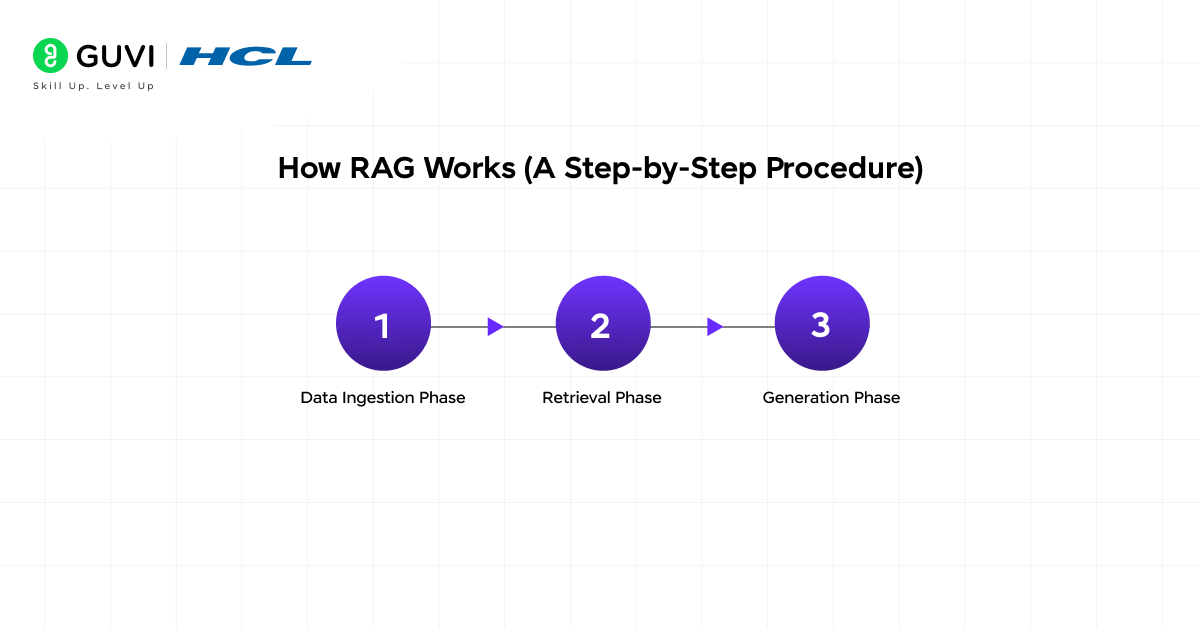
Data Ingestion Phase
This is where your system creates the knowledge base.
You gather your data, such as documents, PDFs or web pages. However, AI models cannot efficiently process large documents in one go, so the data is broken into smaller chunks.
These are then transformed into an embedding, a mathematical representation of meaning. The embeddings are stored in a vector database.
This allows you to search your knowledge base by meaning, rather than keywords.
Retrieval Phase
When a user asks a query, the system doesn’t just answer it.
Rather, it turns the question into an embedding and matches it against the embeddings in the vector database. This enables it to find the most relevant information, even if it is phrased differently.
This is the key to making the system smart as it retrieves information based on meaning, not keywords.
Generation Phase
After the relevant information is extracted, it is sent to the AI system along with the user’s question.
The model is then told to use the context to generate an answer. This guarantees that the response is based on actual data.
This combination of retrieval and generation is what defines RAG.
Build Step-by-Step with n8n
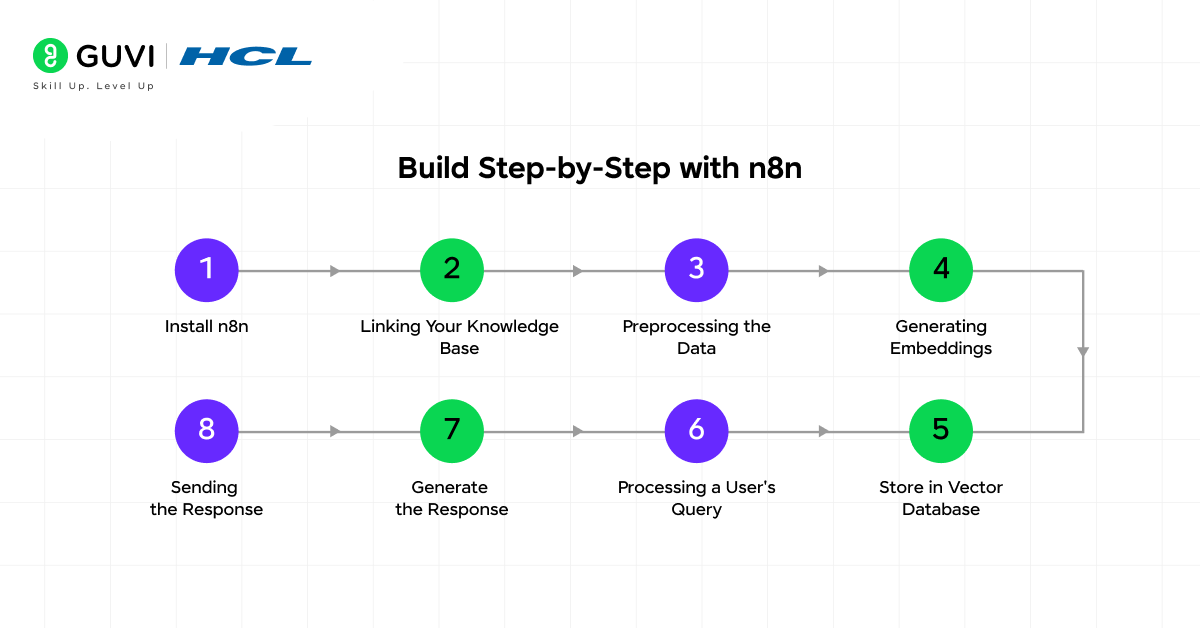
Step 1: Install n8n
First, install or log into n8n. Once inside the dashboard, you create a new workflow. This workflow will act as the pipeline connecting all components of your chatbot.
Step 2: Linking Your Knowledge Base
Next, you link up your data. For example, if you have documents in Google Drive, you can use n8n’s Google Drive integration to load documents automatically.

At this stage, you want to ensure that your data is automatically fed into the system. This is particularly helpful in dynamic settings where data is constantly evolving.
Step 3: Preprocessing the Data
Data is often messy. It can be poorly formatted, have unnecessary parts, or inconsistencies.
You need to:
- Clean the text
- Remove unnecessary elements
- Cut it into smaller pieces
This step will affect your chatbot’s user experience. Poor preprocessing leads to poor retrieval.
Step 4: Generating Embeddings
The text chunks are processed using an AI model to create embeddings. The embeddings represent the meaning of the text as numbers.
This is a key step as it enables semantic search.
Step 5: Store in Vector Database
The embeddings are stored in a vector database, which is optimized for similarity search.
Instead of finding data based on exact matches, vector databases find data based on concepts.
Step 6: Processing a User’s Query
When a user sends a message to your chatbot, the chatbot sends the user’s query to n8n.
The query is:
- Captured
- Converted into an embedding
- Compared against stored embeddings
It gets the closest data chunks.
Step 7: Generate the Response
The retrieved data is combined with the user’s question and sent to the AI model.
It is asked to only use the relevant context. This helps avoid errors and hallucination.
Step 8: Sending the Response
And last, the answer is returned to the user via your medium of choice – a web chatbot, Slack, or what have you.
Real-World Use Case: Marketing Campaign Intelligence
Let’s connect this to something practical.
Imagine you have a history in marketing:
- Campaign reports
- Performance metrics
- Customer engagement data
Rather than looking at the data yourself, you create a RAG chatbot.
Now, when someone asks:
“Which campaign was the most effective for Gen Z?”
The system:
- Searches past campaign data
- Retrieves relevant insights
- Provides an answer in context
This transforms how teams operate. Rather than digging through data, they have immediate insights and can make decisions more quickly.
Why Create a Knowledge RAG Chatbot?
Your team’s knowledge is already valuable but it’s underutilized.
Think about where your information lives:
- Marketing campaigns – spreadsheets and dashboards
- Product decisions – documents and notes
- Customer insights – CRMs and chat logs
It’s not about storing, it’s about retrieval.
Creating a RAG chat bot allows you to:
Centralize Distributed Knowledge: Rather than navigating between applications, you provide a chat window to access all information.
Reduce Time Spent Searching: Employees often spend hours looking for existing information. A RAG chatbot eliminates repetitive searching by delivering answers instantly.
Improve Decision-Making Speed: With answers delivered in seconds, it allows teams to move at a quicker pace.
Enable Scalable Knowledge Access: Onboarding team members don’t have to ask questions, they can interact with the system and get information.
Develop AI Features Without Backend Development: With no-code platforms such as n8n, you can create workflows ready for production without relying on software engineers.
Tools You’ll Use
No need for a fancy tech stack.
Main Components
- n8n – Workflow automation engine
- AI Model API – To generate embeddings and responses
- Vector Database – To store embeddings for search
- Knowledge Base – Your documents and data
Master concepts like RAG, workflow automation, and real-world AI applications with HCL GUVI’s AI & ML Course. Work on hands-on projects and build solutions that go beyond theory into practical impact.
Wrapping it up:
At some point, every growing team hits the same invisible wall not because they lack knowledge, but because that knowledge becomes harder to reach, reuse, and rely on. Documents multiply, tools expand, and answers get slower.
When you build a Custom Knowledge RAG Chatbot using n8n you are doing much more than adding one more artificial intelligence (AI) application into your technology stack. You are reengineering the flow of information throughout the entire system.
Instead of treating knowledge as something you store and search, you start treating it as something you can interact with something that responds, adapts, and supports decisions in real time.
This transformation in how knowledge is used will not only change the efficiency of teams but also the way teams learn, the speed at which they will act and how smoothly they will move from having a thought to executing it.
FAQs
1. What is a RAG Chatbot?
RAG chatbots use AI to search your database and produce accurate responses to answers.
2. Do I need coding skills to use n8n?
No, it’s mostly no-code, but basic logic understanding helps.
3. What Types of Data Can I Utilize?
You can utilize various types of data, such as PDFs, text documents, databases, APIs, and customer relationship management (CRM) systems.
4. What is a vector database?
A database that stores embeddings to enable meaning-based search.
Success Stories

About the Author
Vishalini Devarajan
An Aerospace Engineer turned content writer, I focus on making complex concepts easy to understand through well-structured, reader-friendly blogs. Whether it’s a technical topic or a non-technical one, I love creating content that is clear, engaging, and impactful.
View all posts by Vishalini Devarajan
Connect with me @













Did you enjoy this article?