


Artificial Intelligence and Machine Learning Articles
Finance Manager to Data Analytics: Career Growth, Salary and Seniority
How to Evaluate LLM Outputs in Production Deployments
AI/ML Skills Gap 2026: Why Companies Can't Find Job-Ready Talent
20 AI/ML Interview Questions Recruiters Can Use Without a Tech Background - Best Guide


Get In Touch For Details! Request More Information
Write a Cover Letter with ChatGPT: Step-by-Step Guide (2026)
Aug 14, 2026 8 Min Read 1191 Views
(Last Updated)
Job applications are stressful. You spend hours polishing your resume, finally find a job you actually want, and then you see it: “Please include a cover letter.” Suddenly the hardest part of the application is staring you in the face. Most people either write a generic, forgettable letter or stare at a blank page for an hour and give up. Writing a Cover Letter with ChatGPT fixes both problems. There is a better way. Writing a Cover Letter with ChatGPT can get you from a blank page to a strong, personalised draft in under ten minutes.
This guide walks you through the whole process, step by step. You will learn what information to prepare, how to write prompts that get great results, what to fix before you send, and what mistakes to avoid. Whether you are applying for your first job or your tenth, this guide makes the process simple and fast.
Quick Answer
Writing a Cover Letter with ChatGPT means giving it your resume details, the job description, and clear instructions, then letting it draft a professional, tailored letter for you. The key is to give ChatGPT enough specific information to work with, then personalise the output so it sounds like you, not a machine. A good Cover Letter with ChatGPT takes about 15 to 20 minutes total.
Table of contents
- Why Use ChatGPT to Write a Cover Letter?
- Do Hiring Managers Still Read Cover Letters in 2026?
- What to Prepare Before You Open ChatGPT
- Your Resume Details
- The Job Description
- Company Details
- The Hiring Manager's Name
- Step-by-Step: How to Write a Cover Letter with ChatGPT
- Step 1: Set Up ChatGPT for the Task
- Step 2: Paste the Job Description and Your Details
- Step 3: Review the First Draft
- Step 4: Refine with Follow-Up Prompts
- Step 5: Add Your Personal Voice
- Ready-to-Use Prompt Templates
- For a First-Time Job Seeker
- For an Experienced Professional
- For a Career Change
- For Improving an Existing Draft
- Mistakes to Avoid When Writing a Cover Letter with ChatGPT
- Tips for Making Your Cover Letter Sound Human
- 💡 Did You Know?
- Conclusion
- FAQs
- Is it okay to use ChatGPT to write a cover letter?
- How do I make my Cover Letter with ChatGPT sound less robotic?
- What should I never let ChatGPT write in my cover letter?
- How long should a cover letter written with ChatGPT be?
- What is the best prompt to start a Cover Letter with ChatGPT?
Why Use ChatGPT to Write a Cover Letter?
Writing a cover letter from scratch can feel overwhelming because you need to present your skills clearly, sound professional, and stay concise at the same time. Many job seekers either write something too generic to stand out or spend too long overthinking every sentence.
Using ChatGPT helps solve the biggest challenge of getting started. Instead of staring at a blank page, you get a structured draft in seconds that you can refine with your achievements and tone.
AI-assisted cover letters have become increasingly popular in recent years. Surveys show that around 18% of U.S. job seekers used AI tools for cover letter writing and related tasks in 2025, and the adoption rate continues to grow.
Key Points
- Eliminates Blank Page Stress: Generates a starting draft instantly so you don’t struggle with where to begin.
- Saves Valuable Time: Structures your cover letter quickly, helping you meet tight application deadlines.
- Supports Easy Personalization: Lets you modify tone, achievements, and examples to reflect your real experience.
- Keeps Content Professional: Produces well-organized drafts that follow standard cover letter formats.
- Improves Writing Efficiency: Works best when you provide clear prompts and refine the output before submitting.
Thought to ponder: A hiring manager reads dozens of cover letters every day. They can spot a generic AI-written letter in under five seconds. So what does a great Cover Letter with ChatGPT actually look like, and how do you make sure yours does not sound like everyone else’s?
Hint: The secret is the input you give ChatGPT, not the output it produces. A specific, detailed prompt produces a specific, tailored letter. A vague prompt produces a letter full of phrases like “I am excited to apply” and “I believe I would be a great fit.” Those phrases tell the hiring manager nothing and waste their time. Everything in this guide is about making your input better so your output stands out.
Do Hiring Managers Still Read Cover Letters in 2026?
Yes. Research shows that 94% of hiring managers still read cover letters and say they influence interview decisions. This makes a cover letter more important than ever, even in a world full of quick applications and one-click applies.
What has changed is what they look for. A Cover Letter with ChatGPT, when done right, addresses exactly what modern hiring managers want to see. Hiring managers in 2026 are not looking for a retelling of your resume. They want to see three things quickly: why you want this specific role, what you bring that others do not, and how you will help solve their problems. A well-written Cover Letter with ChatGPT addresses all three of those things when you prompt it properly.
Do check out HCL GUVI’s Artificial Intelligence and Machine Learning Course designed to help you master AI concepts, machine learning algorithms, and deep learning through structured modules and real-world projects, along with mentorship support and placement guidance to make you industry-ready in a short duration.
What to Prepare Before You Open ChatGPT
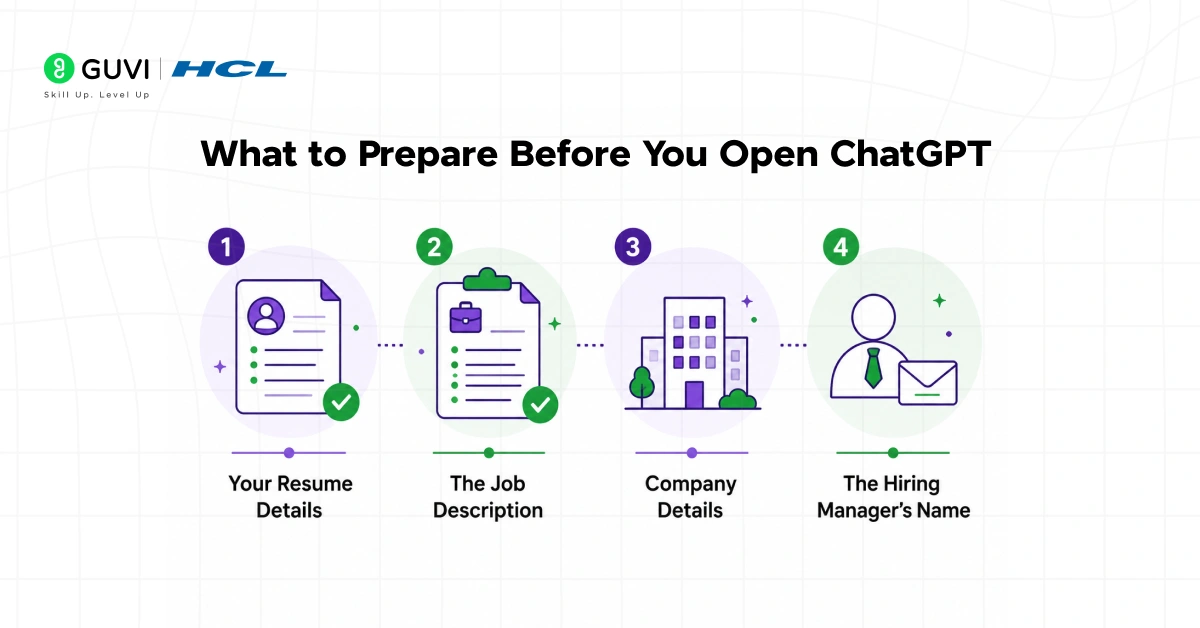
Good output always starts with good input. Before you start writing your Cover Letter with ChatGPT, gather these five things. Having them ready saves time and makes the whole process much smoother.
1. Your Resume Details
When preparing your Cover Letter with ChatGPT, you do not need to paste your entire resume. Just pull out the most relevant points for this specific role. That means your job title, the key skills you have that match the job description, and one or two specific achievements you are proud of. Numbers make achievements memorable. “Increased sales by 30%” beats “improved sales performance” every single time.
- Job title and years of experience: Give ChatGPT a clear picture of where you are in your career.
- Top two or three skills: Focus on what matters for this specific role, not everything on your resume.
- One concrete achievement: A specific result with numbers is far more powerful than a general claim.
- Your tone preference: Do you want the letter to sound warm and conversational, or formal and professional? Tell ChatGPT upfront.
2. The Job Description
Copy the full job description and have it ready to paste. The job description is the most important input you can give when writing a Cover Letter with ChatGPT. It contains the exact keywords the company uses to describe what they need, and your cover letter should echo those words back naturally.
Pay attention to the words used to describe the ideal candidate. If the job description says “cross-functional collaboration,” use that phrase in your letter. If it says “data-driven decision making,” include that. Applicant tracking systems (ATS) often scan for keyword matches before a human reads anything. A well-prompted Cover Letter with ChatGPT naturally incorporates these keywords from the job description. Using the job description’s own language helps you get past that first filter.
3. Company Details
Spending five minutes researching the company before writing your Cover Letter with ChatGPT is one of the highest-value things you can do. Know what they do, what their mission is, and if possible, something recent they have achieved or announced. Writing a Cover Letter with ChatGPT that mentions a specific company milestone or value shows you did your homework and are not just bulk-applying to every job on the internet.
- What the company does: In one or two sentences, what is their core product or service?
- Their mission or values: Most company websites have an About page. Grab a phrase that resonates with you.
- Something recent: A new product launch, an award, or a company initiative you genuinely find interesting.
4. The Hiring Manager’s Name
Whenever possible, find out who will read your letter and address it to them directly. “Dear Ms. Priya” is more engaging than “Dear Hiring Manager.” Check LinkedIn, the company website, or the job posting itself. It takes two minutes and it signals attention to detail.
Riddle: Two candidates apply for the same job. Both write a Cover Letter with ChatGPT. One submits the first draft ChatGPT produced. The other spends ten minutes personalising it with specific examples and the hiring manager’s name. Who gets the callback?
Answer: Almost always the second candidate. The Cover Letter with ChatGPT is just the starting point. The personalisation is what makes it stand out. A letter that mentions real, specific details about the company and uses the candidate’s genuine voice is far more memorable than a polished but generic AI draft. The tool does not write the winning letter. Your input and your edits do.
Step-by-Step: How to Write a Cover Letter with ChatGPT
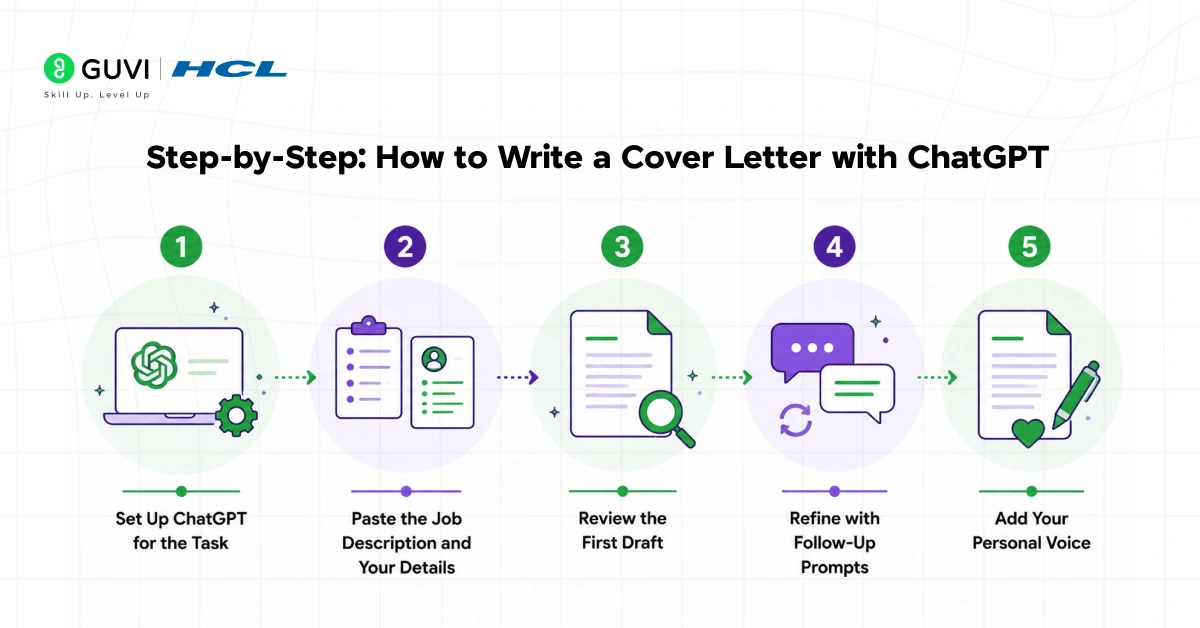
Here is the exact process for writing a Cover Letter with ChatGPT from start to finish.
Step 1: Set Up ChatGPT for the Task
Start by giving ChatGPT a role to play. This sets the tone for everything it produces. Type something like this at the start of your conversation.
“You are a professional cover letter writer with experience helping candidates land jobs in [your industry]. I am going to give you my details and a job description. Write me a cover letter that sounds natural, specific, and enthusiastic without using clichés. Keep it under 350 words and use three paragraphs.”
This one instruction changes the quality of your Cover Letter with ChatGPT dramatically. You are telling ChatGPT who to be, what to avoid, and what format to follow before it writes a single word.
Step 2: Paste the Job Description and Your Details
In the same message or immediately after, give ChatGPT all the information you prepared. This is the most important step in writing a Cover Letter with ChatGPT. Include the job title, company name, your key skills, your best achievement, and the full job description. The more specific you are, the better the output will be.
A prompt that works well looks like this. “I am applying for a [Job Title] role at [Company Name]. Here are my key details: I have [X years] of experience in [your field]. My top skills for this role are [skill 1], [skill 2], and [skill 3]. My biggest achievement is [specific result with numbers]. The company recently [something you found in your research]. Here is the job description: [paste it here]. Write a cover letter based on this.”
That is a genuinely useful prompt. It gives ChatGPT everything it needs to produce a draft that is specific to you, the company, and the role.
Step 3: Review the First Draft
Read the draft carefully. This review step is what turns a good Cover Letter with ChatGPT into a great one. Check that the facts are correct, the tone feels right, and the key achievements are represented accurately. ChatGPT sometimes gets creative with details, so verify anything specific before you keep it.
Ask yourself three questions. Does this sound like me, or does it sound like a robot? Does it address what this company specifically needs? Is there anything generic enough to be copy-pasted into any other application?
Step 4: Refine with Follow-Up Prompts
If the first draft is not quite right, do not start over. Just ask ChatGPT to adjust. This is where a Cover Letter with ChatGPT becomes genuinely powerful.
- “Make the opening line more specific and less generic.”
- “Rewrite the second paragraph to emphasise my experience with [specific skill].”
- “The tone is too formal. Make it sound more natural and conversational.”
- “Shorten this to 300 words without losing the key points.”
- “Replace any clichés like ‘I am passionate’ with something more concrete.”
Each of these instructions moves your Cover Letter with ChatGPT closer to something genuinely impressive. This back-and-forth process is what separates a great Cover Letter with ChatGPT from a lazy one.

Step 5: Add Your Personal Voice
This is the step most people skip when writing a Cover Letter with ChatGPT, and it is the most important one. Read the finished draft and add at least two to three personal details that only you could write. This could be a specific project you worked on, a reason you genuinely admire the company, or a moment from your career that shaped how you work.
These personal additions are what make the difference between a letter that gets filed and one that gets a callback. No AI can invent your actual experiences. A Cover Letter with ChatGPT is most powerful when you bring your real story to the table. Writing a Cover Letter with ChatGPT is most effective when the AI handles the structure and you handle the soul.
Along with writing a cover letter, creating a strong resume is equally important—do read How to Create a Professional Resume Using ChatGPT to learn how to craft a job-ready resume using ChatGPT.
Ready-to-Use Prompt Templates
Here are four ready-to-use prompts for writing your Cover Letter with ChatGPT. Copy, fill in your details, and go.
1. For a First-Time Job Seeker
“I am applying for my first job as a [Job Title] at [Company Name]. I am a recent graduate in [your degree]. My relevant skills include [skill 1], [skill 2], and [skill 3]. During my studies or internship, I [specific project or achievement]. The company’s focus on [something from their website] resonates with me because [your genuine reason]. Here is the job description: [paste it]. Write a 300-word cover letter in three paragraphs. Make it confident but not arrogant, and avoid clichés.”
2. For an Experienced Professional
“I am applying for the [Job Title] role at [Company Name]. I have [X years] of experience in [your field]. My most relevant achievement is [specific result with numbers]. I want to highlight my expertise in [skill]. The job description says they need [key requirement]. Here it is: [paste it]. Write a 350-word cover letter that connects my experience directly to their needs. Sound professional but warm, and avoid sounding like a template.”
3. For a Career Change
“I am writing a Cover Letter with ChatGPT for a career change from [previous field] to [new field], applying for [Job Title] at [Company Name]. My transferable skills include [skill 1] and [skill 2]. In my previous role, I [achievement that applies to the new field]. Here is the job description: [paste it]. Write a cover letter that acknowledges my career change confidently, focuses on transferable value, and explains why I am genuinely excited about this direction.”
4. For Improving an Existing Draft
“I have started writing a Cover Letter with ChatGPT and here is my draft: [paste your draft]. Please improve it by making the opening more specific, removing any clichés, ensuring the key achievement is prominent, and keeping the total length under 350 words. Keep my voice and specific examples.”
Mistakes to Avoid When Writing a Cover Letter with ChatGPT
Even with a good process, there are mistakes that can undo a solid Cover Letter with ChatGPT before a hiring manager ever reads it.
- Submitting the first draft unedited: ChatGPT produces a starting point, not a finished letter. Always review, personalise, and refine before sending.
- Using vague prompts: “Write me a cover letter for a marketing job” gives ChatGPT almost nothing to work with. Be specific about the company, the role, and your own experience.
- Letting ChatGPT write your contact details: Always type your own name, email, phone number, and address. ChatGPT can fabricate these or get them wrong, and a typo in your contact details can cost you an opportunity.
- Ignoring the job description keywords: Your Cover Letter with ChatGPT should mirror the language of the job posting. If it does not, you risk being filtered out by applicant tracking systems before a human reads your application.
- Making it too long: The ideal cover letter is 300 to 400 words across three focused paragraphs. Anything longer gets skimmed or skipped. Tell ChatGPT to stay within this limit from the start.
- Sounding too polished and impersonal: Phrases like “I am deeply passionate about leveraging my synergistic skill set” sound like they came from a machine. If ChatGPT uses words you would never say out loud, replace them.
Do check out HCL GUVI’s AI & ML Email Course, a beginner-friendly 5-day learning series that delivers core AI and machine learning concepts, real-world use cases, career insights, and a clear roadmap to help you understand how AI works and where to start your learning journey.
Tips for Making Your Cover Letter Sound Human
- Read your Cover Letter with ChatGPT out loud: If any sentence makes you stumble or sounds unnatural, rewrite it. A good cover letter should sound like something a confident, articulate person would actually say.
- Use your own stories: Real anecdotes and specific examples are impossible to fake. Add at least one moment from your career that shows, rather than tells, what you can do.
- Show genuine curiosity: Mention something specific about the company that genuinely interests you. Hiring managers can feel the difference between research and flattery.
- Match the company’s tone: A startup wants energy and ideas. A law firm wants precision and professionalism. Read the company’s website and mirror their style subtly in your letter.
- End with confidence: Close with a clear, direct statement about your next step. Something like “I would love to discuss how I can contribute to your team” is stronger than “I hope to hear from you at your earliest convenience.”
💡 Did You Know?
- 94% of hiring managers say cover letters still influence their interview decisions in 2026, meaning a strong letter can genuinely separate you from candidates with identical resumes.
- The ideal cover letter is 300 to 400 words, roughly three paragraphs. Research consistently shows that shorter, focused letters get more attention than long ones that retell the resume.
- Hiring managers report spotting generic AI-written cover letters in under five seconds, and with about 18% of job seekers already using AI tools, personalising your cover letter is what gives you a clear edge.
Conclusion
Writing a Cover Letter with ChatGPT is not about handing your job search over to a machine. It is about using a smart tool to remove the hardest part of the process so you can focus on what really matters: your story, your skills, and your fit for the role.
Use ChatGPT to handle the structure, the keywords, and the first draft of your Cover Letter with ChatGPT. Then spend ten minutes making it yours. Add your specific achievements. Put in a genuine reason you want to work at this company. Make sure it sounds like you on a confident day.
That is the process for writing a great Cover Letter with ChatGPT. And it genuinely works.
FAQs
1. Is it okay to use ChatGPT to write a cover letter?
Yes. Using ChatGPT to write a cover letter is completely acceptable. What matters is that the final letter is accurate and sounds like you. Think of writing a Cover Letter with ChatGPT as using a smart writing assistant, not handing your voice to a machine. Always personalise the output and verify that every detail it includes is true.
2. How do I make my Cover Letter with ChatGPT sound less robotic?
The key to a human-sounding Cover Letter with ChatGPT is personalisation after the draft. Add specific examples from your own experience, replace any corporate clichés with natural language, and read it out loud to catch anything that sounds unnatural. If a sentence would feel awkward to say in a conversation, rewrite it.
3. What should I never let ChatGPT write in my cover letter?
Never let ChatGPT write your contact details. Always type your name, email, phone number, and address yourself. ChatGPT can make mistakes with personal data, and a wrong email or phone number can mean you never hear back from a company that wanted to hire you.
4. How long should a cover letter written with ChatGPT be?
When writing a Cover Letter with ChatGPT, keep it to 300 to 400 words across three paragraphs. That is the length most hiring managers prefer. In your prompt, ask ChatGPT to stay within this limit from the start. If the first draft is too long, use a follow-up prompt to ask it to shorten the letter while keeping the most important points.
5. What is the best prompt to start a Cover Letter with ChatGPT?
The best starting prompt for a Cover Letter with ChatGPT gives ChatGPT a role, a word limit, and a format. For example: “You are a professional cover letter writer. Write a 350-word cover letter for [Job Title] at [Company Name] based on my details: [your info]. Here is the job description: [paste it]. Sound specific, natural, and confident. Avoid clichés.” This gives ChatGPT clear direction from the very first message.
Success Stories

About the Author
Jebasta
I translate the language of data into stories that anyone can understand. As a writer with a data science background, I simplify analytics, AI, and decision-making so beginners and enthusiasts can confidently explore the world of data.
View all posts by Jebasta
Connect with me @













Did you enjoy this article?