


Career Articles
Accountant vs Data Analyst Salary in India After Switching Careers - Best Guide
Finance Managers: Could Data Science Be Your Next Career Move?
Insurance Claims Executive to Data Analyst: Is It a Good Switch?
Banking Executive (Loans, KYC) to Data Analyst: Skills and Career Path


Get In Touch For Details! Request More Information
ATS-Friendly Resume Format 2026: Guide & Examples
Aug 14, 2026 4 Min Read 5197 Views
(Last Updated)
Quick Answer: An ATS-friendly resume format uses a single-column layout, standard section headings, and role-relevant keywords so applicant tracking systems can accurately scan and shortlist resumes.
You’re probably reading this because you’ve applied to a dozen jobs and heard nothing back, even though your profile fits. An ATS-friendly resume format is often the missing piece. Before any recruiter opens your resume, software reads it first, and if that software can’t parse your layout, your application may never reach a human.
This guide walks you through exactly how that software works, how to structure your resume around it, and which mistakes quietly get strong resumes rejected.
Table of contents
- TL;DR Summary
- What Is ATS and How Hiring Will Work in 2026
- How Does an ATS Actually Score Your Resume?
- ATS-Friendly Resume Formats That Work (With Examples)
- Example 1: Clean Single-Column Resume Structure
- Example 2: Experience-Forward Resume Structure
- Example 3: Skill-Grouped Resume Structure
- Example 4: Balanced Hybrid Resume Structure
- PDF vs Word (DOCX): Which File Format is Safer for ATS
- ATS-Friendly Resume for Freshers vs Experienced Professionals
- Common ATS Resume Mistakes to Avoid
- Wrapping Up
- FAQs
- What is an ATS-friendly resume format?
- How can I check if my resume is ATS friendly?
- Is PDF or Word better for an ATS?
- How long should an ATS-friendly resume be?
- Do I need different resumes for platforms like Naukri versus a company's own ATS?
- Should I update my resume format frequently as ATS systems evolve?
TL;DR Summary
- An ATS-friendly resume format uses a single-column layout, standard section headings, and text-based content so parsing software can read it correctly
- Save your resume as a text-based PDF or DOCX, not an image or scanned file
- Avoid tables, columns, icons, and graphics inside the main body, since these often get skipped or scrambled during parsing
- Match your resume language to the keywords in the job description, but keep it natural
- Getting the format right does not guarantee a job, but it stops a strong profile from being filtered out before a recruiter even sees it
What Is ATS and How Hiring Will Work in 2026
An Applicant Tracking System, or ATS, is software used by organisations to collect, organise, and screen job applications at scale. It reads resumes by extracting text, identifying sections, and matching content against role requirements before a recruiter reviews them. This makes the ATS-friendly resume format a practical requirement rather than a preference in modern hiring.
Looking ahead, hiring in 2026 is expected to rely even more on automated and data-driven processes:
- Increased use of AI-assisted screening
ATS tools are becoming better at analyzing context, skill relevance, and consistency rather than relying only on exact keyword matches. - Greater emphasis on structured resumes
Resumes with clear headings, predictable section order, and clean layouts are easier for systems to parse accurately. - Reduced tolerance for complex formatting
Design-heavy resumes with tables, graphics, or multiple columns are more likely to cause parsing errors during screening. - Faster shortlisting cycles
With higher application volumes, ATS systems will continue to filter resumes more quickly, making first-pass accuracy critical.
By understanding how these systems work and how hiring processes are evolving, job seekers can make informed choices about resume structure that support both automated screening and recruiter review.
Also read: How to Build an ATS-Friendly Resume That Actually Gets You Interviews
Most Fortune 500 companies use some form of ATS to screen applications, and the majority of these systems rank candidates rather than auto-reject them. This means formatting mistakes don’t always block you outright, but they do lower where you land in the queue.
How Does an ATS Actually Score Your Resume?
Understanding what happens after you hit submit helps you write with more purpose.
Keyword matching: The system compares the words in your resume against the words in the job description. Skills, tools, and job titles carry the most weight.
Section recognition: ATS software looks for standard headings like Experience, Skills, and Education. Creative labels like “My Journey” or “What I Bring” often go unrecognized.
Formatting penalties: Multi-column layouts, text boxes, and graphics can break the extraction process, causing entire blocks of content to be misread or ignored.
Once your resume clears this first pass, it usually gets ranked and stored for recruiter search, which is why keyword accuracy matters as much as layout.
ATS-Friendly Resume Formats That Work (With Examples)
Applicant tracking systems rely on structure, consistency, and predictable formatting to read resumes accurately. The examples below highlight how different resume structures can remain ATS-friendly while presenting information clearly. Each example focuses on layout logic rather than visual design, showing how structure supports both automated screening and recruiter review.
Example 1: Clean Single-Column Resume Structure
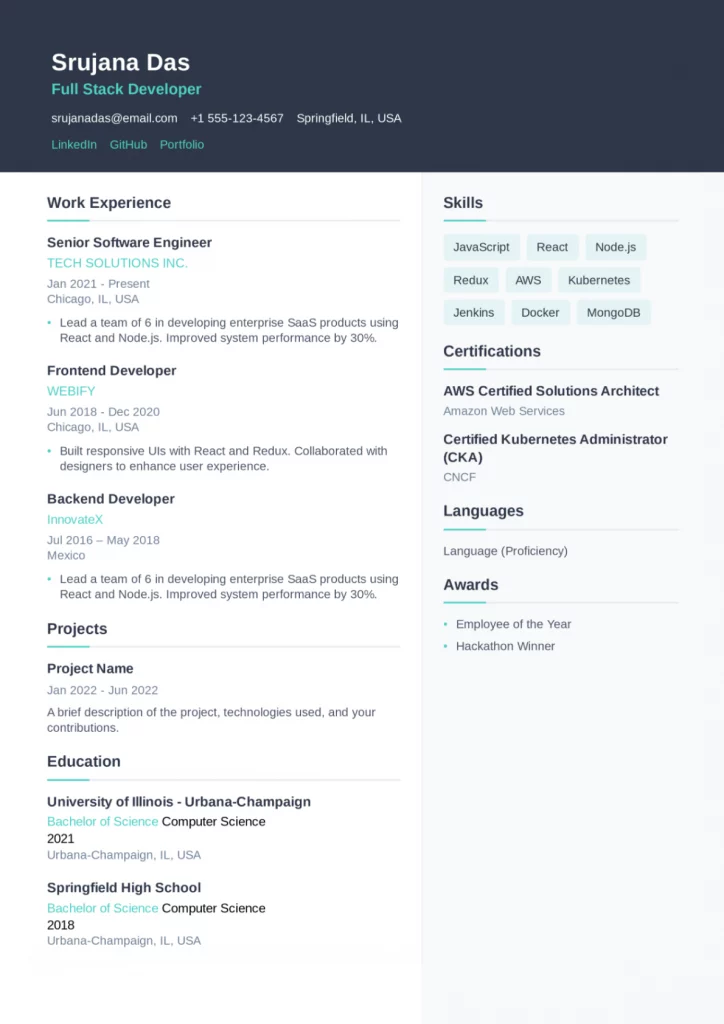
This example shows a straightforward, single-column resume layout where information flows from top to bottom without interruption. All sections are clearly defined, making it easy for applicant tracking systems to identify and categorise details such as skills, experience, and certifications.
What makes this structure effective for ATS is its simplicity. No visual elements are competing with text, and section headings follow a standard naming convention that most systems are trained to recognise.
- Uses a single-column layout that avoids parsing errors
- Keeps section headings clear and conventional
- Presents skills, experience, and education in a logical order
- Avoid icons, graphics, or tables that could disrupt scanning
Example 2: Experience-Forward Resume Structure
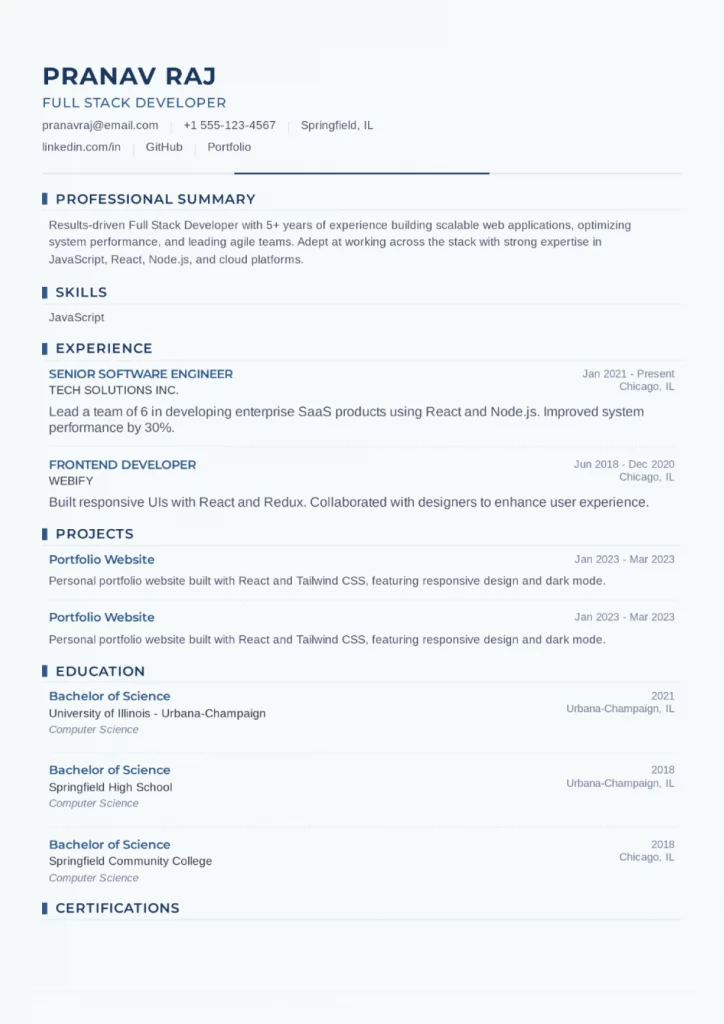
In this structure, professional experience is placed prominently after the summary, allowing ATS systems to quickly detect job titles, timelines, and responsibilities. Dates, roles, and organisations follow a consistent format, which helps systems map career progression accurately.
This layout works well when experience forms a central part of the profile, while still keeping supporting sections like skills and education easy to locate and read.
- Positions work experience early for quick identification
- Maintains consistent formatting for roles and dates
- Separates experience clearly from skills and education
- Keeps content text-based and evenly spaced
Example 3: Skill-Grouped Resume Structure
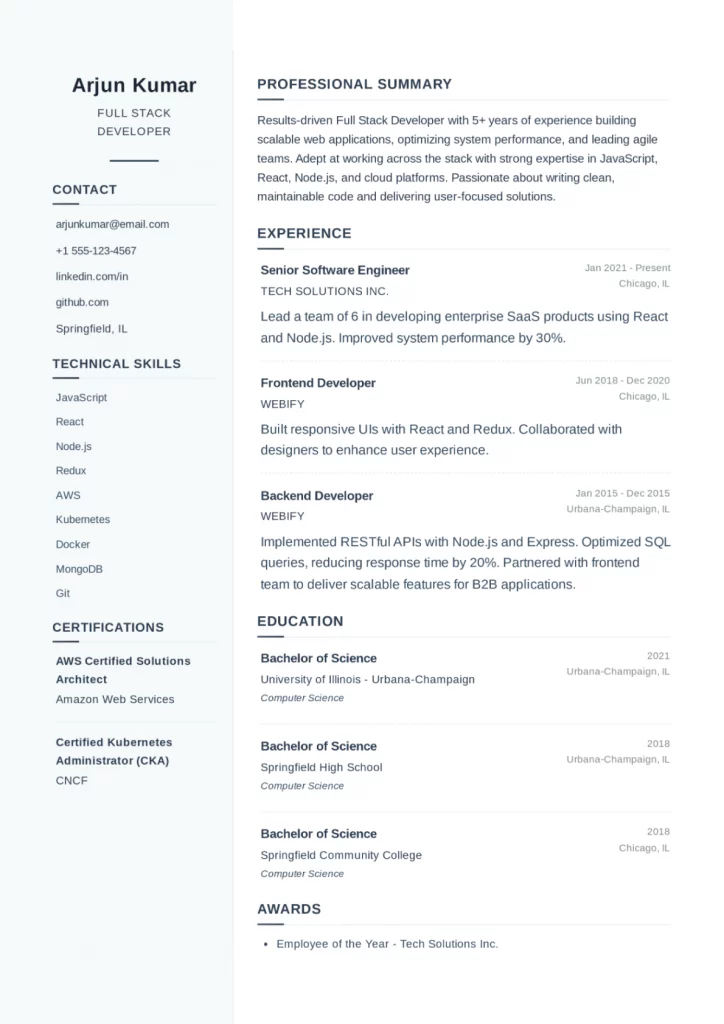
This example highlights how skills can be grouped clearly without compromising ATS readability. Skills are organized under a dedicated section, making it easier for systems to match role-specific keywords against job descriptions.
Supporting sections such as experience and education are still structured predictably, ensuring that the resume remains balanced and easy to parse.
- Group skills under clear, text-based headings
- Supports keyword matching without overloading content
- Maintains separation between skills and experience
- Uses consistent formatting across all sections

Example 4: Balanced Hybrid Resume Structure
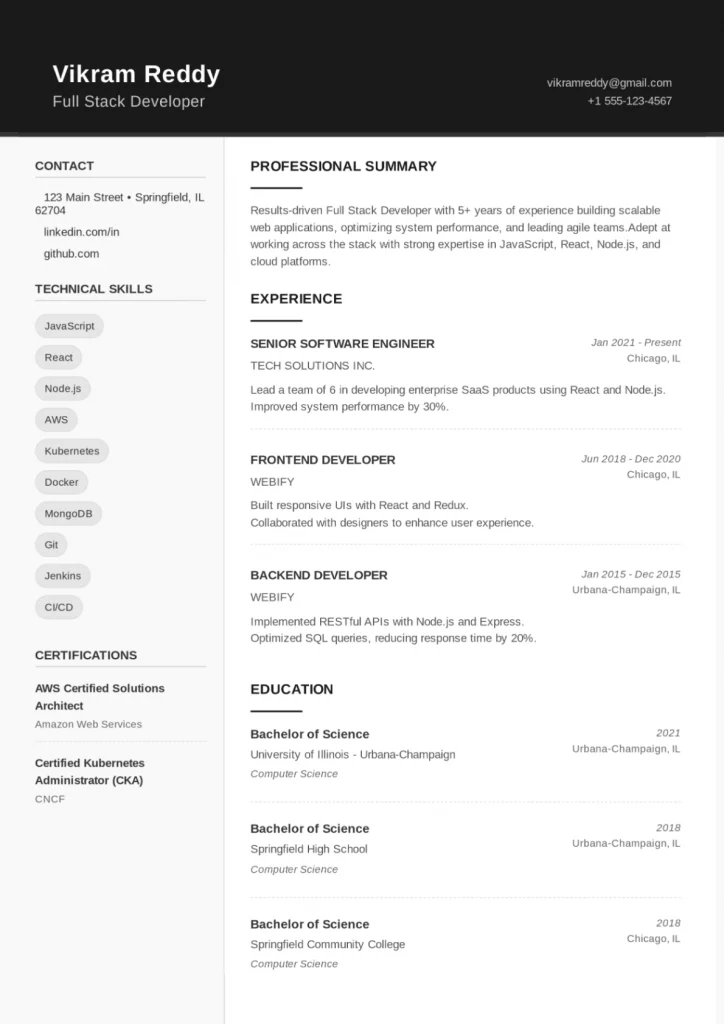
This layout demonstrates a balanced approach where both skills and experience receive equal emphasis. While the resume includes mild visual styling, it remains text-focused and follows standard section ordering, which helps ATS systems read it accurately.
The structure shows that limited visual polish can coexist with ATS-friendly formatting, as long as clarity and consistency are maintained throughout the document.
- Balances skills and experience without disrupting structure
- Uses standard section headings recognized by ATS
- Maintains text readability despite light visual elements
- Keeps alignment and spacing consistent across sections
If you want to build your resume in minutes and also check the ATS score for it, then use HCL GUVI’s Free Resume Builder Tool – Create and Check ATS Score For Free
PDF vs Word (DOCX): Which File Format is Safer for ATS
This is one of the most common points of confusion, so here’s a direct comparison.
| Factor | Text-based PDF | Word (DOCX) | Scanned PDF or Image |
|---|---|---|---|
| Parsing accuracy | High, if not image-based | High | Very low |
| Formatting stays intact | Yes | Sometimes shifts | Not applicable |
| Recruiter preference | Widely accepted | Widely accepted | Usually rejected |
| Risk of layout errors | Low | Moderate | High |
| Recommended for | Most applications | Company career portals that request .docx | Never use for ATS |
If the job posting doesn’t specify a format, a text-based PDF is the safer default. Only switch to DOCX when a company explicitly asks for it.
ATS-Friendly Resume for Freshers vs Experienced Professionals
The core formatting rules stay the same, but what you lead with should shift depending on where you are.
If you’re a fresher, lead with your education, projects, and skills, since you may not have much work history yet. One page is standard.
If you have three or more years of experience, lead with your work experience, and keep skills as a supporting section. Two pages are acceptable once your experience justifies the length.
For more on structuring a resume when you’re just starting out, check out how to build a Python developer portfolio that pairs well with an ATS-friendly resume.
Common ATS Resume Mistakes to Avoid
- Using tables or columns for layout: These often scramble the reading order. Stick to a single column.
- Uploading a scanned or image-based resume: ATS software cannot extract text from an image, no matter how clean it looks.
- Creative section headings: “Skills” beats “What I’m Good At” every time, in ATS terms.
- Keyword stuffing: Repeating the same keyword unnaturally can hurt readability and looks suspicious to recruiters reviewing it later.
- Inconsistent date formats: Mixing “Jan 2023” with “01/2023” across sections confuses parsing and looks careless.
If you want to apply these best practices without spending hours adjusting or worrying about layouts, our free ATS resume tool, the HCL GUVI Resume Builder, offers a practical way forward by helping you create resumes that follow ATS-friendly structures while keeping the process simple and guided.
Also Explore: AI Tools for ATS-Friendly Resumes
Wrapping Up
Getting your ATS-friendly resume format right is about removing avoidable friction between your skills and the recruiter who needs to see them. Stick to a single column, standard headings, and clean text, and save your file the right way. None of this guarantees an offer, but it makes sure your resume is judged on what you’ve actually done, not on formatting it never should have been rejected for.
FAQs
What is an ATS-friendly resume format?
It’s a resume layout built with a single column, standard section headings, and text-based content, so applicant tracking software can extract and categorize your information correctly.
How can I check if my resume is ATS friendly?
Try copying and pasting your resume into a plain text document. If the content stays in order and nothing looks jumbled, it’s a good sign your formatting is ATS-safe.
Is PDF or Word better for an ATS?
A text-based PDF is generally the safer default, though Word (DOCX) works well too. Avoid scanned or image-based PDFs entirely, since ATS software can’t read them.
How long should an ATS-friendly resume be?
One page for freshers or candidates with under three years of experience, and up to two pages for professionals with five or more years of experience.
Do I need different resumes for platforms like Naukri versus a company’s own ATS?
Not necessarily different resumes, but you can adjust keyword emphasis. Think of your Naukri resume as broadly optimized, and your direct application resume as more targeted to that specific job description.
Should I update my resume format frequently as ATS systems evolve?
You do not need to change formats frequently, but it is a good idea to review your resume periodically. As hiring tools evolve, maintaining a simple, structured layout and updating content relevance helps ensure your resume continues to align with modern screening practices and expectations.
Success Stories














Did you enjoy this article?