


AWS Kubernetes Articles
Istio Service Mesh Tutorial for Beginners
Crossplane Tutorial: A Practical Guide for Learners


Get In Touch For Details! Request More Information
What is a Subnet in AWS? Explained for Beginners & Engineers
Sep 24, 2026 5 Min Read 679 Views
(Last Updated)
When deploying applications on AWS, network design is crucial. Subnets are a core part of this design, controlling how resources communicate with one another and with the internet. Understanding AWS subnets helps cloud developers, DevOps engineers, and solutions architects build secure, scalable, and well-organised infrastructure.
Table of contents
- Quick TL;DR
- What is a Subnet in AWS?
- Public vs Private Subnets in AWS
- Public Subnets
- Private Subnets
- How Does a Subnet in AWS Work?
- Step 1: VPC and CIDR Block
- Step 2: Create Subnets
- Step 3: Attach Route Tables
- Step 4: Apply Security Controls
- Key Components That Work With Subnets in AWS
- Types of Subnets in AWS
- Best Practices for Designing Subnets in AWS
- Common Mistakes When Working with Subnets in AWS
- Conclusion
- FAQs
- What is a subnet in AWS?
- What is the difference between a public and private subnet in AWS?
- How many subnets can you have in an AWS VPC?
- Why does AWS reserve 5 IP addresses in every subnet?
- What is a NAT Gateway and why is it used with private subnets?
Quick TL;DR
- A subnet in AWS is a segment of a VPC’s IP address range that helps organise and secure network resources.
- Subnets can be public (internet-accessible) or private (internal only) and are associated with a specific Availability Zone.
- They control how AWS resources communicate and are essential for building secure, scalable cloud architectures.
What is a Subnet in AWS?
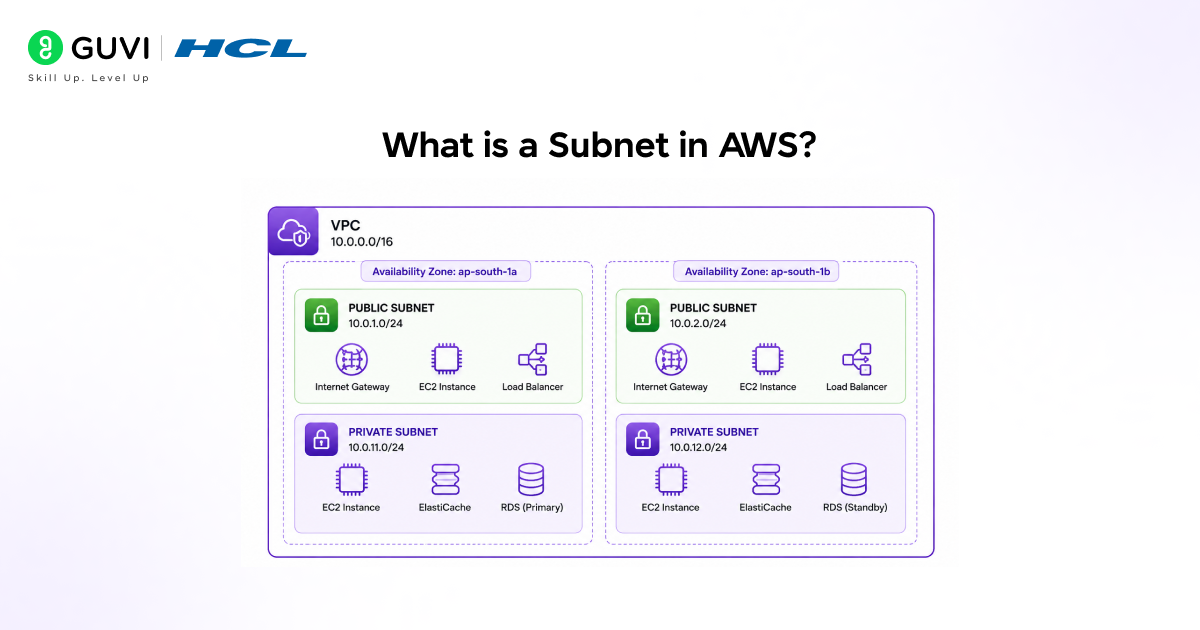
A subnet (subnetwork) in AWS is a range of IP addresses within a Virtual Private Cloud (VPC). Think of a VPC as your private cloud network and a subnet as a smaller section within it, with its own access and communication rules. Each subnet belongs to a single Availability Zone (AZ) and uses a portion of the VPC’s CIDR block. For example, a VPC with CIDR 10.0.0.0/16 can be divided into smaller subnets such as 10.0.1.0/24 and 10.0.2.0/24.
• 10.0.1.0/24 as a public subnet in ap-south-1a
• 10.0.2.0/24 as a private subnet in ap-south-1a
• 10.0.3.0/24 as a private subnet in ap-south-1b
Read More: AWS Roadmap: Your Complete Guide to AWS Career Success
Public vs Private Subnets in AWS
Public Subnets
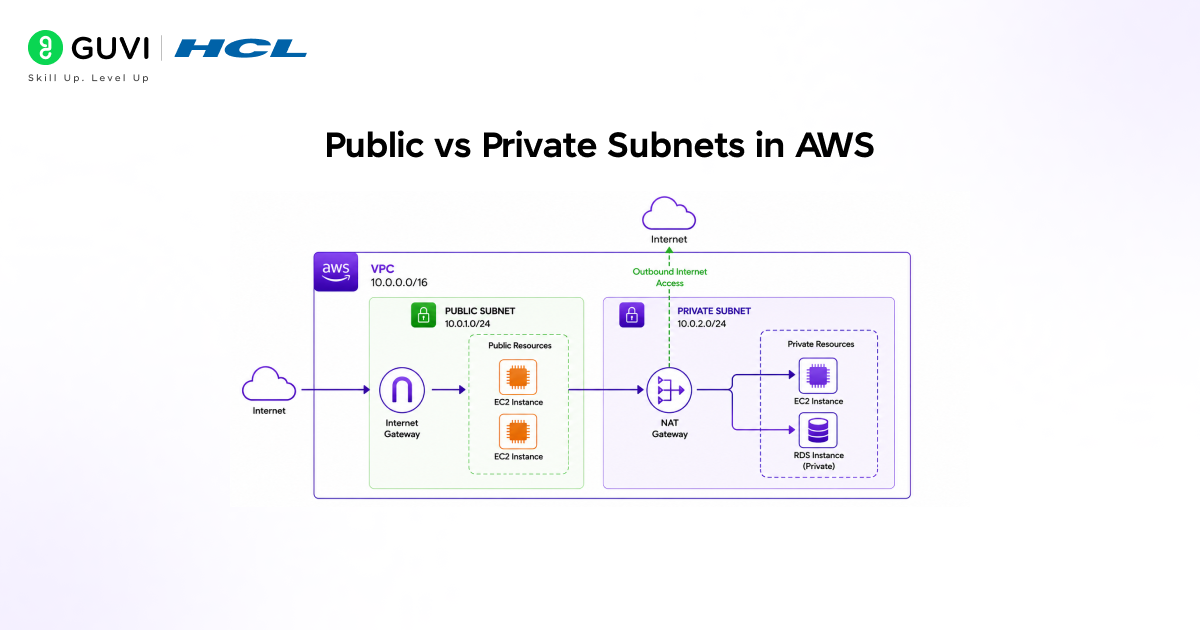
A subnet is public when its route table contains a route that directs internet-bound traffic (0.0.0.0/0) to an Internet Gateway (IGW). Resources in a public subnet can be assigned a public IP address and are reachable from the internet.
Typical resources in a public subnet:
• Load balancers (ALB / NLB)
• Bastion hosts (jump servers for SSH access)
• NAT Gateways (to allow private subnets to reach the internet)
• Web servers that need to serve traffic directly
Check out HCL GUVI’s AWS Cloud Computing Programme designed for developers and IT professionals who want to build job-ready cloud skills with hands-on labs and mentor support.
Private Subnets
A subnet is private when its route table has no route to an Internet Gateway. Resources inside cannot be reached directly from the internet; they can only communicate with other resources within the VPC or reach the internet through a NAT Gateway in a public subnet.
Typical resources in a private subnet:
• RDS databases and ElastiCache clusters
• Application servers and microservices
• Lambda functions that need VPC access
• Internal APIs and backend services
In Amazon Web Services (AWS), each subnet automatically reserves five IP addresses: the first four and the last one in the range. These reserved IPs are used by AWS for internal networking functions such as the network address, VPC router, DNS, and broadcast-like operations. As a result, a /24 subnet (which contains 256 total IP addresses) provides only 251 usable IP addresses for EC2 instances and other resources. This is an important consideration when designing network architectures, especially for large-scale deployments where efficient IP planning is critical.
How Does a Subnet in AWS Work?
Step 1: VPC and CIDR Block
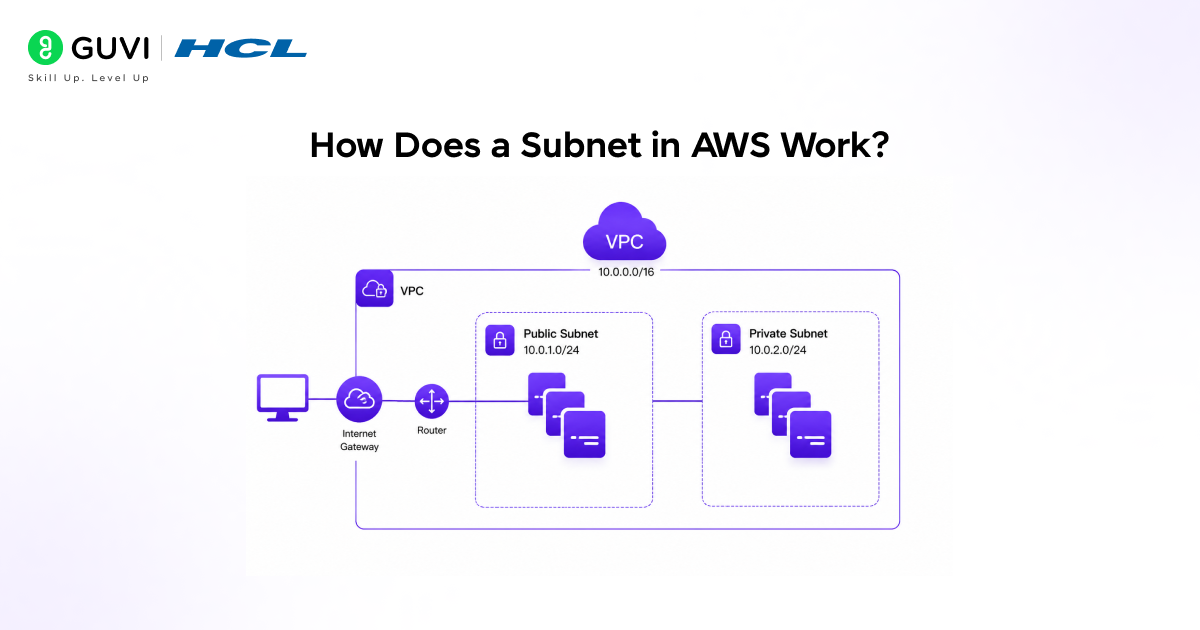
You start by creating a VPC with a CIDR block, for example, 10.0.0.0/16. This gives you 65,536 IP addresses to allocate across your subnets as you see fit.
Step 2: Create Subnets
You carve the VPC’s CIDR block into smaller subnets, assigning each to an Availability Zone. Best practice is to create at least one public and one private subnet in each AZ you plan to use, for high availability.
# Example subnet layout for a multi-AZ production VPC

VPC CIDR:  10.0.0.0/16

Public  Subnet AZ-1a:  10.0.1.0/24   (251 usable IPs)

Public  Subnet AZ-1b:  10.0.2.0/24   (251 usable IPs)

Private Subnet AZ-1a:  10.0.11.0/24  (251 usable IPs)

Private Subnet AZ-1b:  10.0.12.0/24  (251 usable IPs)

Private Subnet AZ-1a:  10.0.21.0/24  (DB tier, 251 usable IPs)

Private Subnet AZ-1b:  10.0.22.0/24  (DB tier, 251 usable IPs)
Step 3: Attach Route Tables
Each subnet is associated with a route table that defines where traffic goes. The public subnet’s route table routes internet traffic to the Internet Gateway. The private subnet’s route table routes internet-bound traffic to the NAT Gateway (for outbound-only access).
# Public subnet route table

Destination Target

10.0.0.0/16 local      (VPC-internal traffic stays inside)

0.0.0.0/0   igw-xxxx   (all other traffic goes to internet)

# Private subnet route table

Destination Target

10.0.0.0/16 local      (VPC-internal traffic stays inside)

0.0.0.0/0   nat-xxxx  (outbound internet via NAT Gateway)
Step 4: Apply Security Controls
Two layers of security govern traffic in and out of subnets: Security Groups (stateful, applied at the instance level) and Network ACLs (stateless, applied at the subnet level). Together they give you fine-grained control over which traffic is allowed.
Read More: What is AWS? A Complete Guide
Key Components That Work With Subnets in AWS
A subnet in AWS does not work in isolation. Here are the key components that define how a subnet behaves and what resources inside it can do:
| Component | What It Does | Where It Lives |
| Internet Gateway (IGW) | Allows two-way internet access for public subnets | Attached to the VPC |
| NAT Gateway | Allows private subnets to initiate outbound internet requests | Deployed in a public subnet |
| Route Table | Defines where traffic from a subnet is directed | Associated with one or more subnets |
| Network ACL (NACL) | Stateless firewall rules at the subnet boundary | Associated with a subnet |
| Security Group | Stateful firewall rules at the instance/resource level | Attached to EC2, RDS, etc. |
| VPC Peering | Connects two VPCs so subnets in each can communicate | Configured at VPC level |
| VPC Endpoints | Private access to AWS services without internet traffic | Associated with a subnet’s route table |
| Elastic IP | Static public IP for resources in public subnets | Attached to EC2 or NAT Gateway |

Types of Subnets in AWS
| Tier | Subnet Type | Typical Resources | Internet Access |
| Presentation | Public | Load Balancers, Bastion Hosts, NAT Gateways | Yes (IGW) |
| Application | Private | EC2 App Servers, ECS Tasks, Lambda in VPC | Outbound only (NAT) |
| Data | Private | RDS, ElastiCache, Redshift, DocumentDB | None |
When you create a new AWS account, a default Virtual Private Cloud (VPC) is automatically created in each region. This default setup includes pre-configured networking components such as subnets in each Availability Zone, along with internet connectivity options that allow you to launch EC2 instances immediately without manual network configuration. While this makes it easy to get started quickly, AWS recommends using a custom VPC for production environments. Custom VPCs allow you to define your own subnet architecture, routing rules, security boundaries, and high-availability design patterns, giving you greater control, scalability, and security over your cloud infrastructure.
Best Practices for Designing Subnets in AWS
1. Always use multiple Availability Zones: Place matching subnets in at least two AZs. If one AZ goes down, your application keeps running on resources in the other this is the foundation of high availability on AWS.
2. Size subnets generously: It is much easier to start with a larger CIDR block than to expand later. Use at least /24 for application subnets in production. Remember that AWS reserves 5 IPs per subnet, so factor that into your planning.
3. Never put databases in public subnets: Databases should always live in private subnets with no route to the internet. Access them from application servers inside the VPC, never directly from the internet.
4. Use separate route tables per subnet type: Do not share a route table between public and private subnets. Each subnet tier should have its own route table so that a misconfiguration in one does not accidentally expose another.
Common Mistakes When Working with Subnets in AWS
1. Confusing Security Groups with NACLs: Security Groups are stateful if you allow inbound traffic, the response is automatically allowed out. NACLs are stateless; you must explicitly allow both inbound and outbound traffic. Forgetting this causes mysterious connectivity failures.
2. Overlapping CIDR blocks: If you plan to peer VPCs or connect to an on-premises network via VPN, overlapping CIDR blocks will make routing impossible. Plan your IP address space carefully before you start creating subnets.
3. Forgetting the NAT Gateway for private subnets: EC2 instances in private subnets cannot reach the internet, including AWS endpoints, without a NAT Gateway. A common symptom is being unable to download packages or pull Docker images.
4. Using the default VPC in production: The default VPC’s subnets are all public by default. Deploying production workloads here exposes resources to the internet unnecessarily. Always create a custom VPC for production environments.
Want to master AWS networking, subnets, VPCs, IAM, and cloud architecture with real projects and certifications? Check out HCL GUVI’s AWS Cloud Computing Programme designed for developers and IT professionals who want to build job-ready cloud skills with hands-on labs and mentor support.
Conclusion
Understanding AWS subnets is essential for building secure, reliable, and high-performing cloud architectures. Subnets help organize and control network traffic within a VPC. A common best practice is to create separate public and private subnets across multiple Availability Zones. Route tables, Security Groups, and NACLs work together to manage connectivity and security.
FAQs
1. What is a subnet in AWS?
A subnet in AWS is a range of IP addresses within a Virtual Private Cloud (VPC) that segments the network into smaller, isolated sections. Each subnet is tied to one Availability Zone and can be designated as public (internet-accessible) or private (internal only) based on its route table configuration.
2. What is the difference between a public and private subnet in AWS?
A public subnet has a route in its route table that directs internet traffic to an Internet Gateway, making resources reachable from the internet. A private subnet has no such route, so resources inside it cannot be reached directly from the internet and access the internet only through a NAT Gateway.
3. How many subnets can you have in an AWS VPC?
By default, AWS allows up to 200 subnets per VPC, though this limit can be increased by submitting a service quota increase request. Each subnet must be assigned a unique CIDR block that falls within the VPC’s overall CIDR range and does not overlap with other subnets.
4. Why does AWS reserve 5 IP addresses in every subnet?
AWS reserves the first four IP addresses and the last IP address in every subnet for internal purposes: the network address, the VPC router, the DNS server, future use, and the broadcast address. A /24 subnet with 256 total addresses therefore provides only 251 usable IP addresses.
5. What is a NAT Gateway and why is it used with private subnets?
A NAT Gateway is a managed AWS service placed in a public subnet that allows resources in private subnets to make outbound internet requests such as downloading software updates or calling external APIs without exposing those resources to inbound internet traffic.
Success Stories

About the Author
Vishalini Devarajan
An Aerospace Engineer turned content writer, I focus on making complex concepts easy to understand through well-structured, reader-friendly blogs. Whether it’s a technical topic or a non-technical one, I love creating content that is clear, engaging, and impactful.
View all posts by Vishalini Devarajan
Connect with me @








Did you enjoy this article?