


Cloud Computing Articles
From Beginner to DevOps Engineer: How HCL GUVI Zen Class Helps You Get There
12 Important Azure Admin Roles and Responsibilities- Complete Guide


Get In Touch For Details! Request More Information
What is a Firewall in Computer Network? A Beginner’s Guide (2026)
Sep 19, 2026 9 Min Read 3121 Views
(Last Updated)
According to Verizon’s 2026 Data Breach Investigations Report, 31% of breaches now begin with vulnerability exploitation, making it the leading initial access method for the first time in the report’s 19-year history.
That makes a firewall in computer network more important than ever. A firewall monitors incoming and outgoing traffic, blocks unauthorized connections, and controls which users, applications, ports, and protocols can access a network.
In this guide, you will learn how firewalls work, their major types, common ports and rules, real-world examples, limitations, and best practices for stronger network security.
Table of contents
- TL;DR Summary
- What is a Firewall in Computer Network?
- Why Firewalls Are Essential in Digital Security
- Firewall vs Antivirus: Key Differences
- Firewall vs IDS vs IPS: What Is the Difference?
- How Firewalls Work in Network Security
- 1) Packet Filtering and Inspection
- 2) Default Firewall Policies: Accept, Reject, and Drop
- 3) Role of Firewall Rules and Configuration
- Common Ports and Protocols Used in Firewall Rules
- Where Is a Firewall Placed in a Computer Network?
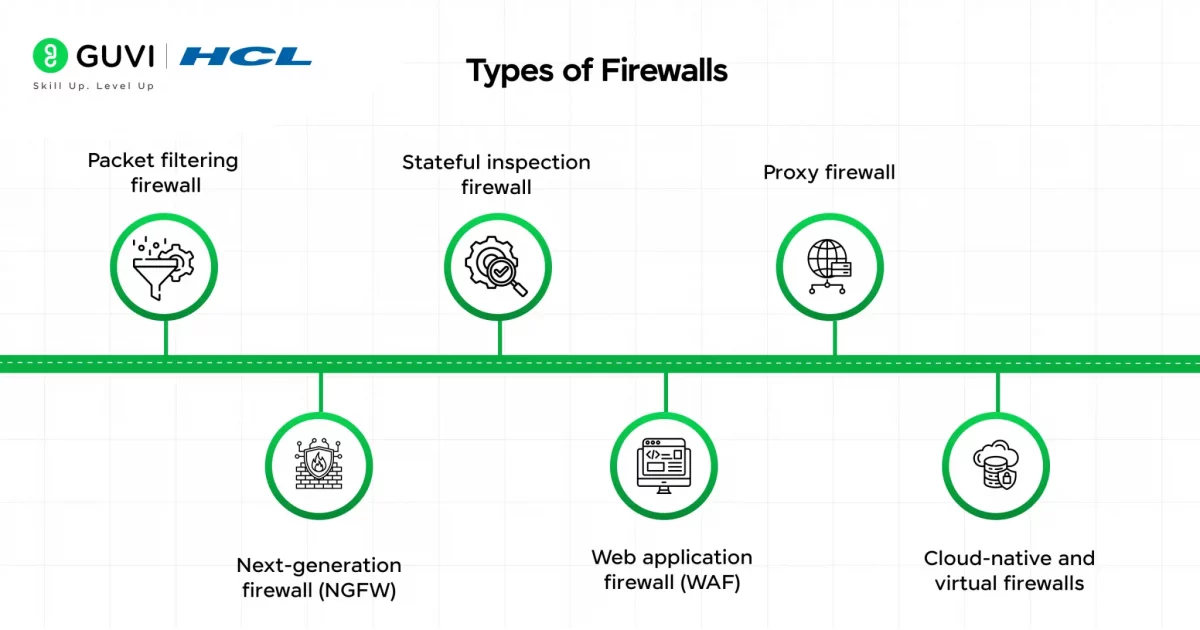
- Types of Firewalls Explained
- 1) Packet Filtering Firewall
- 2) Stateful Inspection Firewall
- 3) Proxy Firewall
- 4) Next-Generation Firewall (NGFW)
- 5) Web Application Firewall (WAF)
- 6) Cloud-Native and Virtual Firewalls
- Types of Firewalls in Computer Network: A Quick Comparison
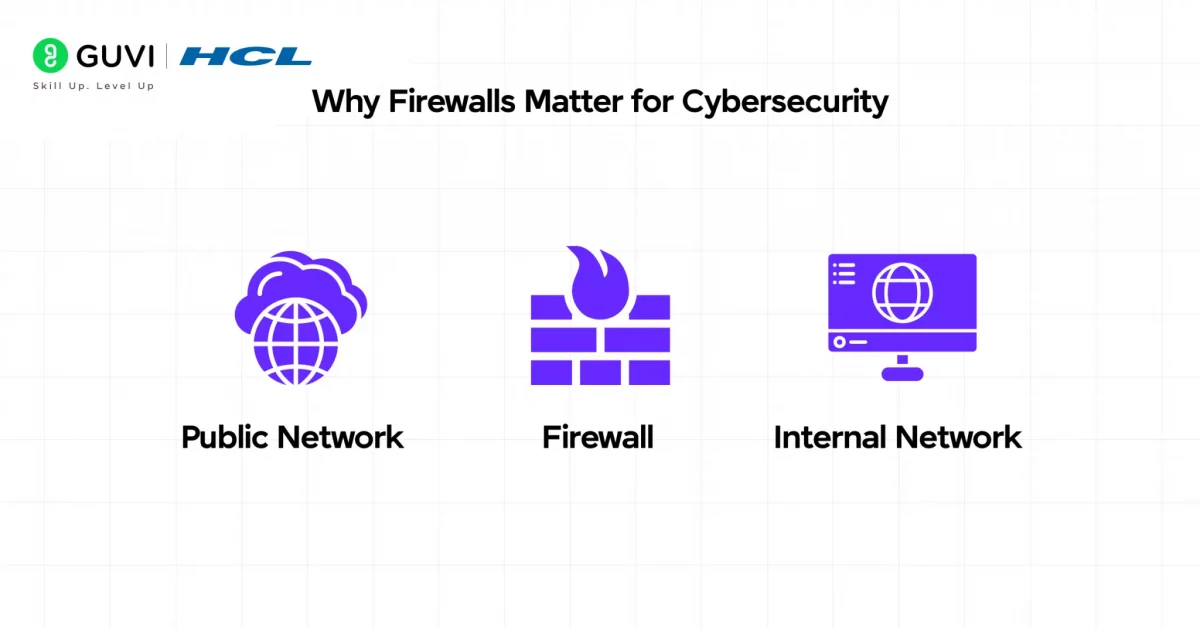
- Why Firewalls Matter for Cybersecurity
- 1) Prevent Unauthorized Access
- 2) Block Malicious Traffic
- 3) Protect Sensitive Data
- 4) Support Compliance and Security Audits
- Limitations of Firewalls: What a Firewall Cannot Protect Against
- Real-World Examples of Firewalls
- Best Practices for Using Firewalls
- Conclusion
- FAQs
- What is a firewall in a computer network?
- What are the main types of firewalls?
- How does a firewall protect a network?
- What is the difference between a firewall and antivirus?
- Can a firewall stop all cyberattacks?
TL;DR Summary
- A firewall in computer network is a security system that monitors and filters incoming and outgoing traffic based on defined rules, acting as a barrier between trusted and untrusted networks.
- Firewalls come in three forms: hardware, software, and cloud-based, each protecting devices or networks from unauthorized access.
- The main types include packet filtering, stateful inspection, proxy, NGFW, WAF, and cloud-native firewalls, each suited to different security needs.
- Firewalls work by inspecting data packets and applying accept, reject, or drop rules to decide what traffic is allowed through.
- They’re essential for blocking malware, preventing unauthorized access, protecting sensitive data, and meeting compliance standards like GDPR and HIPAA.
While firewalls are a modern cybersecurity essential, their roots and evolution are quite fascinating:
The Term “Firewall” Originated from Architecture: Before becoming a cybersecurity term, “firewall” referred to a physical wall built to stop fires from spreading between buildings. The same principle now applies digitally — stopping online threats from spreading across networks.
The First Firewalls Appeared in the Late 1980s: The earliest firewalls were simple packet filters created to protect internal corporate networks from external internet threats, marking the birth of network-level security as we know it today.
Modern Firewalls Use AI: Today’s next-generation firewalls leverage machine learning and AI-based analytics to detect previously unseen threats and adapt to new attack patterns in real time.
These facts highlight how firewalls evolved from simple packet filters into intelligent security systems that form the backbone of today’s digital defense infrastructure.
What is a Firewall in Computer Network?
A firewall is a security system that monitors and controls network traffic based on predetermined security rules. It sits between a trusted network (like your home or office network) and an untrusted network (typically the Internet). This digital barrier determines whether to allow or block specific data packets entering or leaving your network.
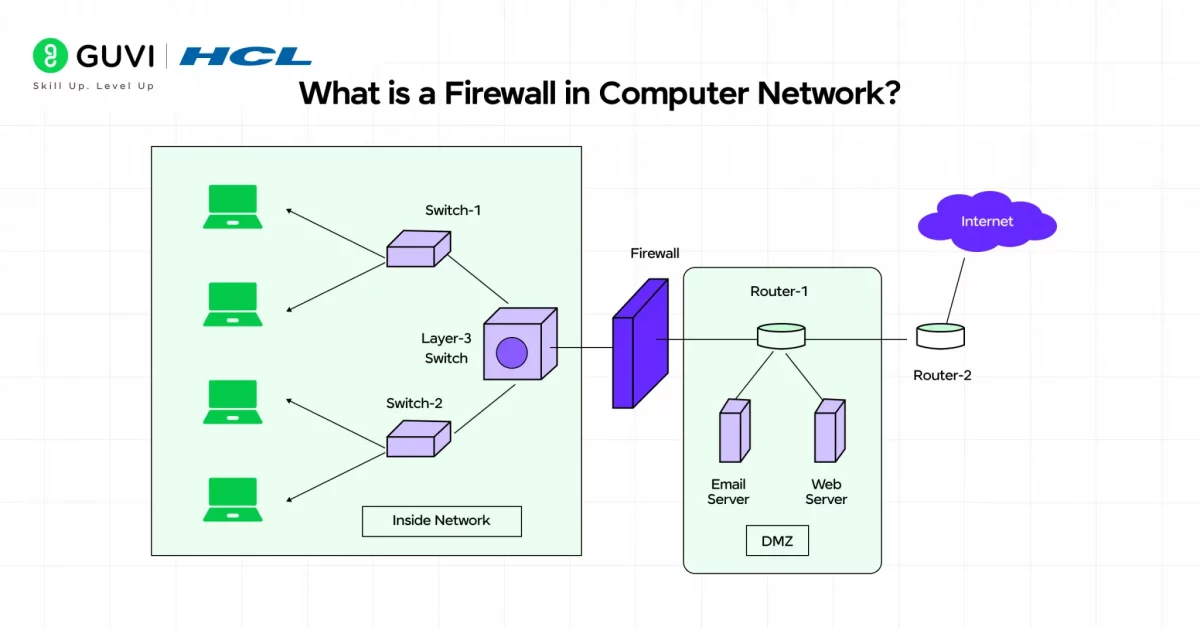
The term firewall originally came from construction, where physical walls were used to stop fire from spreading from one area to another. A network firewall follows the same idea digitally by creating a security barrier between trusted systems and potentially harmful traffic.
Firewalls generally come in three forms:
- Hardware firewalls: Physical security devices placed between a network and the internet.
- Software firewalls: Applications installed on individual devices to monitor and control network traffic.
- Cloud-based firewalls: Firewall services delivered through the cloud to protect distributed, remote, and hybrid environments.
Why Firewalls Are Essential in Digital Security
Firewalls remain one of the most important layers of network security because they control how traffic enters and leaves a system.
- Prevent Unauthorized Access: Firewalls block suspicious connection attempts and restrict access to trusted users, devices, and services.
- Reduce Exposure to Cyber Threats: They can stop malicious or unwanted traffic before it reaches internal systems.
- Control Network Content: Organizations can create rules that restrict access to specific websites, applications, services, or categories of content.
- Regulate Traffic: Firewalls can allow or block traffic based on IP addresses, ports, protocols, applications, and network locations.
- Support Security Monitoring: Firewall logs record connection attempts, blocked traffic, and unusual activity, helping security teams investigate potential threats.
- Assist With Compliance: Detailed logs and access controls can support audits and help organizations meet security and regulatory requirements.
A firewall does more than block traffic. It gives organizations visibility and control over how systems communicate, making it a core part of a layered cybersecurity strategy.
Firewall vs Antivirus: Key Differences
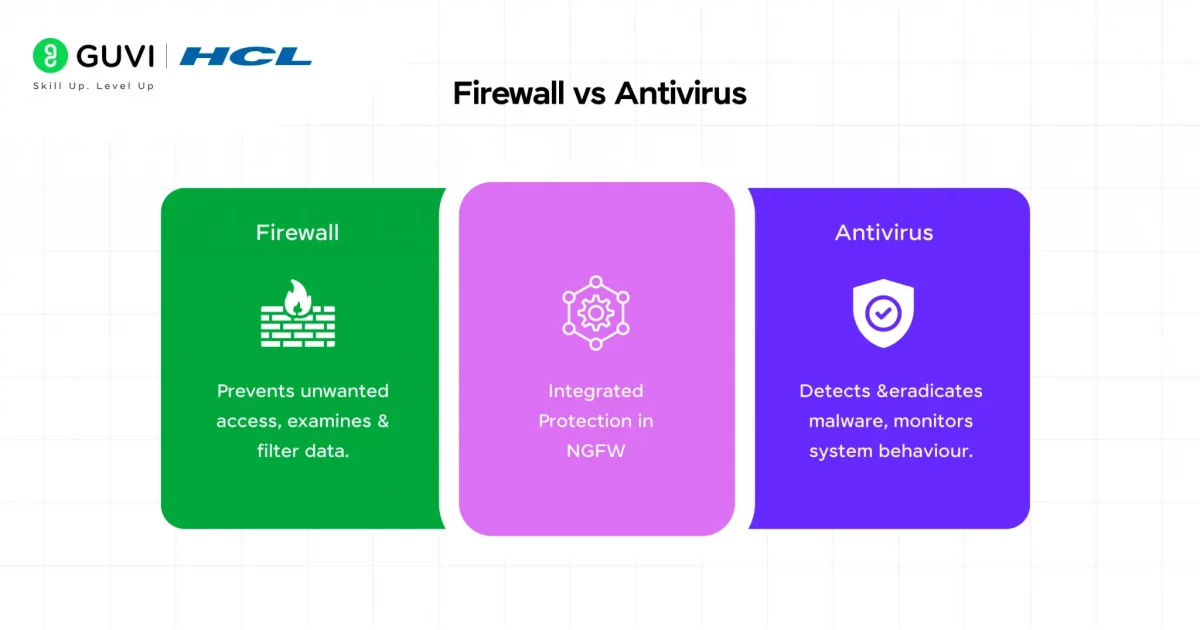
| Feature | Firewall | Antivirus |
|---|---|---|
| Primary Function | Monitors and controls incoming and outgoing network traffic | Detects, blocks, and removes malicious files and software |
| Protection Focus | Network traffic, connections, and access threats | Malware, malicious files, processes, and applications |
| How It Works | Applies security rules to allow, reject, or block network traffic | Scans files, applications, memory, and system activity for malicious behavior |
| Deployment | Can operate on devices, network gateways, or cloud infrastructure | Primarily installed on individual endpoints and servers |
| Common Threats Addressed | Unauthorized access, suspicious connections, malicious network traffic, and exposed services | Viruses, ransomware, spyware, trojans, and other malware |
| Main Role | Prevents unwanted network communication before it reaches protected systems | Detects and responds to malicious software on the protected system |
Firewall vs IDS vs IPS: What Is the Difference?
Firewalls, Intrusion Detection Systems (IDS), and Intrusion Prevention Systems (IPS) all strengthen network security, but they perform different jobs.
- Firewall: Controls incoming and outgoing network traffic according to predefined security rules. It decides whether a connection should be allowed or blocked.
- IDS: Monitors network traffic for suspicious behavior and generates alerts when it detects a possible attack. It primarily identifies threats rather than blocking them automatically.
- IPS: Monitors traffic like an IDS but can also take action by blocking malicious packets, connections, or sources before they reach protected systems.
- Main Difference: A firewall controls access, an IDS detects suspicious activity, and an IPS can detect and actively stop attacks.
- How They Work Together: Organizations often use firewalls with IDS and IPS capabilities to create layered security. The firewall restricts access while intrusion detection and prevention technologies inspect permitted traffic for malicious behavior.
How Firewalls Work in Network Security
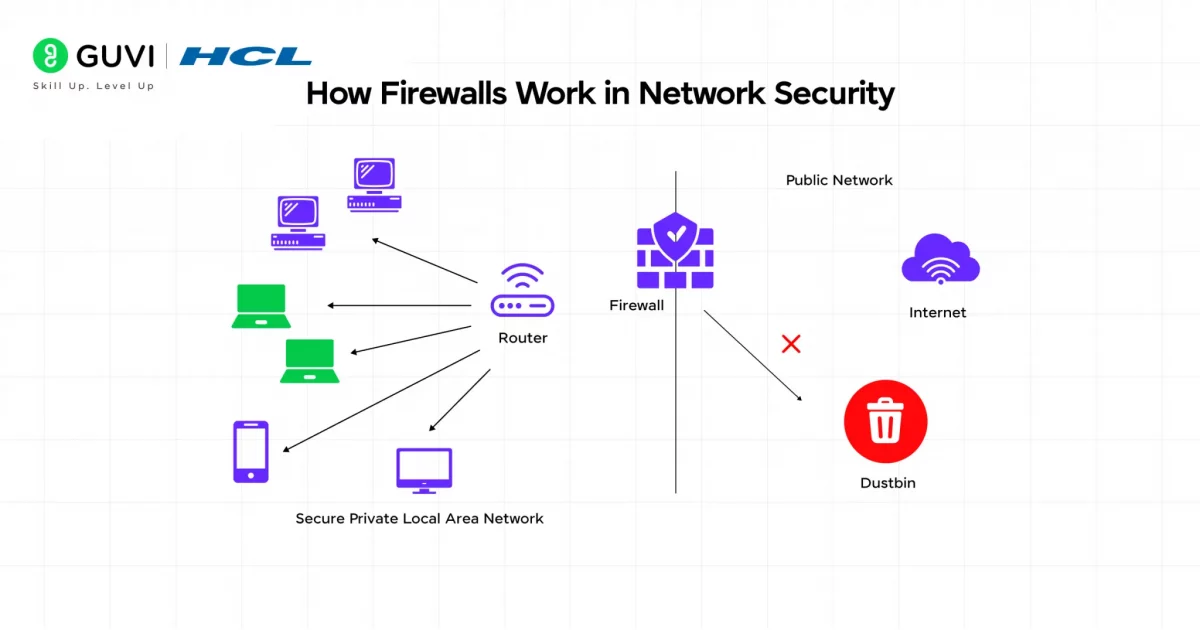
Understanding how firewalls operate requires looking under the hood of these digital security systems. Firewalls analyze every piece of data trying to cross your network boundary, making split-second decisions that protect your digital assets from potential threats.
1) Packet Filtering and Inspection
A firewall starts by examining the data packets moving into or out of a network. It checks each packet against configured security rules before deciding whether the traffic should continue.
When a packet reaches the firewall, the process usually involves:
- Traffic Monitoring: The firewall continuously monitors incoming and outgoing network traffic.
- Rule Matching: It compares the packet against configured firewall rules.
- Packet Inspection: Depending on the firewall type, it may inspect details such as source IP, destination IP, port number, protocol, connection state, and application data.
- Traffic Decision: The firewall allows, rejects, or drops the packet based on the matching rule.
- Logging and Alerts: Important events can be recorded and suspicious activity can trigger security alerts.
Basic packet filtering examines individual packets. Stateful firewalls go further by tracking active connections and understanding whether a packet belongs to a legitimate communication session.
More advanced firewalls can also perform deep packet inspection, application identification, intrusion prevention, and threat analysis.
2) Default Firewall Policies: Accept, Reject, and Drop
Firewall policies determine what happens when traffic matches a rule or when no specific permission exists.
- Accept: Allows the packet or connection to continue through the firewall.
- Reject: Blocks the connection and sends a response informing the source that the request was denied.
- Drop: Blocks the packet without sending a response. The sender receives no confirmation and usually waits until the connection times out.
A secure configuration commonly follows a default-deny approach, where unnecessary traffic is blocked and only explicitly approved services are allowed.
Reject can be useful when legitimate users or systems should know that access is unavailable. Drop is often used when administrators do not want the firewall to provide unnecessary information to unknown sources.
3) Role of Firewall Rules and Configuration
Firewall rules tell the firewall which traffic should be allowed or blocked. These rules can evaluate characteristics such as IP addresses, ports, applications, connection direction, and network protocols.
A typical firewall rule may specify:
- Source IP address
- Destination IP address
- Source or destination port
- Protocol such as TCP, UDP, or ICMP
- Application or service
- Traffic direction
- Action such as allow, reject, or drop
Good firewall configuration follows the principle of least privilege. Only the traffic required for legitimate business or system operations should be permitted.
Rule order also matters. Many firewalls evaluate policies from top to bottom and stop when they find the first matching rule. A broad rule placed above a more specific rule can therefore produce unintended results.
For stronger firewall security:
- Block unnecessary traffic by default.
- Allow only required ports, applications, and services.
- Keep rules as specific as possible.
- Place specific rules before broader policies.
- Remove outdated or duplicate rules.
- Review configurations whenever network requirements change.
- Use stateful inspection where appropriate.
- Log important allow and deny events.
A powerful firewall with poor rules can still leave a network exposed. Correct configuration is what turns firewall technology into effective network protection.
Common Ports and Protocols Used in Firewall Rules
Firewall rules frequently use port numbers and network protocols to determine which services can communicate across a network. Understanding common ports helps administrators create more precise access-control policies.
- Port 80 – HTTP: Used for standard web traffic. Many websites now redirect HTTP connections to encrypted HTTPS.
- Port 443 – HTTPS: Used for encrypted web communication and is one of the most commonly permitted outbound ports.
- Port 22 – SSH: Used for secure remote access to servers. Access should generally be limited to authorized systems or users.
- Port 53 – DNS: Used for Domain Name System queries that translate domain names into IP addresses.
- Port 25 – SMTP: Commonly associated with email transmission between mail servers.
- Port 3389 – RDP: Used by Microsoft Remote Desktop Protocol for remote system access. Exposing it unnecessarily to the public internet can increase security risk.
- TCP and UDP: Firewall rules also specify the transport protocol. TCP is connection-oriented, while UDP sends data without establishing a persistent connection.
Where Is a Firewall Placed in a Computer Network?
Firewall placement determines which traffic can be inspected and which systems receive protection. Modern networks may use several firewalls at different points instead of relying on a single perimeter device.
- Network Perimeter: A firewall is commonly placed between an internal network and the internet. It filters traffic entering or leaving the organization.
- Between Network Segments: Internal firewalls can separate departments, servers, databases, or sensitive systems. This helps limit lateral movement if one part of the network is compromised.
- Around a DMZ: Organizations may place firewalls around a Demilitarized Zone (DMZ) containing public-facing services such as web or email servers while keeping the internal network isolated.
- On Individual Devices: Host-based firewalls operate directly on laptops, desktops, and servers to control traffic reaching a specific device.
- Inside Cloud Networks: Cloud firewalls can protect virtual networks, workloads, applications, and traffic moving between cloud environments.
- Across Hybrid Networks: Businesses using both on-premises and cloud infrastructure may deploy firewalls at several connection points to enforce consistent security policies.
Types of Firewalls Explained
Firewalls have evolved significantly over time, with various types designed to address specific security challenges. Let’s explore the main firewall categories that form the backbone of network firewall security.
1) Packet Filtering Firewall
A packet filtering firewall is one of the simplest types of firewalls. It examines individual data packets and allows or blocks them based on predefined security rules.
It typically checks:
- Source and destination IP addresses
- Source and destination ports
- Network protocols such as TCP, UDP, and ICMP
Packet filtering firewalls are usually stateless. This means they inspect each packet independently without tracking the full connection.
They are fast and lightweight, but they offer less context than more advanced firewalls.
2) Stateful Inspection Firewall
A stateful inspection firewall monitors active network connections instead of evaluating every packet in isolation.
It can:
- Track active TCP sessions
- Record the state of established connections
- Compare incoming traffic with known connection states
- Block packets that do not match legitimate sessions
Stateful firewalls mainly operate at Layers 3 and 4 of the OSI model. They provide stronger protection than basic packet filtering because they understand the context of network communication.
This makes them useful for detecting suspicious connection attempts, spoofed traffic, and abnormal packet behavior.
3) Proxy Firewall
A proxy firewall acts as an intermediary between an internal network and external systems. Instead of allowing direct communication, it receives traffic on behalf of the protected network.

A proxy firewall can:
- Prevent direct connections between internal and external systems
- Hide internal IP addresses
- Inspect application-layer traffic
- Analyze protocols such as HTTP, FTP, and SMTP
- Apply detailed content and access rules
Because proxy firewalls create separate connections for each side of the communication, they can provide strong application-level control. The trade-off is additional processing, which may affect performance.
4) Next-Generation Firewall (NGFW)
A Next-Generation Firewall combines traditional firewall functions with advanced threat detection and application-level security.
Common NGFW capabilities include:
- Stateful inspection
- Intrusion prevention systems
- Application awareness and control
- Deep packet inspection
- Threat intelligence integration
- User-based access controls
- Malware and suspicious traffic detection
NGFWs can inspect traffic beyond basic IP addresses and ports. They can analyze application-layer activity, making them better suited for modern threats hidden inside legitimate-looking traffic.
5) Web Application Firewall (WAF)
A Web Application Firewall protects websites, web applications, and APIs by monitoring HTTP and HTTPS traffic.
A WAF can help:
- Inspect incoming web requests
- Block malicious request patterns
- Prevent SQL injection attacks
- Reduce cross-site scripting risks
- Filter malicious bots
- Protect APIs from suspicious traffic
Unlike a traditional network firewall, a WAF focuses specifically on application-layer threats. It is commonly placed between users and the web application it protects.
6) Cloud-Native and Virtual Firewalls
Cloud-native and virtual firewalls are designed for virtualized, cloud, and hybrid environments where traditional physical firewalls may not provide enough flexibility.
- Virtual Firewalls: Software-based firewalls deployed inside virtual machines or virtual networks. They can inspect both north-south traffic and east-west traffic between workloads.
- Cloud-Native Firewalls: Firewall services delivered through cloud platforms or security providers. They can scale with changing workloads and integrate with cloud infrastructure.
These firewalls are especially useful for organizations running applications across public cloud, private cloud, virtual machines, containers, and hybrid networks.
Types of Firewalls in Computer Network: A Quick Comparison
| Type | How It Works | Examples/Tools | Pros | Cons | Best For |
|---|---|---|---|---|---|
| Packet Filtering Firewall | Checks individual packets using IP addresses, ports, and protocols | iptables, nftables, Cisco IOS ACLs, MikroTik RouterOS | Fast, lightweight, easy to configure | No connection awareness, limited threat detection | Small networks and basic perimeter security |
| Stateful Inspection Firewall | Tracks active connections and evaluates packets within connection context | pfSense, Check Point Quantum, Cisco Secure Firewall | Better context, stronger protection than stateless filtering | Uses more system resources | Mid-size and enterprise networks |
| Proxy Firewall | Acts as an intermediary between internal users and external networks | Squid Proxy, Zscaler Internet Access | Hides internal IPs, provides application-level inspection | Can increase latency and complexity | High-security environments and content filtering |
| Next-Generation Firewall (NGFW) | Combines stateful inspection with IPS, application control, and threat intelligence | Palo Alto Networks PA-Series, Fortinet FortiGate, Check Point Quantum | Deep visibility, advanced threat detection, built-in IPS | Higher cost and more complex management | Enterprises facing advanced cyber threats |
| Web Application Firewall (WAF) | Filters HTTP and HTTPS traffic to protect web applications and APIs | Cloudflare WAF, AWS WAF, Imperva WAF | Protects against SQL injection, XSS, malicious bots, and web attacks | Protects web traffic only and requires tuning | Websites, APIs, and web applications |
| Cloud-Native / Virtual Firewall | Runs as software or a cloud service to protect virtual and cloud environments | Azure Firewall, AWS Network Firewall, VMware NSX | Scalable, flexible, integrates with cloud infrastructure | Can become costly and depends on cloud architecture | Hybrid cloud, multi-cloud, and virtualized environments |
Why Firewalls Matter for Cybersecurity
In today’s digital age, firewalls form a crucial component of your cybersecurity arsenal. Beyond just filtering traffic, these protective barriers deliver multiple security benefits that safeguard your digital presence.
1) Prevent Unauthorized Access
A firewall acts as a security barrier between trusted internal systems and untrusted external networks. It checks connection attempts and blocks traffic that does not meet defined security rules.
Firewalls help by:
- Monitoring incoming and outgoing connections
- Restricting access from unknown or unauthorized sources
- Allowing only approved users, devices, ports, and services
- Reducing exposure to remote access attempts and network scanning
Without proper firewall protection, exposed devices and services can become easier targets for attackers looking for open ports, weak configurations, or unauthorized entry points.
2) Block Malicious Traffic
Firewalls can help stop suspicious traffic before it reaches internal systems. Modern firewalls may also use threat intelligence, DNS filtering, and intrusion prevention to identify known malicious sources.
They can:
- Block connections to known malicious IP addresses
- Restrict access to dangerous domains
- Prevent communication with known command-and-control servers
- Filter suspicious application or network traffic
- Reduce exposure to malware delivery attempts
Some DNS security tools can also prevent users from reaching domains associated with phishing, malware, or other known threats.
3) Protect Sensitive Data
Sensitive information may move between internal networks, cloud platforms, SaaS applications, APIs, and remote devices. Firewalls help control how that data travels across network boundaries.
They can:
- Restrict access to sensitive systems and databases
- Control which applications can send data outside the network
- Block unauthorized outbound connections
- Separate critical systems from less trusted network segments
- Log suspicious traffic for further investigation
Firewalls do not replace encryption or identity controls, but they add an important layer of protection around systems that store or process sensitive information.
4) Support Compliance and Security Audits
Firewalls can also support regulatory and security requirements by controlling access and maintaining records of network activity.
They help organizations:
- Enforce network access policies
- Maintain logs of allowed and blocked connections
- Create audit trails for security reviews
- Restrict access to systems containing regulated data
- Demonstrate that network controls are actively maintained
Firewall controls can support frameworks and standards such as GDPR, HIPAA, and PCI DSS, depending on the organization and its compliance requirements.
For stronger protection, firewalls should work alongside multi-factor authentication, encryption, endpoint security, IDS/IPS, vulnerability management, and continuous monitoring.
Limitations of Firewalls: What a Firewall Cannot Protect Against
A firewall is an important network security control, but it cannot protect an organization from every cyber threat. Effective cybersecurity requires additional controls alongside firewall protection.
- Social Engineering Attacks: A firewall cannot prevent users from sharing passwords, opening fraudulent messages, or being manipulated through social engineering.
- Insider Threats: Authorized users may misuse legitimate access or expose sensitive information without triggering traditional firewall rules.
- Malware Already Inside the Network: If malware enters through an approved channel or compromised device, a perimeter firewall alone may not detect every malicious action.
- Weak Passwords and Stolen Credentials: Firewalls control network connections but cannot replace strong authentication, password policies, or multi-factor authentication.
- Application-Level Vulnerabilities: A firewall may allow legitimate web traffic that later exploits a vulnerable application. Specialized controls such as WAFs and secure coding practices are still required.
- Encrypted Malicious Traffic: Attackers can hide harmful activity inside encrypted connections. Firewalls without advanced inspection capabilities may have limited visibility into that traffic.
- Misconfiguration: Even an advanced firewall provides weak protection when rules are overly permissive, outdated, or incorrectly ordered.
Real-World Examples of Firewalls
Firewalls are working around you every day, often without you noticing. Here are some of the clearest real-world examples:
- Home Wi-Fi Networks: Your Wi-Fi router uses a built-in firewall to block unsolicited traffic from the internet before it reaches laptops, phones, smart TVs, and other connected devices.
- Windows PCs: Microsoft Defender Firewall controls which applications can communicate through a Windows device. It can block suspicious incoming connections while allowing trusted apps and services.
- Online Banking Systems: Banks use next-generation firewalls such as Palo Alto Networks and Fortinet FortiGate to inspect network traffic, restrict unauthorized access, and protect critical banking infrastructure.
- E-commerce and Login Pages: Web Application Firewalls protect websites and APIs from attacks such as SQL injection, cross-site scripting, malicious bots, and suspicious HTTP requests before they reach the application.
- Hospitals and Healthcare Networks: Firewalls help separate sensitive systems such as patient databases and clinical applications from public or less trusted networks. This reduces unnecessary access to confidential healthcare data.
- Remote and Hybrid Workforces: Organizations use cloud firewalls and secure access platforms such as Azure Firewall and Zscaler to enforce security policies when employees connect from homes, offices, or other locations.
As you learn how firewalls protect networks, take the next step in your tech career with HCL GUVI’s IITM Pravartak & MongoDB Certified AI Software Development Course. This 9-month program includes 300+ hours of hands-on learning, real-world projects, expert mentorship, and industry-recognized certifications to help you become job-ready.
Best Practices for Using Firewalls
A firewall works best when it is regularly updated, monitored, and configured with clear security rules.
- Keep Software Updated: Install patches and firmware updates to fix known vulnerabilities.
- Review Firewall Rules: Remove outdated, duplicate, or overly broad rules regularly.
- Follow Least Privilege: Allow only the users, ports, applications, and services that are necessary.
- Use a Default-Deny Policy: Block unnecessary traffic and permit only approved connections.
- Monitor Logs and Alerts: Review unusual connection attempts, blocked traffic, and suspicious activity.
- Segment the Network: Separate critical systems, guest networks, and sensitive databases to limit lateral movement.
- Protect Multiple Layers: Combine network firewalls with host-based firewalls, MFA, endpoint security, and IDS/IPS.
- Test Configurations: Review firewall changes before deploying them across important production systems.
Conclusion
A firewall is not something you configure once and forget. As cyber threats evolve, firewall rules, updates, and monitoring need to evolve with them.
Whether it is protecting a home Wi-Fi network or securing enterprise infrastructure with an NGFW, the purpose remains simple: control what enters, what leaves, and what gets blocked.
A firewall cannot stop every cyberattack on its own. But when combined with endpoint security, MFA, IDS/IPS, encryption, and regular monitoring, it becomes a strong foundation for modern network security.
FAQs
What is a firewall in a computer network?
A firewall in a computer network is a security system that monitors and controls incoming and outgoing network traffic based on predefined rules. It helps block unauthorized access while allowing legitimate communication.
What are the main types of firewalls?
The main types of firewalls include packet filtering firewalls, stateful inspection firewalls, proxy firewalls, next-generation firewalls, Web Application Firewalls, and cloud-based or virtual firewalls.
How does a firewall protect a network?
A firewall protects a network by inspecting traffic, applying security rules, blocking suspicious connections, restricting access to sensitive systems, and logging network activity for monitoring and investigation.
What is the difference between a firewall and antivirus?
A firewall controls network traffic and helps prevent unauthorized access, while antivirus software scans files and applications for malware already present on a device. Both are commonly used together for stronger cybersecurity.
Can a firewall stop all cyberattacks?
No. A firewall can block many unauthorized connections and malicious traffic, but it cannot stop every cyberattack. Strong security also requires MFA, endpoint protection, encryption, IDS/IPS, vulnerability management, and continuous monitoring.
Success Stories

About the Author
Vaishali
I'm a seasoned writer with four years of experience across technical, non-technical, and just about every genre or niche you can imagine. Adaptable and curious, I enjoy exploring new topics and making information engaging and easy to understand. Fueled by a steady stream of tea, I approach each project with creativity, reliability, and genuine enthusiasm for storytelling.
View all posts by Vaishali
Connect with me @














Did you enjoy this article?