


Artificial Intelligence and Machine Learning Articles
AI/ML Skills Gap 2026: Why Companies Can't Find Job-Ready Talent
20 AI/ML Interview Questions Recruiters Can Use Without a Tech Background - Best Guide
How Industry-Backed AI/ML Bootcamps Are Changing the AI/ML Hiring Pipeline - Best Guide 2026
From IT Support to AI Engineer: A Realistic Career Switch Guide 2026


Get In Touch For Details! Request More Information
Using Claude to Write Explainer Video Scripts
Aug 04, 2026 3 Min Read 240 Views
(Last Updated)
Claude is a powerful tool for writing explainer video scripts because it can turn complex topics into clear, engaging narratives. It works best when you give it a clear topic, audience, tone, and length so the script feels natural and keeps viewers engaged from start to finish.
Table of contents
- TL;DR Summary
- Why Use Claude for Explainer Videos
- The Challenge With Script Writing
- How Claude Helps
- Getting Started With Claude for Video Scripts
- Step 1: Define Your Video Goal
- Step 2: Provide Context and Details
- Step 3: Generate The First Draft
- Best Practices for Explainer Video Scripts
- Start With A Strong Hook
- Keep It Simple and Clear
- Include Visual Cues
- End With A Clear CTA
- Pro Tips for Better Scripts
- Iterate With Feedback
- Use Templates For Consistency
- Generate Multiple Versions
- Time Your Script
- Building A Script Structure
- The Hook Section
- The Main Content
- The Call To Action
- Common Mistakes to Avoid
- Don't Skip The Hook
- Avoid Jargon and Complexity
- Don't Forget The CTA
- Real-World Workflow
- The 10-Minute Setup
- The Three Deliverables
- The Production-Ready Script
- Conclusion
- FAQs
- How long does it take to generate a script with Claude
- Can Claude write scripts for different video lengths
- How do I make the script more engaging
- What types of videos can Claude write scripts for
- Do I still need human review
TL;DR Summary
- Using Claude to Write Explainer Video Scripts helps you create engaging, well-structured video scripts with compelling hooks, clear explanations, and strong calls to action in minutes.
- By providing Claude with your topic, audience, tone, and video goals, you can generate production-ready scripts complete with narration, visual cues, and multiple content variations.
- Combine Claude’s speed with human review to ensure your explainer videos remain accurate, on-brand, and optimized for viewer engagement.
Use Claude to write explainer video scripts with stronger hooks, clear flow, and faster revisions. Build smarter business content skills with HCL GUVI’s Complete Business Analytics Professional Program.
Why Use Claude for Explainer Videos
1. The Challenge With Script Writing
Writing explainer video scripts takes time and requires balancing clarity, engagement, and brevity. Many teams struggle to make technical topics accessible while keeping the script tight and focused.
2. How Claude Helps
Claude can turn your product features, ideas, or topics into structured scripts with hooks, clear explanations, and strong calls to action. It follows your tone and style while producing content that’s ready to record or animate.
Getting Started With Claude for Video Scripts
Step 1: Define Your Video Goal
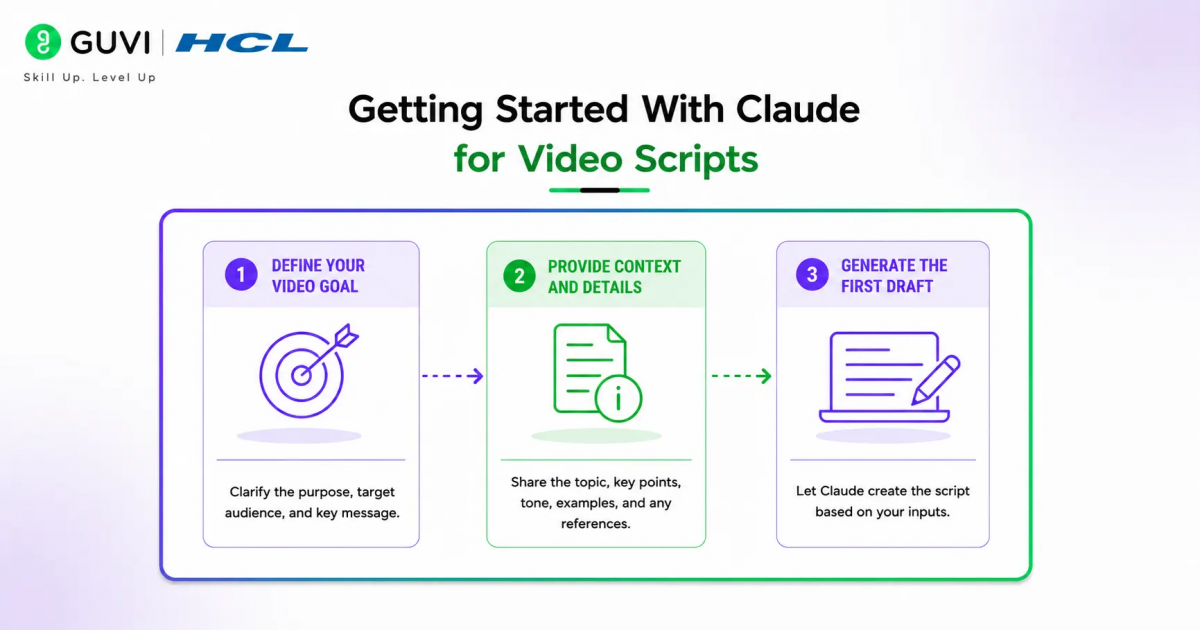
Tell Claude the topic, target audience, video length, and purpose. Specify whether it’s educational, promotional, or instructional content.
Step 2: Provide Context and Details
Share your product information, key points, or technical details. Upload any existing content like feature docs or blog posts that Claude can reference.
Step 3: Generate The First Draft
Ask Claude to create a complete script with a hook, main content, and call to action. Request it in a format that matches your production needs.
Best Practices for Explainer Video Scripts

1. Start With A Strong Hook
The first few seconds determine if viewers keep watching. Ask Claude to write multiple hook options so you can choose the most engaging one.
2. Keep It Simple and Clear
Use plain language and short sentences. Claude can simplify complex topics while maintaining accuracy and clarity.
3. Include Visual Cues
Ask Claude to suggest B-roll, animations, or on-screen text that supports the narration. This makes the script more production-ready.
4. End With A Clear CTA
Every explainer video should guide viewers to the next step. Claude can write compelling calls to action that match your goal.
Pro Tips for Better Scripts
1. Iterate With Feedback
Review the first draft and give Claude specific direction on what to adjust. Ask it to make sections shorter, clearer, or more engaging.
2. Use Templates For Consistency
Create templates for different video types, such as feature launches, tutorials, and product overviews. Claude can fill these templates while maintaining your style.
3. Generate Multiple Versions
Ask Claude to create variations in tone, length, or angle. This gives you options to test what resonates best with your audience.
4. Time Your Script
Read the script aloud and time it. Ask Claude to adjust the length if it runs too long or short for your target duration.

Building A Script Structure
1. The Hook Section
Start with a question, problem statement, or surprising fact that grabs attention. Claude can write multiple hook options for you to choose from.
2. The Main Content
Break the explanation into clear beats or sections. Use simple language and logical flow so viewers can follow along easily.
3. The Call To Action
End with a clear next step like visiting a website, signing up, or learning more. Make it specific and action-oriented.
Common Mistakes to Avoid
1. Don’t Skip The Hook
Without a strong opening, viewers may drop off in the first few seconds. Always start with something that grabs attention.
2. Avoid Jargon and Complexity
Keep language simple even for technical topics. Claude can simplify complex concepts without losing meaning.
3. Don’t Forget The CTA
Every video should guide viewers to the next step. Without a clear call to action, you miss conversion opportunities.
Use Claude to write explainer video scripts with stronger hooks, clear flow, and faster revisions. Build smarter business content skills with HCL GUVI’s Complete Business Analytics Professional Program.
Claude can generate complete video scripts with timestamps, B-roll suggestions, and scene descriptions in minutes. It can also create multiple versions optimised for different platforms like YouTube, TikTok, or Instagram Reels.
Real-World Workflow
1. The 10-Minute Setup
Any marketer or product manager can share their feature details with Claude and get a complete script in under 10 minutes. This includes hooks, main content, and CTAs.
2. The Three Deliverables
First, a complete narration script. Second, visual suggestions for B-roll or animations. Third, multiple hook and CTA options for testing.
3. The Production-Ready Script
The script doesn’t just sit in a document. It becomes a production tool with timestamps, visual cues, and clear direction for your video team.
Conclusion
Claude for explainer video scripts transforms how teams create video content by producing clear, engaging narratives quickly. The key is providing clear context, defined style rules, and regular human review to ensure accuracy and quality.
FAQs
1. How long does it take to generate a script with Claude
Most teams can get a complete explainer script in under 10 minutes. The setup involves sharing your topic, audience, and key points.
2. Can Claude write scripts for different video lengths
Yes, Claude can create scripts for 30-second micro videos, 60-second explainers, or longer format content based on your needs.
3. How do I make the script more engaging
Ask Claude to write multiple hook options, simplify complex language, and add visual cues that support the narration.
4. What types of videos can Claude write scripts for
Claude can write scripts for product explainers, tutorials, feature launches, testimonials, and promotional videos.
5. Do I still need human review
Yes, always review scripts for accuracy and brand voice before production. Claude speeds up the process but human expertise ensures quality.
Success Stories

About the Author
HCL GUVI
This article was selected and published as part of the HCL GUVI AI Blogathon 2026, an initiative designed to encourage students, AI enthusiasts, and aspiring tech writers to simplify complex AI concepts through impactful technical content. The contest recognized high-quality, original, and insightful AI-focused blogs, with selected authors receiving publication opportunities on the HCL GUVI blog platform along with official author credits and recognition.
View all posts by HCL GUVI
Connect with me @













Did you enjoy this article?