


Cloud Computing Articles
From Beginner to DevOps Engineer: How HCL GUVI Zen Class Helps You Get There
12 Important Azure Admin Roles and Responsibilities- Complete Guide


Get In Touch For Details! Request More Information
Types of Computer Networks Explained: A Simple Guide for Beginners (2026)
Aug 10, 2026 10 Min Read 2911 Views
(Last Updated)
Every Wi-Fi login, Bluetooth pairing, and email you send is riding on some type of computer network, whether you notice it or not.
A computer network is simply a group of connected devices that share information and resources, and the way they’re built and organized varies a lot depending on size, purpose, and reach.
This guide breaks down the Types of Computer Networks by geographical area, transmission medium, communication method, and ownership, with real examples for each.
Quick summary of the 5 major Types of Computer Networks by geographical coverage:
- PAN (Personal Area Network): connects your own devices, like a phone and wireless earbuds, within about 10 meters.
- LAN (Local Area Network): connects devices in one building, like a home or office, using Wi-Fi or Ethernet.
- CAN (Campus Area Network): connects multiple buildings on one campus, such as a university or hospital.
- MAN (Metropolitan Area Network): connects multiple LANs across a city, often over fiber optic cables.
- WAN (Wide Area Network): connects networks across countries or continents; the internet is the largest example.
Table of contents
- TL;DR Summary
- What is a Computer Network?
- A) Types of Computer Networks by Geographical Area
- 1) Personal Area Network (PAN)
- 2) Local Area Network (LAN)
- 3) Metropolitan Area Network (MAN)
- 4) Wide Area Network (WAN)
- 5) Campus Area Network (CAN)
- B) Types of Networks Based on Transmission Medium
- 1) Wired networks (Ethernet, fiber)
- 2) Wireless networks (Wi-Fi, Bluetooth)
- 3) Passive Optical LAN (POLAN)
- C) Types of Computer Networks by Communication Method
- 1) Point-to-Point networks
- 2) Multipoint networks
- 3) Broadcast networks
- 4) Virtual Private Network (VPN)
- D) Types of Networks Based on Ownership and Access
- 1) Private networks
- 2) Public networks
- 3) Hybrid networks
- 4) Enterprise Private Network (EPN)
- Types of Computer Networks in Organizations vs Homes
- Which Type of Network Is the Internet?
- LAN vs WAN vs MAN vs PAN: Comparison with Real Examples
- Types of Computer Networks Comparison Table
- By Geographical Area (the most common way to split Types of Computer Networks)
- By Transmission Medium (a second lens on Types of Computer Networks)
- By Communication Method (a third lens on Types of Computer Networks)
- By Ownership (the final lens on Types of Computer Networks)
- Types of Computer Networks Interview Questions
- Concluding Thoughts…
- FAQs
- Q1. What are the main types of computer networks based on geographical area?
- Q2. How do wired and wireless networks differ?
- Q3. What is a Virtual Private Network (VPN) and how does it work?
- Q4. What's the difference between private and public networks?
- Q5. What is a Passive Optical LAN (POLAN) and what are its advantages?
TL;DR Summary
- Types of Computer Networks are usually classified by geographical area (PAN, LAN, CAN, MAN, WAN), transmission medium (wired or wireless), communication method (point-to-point, multipoint, broadcast, VPN), and ownership (private, public, hybrid, EPN).
- A PAN covers about 10 meters, a LAN up to 2 kilometers, a MAN 5 to 50 kilometers, and a WAN anything beyond 50 kilometers, including the entire internet.
- The internet is technically the world’s largest WAN: a decentralized “network of networks” with no single owner, running on TCP/IP and packet switching.
- Homes typically rely on a single LAN plus a few PANs, while organizations combine LANs, a MAN or WAN, VPNs, and private/hybrid ownership models to connect branch offices securely.
- Wired connections (Ethernet, fiber) are more stable and faster; wireless connections (Wi-Fi, Bluetooth) trade some speed and stability for mobility and easy setup.
What is a Computer Network?
A computer network, the basic unit behind all Types of Computer Networks, is a collection of computing devices connected to share information and resources. At its core, a network enables your devices to communicate, much like people in a conversation, sending, receiving, and processing information between them.
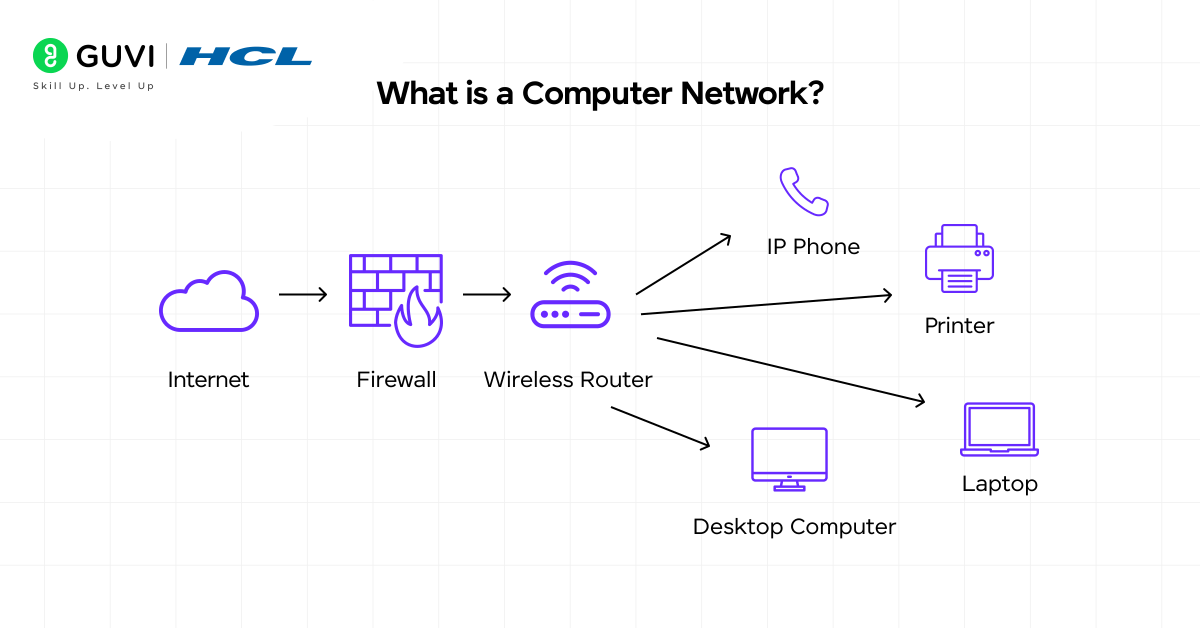
Picture this: every time you send an email, print a document wirelessly, or browse a website, you’re relying on computer networks.
These networks span every Types of Computer Networks category.
Each consists of two or more devices that can transmit data and share resources with one another. Furthermore, they use a system of rules, called communications protocols, to organize how this information travels across physical cables or wireless connections.
Modern computer networks connect an array of devices beyond traditional computers:
- Laptops, desktops, and servers
- Smartphones and tablets
- IoT devices (cameras, door locks, thermostats, sensors)
The foundation of any network consists of several key components working together.
This holds true regardless of which Types of Computer Networks category it falls under. Switches act as controllers, connecting computers, printers, and servers within a building or campus. They allow your devices to communicate with each other while sharing resources efficiently.
Meanwhile, routers serve as dispatchers; they connect multiple networks, analyze data being sent, choose the best routes for transmission, and protect information from security threats.
For wireless connections, access points function as network amplifiers. While routers provide bandwidth, access points extend that coverage so multiple devices can connect from greater distances without cables.
How do networks identify all these connected devices? Through two main addressing systems:
- MAC addresses: unique “burned-in” identifiers assigned to network interface cards by manufacturers
- IP addresses: numbers assigned to network connections
These addresses work somewhat like postal addresses, ensuring data reaches the correct destination among numerous connected devices.
The physical infrastructure supporting networks can be either wired (using copper cables or optical fibers) or wireless (using radio-frequency media), forming the highway on which digital information travels.
If you’re ready to move beyond just networking basics and step into the world of building intelligent systems, check out the AI Software Development Course by HCL GUVI (in partnership with IITM Pravartak & MongoDB Inc.). With 300+ hours of live learning, AI-powered tools, and real-world projects, it’s the launchpad you need to become SDE-ready for top product companies.
A) Types of Computer Networks by Geographical Area
Computer networks are commonly classified based on their geographical scope, the physical area they cover and serve, and this is one of the most common ways to group Types of Computer Networks. This classification helps in understanding their design, capabilities, and appropriate use cases.
From the smallest personal connections to worldwide systems, let’s explore each type based on its coverage area.
1) Personal Area Network (PAN)
Personal Area Networks, one of the smallest Types of Computer Networks, connect devices within a very limited range around a person, typically spanning just 1 to 10 meters. These networks primarily serve your personal devices, creating a small connectivity bubble wherever you go.
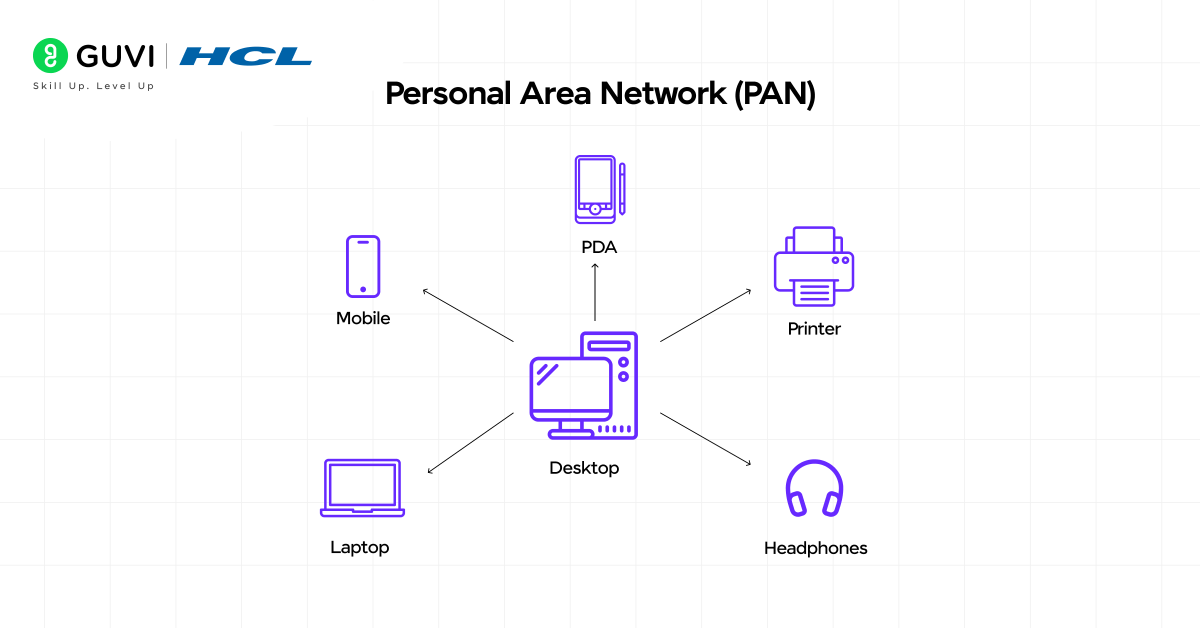
A PAN, the smallest Types of Computer Networks category, lets your personal gadgets, like phones, tablets, laptops, and wearables, communicate and share data. Most commonly implemented using wireless technologies such as Bluetooth or infrared, though USB connections can also create wired PANs.
Key characteristics of PANs include:
- Very short range (up to 10 meters)
- High transmission speeds
- Low maintenance requirements
- Extremely easy setup
- Very low implementation cost
Common examples of this entry in the Types of Computer Networks family include connecting your smartphone to wireless earbuds via Bluetooth or using infrared communication between a TV and remote control.
2) Local Area Network (LAN)
Local Area Networks, among the most common Types of Computer Networks, connect computers and devices within a limited geographical area, such as a single building, home, office, or school campus. Unlike the personal nature of PANs, LANs serve multiple users simultaneously.
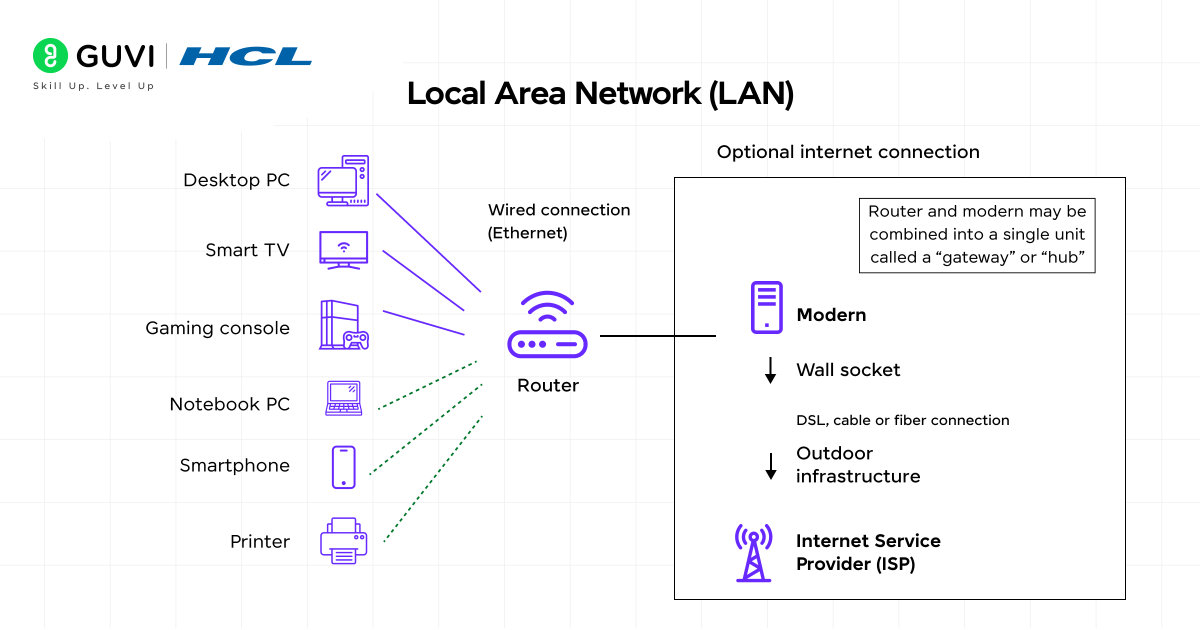
A LAN is likely the most familiar Types of Computer Networks category.
It typically ranges up to 2 kilometers and uses Ethernet cables or Wi-Fi for connectivity. These networks, one of the most widely deployed Types of Computer Networks, excel at resource sharing, allowing connected devices to use a single internet connection, access shared printers, and exchange files easily.
LANs come in two main varieties:
- Client/server LANs: several devices (clients) connect to a central server that manages file storage, applications, and network traffic
- Peer-to-peer LANs: devices share resources equally without a central server
3) Metropolitan Area Network (MAN)
Metropolitan Area Networks, a mid-sized entry among Types of Computer Networks, expand beyond single locations to connect multiple LANs across a city or metropolitan area. They bridge the gap between smaller LANs and larger WANs, providing city-wide connectivity.
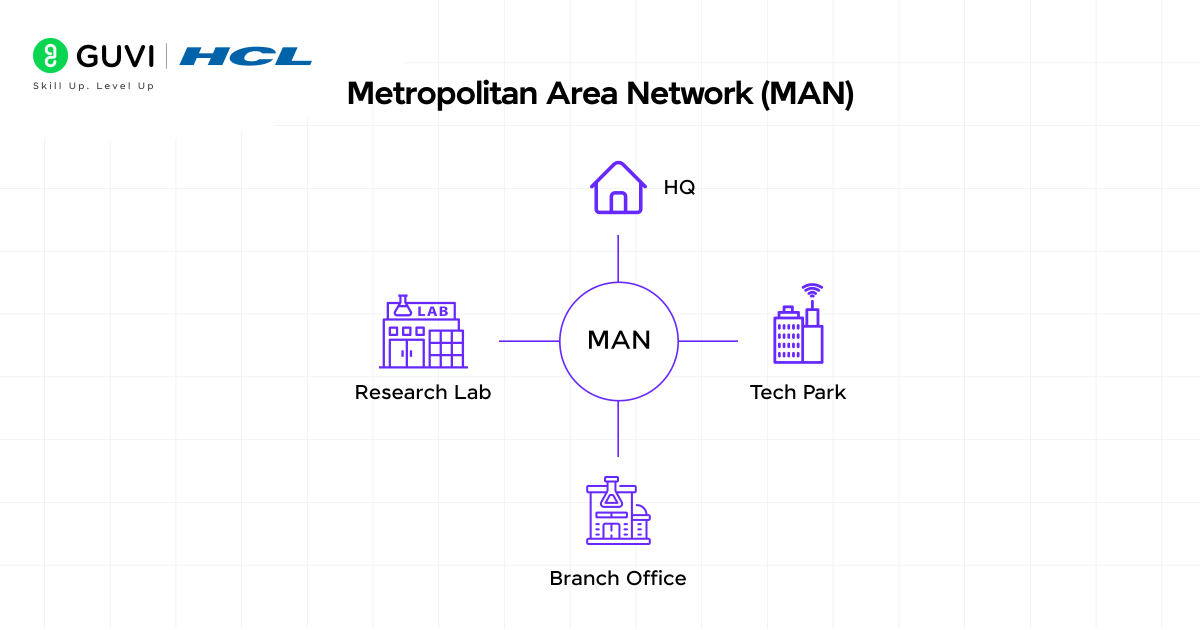
MANs, a city-scale entry among Types of Computer Networks, typically span 5 to 50 kilometers and often utilize fiber optic cables to achieve reliable high-speed connections. They enable efficient communication between different buildings, campuses, or organizations within the same urban area.
Unlike LANs, usually managed by a single organization, MANs frequently combine networks from multiple entities, a distinct trait among Types of Computer Networks. They’re commonly deployed in universities, municipal governments, and large corporations with multiple sites in the same metropolitan region.
4) Wide Area Network (WAN)
Wide Area Networks, the largest of the Types of Computer Networks by geography, connect computers and networks across large geographical distances, spanning cities, countries, or even continents. In essence, a WAN is a “network of networks” that links multiple LANs together.
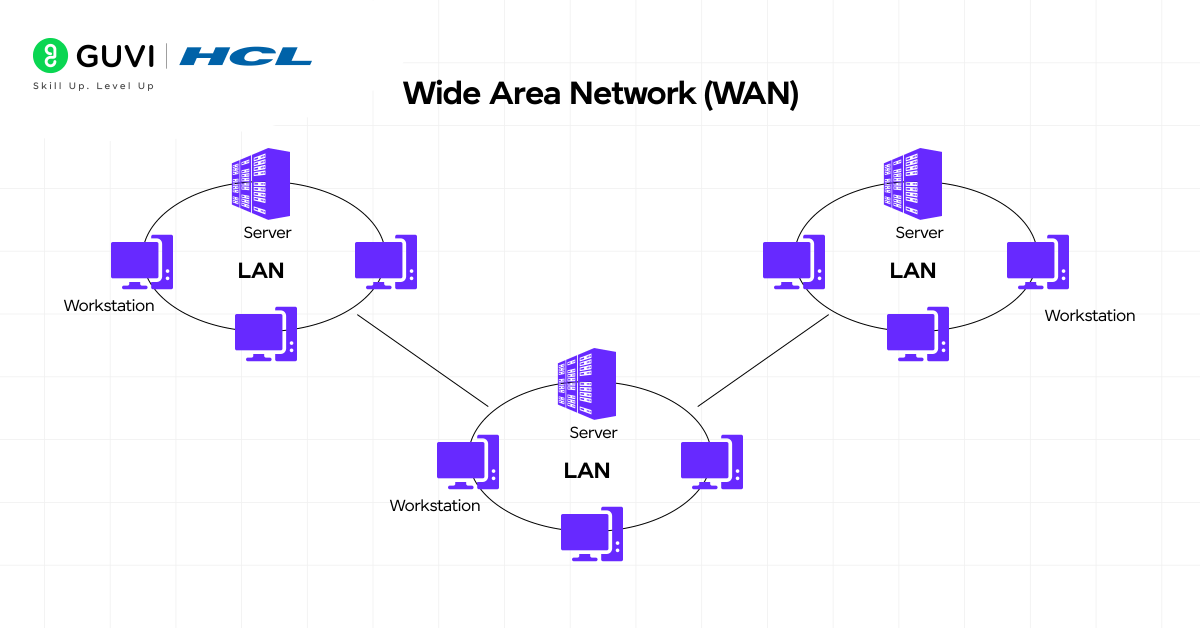
WANs, the broadest of the Types of Computer Networks, cover areas exceeding 50 kilometers and typically use leased telecommunication circuits or internet links. The Internet itself is considered the world’s largest WAN. Unlike local networks, WANs generally offer slower speeds but a much greater coverage area.
These networks, among the most far-reaching Types of Computer Networks, enable businesses with international offices to share resources and communicate globally. They utilize various technologies, including packet switching, TCP/IP protocols, and sophisticated routing systems.
5) Campus Area Network (CAN)
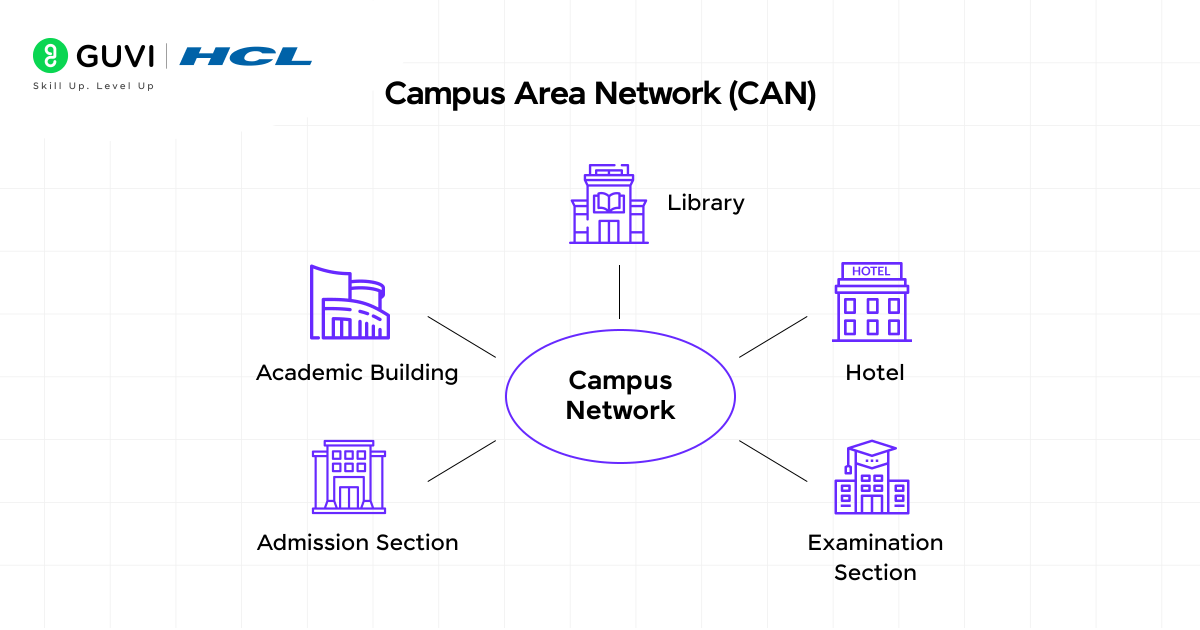
- Campus Area Networks connect multiple buildings within a specific, limited geographical area, such as university campuses, corporate facilities, or hospital complexes. A CAN exceeds the size of a single LAN but offers less coverage than both MANs and WANs.
- CANs are designed for organizations that need to link various buildings to facilitate efficient communication, resource sharing, and centralized management. They typically rely on a central hub to which other locations connect, providing more control over network resources compared to public networks.
- The key distinction between a CAN and other network types lies in its specialized purpose for campus environments and its intermediate geographical scope.
B) Types of Networks Based on Transmission Medium
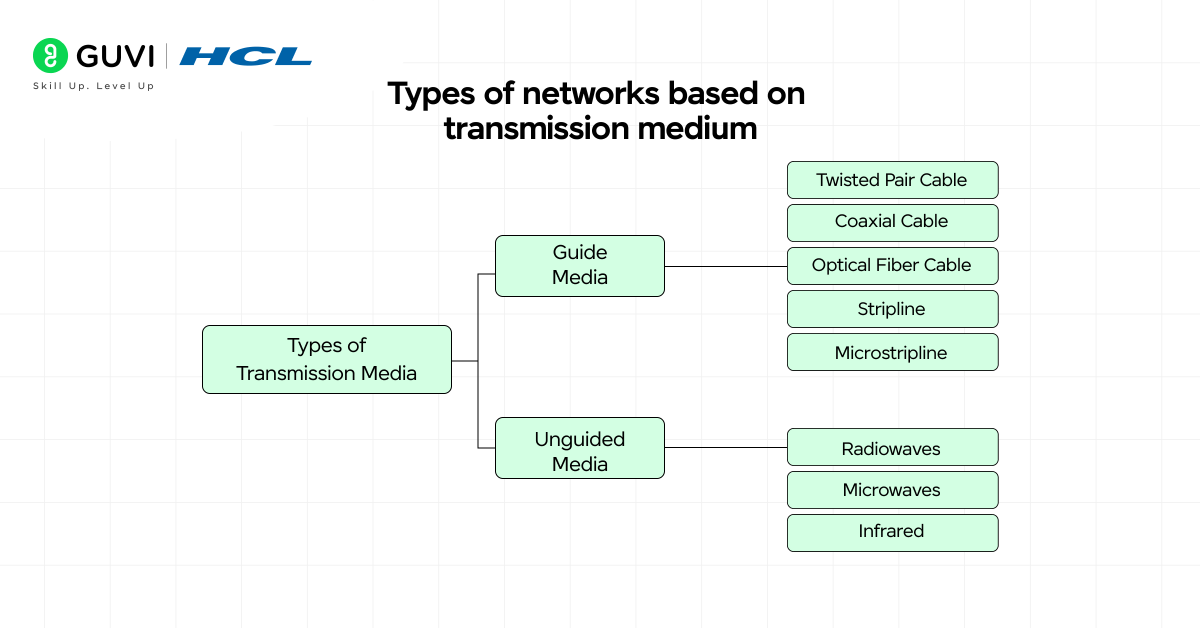
Network transmission medium refers to the physical pathway through which data travels between devices. How data moves from one point to another significantly impacts network performance, reliability, and cost-effectiveness.
1) Wired networks (Ethernet, fiber)
Wired networks utilize physical cables to transmit data between devices, offering stable and reliable connections. These networks primarily use two types of transmission media:
- Ethernet employs copper cables (typically twisted pair) for data transmission. These cables come in various categories like Cat5e, Cat6, and Cat7, supporting speeds from 10 Mbps to 10 Gbps. Ethernet connections excel in stability, with reliability rates of almost 99%. They’re ideal for situations requiring consistent performance, especially for video calls, online gaming, and office environments where minimal latency is crucial.
- Fiber optic cables transmit data using light pulses through thin strands of glass or plastic. These cables have revolutionized long-distance communication by carrying huge amounts of data with minimal signal loss. Fiber can run hundreds of miles without requiring signal repeaters, making it perfect for backbone connections between buildings or cities. Modern fiber networks can achieve speeds of up to 100 Gbps, significantly outpacing copper-based alternatives.
2) Wireless networks (Wi-Fi, Bluetooth)
Wireless networks eliminate physical cables by transmitting data through the air using radio waves, infrared, or electromagnetic signals.
- Wi-Fi operates in the 2.4 GHz, 5 GHz, and newer 6 GHz frequency bands with theoretical speeds of 100 Mbps, 1 Gbps, and 2 Gbps, respectively. This technology creates wireless access points that can connect up to 50 simultaneous users. Wi-Fi is governed by IEEE standards (802.11n, 802.11ac, 802.11ax) that continuously improve performance and security.
- Bluetooth functions as a short-range radio technology designed to connect personal devices within approximately 10 meters. Unlike Wi-Fi, which connects devices to the internet, Bluetooth creates direct device-to-device connections.
- It uses a clever technique called Frequency Hopping Spread Spectrum (FHSS) that switches between 79 different channels 1,600 times per second, making it resistant to interference. This makes Bluetooth ideal for connecting headphones, keyboards, and other personal accessories with lower power requirements.
3) Passive Optical LAN (POLAN)
Passive Optical LAN represents an innovative approach to network architecture that replaces traditional copper-based LANs with fiber optics. Unlike conventional networks with multiple switches and routers, POLAN simplifies infrastructure through:
- Single-mode fiber extending closer to end users
- Passive optical splitters that divide signals without electricity
- Optical Line Terminals (OLTs) and Optical Network Terminals (ONTs)
This architecture delivers significant advantages, particularly for larger installations. It reduces power consumption by approximately 50% compared to traditional LANs, eliminates the need for telecommunications rooms, and supports fiber lifespan exceeding 25 years versus the 5-7 year replacement cycle of copper networks.
To make your learning more interesting, here are a few surprising facts about how computer networks came to shape our digital world:
The Internet Began as ARPANET (1969): The first form of the internet, ARPANET, connected just four computers across U.S. universities — UCLA, Stanford, UCSB, and the University of Utah. This humble beginning eventually evolved into the global internet we use today.
First Email Was Sent in 1971: Ray Tomlinson, a computer engineer, sent the world’s first email between two machines placed side by side. He also introduced the “@” symbol to separate user names from host addresses — a convention still used in emails today.
Wi-Fi Is Older Than You Think: Though it became popular in the 2000s, Wi-Fi technology was first developed in 1991 as part of a project to improve cash register communication systems in the Netherlands.
These fun facts show how decades of innovation in computer networking laid the foundation for today’s hyper-connected digital age.
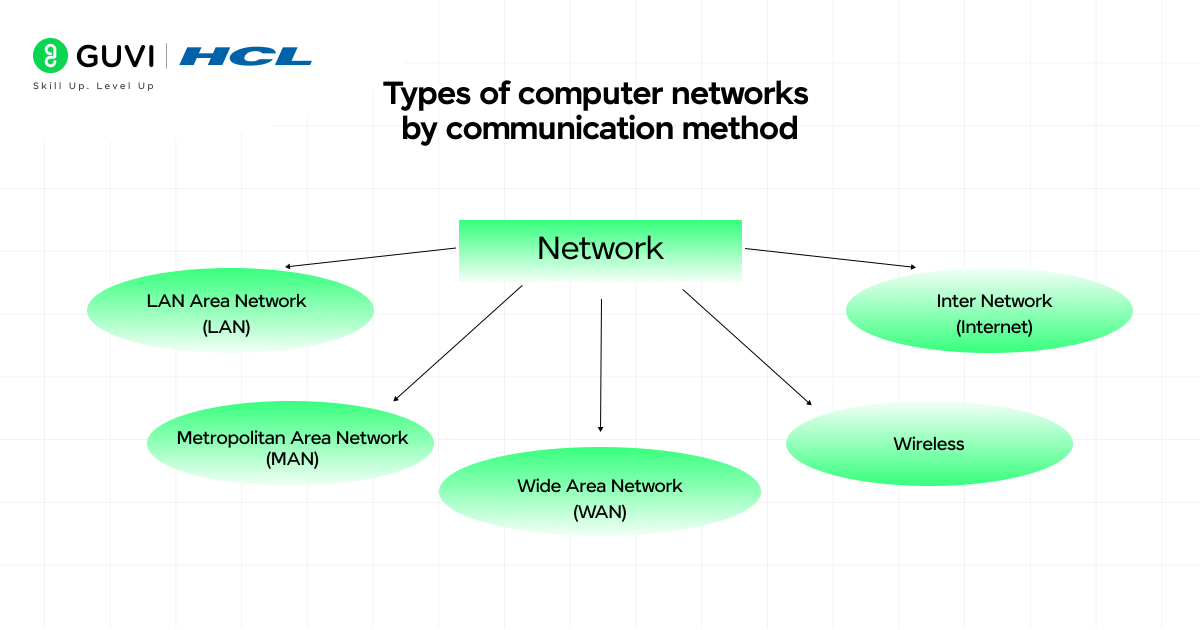
C) Types of Computer Networks by Communication Method
Communication methods determine how data moves between devices in a network, shaping how information flows and who receives it. Different communication approaches address specific network needs, from secure point-to-point links to widespread broadcasts.
1) Point-to-Point networks
Point-to-Point networks create dedicated communication channels between exactly two devices. In this straightforward configuration, a single sender connects directly with a single receiver. This arrangement offers several distinct advantages:
- Maximum bandwidth efficiency (no sharing required)
- Consistently low latency communication
- Enhanced security through isolated connections
These networks excel in situations requiring reliable, high-speed data transfer. They form the backbone of many critical infrastructure connections, including high-speed Ethernet links, fiber-optic communication systems, and data center interconnects.
For businesses with remote locations, point-to-point connectivity provides a direct link between facilities, offering instant and reliable communication. This approach works best when devices are relatively close or when security is paramount.
2) Multipoint networks
Multipoint networks connect three or more hosts through a hub-and-spoke topology. In this arrangement, a central node (the hub) communicates with multiple remote nodes (the spokes), creating a one-to-many structure.
The main characteristics of multipoint networks include:
- A central hub site often serving as headquarters
- Remote sites accessing resources from the main hub
- Ability to grow exponentially based on hardware and software capabilities
From the perspective of non-central nodes, each feels like it’s in an exclusive peer-to-peer relationship with the central node. This makes multipoint networks ideal for organizations with branch offices or distributed teams.
3) Broadcast networks
Broadcast networks transmit data from one device to all others simultaneously on the network. This one-to-all approach ensures widespread information delivery without repeating transmissions.

In broadcast communication:
- A single datagram is routed to all endpoints
- The network automatically replicates data as needed
- All devices receive the same message
Broadcasts typically operate within a broadcast domain (usually a subnet). When a computer sends a broadcast packet, it uses a special MAC address (FF:FF:FF:FF:FF:FF) that signals all devices to process the message rather than just those matching the specific address.
4) Virtual Private Network (VPN)
A Virtual Private Network creates a secure, encrypted tunnel for data traveling over public networks. VPNs protect your online traffic by:
- Encrypting all internet traffic (making it appear as gibberish to outsiders)
- Hiding your IP address and location
- Preventing third parties from monitoring your activities
VPNs act as overlay networks where connections between nodes travel through virtual circuits in larger networks instead of physical wires. This technology has gained significant popularity, with approximately 31% of internet users worldwide now using VPNs.
Beyond security, VPNs provide practical benefits for accessing restricted content, protecting sensitive information on public Wi-Fi, and maintaining privacy during everyday browsing activities.
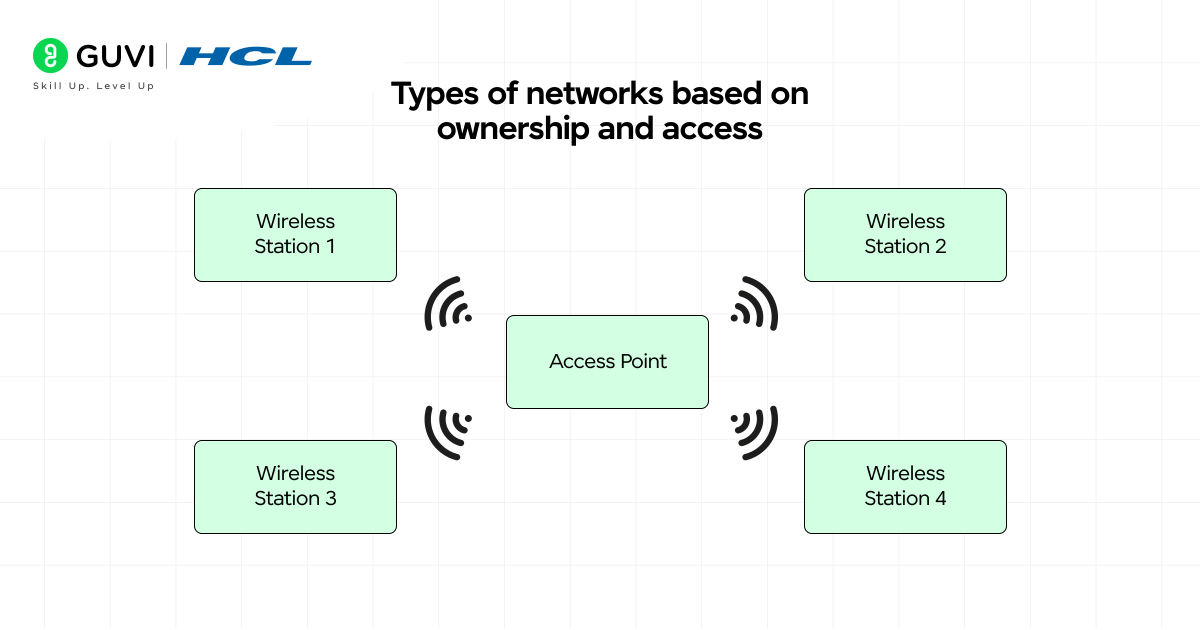
D) Types of Networks Based on Ownership and Access
Ownership and accessibility define who controls and uses a network, creating crucial distinctions in how networks function and who can access them. Let’s examine the four main categories based on these factors.
1) Private networks
Private networks operate under the exclusive control of a single organization, allowing only authorized users to connect and access resources. These networks prioritize security through firewalls and strict access policies. Indeed, their isolation from outside access makes them highly secure and reliable for handling sensitive information.
Common examples include:
- Corporate intranets for internal communications
- Hospital systems storing confidential patient data
- School campus networks with restricted access
2) Public networks
Public networks remain open to general public use with minimal authentication requirements. These networks typically come from Internet Service Providers (ISPs) or businesses in public spaces. At this point, it’s worth noting that they offer convenience at the cost of security vulnerabilities if used carelessly.
3) Hybrid networks
Hybrid networks combine at least two types of network infrastructure integrated together. This approach blends private and public elements, offering role-based access control where some parts remain restricted while others allow open access.
According to an Omdia survey, businesses choose hybrid models for their ability to deploy at scale without major redesign and guaranteed application performance.
4) Enterprise Private Network (EPN)
Enterprise Private Networks are custom-designed systems built specifically for businesses to share resources across different geographical regions. For this reason, they excel at handling bandwidth-intensive applications without creating bottlenecks.
EPNs optimize performance through tunneling protocols like Layer 2 Tunneling Protocol and Internet Protocol Security, ensuring privacy across all network operations.
If you’re ready to move beyond just networking basics and step into the world of building intelligent systems, check out the AI Software Development Course by HCL GUVI (in partnership with IITM Pravartak & MongoDB Inc.). With 300+ hours of live learning, AI-powered tools, and real-world projects, it’s the launchpad you need to become SDE-ready for top product companies.
Types of Computer Networks in Organizations vs Homes
The same Types of Computer Networks show up at home and at work, just at very different scales of size and complexity.
At home: a single LAN via a Wi-Fi router, plus a few PANs on top (phone to earbuds, smartwatch to phone, laptop to wireless mouse). It’s private, managed by one person, with barely any setup beyond a Wi-Fi password.
In organizations: the picture is layered. One floor might run a client/server LAN; multiple buildings on a site use a CAN; branches across a city lean on a MAN; and offices in different countries connect via a WAN, often the public internet. Organizations also add VPNs for remote staff, firewalls, hybrid setups, and sometimes a custom Enterprise Private Network (EPN) to move data securely across regions.
In short, homes need just one or two of these Types of Computer Networks, while organizations combine several to balance connectivity, security, and cost.
Which Type of Network Is the Internet?
Among all Types of Computer Networks, the internet is technically the world’s largest Wide Area Network (WAN), linking homes, businesses, universities, and governments into one global system.
But it’s more precise to call it a decentralized network of networks: thousands of independently run Autonomous Systems (ASes), each connected to others through routing protocols like BGP (Border Gateway Protocol). No single company or government owns it.
Ownership-wise, it’s best described as a hybrid public network: backbone infrastructure belongs to telecoms and ISPs, but access is open to everyone.
So the full answer combines two classifications from this guide: by geography, it’s a WAN; by ownership, it’s a public, packet-switched network of interconnected systems.
LAN vs WAN vs MAN vs PAN: Comparison with Real Examples
These four Types of Computer Networks are the ones people mix up most, so here’s a side-by-side look with everyday examples for each.
| Aspect | PAN | LAN | MAN | WAN |
|---|---|---|---|---|
| Full form | Personal Area Network | Local Area Network | Metropolitan Area Network | Wide Area Network |
| Typical range | 1 to 10 meters | Up to 2 kilometers | 5 to 50 kilometers | Beyond 50 kilometers |
| Who manages it | An individual | A single organization or household | Multiple entities in a city | Multiple organizations or ISPs |
| Real example | Smartwatch synced to a phone via Bluetooth | A college computer lab connected by Wi-Fi | A city’s public Wi-Fi or cable TV network | A multinational company linking offices in Chennai, London, and New York |
| Typical cost | Very low | Low to moderate | Moderate to high | High |
A simple way to remember the difference between these Types of Computer Networks: a PAN is about you, a LAN is about one room or building, a MAN is about one city, and a WAN is about the whole map. Each step up in these Types of Computer Networks trades a bit of speed for a lot more reach.
Types of Computer Networks Comparison Table
This guide covers Types of Computer Networks across four different classifications: geographical area, transmission medium, communication method, and ownership. Here’s every type discussed, grouped by how it’s segregated, with coverage, speed, a real example, and its main use case.
By Geographical Area (the most common way to split Types of Computer Networks)
| Network Type | Coverage | Speed | Example | Use Case |
|---|---|---|---|---|
| PAN | 1 to 10 meters | Up to 2-3 Mbps (Bluetooth) | Phone to wireless earbuds | Connecting your own personal devices |
| LAN | Up to 2 kilometers | 100 Mbps to 10 Gbps (Ethernet/Wi-Fi) | Home or office Wi-Fi network | Sharing files and printers within a building |
| CAN | Larger than a LAN, smaller than a MAN | 1 Gbps to 10 Gbps (fiber backbone) | University or hospital campus network | Linking multiple buildings on one campus |
| MAN | 5 to 50 kilometers | Up to several Gbps (fiber optic) | City-wide ISP or municipal network | Connecting LANs across a city |
| WAN | Beyond 50 kilometers | Slower per link, but massive aggregate capacity | The internet, a bank’s branch network | Connecting offices across countries |
By Transmission Medium (a second lens on Types of Computer Networks)
| Network Type | Coverage | Speed | Example | Use Case |
|---|---|---|---|---|
| Ethernet (wired) | Depends on cable run | 10 Mbps to 10 Gbps | Office Ethernet cabling | Stable, low-latency connections |
| Fiber optic (wired) | Hundreds of miles without repeaters | Up to 100 Gbps | Backbone links between buildings or cities | High-speed, long-distance backbone |
| Wi-Fi (wireless) | A few meters to ~100 meters | 100 Mbps to 2 Gbps | Home or office Wi-Fi | Cable-free internet access indoors |
| Bluetooth (wireless) | Up to ~10 meters | Up to 2-3 Mbps | Wireless earbuds, keyboards | Short-range personal device pairing |
| POLAN | Similar reach to fiber backbones | High-speed (fiber-based) | Large enterprise or campus fiber rollout | Cutting power use in big installations |
By Communication Method (a third lens on Types of Computer Networks)
| Network Type | Coverage | Speed | Example | Use Case |
|---|---|---|---|---|
| Point-to-Point | Direct link, any distance | High, fully dedicated bandwidth | Leased line between two offices | Reliable, high-speed direct transfer |
| Multipoint | Hub-and-spoke, any distance | Depends on hub capacity | Branch offices connecting to HQ | Distributed teams accessing one hub |
| Broadcast | Limited to one broadcast domain/subnet | Depends on the LAN | DHCP requests, ARP messages | Delivering one message to every device |
| VPN | Works over any existing network | Depends on underlying connection | Remote employee accessing office resources | Secure access over public networks |
By Ownership (the final lens on Types of Computer Networks)
| Network Type | Coverage | Speed | Example | Use Case |
|---|---|---|---|---|
| Private | Any scale, org-controlled | Depends on infrastructure | Corporate intranet, hospital network | Restricted, secure internal access |
| Public | Any scale, open access | Depends on the ISP | Public Wi-Fi, ISP network | General-purpose public internet access |
| Hybrid | Any scale, mixed access | Depends on the mix | Company combining cloud and on-premise systems | Balancing openness with security |
| EPN | Custom, multi-region | High, via tunneling protocols | A multinational company’s private backbone | Secure data movement across regions |
Types of Computer Networks Interview Questions
Types of Computer Networks fundamentals come up constantly in technical interviews, especially for roles touching infrastructure, DevOps, or backend systems. Here are questions you should be ready for:
- What are the main Types of Computer Networks based on geographical area, and how do they differ in range and typical use case?
- What is the difference between a LAN and a WAN?
- Why is the internet considered a WAN rather than a MAN?
- What is the difference between a MAN and a CAN, given that both cover more than a single building?
- How does a client/server LAN differ from a peer-to-peer LAN?
- What is the difference between wired and wireless networks in terms of speed and reliability?
- How does a VPN keep data secure over a public network?
- What is the difference between point-to-point, multipoint, and broadcast communication methods?
- What is a broadcast domain, and what special MAC address is used to reach every device on it?
- What is the difference between a private network, a public network, and a hybrid network?
- What is an Enterprise Private Network (EPN), and how does it differ from a regular WAN?
- What is Passive Optical LAN (POLAN), and why might an organization choose it over a traditional copper LAN?
- How do MAC addresses differ from IP addresses in identifying devices on a network?
- What role do routers and switches play differently within a network?
- Why do organizations typically combine several Types of Computer Networks together, rather than relying on just one?
Concluding Thoughts…
Computer networks form the invisible foundation of our digital world, connecting billions of devices across various distances and purposes. Throughout this guide, you’ve learned about the different classifications of networks based on geographical area, transmission medium, communication method, and ownership.
Computer networks might seem complex at first, but they essentially serve one primary purpose – connecting devices to share information and resources efficiently. This knowledge empowers you to navigate our interconnected world with greater confidence and understanding.
FAQs
Q1. What are the main types of computer networks based on geographical area?
The main types of computer networks based on geographical area are Personal Area Network (PAN), Local Area Network (LAN), Metropolitan Area Network (MAN), Wide Area Network (WAN), and Campus Area Network (CAN). Each type covers a different range, from very small personal spaces to worldwide connections.
Q2. How do wired and wireless networks differ?
Wired networks use physical cables like Ethernet or fiber optic for data transmission, offering stable and fast connections. Wireless networks, such as Wi-Fi and Bluetooth, transmit data through the air using radio waves, providing more flexibility but potentially less stability than wired options.
Q3. What is a Virtual Private Network (VPN) and how does it work?
A VPN creates a secure, encrypted tunnel for data traveling over public networks. It protects online traffic by encrypting internet data, hiding the user’s IP address and location, and preventing third parties from monitoring activities. VPNs are useful for accessing restricted content and maintaining privacy on public Wi-Fi.
Q4. What’s the difference between private and public networks?
Private networks are controlled by a single organization and allow only authorized users to access resources, prioritizing security. Public networks are open for general use with minimal authentication, offering convenience but potentially less security. Hybrid networks combine elements of both private and public networks.
Q5. What is a Passive Optical LAN (POLAN) and what are its advantages?
A Passive Optical LAN is an innovative network architecture that replaces traditional copper-based LANs with fiber optics. It simplifies infrastructure by using single-mode fiber, passive optical splitters, and specialized terminals. POLAN offers advantages such as reduced power consumption, elimination of telecommunications rooms, and longer lifespan compared to copper networks.
Success Stories

About the Author
Jebasta
I translate the language of data into stories that anyone can understand. As a writer with a data science background, I simplify analytics, AI, and decision-making so beginners and enthusiasts can confidently explore the world of data.
View all posts by Jebasta
Connect with me @











Did you enjoy this article?