


Artificial Intelligence and Machine Learning Articles
What is Particle Swarm Optimization: A Beginner's Guide
What is One-Class SVM: A Complete Guide for Beginners
Image Super-Resolution: How AI Upscales Images
What Is the FP-Growth Algorithm for Association Rule Mining?


Get In Touch For Details! Request More Information
Optical Flow in Computer Vision Explained
Aug 26, 2026 4 Min Read 18 Views
(Last Updated)
How can a computer determine whether an object is moving, where it is moving, and how quickly it is moving? Optical Flow provides a way to estimate the apparent motion of objects, surfaces, and patterns between consecutive video frames.
It is an important computer vision technique used in applications ranging from motion detection and video stabilization to autonomous systems and object tracking. By analyzing how pixels shift between frames, Optical Flow helps machines understand movement without requiring every object to be explicitly identified.
Table of contents
- TL;DR
- What Is Optical Flow?
- How Does Optical Flow Work?
- What Does an Optical Flow Vector Represent?
- Common Optical Flow Methods
- Sparse vs Dense Optical Flow
- Where Is Optical Flow Used?
- Optical Flow vs Object Trackicng
- What Are the Advantages of Optical Flow?
- What Are Its Limitations?
- A Simple Example
- Key Takeaways
- Conclusion
- FAQs
- What is Optical Flow in computer vision?
- What is the difference between sparse and dense Optical Flow?
- What is the Lucas-Kanade method?
- Where is Optical Flow used?
- What can affect Optical Flow accuracy?
TL;DR
- Optical Flow estimates apparent pixel motion between consecutive frames.
- It represents motion using direction and velocity vectors.
- Lucas-Kanade and Farneback are common traditional methods.
- Deep learning has introduced more advanced optical flow models.
- It is useful for tracking, video analysis, robotics, and autonomous systems.
What Is Optical Flow?
Optical Flow describes the apparent movement of pixels or visual patterns between two consecutive images in a video.
Imagine recording a moving car. Between two frames, the car appears at a slightly different position. Optical Flow estimates how pixels associated with the car have moved from one frame to the next.
The result is commonly represented as a motion vector field, where each vector indicates the estimated direction and magnitude of movement.
Read More: Top Computer Vision Projects for Beginners in 2026
Build computer vision expertise with HCL GUVI’s Artificial Intelligence & Machine Learning Course. Learn computer vision, deep learning, and AI through hands-on projects.
How Does Optical Flow Work?
Optical Flow algorithms compare consecutive frames and search for changes in pixel positions.
A simplified process looks like this:
- Capture two consecutive video frames.
- Identify visual patterns or pixel regions.
- Compare their positions between frames.
- Estimate the direction of movement.
- Calculate the magnitude of displacement.
- Generate a motion field.
The resulting flow field can then be used by another computer vision system to understand movement.
Optical Flow does not necessarily represent the actual physical movement of an object. Camera movement, lighting changes, shadows, and reflections can also create apparent motion.
What Does an Optical Flow Vector Represent?
An Optical Flow vector typically contains two components:
- Direction: Indicates where the visual feature appears to be moving.
- Magnitude: Indicates how much the feature has moved between frames.
For example, a vector pointing toward the right with a large magnitude indicates significant rightward movement.
A collection of these vectors creates a visual representation of motion across the frame.
Pro Tip: Visualizing optical flow as arrows or color-coded motion maps can make it much easier to identify whether an algorithm is correctly detecting movement.
Common Optical Flow Methods
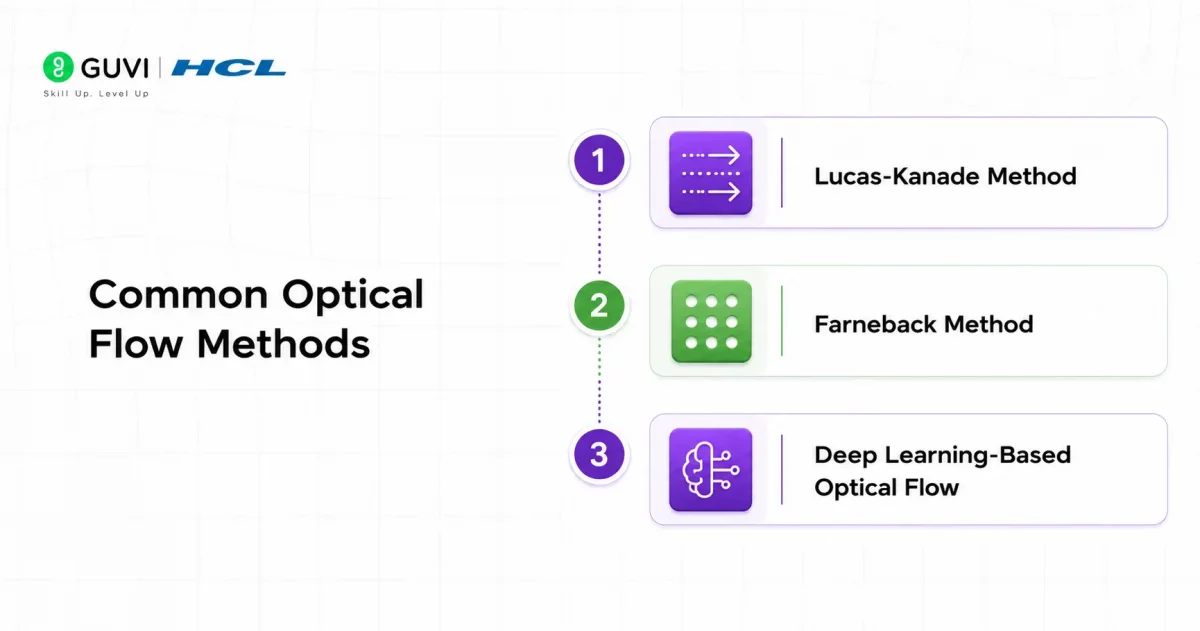
Different algorithms estimate motion in different ways. Some traditional approaches focus on local regions, while others calculate dense motion across an entire image.
- Lucas-Kanade Method
The Lucas-Kanade method estimates motion by examining small windows around image features. It assumes that pixels within a local region have similar motion.
It is computationally efficient and is commonly used for tracking distinctive features.
- Farneback Method
Farneback Optical Flow estimates dense motion across an image. Instead of tracking only selected points, it attempts to determine motion for many pixels.
This makes it useful when a more complete representation of scene movement is required.
- Deep Learning-Based Optical Flow
Modern approaches use neural networks to estimate motion between frames. These models can learn complex motion patterns and may perform better in challenging visual environments.
They can be useful when traditional assumptions about motion are insufficient.
Sparse vs Dense Optical Flow
Optical Flow can generally be divided into two categories.
- Sparse Optical Flow
Sparse Optical Flow tracks selected feature points rather than every pixel.
It is useful when you only need to follow specific visual features.
Examples include:
- Corner tracking
- Object tracking
- Camera motion estimation
- Feature tracking
- Dense Optical Flow
Dense Optical Flow estimates motion across most or all pixels in an image.
This produces a more detailed motion representation and can be useful for:
- Motion segmentation
- Video analysis
- Scene understanding
- Motion visualization
Best Practice: Use sparse flow when tracking selected features is sufficient. Dense flow is more appropriate when understanding motion across the entire scene is important.
Where Is Optical Flow Used?
Optical Flow has applications across many computer vision systems.
- Object Tracking
Optical Flow can estimate how objects move between video frames. This information can help tracking systems maintain the position of moving objects.
- Video Stabilization
Camera movement can cause unwanted motion in recorded footage. Optical Flow can estimate this movement and help stabilization algorithms compensate for it.
- Autonomous Vehicles
Vehicles can use motion information to understand how objects and surfaces are changing relative to the camera.
Optical Flow can contribute to tasks such as:

- Motion estimation
- Obstacle detection
- Visual navigation
- Scene understanding
- Robotics
Robots can use visual motion to estimate movement within their environment. This can support navigation and interaction with surrounding objects.
- Sports Analytics
Optical Flow can help analyze player movement, ball motion, and overall activity within sports footage.
Optical Flow vs Object Trackicng
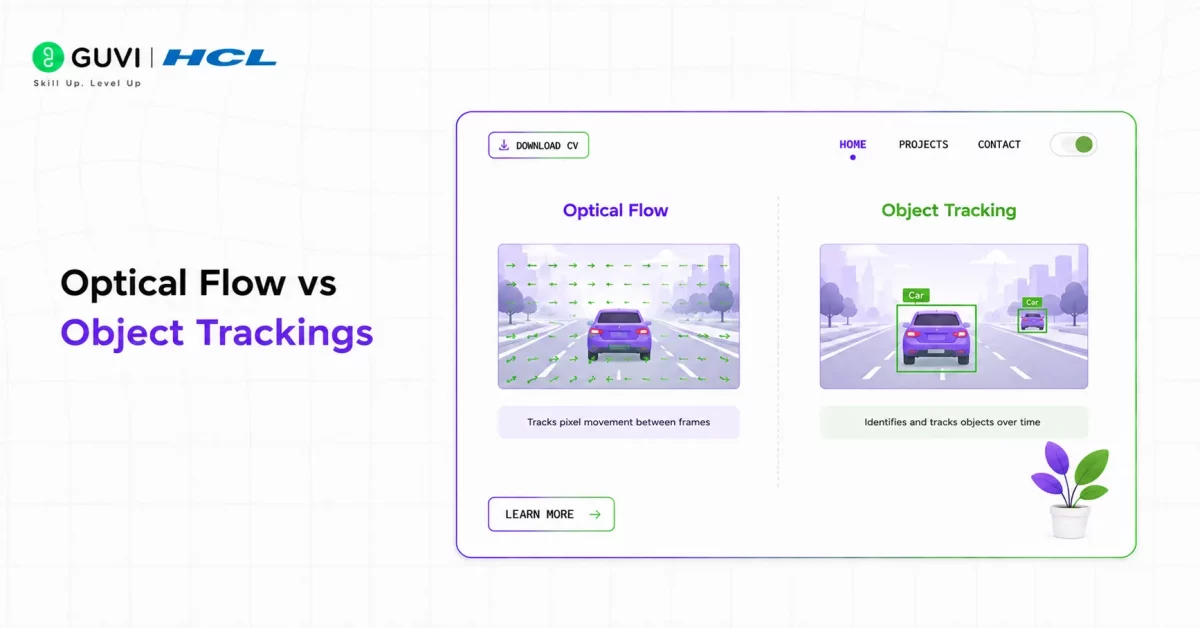
Although they are related, Optical Flow and object tracking are not the same.
Object tracking focuses on following a particular object across frames. Optical Flow focuses on estimating apparent motion across visual regions.
For example, a tracking system might use Optical Flow as one source of motion information to estimate where a player has moved.
This means Optical Flow can serve as a component within a larger tracking pipeline.
What Are the Advantages of Optical Flow?
Optical Flow provides several useful capabilities for video-based computer vision.
- Motion information: It provides detailed information about how visual content changes between frames.
- No object labels required: Traditional optical flow does not necessarily need predefined object categories to estimate motion.
- Broad applicability: It can support tracking, stabilization, navigation, and video analysis.
- Frame-to-frame analysis: It can detect movement even when objects are not explicitly recognized.
These characteristics make Optical Flow a useful building block for many computer vision applications.
What Are Its Limitations?
Optical Flow also faces several challenges.
Changes in lighting can be mistaken for motion. Occlusion can make it difficult to determine where a feature has moved. Fast movement can also create large changes between frames that are difficult to estimate accurately.
Other limitations include:
- Motion blur
- Camera movement
- Shadows and reflections
- Textureless regions
- Large object displacement
- Computational requirements for dense methods
Warning: Optical Flow should not automatically be interpreted as object movement. Camera motion and environmental changes can produce significant flow even when objects themselves are stationary.
A Simple Example
Consider a security camera recording a person walking across a hallway.
The person’s position changes between consecutive frames. An Optical Flow algorithm estimates the direction and magnitude of these pixel movements.
The resulting motion information can then be combined with object detection to determine that a person is moving toward a particular area.
This illustrates an important concept — Optical Flow provides motion information, while other computer vision models can provide semantic information about what is moving.
Key Takeaways
- Optical Flow estimates apparent motion between consecutive video frames.
- Motion is commonly represented using vectors showing direction and magnitude.
- Lucas-Kanade is commonly used for sparse tracking.
- Farneback can estimate dense optical flow.
- Deep learning approaches can handle more complex motion patterns.
- Optical Flow supports tracking, stabilization, robotics, and autonomous systems.
- Camera movement, lighting changes, and occlusion can affect accuracy.
Build computer vision expertise with HCL GUVI’s Artificial Intelligence & Machine Learning Course. Learn computer vision, deep learning, and AI through hands-on projects.
Conclusion
Optical Flow provides computers with a way to understand visual movement by estimating how image regions shift between consecutive frames. From tracking objects to stabilizing videos and supporting robotic navigation, it remains an important concept in computer vision.
Traditional methods such as Lucas-Kanade and Farneback continue to be useful for many applications, while deep learning approaches provide new ways to handle complex motion. When combined with object detection, tracking, and other vision techniques, Optical Flow can become a powerful component of video understanding systems.
FAQs
What is Optical Flow in computer vision?
Optical Flow is a technique used to estimate the apparent motion of pixels or visual features between consecutive video frames.
What is the difference between sparse and dense Optical Flow?
Sparse Optical Flow tracks selected feature points, while dense Optical Flow estimates motion across most or all pixels.
What is the Lucas-Kanade method?
Lucas-Kanade is a local Optical Flow method that estimates motion by analyzing small regions around selected image features.
Where is Optical Flow used?
Optical Flow is used in object tracking, video stabilization, robotics, autonomous systems, sports analytics, and motion analysis.
What can affect Optical Flow accuracy?
Lighting changes, motion blur, camera movement, occlusion, textureless regions, and large object displacement can reduce accuracy.
Success Stories

About the Author
HCL GUVI
This article was selected and published as part of the HCL GUVI AI Blogathon 2026, an initiative designed to encourage students, AI enthusiasts, and aspiring tech writers to simplify complex AI concepts through impactful technical content. The contest recognized high-quality, original, and insightful AI-focused blogs, with selected authors receiving publication opportunities on the HCL GUVI blog platform along with official author credits and recognition.
View all posts by HCL GUVI
Connect with me @










Did you enjoy this article?