


Full Stack Development Articles
Claude for Architecture and Engineering Documentation
Freelancing as a Python Developer: Getting Your First Client


Get In Touch For Details! Request More Information
Mobile App Testing Skills for Beginners
Sep 02, 2026 6 Min Read 633 Views
(Last Updated)
A banking app that freezes on one Android model, a food delivery app that drains battery in minutes, a game that crashes mid-purchase, these aren’t rare glitches. They’re exactly what mobile app testers are hired to catch before users do. With thousands of device, OS, and network combinations in the wild, mobile testing has become one of the most in-demand entry points into QA.
If you’re starting out, here’s what you actually need to learn.
TL;DR
- A Mobile App Testing beginner checks how apps function, perform, and behave across different devices, OS versions, screen sizes, and network conditions.
- The role requires familiarity with tools like Appium, Espresso, XCUITest, BrowserStack, and Charles Proxy to test functionality, UI, and network behavior.
- Core technical skills include manual testing basics, device/OS fragmentation handling, API testing, automation fundamentals, and bug tracking.
- Strong soft skills such as attention to detail, communication, and curiosity help testers catch issues that automated checks often miss.
Table of contents
- What is Mobile App Testing
- Why mobile app testing skills are important:
- Mobile Testing Skills Every Beginner Should Learn
- Start With Core QA Skills
- Learn Mobile-Specific Testing Skills
- Master the Main Mobile Testing Types
- Test Real User Scenarios
- Understand Different App Types
- Learn Useful Mobile Testing Tools
- Understand Mobile Test Automation Basics
- Build the Mindset of a Good Mobile Tester
- Mobile Testing Tools Beginners Should Know
- Career Opportunities After Learning Mobile App Testing
- Conclusion
- FAQs
- Do I need to know coding to start mobile app testing?
- Should I learn Android testing or iOS testing first?
- What’s the difference between testing on an emulator and a real device?
- How important is it to test on multiple devices as a beginner?
- Can I get a mobile testing job with only manual testing skills?
What is Mobile App Testing
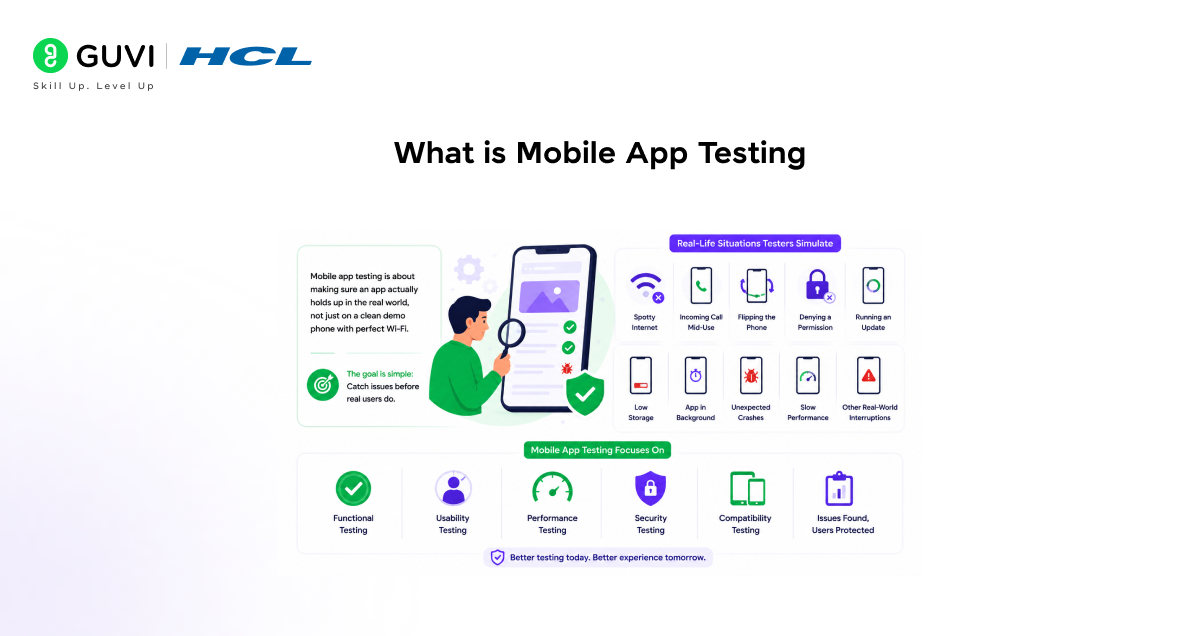
Mobile app testing is about making sure an app actually holds up in the real world, not just on a clean demo phone with perfect Wi-Fi. It goes way beyond tapping buttons and checking screens. A good tester throws all kinds of messy, real-life situations at the app: spotty internet, an incoming call mid-use, flipping the phone sideways, denying a permission, running an update, dealing with low storage, or just leaving the app sitting in the background for a while. The point is to catch the functional, usability, performance, security, and compatibility issues before actual users run into them.
Why mobile app testing skills are important:
- High demand, low entry barrier: Companies need testers constantly, and you don’t need a coding background to start.
- Direct impact on user experience: A buggy app gets uninstalled fast. Testers are the last line of defense before that happens.
- Device and OS fragmentation: With thousands of device, OS, and screen-size combinations out there, someone has to make sure the app doesn’t break on half of them.
- Catches issues before they cost money: Bugs found after launch are far more expensive to fix than bugs caught during testing.
- Builds a foundation for other tech roles: Testing skills transfer well into QA automation, product management, and even development.
- Security and trust: Testers help spot vulnerabilities (data leaks, permission misuse) that could damage user trust or violate compliance rules.
The mobile app industry is worth hundreds of billions, with annual downloads crossing 300 billion worldwide.
Mobile Testing Skills Every Beginner Should Learn
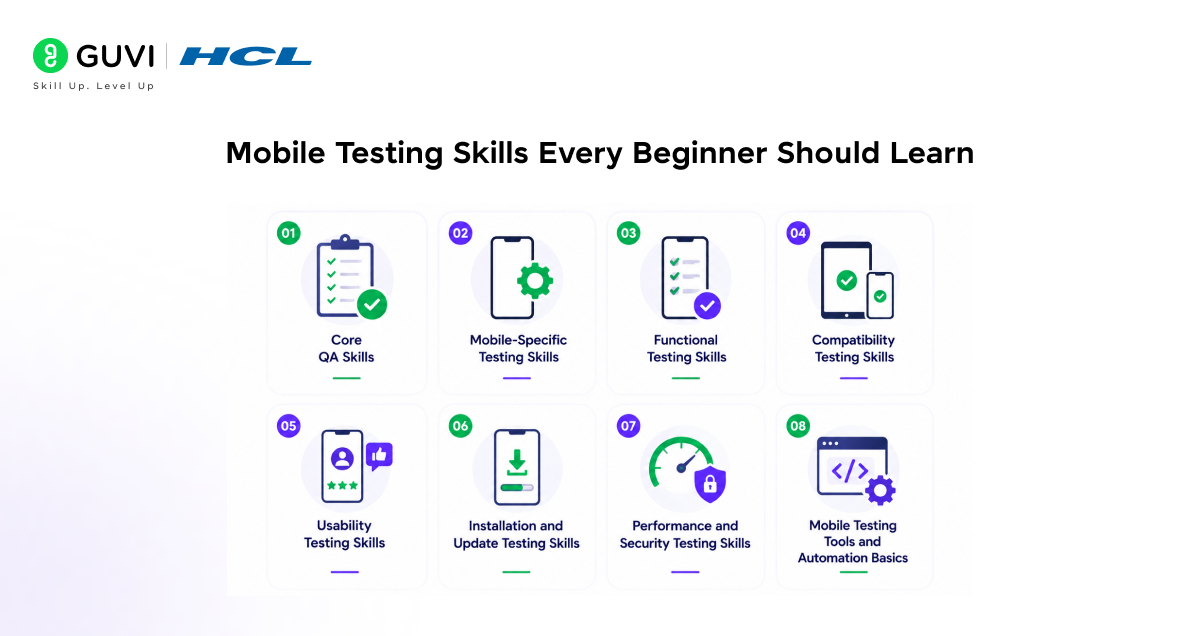
1. Start With Core QA Skills
Mobile testing becomes easier when your QA basics are strong. Before testing devices, networks, and gestures, learn how to test with structure.
1.1 Understand Requirements Clearly
Start by reading the feature requirement, user flow, and expected result. For example, login testing is not only about checking a successful login. You also need to test wrong passwords, empty fields, OTP delays, locked accounts, and app closure during login.
1.2 Write Practical Test Cases
A good test case should be clear enough for another tester to follow.
Add these details:
- Test scenario
- Preconditions
- Test steps
- Test data
- Expected result
- Actual result
- Pass or fail status
1.3 Report Bugs Properly
A good bug report saves time for developers. Avoid vague lines like “app is not working.” A strong mobile bug report should mention:
- Device name
- OS version
- App version
- Network condition
- Steps to reproduce
- Expected result
- Actual result
- Screenshot or screen recording
- Crash log, if available
Example: “App crashes on checkout after applying coupon on Android 14, Samsung Galaxy S23.”
1.4 Learn SDLC and STLC
Know where testing fits in the product cycle. This helps you understand requirement review, test planning, execution, bug reporting, retesting, and regression testing.
Kickstart your software testing career with HCL GUVI’s Advanced Selenium Java Course. Learn essential automation testing skills, Selenium frameworks, Java programming, test execution, and real-world QA practices through hands-on training designed for aspiring testing professionals.
2. Learn Mobile-Specific Testing Skills
Mobile apps behave differently because users keep moving between calls, networks, screens, and permissions.
2.1 Interrupt Testing
Mobile users get interrupted all the time. Test how the app behaves when the flow breaks.
Check these cases:
- Incoming calls
- SMS alerts
- Push notifications
- Alarm pop-ups
- Low battery warning
- Screen lock and unlock
- App moving to background
- App reopening from recent apps
A payment app should not lose progress just because a call comes in.
2.2 Network Testing
Mobile networks are not always stable. A tester must check how the app behaves during poor or changing connectivity. Test these cases:
- Wi-Fi to 5G
- 5G to 4G
- Slow internet
- No internet
- Airplane mode
- Server timeout
- Offline mode
- Data sync after reconnection
A good app should not crash when the internet drops. It should show a clear message and recover smoothly.
2.3 Permission Testing
Many mobile apps need access to device features. Test whether the app asks for permission at the right time. Check permissions for:
- Camera
- Location
- Microphone
- Contacts
- Files
- Notifications
- Bluetooth
- Biometrics
Also test what happens when the user denies permission.
2.4 Hardware and Sensor Testing
Some features depend on the device hardware. Test them across real devices whenever possible. Focus on:
- GPS
- Camera
- QR scanner
- Fingerprint login
- Face unlock
- Gyroscope
- Accelerometer
- NFC
- Speaker and microphone
A feature may work on one phone and fail on another.
3. Master the Main Mobile Testing Types
Mobile testing is not only about checking buttons. Each testing type checks a different part of the app experience.
3.1 Functional Testing
Functional testing checks whether app features work as expected.
Test areas like:
- Login
- Signup
- Forms
- Search
- Filters
- Menus
- Checkout
- Payments
- Profile updates
- Error messages
The goal is simple. Every feature should match the requirement.
3.2 Compatibility Testing
Compatibility testing checks whether the app works across devices, OS versions, and screen sizes.
Test across:
- Android versions
- iOS versions
- Different phone brands
- Tablets
- Small screens
- Large screens
- Portrait mode
- Landscape mode
This is important because every user does not use the same device.
3.3 Usability Testing
Usability testing checks whether the app feels easy to use.
Review:
- Navigation flow
- Button placement
- Text readability
- Touch response
- Swipe gestures
- Scroll behavior
- Pinch and zoom
- Form experience
A feature can work technically and still feel confusing for users.
3.4 Installation Testing
Installation testing checks how the app behaves during install, uninstall, reinstall, and updates.
Test these cases:
- Fresh install
- App uninstall
- App reinstall
- Update from old version
- User data after update
- Failed installation
- Low storage installation
User data should stay safe during version updates.
3.5 Regression Testing
Regression testing checks whether a new change has broken old features. For example, a new payment feature should not break login, cart, profile, or notification flow.
3.6 Smoke Testing
Smoke testing is a quick check after a new build arrives. Check the main flows first:
- App launch
- Login
- Home screen
- Main navigation
- Key feature access
- Logout
A failed smoke test means the build is not ready for deep testing.
4. Test Real User Scenarios
Good mobile testing feels close to real life. Users tap fast, switch apps, lose internet, deny permissions, and close apps midway.
4.1 Screen Responsiveness
Mobile screens vary a lot. Check whether the UI adjusts properly on different devices.
Review:
- Text alignment
- Image scaling
- Button spacing
- Menu layout
- Keyboard overlap
- Portrait mode
- Landscape mode
The app should look clean on both small and large screens.
4.2 Performance Testing
Users leave slow apps quickly. Test how the app performs during normal and heavy usage. Check:
- App launch time
- Screen loading speed
- API response time
- Scrolling smoothness
- Memory usage
- Battery drain
- App freeze
- Crash frequency
Low-end device testing is especially useful.

4.3 Accessibility Testing
Accessibility testing checks whether more people can use the app comfortably. Focus on:
- Screen reader support
- Text size adjustment
- Colour contrast
- Button labels
- VoiceOver on iOS
- TalkBack on Android
A more accessible app usually creates a better experience for everyone.
4.4 Localization Testing
Localization testing checks whether the app works well for users in different regions. Review:
- Language translation
- Currency symbols
- Date format
- Time zones
- Address format
- Text expansion
- Right-to-left language support, if needed
Small localization errors can make an app feel careless.
The global mobile application market is projected to reach $378 billion in 2026 and exceed $1.2 trillion by 2035.
5. Understand Different App Types
A tester should know what type of mobile app they are testing. Each app type needs a slightly different testing approach.
5.1 Native Apps
Native apps are built for one platform, such as Android or iOS. Test:
- OS-specific behavior
- App permissions
- Push notifications
- Hardware access
- App store rules
5.2 Mobile Web Apps
Mobile web apps run inside browsers. Test:
- Chrome
- Safari
- Responsive layout
- Page loading speed
- Browser back button
- Session handling
5.3 Hybrid Apps
Hybrid apps combine native and web elements. Test:
- WebView behavior
- UI consistency
- Offline behavior
- Permission handling
- App performance
- Update flow
6. Learn Useful Mobile Testing Tools
Tools help testers capture bugs, check logs, and test across devices faster.
6.1 Bug Tracking Tools
Common tools include:
- Jira
- Bugzilla
- Trello
- Azure DevOps
- ClickUp
These tools help track bugs from reporting to closure.
6.2 Device Testing Tools
Testers should use both real devices and emulators.
Useful tools include:
- Android Studio Emulator
- Xcode Simulator
- BrowserStack
- Sauce Labs
- LambdaTest
Real devices are better for camera, GPS, battery, gestures, and performance testing.
6.3 Log and Debugging Tools
Logs help developers understand what happened behind the screen. Useful tools include:
- Android Logcat
- Xcode Console
- Charles Proxy
- Firebase Crashlytics
- Postman
A tester who shares logs clearly becomes much more helpful to the team.
7. Understand Mobile Test Automation Basics
Manual testing is important. Automation helps repeat stable test cases faster.
7.1 Know What to Automate
Automate test cases that are stable, repeated, and high value.
Good examples include:
- Login flow
- Signup flow
- Search flow
- Add to cart
- Checkout flow
- Profile update
- Basic regression cases
7.2 Learn Common Automation Tools
Beginner-friendly tools include:
- Appium
- Selenium basics
- Espresso
- XCUITest
- Detox
A beginner does not need to master automation immediately. Basic knowledge is enough to grow faster.
8. Build the Mindset of a Good Mobile Tester
Strong testers do not only follow test cases. They stay curious and think like real users.
8.1 Test Beyond Happy Paths
Users do not always follow perfect steps.
Test cases like:
- Empty fields
- Invalid inputs
- Repeated taps
- Back button use
- Session timeout
- Failed payment
- Interrupted upload
- Duplicate submission
These scenarios often reveal important bugs.
8.2 Communicate Bugs Clearly
Good communication makes bug fixing faster.
Explain:
- What happened
- Where it happened
- Why it matters
- How to reproduce it
- Which users may be affected
Clear testers become valuable team members.
8.3 Keep Learning From Every Release
Mobile apps change often. New devices, OS updates, and user feedback keep testing active.
Learn from:
- Production bugs
- Crash reports
- User reviews
- App store feedback
- Release notes
- Developer discussions
Every release teaches something useful.
Mobile Testing Tools Beginners Should Know
| Tool Category | Tools | Use |
| Bug Tracking | Jira, Bugzilla, ClickUp, Azure DevOps | Log, assign, track, and retest bugs |
| Test Management | TestRail, Zephyr, Xray | Create test cases and manage test cycles |
| Android Testing | Android Studio Emulator, ADB, Logcat | Test Android builds, logs, crashes, and devices |
| iOS Testing | Xcode Simulator, Xcode Console, TestFlight | Test iOS builds, simulators, and beta releases |
| Cross-Device Testing | BrowserStack, Sauce Labs, LambdaTest | Test apps across real devices and OS versions |
| API Testing | Postman, Swagger, REST Assured | Check API responses, authentication, and data flow |
| Crash Reporting | Firebase Crashlytics, Sentry, Instabug | Track crashes, affected devices, and error logs |
| Network Debugging | Charles Proxy, Fiddler, Proxyman | Inspect API calls and network issues |
| Performance Testing | Firebase Performance, New Relic, Datadog | Check app speed, delays, and load issues |
| Automation Testing | Appium, Espresso, XCUITest, Detox | Automate stable flows like login and checkout |
| Accessibility Testing | Accessibility Scanner, Accessibility Inspector, axe DevTools | Check labels, contrast, screen readers, and touch targets |
| App Distribution | TestFlight, Firebase App Distribution, Diawi | Share test builds with QA teams and beta users |
Career Opportunities After Learning Mobile App Testing
- Mobile App Tester: Tests Android and iOS apps for bugs, crashes, usability issues, device compatibility, and real-world performance problems.
- QA Tester: Works on manual testing for web and mobile applications, including test case writing, bug reporting, retesting, and regression testing.
- Software Test Engineer: Handles structured testing across features, APIs, databases, user flows, and release builds.
- Mobile QA Engineer: Focuses specifically on mobile app quality, including network changes, permissions, gestures, screen sizes, app updates, and device-specific behavior.
- Automation Test Engineer: Uses tools like Appium, Selenium, Espresso, or XCUITest to automate repeated mobile test cases.
- Performance Tester: Checks app speed, API response time, memory usage, battery drain, crash frequency, and stability under load.
- QA Analyst: Reviews requirements, prepares test plans, analyzes defects, tracks quality metrics, and works closely with developers and product teams.
- App Release Tester: Validates final builds before launch and checks whether the app is ready for Play Store or App Store release.
- API Tester: Tests backend APIs that support mobile app features such as login, payments, search, notifications, and user profiles.
- Test Lead: Manages testing activities, assigns tasks, reviews bug reports, tracks release quality, and guides junior testers.
Conclusion
Mobile app testing isn’t just about tapping through screens and checking if buttons work. It’s about anticipating the thousand small ways real users, on real devices, with real network conditions, can break an app. Beginners who build a foundation across manual testing, device fragmentation, basic automation, and clear bug reporting set themselves up for a fast-growing QA career. Start small, test often, and the instincts will follow.
FAQs
Do I need to know coding to start mobile app testing?
Not at the beginner stage. Manual testing skills come first; scripting knowledge in Java or Python becomes useful once you move into automation.
Should I learn Android testing or iOS testing first?
Start with whichever platform you have access to. Android testing is often easier to begin with since emulators and devices are more accessible and affordable.
What’s the difference between testing on an emulator and a real device?
Emulators are useful for quick checks, but real devices reveal issues like battery drain, touch responsiveness, and network behavior that emulators often miss.
How important is it to test on multiple devices as a beginner?
Very important. Device and OS fragmentation is one of the biggest sources of mobile bugs, and beginners need to build this habit early.
Can I get a mobile testing job with only manual testing skills?
Yes, many entry-level roles focus purely on manual testing. Automation skills help you grow into mid-level and senior QA roles over time.
Success Stories

About the Author
Vaishali
I'm a seasoned writer with four years of experience across technical, non-technical, and just about every genre or niche you can imagine. Adaptable and curious, I enjoy exploring new topics and making information engaging and easy to understand. Fueled by a steady stream of tea, I approach each project with creativity, reliability, and genuine enthusiasm for storytelling.
View all posts by Vaishali
Connect with me @





































Did you enjoy this article?