


Artificial Intelligence and Machine Learning Articles
AI/ML Skills Gap 2026: Why Companies Can't Find Job-Ready Talent
20 AI/ML Interview Questions Recruiters Can Use Without a Tech Background - Best Guide
How Industry-Backed AI/ML Bootcamps Are Changing the AI/ML Hiring Pipeline - Best Guide 2026
From IT Support to AI Engineer: A Realistic Career Switch Guide 2026


Get In Touch For Details! Request More Information
How to Use Midjourney: A Complete Step-by-Step Guide for Beginners
Jun 30, 2026 4 Min Read 1427 Views
(Last Updated)
What if you could turn a simple text idea into a detailed, high-quality image within seconds without any design skills? This is exactly what Midjourney enables through AI-powered image generation. It beautifully shifts creative work from manual design effort to prompt-driven visual creation, making high-quality content production faster and more accessible.
This guide explains how Midjourney works, how to set it up, and how to generate better results with structured prompts.
Quick Answer:
Midjourney is an AI image generation tool that creates visuals from text prompts. To use it, join Discord, access the Midjourney server, enter prompts using commands like /imagine, and refine outputs using variations and prompt optimization techniques.
Table of contents
- What is Midjourney?
- How to Use Midjourney: A Step-by-Step Guide
- Step 1: Set Up a Discord Account
- Step 2: Access the Midjourney Server or Bot
- Step 3: Select an Appropriate Subscription Plan
- Step 4: Structure Prompts With Technical Clarity
- Step 5: Use Camera and Rendering Terms for Precision
- Step 6: Interpret the Image Grid Strategically
- Step 7: Refine Outputs Using Upscale and Variation Controls
- Step 8: Apply Advanced Parameters for Controlled Output
- Step 9: Enable Remix Mode for Iterative Editing
- Step 10: Manage Workflow With Private Channels
- Step 11: Download, Review, and Reuse Prompt Patterns
- Midjourney Use Cases Across Industries
- Performance Marketing Creatives for Paid Campaigns
- Product Concept Visualization Before Manufacturing
- Content Production for Blogs and Thumbnails
- Game and Film Pre-Production Concept Art
- E-commerce Visual Mockups and Listing Images
- Midjourney vs Other AI Image Generators
- Conclusion
- FAQs
- Can Midjourney generate consistent images for a brand style?
- How accurate are Midjourney outputs for real-world use cases?
- Does Midjourney store or reuse generated images?
What is Midjourney?
Midjourney is an Artificial Intelligence-powered image generation tool that converts text prompts into high-quality visuals using advanced diffusion models. It operates primarily through Discord, where users input structured prompts to generate and upscale images. Known for its strong artistic output and style flexibility, Midjourney is widely used for concept art, marketing creatives, and visual content production without requiring design skills.
How to Use Midjourney: A Step-by-Step Guide
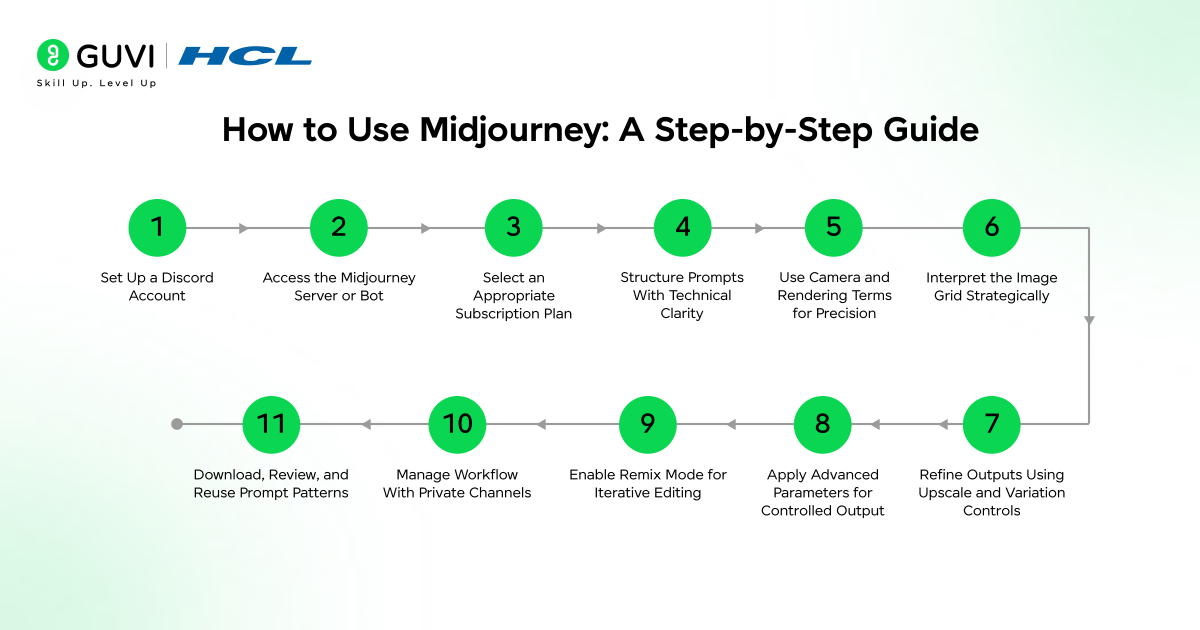
Step 1: Set Up a Discord Account
Discord is the primary interface for using Midjourney. Create an account using a valid email address and complete verification. Configure basic settings such as username, notifications, and privacy controls to avoid interruptions during prompt execution.
Step 2: Access the Midjourney Server or Bot
Enter the official Midjourney Discord server and locate “newbies” channels for initial usage. For focused work, add the Midjourney bot to a private server. This reduces noise from public channels and helps track prompt history, which is important for iterative improvement.
Step 3: Select an Appropriate Subscription Plan
The next step is to choose an appropriate subscription plan, as Midjourney is a paid tool; the table below outlines the available plans and their features:
| Plan | Monthly Price | Fast GPU Time | Relax Mode | Stealth Mode | Best For |
| Basic Plan | $10/month | 3.3 hours | Not available | Not available | Beginners and low usage |
| Standard Plan | $30/month | 15 hours | Unlimited | Not available | Regular users and content creators |
| Pro Plan | $60/month | 30 hours | Unlimited | Available | Professionals and teams |
| Mega Plan | $120/month | 60 hours | Unlimited | Available | Heavy users and advanced workflows |
Key Features and Pricing Details
- Annual Savings: 20% discount when billed annually
- Fast vs Relax Mode: Fast mode processes jobs immediately using GPU hours. Relax mode queues jobs with slower processing but allows unlimited generations on Standard plan and above
- Stealth Mode: Available only on Pro and Mega plans for private image generation
Step 4: Structure Prompts With Technical Clarity
Use the /imagine command followed by a well-structured prompt. Effective prompts follow a logical hierarchy:
Core structure:
Subject → environment → composition → lighting → style → technical detail
Example:
“Modern office workspace, top-down composition, soft natural lighting, minimal aesthetic, high detail, 4k render”
Key insight: Placing the most important subject at the beginning improves model prioritization. Overloading prompts with unrelated descriptors reduces output consistency.
Step 5: Use Camera and Rendering Terms for Precision
Incorporate technical keywords to guide visual output:
- Camera angles: close-up, wide-angle, top-down
- Lens types: 35mm, 85mm portrait
- Lighting styles: studio lighting, cinematic shadows, soft daylight
- Rendering quality: 4k, ultra realistic, photorealistic
These terms act as constraints that reduce randomness and align outputs with real-world visual standards used in photography and design.
Step 6: Interpret the Image Grid Strategically
Each prompt produces four variations. Instead of selecting randomly:
- Identify which version best aligns with composition goals
- Evaluate subject clarity and background balance
- Check lighting consistency and detail accuracy
This evaluation step improves decision quality and reduces unnecessary re-prompts.
Step 7: Refine Outputs Using Upscale and Variation Controls
- Upscale (U1 to U4): Enhances resolution and sharpness
- Variations (V1 to V4): Generates similar outputs with controlled differences
Use variations when the concept is correct but needs refinement. Use upscale when composition and detail meet expectations.
Step 8: Apply Advanced Parameters for Controlled Output
Midjourney parameters provide measurable control:
- Aspect ratio: –ar 16:9, –ar 9:16, –ar 1:1
- Stylization: –stylize 0–1000 controls artistic influence
- Quality: –q 0.25, 0.5, 1, 2 adjusts render effort
- Seed: –seed maintains consistency across outputs
- Version: –v 6 selects the model version
Practical use: For product images, use lower stylization and higher clarity. For concept art, increase stylization.
Step 9: Enable Remix Mode for Iterative Editing
Activate Remix Mode in settings. This allows prompt editing during variation generation. It supports controlled experimentation without restarting the process from scratch.
Step 10: Manage Workflow With Private Channels
Create a dedicated Discord server and organize channels by project or use case. This approach:
- Keeps prompt history structured
- Improves collaboration in team environments
- Supports repeatability in production workflows

Step 11: Download, Review, and Reuse Prompt Patterns
After upscaling, download images in full resolution. Maintain a repository of:
- High-performing prompts
- Parameter combinations
- Output references
This builds a reusable system that reduces trial and error in future projects.
Learn how to create high-quality AI-generated visuals with practical guidance and hands-on experience. Enroll in HCL GUVI’s Midjourney course to master prompt techniques, image generation workflows, and real-world creative use cases through structured, self-paced learning.
Midjourney Use Cases Across Industries
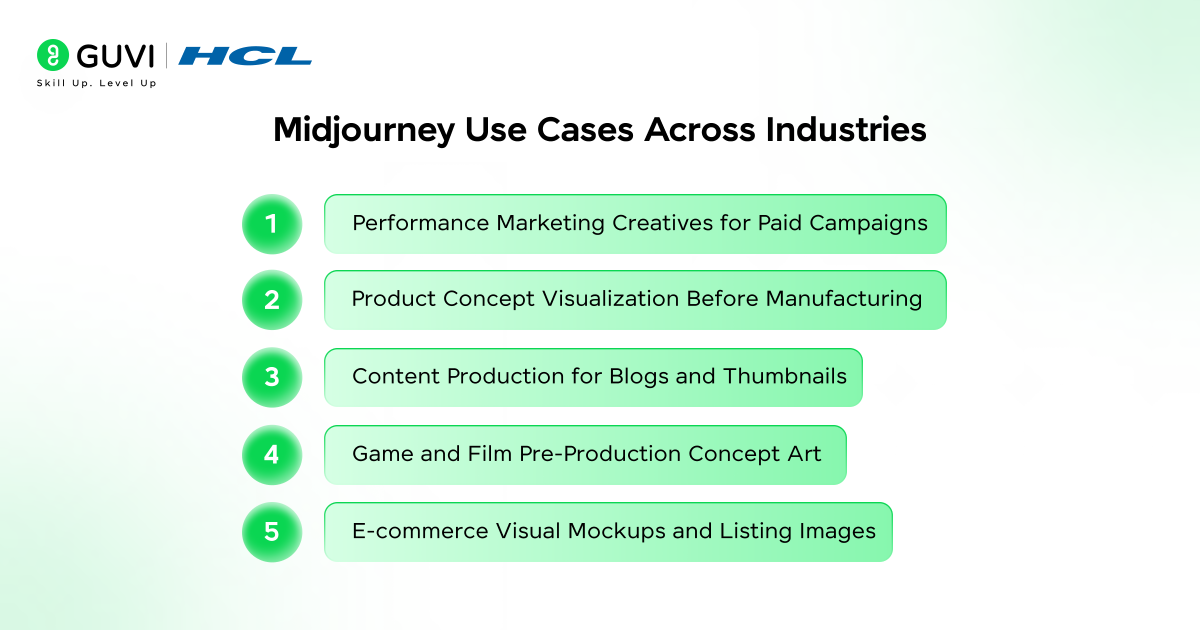
1. Performance Marketing Creatives for Paid Campaigns
Marketing teams use Midjourney to generate multiple ad visual variations for A/B testing. Instead of relying on manual design cycles, teams can produce campaign-ready creatives aligned with different audience segments, improving testing speed and creative iteration.
2. Product Concept Visualization Before Manufacturing
Product teams use Midjourney to visualize early-stage concepts such as packaging designs, consumer goods, or UI mockups. This reduces dependency on full-scale design prototypes and supports faster validation during early product development phases.
3. Content Production for Blogs and Thumbnails
Content teams generate blog banners, thumbnails, and social media visuals tailored to specific topics. This helps maintain visual consistency across content pipelines without requiring dedicated design bandwidth for each asset.
4. Game and Film Pre-Production Concept Art
Studios use Midjourney to create environment concepts, character references, and mood boards. This supports creative direction discussions before committing resources to detailed 3D modeling or production design workflows.
5. E-commerce Visual Mockups and Listing Images
E-commerce teams generate product-in-context visuals such as lifestyle shots or background variations. This is useful when physical photoshoots are not feasible, allowing faster listing optimization across marketplaces.
Go beyond image generation tools and build complete AI capabilities with structured learning. Join HCL GUVI’s Artificial Intelligence and Machine Learning Course to learn through live online classes by industry experts and Intel engineers, master in-demand skills like Python, ML, MLOps, Generative AI, and Agentic AI, and gain hands-on experience with 20+ industry-grade projects, 1:1 doubt sessions, and placement support with 1000+ hiring partners.
Midjourney vs Other AI Image Generators
| Factor | Midjourney | DALL·E | Stable Diffusion |
| Platform Access | Discord-based interface | Web-based (ChatGPT/OpenAI) | Local setup or web apps |
| Ease of Use | Easy but Discord learning curve | Very easy and beginner-friendly | Moderate to complex |
| Output Quality | Highly artistic and stylized | Balanced, realistic + creative | Depends on setup and models |
| Prompt Control | Strong with parameters | Moderate | Very high and customizable |
| Customization Level | Medium | Low to medium | Very high (full control) |
| Speed | Fast (depends on plan) | Fast | Varies (hardware-dependent) |
| Hardware Requirement | None (cloud-based) | None (cloud-based) | High if running locally (GPU needed) |
| Cost Structure | Subscription-based | Credit or subscription-based | Free (open-source) + infra cost |
| Privacy Mode | Paid private generations | Available | Fully private if local |
| Best For | Artists, designers, creatives | General users, marketers | Developers, researchers |
| Image Editing | Limited editing tools | Strong editing (inpainting, edits) | Advanced editing via tools |
Conclusion
Midjourney simplifies image creation by converting ideas into visuals through structured prompts and iterative refinement. With the right approach to prompt writing and parameter control, even beginners can generate professional-quality images. As AI-generated content continues to grow, learning tools like Midjourney become a practical skill for creators, marketers, and designers.
FAQs
1. Can Midjourney generate consistent images for a brand style?
Yes, consistency can be achieved by reusing structured prompts, fixed parameters such as seed values, and reference images. This approach helps maintain uniform color schemes, composition, and visual identity across multiple outputs.
2. How accurate are Midjourney outputs for real-world use cases?
Midjourney produces visually strong results, but outputs may require review for accuracy in details such as text, proportions, or product specifications. For production use, manual validation or post-editing is recommended.
3. Does Midjourney store or reuse generated images?
By default, generated images are visible within the platform’s public environment. Private generation is available through Stealth Mode in higher-tier plans, which restricts visibility to the user only.
Success Stories

About the Author
Vaishali
I'm a seasoned writer with four years of experience across technical, non-technical, and just about every genre or niche you can imagine. Adaptable and curious, I enjoy exploring new topics and making information engaging and easy to understand. Fueled by a steady stream of tea, I approach each project with creativity, reliability, and genuine enthusiasm for storytelling.
View all posts by Vaishali
Connect with me @









Did you enjoy this article?