


Artificial Intelligence and Machine Learning Articles
Generative Adversarial Networks (GANs): The Complete Guide
GRU vs LSTM: Which Should You Use?
LSTM Networks Explained: Solving the Vanishing Gradient Problem


Get In Touch For Details! Request More Information
Claude for Slack Bots: Build and Deploy in 1 Hour
Aug 19, 2026 4 Min Read 129 Views
(Last Updated)
Claude for Slack bots have become an essential part of modern workplace automation, helping teams answer questions, automate repetitive tasks, and improve collaboration. With Claude, developers can build intelligent Slack bots quickly using powerful language models and APIs. This Slack bot tutorial explains how to create and deploy a Claude-powered Slack bot in about an hour.
Table of contents
- TL;DR
- Direct Answer Box
- Why Build a Claude Slack Bot?
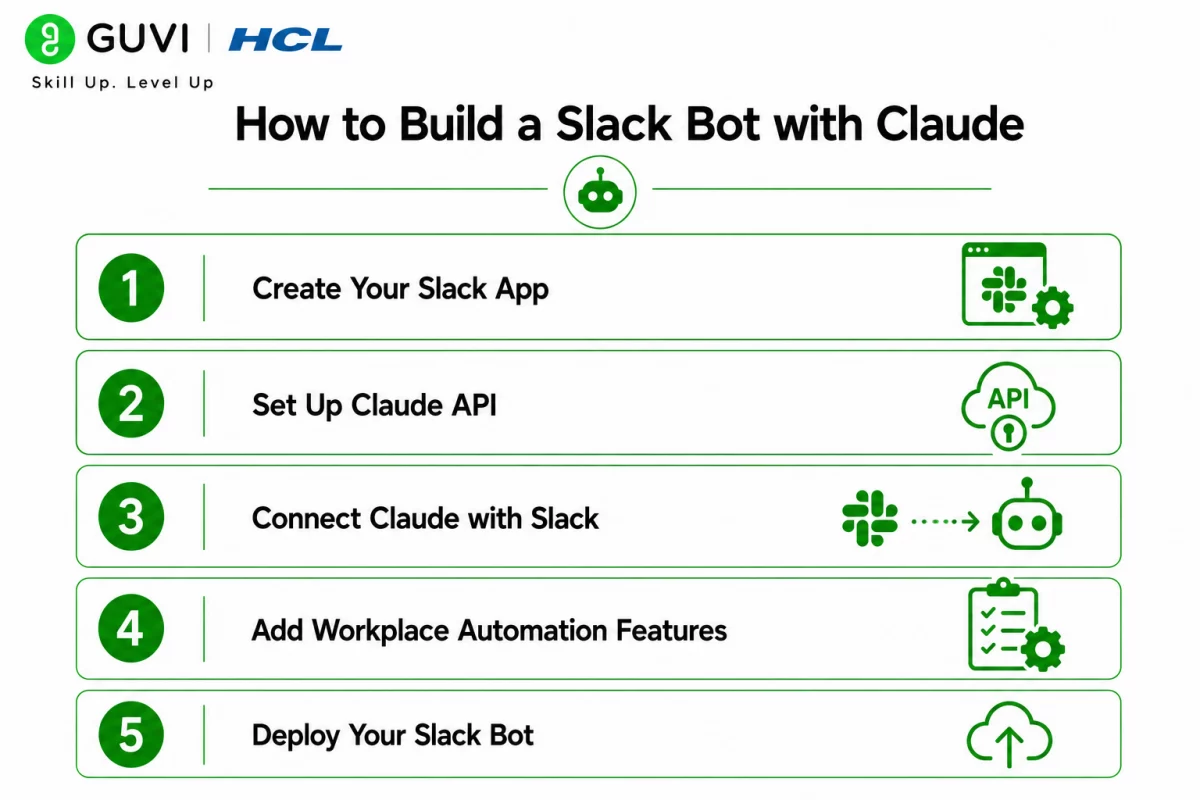
- How to Build a Slack Bot with Claude
- Step 1: Create Your Slack App
- Step 2: Set Up Claude API
- Step 3: Connect Claude with Slack
- Step 4: Add Workplace Automation Features
- Step 5: Deploy Your Slack Bot
- Claude vs Traditional Slack Bots
- Feature Comparison
- Which Teams Should Use Claude Slack Bots?
- Tasks You Can Automate Using Claude Slack Bots
- What AI Slack Bots Should Not Replace
- Best Practices
- Conclusion
- FAQs
- What is a Claude Slack bot?
- Can beginners build a Slack bot?
- What can an AI chatbot for Slack do?
- Which programming language is best for Slack bot development?
- Is Claude suitable for workplace automation?
- Can I deploy a Slack bot for free?
- How secure is a Claude Slack bot?
TL;DR
- Claude makes it easy to build AI-powered Slack bots.
- Slack bots improve workplace automation and team productivity.
- Claude integrates with Slack using APIs and webhooks.
- You can build and deploy a basic Slack bot in about an hour.
- This guide covers setup, integration, deployment, and best practices.
Data Point: Organizations increasingly use AI chatbots for Slack to automate employee support, answer internal questions, summarize conversations, and streamline repetitive workflows, helping teams save time and improve productivity.
Source: https://slack.com/blog/news/the-new-ai-advantage
Direct Answer Box
| A Claude-powered Slack bot can automate workplace conversations, answer employee questions, summarize discussions, and improve productivity. By integrating Claude API with Slack APIs, developers can quickly create intelligent assistants for customer support, HR, IT help desks, and internal collaboration. Following a structured Slack bot tutorial makes deployment simple, even for beginners. |
Why Build a Claude Slack Bot?
Businesses rely on Slack for communication, but answering repetitive questions and handling routine requests can consume valuable time. AI-powered Slack bots reduce manual effort by responding instantly, assisting employees, and automating workflows.
Claude’s strong reasoning capabilities make it particularly effective for workplace conversations because it understands context, generates detailed responses, and maintains natural interactions.
Common business use cases include:
- HR support
- IT help desk
- Employee onboarding
- Project management
- Internal knowledge base
- Customer support
- Meeting summaries
- Task reminders
How to Build a Slack Bot with Claude
Before starting this Slack bot tutorial, ensure you have the following:
- A Slack Workspace
- A Slack Developer Account
- Claude API access
- Basic knowledge of JavaScript or Python
- Node.js or Python installed
- A code editor such as VS Code
- A deployment platform (Render, Railway, Heroku, or AWS)
Having these tools ready allows you to build and deploy your bot much faster.
Step 1: Create Your Slack App
Visit the Slack Developer Portal and create a new application.
Configure the following:
- App Name
- Workspace
- Bot User
- OAuth Permissions
- Event Subscriptions
- Slash Commands (optional)
After configuration, install the application into your Slack workspace.
Slack generates credentials including:
- Bot Token
- Signing Secret
- App ID
These credentials are required to connect your application securely.
Step 2: Set Up Claude API
Next, obtain your Claude API credentials from Anthropic.
Store your API key securely using environment variables rather than hardcoding it into your application.
Your backend will send Slack user messages to Claude and return AI-generated responses back into Slack channels.
This architecture keeps your application secure while making future maintenance easier.
Step 3: Connect Claude with Slack
Now connect Slack events to Claude.
A typical workflow looks like this:
- User sends a Slack message.
- Slack forwards the event to your server.
- Your backend receives the request.
- Claude processes the prompt.
- Claude generates a response.
- Your application sends the response back to Slack.
This event-driven architecture enables real-time conversations between users and the AI chatbot for Slack.
Step 4: Add Workplace Automation Features
Beyond answering questions, your Slack bot can automate many everyday tasks.
Popular workplace automation features include:
- Daily stand-up reminders
- FAQ responses
- Leave policy assistance
- HR information lookup
- IT troubleshooting
- Ticket creation
- Meeting summaries
- Document search
- Knowledge retrieval
- Team announcements
As organizations scale, these automations reduce repetitive work while improving response times and employee productivity.
Developers interested in building production-ready web applications and AI integrations can gain hands-on experience through HCL GUVI’s Full Stack Development (FSD) Course, which covers backend development, APIs, databases, deployment, and modern application architecture.
Step 5: Deploy Your Slack Bot
Once your Slack bot is working locally, the next step is deployment. Hosting the application online ensures it can receive Slack events continuously and respond to users in real time.
Popular deployment platforms include:
During deployment:
- Store API keys as environment variables.
- Configure HTTPS endpoints for Slack Events.
- Enable automatic deployments from GitHub.
- Test your bot before inviting team members.
After deployment, update the Request URL in your Slack App settings so Slack can communicate with your hosted application.
Claude vs Traditional Slack Bots
Traditional Slack bots rely on predefined rules, keywords, or decision trees. While effective for repetitive tasks, they often struggle with complex questions and natural conversations.

Claude-powered Slack bots use advanced AI to understand context, generate detailed responses, summarize conversations, and provide more human-like interactions. This makes them suitable for modern workplace automation where flexibility and intelligent assistance are essential.
Feature Comparison
| Feature | Claude Slack Bot | Traditional Slack Bot |
| Natural Conversations | Excellent | Limited |
| Context Understanding | Excellent | Basic |
| Workplace Automation | Excellent | Good |
| Knowledge Retrieval | Excellent | Limited |
| Custom Responses | Dynamic | Rule-Based |
| Setup Complexity | Moderate | Easy |
| Scalability | Excellent | Good |
Which Teams Should Use Claude Slack Bots?
Claude-powered Slack bots can improve productivity across multiple departments by automating repetitive tasks and providing instant assistance.
They are particularly valuable for:
- HR teams managing employee queries
- IT support handling troubleshooting requests
- Customer support teams answering internal questions
- Engineering teams retrieving technical documentation
- Sales teams accessing product information
- Marketing teams generating content ideas
- Operations teams automating routine workflows
- Remote teams improving collaboration
Whether you’re a startup or a large enterprise, integrating an AI chatbot for Slack can streamline communication and reduce manual effort.
Modern AI-powered Slack bots can do much more than answer questions. They can summarize long conversations, retrieve company knowledge, draft messages, automate workflows, assist with onboarding, and integrate with business tools—making them valuable digital assistants for workplace productivity.
Tasks You Can Automate Using Claude Slack Bots
Claude-powered Slack bots support a wide range of workplace automation tasks, including:
- Answering employee FAQs
- IT help desk support
- HR policy assistance
- Meeting summaries
- Daily stand-up reminders
- Project updates
- Knowledge base search
- Customer support responses
- Content drafting
- Document summarization
- Task notifications
- Team collaboration assistance
To learn more about the technologies behind AI-powered assistants, HCL GUVI’s Artificial Intelligence eBook introduces concepts such as generative AI, prompt engineering, machine learning, and intelligent automation, helping beginners understand how AI enhances modern workplace applications.
What AI Slack Bots Should Not Replace
Although AI significantly improves efficiency, it should support—not replace—human expertise.
AI Slack bots should not replace:
- Strategic business decisions
- Sensitive HR conversations
- Legal advice
- Financial approvals
- Performance reviews
- Security-critical decisions
- Human creativity
- Final managerial judgment
Maintaining human oversight ensures better accuracy, accountability, and trust.
Warning: Claude-generated responses may occasionally be inaccurate or lack important business context. Always validate AI-generated information before using it for customer communication, compliance-related tasks, or critical organizational decisions.
Best Practices
- Define clear responsibilities for your Slack bot.
- Keep API keys secure using environment variables.
- Use clear prompts for better responses.
- Restrict sensitive data access.
- Test workflows before deployment.
- Monitor usage and API costs.
- Continuously improve prompts based on user feedback.
Conclusion
Building a Claude-powered Slack bot is an effective way to improve team collaboration and automate repetitive workplace tasks. From answering employee questions to streamlining workflows, AI-powered Slack assistants enhance productivity while reducing manual effort. By following this Slack bot tutorial, developers can quickly deploy intelligent workplace solutions that scale with growing business needs.
FAQs
1. What is a Claude Slack bot?
A Claude Slack bot is an AI-powered assistant that integrates Claude with Slack to automate conversations, answer questions, and improve workplace productivity.
2. Can beginners build a Slack bot?
Yes. With basic programming knowledge and a structured Slack bot tutorial, beginners can build and deploy a simple Slack bot in about an hour.
3. What can an AI chatbot for Slack do?
It can answer employee questions, summarize meetings, automate workflows, search company knowledge, send reminders, and assist with routine workplace tasks.
4. Which programming language is best for Slack bot development?
Developers commonly use JavaScript (Node.js) or Python because both have strong SDK support for Slack integrations.
5. Is Claude suitable for workplace automation?
Yes. Claude’s reasoning capabilities make it well suited for document analysis, internal support, collaboration, and workplace automation.
6. Can I deploy a Slack bot for free?
Yes. Many cloud platforms, such as Render and Railway, offer free tiers suitable for testing and small-scale deployments.
7. How secure is a Claude Slack bot?
A Slack bot can be secure when developers protect API keys, use environment variables, verify Slack requests, and follow security best practices during deployment.
Success Stories

About the Author
HCL GUVI
This article was selected and published as part of the HCL GUVI AI Blogathon 2026, an initiative designed to encourage students, AI enthusiasts, and aspiring tech writers to simplify complex AI concepts through impactful technical content. The contest recognized high-quality, original, and insightful AI-focused blogs, with selected authors receiving publication opportunities on the HCL GUVI blog platform along with official author credits and recognition.
View all posts by HCL GUVI
Connect with me @







Did you enjoy this article?