


Artificial Intelligence and Machine Learning Articles
AI/ML Skills Gap 2026: Why Companies Can't Find Job-Ready Talent
20 AI/ML Interview Questions Recruiters Can Use Without a Tech Background - Best Guide
How Industry-Backed AI/ML Bootcamps Are Changing the AI/ML Hiring Pipeline - Best Guide 2026
From IT Support to AI Engineer: A Realistic Career Switch Guide 2026


Get In Touch For Details! Request More Information

Building a Claude-Powered Newsletter in 1 Hour
Aug 17, 2026 4 Min Read 296 Views
(Last Updated)
Many newsletter creators and content teams struggle not with ideas but with production time, the hours spent summarizing sources, writing transitions, drafting sections, and testing subject lines that make weekly or daily publishing unsustainable alongside other responsibilities. A Claude-powered newsletter workflow compresses that production time dramatically by handling the mechanical writing tasks while you focus on editorial judgment, curation, and the distinctive voice that makes a newsletter worth subscribing to.
Table of contents
- Quick TL;DR
- What You Need Before Starting
- The One-Hour Newsletter Production Workflow
- Stage 1: Planning the Issue (10 Minutes)
- Stage 2: Research Summarization (15 Minutes)
- Stage 3: Drafting Newsletter Sections (20 Minutes)
- Stage 4: Subject Lines and Preview Text (10 Minutes)
- Stage 5: Final Review and Polish (5 Minutes)
- Conclusion
- FAQ
- What is a Claude-powered newsletter?
- How long does it take to build a newsletter using Claude?
- What newsletter platforms work best with a Claude workflow?
- Should Claude write the entire newsletter?
- How do I maintain my newsletter's voice when using Claude?
- Can I use Claude to generate newsletter topic ideas?
Quick TL;DR
Building a Claude-powered newsletter means using Claude to handle the most time-consuming parts of newsletter production, including research summarization, section drafting, subject line generation, and content curation, so you can produce a polished, consistent newsletter in under an hour. Claude works as your writing and research partner throughout the production workflow, not as a fully automated publisher.
Want to turn content performance data and audience insights into a smarter publishing strategy? Explore HCL GUVI’s Business Analytics Course, designed to help you build the data thinking and AI workflow skills that modern content and marketing roles demand.
What You Need Before Starting
Before building your Claude-powered newsletter workflow, have these ready:
- A Claude account at claude.ai, Pro plan recommended for longer documents and faster responses
- A newsletter platform such as Beehiiv, Substack, Mailchimp, or ConvertKit
- A defined newsletter topic, audience, and rough format, even a simple one
- A list of three to five sources you regularly pull content from, such as newsletters, blogs, or RSS feeds
- A basic understanding of your newsletter’s tone, whether that is analytical, conversational, opinionated, or educational
Read More: Create And Edit Files with Claude in One Click
The One-Hour Newsletter Production Workflow
The workflow divides into five stages, each handled with Claude assistance:
| Stage | Task | Time |
| 1. Planning | Define this issue’s angle and select content | 10 minutes |
| 2. Research | Summarize sources and extract key insights | 15 minutes |
| 3. Drafting | Write each newsletter section | 20 minutes |
| 4. Polish | Subject lines, preview text, and final edit | 10 minutes |
| 5. Review | Final read-through and publish | 5 minutes |
Want to turn content performance data and audience insights into a smarter publishing strategy? Explore HCL GUVI’s Business Analytics Course, designed to help you build the data thinking and AI workflow skills that modern content and marketing roles demand.
Stage 1: Planning the Issue (10 Minutes)
Start each newsletter session with a quick planning prompt that sets Claude’s context for the entire session. The more clearly you define the issue’s angle upfront, the more consistent Claude’s output will be across every subsequent stage.
I am producing this week's issue of [Newsletter Name], a weekly newsletter
for [audience description] focused on [topic].

This week's angle is: [one sentence describing the theme or hook for this issue]

My tone is: [conversational / analytical / opinionated / educational]

I will be covering these three topics this week:
1. [Topic 1]
2. [Topic 2]
3. [Topic 3]

Keep this context in mind for everything I ask you to help with in this session.
Setting this context at the start means you do not need to re-explain your newsletter’s purpose in every subsequent prompt within the same conversation.
Stage 2: Research Summarization (15 Minutes)
This stage is where Claude saves the most time. Instead of reading every source fully and writing your own notes, paste the key source content into Claude and ask it to extract what matters for your specific audience.
- Summarizing a Single Source
Summarize the following article for my newsletter audience of [audience].
Extract: the single most important insight, one surprising or counterintuitive
detail, and one practical implication they can act on. Keep it under 100 words.

[paste article text or key excerpts]- Synthesizing Multiple Sources into One Section
Here are three articles covering [topic]. Synthesize the key points intoa coherent 150-word newsletter section. Do not summarize each article
separately. Find the common thread and write it as a single, flowing insight
with my newsletter's [tone] voice.

Article 1: [paste]
Article 2: [paste]
Article 3: [paste]
- Generating Your Own Angle on a Topic
If you want to add original commentary rather than pure summarization:
Here is an article on [topic]. I want to add my own take for my newsletter
readers. Give me three distinct opinion angles I could take on this story,
ranging from contrarian to consensus. Two to three sentences each.

[paste article]Email newsletters consistently outperform social media for direct audience engagement, with average open rates between 30 and 50 percent for niche newsletters compared to organic reach rates below 5 percent on most social platforms. This gap has driven a significant shift toward owned-audience newsletter strategies since 2022.
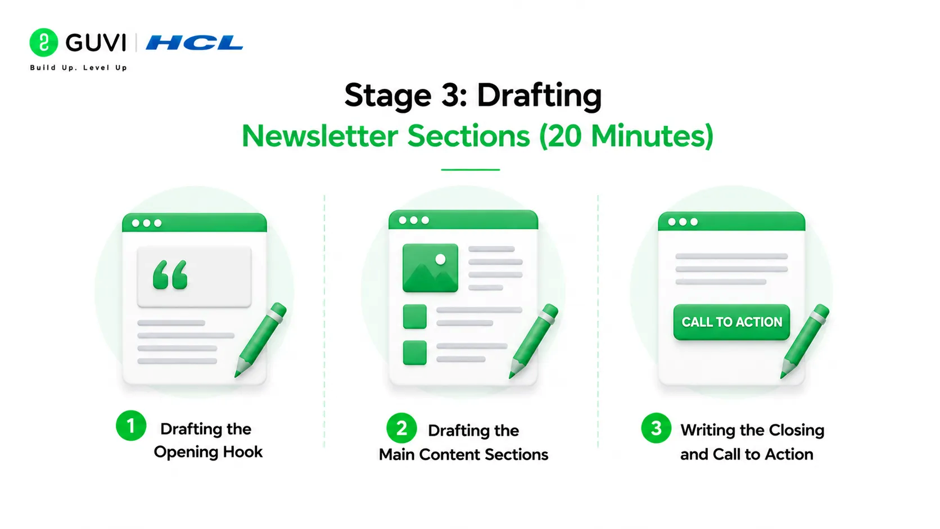
Stage 3: Drafting Newsletter Sections (20 Minutes)
With your research summarized, move to drafting each section of the newsletter. Most newsletters follow a consistent format issue to issue, which makes Claude prompting faster once the template is established.
- Drafting the Opening Hook
The opening is the most important section to get right since it determines whether readers continue. Give Claude your topic and ask for multiple options:
Write five opening paragraph options for this week's newsletter issue on [topic].Each should be under 60 words. Vary the approach across: a surprising statistic,
a short story, a provocative question, a bold claim, and a relatable scenario.
My tone is [tone].
Choose the strongest option and edit it to sound like your voice before moving on.
- Drafting the Main Content Sections
Use the research summaries from Stage 2 as inputs for each section draft:
Using this research summary, write a newsletter section of approximately
200 words on [topic]. Write it in a [tone] voice for an audience of
[audience description]. End with one sentence that transitions naturally
to the next section about [next topic].

Research summary: [paste your Stage 2 output]- Writing the Closing and Call to Action
Write a closing paragraph for this newsletter issue that:- Ties together the three topics covered this week under the theme of [theme]
- Ends with a single clear call to action asking readers to [desired action,
  e.g. reply with their thoughts, share the newsletter, or click a link]
- Matches the [tone] voice used throughout
- Is under 80 words

Stage 4: Subject Lines and Preview Text (10 Minutes)
Subject lines and preview text determine open rates more than any other single factor in newsletter performance. Use Claude to generate a range of options rather than writing one and committing.
- Generating Subject Line Options
Generate 10 subject line options for a newsletter issue covering [brief
description of this week's content]. My audience is [audience].

Vary the approach across these angles:
- Curiosity-gap (tease without fully revealing)
- Direct benefit (tell them exactly what they will learn)
- Question format
- Bold or contrarian claim
- Numbered list format

All under 50 characters. No clickbait or false urgency.- Generating Preview Text
Write five preview text options that pair with this subject line: [chosen subject line]
Preview text should complement the subject line without repeating it,
and give readers one additional reason to open. Under 90 characters each.
Test two subject line variants if your platform supports A/B testing, using Claude’s options as the candidate pool to select from.
Most independent newsletter creators cite content production time as their primary barrier to consistent publishing, despite platforms like Beehiiv and Substack reporting millions of active newsletters by 2025. Newsletters that publish consistently retain subscribers at significantly higher rates than those with irregular schedules. regardless of frequency, retain subscribers at significantly higher rates than those with irregular schedules.
Stage 5: Final Review and Polish (5 Minutes)
Before publishing, run a final consistency check using Claude:
Review the following newsletter draft and check for:
1. Tone inconsistencies between sections
2. Any sentences that feel generic or could appear in any newsletter
3. Transitions between sections that feel abrupt
4. The overall flow from opening to closing

Do not rewrite the draft. Just list the specific issues you find
so I can address them myself.

[paste full draft]
This final check catches inconsistencies introduced when sections are drafted separately and assembled, without outsourcing the final editorial decisions to Claude.
Conclusion
A Claude-powered newsletter workflow does not automate away the editorial judgment, curation, and distinctive voice that make newsletters worth reading. What it does is remove the mechanical production friction that makes consistent publishing difficult, specifically the research summarization, section drafting, and subject line generation that consume most production time without requiring the highest-level creative decisions.
Build the workflow issue by issue, refine your prompts based on what produces the strongest output for your audience, and treat each hour saved in production as time reinvested into the reader relationships and content sourcing that grow a newsletter over time.
FAQ
What is a Claude-powered newsletter?
It is a newsletter production workflow where Claude assists with research summarization, section drafting, subject line generation, and consistency checking, reducing total production time while the creator retains editorial control.
How long does it take to build a newsletter using Claude?
With a structured workflow covering planning, research, drafting, subject lines, and review, most newsletters can be produced in under one hour once the workflow and prompts are established.
What newsletter platforms work best with a Claude workflow?
Any platform works since Claude operates through copy-paste or API integration. Beehiiv, Substack, Mailchimp, and ConvertKit are the most commonly used alongside Claude-assisted production workflows.
Should Claude write the entire newsletter?
No. Claude works best handling research summarization, first drafts, and subject line generation while the creator contributes editorial judgment, original opinion, curation decisions, and voice editing throughout.
How do I maintain my newsletter’s voice when using Claude?
Establish your tone clearly in the planning prompt at the start of each session, always edit Claude’s output before publishing, and ensure the opening paragraph and any original commentary sections are written or heavily rewritten in your own voice.
Can I use Claude to generate newsletter topic ideas?
Yes. Ask Claude to generate topic angles based on your newsletter’s focus area and recent industry developments, then apply your own editorial judgment to select and develop the strongest ideas.
Success Stories

About the Author
Vishalini Devarajan
An Aerospace Engineer turned content writer, I focus on making complex concepts easy to understand through well-structured, reader-friendly blogs. Whether it’s a technical topic or a non-technical one, I love creating content that is clear, engaging, and impactful.
View all posts by Vishalini Devarajan
Connect with me @












Did you enjoy this article?