


Artificial Intelligence and Machine Learning Articles
AI/ML Skills Gap 2026: Why Companies Can't Find Job-Ready Talent
20 AI/ML Interview Questions Recruiters Can Use Without a Tech Background - Best Guide
How Industry-Backed AI/ML Bootcamps Are Changing the AI/ML Hiring Pipeline - Best Guide 2026
From IT Support to AI Engineer: A Realistic Career Switch Guide 2026


Get In Touch For Details! Request More Information
Building a Claude-Powered GitHub Actions Workflow
Aug 06, 2026 3 Min Read 260 Views
(Last Updated)
Building a Claude-powered GitHub Actions workflow lets you automate code reviews, issue triage, and development tasks directly in your repository. Claude Code integrates with GitHub Actions to review pull requests automatically, respond to issue comments, and execute tasks when you mention it in PRs or issues.
Table of contents
- TL;DR
- Why Use Claude in GitHub Actions
- The Challenge With Manual Reviews
- How Claude Helps
- Getting Started With Claude Code Integration
- Step 1: Install the GitHub App
- Step 2: Configure Your API Key
- Step 3: Create Your Workflow Files
- Best Practices for GitHub Actions Workflows
- Set Up Automatic PR Reviews for GitHub Actions Workflows
- Enable Manual Triggering
- Control Costs and Usage
- Secure Your Secrets
- Pro Tips for Better Workflows
- Customize Review Triggers
- Add Context to Issues
- Monitor Token Usage
- Test in a Safe Environment
- Workflow Structure for Claude-Powered GitHub Actions Workflow
- The PR Review Workflow Structure for Claude-Powered GitHub Actions Workflow
- The Manual Trigger Workflow
- The Response Format
- Common Mistakes to Avoid
- Don't Skip Secret Management
- Avoid Unrestricted Triggers
- Don't Ignore Cost Implications
- Don't Skip Human Review
- Real-World Workflow
- The Setup Process
- The Automatic Review
- The On-Demand Assistance
- Conclusion
- FAQs
- How long does it take to set up Claude Code in GitHub
- Can Claude review pull requests automatically
- How do I trigger Claude manually
- What are the costs involved
- Do I still need human code review
TL;DR
- Building a Claude-powered GitHub Actions workflow helps automate pull request reviews, issue management, and development tasks directly within your GitHub repositories.
- Building a Claude-powered GitHub Actions workflow enables developers to integrate Claude with GitHub Actions for AI-powered code reviews, issue responses, and workflow automation.
- Building a Claude-powered GitHub Actions workflow improves development speed, reduces manual effort, and combines AI assistance with human oversight for secure, high-quality software delivery.
Why Use Claude in GitHub Actions

1. The Challenge With Manual Reviews
Code reviews and issue management take significant time from development teams. Manual reviews create bottlenecks, and responding to every issue or question slows down progress on actual coding work.
2. How Claude Helps
Claude Code can automatically review pull requests, suggest improvements, and respond to questions in issues or PR comments. By integrating it into GitHub Actions, you get 24/7 AI assistance that scales with your team’s needs.
Getting Started With Claude Code Integration
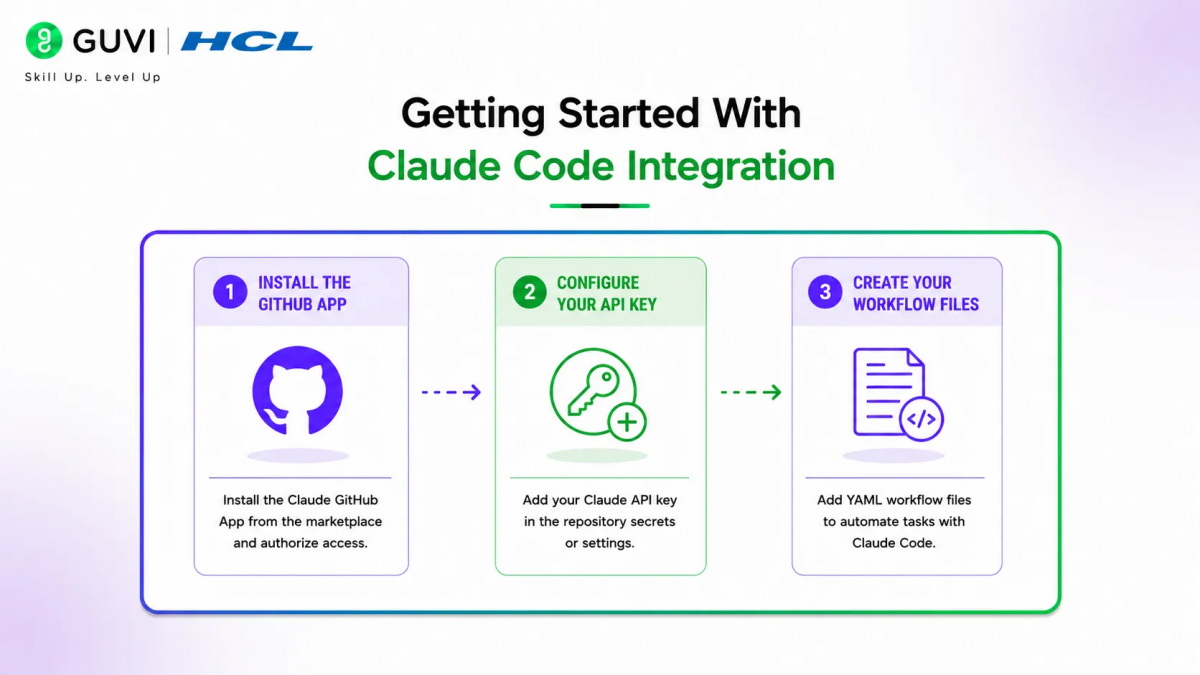
Step 1: Install the GitHub App
Open VS Code and execute the install GitHub app command. Choose which repository to install the GitHub app on and authorize it through the GitHub page that opens.
Step 2: Configure Your API Key
Select your Claude subscription and API key for authentication. This connects Claude Code to your GitHub repository and enables it to execute tasks on your behalf.
Step 3: Create Your Workflow Files
Claude will generate two workflow files: claude-code-review.yaml and claude.yaml. Both go under the .github/workflows folder and handle different automation scenarios.
Best Practices for GitHub Actions Workflows
1. Set Up Automatic PR Reviews for GitHub Actions Workflows
Configure the Claude-code-review workflow to trigger on new pull requests, synchronized commits, and reopened PRs. This ensures every PR gets reviewed automatically without manual intervention.
2. Enable Manual Triggering
Use the claude.yaml workflow to trigger Claude by mentioning it in issues, PR comments, or issue assignments. This gives you on-demand AI assistance when you need it.
3. Control Costs and Usage
Understand that Claude Code uses your API key tokens and GitHub Actions minutes. Set appropriate limits and monitor usage to avoid unexpected costs.
4. Secure Your Secrets
Store your Claude API key as a GitHub secret, not in plain text. This protects your credentials and prevents unauthorized access to your AI service.
Pro Tips for Better Workflows
1. Customize Review Triggers
Adjust workflow triggers to match your team’s needs. You can trigger on specific branches, labels, or PR states to focus Claude’s attention where it matters most.
2. Add Context to Issues
When mentioning Claude in issues, provide clear context about what you need. Specific instructions help Claude give more relevant and useful responses.
3. Monitor Token Usage
Track your Claude token consumption and GitHub Actions minutes usage. This helps you understand costs and optimize your workflows for efficiency.
4. Test in a Safe Environment
Start with a test repository before deploying to production codebases. This lets you fine-tune workflows without risking critical code.
Workflow Structure for Claude-Powered GitHub Actions Workflow
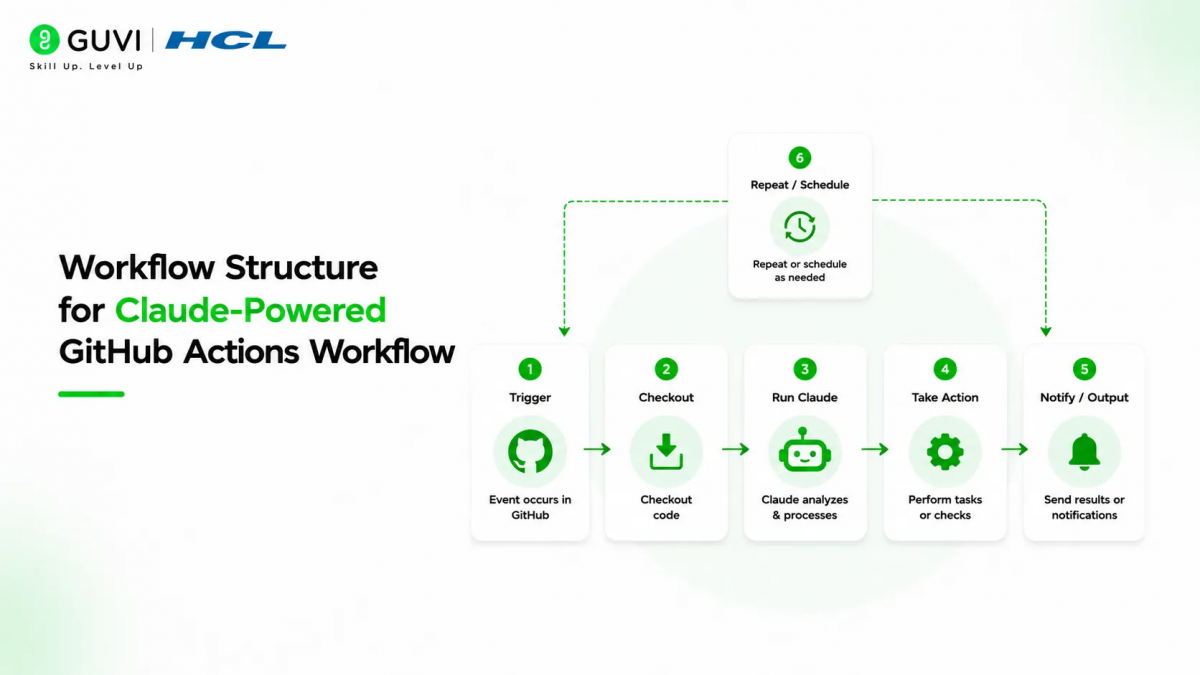
1. The PR Review Workflow Structure for Claude-Powered GitHub Actions Workflow
The Claude code review workflow triggers on pull request events. It checks out the repository, runs Claude Code Review, and posts feedback directly in the PR.
2. The Manual Trigger Workflow
The claude.yaml workflow listens for @claude mentions in issues and PR comments. When triggered, it executes the task you assign and posts the response back.

3. The Response Format
Claude posts its feedback as comments in PRs or issues, making it easy to review suggestions and iterate. You can merge, reject, or request changes based on the feedback.
Common Mistakes to Avoid
1. Don’t Skip Secret Management
Always store your API key as a GitHub secret. Putting it directly in workflow files exposes your credentials and risks unauthorized access.
2. Avoid Unrestricted Triggers
Don’t let workflows run on every event without limits. Set appropriate filters to prevent unnecessary token consumption and GitHub Actions minutes usage.
3. Don’t Ignore Cost Implications
Both Claude tokens and GitHub Actions minutes have costs. Monitor usage and set appropriate limits to avoid unexpected bills.
4. Don’t Skip Human Review
Always review Claude’s suggestions before acting on them. AI assistance speeds up work but human judgment ensures quality and correctness.
Claude Code can automatically review every pull request in your repository and post detailed feedback with code suggestions, security concerns, and best practice recommendations. It can also respond to issue comments and execute development tasks when you mention it with @claude in any GitHub discussion.
Automate code reviews and issue-to-PR workflows with a Claude-powered GitHub Actions setup. Learn DevOps essentials with HCL GUVI’s Fundamentals of DevOps.
Real-World Workflow
1. The Setup Process
Install the GitHub app in VS Code, authorize it for your repository, and configure your API key. This takes about 5 minutes and creates the necessary workflow files.
2. The Automatic Review
Once merged, every new PR automatically gets reviewed by Claude. You’ll see detailed feedback posted as comments with suggestions for improvements.
3. The On-Demand Assistance
Tag Claude anywhere in GitHub with “@Claude” and assign it a task. It will execute the task and post the results back in the same thread.
Conclusion
Building a Claude-powered GitHub Actions workflow transforms your development process by adding 24/7 AI assistance for code reviews and issue management. The key is proper setup with secure credentials, appropriate triggers, and human oversight to ensure quality while maximizing productivity gains.
FAQs
1. How long does it take to set up Claude Code in GitHub
Most developers can set up Claude Code integration in about 5 minutes. The process involves installing the GitHub app and configuring your API key.
2. Can Claude review pull requests automatically
Yes, once configured, Claude automatically reviews every new pull request and posts detailed feedback with code suggestions and improvements.
3. How do I trigger Claude manually
Mention @claude in any issue, PR comment, or discussion and assign it a task. It will execute the task and respond in the same thread.
4. What are the costs involved
Claude uses your API key tokens and GitHub Actions minutes. Usage is pay-as-you-go based on your Claude subscription and GitHub Actions plan.
5. Do I still need human code review
Yes, always review Claude’s suggestions before merging. AI assistance speeds up reviews but human judgment ensures code quality and correctness.
Success Stories

About the Author
HCL GUVI
This article was selected and published as part of the HCL GUVI AI Blogathon 2026, an initiative designed to encourage students, AI enthusiasts, and aspiring tech writers to simplify complex AI concepts through impactful technical content. The contest recognized high-quality, original, and insightful AI-focused blogs, with selected authors receiving publication opportunities on the HCL GUVI blog platform along with official author credits and recognition.
View all posts by HCL GUVI
Connect with me @












Did you enjoy this article?