


Data Structure Articles
Sliding Window Technique: Explained with Examples
Two Pointer Technique: Problems and Applications


Get In Touch For Details! Request More Information
Array Data Structures in Java: Beginner’s Guide
Sep 19, 2026 8 Min Read 3527 Views
(Last Updated)
Array data structures are one of the most fundamental ways to store and organize multiple values under a single variable name in Java. Instead of creating separate variables for each piece of data, arrays let you group related values, making your code cleaner, faster, and much easier to manage.
But arrays aren’t just a beginner concept you learn and forget. They quietly power everything from search engines to game leaderboards to autocomplete on your phone, showing how much value a simple idea can hold.
Table of contents
- TL;DR Summary
- What is an Array in Java?
- Why Are Array Data Structures and Algorithms Important?
- Types of Arrays in Java
- One-Dimensional Array
- Multi-Dimensional Array
- How to Declare, Initialize, and Access Arrays in Java
- Declaring an Array
- Initializing an Array
- Accessing and Updating Elements
- Finding Array Length
- Traversing Arrays Using Loops
- Arrays of Objects in Java
- Passing Arrays to Methods
- Returning Arrays from Methods
- Common Algorithms Using Arrays in Java
- Searching an Element (Linear Search)
- Searching an Element (Binary Search)
- Sorting an Array
- Finding the Maximum and Minimum Element
- Reversing an Array
- Array Data Structures Operations: Time and Space Complexity
- Advantages of Arrays in Java
- Disadvantages of Arrays in Java
- Java Array vs ArrayList: When to Use Which?
- Array Interview Questions in Java: Top 15 Asked at Product Companies
- Common Java Array Mistakes in Interviews
- Conclusion
- FAQs
- What is an array in Java?
- What are the benefits of using arrays?
- Can an array hold different data types?
- What are the differences between an array and an ArrayList?
TL;DR Summary
- This blog covers what array data structures are in Java and why they matter, along with the different types you’ll come across.
- It helps you understand how to declare, initialize, and work with arrays, including how they behave with methods and objects.
- It breaks down core algorithms like searching, sorting, and reversing, along with their time and space complexity.
- It compares arrays with ArrayLists so you know exactly when to use which one in your code.
- It wraps up with top interview questions and common mistakes, so you’re not just learning arrays; you’re learning how to use them well.
What is an Array in Java?
An array in Java is a collection of elements of the same data type stored in contiguous memory locations. It lets you store multiple values in a single variable instead of declaring separate variables for each value.
Understanding Array Data Structures at this level is the first step to writing efficient Java programs.
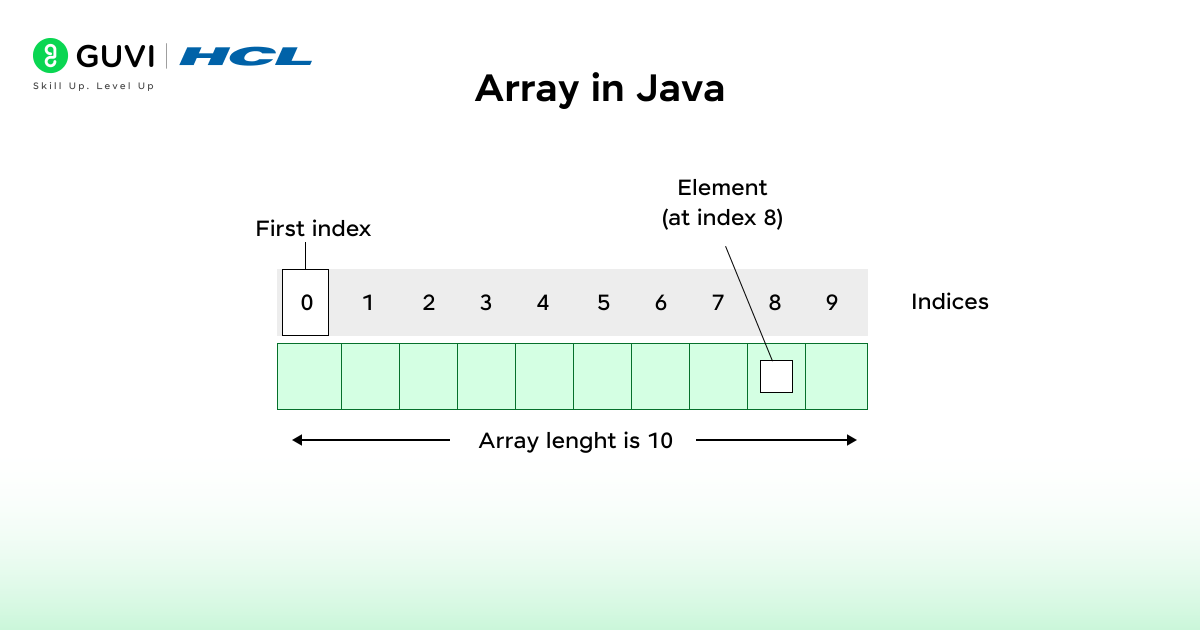
For example, instead of writing:
int num1 = 10;
int num2 = 20;
int num3 = 30;
You can store all the values in a single array
int[] numbers = {10, 20, 30};Master arrays and go far beyond them with HCL GUVI’s Software and AI Engineer Programme. Learn Java, DSA, full stack, and backend engineering from industry mentors, build real-world projects, and get placement support with mock interviews. Take the next step in your software engineering career and enroll today!
Why Are Array Data Structures and Algorithms Important?
Arrays are one of the most important data structures in Java because they form the basis for many others, such as stacks, queues, and lists.
They are a simple, fast way to store and handle data; therefore, they are an important concept when learning algorithms.
Imagine tracking marks for 100 students without arrays. You would have to create 100 separate variables to hold those values! Using arrays, you can group all those values into one data structure and reference any one of those values instantly using its index.
This is why arrays are important:
1. Foundation for Other Structures
Arrays are the building blocks for many complex data structures, such as lists, stacks, queues, and matrices. Designing and manipulating advanced data structures would be difficult without arrays.
2. Core of Algorithm Design
Most algorithms in Java use arrays, from sorting to searching. For example, Binary Search, which takes advantage of the ordered nature of an array, searches for an element quickly; Merge Sort and Quick Sort sort by manipulating values of an array.
3. Speed and Efficiency
One amazing fact about arrays is that accessing an element takes constant time (O(1)) because arrays store data in contiguous memory. This makes arrays very fast and a good choice when you need performance.
4. Real-World Use
Arrays are also everywhere. They are used for everything from storing sensor readings and financial data to representing pixels in an image.
They also show up as feature values for training data when working on a machine learning project.
Also Explore: 5 Best Reasons to Learn Data Structures and Algorithms [DSA]
Build a strong foundation with HCL GUVI’s Java Programming for Beginners Course. Learn OOP, JSP, Servlets, and MySQL through 20 hours of expert-led content, work on real projects, and earn a certification to boost your resume. Enroll now and start coding with confidence!
Types of Arrays in Java
Java supports two broad categories of Array Data Structures: one-dimensional and multi-dimensional. Knowing which type fits your problem is a core Array Data Structures skill.
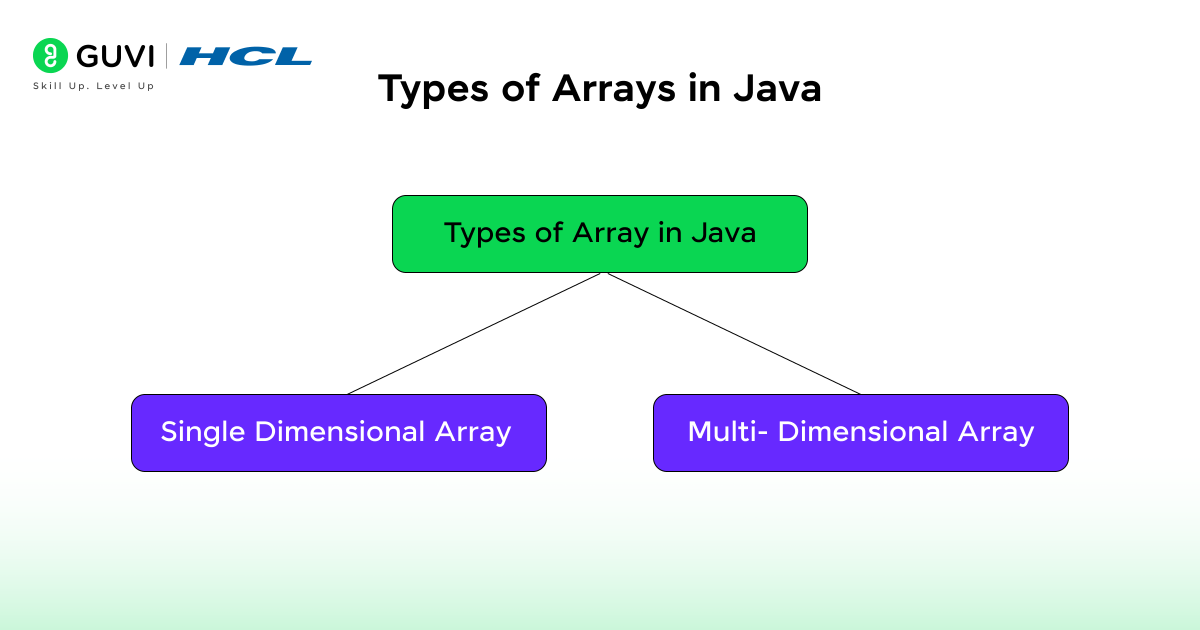
1. One-Dimensional Array
This is the simplest form of an array, storing data in a single line, and it is the most common Array Data Structures pattern you will use day to day.
For example:
int[] marks = {85, 90, 78, 92};2. Multi-Dimensional Array
It is an array of arrays, as the name suggests, and one of the more advanced Array Data Structure patterns. It is often used to represent matrices or tables.
For example:
int[][] matrix = {
    {1, 2, 3},
    {4, 5, 6},
    {7, 8, 9}
};
Also Read: Is DSA Important for Placement?
How to Declare, Initialize, and Access Arrays in Java
1. Declaring an Array
Declaring correctly is the first step in every Array Data Structures workflow in Java.
To use an array, you must first declare it. The declaration tells Java the data type and that it will store multiple values.
You can declare an array in two ways:
// Method 1
int arr[];

// Method 2 (preferred)
int[] arr;
Here, you declare a variable arr that will hold an array of integers, but no memory is allocated yet.
Note: The declaration only defines the type; you still need to allocate memory before storing values.
2. Initializing an Array
After declaring, you can initialize the array using the keyword new, as shown in the example below. This initialization step is where Array Data Structures actually reserve memory.
int[] arr = new int[5];This allocates space for five integers.
By default, Java initializes:
- Numeric arrays with 0
- Boolean arrays with false
- Reference arrays (like objects) with null
You can also assign values manually:
arr[0] = 10;
arr[1] = 20;
arr[2] = 30;
arr[3] = 40;
arr[4] = 50;
Or use array literals (the simple way):
int[] arr = {10, 20, 30, 40, 50};- The size of this array specifies the length of the newly created array.
- You don’t have to write the new int[] in current versions of Java.
3. Accessing and Updating Elements
You can access array elements using their index, which is the fastest of all Array Data Structures operations:
System.out.println(arr[2]); // prints 30You can also update elements:
arr[2] = 99;
System.out.println(arr[2]); // prints 99
Remember, if you try to access an index outside the array length, Java will throw an ArrayIndexOutOfBoundsException.
4. Finding Array Length
The length of an array can be accessed using the .length property, a detail every Array Data Structures question expects you to know:
int size = arr.length;
System.out.println("Array size: " + size);
5. Traversing Arrays Using Loops
You can print or manipulate all array elements using a for loop or an enhanced for loop. Traversal is the most basic Array Data Structures operation, and mastering it makes every later operation easier to follow.
For example, using a standard for loop:
class Main {
    public static void main(String[] args) {
        int[] arr = {2, 4, 6, 8, 10};
        for (int i = 0; i < arr.length; i++) {
            System.out.println("Element at index " + i + ": " + arr[i]);
        }
    }
}
Or using an enhanced for-each loop:
class Main {
    public static void main(String[] args) {
        int[] arr = {2, 4, 6, 8, 10};
        for (int value : arr) {
            System.out.println("Value: " + value);
        }
    }
}
Output:
Element at index 0: 2
Element at index 1: 4
Element at index 2: 6
Element at index 3: 8
Element at index 4: 10
Arrays of Objects in Java
Arrays can contain items of any type, not just primitive types, which makes object arrays a flexible part of Array Data Structures in Java. You can also create arrays of objects, for example, an array of Student objects using a Student class.
class Student {
    int rollNo;
    String name;

    Student(int rollNo, String name) {
        this.rollNo = rollNo;
        this.name = name;
    }
}

public class Main {
    public static void main(String[] args) {
        Student[] students = new Student[3];

        students[0] = new Student(1, "Aman");
        students[1] = new Student(2, "Visha");
        students[2] = new Student(3, "Mandeep");

        for (int i = 0; i < students.length; i++) {
            System.out.println("Roll No: " + students[i].rollNo + ", Name: " + students[i].name);
        }
    }
}
Output:
Roll No: 1, Name: Aman
Roll No: 2, Name: Visha
Roll No: 3, Name: Mandeep
Passing Arrays to Methods
Arrays can be passed as arguments to methods in Java, just like regular variables, which is a common Array Data Structures pattern for reusable code.
public class Main {
    public static void main(String[] args) {
        int[] nums = {3, 5, 7, 9};
        printSum(nums);
    }

    static void printSum(int[] arr) {
        int sum = 0;
        for (int n : arr) sum += n;
        System.out.println("Sum of array elements: " + sum);
    }
}
Output:
Sum of array elements: 24Returning Arrays from Methods
Just like you can pass arrays to methods, you can also return arrays from them, completing the round trip for Array Data Structures in method design.
class Main {
    static int[] createArray() {
        return new int[]{10, 20, 30};
    }

    public static void main(String[] args) {
        int[] result = createArray();
        for (int val : result)
            System.out.print(val + " ");
    }
}
Output:
10 20 30Also Read: Best DSA Roadmap Beginners Should Know
Common Algorithms Using Arrays in Java
Arrays are the basis for many Array Data Structures algorithms in Java.
Let’s walk through the searching and sorting algorithms every developer should know, since these are the Array Data Structures operations interviewers test most often.
1. Searching an Element (Linear Search)
If the array isn’t sorted, use linear search to find an element. It checks each element one by one until it finds a match, and it is usually the first searching technique taught in any Array Data Structures course.
int[] arr = {10, 25, 30, 40, 50};
int key = 30;
boolean found = false;

for (int i = 0; i < arr.length; i++) {
    if (arr[i] == key) {
        System.out.println("Element found at index: " + i);
        found = true;
        break;
    }
}
if (!found)
    System.out.println("Element not found!");
2. Searching an Element (Binary Search)
If the array is already sorted, Binary Search is far faster than Linear Search because it repeatedly halves the search space, making it a favorite Array Data Structures topic in technical interviews.
int[] arr = {10, 25, 30, 40, 50};
int key = 40;
int low = 0, high = arr.length - 1;

while (low <= high) {
    int mid = (low + high) / 2;
    if (arr[mid] == key) {
        System.out.println("Element found at index: " + mid);
        break;
    } else if (arr[mid] < key) {
        low = mid + 1;
    } else {
        high = mid - 1;
    }
}
You can also use the built-in method:
int index = Arrays.binarySearch(arr, key);3. Sorting an Array
Sorting is one of the most tested Array Data Structures skills. It helps in organizing elements in ascending or descending order. This is one of the most frequently tested Array Data Structures topics in coding interviews.
Example using Bubble Sort:
int[] arr = {5, 2, 9, 1, 5, 6};

for (int i = 0; i < arr.length - 1; i++) {
    for (int j = 0; j < arr.length - i - 1; j++) {
        if (arr[j] > arr[j + 1]) {
            int temp = arr[j];
            arr[j] = arr[j + 1];
            arr[j + 1] = temp;
        }
    }
}
System.out.println(Arrays.toString(arr));
Output:
[1, 2, 5, 5, 6, 9]You can also use the built-in method:
Arrays.sort(arr);
4. Finding the Maximum and Minimum Element
Finding the max and min is a beginner-friendly Array Data Structures exercise that shows up constantly in interviews.
int[] arr = {12, 45, 23, 78, 56};
int max = arr[0];
int min = arr[0];

for (int num : arr) {
    if (num > max) max = num;
    if (num < min) min = num;
}

System.out.println("Max: " + max);
System.out.println("Min: " + min);
5. Reversing an Array
Reversing is another classic Array Data Structures problem that tests your grip on index arithmetic.
int[] arr = {10, 20, 30, 40, 50};
for (int i = arr.length - 1; i >= 0; i--) {
    System.out.print(arr[i] + " ");
}
Output:
50 40 30 20 10Also, Explore About 10 Best Data Structures and Algorithms Courses
Array Data Structures Operations: Time and Space Complexity
Here is a quick-reference table for the most common Array Data Structures operations in Java, the time and space they cost, and the Java method you would typically reach for.
| Array Operation | Time Complexity | Space Complexity | Java Method |
|---|---|---|---|
| Access by index | O(1) | O(1) | arr[i] |
| Traversal | O(n) | O(1) | for loop / for-each |
| Linear Search | O(n) | O(1) | manual loop |
| Binary Search (sorted array) | O(log n) | O(1) | Arrays.binarySearch() |
| Bubble Sort | O(n^2) | O(1) | manual implementation |
| Arrays.sort() (primitives use dual-pivot Quicksort; objects use TimSort) | O(n log n) | O(log n) | Arrays.sort() |
| Insertion (creating a new array) | O(n) | O(n) | Arrays.copyOf() |
| Deletion (creating a new array) | O(n) | O(n) | manual shift or copy |
| Reversal | O(n) | O(1) | manual loop |
| Finding Max / Min | O(n) | O(1) | manual loop |
Advantages of Arrays in Java
Understanding these Array Data Structures advantages helps you explain trade-offs in interviews.
Arrays are critical to Data Structures and Algorithms in Java because of their simplicity and speed.
Below are four reasons they can be so helpful:
- Fast Access: You can access elements in an array in constant time (O(1)) at an index. This means it doesn’t matter whether you access the first element or the hundredth; access speed stays the same, making arrays a great fit for search and sorting algorithms.
- Memory Efficient (a key Array Data Structure advantage): Arrays keep all elements in contiguous memory locations. Thus, memory consumption is efficient, and access is faster than in structures that don’t reside contiguously (e.g., linked lists).
- Easy to Use: Arrays make data management and iteration much easier. For example, you can loop through the elements, update element values directly, and systematically operate on all elements, such as sum, average, sort, etc.
- Building Blocks for Complex Structures: Most other data structures (e.g., stacks, queues, heaps, etc.) are built on arrays or similar constructs. Learning and mastering arrays is the first step in preparing to learn about more advanced Array Data Structures and algorithms in Java.
Disadvantages of Arrays in Java
Every set of Array Data Structures trade-offs has a downside. While arrays are simple and quick, there are some weaknesses developers should be aware of:
- Fixed Size: Once created, an array cannot be resized. To accommodate more elements, developers must create a new array and copy the existing data.
- Same Data Type Only: An array can only hold elements of the same data type and cannot hold integers, strings, and booleans together in the same array.
- Costly Insertions and Deletions (a well-known Array Data Structures limitation): Adding or removing elements (especially in the middle) requires shifting other elements, making these operations slower (O(n)).
- No Built-in Flexibility: Arrays are more restrictive and offer less built-in flexibility, especially compared to a collection like ArrayList. Arrays cannot auto-resize and have no methods to aid with sorting or searching, so the developer must implement sorting and searching themselves or rely on the Arrays class helpers.
Java Array vs ArrayList: When to Use Which?
Both arrays and ArrayLists store collections of elements, but they behave very differently once you start writing real Java programs. The table below compares the two array data structure options side by side.
| Aspect | Array | ArrayList |
|---|---|---|
| Size | Fixed at creation | Grows and shrinks dynamically |
| Data type | Primitives or objects | Objects only (autoboxing for primitives) |
| Performance | Faster for fixed-size, indexed access | Slightly slower due to internal resizing |
| Built-in methods | Very few (Arrays class helpers) | Rich API (add, remove, contains, etc.) |
| Memory usage | Lower overhead | Higher overhead from dynamic resizing |
| Best for | Performance-critical, fixed-size data | Frequently changing collections |
Choosing the right Array Data Structures option matters for performance. Use a plain array when you know the exact size upfront and need the fastest possible access, such as a fixed-size lookup table or a matrix.
Reach for an ArrayList when the number of elements changes at runtime, since it handles resizing, insertion, and deletion for you. Many interviewers ask candidates to justify this choice, so being clear on the trade-off is a strong signal in Array Data Structures interview rounds.
Array Interview Questions in Java: Top 15 Asked at Product Companies
Product-based companies frequently test candidates on Array Data Structures fundamentals, and interviewers expect fluency in these Array Data Structures basics before moving to harder problems. Here are 15 questions you should be ready for:
- What is an array, and how is it stored in memory in Java?
- What is the time complexity of accessing an element in an array, and why is this considered the fastest Array Data Structures operation?
- How do you find the second largest element in an array without sorting it?
- How would you reverse an array in place without using extra space?
- What is the difference between a shallow copy and a deep copy of an array?
- How do you find duplicate elements in an array?
- What is Kadane’s Algorithm, and what classic Array Data Structures problem does it solve?
- How do you rotate an array by k positions?
- How would you merge two sorted arrays into one sorted array?
- What is the difference between Arrays.sort() and a custom sort using a Comparator?
- How do you find the missing number in an array of 1 to n?
- What causes an ArrayIndexOutOfBoundsException, and how do you prevent it?
- How would you find the intersection of two arrays using Array Data Structures techniques you already know?
- Why are multi-dimensional arrays in Java called arrays of arrays rather than true matrices?
- What is the difference between an array and an ArrayList in Java, and when would you choose one over the other?
Practicing these Array Data Structures questions on a whiteboard, not just in an IDE, is one of the best ways to prepare for product-company interview rounds.
To build hands-on speed, practice array problems regularly on LeetCode and HackerRank, both of which have dedicated array tracks ranging from beginner to advanced difficulty.
Common Java Array Mistakes in Interviews
Even candidates who understand Array Data Structures reasonably well still tend to lose marks on avoidable mistakes. Watch out for these:
- Confusing length and length() (a basic Array Data Structures mix-up): Arrays use the
.lengthproperty, while Strings and ArrayLists use the.length()or.size()method. Mixing these up is one of the most common syntax slips in interviews. - Off-by-one errors in loops: Using
<=instead of<(or vice versa) in a for loop is a frequent cause of an ArrayIndexOutOfBoundsException. - Assuming arrays can resize: Candidates sometimes try to add an element beyond an array’s fixed length, forgetting that Java arrays cannot grow dynamically.
- Not explaining time complexity out loud (a common Array Data Structures interview mistake): Interviewers expect you to state the Big-O of your Array Data Structures solution, not just produce working code.
- Ignoring edge cases: Empty arrays, single-element arrays, and arrays with all duplicate values are edge cases interviewers commonly probe for.
- Comparing arrays with == (an easy Array Data Structures trap): Using
==on two arrays compares references, not contents. UseArrays.equals()to compare values instead. - Forgetting to import java.util.Arrays: Many candidates write
Arrays.sort()orArrays.toString()without importing the Arrays class, which breaks compilation.
Conclusion
Arrays may seem easy, but they are truly the backbone of programming in Java. From efficient data storage to powering some of the most complicated algorithms, arrays do a lot of heavy lifting behind the scenes.
Once you grasp how arrays work, how to create, access, and manipulate arrays, you’re not just learning syntax; you’re actually programming your brain to think like a programmer. This vital foundation will make it much easier to learn about complex data structures such as linked lists, trees, and graphs.
I really hope this blog post was able to teach you the basics of arrays in Java – what they are, how they work, and why they are so important in programming.
FAQs
1. What is an array in Java?
An array in Java is a data structure that holds multiple values of the same type in one variable. You can access an array’s values by index.
2. What are the benefits of using arrays?
Arrays provide fast access to data, easy iteration, and a great way to organize large amounts of data. Arrays also form the basis of many advanced data structures.
3. Can an array hold different data types?
No. Java arrays are homogeneous; all elements must be the same type.
4. What are the differences between an array and an ArrayList?
Arrays are fixed in size, while ArrayLists can resize dynamically as needed.
Success Stories













Did you enjoy this article?