


Full Stack Development Articles
Claude for Architecture and Engineering Documentation
Freelancing as a Python Developer: Getting Your First Client


Get In Touch For Details! Request More Information
ReactJS Prerequisites in 2026: What You Actually Need to Know
Sep 29, 2026 5 Min Read 38451 Views
(Last Updated)
ReactJS prerequisites in 2026 boil down to six things: HTML and CSS, JavaScript (especially ES6+), basic DOM understanding, TypeScript basics, Git for version control, and Node.js with npm. Everything else people call a “must-know” is usually optional or something you’ll pick up along the way.
Most beginners either over-prepare and never actually start, or jump in with zero fundamentals and get stuck early. This guide covers exactly what you need before starting React, and what can wait.
Table of contents
- TL;DR Summary
- What Are ReactJS Prerequisites?
- Why You Can't Skip ReactJS Prerequisites
- ReactJS Prerequisites You Need to Know Before Getting Started
- HTML & CSS
- JavaScript (ES6+)
- DOM Manipulation
- TypeScript (basics)
- Version Control (Git/GitHub)
- Node.js & npm/pnpm
- Real-World Examples of ReactJS Prerequisites
- Example 1: Building an E-Commerce Product Card
- Example 2: Building a Weather App
- Common Mistakes Beginners Make Before Learning ReactJS
- Conclusion
- FAQs
- What are the ReactJS prerequisites for beginners?
- Is TypeScript a compulsory prerequisite for ReactJS?
- Do I need to master JavaScript before learning ReactJS?
- Can I skip Git while learning ReactJS?
- How long does it take to cover the ReactJS Prerequisites?
TL;DR Summary
- This blog breaks down the essential ReactJS prerequisites, including HTML, CSS, and JavaScript.
- It explains how DOM manipulation connects to how React updates the UI.
- You’ll find out why TypeScript basics matter for ReactJS prerequisites in 2026.
- Git and GitHub are covered as core ReactJS prerequisites for real projects.
- Node.js and npm/pnpm are explained, along with why you can’t skip them.
- Common mistakes beginners make with ReactJS prerequisites are flagged too.
- Real-world examples show these ReactJS prerequisites in action.
What Are ReactJS Prerequisites?
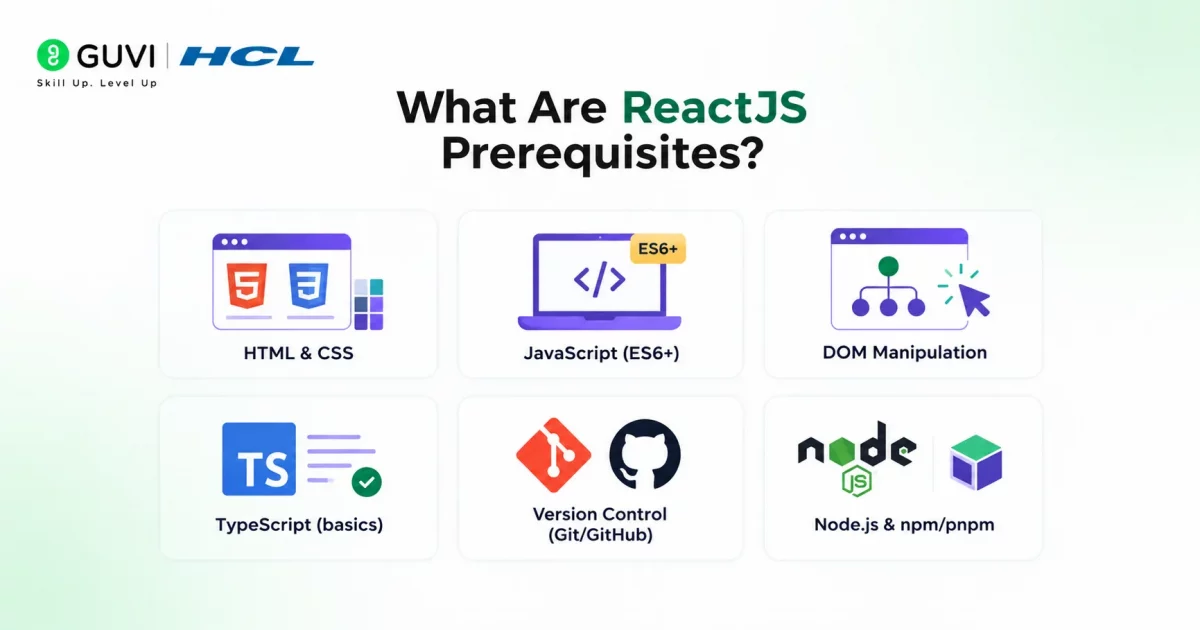
ReactJS prerequisites are the core web development skills you should be comfortable with before you start learning React itself.
React isn’t a standalone language. It’s a JavaScript library that runs on top of the web fundamentals you already need to know for regular web development.
If you skip these basics, React’s concepts like components, props, and state will feel confusing instead of intuitive.
These are the following ReactJS prerequisites:
- HTML & CSS
- JavaScript (ES6+)
- DOM Manipulation
- TypeScript (basics)
- Version Control (Git/GitHub)
- Node.js & npm/pnpm
Each of these plays a different role, and you’ll see why they matter as you go through this guide.
Also Read: What Is DOM Manipulation in JavaScript?
- React is used by more than 24.39 million live websites worldwide, with over 14.68 million React-using websites in the United States alone.
- This makes React one of the most widely adopted front-end technologies for modern web development.
Going beyond the fundamentals means building job-ready skills in React.js, JavaScript, Node.js, Git, and real-world projects. HCL GUVI’s Software and AI Engineer Programme offers exactly that, with mentor support from professionals at companies like Amazon and Microsoft, mock interviews, and placement guidance. Explore the programme and enroll today!
Why You Can’t Skip ReactJS Prerequisites
Skipping ReactJS prerequisites usually catches up with you fast. You end up copying code you don’t understand, or getting stuck on basic errors that have nothing to do with React itself.
| Prerequisite | Why It’s Important in ReactJS | What You Should Know | How It’s Used in React | Difficulty to Learn |
|---|---|---|---|---|
| HTML & CSS | React components ultimately render HTML, and you’ll style them constantly. Without this base, JSX will feel unfamiliar. | Semantic tags, box model, flexbox, grid, basic responsiveness | JSX closely mirrors HTML syntax; CSS is used via classNames, CSS modules, or styling libraries | Easy |
| JavaScript (ES6+) | React is JavaScript at its core. Most confusion beginners face isn’t React, it’s not knowing JS well enough. | Arrow functions, destructuring, spread/rest, template literals, array methods (map, filter), promises/async-await | Used everywhere, from writing components to handling state, props, and events | Moderate |
| DOM Manipulation | React manages the DOM for you, but understanding what the DOM is helps you grasp why React’s rendering approach exists. | What the DOM tree is, how events work, how the browser updates the page | React uses a virtual DOM to calculate and apply efficient updates instead of manual DOM edits | Easy to Moderate |
| TypeScript (basics) | Most production React codebases in 2026 use TypeScript. Skipping it means struggling to read real-world code and job-ready projects. | Basic types, interfaces, typing function props and state | Used to type component props, state, and function signatures in .tsx files | Moderate |
| Version Control (Git/GitHub) | You’ll work with React projects, templates, and collaborate with others. Git is non-negotiable in any real dev workflow. | git init, add, commit, push, pull, branching, merging, pull requests | Used to manage React project code, track changes, and collaborate via GitHub repos | Easy |
| Node.js & npm/pnpm | React tooling (Vite, Create React App, build tools) runs on Node.js. Without it, you can’t even set up a React project. | Installing Node, running npm/pnpm commands, understanding package.json | Used to install React, manage dependencies, and run local dev servers | Easy |
ReactJS Prerequisites You Need to Know Before Getting Started
Here’s a closer look at all ReactJS prerequisites, why they matter, and what you actually need to learn before moving on to actual practice:
1. HTML & CSS
HTML gives a webpage its structure, and CSS controls how that structure looks and behaves visually.
In React, this shows up directly through JSX, which uses HTML-like syntax to build UI, and through styling components using CSS, CSS modules, or styling libraries.
Here’s what you should be comfortable with:
- Semantic tags like
header,section,article,footer - Non-semantic tags like
divandspan, and knowing when to use them - The box model (margin, border, padding, content)
- Flexbox for layout and alignment
- CSS Grid for more complex layouts
- Basic responsiveness using media queries
2. JavaScript (ES6+)
JavaScript is the actual language React is built with. React isn’t a separate language; it’s a library that uses JavaScript to build interfaces, so your JS skills directly affect how easily you pick up React.
In React, ES6+ features show up everywhere, from writing components to managing state and props. If your JavaScript basics aren’t solid, most issues you face won’t really be “React problems”; they’ll be JS gaps showing up inside React code.
Here’s what you should be comfortable with:
- Arrow functions and how they handle
this - Destructuring for objects and arrays
- Spread and rest operators
- Template literals for cleaner string handling
- Array methods like
map,filter, andreduce - Promises and async/await for handling asynchronous code
3. DOM Manipulation
The DOM (Document Object Model) is the browser’s live representation of your webpage. Traditionally, JavaScript is used to find and update elements directly, and understanding this helps React’s approach make more sense.
In React, you don’t manipulate the DOM yourself. React uses a virtual DOM to figure out what changed and updates only that part of the real DOM, which is why understanding the DOM basics still matters.
Here’s what you should be comfortable with:
- What the DOM tree actually is
- Selecting elements using methods like
querySelector - Event handling, like clicks and form inputs
- How the browser updates content after a change
- The difference between the real DOM and the virtual DOM
4. TypeScript (basics)
TypeScript is JavaScript with an added type system. It lets you define what kind of data your variables, functions, and objects should hold, which catches errors before your code even runs.

In React, most production codebases in 2026 use TypeScript, especially for typing component props and state. Skipping it makes real-world projects and job-ready codebases harder to read, even if your JavaScript is strong.
Here’s what you should be comfortable with:
- Basic types like
string,number,boolean - Interfaces for defining object shapes
- Typing function parameters and return values
- Typing component props and state
- Optional properties using
?
5. Version Control (Git/GitHub)
Git is a tool that tracks changes in your code over time, and GitHub is where those Git projects are hosted and shared online. Together, they’re how developers manage code without overwriting each other’s work.
In React, you’ll use Git for every real project, whether it’s cloning a starter template, tracking your own changes, or collaborating with others through GitHub. It’s less about React specifically and more about being job-ready in any dev workflow.
Most of this Git and GitHub work happens through the CLI (Command Line Interface), so basic comfort with running commands in a terminal matters too, for example git status, git commit, git push, git pull, etc.
Here’s what you should be comfortable with:
- Basic commands like
git init,add,commit,push,pull - Branching to work on features separately
- Merging branches back together
- Cloning repositories from GitHub
- Pull requests, for collaboration and code review
6. Node.js & npm/pnpm
Node.js is a runtime that lets JavaScript run outside the browser, on your own machine. npm (and pnpm) are package managers that come with it, used to install and manage external code libraries your project depends on.
In React, Node.js powers the tooling behind the scenes, things like Vite or Create React App, which set up and run your project. Without Node installed, you can’t even create a React project or install React itself.
Here’s what you should be comfortable with:
- Installing Node.js on your system
- Running basic npm/pnpm commands like
install,run,start - Understanding
package.jsonand what it does - Installing and updating dependencies
- Running a local development server
Real-World Examples of ReactJS Prerequisites
Example 1: Building an E-Commerce Product Card
A beginner building an e-commerce product card in React needs HTML and CSS for structure and layout, JavaScript for dynamic pricing or discount logic, and JSX to actually write the component.
TypeScript helps define what a “product” looks like, things like its name, price, and stock status, catching errors early. Git tracks every change made to the design, and npm installs packages needed for icons, routing, or state management.
Example 2: Building a Weather App
A weather app is one of the most common beginner React projects, and it touches almost every prerequisite. HTML and CSS handle the layout, showing the city name, temperature, and weather icon. JavaScript fetches data from a weather API and updates what’s shown on screen.
Understanding the DOM helps you see how React updates the UI when new weather data comes in, without you manually touching the DOM.
TypeScript can type the API response, so you’re not guessing what fields exist, and Git keeps track of your progress as you build out each feature. npm installs any packages needed for API calls or UI icons.
- React had 3.46+ billion npm downloads between May 2025 and May 2026, showing its massive use in JavaScript projects.
- 91% of State of JS 2024 respondents were aware of React, making it one of the most recognized front-end technologies.
- React ranked #2 among front-end frameworks in State of JS 2024, with 8,548 developers selecting it.
Common Mistakes Beginners Make Before Learning ReactJS
Ignoring these ReactJS prerequisites is one of the most common reasons beginners struggle early on, not because React itself is hard, but because the gaps show up the moment you start building.
- Skipping JavaScript fundamentals. Many beginners jump into React without being comfortable with array methods, destructuring, or async/await. Since React is JavaScript-based, weak fundamentals here slow down everything else.
- Ignoring TypeScript completely. Some learners treat TypeScript as optional and skip it entirely, only to struggle later when most real-world React projects and job postings expect at least basic TypeScript knowledge.
- Not learning Git before starting projects. Beginners often start coding without version control, then panic when they break something with no way to undo it or collaborate properly on GitHub.
- Assuming DOM knowledge doesn’t matter. Since React handles the DOM automatically, some beginners skip understanding it altogether, which makes concepts like re-rendering and the virtual DOM feel confusing instead of logical.
- Underestimating CSS layout skills. Many beginners can write basic CSS but struggle with Flexbox or Grid, which becomes a bottleneck the moment they need to structure a real component layout.
Conclusion
Getting your ReactJS prerequisites sorted first is what makes React actually click, not feel like guesswork. These fundamentals carry over into other frameworks too, and with most 2026 job postings quietly expecting TypeScript and Git experience, getting this right early puts your career ahead, not behind.
FAQs
1. What are the ReactJS prerequisites for beginners?
The core ReactJS prerequisites are HTML, CSS, JavaScript (ES6+), basic DOM understanding, TypeScript basics, Git, and Node.js with npm.
2. Is TypeScript a compulsory prerequisite for ReactJS?
Not compulsory, but strongly recommended. Most real-world ReactJS projects in 2026 use TypeScript, so knowing the basics helps a lot.
3. Do I need to master JavaScript before learning ReactJS?
You don’t need to master it, but you should be comfortable with core concepts like functions, arrays, and ES6+ features, since these are key ReactJS prerequisites.
4. Can I skip Git while learning ReactJS?
It’s not recommended. Git is used in almost every real ReactJS project, and skipping it makes collaboration and version tracking difficult.
5. How long does it take to cover the ReactJS Prerequisites?
Most beginners can cover the ReactJS prerequisites in 3 to 6 weeks with consistent daily practice.
Success Stories



























Did you enjoy this article?