


Artificial Intelligence and Machine Learning Articles
Generative Adversarial Networks (GANs): The Complete Guide
GRU vs LSTM: Which Should You Use?
LSTM Networks Explained: Solving the Vanishing Gradient Problem


Get In Touch For Details! Request More Information
Vision-Language Models (VLMs) Explained: CLIP and Beyond
Aug 26, 2026 4 Min Read 22 Views
(Last Updated)
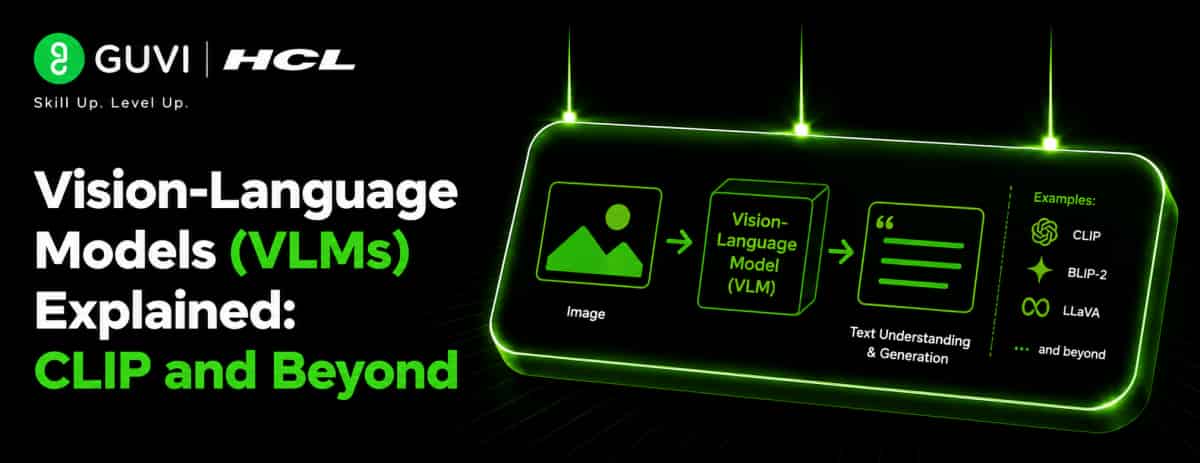
AI systems traditionally process either text or images, but Vision-Language Models (VLMs) are designed to work with both. They connect visual information with natural language, enabling AI systems to understand images, text, and their relationships. CLIP is a well-known example that demonstrated how images and text can be aligned in a shared representation space. This guide explains how VLMs work, the role of CLIP, and how newer models extend these capabilities.
Table of contents
- TL;DR
- Quick Answer
- Why Vision-Language Models Matter
- What Are Vision-Language Models?
- What Is CLIP?
- How CLIP Works
- Step 1: Process the Image
- Step 2: Process the Text
- Step 3: Create a Shared Representation Space
- Step 4: Compare Representations
- How VLMs Go Beyond CLIP
- Key Concepts to Remember
- Multimodal Learning
- Image Encoder
- Text Encoder
- Shared Representation
- Contrastive Learning
- VLM Workflow
- Common Applications
- Visual Search
- Accessibility
- E-Commerce
- Document Understanding
- Multimodal Assistants
- Benefits of Vision-Language Models
- Multimodal Understanding
- Flexible Applications
- Natural Interaction
- Better Context
- When Should You Use Vision-Language Models?
- Visual Search
- Image Understanding
- Visual Question Answering
- Document Understanding
- Multimodal Assistants
- Key Concepts to Remember
- A Practical VLM Workflow
- Provide Visual and Textual Input
- Process the Inputs
- Connect the Modalities
- Understand the Content
- Generate the Output
- Real-World Applications
- E-Commerce
- Accessibility
- Visual Search
- Document Analysis
- Best Practices
- Conclusion
- FAQs
- What are Vision-Language Models?
- What is CLIP?
- How does CLIP connect images and text?
- What is contrastive learning?
- What can modern VLMs do?
- Where are VLMs used?
- Why are VLMs useful?
TL;DR
- VLMs connect visual and language information.
- CLIP learns relationships between images and text.
- Shared representations enable cross-modal understanding.
- Newer VLMs can support image understanding and generation tasks.
- VLMs are useful across search, accessibility, robotics, and multimodal AI.
Quick Answer
| Vision-Language Models (VLMs) are AI models that process and connect visual and textual information. They can learn relationships between images and their corresponding descriptions, allowing systems to perform tasks such as image-text matching, visual search, image classification, and visual question answering. CLIP is a foundational example that aligns images and text in a shared representation space. |
Why Vision-Language Models Matter
Images contain information that cannot always be represented effectively through text alone. VLMs allow AI systems to combine visual information with language-based understanding.
They can support:
- Image-text matching
- Visual search
- Image classification
- Image understanding
- Visual question answering
- Multimodal assistants
What Are Vision-Language Models?
Vision-Language Models (VLMs) combine computer vision and natural language processing capabilities.
A VLM can receive:
- Images
- Text
- Or both together
The model then learns relationships between these modalities.
For example, given an image of a dog and the text “a dog playing in a park,” a VLM can learn that the visual content and textual description are related.
What Is CLIP?
CLIP (Contrastive Language–Image Pre-training) is a vision-language model developed by OpenAI.
Its key idea is to learn a relationship between images and text by training on image-text pairs.
Instead of learning only from predefined image categories, CLIP learns representations that connect visual content with natural-language descriptions.
How CLIP Works
A simplified CLIP workflow includes:
Step 1: Process the Image
An image encoder converts the image into a numerical representation.
Step 2: Process the Text
A text encoder converts a textual description into a numerical representation.
Step 3: Create a Shared Representation Space
The model learns to place related image and text representations closer together.
Step 4: Compare Representations
The similarity between image and text representations can be measured to determine how well they correspond.
This allows CLIP to perform tasks such as zero-shot image classification by comparing an image with different textual descriptions.
How VLMs Go Beyond CLIP
Modern VLMs can support more complex interactions between images and language.
They can be designed for tasks such as:
- Image captioning
- Visual question answering
- Image analysis
- Document understanding
- Multimodal conversation
- Visual reasoning
Rather than simply matching an image with text, newer systems can process an image and generate a natural-language response based on its contents.
Key Concepts to Remember
Multimodal Learning
Learning from multiple types of information, such as images and text.
Image Encoder
A component that converts visual information into representations that the model can process.
Text Encoder
A component that converts language into numerical representations.
Shared Representation
A representation space where related visual and textual information can be aligned.
Contrastive Learning
A training approach that encourages matching image-text pairs to have similar representations while separating unrelated pairs.
VLM Workflow
A simplified VLM workflow can look like:
Image + Text → Vision and Language Encoders → Multimodal Representations → Understanding → Output
The exact architecture varies between different VLMs.
Common Applications
Visual Search
Match images with text queries to find visually relevant content.
Accessibility
Help describe visual content and make images more accessible.
E-Commerce
Connect product images with descriptions and customer queries.
Document Understanding
Analyze documents containing both text and visual elements.
Multimodal Assistants
Allow users to ask questions about images using natural language.
CLIP is important because it demonstrated the power of aligning images and text in a shared representation space, but modern VLMs can do much more than image-text matching. When comparing VLMs, look at the specific capabilities and architecture rather than treating every vision-language model as equivalent.
Benefits of Vision-Language Models
Multimodal Understanding
VLMs can connect visual and textual information.
Flexible Applications
The same underlying capabilities can support search, classification, question answering, and other tasks.

Natural Interaction
Users can interact with visual information through natural language.
Better Context
Combining multiple modalities can provide richer information than relying on text or images alone.
When Should You Use Vision-Language Models?
Vision-Language Models (VLMs) are useful when an AI system needs to understand visual information together with natural language.
Visual Search
Use VLMs to match text queries with relevant images or visual content.
Image Understanding
VLMs can analyze images and provide information about their contents.
Visual Question Answering
Users can ask questions about an image and receive language-based answers.
Document Understanding
Use VLMs to process documents containing both text and visual elements.
Multimodal Assistants
VLMs allow users to interact with images through natural-language questions and instructions.
Professionals interested in computer vision, generative AI, multimodal AI, and machine learning can strengthen their expertise through HCL GUVI’s Artificial Intelligence and Machine Learning Course.
Key Concepts to Remember
- VLMs connect visual and textual information.
- Image encoders convert visual information into representations.
- Text encoders represent language numerically.
- Contrastive learning can align related images and text.
- Shared representations allow different modalities to be compared.
- Modern VLMs support capabilities beyond basic image-text matching.
A Practical VLM Workflow
1. Provide Visual and Textual Input
Give the model an image, text, or both depending on the task.
2. Process the Inputs
Vision and language components convert the inputs into representations the model can process.
3. Connect the Modalities
The model combines or aligns information from the visual and language inputs.
4. Understand the Content
The VLM identifies relevant objects, concepts, relationships, or information.
5. Generate the Output
The system produces the appropriate result, such as a classification, description, or natural-language answer.
Real-World Applications
E-Commerce
Connect product images with descriptions and customer search queries.
Accessibility
Generate descriptions or other useful information about visual content.
Visual Search
Find images or products based on natural-language queries.
Document Analysis
Understand documents containing text, images, charts, and other visual elements.
The HCL GUVI’s Artificial Intelligence eBook introduces artificial intelligence, machine learning, generative AI, and intelligent automation concepts, helping learners understand modern AI technologies and their practical applications.
Best Practices
- Choose a VLM based on the specific task.
- Provide clear and relevant visual inputs.
- Use appropriate text prompts or queries.
- Evaluate visual and language understanding separately when needed.
- Test models on representative real-world inputs.
- Consider limitations in visual reasoning and interpretation.
- Monitor model performance as applications evolve.
Conclusion
Vision-Language Models (VLMs) connect computer vision and natural language to enable multimodal AI applications. Models such as CLIP demonstrated how images and text can be aligned, while newer VLMs support broader image understanding and language-based interactions. Their ability to process multiple modalities makes them useful for visual search, document analysis, accessibility, e-commerce, and multimodal assistants.
FAQs
1. What are Vision-Language Models?
Vision-Language Models (VLMs) are AI models designed to process and connect visual and textual information.
2. What is CLIP?
CLIP is a vision-language model developed by OpenAI that learns relationships between images and text by training on image-text pairs.
3. How does CLIP connect images and text?
CLIP uses separate image and text encoders and learns to place related image-text representations closer together in a shared representation space.
4. What is contrastive learning?
Contrastive learning trains a model to bring related examples closer together while separating unrelated examples in its representation space.
5. What can modern VLMs do?
Modern VLMs can support image understanding, visual question answering, image captioning, document analysis, visual reasoning, and multimodal conversations.
6. Where are VLMs used?
VLMs can be used in visual search, accessibility, e-commerce, document understanding, and multimodal assistants.
7. Why are VLMs useful?
VLMs allow AI systems to combine visual and textual information, enabling more flexible interactions and richer understanding than systems limited to a single modality.
Success Stories

About the Author
HCL GUVI
This article was selected and published as part of the HCL GUVI AI Blogathon 2026, an initiative designed to encourage students, AI enthusiasts, and aspiring tech writers to simplify complex AI concepts through impactful technical content. The contest recognized high-quality, original, and insightful AI-focused blogs, with selected authors receiving publication opportunities on the HCL GUVI blog platform along with official author credits and recognition.
View all posts by HCL GUVI
Connect with me @






Did you enjoy this article?