


AWS Kubernetes Articles
Istio Service Mesh Tutorial for Beginners
Crossplane Tutorial: A Practical Guide for Learners
Pulumi Infrastructure as Code Tutorial: A Beginner's Guide
ArgoCD GitOps Tutorial: A Complete Beginner's Guide to Continuous Delivery


Get In Touch For Details! Request More Information
FluxCD Tutorial: An Effective Beginner’s Guide
Sep 12, 2026 5 Min Read 701 Views
(Last Updated)
Managing Kubernetes changes manually across multiple clusters gets old fast. FluxCD, alongside Argo CD, brings GitOps to Kubernetes by automatically syncing cluster state with your Git repository.
This FluxCD tutorial is for developers familiar with Kubernetes basics who want deployments to update automatically with every Git push. You’ll learn how Flux works, how to bootstrap it on a cluster, organize repositories effectively, and troubleshoot reconciliation issues when they happen.
Table of contents
- TL;DR Summary
- What Is FluxCD?
- FluxCD vs. Argo CD: Which One Should You Use?
- How does FluxCD work?
- Step-by-Step Guide: Bootstrapping FluxCD
- Structuring Your Git Repo for Flux
- Common Beginner Mistakes (and Fixes)
- Key Takeaways
- FAQs
- Is FluxCD free to use?
- Do I need to know Kustomize before learning FluxCD?
- Can FluxCD manage multiple clusters from one Git repo?
- What happens if someone manually changes something with kubectl?
- Is FluxCD better than Argo CD for beginners?
TL;DR Summary
- FluxCD is a GitOps tool that automatically syncs your Kubernetes cluster state with what’s defined in a Git repository, so you never run kubectl apply by hand again.
- You install it once with the flux bootstrap command, and from then on, every Git commit becomes a deployment.
- It’s built on Kubernetes Custom Resources, which means it plays nicely with existing cluster tooling instead of fighting it.
- Most beginners get stuck on reconciliation intervals and Git authentication — this guide covers both in plain language.
- By the end, you’ll have a working Flux setup syncing a real repo to a real cluster.
What Is FluxCD?
FluxCD is an open-source GitOps tool for Kubernetes that continuously syncs your cluster’s actual state with the desired state defined in a Git repository.
It runs as a set of controllers in your cluster, checking Git at set intervals (typically every 1–5 minutes) and automatically applying changes. In practice, this means deployments happen through git push, not kubectl apply.
The name “Flux” can be confusing because it refers to two generations of the same idea. Flux v1 was a single monolithic operator. Flux v2 — what everyone means today when they say “FluxCD” — is a toolkit of small, focused controllers, each doing one job.
- Source Controller watches your Git repositories, Helm repositories, and OCI registries for changes and pulls down new artifacts whenever something updates. This is the piece that actually talks to GitHub, GitLab, or wherever your manifests live.
- Kustomize Controller takes the manifests pulled by the Source Controller, runs them through Kustomize overlays if you’ve defined any, and applies the result to your cluster. It also detects drift between Git and your live cluster state.
- Helm Controller manages Helm releases declaratively, reconciling HelmRelease resources against the charts defined in your repo. If you’re managing third-party software like Prometheus or cert-manager via Helm, this controller does the heavy lifting.
What ties all of this together is that every piece of configuration — what to sync, how often, from where — is itself a Kubernetes Custom Resource. You’re not learning a separate config language; you’re extending the Kubernetes API you already know.
Kubernetes isn’t the future anymore — it’s already the standard. If you’re serious about understanding how modern apps run at scale, HCL GUVI’s Kubernetes Course is a solid place to start. Stop watching from the sidelines and start building skills that actually matter in today’s tech world!
FluxCD vs. Argo CD: Which One Should You Use?
This is the comparison every beginner eventually asks about, and the honest answer is: it depends on what you already use. Both are CNCF-certified GitOps tools that solve the same core problem, but they make different trade-offs.
| Feature | FluxCD | Argo CD |
| UI | No built-in UI (Weave GitOps/Flux UI is separate) | Rich built-in web UI |
| Architecture | Modular controllers, each single-purpose | Single application controller |
| Multi-tenancy | Native, via Kubernetes RBAC and namespaces | Supported, configured separately |
| Learning curve | Steeper CLI-first learning curve | Friendlier for visual learners |
| Helm support | Native HelmRelease CRD | Supported via plugin/wrapper |
| Best fit | Teams already comfortable with kubectl/CLI workflows | Teams wanting visibility for less CLI-fluent stakeholders |
⚠️ Warning: Don’t choose a GitOps tool based on which one your favorite YouTuber demoed. Pull both into a sandbox cluster and bootstrap a single app with each — the four-hour time investment will tell you more than any comparison article, including this one.
How does FluxCD work?
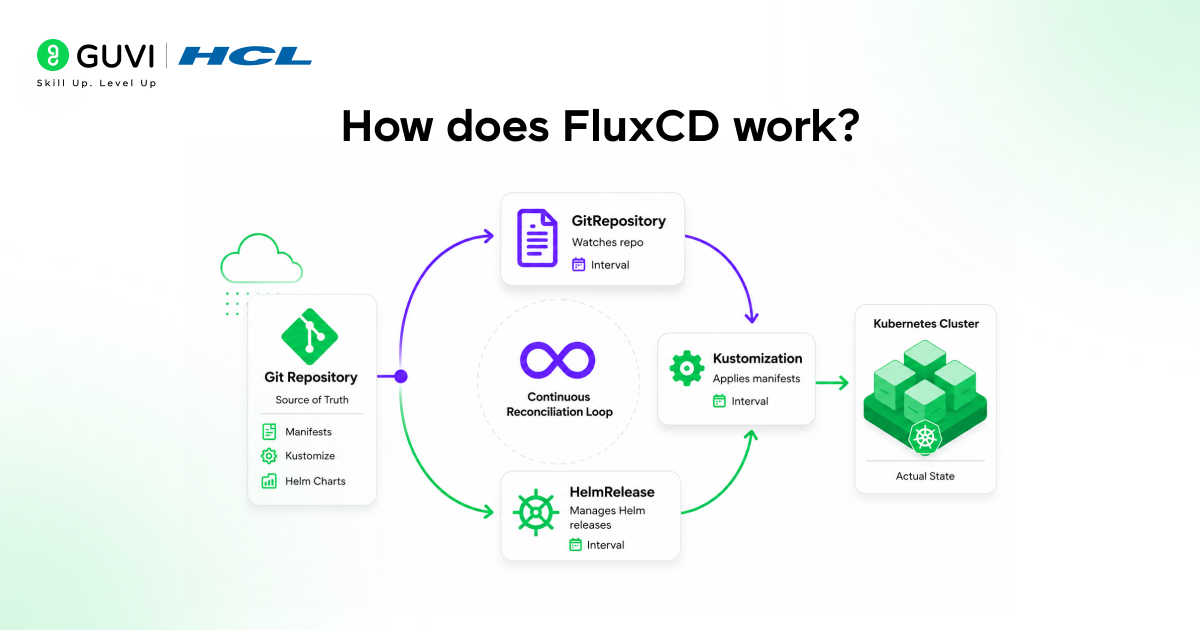
Here’s the mental model that finally made Flux click for many beginners: think of it as a continuous loop, not a one-time deployment tool.
Every controller runs a reconciliation loop, constantly comparing “what Git says” with “what’s actually running” and correcting any differences it finds.
This loop runs at an interval you define — typically between 1 and 10 minutes — rather than reacting instantly to every Git push (though webhook-based instant sync is also supported). That interval is the single most misunderstood setting in Flux, and we’ll come back to it.
- GitRepository is the Custom Resource that tells the Source Controller which repo to watch, which branch or tag to track, and how often to check for new commits. Get this wrong — point it at the wrong branch — and you’ll spend an hour debugging “why isn’t anything updating” before realizing Flux was watching staging the whole time.
- Kustomization (the Flux CRD, not the plain kustomization.yaml file) defines which path inside that repo to apply, and at what reconciliation interval. This is also where you configure health checks and dependency ordering between Kustomizations.
- HelmRelease ties a Helm chart source to a set of values, letting Flux manage upgrades the same declarative way it manages raw manifests. Changing a value here and pushing to Git triggers a Helm upgrade automatically, with no helm upgrade command ever typed by a human.
Once these three resource types are in place and talking to each other, you’ve got a self-healing deployment pipeline. Drift happens — someone runs a manual kubectl edit during an incident — but within one reconciliation cycle, Flux quietly reverts it back to what Git says it should be.
Step-by-Step Guide: Bootstrapping FluxCD
Now that you understand the pieces, let’s get them running. This walkthrough assumes you have a Kubernetes cluster you can reach with kubectl, and a GitHub account (Flux also supports GitLab, Bitbucket, and generic Git servers).
- Install the Flux CLI. On macOS or Linux, run curl -s https://fluxcd.io/install.sh | sudo bash. This gives you the flux binary, which is both the installer and the day-to-day diagnostic tool you’ll use constantly.
- Run the pre-flight check. Run flux check –pre before doing anything else. This confirms that your cluster version and permissions are compatible, helping catch version mismatches before they cause confusing mid-bootstrap errors.
- Export a GitHub personal access token. Run export GITHUB_TOKEN=<your-token>. Flux needs this to create the repository (if it doesn’t exist) and push the initial Flux manifests on your behalf.
- Bootstrap Flux onto your cluster. Run flux bootstrap github –owner=<your-username> –repository=<repo-name> –branch=main –path=clusters/my-cluster –personal. This single command installs the Flux controllers, commits their manifests to your repo, and configures Flux to watch that exact path going forward.
- Verify the installation. Run flux check (without –pre this time) to confirm all controllers are running and healthy inside the flux-system namespace.
✅ Best Practice: Always bootstrap into a dedicated clusters/<cluster-name> path rather than the repo root. The moment you add a second cluster — staging, say — you’ll be glad your repo structure already supports it.

Structuring Your Git Repo for Flux
A messy repo structure is the single biggest reason beginners abandon Flux in week two, not any actual limitation of the tool. The convention that scales is separating “what runs where” by directory, not by branch.
- clusters/ holds one subdirectory per cluster (e.g., clusters/staging, clusters/production), each containing the Kustomization resources that tell Flux what to sync for that specific cluster. This is the entry point Flux reads from after bootstrap.
- apps/ holds your actual application manifests, organized by app name, kept deliberately separate from cluster-specific wiring. Keeping apps decoupled from clusters means the same app definition can be referenced by staging and production without duplication.
- infrastructure/ holds shared cluster add-ons — ingress controllers, cert-manager, monitoring stacks — that every cluster needs but that aren’t part of your actual product. Separating this from apps/ keeps platform concerns from cluttering application-team pull requests.
This three-folder pattern isn’t an official Flux requirement, but it’s the structure the Flux maintainers themselves use in their own example repositories, and it scales cleanly from one cluster to a dozen without a rewrite.
💡 Pro Tip: Use Kustomize overlays inside apps/ for environment-specific values (replica counts, resource limits) rather than maintaining separate manifest copies for each environment. It reduces duplication and makes the differences between staging and production actually readable in a pull request.
Common Beginner Mistakes (and Fixes)
Most Flux problems beginners run into aren’t bugs — they’re misunderstandings about how reconciliation timing and Git authentication interact. Knowing the usual suspects saves hours.
- Setting the reconciliation interval too low. Some beginners set interval: 10s thinking faster is better, then wonder why their Git provider starts rate-limiting them. A 1–5 minute interval is fine for almost every real-world workflow, and webhooks handle the “I need it now” cases.
- Forgetting flux reconcile exists. If you’re sitting there waiting for the next interval after a push, you’re wasting time. Run flux reconcile kustomization <name> –with-source to force an immediate sync without waiting.
- Mismatched RBAC between namespaces. Flux Kustomizations need explicit serviceAccountName references when applying across namespace boundaries with restricted permissions — skipping this is the most common cause of silent “nothing happened” reconciliation failures.
Key Takeaways
- FluxCD implements GitOps by running controllers inside your cluster that continuously pull and apply changes from Git, removing the need for manual kubectl apply commands.
- The three core building blocks — GitRepository, Kustomization, and HelmRelease — are all standard Kubernetes Custom Resources, so existing RBAC and tooling apply directly.
- Bootstrapping is a single CLI command, but the repo structure (clusters/apps/infrastructure) determines whether Flux scales cleanly or becomes unmanageable.
- Reconciliation interval is the setting beginners misconfigure most often — too short causes rate-limiting, too long delays deployments.
- flux check, flux get sources git, and flux reconcile are the three commands you’ll use most for day-to-day troubleshooting.
- Flux and Argo CD solve the same problem differently — Flux favors CLI-first, modular control; Argo CD favors a built-in visual UI.
- Drift correction happens automatically, but only within the reconciliation window — it’s self-healing, not instant.
FAQs
Is FluxCD free to use?
Yes. FluxCD is fully open-source under the Apache 2.0 license and is a CNCF graduated project, meaning there’s no paid tier required to run it in production.
Do I need to know Kustomize before learning FluxCD?
Not strictly, but basic familiarity helps. Flux’s Kustomization CRD builds on the same overlay concepts as plain Kustomize, so understanding bases and overlays will make Flux’s behavior far more predictable.
Can FluxCD manage multiple clusters from one Git repo?
Yes, this is one of its core strengths. By organizing your repo with one directory per cluster under clusters/, a single repository can drive staging, production, and any number of additional environments.
What happens if someone manually changes something with kubectl?
Flux will detect the drift during its next reconciliation cycle and revert the live cluster state back to match what’s defined in Git, assuming drift detection is enabled on that Kustomization.
Is FluxCD better than Argo CD for beginners?
Neither is strictly “better” — Flux suits teams comfortable working primarily from the command line, while Argo CD’s built-in UI tends to be friendlier for beginners who want visual feedback during their first deployments.
Success Stories










Did you enjoy this article?