


Javascript Articles
GraphQL with Strawberry Tutorial: Build Your First Python API
gRPC Tutorial: A Beginner's Guide to Building Fast, Modern APIs
Temporal Workflow Engine Tutorial: Build Reliable Workflows
Tauri 2.0 Desktop App Tutorial: Build Your First App Without the Bloat


Get In Touch For Details! Request More Information
How to Comment in JavaScript: A Complete Guide
Jul 06, 2026 7 Min Read 1315 Views
(Last Updated)
Writing code that works is the first milestone. Writing code that other developers and your future self can understand is the real craft.
Comments in JavaScript are one of the most fundamental tools for making code readable, maintainable, and collaborative. A well-placed comment can explain why a particular approach was chosen, flag a known limitation, mark a section that needs revisiting, or document how a complex function is meant to be used.
Yet comments are often overlooked in tutorials focused on syntax and logic. This guide gives them the attention they deserve.
This complete guide covers everything you need to know about how to comment in JavaScript, the syntax for single-line and multi-line comments, the JSDoc standard for documenting functions and classes, when to write comments and when to let the code speak for itself, and the best practices that professional JavaScript developers follow.
Table of contents
- TL;DR
- Why Comments Matter in JavaScript
- Single-Line Comments in JavaScript
- Basic Syntax
- Standalone vs. Inline Comments
- TODO and FIXME Comments
- Multi-Line Comments in JavaScript
- Basic Syntax
- Inline Multi-Line Comments
- Important: Multi-Line Comments Cannot Be Nested
- JSDoc Comments: Documenting JavaScript Code
- Function Documentation
- Common JSDoc Tags
- Documenting Classes
- Commenting Best Practices in JavaScript
- Comment the Why, Not the What
- Keep Comments Accurate and Up to Date
- Prefer Readable Code Over Comments
- Avoid Commented-Out Code in Production
- Avoid Obvious and Redundant Comments
- Use Consistent Formatting
- Comments and JavaScript Performance
- Keyboard Shortcuts for Commenting in JavaScript
- Conclusion
- FAQs
- How do you comment in JavaScript?
- What is the difference between // and /* */ in JavaScript?
- Do comments affect JavaScript performance?
- What is a JSDoc comment, and when should I use it?
- Should I use comments to disable code temporarily?
TL;DR
• Use // for single-line comments, the most common comment syntax in JavaScript.
• Use /* … */ for multi-line comments that span several lines.
• Use /** … */ (JSDoc) to document functions, parameters, return values, and classes.
• Comments should explain why, not what; the code itself explains what it does.
• Avoid over-commenting, commented-out code in production, and redundant or misleading comments.
What Is a Comment in JavaScript?
A comment in JavaScript is a section of text within the source code that is ignored by the JavaScript engine during execution. Comments are intended solely for developers to document code, explain logic, provide context, and leave notes for future maintenance. JavaScript supports single-line comments using //, multi-line comments using /* ... */, and JSDoc comments using /** ... */ for generating documentation automatically. Since comments are not executed, they have no impact on program behavior or performance.
Why Comments Matter in JavaScript
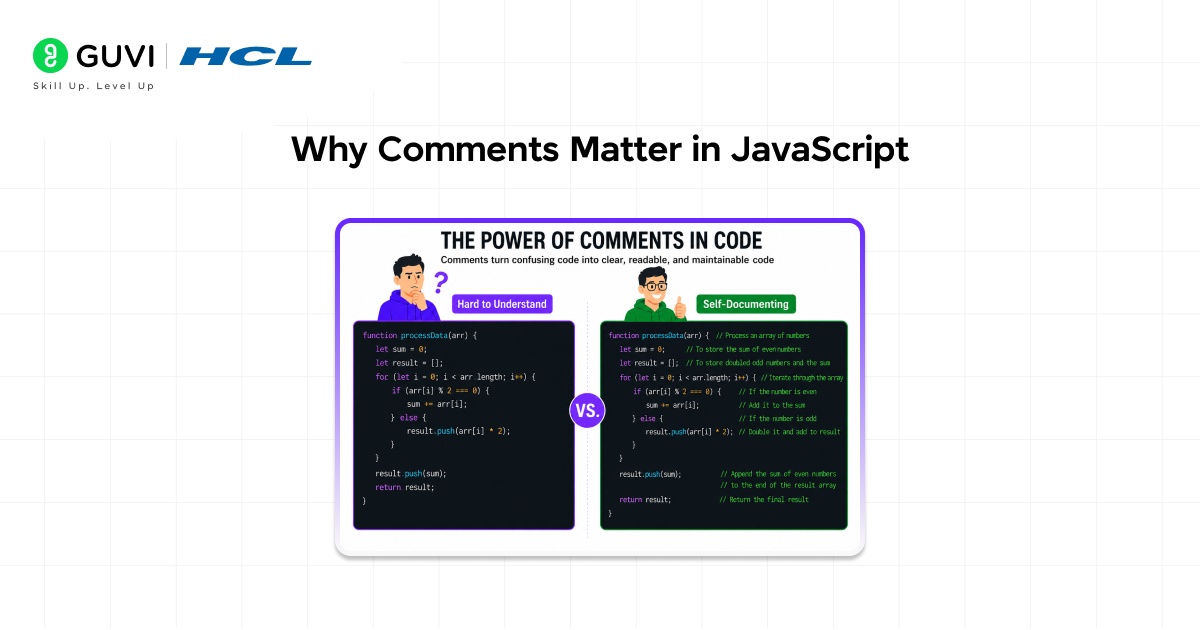
Before diving into syntax, it is worth understanding what comments actually accomplish because writing good comments requires understanding their purpose, not just their format.
JavaScript is executed by machines but read by humans. Code that seems obvious to the person who wrote it at 11 pm on a Friday often appears cryptic to a colleague the following Monday, or to the same developer six months later. Comments bridge that gap.
Comments serve several distinct purposes in a professional codebase:
- Explaining intent: Comments explain why a piece of code exists or why a particular approach was chosen over a simpler alternative. The code shows what it does; the comment explains why it does it.
- Documenting APIs: JSDoc comments on functions and classes tell other developers exactly how to use a piece of code, what parameters it accepts, what it returns, and what side effects it has, without requiring them to read the implementation.
- Flagging known issues: A TODO or FIXME comment marks code that needs future attention without breaking the current build.
- Providing context: Some code is complex because the problem it solves is complex. A comment referencing the relevant algorithm, specification, or Stack Overflow answer saves the next developer hours of investigation.
- emporarily disabling code: During debugging and development, commenting out a line or block allows testing without deleting code. This should not persist into production.
The goal is always to reduce the cognitive load of reading and maintaining code. A comment that achieves this is valuable. A comment that states the obvious adds noise without adding value.
Single-Line Comments in JavaScript
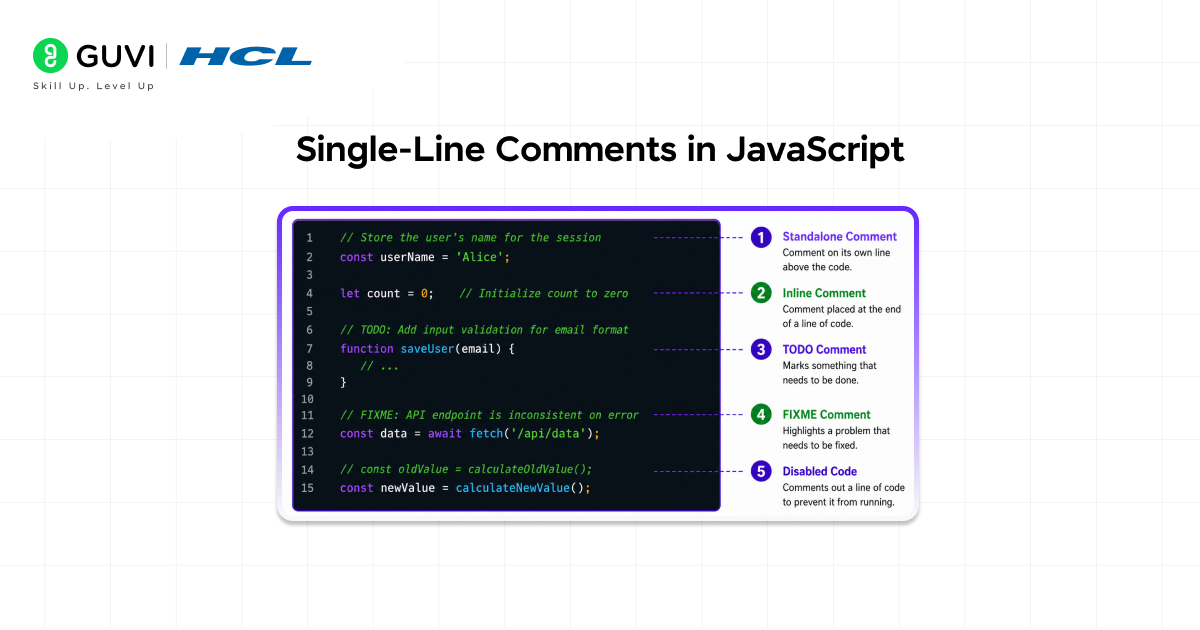
The single-line comment is the most commonly used comment syntax in JavaScript. It is written by placing two forward slashes (//) at any point on a line. Everything from the // to the end of that line is treated as a comment and ignored by the JavaScript engine.
Basic Syntax
| // This is a standalone single-line commentconst maxRetries = 3; const timeout = 5000; // Timeout in milliseconds // TODO: Replace with a configurable value from settingsconst apiVersion = ‘v2’; |
Standalone vs. Inline Comments
A single-line comment can appear on its own line, typically above the code it refers to, or inline at the end of a line of code.
• Standalone comments appear on a dedicated line above the relevant code. They are best for explaining a block of logic, a function call, or a decision point.
• Inline comments follow code on the same line. They are best for brief clarifications units of measurement, expected ranges, or a quick note about a variable.
| // Standalone: explains the purpose of the block below// Fetch user data and cache it for 10 minutesfetchUserData(userId).then(cacheResult); const CACHE_TTL = 600; // 10 minutes in seconds (inline) |
TODO and FIXME Comments
Single-line comments are commonly used with standard tags that most editors and linters recognise and highlight:
- // TODO: Mark’s functionality that needs to be added or a section that needs refactoring.
- // FIXME: Marks a known bug or broken implementation that needs to be corrected.
- // HACK: Marks a workaround that works but is not a clean solution and should be revisited.
- // NOTE: Highlights something important that other developers must be aware of.
| // TODO: Add input validation before processingfunction processOrder(order) { return calculateTotal(order.items);} // FIXME: This fails when the array is empty. function getFirstItem(arr) { return arr[0].value;} |
Multi-Line Comments in JavaScript
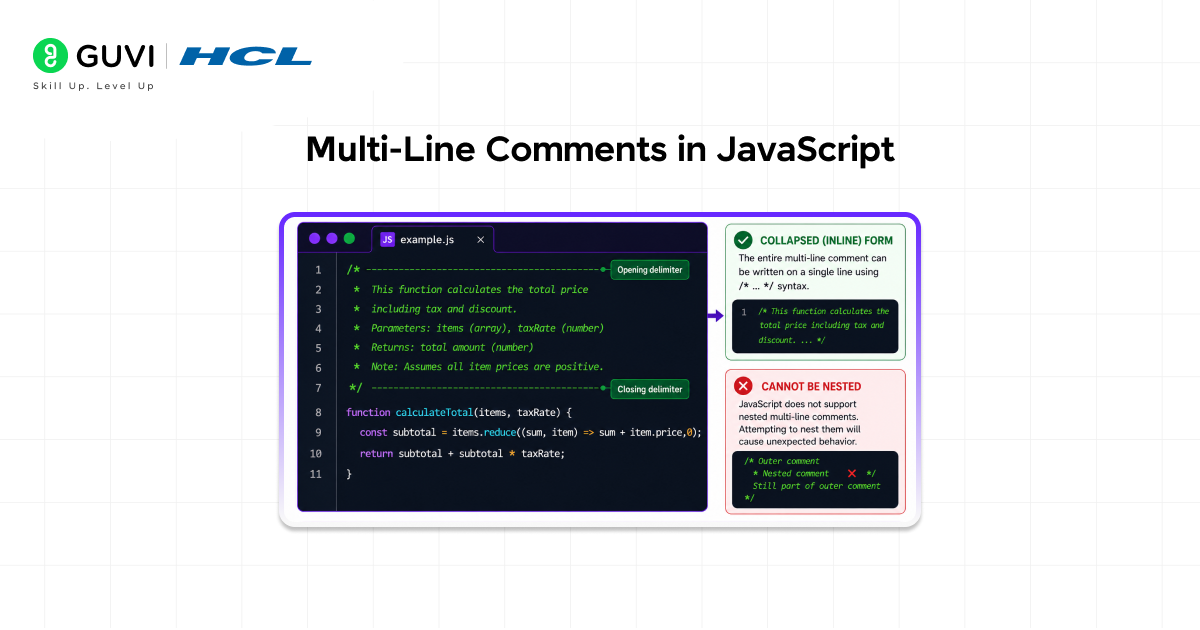
Multi-line comments allow a comment to span multiple lines. They begin with /* and end with */. Everything between these two delimiters, including line breaks, is treated as a comment.
Basic Syntax
| /* This function calculates the compound interest for a given principal, rate, and time period. Formula: A = P(1 + r/n)^(nt)*/function compoundInterest(principal, rate, periods, time) { return principal * Math.pow((1 + rate / periods), periods * time);} |
Inline Multi-Line Comments
The /* */ syntax can also appear inline within a line of code though this usage is rare and should be reserved for cases where it genuinely improves clarity, such as annotating function parameters at a call site.
| createUser(/* name */ ‘Alice’, /* age */ 29, /* admin */ true); |
Important: Multi-Line Comments Cannot Be Nested
A critical rule: multi-line comments cannot be nested. If you write /* inside an existing /* … */ comment, the first */ encountered closes the entire comment not just the inner one. The code after the inner */ becomes active code, which typically causes a syntax error.
| /* Outer comment start /* Inner comment – DANGER: this does NOT work as expected */ This line is now ACTIVE CODE and will cause an error*/ |
To comment out a block of code that already contains /* */ comments, use single-line // comments on each line, or use a conditional compilation technique. Most editors provide a keyboard shortcut to toggle line comments across a selection.
JavaScript’s familiar comment syntax—// for single-line comments and /* … */ for multi-line comments—was inherited directly from the C and C++ programming languages. When Brendan Eich created JavaScript at Netscape in just ten days in May 1995, he intentionally adopted familiar syntax from popular programming languages to make the new language easier for developers to learn. More than three decades later, these comment styles remain unchanged and are used daily by millions of developers to document code, explain logic, and temporarily disable sections of programs during debugging.
JSDoc Comments: Documenting JavaScript Code
JSDoc is a documentation standard for JavaScript that uses specially formatted block comments to annotate functions, classes, methods, and variables. JSDoc comments begin with /** (two asterisks) and end with */. Documentation tools like JSDoc, TypeDoc, and ESDoc parse these annotations to automatically generate API reference documentation.
Many IDEs and editors, including VS Code, WebStorm, and IntelliJ, also read JSDoc annotations to provide intelligent autocomplete, parameter hints, and type checking as you write code.
Function Documentation
| /** * Calculates the total price including tax. * * @param {number} price – The base price before tax. * @param {number} taxRate – The tax rate as a decimal (e.g., 0.2 for 20%). * @returns {number} The total price rounded to two decimal places. * @throws {Error} If price or taxRate is negative. * * @example * calculateTotal(100, 0.2); // Returns 120.00 */function calculateTotal(price, taxRate) { if (price < 0 || taxRate < 0) { throw new Error(‘Price and tax rate must be non-negative.’); } return Math.round(price * (1 + taxRate) * 100) / 100;} |
Common JSDoc Tags
JSDoc provides a rich vocabulary of tags for different documentation needs. The most widely used tags are:
- @param {type} name – description: Documents a function parameter, its expected type, and what it represents.
- @returns {type} description: Documents what the function returns and its type.
- @throws {ErrorType} description: Documents errors or exceptions the function may throw.
- @example: Provides a usage example that appears in the generated documentation.
- @type {type}: Annotates the type of a variable or property.
- @typedef: Defines a custom type that can be referenced elsewhere with @type.
- @deprecated: Marks a function or property as deprecated, signalling that it should no longer be used.
- @since version: Indicates the version of the library in which this feature was introduced.
- @author: Credits the author of a module or function.
Documenting Classes
| /** * Represents a bank account. * * @class * @param {string} owner – The full name of the account owner. * @param {number} balance – The initial account balance. */class BankAccount { constructor(owner, balance) { this.owner = owner; this.balance = balance; } /** * Deposits an amount into the account. * @param {number} amount – The amount to deposit (must be positive). * @returns {number} The new balance after the deposit. */ deposit(amount) { this.balance += amount; return this.balance; }} |

Commenting Best Practices in JavaScript
Understanding comment syntax is only half the discipline. Knowing when and how to write comments that genuinely add value is what distinguishes professional-grade code from amateur code.
Comment the Why, Not the What
The most important principle of good commenting: explain why, not what. The code itself shows what it does. A comment that merely restates the code in plain English adds zero value and creates maintenance overhead if the code changes, the redundant comment must also change, or it becomes misleading.
| // BAD: restates the code – adds no valuelet i = 0; // Set i to zero // GOOD: explains the intent behind the choice// Start from index 1 to skip the header rowlet i = 1; |
Keep Comments Accurate and Up to Date
A comment that contradicts the code it describes is worse than no comment at all — it actively misleads the reader. Whenever code is changed, check the surrounding comments and update them. Stale comments are a significant source of confusion in large codebases.
Prefer Readable Code Over Comments
If code requires a comment to explain what it does, consider whether it can be rewritten to be self-explanatory. Meaningful variable and function names, shorter functions with single responsibilities, and clear logical structure often eliminate the need for comments.
| // BAD: cryptic code compensated by comment// Check if user is eligible for discountif (u.age > 60 && u.yrs > 2 && !u.excl) { … } // GOOD: self-documenting code needs no commentconst isSenior = user.age > 60;const isLoyalCustomer = user.yearsSubscribed > 2;const isEligibleForDiscount = isSenior && isLoyalCustomer && !user.excluded;if (isEligibleForDiscount) { … } |
Avoid Commented-Out Code in Production
Commented-out code is one of the most common code quality problems in real-world JavaScript projects. It clutters the codebase, confuses future readers (is this code broken? intentionally disabled? safe to delete?), and creates maintenance debt.
Use version control (Git) to track history. If code is removed, commit the deletion with a clear message. Anyone who needs to recover it can find it in the repository history. There is no reason to keep dead code as comments in production files.
Avoid Obvious and Redundant Comments
Comments that describe code so simple that no explanation is needed are noise. They make the reader work harder to find the comments that actually matter.
| // BAD: completely obviousconst name = ‘Alice’; // Assign the string ‘Alice’ to namei++; // Increment i by 1 // GOOD: only comment when genuinely neededconst MAX_PAYLOAD_BYTES = 1048576; // 1 MB — enforced by the upstream API |
Use Consistent Formatting
Adopt a consistent comment style across your project or team. Common conventions include:
- Capitalise the first word of a comment and end with a period for full-sentence comments.
- Use a single space after // before the comment text: // like this, not //like this.
- Align inline comments at the same column where practical for groups of related declarations.
- Follow the JSDoc standard for all public-facing functions and class documentation.
Comments and JavaScript Performance
A common misconception among newer JavaScript developers is that large numbers of comments or very long comment blocks might slow down the execution of a script.
This is not the case. JavaScript comments have absolutely no effect on runtime performance.
During parsing, the JavaScript engine’s tokeniser identifies and discards all comment text before the code is parsed into an Abstract Syntax Tree (AST) or compiled. Comments never reach the optimising compiler, never appear in bytecode, and never execute. The only context in which large comment volumes matter is the size of the file transmitted over a network, and in production, all comment text is eliminated by minifiers and bundlers (Webpack, Rollup, esbuild, Terser) as part of the build process.
Write as many comments as your code needs. They cost nothing at runtime.
Keyboard Shortcuts for Commenting in JavaScript
Most modern code editors provide keyboard shortcuts for toggling comments, which is especially useful when commenting or uncommenting multiple lines at once during debugging.
- VS Code: Ctrl + / (Windows/Linux) or Cmd + / (Mac) toggles single-line comments on the selected line(s). Shift + Alt + A toggles a block comment around the selection.
- WebStorm / IntelliJ: Ctrl + / toggles line comments; Ctrl + Shift + / toggles block comments on the selection.
- Sublime Text: Ctrl + / (Windows/Linux) or Cmd + / (Mac) toggles line comments on the selection.
- Vim / Neovim: Plugins like vim-commentary (gc) or nerdcommenter provide comment toggle commands across selections.
Learning the comment toggle shortcut for your editor is one of the small habits that meaningfully speed up the debugging and development workflow.
If you want to build industry-ready web applications and become a skilled Full Stack Developer, do not miss the opportunity to enroll in HCL GUVI’s Full Stack Development Course. Learn front-end technologies, back-end development, databases, APIs, cloud deployment, and modern development frameworks through hands-on projects and real-world applications. Backed by industry-recognised certification and practical experience, this course helps you strengthen your portfolio and stand out in the competitive software development job market.
Conclusion
Comments are not decoration. They are a core part of writing professional JavaScript, the layer of communication that connects the author of code to everyone who will read it in the future, including collaborators, reviewers, and the original developer months later.
JavaScript provides two syntactic forms for general commenting: // for single-line comments and /* … */ for multi-line comments. The JSDoc standard extends /* … */ into a powerful documentation tool that enables automatic API reference generation and IDE intelligence for functions, classes, and modules.
The craft of commenting lies not in the syntax but in the judgement: knowing when a comment adds genuine value versus when it adds noise. Comment on the why, not the what. Keep comments accurate and current. Use JSDoc for public APIs. Let readable code replace comments wherever possible. And never leave commented-out code in production, that is what version control is for.
Applied consistently, these principles produce a codebase that is not just functional but a genuinely readable one where every developer who opens a file can understand not only what the code does, but why it exists and how it is intended to be used.
FAQs
1. How do you comment in JavaScript?
Use // for a single-line comment (everything from // to the end of the line is ignored) or /* … */ for a multi-line comment. For documenting functions and classes, use /** … */ JSDoc comments with tags like @param and @returns.
2. What is the difference between // and /* */ in JavaScript?
// comments a single line from the double slash to the end of that line. /* … */ comments everything between the delimiters, which can span multiple lines. Both are completely ignored by the JavaScript engine at runtime.
3. Do comments affect JavaScript performance?
No. Comments are stripped out by the JavaScript parser before any compilation or execution occurs. They have zero effect on runtime performance. In production builds, minifiers remove all comments from the output file automatically.
4. What is a JSDoc comment, and when should I use it?
A JSDoc comment starts with /** and uses tags like @param, @returns, and @throws to document a function or class. Use JSDoc for any public-facing code it enables automatic documentation generation and provides IDE autocomplete and type hints for other developers.
5. Should I use comments to disable code temporarily?
During development and debugging, yes. In production code, no remove unused code and rely on Git history to recover it if needed. Commented-out code in production files clutters the codebase and confuses future developers about whether the code is intentionally disabled.
Success Stories

About the Author
Vishalini Devarajan
An Aerospace Engineer turned content writer, I focus on making complex concepts easy to understand through well-structured, reader-friendly blogs. Whether it’s a technical topic or a non-technical one, I love creating content that is clear, engaging, and impactful.
View all posts by Vishalini Devarajan
Connect with me @













Did you enjoy this article?