


Javascript Articles
GraphQL with Strawberry Tutorial: Build Your First Python API
gRPC Tutorial: A Beginner's Guide to Building Fast, Modern APIs
Temporal Workflow Engine Tutorial: Build Reliable Workflows
Tauri 2.0 Desktop App Tutorial: Build Your First App Without the Bloat


Get In Touch For Details! Request More Information

How to Add Delay in JavaScript: A Complete Guide
Jul 16, 2026 7 Min Read 1308 Views
(Last Updated)
Timing is everything in modern JavaScript applications. Whether you are building a loading animation that waits before transitioning, a rate-limiter that pauses between API calls, a user notification that dismisses after a few seconds, or a retry mechanism that waits before re-attempting a failed request, all of these require adding a deliberate delay to code execution.
But the delay in JavaScript is not as straightforward as it appears. JavaScript is single-threaded and asynchronous by design. You cannot simply pause a script and resume it the way you might in a synchronous language like Python with time.sleep(). Doing so would freeze the entire browser tab, no scrolling, no clicks, no rendering, while the delay runs.
Instead, JavaScript provides a set of tools, setTimeout, Promises, and async/await, that allow you to schedule delayed execution without blocking the thread.
This complete guide covers every method for adding a delay in JavaScript, when to use each one, the mistakes to avoid, and the patterns that professional developers use in real-world applications.
Table of contents
- TL;DR
- Why JavaScript Has No Built-In sleep() Function
- Method 1: setTimeout: The Foundation of JS Delays
- Basic Syntax
- Passing Arguments to the Callback
- Cancelling a setTimeout
- Limitations of setTimeout
- Method 2: A Promise-Based sleep() Function
- Building the sleep() Function
- Chaining Multiple Delays
- Method 3: async/await The Modern Standard
- The Pattern
- Delay with Error Handling
- Delay Inside Loops
- Method 4: setInterval for Repeated Delays
- Basic Syntax
- Building a Countdown Timer
- setInterval vs. Recursive setTimeout
- Adding Delay in Node.js
- timers/promises Module (Node.js 15+)
- util.promisify (Node.js 8+)
- Common Mistakes When Adding Delay in JavaScript
- Mistake 1: Using a Busy-Wait Loop
- Mistake 2: Forgetting to await before sleep
- Mistake 3: Using await outside an async Function
- Mistake 4: Expecting setTimeout to Be Precise
- Real-World Use Cases for Delay in JavaScript
- Conclusion
- FAQs
- How do I add a delay in JavaScript?
- Can I use sleep() in JavaScript like in Python?
- Why can't I use a while loop to delay JavaScript?
- What is the difference between setTimeout and setInterval?
- Is setTimeout accurate for precise timing in JavaScript?
TL;DR
- setTimeout() schedules a callback to run after a delay the simplest way to add a delay in JavaScript.
- A Promise-based sleep() function makes delays chainable and composable.
- async/await + sleep() produces the cleanest, most readable delay code in the modern standard.
- setInterval() repeats code at a fixed interval; clearInterval() stops it.
- Never use a busy-wait loop for delays; it blocks the thread and freezes the UI.
What Does Adding a Delay in JavaScript Mean?
Adding a delay in JavaScript means scheduling code to run after a specified period of time without blocking the main execution thread. Since JavaScript is single-threaded, it cannot pause execution with a traditional blocking sleep operation without freezing the application. Instead, delays are implemented using asynchronous mechanisms such as setTimeout(), Promises, and async/await, which work with the event loop to defer execution while allowing the browser or runtime to remain responsive.
Why JavaScript Has No Built-In sleep() Function
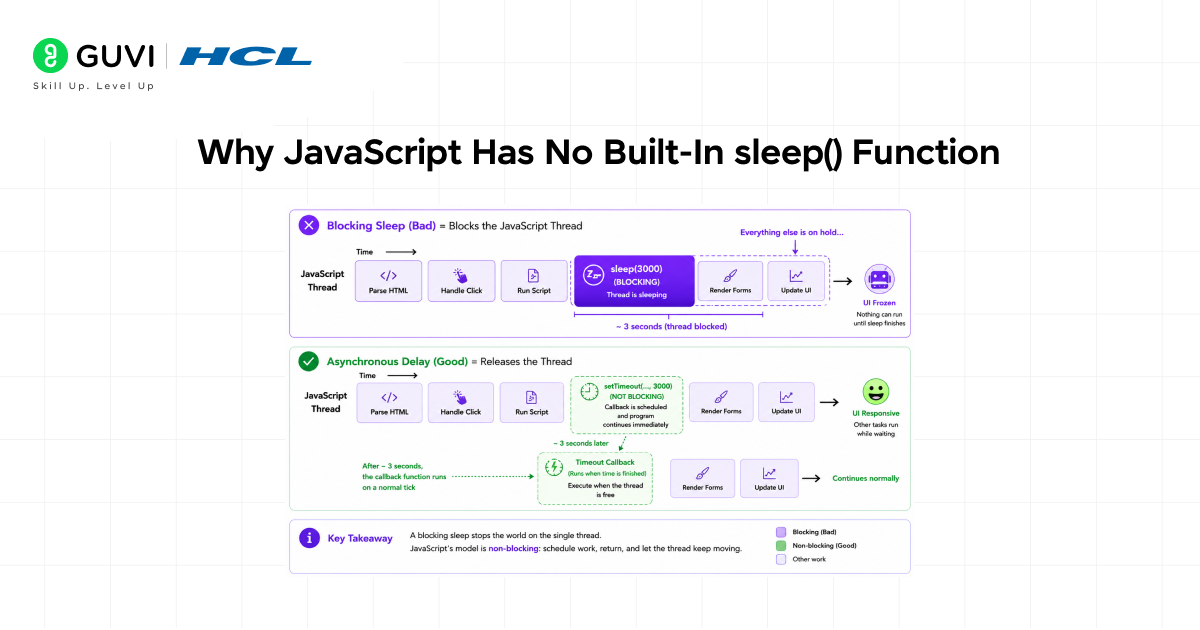
To understand how to add a delay in JavaScript correctly, it helps to understand why there is no sleep() function built into the language.
JavaScript is single-threaded. This means that at any given moment, exactly one piece of JavaScript code is executing. There is no parallel thread for UI rendering, event handling, or network responses while your script runs; everything shares the same thread.
In languages like Python or Java, calling sleep() pauses the current thread but allows other threads to run. In JavaScript, pausing the only thread means everything stops:
• The browser cannot repaint the screen.
• Click and keyboard events are queued but not processed.
• Network responses arrive but cannot be handled.
• Animations freeze mid-frame.
This is why JavaScript relies on the event loop. This mechanism allows deferred code (callbacks, Promise handlers, async functions) to run after the current synchronous code completes, without ever blocking the thread.
The correct approach to delay in JavaScript is always asynchronous: schedule future execution, release the thread, and let the event loop call the code back when the time arrives.
Method 1: setTimeout: The Foundation of JS Delays
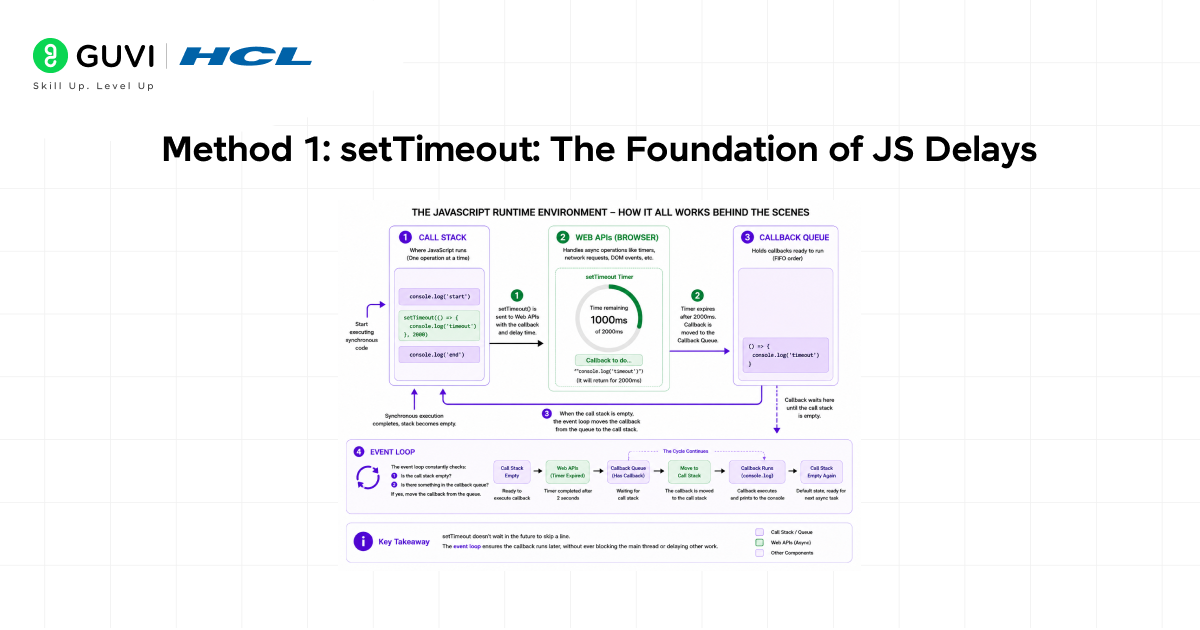
setTimeout() is the most fundamental way to add a delay in JavaScript. It is available in all browsers, in Node.js, and in every JavaScript runtime without any imports or configuration.
Basic Syntax
| setTimeout(callback, delayInMilliseconds); // Example: log a message after 2 secondssetTimeout(() => { console.log(‘This runs after a 2-second delay’);}, 2000); console.log(‘This runs immediately’); // Output:// This runs immediately// This runs after a 2-second delay (after ~2000ms) |
The key insight: code after setTimeout continues running immediately. The callback is not executed in-line; it is handed to the browser’s timer API, which calls it back after the delay via the event loop.
Passing Arguments to the Callback
setTimeout accepts additional arguments after the delay value. These are passed directly to the callback function when it runs.
| setTimeout((name, role) => { console.log(`Welcome, ${name}! You are a ${role}.`);}, 1500, ‘Alice’, ‘developer’); // Output after 1500ms:// Welcome, Alice! You are a developer. |
Cancelling a setTimeout
setTimeout returns a timer ID. Pass this ID to clearTimeout() to cancel the scheduled callback before it fires useful when a user action (such as dismissing a notification early) should prevent the scheduled code from running.
| const timerId = setTimeout(() => { console.log(‘This will be cancelled’);}, 3000); // Cancel the timer before it firesclearTimeout(timerId);console.log(‘Timer cancelled callback will never run’); |
Limitations of setTimeout
- Callbacks nest awkwardly for sequential delays. Multiple nested setTimeouts create callback hell.
- setTimeout is not precise; the delay is a minimum, not a guarantee. A busy call stack delays the callback.
- Error handling inside callbacks requires try/catch inside each callback, not at a higher level.
Method 2: A Promise-Based sleep() Function
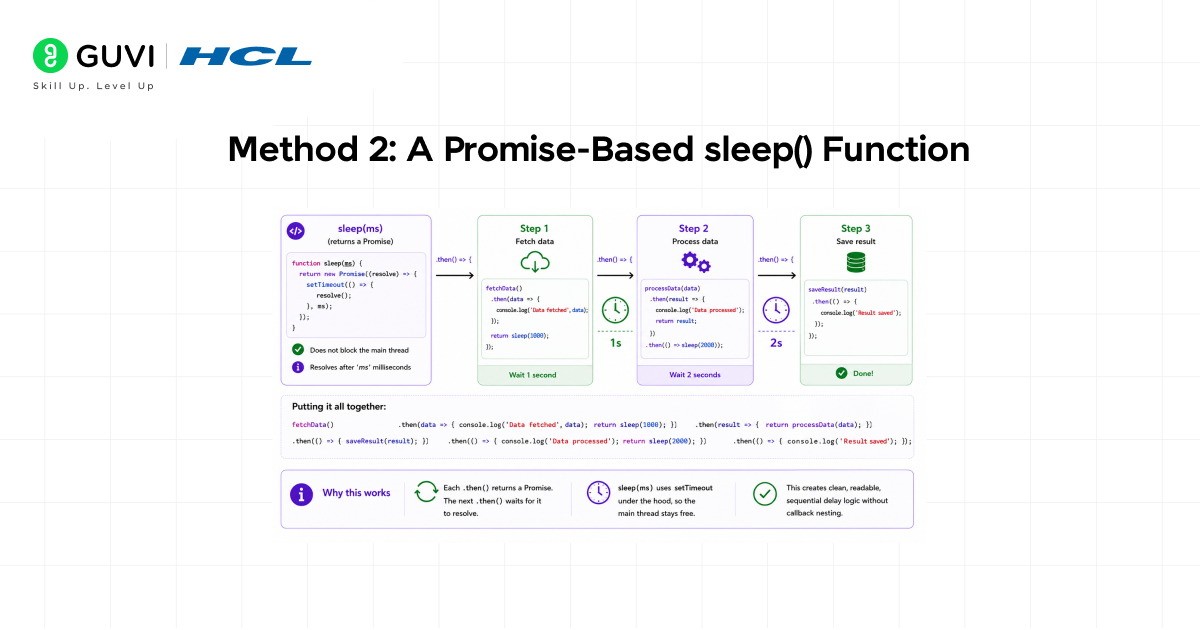
Raw setTimeout callbacks are fine for simple fire-and-forget delays. But for sequential delays, doing step A, waiting, then doing step B, waiting, then doing step C, nested callbacks become difficult to read and maintain. The solution is to wrap setTimeout in a Promise.
Building the sleep() Function
| // A reusable sleep utilityfunction sleep(ms) { return new Promise(resolve => setTimeout(resolve, ms));} // Usage with Promise chainingconsole.log(‘Start’); sleep(1000) .then(() => { console.log(‘After 1 second’); return sleep(2000); }) .then(() => { console.log(‘After 3 seconds total’); }); // Output:// Start// After 1 second (after ~1000ms)// After 3 seconds total (after ~3000ms) |
The sleep() function creates a Promise that resolves after the specified number of milliseconds. Because it returns a Promise, it integrates naturally into any Promise chain and plays well with async/await.
Chaining Multiple Delays
| function sleep(ms) { return new Promise(resolve => setTimeout(resolve, ms));} function runSequence() { console.log(‘Step 1: Starting process…’); return sleep(1000) .then(() => { console.log(‘Step 2: Loading data…’); return sleep(1500); }) .then(() => { console.log(‘Step 3: Processing complete.’); });} |
Many developers assume setTimeout() is a core JavaScript feature, but it was actually introduced as a browser API by early web browsers such as Netscape Navigator rather than being part of the original ECMAScript language specification. Its behavior is defined by the HTML Standard, which specifies how browsers schedule timers and interact with the event loop. This distinction helps explain why JavaScript environments such as browsers and Node.js can provide features beyond the language itself. In other words, JavaScript defines the language, while host environments supply additional APIs like setTimeout(), fetch(), and DOM manipulation capabilities.
Method 3: async/await The Modern Standard
The async/await syntax, introduced in ES2017, is the modern standard for writing asynchronous JavaScript. Combined with the Promise-based sleep() function, it produces a delay code that reads like synchronous, top-to-bottom logic, no nesting, no chaining, no callbacks.
The Pattern
| function sleep(ms) { return new Promise(resolve => setTimeout(resolve, ms));} async function runWithDelays() { console.log(‘Task 1: Starting…’); await sleep(1000); console.log(‘Task 2: Processing… (1s elapsed)’); await sleep(2000); console.log(‘Task 3: Done. (3s total elapsed)’);} runWithDelays(); |
The await keyword pauses execution inside the async function until the Promise resolves — without blocking the main thread. Other code, event handlers, and browser rendering continue normally while the async function waits.
Delay with Error Handling
One major advantage of async/await over raw callbacks is clean, centralized error handling using try/catch.
| function sleep(ms) { return new Promise(resolve => setTimeout(resolve, ms));} async function fetchWithRetry(url, retries = 3) { for (let attempt = 1; attempt <= retries; attempt++) { try { const response = await fetch(url); if (!response.ok) throw new Error(`HTTP ${response.status}`); return await response.json(); } catch (error) { console.log(`Attempt ${attempt} failed: ${error.message}`); if (attempt < retries) { console.log(`Retrying in 2 seconds…`); await sleep(2000); // Wait before retry } } } throw new Error(‘All retry attempts failed.’);} |
Delay Inside Loops
async/await makes adding delays inside loops natural and readable — a pattern that is awkward or impossible with raw setTimeout callbacks.
| function sleep(ms) { return new Promise(resolve => setTimeout(resolve, ms));} async function processItemsWithDelay(items) { for (const item of items) { await processItem(item); // Process each item await sleep(500); // Wait 500ms before the next } console.log(‘All items processed.’);} |
Method 4: setInterval for Repeated Delays
While setTimeout fires once after a delay, setInterval fires repeatedly at a fixed interval until explicitly stopped. It is the right tool when you need to execute code periodically — polling for updates, running a countdown timer, or animating a value step by step.

Basic Syntax
| // Run a callback every 1000ms (1 second)const intervalId = setInterval(() => { console.log(‘Tick:’, new Date().toLocaleTimeString());}, 1000); // Stop after 5 secondssetTimeout(() => { clearInterval(intervalId); console.log(‘Interval stopped.’);}, 5000); |
Building a Countdown Timer
| function startCountdown(seconds) { let remaining = seconds; const intervalId = setInterval(() => { console.log(`Time remaining: ${remaining}s`); remaining–; if (remaining < 0) { clearInterval(intervalId); console.log(‘Countdown complete!’); } }, 1000);} startCountdown(5); |
setInterval vs. Recursive setTimeout
setInterval fires at a fixed interval regardless of how long the callback takes to run. If a callback takes longer than the interval, callbacks can stack up. Recursive setTimeout — where each callback schedules the next one — avoids this by guaranteeing a minimum gap between executions:
| // Recursive setTimeout: guaranteed gap between runsfunction scheduleNext() { doWork(); // Run the task setTimeout(scheduleNext, 1000); // Schedule next run AFTER task completes} |
Prefer recursive setTimeout over setInterval for callbacks that perform I/O or other variable-length work.
Adding Delay in Node.js
In Node.js environments, the same setTimeout and async/await patterns described above work identically. However, Node.js also provides some additional built-in options.
timers/promises Module (Node.js 15+)
Since Node.js 15, the timers/promises module exports a native Promise-based setTimeout — eliminating the need to write a custom sleep() utility:
| // Node.js 15+ onlyimport { setTimeout as delay } from ‘timers/promises’; async function run() { console.log(‘Start’); await delay(2000); // Built-in Promise delay console.log(‘After 2 seconds’);} run(); |
util.promisify (Node.js 8+)
For older Node.js versions, util. promisify converts the callback-based setTimeout into a Promise:
| const { promisify } = require(‘util’);const sleep = promisify(setTimeout); async function run() { console.log(‘Waiting…’); await sleep(1500); console.log(‘Done after 1.5 seconds’);} run(); |
Common Mistakes When Adding Delay in JavaScript
Mistake 1: Using a Busy-Wait Loop
The most damaging mistake when adding delay in JavaScript is implementing a blocking busy-wait loop — repeatedly checking the clock until the desired time has passed.
| // WRONG: This freezes the browser completely. function badDelay(ms) { const start = Date.now(); while (Date.now() – start < ms) { // Busy-waiting — blocks the entire thread }} badDelay(2000); // Browser is completely frozen for 2 seconds |
This approach blocks the JavaScript thread entirely. The page cannot render, events are not processed, and the browser may show a script-frozen warning. Never use a busy-wait loop for delays in JavaScript.
Mistake 2: Forgetting to await before sleep
Calling sleep() without await means the function returns a Promise immediately — the delay does not happen, and execution continues without waiting.
| // WRONG: missing await — no delay occursasync function run() { console.log(‘Step 1’); sleep(1000); // Returns Promise, not awaited console.log(‘Step 2’); // Runs immediately, no delay} // CORRECT: await the sleepasync function run() { console.log(‘Step 1’); await sleep(1000); // Waits 1 second console.log(‘Step 2’); // Runs after delay} |
Mistake 3: Using await outside an async Function
The await keyword can only be used inside an async function (or at the top level of an ES module). Using it in a regular function causes a syntax error.
| // WRONG: await outside async function — SyntaxErrorfunction run() { await sleep(1000); // SyntaxError: await is only valid in async functions} // CORRECT: declare the function as asyncasync function run() { await sleep(1000); // Works correctly} |
Mistake 4: Expecting setTimeout to Be Precise
setTimeout specifies a minimum delay, not an exact one. If the call stack is busy when the timer fires, the callback waits in the queue. For time-critical applications, use the Web Performance API (performance.now()) or the requestAnimationFrame API for frame-accurate timing.
Real-World Use Cases for Delay in JavaScript
Understanding how to add a delay in JavaScript is valuable because the pattern appears across a wide range of practical development scenarios.
- Auto-dismissing UI notifications: Show a toast notification and automatically remove it after 3–5 seconds using setTimeout or async/await sleep.
- API rate limiting: When calling a third-party API that enforces a request rate limit, add a delay between successive requests to avoid HTTP 429 (Too Many Requests) errors.
- Retry with exponential backoff: After a failed network request, wait a progressively longer delay (1s, 2s, 4s) before retrying, reducing load on struggling servers.
- Debouncing user input: Delay a search query or validation check until the user has stopped typing for a set period, avoiding redundant API calls on every keystroke.
- Animated step sequences: Display UI elements one after another with deliberate timing onboarding flows, tutorial highlights, or staggered content reveals.
- Polling for updates: Check an endpoint periodically (using setInterval or recursive setTimeout) until a background job completes or a status changes.
If you want to build industry-ready web applications and become a skilled Full Stack Developer, do not miss the opportunity to enroll in HCL GUVI’s Full Stack Development Course. Learn front-end technologies, back-end development, databases, APIs, cloud deployment, and modern development frameworks through hands-on projects and real-world applications. Backed by industry-recognized certification and practical experience, this course helps you strengthen your portfolio and stand out in the competitive software development job market.
Conclusion
Adding a delay in JavaScript requires understanding the language’s asynchronous, single-threaded nature. There is no built-in sleep() because blocking the thread would freeze everything, rendering events and all other running code. Instead, JavaScript provides a set of powerful, non-blocking tools for scheduling deferred execution.
The foundational method is setTimeout, which schedules a callback after a specified number of milliseconds. For sequential or composable delays, wrapping setTimeout in a Promise creates a reusable sleep() utility. And with async/await, that sleep() function enables delay logic that reads as clearly and linearly as synchronous code, the modern standard for any non-trivial delay pattern.
For repeating delays, setInterval fires a callback at a fixed interval, while recursive setTimeout offers more precise control when the callback itself takes variable time. In Node.js, the timers/promises module provides a built-in Promise-based delay without needing a custom utility.
The one thing to avoid absolutely is the busy-wait loop, a blocking approach that consumes 100% CPU and freezes the entire JavaScript runtime. Every legitimate delay in JavaScript should be asynchronous, event-loop-friendly, and non-blocking.
FAQs
1. How do I add a delay in JavaScript?
Use setTimeout() for a one-time delay, or build a Promise-based sleep() function: sleep(ms) { return new Promise(resolve => setTimeout(resolve, ms)); } and await it inside an async function. This is the most readable and composable approach for adding delay in JavaScript.
2. Can I use sleep() in JavaScript like in Python?
JavaScript has no built-in sleep(). However, you can create one using a Promise that wraps setTimeout. When combined with async/await, this produces code that looks almost identical to Python’s time module.sleep() but without blocking the JavaScript thread.
3. Why can’t I use a while loop to delay JavaScript?
A while loop busy-wait blocks the single JavaScript thread entirely; the browser cannot render frames, process events, or handle network responses. The page appears completely frozen. Always use setTimeout or async/await sleep for delays instead.
4. What is the difference between setTimeout and setInterval?
setTimeout executes a callback once after a specified delay. setInterval executes a callback repeatedly at a fixed interval until clearInterval() is called. Use setTimeout for a one-time delay and setInterval (or recursive setTimeout) for periodic repeated execution.
5. Is setTimeout accurate for precise timing in JavaScript?
No. setTimeout specifies a minimum delay, not an exact one. If the call stack is busy when the timer expires, the callback waits in the queue and fires later. For precise frame-level timing, use requestAnimationFrame; for high-resolution timestamps, use performance.now().
Success Stories

About the Author
Vishalini Devarajan
An Aerospace Engineer turned content writer, I focus on making complex concepts easy to understand through well-structured, reader-friendly blogs. Whether it’s a technical topic or a non-technical one, I love creating content that is clear, engaging, and impactful.
View all posts by Vishalini Devarajan
Connect with me @
















Did you enjoy this article?