


Artificial Intelligence and Machine Learning Articles
AI/ML Skills Gap 2026: Why Companies Can't Find Job-Ready Talent
20 AI/ML Interview Questions Recruiters Can Use Without a Tech Background - Best Guide
How Industry-Backed AI/ML Bootcamps Are Changing the AI/ML Hiring Pipeline - Best Guide 2026
From IT Support to AI Engineer: A Realistic Career Switch Guide 2026


Get In Touch For Details! Request More Information
n8n.io: The Open-Source Automation Platform Built for Developers
Jun 11, 2026 6 Min Read 618 Views
(Last Updated)
Automation is no longer a luxury reserved for enterprises with dedicated engineering teams. Today, a single developer or a small operations team can connect dozens of applications, automate complex business processes, and build data pipelines all without writing hundreds of lines of custom integration code.
n8n.io has become one of the most compelling tools in this space.
What sets n8n apart from other automation platforms is its commitment to openness and flexibility. It is open-source, can be self-hosted, supports custom code inside workflows, and provides a visual canvas that developers and non-developers can both use effectively. It does not lock you into a subscription model or a closed ecosystem.
This article explains what n8n.io is, how it works, what makes it different, and how to use it to build powerful automations for real-world business needs.
Table of contents
- TL;DR
- The Problem n8n.io Solves
- How n8n.io Works: Nodes, Triggers, and Workflows
- Nodes
- Triggers
- Workflows
- Self-Hosted Automation: Owning Your Infrastructure
- Self-Hosting Options
- Low-Code Workflow Design: The n8n Canvas
- Key Canvas Features
- The Code Node: Where Low-Code Meets Pro-Code
- API Integrations and the HTTP Request Node
- Business Process Automation: Real-World Use Cases
- Lead Management and CRM Automation
- Data Pipeline and Synchronization
- DevOps and IT Automation
- Customer Onboarding
- AI-Powered Workflows
- n8n vs. Zapier and Make: Choosing the Right Platform
- n8n
- Zapier
- Make (formerly Integromat)
- Conclusion
- FAQs
- Is n8n.io completely free to use?
- How difficult is it to self-host n8n?
- Can non-developers use n8n?
- How does n8n handle errors in workflows?
- Can n8n be used to build AI agent workflows?
TL;DR
- n8n.io is an open-source workflow automation platform with 400+ built-in integrations.
- It supports self-hosting, giving teams full control over their data and infrastructure.
- Workflows are built visually using a node-based canvas, with code execution available inside any node.
- n8n is positioned between no-code tools like Zapier and fully custom integration code, ideal for technical teams.
- It supports trigger automation, API integrations, conditional logic, loops, and AI-powered workflows.
What is n8n.io?
n8n.io (pronounced “n-eight-n” or “nodemation”) is an open-source, fair-code workflow automation platform that allows users to connect applications, automate business processes, and build data pipelines using a visual node-based editor. It also supports custom JavaScript and Python code for advanced workflow customization and gives users the flexibility to self-host the platform on their own infrastructure.
The Problem n8n.io Solves
Modern businesses run on dozens of applications. A sales team might use a CRM, an email platform, a meeting scheduler, a contract tool, and a reporting dashboard, all from different vendors, all with different APIs, and none of them natively connected.
Every gap between these tools is a manual process. Someone copies data from one system into another. Someone checks a spreadsheet and sends a follow-up email. Someone pulls a weekly report by hand. These tasks are repetitive, error-prone, and expensive; they consume time that could be spent on higher-value work.
Traditional solutions fall into two camps. On one side are no-code tools like Zapier and Make, which are easy to use but limited in flexibility, expensive at scale, and reliant on cloud infrastructure you do not control. On the other side is custom integration code — flexible but slow to build, hard to maintain, and inaccessible to non-engineers.
n8n.io occupies the middle ground. It is visual enough for operations teams to use, powerful enough for developers to build sophisticated workflows, and open enough to run anywhere.
How n8n.io Works: Nodes, Triggers, and Workflows
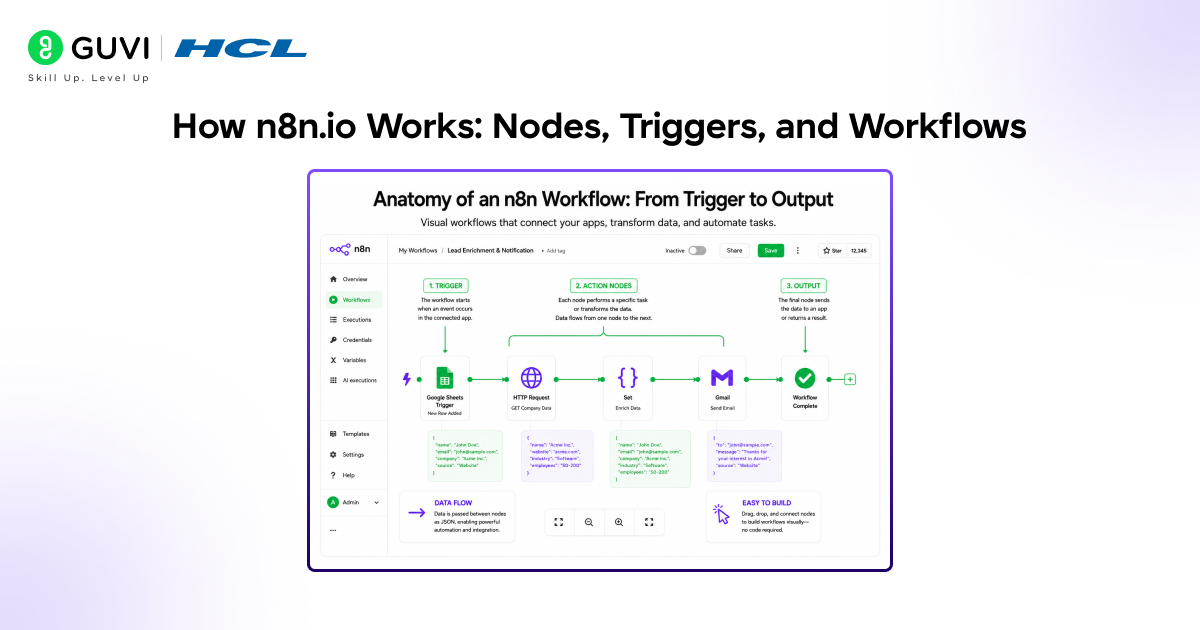
Everything in n8n is built around three core concepts: nodes, triggers, and workflows. Understanding these three elements is all you need to start building.-
Nodes
A node is a single unit of work in an n8n workflow. Every integration, every action, every transformation is a node. n8n provides over 400 built-in nodes covering applications and services across every major category:
• Communication: Slack, Gmail, Microsoft Teams, Telegram, WhatsApp.
• CRM and sales: Salesforce, HubSpot, Pipedrive, Zoho.
• Databases: PostgreSQL, MySQL, MongoDB, Redis, Supabase.
• Cloud storage: Google Drive, Dropbox, AWS S3, OneDrive.
• Developer tools: GitHub, GitLab, Jira, Linear, PagerDuty.
• AI and ML: OpenAI, Anthropic, Google Gemini, Hugging Face, LangChain.
If n8n does not have a built-in node for a specific service, the HTTP Request node connects to any REST API. The Code node allows arbitrary JavaScript or Python execution. These two nodes together mean n8n can integrate with virtually anything.
Triggers
A trigger node starts a workflow. It defines the condition that kicks off the automation. n8n supports multiple trigger types:
- Webhook trigger: The workflow starts when an external service sends an HTTP request to n8n’s webhook URL.
- Schedule trigger: The workflow runs on a defined schedule every hour, every day at 9 AM, and every Monday.
- App event trigger: The workflow starts when a specific event occurs in a connected application, a new lead in HubSpot, a new row in a Google Sheet, or a new message in Slack.
- Manual trigger: The workflow is started manually, useful for testing and on-demand processes.
Workflows
A workflow is the complete automation of the sequence of nodes connected to accomplish a task. Workflows can be linear (one node after another) or complex (with branches, loops, merge nodes, and conditional logic). They can call sub-workflows, wait for external events, and handle errors through dedicated error branches.
Each node in a workflow passes data to the next node as a structured JSON object. This means any output from any node, an API response, a database query result, or a transformed value becomes the input for the next step. The data flows through the workflow like water through pipes.
Self-Hosted Automation: Owning Your Infrastructure
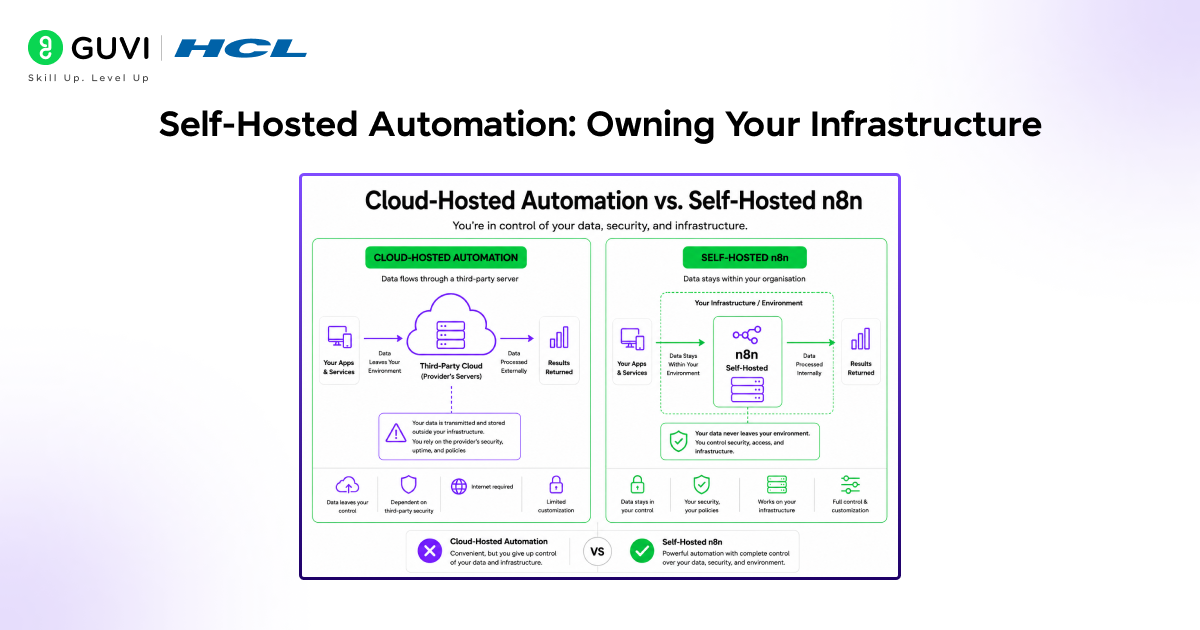
One of n8n’s most important differentiators is its self-hosting capability. Unlike Zapier, Make, or Workato, where workflows and all the data they process pass through the vendor’s server, n8n can run entirely on your own infrastructure.
This matters significantly for teams operating under data privacy requirements, regulatory constraints, or internal security policies that prohibit routing sensitive data through third-party platforms.
Self-Hosting Options
- Docker: The most common deployment method. A single Docker command launches n8n in minutes. Docker Compose handles multi-container setups with a database and reverse proxy.
- Kubernetes: For production deployments requiring high availability, horizontal scaling, and infrastructure-as-code management.
- npm: Install n8n globally via npm for quick local development and testing.
- Cloud VMs: Deploy to AWS EC2, Google Cloud Compute, DigitalOcean Droplets, or any Linux virtual machine.
n8n also offers a fully managed cloud version, n8n Cloud,d for teams that want the flexibility and power of n8n without the overhead of managing their own infrastructure.
n8n uses a fair-code licensing model under the Sustainable Use Licence. Its source code is publicly available and can be freely used for internal business automation and self-hosting, but organizations that want to offer n8n as a commercial hosted service to external customers must obtain a separate commercial licence. This approach is designed to balance openness and community access while still providing sustainable funding for long-term platform development.
Low-Code Workflow Design: The n8n Canvas
The n8n workflow editor is a visual canvas where nodes are placed, configured, and connected by dragging lines between them. It is designed to be intuitive enough for non-developers to build basic workflows, while exposing enough depth for developers to build sophisticated systems.
Key Canvas Features
- Drag-and-drop node placement: Add any node from the sidebar and position it on the canvas. Connect nodes by drawing lines between their input and output ports.
- Live data preview: Execute any node individually and preview the data it produces before connecting it to the next step. This makes debugging fast and intuitive.
- Expression editor: Reference data from any previous node using n8n’s expression syntax. Map fields dynamically — for example, using the email address from a trigger node as the recipient in a later email node.
- Sticky notes: Add documentation directly on the canvas to explain workflow logic for future collaborators.
- Error handling: Connect an error branch from any node to handle failures gracefully, logging errors, sending alerts, or retrying failed operations.
- Sub-workflows: Call one workflow from inside another, enabling modular design and reuse of common automation patterns.
The Code Node: Where Low-Code Meets Pro-Code
The Code node is what makes n8n genuinely powerful for developers. Inside any workflow, you can drop a Code node and write JavaScript or Python to perform any transformation, calculation, or logic that the visual nodes cannot express.
This is a crucial distinction from purely no-code tools. In Zapier, if the built-in actions cannot do what you need, you are stuck. In n8n, you write the code. The visual editor handles the integrations; the Code node handles the edge cases.

API Integrations and the HTTP Request Node
Not every service has a dedicated n8n node, but virtually every modern service has an API. The HTTP Request node is n8n’s universal connector, capable of calling any REST API with full control over:
• HTTP method (GET, POST, PUT, PATCH, DELETE).
• Request headers, including authentication tokens and content types.
• Query parameters and request body (JSON, form data, or raw).
• Response handling, including pagination for multi-page API results.
n8n also provides a credential system that stores API keys, OAuth tokens, and basic auth credentials securely — separated from the workflow logic and reusable across multiple workflows. This means you configure a credential once and reference it anywhere.
Business Process Automation: Real-World Use Cases
n8n’s flexibility means it is used across a wide range of business contexts. Here are the most common and impactful use cases.
Lead Management and CRM Automation
When a new lead submits a form on a website, n8n can automatically create a contact in the CRM, assign it to the appropriate sales representative based on territory rules, send a personalized welcome email, create a follow-up task, and post a notification to the sales Slack channel all within seconds of form submission, without any manual intervention.
Data Pipeline and Synchronization
n8n excels at building data pipelines that move and transform data between systems on a schedule. A workflow might pull sales data from a CRM every night, transform it into a standardized format, write it to a data warehouse, and trigger a reporting refresh, automating a process that would otherwise require a custom ETL script and a scheduler.
DevOps and IT Automation
Engineering teams use n8n to automate operational workflows: creating GitHub issues from monitoring alerts, triggering deployment pipelines on pull request merges, rotating API keys on a schedule, sending on-call notifications through PagerDuty, and generating incident reports automatically from log data.
Customer Onboarding
SaaS companies use n8n to orchestrate multi-step onboarding sequences. When a new user signs up, n8n can provision their account in the product, add them to the appropriate customer success queue, enroll them in an email sequence, create a record in the billing system, and notify the account management team of a sequence that would otherwise involve manual coordination across five different tools.
AI-Powered Workflows
n8n’s native integrations with OpenAI, Anthropic, and other AI providers make it straightforward to embed AI capabilities inside automation workflows. Common patterns include: classifying incoming support tickets with an LLM before routing them, generating personalized content at scale, extracting structured data from unstructured documents, and building AI agent workflows that use tools and make multi-step decisions.
n8n vs. Zapier and Make: Choosing the Right Platform
n8n is frequently compared to Zapier and Make. Each platform serves a different audience and has different strengths.
n8n
- Best for: Technical teams, developers, and organizations with data privacy requirements.
- Strengths: Self-hosting, open-source, custom code support, AI integration, fair pricing at scale.
- Limitations: Steeper learning curve than Zapier; requires infrastructure management for self-hosted deployments.
Zapier
- Best for: Non-technical users who need simple, reliable two-step automations quickly.
- Strengths: Ease of use, extensive app library, reliable cloud infrastructure.
- Limitations: Expensive at volume, limited logic complexity, no self-hosting, and no custom code.
Make (formerly Integromat)
- Best for: Power users who want a visual tool with more logic depth than Zapier but without writing code.
- Strengths: Strong visual scenario builder, good pricing, complex branching support.
- Limitations: No self-hosting, limited custom code, proprietary platform.
For teams that have technical resources, care about data sovereignty, and need workflows more complex than basic two-step automations, n8n is almost always the right choice.
If you want to learn more about building skills for Claude Code and automating your procedural knowledge, do not miss the chance to enroll in HCL GUVI’s Intel & IITM Pravartak Certified Artificial Intelligence & Machine Learning courses. Endorsed with Intel certification, this course adds a globally recognized credential to your resume, a powerful edge that sets you apart in the competitive AI job market.
Conclusion
n8n.io has established itself as the automation platform for teams that need genuine power without giving up control. Its combination of open-source transparency, self-hosting capability, a visual low-code canvas, custom code support, and deep API integration makes it uniquely positioned in the automation landscape.
Whether you are building a simple notification workflow, a multi-step data pipeline, a customer onboarding sequence, or an AI-powered agent system, n8n provides the tools to do it on your infrastructure, at your own pace, without the usage-based pricing cliffs that make other platforms expensive at scale.
For developers and technical teams looking for an automation platform they can truly own, extend, and rely on in production, n8n.io is one of the most complete and capable options available today.
FAQs
1. Is n8n.io completely free to use?
n8n is free to self-host for internal business use under its fair-code Sustainable Use Licence. There are no workflow execution limits or per-task charges when self-hosted. n8n Cloud, the managed hosting option, is a paid service with a free trial. Commercial use, such as offering n8n as a hosted product to others, requires a commercial licence.
2. How difficult is it to self-host n8n?
Self-hosting n8n is straightforward for anyone with basic Docker experience. A single Docker command launches a working instance in minutes. For production deployments, a Docker Compose setup with a PostgreSQL database and a reverse proxy like Nginx or Caddy is the recommended configuration. Full documentation and community guides are available for all major cloud providers.
3. Can non-developers use n8n?
Yes, to a significant degree. The visual canvas, pre-built nodes, and expression editor are all accessible to non-developers who are comfortable working with data and APIs at a conceptual level. However, n8n is fundamentally positioned as a tool for technical users. Teams with a developer available to set up infrastructure and build complex workflows will get the most value from it.
4. How does n8n handle errors in workflows?
n8n provides built-in error handling at both the node level and the workflow level. Any node can have an error output branch that activates when the node fails, allowing you to log the error, send an alert, or trigger a retry logic. At the workflow level, a dedicated Error Workflow can be configured to run whenever any workflow fails, centralizing error monitoring and response.
5. Can n8n be used to build AI agent workflows?
Yes. n8n has native integrations with OpenAI, Anthropic, Google Gemini, and other AI providers, as well as a LangChain node for building agent-style workflows. You can implement tool-using AI workflows directly in n8n, giving an AI model access to web search, database queries, API calls, and code execution as part of an automated reasoning loop. This makes n8n a practical platform for building production AI agent systems without custom infrastructure.
Success Stories

About the Author
Vishalini Devarajan
An Aerospace Engineer turned content writer, I focus on making complex concepts easy to understand through well-structured, reader-friendly blogs. Whether it’s a technical topic or a non-technical one, I love creating content that is clear, engaging, and impactful.
View all posts by Vishalini Devarajan
Connect with me @









Did you enjoy this article?