


Software Development Articles
How to Read and Understand System Design Diagrams?
System Engineer Roles and Responsibilities: 12 Proven Duties for Growth
SAP Consultant Roles and Responsibilities: 12 Proven Duties for Growth and Success
Network Engineer Roles and Responsibilities: 12 Essential Duties for Success


Get In Touch For Details! Request More Information

What is Design Patterns Tutorial: Learn with Real Code Examples
Jul 02, 2026 9 Min Read 1774 Views
(Last Updated)
Every developer eventually hits the same wall. The code works, but it is a mess. Adding a new feature breaks three other things. The same logic appears in five different places. A colleague asks how the code works and you cannot explain it in less than ten minutes. Design patterns are the solution to exactly these problems.
This design patterns tutorial is different from most. It does not just explain what patterns are. It walks you through the most important ones step by step, with real code examples in Python and JavaScript that you can follow even as a beginner. By the end of this design patterns tutorial, you will know what patterns are, how to read them, and how to write them, how to read them in code, and how to write them yourself.
Quick Answer
A design pattern is a reusable, named solution to a common programming problem. There are 23 classic patterns grouped into three categories: Creational (how objects are made), Structural (how objects are connected), and Behavioral (how objects talk to each other). This design patterns tutorial covers the 8 most important patterns with code examples you can run today.
Table of contents
- What Are Design Patterns?
- Creational Patterns: Controlling How Objects Are Created
- Singleton Pattern
- Factory Method Pattern
- Builder Pattern
- Structural Patterns: Organising How Objects Connect
- Adapter Pattern
- Decorator Pattern
- Facade Pattern
- Behavioral Patterns: How Objects Communicate
- Observer Pattern
- Strategy Pattern
- Putting It All Together: Which Pattern to Use When
- Common Beginner Mistakes in This Design Patterns Tutorial
- 💡 Did You Know?
- Conclusion
- FAQs
- Which programming language is best for learning design patterns?
- Do I need to know all 23 design patterns for interviews?
- Is the Observer pattern the same as event listeners in JavaScript?
- Can I use multiple patterns in the same codebase?
- How long does it take to get comfortable with design patterns?
What Are Design Patterns?
Imagine you work in a kitchen. Every day, new chefs join and face the same problems. How do you keep sauces from burning? How do you time three dishes to finish at the same moment? Experienced chefs pass down named techniques. “Use the bain-marie for the chocolate sauce.” Every chef immediately knows what to do. No one reinvents it.
Design patterns are exactly that, and this design patterns tutorial will prove it with real code. Named, proven solutions that experienced developers pass down. You do not invent them. You learn them, recognise when to use them, and apply them.
What this design patterns tutorial gives you:
- A shared language: Say “use the Observer pattern here” and every developer on your team knows exactly what the code structure will look like
- Battle-tested solutions: Each pattern has been refined across thousands of projects over decades
- Cleaner code: Patterns reduce duplication, loosen coupling, and make change easier
- Interview readiness: Design pattern questions appear in almost every mid and senior developer interview
The three categories at a glance:
| Category | Solves | Key patterns |
| Creational | How objects are created | Singleton, Factory, Builder |
| Structural | How objects are organised and connected | Adapter, Decorator, Facade |
| Behavioral | How objects communicate and share responsibility | Observer, Strategy |
Every major framework you use was built using patterns from a design patterns tutorial like this one. React uses Observer. Express uses Decorator. Java’s Collections use Iterator and Strategy throughout. Once you work through this design patterns tutorial, you will recognise these patterns in code you write every day.
Do check out HCL GUVI’s AI Software Development Course if you want to master system design and design patterns with real-world coding skills. This industry-focused program offers 300+ hours of hands-on learning, live sessions, and certifications from IITM Pravartak and MongoDB, helping you build scalable applications, understand architecture, and become job-ready with practical projects.
Creational Patterns: Controlling How Objects Are Created
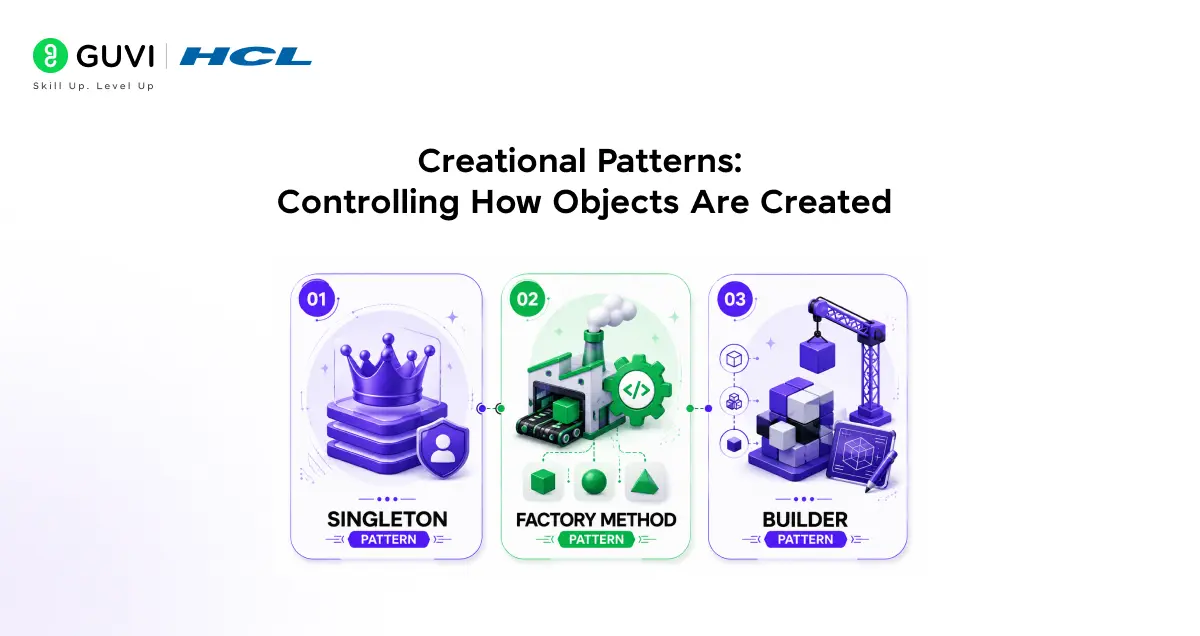
The first category in any design patterns tutorial is Creational patterns, which deal with object creation. The goal is to make creation flexible, controlled, and decoupled from the rest of the code.
1. Singleton Pattern
The problem Singleton solves in this design patterns tutorial: You need exactly one instance of a class in your entire application. No duplicates. Not two database connections, not two configuration managers, not two loggers.
Real-world analogy: A company has one HR manager. Every department goes to the same person. Creating two HR managers causes confusion and conflicting decisions.
How it works step by step:
- Step 1: The class keeps a private reference to its own single instance
- Step 2: The constructor is made private so no one can call new on it directly
- Step 3: A public method called getInstance() checks if an instance already exists
- Step 4: If yes, it returns the existing one. If no, it creates one and stores it.
Python code example:
class DatabaseConnection:
    _instance = None  # Step 1: private reference

    def __new__(cls):
        if cls._instance is None:  # Step 3: check if exists
            cls._instance = super().__new__(cls)
            cls._instance.connection = "Connected to DB"
        return cls._instance  # Step 4: return existing

# Usage
db1 = DatabaseConnection()
db2 = DatabaseConnection()

print(db1 is db2)  # True - same object
print(db1.connection)  # Connected to DB
When to use Singleton:
- Database connection pools
- Application configuration settings
- Logging services
- Cache managers
When NOT to use it:
- When multiple instances would be fine (Singleton adds unnecessary constraint in this case)
- When testing is critical. Singletons hold global state and make unit testing significantly harder.
2. Factory Method Pattern
The problem Factory solves in this design patterns tutorial: You need to create different types of objects but do not want the calling code to know which exact class it is creating. Creation details should be hidden.
Real-world analogy: You walk into a car dealership and ask for “a red sedan.” You do not know which factory made it, which assembly line it came off, or which workers built it. You just asked for the car. The dealership handles the creation details.
How it works step by step:
- Step 1: Define an interface or base class that all products share
- Step 2: Create a Factory class with a method that takes a parameter
- Step 3: Inside the factory method, use a condition to decide which class to instantiate
- Step 4: Return the created object. The caller only sees the base type.
Python code example:
# Step 1: Base class all notifications share
class Notification:
    def send(self, message):
        pass

class EmailNotification(Notification):
    def send(self, message):
        print(f"Sending EMAIL: {message}")

class SMSNotification(Notification):
    def send(self, message):
        print(f"Sending SMS: {message}")

class PushNotification(Notification):
    def send(self, message):
        print(f"Sending PUSH: {message}")

# Step 2-3: The Factory
class NotificationFactory:
    @staticmethod
    def create(notif_type):
        if notif_type == "email":
            return EmailNotification()
        elif notif_type == "sms":
            return SMSNotification()
        elif notif_type == "push":
            return PushNotification()
        raise ValueError(f"Unknown type: {notif_type}")

# Step 4: Usage - caller does not know which class was created
notif = NotificationFactory.create("email")
notif.send("Your order has shipped!")
# Output: Sending EMAIL: Your order has shipped!
When to use Factory:
- When the exact type of object depends on user input or configuration
- When you want to centralise creation logic in one place
- When adding a new type should not require changing existing code
Riddle: Your app currently supports PayPal and Credit Card payments. Your manager asks you to add UPI and Crypto next month. Without a Factory, how many files do you change? With a Factory, how many?
Answer: Without a Factory, you likely change the checkout logic, the payment UI, the validation rules, and the billing records, all scattered across multiple files. With a Factory, you add one new PaymentMethod class and register it in the factory. One file. Everything else stays the same. This is why the Factory pattern exists.
3. Builder Pattern
The problem Builder solves in this design patterns tutorial: Creating an object requires many optional parameters. A constructor with ten parameters is confusing and error-prone. You forget which position is which.
Real-world analogy: Ordering a custom pizza. You say the size, the base, the sauce, each topping one at a time. The pizza is assembled step by step. You do not shout out every option in one breath.
How it works step by step:
- Step 1: Create a Builder class that stores parameters as properties
- Step 2: Add methods for each parameter that return self (for chaining)
- Step 3: Add a build() method that creates and returns the final object
- Step 4: Chain the method calls to set only the options you need
Python code example:
class Pizza:
    def __init__(self, size, crust, sauce, toppings):
        self.size = size
        self.crust = crust
        self.sauce = sauce
        self.toppings = toppings

    def __str__(self):
        return f"{self.size} pizza, {self.crust} crust, {self.sauce} sauce, toppings: {self.toppings}"

# Step 1-3: The Builder
class PizzaBuilder:
    def __init__(self):
        self.size = "medium"
        self.crust = "thin"
        self.sauce = "tomato"
        self.toppings = []

    def set_size(self, size):
        self.size = size
        return self  # Step 2: returns self for chaining

    def set_crust(self, crust):
        self.crust = crust
        return self

    def add_topping(self, topping):
        self.toppings.append(topping)
        return self

    def build(self):  # Step 3: creates the final object
        return Pizza(self.size, self.crust, self.sauce, self.toppings)

# Step 4: Usage
pizza = (PizzaBuilder()
         .set_size("large")
         .set_crust("stuffed")
         .add_topping("mushrooms")
         .add_topping("olives")
         .build())

print(pizza)
# Output: large pizza, stuffed crust, tomato sauce, toppings: ['mushrooms', 'olives']
When to use Builder:
- Objects with many optional parameters
- Step-by-step construction of complex objects
- When you want readable, self-documenting object creation code
Structural Patterns: Organising How Objects Connect
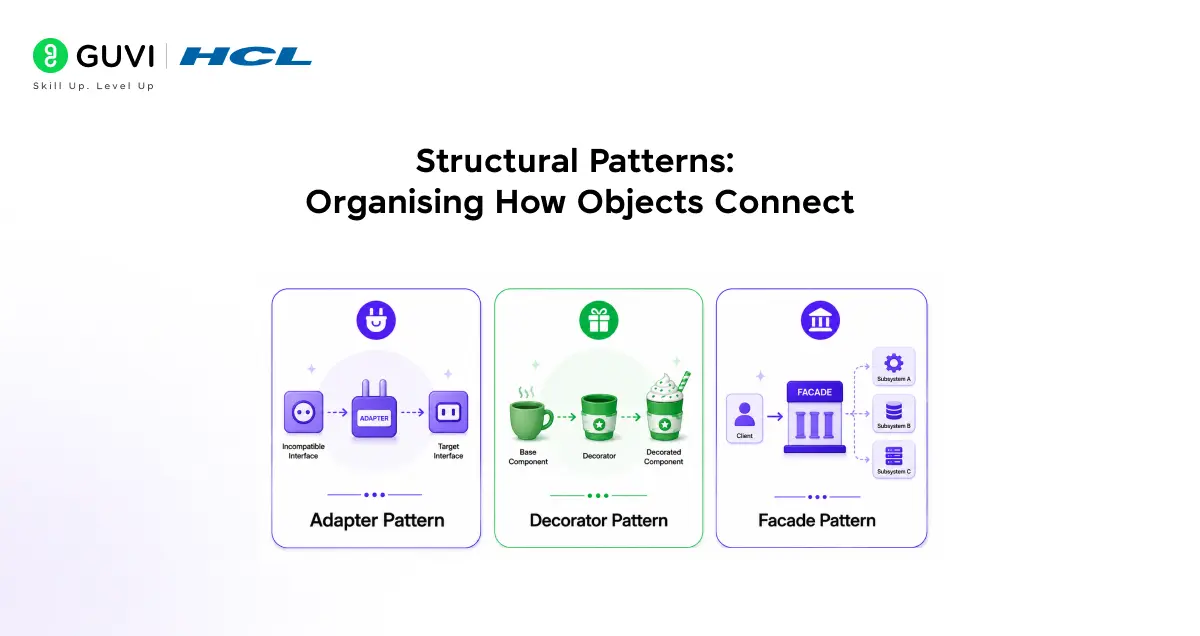
The second section of this design patterns tutorial covers Structural patterns, which deal with how classes are composed into larger structures. They make complex systems easier to navigate.
4. Adapter Pattern
The problem Adapter solves in this design patterns tutorial: Two pieces of code need to work together but have incompatible interfaces. One expects data in format A, the other provides format B.
Real-world analogy: A universal travel plug adapter. Your UK plug does not fit a US socket. The adapter sits between the two, translating one interface to another. Neither the plug nor the socket changes.
How it works step by step:
- Step 1: Identify the Target interface your code expects
- Step 2: Identify the Adaptee (the incompatible class you cannot change)
- Step 3: Create an Adapter class that implements the Target interface
- Step 4: Inside the Adapter, call the Adaptee’s methods and translate the output
Python code example:
# Your app expects this interface (Target)
class JSONLogger:
    def log(self, data: dict):
        print(f"JSON LOG: {data}")

# A third-party library you cannot change (Adaptee)
class OldTextLogger:
    def write_log(self, text: str):
        print(f"TEXT LOG: {text}")

# Step 3-4: The Adapter bridges the gap
class LoggerAdapter:
    def __init__(self, old_logger: OldTextLogger):
        self.old_logger = old_logger

    def log(self, data: dict):  # Matches the Target interface
        # Step 4: translate dict to string for the old logger
        text = ", ".join(f"{k}={v}" for k, v in data.items())
        self.old_logger.write_log(text)

# Usage - your app calls .log() and never knows about OldTextLogger
old = OldTextLogger()
logger = LoggerAdapter(old)
logger.log({"user": "Priya", "action": "login"})
# Output: TEXT LOG: user=Priya, action=login
When to use Adapter:
- Integrating third-party libraries with incompatible interfaces
- Making legacy code work with new systems without rewriting it
- Any time you need to bridge two interfaces you cannot modify
5. Decorator Pattern
The problem Decorator solves in this design patterns tutorial: You need to add new behaviour to an object at runtime without modifying its class or creating a separate subclass for every combination.
Real-world analogy: Ordering coffee. You start with a plain espresso. Add milk. Now it is a latte. Add caramel. Now it is a caramel latte. Each addition wraps the previous one without changing it.
How it works step by step:
- Step 1: Define a base component interface or class
- Step 2: Create concrete components that implement the base
- Step 3: Create a Decorator class that also implements the base but wraps another component
- Step 4: Override the relevant method to add behaviour before or after calling the wrapped component
Python code example:
# Step 1: Base interface
class Coffee:
    def cost(self):
        return 0
    def description(self):
        return ""

# Step 2: Concrete component
class Espresso(Coffee):
    def cost(self):
        return 50  # Rs. 50
    def description(self):
        return "Espresso"

# Step 3-4: Decorators
class MilkDecorator(Coffee):
    def __init__(self, coffee: Coffee):
        self._coffee = coffee  # wraps an existing coffee

    def cost(self):
        return self._coffee.cost() + 20  # adds to existing cost

    def description(self):
        return self._coffee.description() + " + Milk"

class CaramelDecorator(Coffee):
    def __init__(self, coffee: Coffee):
        self._coffee = coffee

    def cost(self):
        return self._coffee.cost() + 30

    def description(self):
        return self._coffee.description() + " + Caramel"

# Usage
order = Espresso()
order = MilkDecorator(order)      # wrap with milk
order = CaramelDecorator(order)   # wrap with caramel

print(order.description())  # Espresso + Milk + Caramel
print(f"Rs. {order.cost()}")  # Rs. 100
When to use Decorator:
- Adding optional features to objects without creating a subclass for every combination
- Middleware in web frameworks (auth, logging, rate limiting)
- File stream processing (compression, encryption, buffering)

6. Facade Pattern
The problem Facade solves in this design patterns tutorial: A complex subsystem has many classes and methods. The calling code should not need to know all of them just to do one simple thing.
Real-world analogy: A hotel concierge. You say “I need a restaurant booking, a taxi, and a wake-up call at 7am.” You do not call the restaurant, the taxi company, and the front desk separately. The concierge handles all of it. One interface. All the complexity hidden behind it.
How it works step by step:
- Step 1: Identify the complex subsystem with many components
- Step 2: Create a Facade class that the caller will interact with
- Step 3: Inside the Facade, hold references to the subsystem components
- Step 4: Create simple methods that coordinate the complex steps internally
Python code example:
# Step 1: Complex subsystem with many moving parts
class VideoDecoder:
    def decode(self, file):
        print(f"Decoding {file}")

class AudioExtractor:
    def extract(self, file):
        print(f"Extracting audio from {file}")

class SubtitleParser:
    def parse(self, file):
        print(f"Parsing subtitles for {file}")

class VideoUploader:
    def upload(self, file):
        print(f"Uploading {file} to CDN")

# Step 2-4: The Facade
class VideoProcessingFacade:
    def __init__(self):
        self.decoder = VideoDecoder()
        self.audio = AudioExtractor()
        self.subtitles = SubtitleParser()
        self.uploader = VideoUploader()

    def process_and_publish(self, filename):
        print(f"--- Processing {filename} ---")
        self.decoder.decode(filename)
        self.audio.extract(filename)
        self.subtitles.parse(filename)
        self.uploader.upload(filename)
        print("Done!")

# Usage - caller does one thing, Facade handles everything
facade = VideoProcessingFacade()
facade.process_and_publish("lecture_video.mp4")
When to use Facade:
- Simplifying complex library or framework interactions
- Creating a clean API for a layered system
- Hiding legacy complexity behind a modern interface
Behavioral Patterns: How Objects Communicate
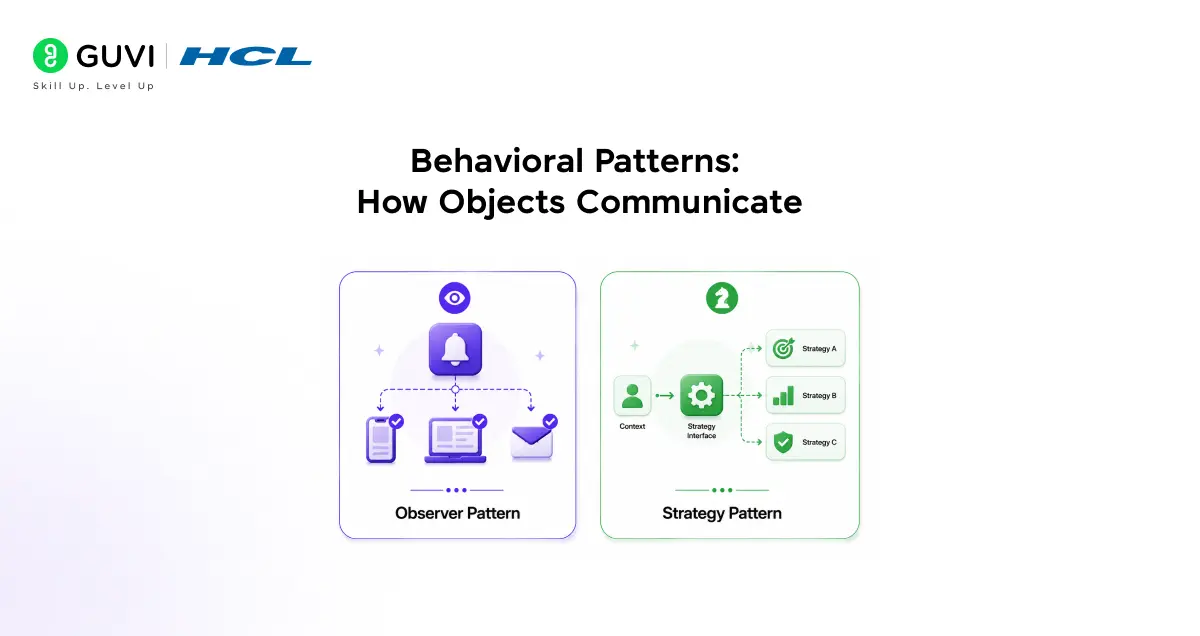
The final section of this design patterns tutorial covers Behavioral patterns, which deal with communication between objects and the assignment of responsibilities.
7. Observer Pattern
The problem Observer solves in this design patterns tutorial: When one object changes, several other objects need to be notified and updated automatically. You do not want the Subject to know the details of each Observer.
Real-world analogy: A YouTube channel. When a creator uploads a video, all subscribers get notified automatically. The creator does not call each subscriber one by one. Subscribers register themselves. Unsubscribers stop receiving notifications.
How it works step by step:
- Step 1: Create a Subject class that holds a list of observers and a method to notify them
- Step 2: Add subscribe() and unsubscribe() methods to manage the observer list
- Step 3: When state changes, call notify() which loops through all observers
- Step 4: Each Observer implements an update() method that is called by the Subject
Python code example:
# Step 1-3: The Subject
class StockMarket:
    def __init__(self):
        self._observers = []
        self._price = 0

    def subscribe(self, observer):   # Step 2
        self._observers.append(observer)

    def unsubscribe(self, observer):
        self._observers.remove(observer)

    def notify(self):                # Step 3
        for observer in self._observers:
            observer.update(self._price)

    def set_price(self, price):
        self._price = price
        print(f"\nPrice changed to Rs. {price}")
        self.notify()

# Step 4: Observers implement update()
class MobileApp:
    def update(self, price):
        print(f"  Mobile App alert: Price is now Rs. {price}")

class EmailAlert:
    def update(self, price):
        print(f"  Email sent: Current price Rs. {price}")

class TradingBot:
    def update(self, price):
        if price < 1000:
            print(f"  Trading Bot: BUY at Rs. {price}")
        else:
            print(f"  Trading Bot: HOLD at Rs. {price}")

# Usage
market = StockMarket()
market.subscribe(MobileApp())
market.subscribe(EmailAlert())
market.subscribe(TradingBot())

market.set_price(950)
market.set_price(1200)
Output:
Price changed to Rs. 950
  Mobile App alert: Price is now Rs. 950
  Email sent: Current price Rs. 950
  Trading Bot: BUY at Rs. 950

Price changed to Rs. 1200
  Mobile App alert: Price is now Rs. 1200
  Email sent: Current price Rs. 1200
  Trading Bot: HOLD at Rs. 1200
When to use Observer:
- Event-driven systems (button clicks, keyboard events)
- Real-time notification systems (price alerts, live scores)
- React’s state and effect system uses Observer internally
- Any time multiple parts of an app must react to one change
8. Strategy Pattern
The problem Strategy solves in this design patterns tutorial: You have multiple ways to perform the same task. Switching between them requires messy if-else chains that grow every time a new option is added.
Real-world analogy: Google Maps route options. Same destination, different strategies. Fastest. Shortest. Avoid tolls. Avoid highways. You pick a strategy. The navigation engine switches without any other code changing.
How it works step by step:
- Step 1: Define a Strategy interface with one method all strategies share
- Step 2: Create a concrete class for each algorithm that implements the interface
- Step 3: Create a Context class that holds a reference to the current strategy
- Step 4: Add a set_strategy() method to swap strategies at runtime
Python code example:
# Step 1: Strategy interface
class SortStrategy:
    def sort(self, data):
        pass

# Step 2: Concrete strategies
class BubbleSort(SortStrategy):
    def sort(self, data):
        print("Using Bubble Sort")
        return sorted(data)  # simplified for demo

class QuickSort(SortStrategy):
    def sort(self, data):
        print("Using Quick Sort")
        return sorted(data)  # simplified for demo

class MergeSort(SortStrategy):
    def sort(self, data):
        print("Using Merge Sort")
        return sorted(data)  # simplified for demo

# Step 3-4: The Context
class DataProcessor:
    def __init__(self, strategy: SortStrategy):
        self._strategy = strategy

    def set_strategy(self, strategy: SortStrategy):  # Step 4
        self._strategy = strategy

    def process(self, data):
        return self._strategy.sort(data)

# Usage - swap strategies at runtime, no if-else needed
numbers = [64, 25, 12, 22, 11]

processor = DataProcessor(BubbleSort())
print(processor.process(numbers))

processor.set_strategy(QuickSort())   # switch strategy
print(processor.process(numbers))
When to use Strategy:
- Payment methods (CreditCard, PayPal, UPI, Crypto)
- Sorting algorithms (let the caller choose)
- Validation rules that differ by user type
- Compression algorithms (ZIP, GZIP, BZIP)
- Any time an if-else chain grows every time a new option is added
Riddle: Your e-commerce app has a discount calculator. Right now it uses if-else to check student discount, festive discount, loyalty discount, and employee discount. Your manager says two new discount types are coming next month. Every time a discount is added, three developers edit the same file and conflicts happen. Which pattern solves this cleanly?
Answer: Strategy pattern. Each discount type becomes its own DiscountStrategy class. The calculator holds a reference to whichever strategy is active. Adding a new discount means adding one new class and registering it. Zero changes to the calculator itself. No more conflicts. No more growing if-else chains.
Putting It All Together: Which Pattern to Use When
After working through this design patterns tutorial, use this table as your quick reference.
| Situation | Pattern to Use |
| Need exactly one instance of a class | Singleton |
| Create objects without knowing their exact class | Factory Method |
| Build complex objects with many optional steps | Builder |
| Connect two incompatible interfaces | Adapter |
| Add behaviour to objects without changing their class | Decorator |
| Simplify access to a complex subsystem | Facade |
| Notify multiple objects when one object changes | Observer |
| Switch algorithms or behaviours at runtime | Strategy |
Common Beginner Mistakes in This Design Patterns Tutorial
- Overusing Singleton from this design patterns tutorial: Not every class needs to be a Singleton. Use it only when truly one instance is needed. Overuse makes testing very hard.
- Applying design patterns tutorial patterns before the problem exists: Do not start a project by deciding which patterns to use. Write clean code first. Patterns emerge when pain appears.
- Copying design patterns tutorial code without understanding it: Every code example in this design patterns tutorial has a reason. If you copy it without knowing why each part exists, you will not know how to adapt it.
- Confusing the Decorator from this design patterns tutorial with Inheritance: Decorator adds behaviour at runtime by wrapping objects. Inheritance adds behaviour at compile time by extending classes. They solve different problems.
- Forgetting to deregister Observers from this design patterns tutorial: If an object subscribes to events and is never unsubscribed, it stays in memory forever. Always call unsubscribe() when an Observer is no longer needed.
💡 Did You Know?
- The Gang of Four book, the original design patterns tutorial, was published in 1994 and has never gone out of print. It remains the foundational reference for every design patterns tutorial written since.
- Design patterns are language-agnostic. Every example in this design patterns tutorial was written in Python, but the exact same structure works in JavaScript, Java, C#, TypeScript, and any other object-oriented language. Only the syntax changes.
Conclusion
This design patterns tutorial has walked through 8 of the 23 classic patterns with working code you can run today. Singleton for one-of-a-kind objects. Factory for flexible creation. Builder for complex construction. Adapter for incompatible interfaces. Decorator for wrapping behaviour. Facade for hiding complexity. Observer for event-driven updates. Strategy for swappable algorithms.
These 8 patterns cover the majority of real-world design problems you will encounter as a developer. The best next step from this design patterns tutorial is to pick one pattern and apply it to code you are already writing.
FAQs
1. Which programming language is best for learning design patterns?
Any object-oriented language works for this design patterns tutorial. Python is ideal for beginners because its syntax is clean and readable. Java and C# are the most common languages in enterprise where patterns appear frequently. Every example in this design patterns tutorial works in any of these languages with minor syntax changes.
2. Do I need to know all 23 design patterns for interviews?
No. Knowing the 8 patterns in this design patterns tutorial deeply is far more valuable than knowing all 23 superficially. Interviewers want you to explain a pattern clearly, identify when to use it, and discuss its trade-offs.
3. Is the Observer pattern the same as event listeners in JavaScript?
Yes. This design patterns tutorial’s Observer section maps directly to how JavaScript’s addEventListener works. The DOM element is the Subject. Each listener is an Observer. removeEventListener is the unsubscribe method. This design patterns tutorial’s Observer example maps directly to how the browser handles events.
4. Can I use multiple patterns in the same codebase?
Yes, and most real codebases do. A Factory might create objects that use the Decorator pattern. An Observer might trigger a method in a class that uses Strategy. Patterns complement each other naturally.
5. How long does it take to get comfortable with design patterns?
Most developers feel comfortable with the 8 core patterns in this design patterns tutorial after two to four weeks of deliberate practice, meaning reading, coding, and applying them to real projects. Encountering them in real codebases after that accelerates understanding rapidly.
Success Stories

About the Author
Jebasta
I translate the language of data into stories that anyone can understand. As a writer with a data science background, I simplify analytics, AI, and decision-making so beginners and enthusiasts can confidently explore the world of data.
View all posts by Jebasta
Connect with me @
















Did you enjoy this article?