


Artificial Intelligence and Machine Learning Articles
AI/ML Skills Gap 2026: Why Companies Can't Find Job-Ready Talent
20 AI/ML Interview Questions Recruiters Can Use Without a Tech Background - Best Guide
How Industry-Backed AI/ML Bootcamps Are Changing the AI/ML Hiring Pipeline - Best Guide 2026
From IT Support to AI Engineer: A Realistic Career Switch Guide 2026


Get In Touch For Details! Request More Information

ICD-10 Connector in Claude: Find Medical Codes Instantly
Jun 24, 2026 5 Min Read 830 Views
(Last Updated)
Medical coders, billing teams, and clinical documentation specialists spend a significant part of their day looking up, verifying, and cross-referencing ICD-10 codes. It is repetitive, detail-heavy work where a single wrong code can delay a claim or trigger a compliance issue. The ICD-10 connector Claude integration is built to take that friction away.
Instead of switching between a coding reference tool, your EHR, and a payer guideline, you ask Claude directly. It looks up the right code, explains what it covers, flags related codes you might need, and walks you through coding guidelines — all inside one chat window.
This guide covers what the connector does, how to connect it in five minutes, what kinds of questions you can ask, real prompts for clinical and billing workflows, and where the limits are. Let’s get into it.
Quick TL;DR Summary
- The ICD-10 connector Claude integration gives you instant access to ICD-10-CM and ICD-10-PCS code lookups, descriptions, and coding guidelines directly inside Claude.
- No more switching tabs between your EHR, a coding reference tool, and payer guidelines.
- You connect it once through Claude’s connector settings, no technical setup required.
- Ask Claude to look up a code, find the right code for a diagnosis description, check coding guidelines, or identify related codes for a claim.
- It is read-only and does not write back to any system. It is a lookup and guidance tool, not a billing engine.
- This guide walks through setup, practical prompts for coders and billers, limitations, and best practices.
Table of contents
- What Is the ICD-10 Connector?
- Prerequisites: What You Need Before You Start
- What You Need
- Step 1: Connect ICD-10 to Claude
- How to Connect
- Step 2: Understanding What Claude Can Access
- What the Connector Covers
- What the Connector Does Not Cover
- Step 3: Running Your First Code Lookup
- Simple Lookups to Start With
- Step 4: Practical Prompts for Coders and Billing Teams
- Diagnosis Code Lookups
- Code Validation and Guidelines
- Procedure Code Lookups (ICD-10-PCS)
- Coding Scenario Questions
- Step 5: What the ICD-10 Connector Claude Cannot Do
- Current Limitations
- Tips for Getting the Best Results
- Write Like You Are Describing the Case
- For Team Use
- Conclusion
- Frequently Asked Questions
- Q1. What is the ICD-10 connector in Claude?
- Q2. Does the ICD-10 connector Claude integration cover ICD-10-PCS as well as ICD-10-CM?
- Q3. Is the ICD-10 connector free to use?
- Q4. Can Claude code a patient chart using the ICD-10 connector?
- Q5. Does the connector access my patient data or the EHR system?
What Is the ICD-10 Connector?
ICD-10 stands for International Classification of Diseases, 10th Revision. It is the standardised code set used across healthcare to classify diagnoses, symptoms, procedures, and conditions on every insurance claim, clinical note, and discharge summary.
The ICD-10 connector in Claude is a native integration that gives Claude direct access to the ICD-10-CM (clinical modification, used for diagnoses) and ICD-10-PCS (procedure coding system, used for inpatient procedures) code sets.
In practice, it means you can describe a condition in plain English and Claude will return the correct code, its full description, any coding notes, and guidance on related codes without you opening a separate reference tool.
Prerequisites: What You Need Before You Start
The setup is straightforward. You do not need any technical background or administrator access to a health system. Here is what you need before you connect.
What You Need
• A Claude Pro, Team, or Enterprise account, the connector is not available on the free plan.
• Access to the Claude connector settings found in the left sidebar or tools menu inside Claude.
• Familiarity with ICD-10-CM or ICD-10-PCS, depending on your role, the connector covers both.
• An understanding of your organisation’s coding guidelines and payer requirements. Claude provides code information, but your team applies the clinical judgement.
ICD-10-CM includes over 70,000 diagnosis codes, while ICD-10-PCS adds another 87,000 procedure codes. Navigating this massive code set manually — especially by description — is one of the most time-consuming tasks in medical coding. The ICD-10 connector in Claude makes the entire system searchable using plain English.
Step 1: Connect ICD-10 to Claude
Connecting takes about two minutes and does not require any system integration on your end. Here is exactly how to do it.
How to Connect
1. Open Claude and click the connector icon (the plug symbol) in the left sidebar or tools menu.
2. Search for ICD-10 in the connector directory and click on it.
3. Click Connect. There is no login or OAuth required for this connector since the ICD-10 code set is a public reference standard.
4. The connector will show as Connected immediately.
5. Start a new chat. Claude now has access to the full ICD-10 code set.
Unlike connectors that link to private systems, the ICD-10 connector accesses the publicly published CMS code set. There is no patient data involved and no authorisation to configure with a third-party system.
Step 2: Understanding What Claude Can Access
Before running your first query, it helps to know exactly what the connector gives Claude access to. This keeps expectations clear and helps you ask better questions.
What the Connector Covers
- ICD-10-CM diagnosis codes the full current-year code set used for outpatient and inpatient diagnosis coding in the US.
- ICD-10-PCS procedure codes the full procedure classification system used for inpatient hospital billing.
- Code descriptions, both short and full descriptions, for every code.
- Coding notes and guidelines include and exclude notes, code first instructions, use additional code prompts, and manifestation coding rules.
- Code validity: whether a code is billable (a valid leaf code) or a category header that requires a more specific code.
What the Connector Does Not Cover
• CPT codes (procedure codes used for outpatient/physician billing) are a separate AMA code set.
• HCPCS Level II codes are used for supplies, equipment, and certain services.
• Payer-specific coding policies or LCD/NCD guidelines that vary by payer and are not part of the ICD-10 code set.
• Patient records, EHR data, or any clinical documentation from your organisation.
The connector is a clean, read-only window into the published ICD-10 reference standard. It has no access to your systems, your patients, or your billing data.
Step 3: Running Your First Code Lookup
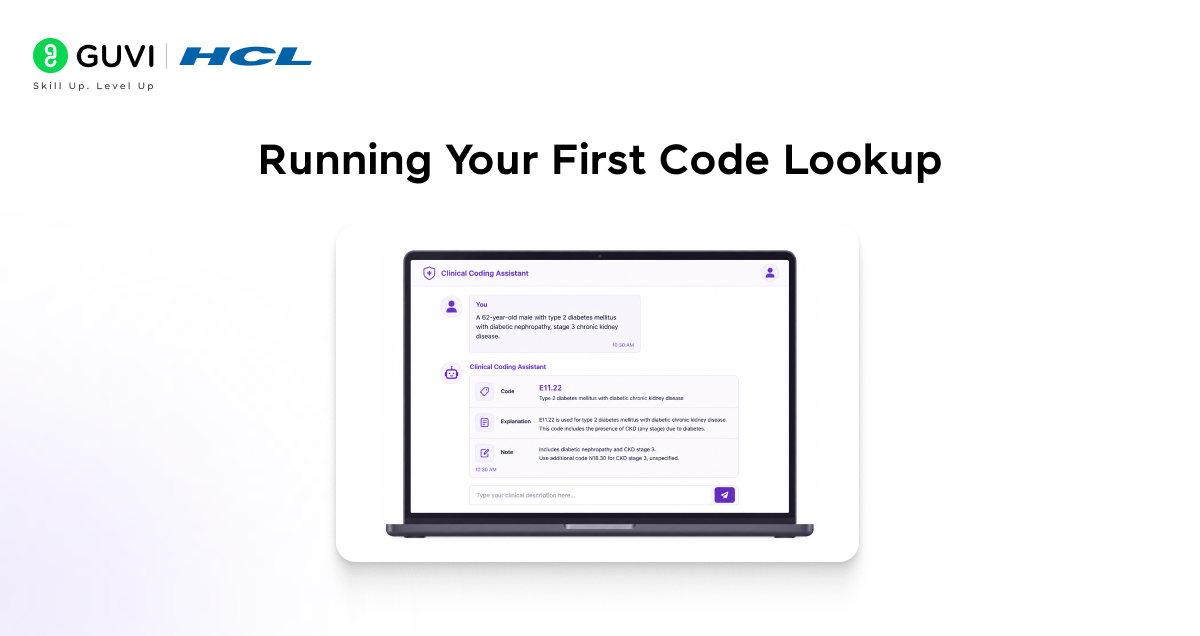
Once the connector is active, you can start asking questions straight away. You do not need to know the code format or structure. Describe what you are looking for the way you would describe it to a colleague.
Simple Lookups to Start With
- “What is the ICD-10 code for type 2 diabetes with diabetic chronic kidney disease, stage 3?”
- “Give me the code for a pathological fracture of the right femur due to osteoporosis.”
- “Is Z23 a valid billable code or do I need a more specific one?”
- “What does the excludes1 note on J44.1 mean?”
Claude will return the code, its full description, any relevant coding notes, and, where applicable, guidance on whether a secondary code is required or excluded.
If your description matches multiple possible codes, Claude will list the options and explain the clinical difference between them so you can select the most accurate one.
Step 4: Practical Prompts for Coders and Billing Teams
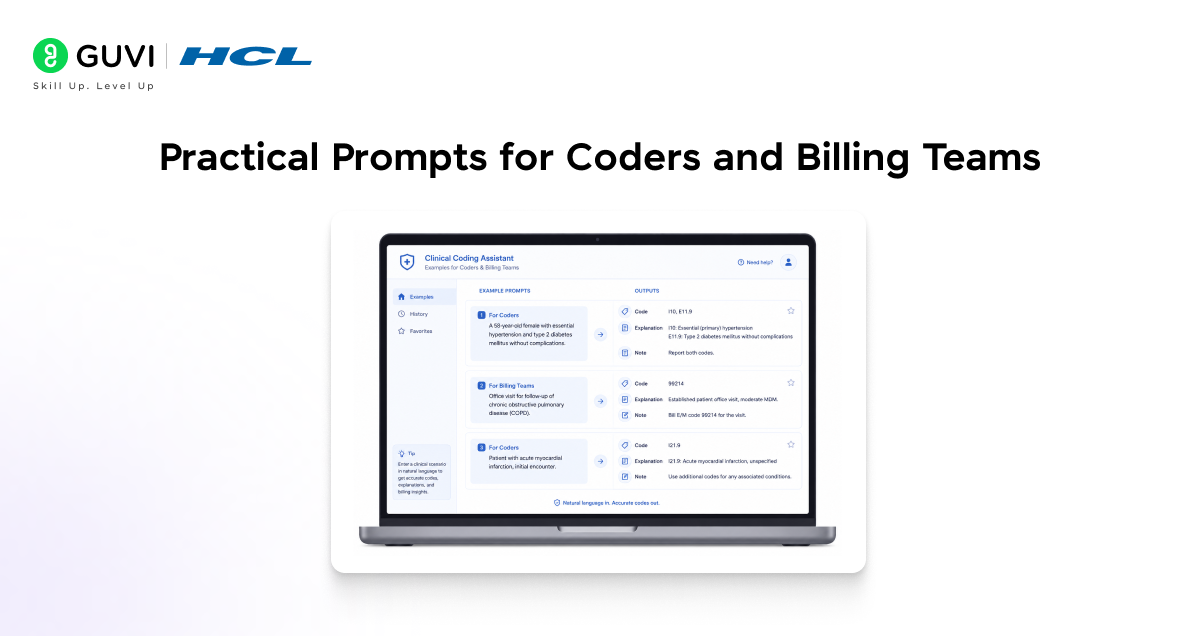
Here are prompts organised by the actual tasks medical coders and billing professionals handle day to day. These are ready to use as-is or adapt to your specific situation.
Diagnosis Code Lookups
- “What is the correct ICD-10-CM code for essential hypertension with stage 4 chronic kidney disease?”
- “Give me the code for major depressive disorder, recurrent, severe without psychotic features.”
- “What code do I use for a patient presenting with chest pain that is unspecified?”

Code Validation and Guidelines
- “Is E11.65 a billable code? What does it cover?”
- “What is the coding guideline for sequencing diabetes and CKD — which goes first?”
- “Explain the difference between I10 and I11 for hypertension.”
- “When do I use Z codes as a primary diagnosis versus a secondary code?”
Procedure Code Lookups (ICD-10-PCS)
• “What is the ICD-10-PCS code for a laparoscopic cholecystectomy?”
• “Give me the PCS code for a total knee replacement using a synthetic substitute, right knee.”
• “Explain the seven-character structure for this PCS code: 0RG00J0.”
Coding Scenario Questions
- “A patient is admitted with sepsis due to MRSA. What ICD-10 codes do I need and how do I sequence them?”
- “Patient has both COPD and acute bronchitis. Do I code both? Which is principal?”
- “What is the correct code for pressure ulcer, stage 2, right heel?”
A 2023 AHIMA survey found that medical coders spend around 30–40% of their time on code lookup and verification. With the ICD-10 connector in Claude, routine lookups can be handled in seconds, allowing coders to focus on complex cases that require clinical judgment and detailed chart review.
Step 5: What the ICD-10 Connector Claude Cannot Do
The connector is a powerful lookup and guidance tool. It is not a coding engine, a compliance system, or a replacement for a certified coder. Being clear about the limits matters, especially in a healthcare context.
Current Limitations
- Claude cannot code from a patient chart. It cannot read your EHR, clinical notes, or discharge summary. It answers questions about codes, but it does not perform autonomous coding on clinical documentation.
- Claude cannot guarantee payer acceptance. Codes may be correct per ICD-10 guidelines, but still denied by a specific payer due to their own LCD or NCD policies. Always verify against payer-specific coverage rules.
- Claude does not replace a certified medical coder. Complex cases, especially inpatient DRG coding, HCC risk adjustment, and cases with complication/comorbidity considerations, require trained professional review.
- Claude cannot access CPT or HCPCS codes through this connector. For outpatient procedure coding, you will need a separate reference.
- Claude does not know your payer mix or contract terms. Its guidance is based on the published CMS ICD-10 guidelines, not your organisation’s specific billing rules.
Think of Claude with the ICD-10 connector as a highly knowledgeable coding reference that is available instantly, not an autonomous coding system. Clinical judgement and professional responsibility still sit with your team.
Tips for Getting the Best Results
A few habits will make your experience with the connector noticeably more effective from the start.
Write Like You Are Describing the Case
- Include laterality when relevant: right, left, or bilateral. ICD-10 codes are often laterality-specific.
- Specify type and severity type 1 vs. type 2 diabetes, stage of CKD, and degree of a burn.
- Mention acuity: acute, chronic, acute-on-chronic. These distinctions drive different codes.
For Team Use
- Use Claude to train newer coders, ask it to explain coding guidelines in plain language as a teaching tool.
- Use a Claude Team workspace so all coders share connector access without individual setup.
- Pair Claude with your internal coding policies, paste your organisation’s coding guidelines into the chat for scenario-specific guidance.
If you want to learn more about building skills for Claude Code and automating your procedural knowledge, do not miss the chance to enroll in HCL GUVI’s Intel & IITM Pravartak Certified Artificial Intelligence & Machine Learning courses. Endorsed with Intel certification, this course adds a globally recognized credential to your resume, a powerful edge that sets you apart in the competitive AI job market.
Conclusion
The ICD-10 connector Claude integration gives coders and billing teams instant, plain-English access to the full ICD-10 code set, including codes, descriptions, guidelines, and sequencing rules, without leaving Claude.
It is read-only, covers both ICD-10-CM and ICD-10-PCS, and requires no technical setup. It does not replace clinical judgement or certified coding expertise, but it removes the lookup and reference steps that consume a large part of a coder’s day.
For teams doing high-volume coding work, the ICD-10 connector Claude combination is the fastest path from a documented diagnosis to the correct, verified code.
Frequently Asked Questions
Q1. What is the ICD-10 connector in Claude?
The ICD-10 connector is a native integration in Claude that gives you direct access to the full ICD-10-CM and ICD-10-PCS code sets. You can look up codes by description, check coding guidelines, validate billability, and get sequencing guidance all in plain English, inside the Claude chat interface.
Q2. Does the ICD-10 connector Claude integration cover ICD-10-PCS as well as ICD-10-CM?
Yes. The connector covers both ICD-10-CM, which is used for diagnosis coding across outpatient and inpatient settings, and ICD-10-PCS, which is used for inpatient hospital procedure coding. You can ask about either code set in the same conversation.
Q3. Is the ICD-10 connector free to use?
The connector itself is included with the Claude Pro, Team, and Enterprise plans. There is no additional fee for the connector since ICD-10 is a publicly published CMS code set. You do need a paid Claude plan to access it.
Q4. Can Claude code a patient chart using the ICD-10 connector?
No. Claude cannot read your EHR, patient records, or clinical documentation. It answers questions about ICD-10 codes and guidelines based on what you describe to it in the chat. Coding from a chart still requires a trained coder reviewing the actual clinical documentation.
Q5. Does the connector access my patient data or the EHR system?
No. The ICD-10 connector accesses only the publicly published CMS ICD-10 code set. It has no connection to your EHR, practice management system, or any patient records. No patient data is involved at any point.
Success Stories

About the Author
Vishalini Devarajan
An Aerospace Engineer turned content writer, I focus on making complex concepts easy to understand through well-structured, reader-friendly blogs. Whether it’s a technical topic or a non-technical one, I love creating content that is clear, engaging, and impactful.
View all posts by Vishalini Devarajan
Connect with me @










Did you enjoy this article?