


VFX Articles
Top 16 AI-Driven Tools for 3D Animation and VFX
9 Must-Know VFX Project Ideas for Beginners in 2026


Get In Touch For Details! Request More Information
What is a Green Screen? How It Works, Uses, Setup, Chroma Key Guide 2026
Sep 30, 2026 6 Min Read 8024 Views
(Last Updated)
Table of contents
- TL;DR
- Introduction
- What is a Green Screen?
- What Exactly Does a Green Screen Do, and How Does It Work?
- Why Is Green Used for Green Screens?
- Green Screen vs Blue Screen
- Where is a Green Screen Used, and For What?
- How to Set Up a Green Screen
- The Future of Green Screen Technology
- Integration with Virtual and Augmented Reality
- High-Resolution and HDR Adaptations
- Enhanced Accessibility and Democratization
- Sustainable Practices
- Widespread Applications in Non-Entertainment Sectors
- Common Green Screen Mistakes To Avoid
- Advantages of Using a Green Screen
- Creative Flexibility
- Cost Efficiency
- Production Flexibility
- Wide Range of Applications
- Disadvantages of Green Screens
- Lighting Requirements
- Green Spill
- Post-Production Work
- Clothing and Props
- Edge Problems
- Green Screen vs LED Wall: What's the Difference?
- The Future of Green Screen Technology
- Integration with Virtual and Augmented Reality
- High-Resolution and HDR Adaptations
- Enhanced Accessibility and Democratization
- Sustainable Practices
- Widespread Applications in Non-Entertainment Sectors
- Take Your Digital Skills Further With HCL GUVI
- Concluding Thoughts…
- FAQs
- What is a green screen used for?
- What are the disadvantages of green screen?
- What is green screen on phone?
- Why does VFX use a green screen?
- What is better than a green screen?
- Why is green used for green screens?
- Is Green Screen better than Blue Screen?
TL;DR
- A green screen is a green-colored backdrop used to separate a person or object from its background during video production or photography.
- Chroma key software detects the green color and removes it, allowing editors to replace the background with another image, video, animation, or virtual environment.
- Green screens are commonly used in: Movies and television, VFX and filmmaking, Photography, News and weather broadcasting, YouTube videos, Live streaming, Gaming, Education and training and Corporate presentations.
Introduction
Come on, you’ve seen those green screens right? How they just magically give you the background you desire, you could be in India and the green screen would show you’re in Paris!
In the dynamic landscape of visual effects, green screen technology—technically termed chroma key compositing has emerged as an indispensable tool for content creators.
Its ability to seamlessly integrate real-world subjects into digitally crafted environments has revolutionized filmmaking, broadcasting, photography, and live streaming.
Through this guide, I aim to give you a complete understanding of what green screens are, their usage, their applications, and how advancements in this domain continue to redefine visual storytelling.
What is a Green Screen?
A green screen is an advanced visual effects methodology used to digitally replace the physical background of a scene with alternate imagery or video.
The green background is later removed digitally using chroma key technology. Once the green area is removed, another background can be placed behind the subject.
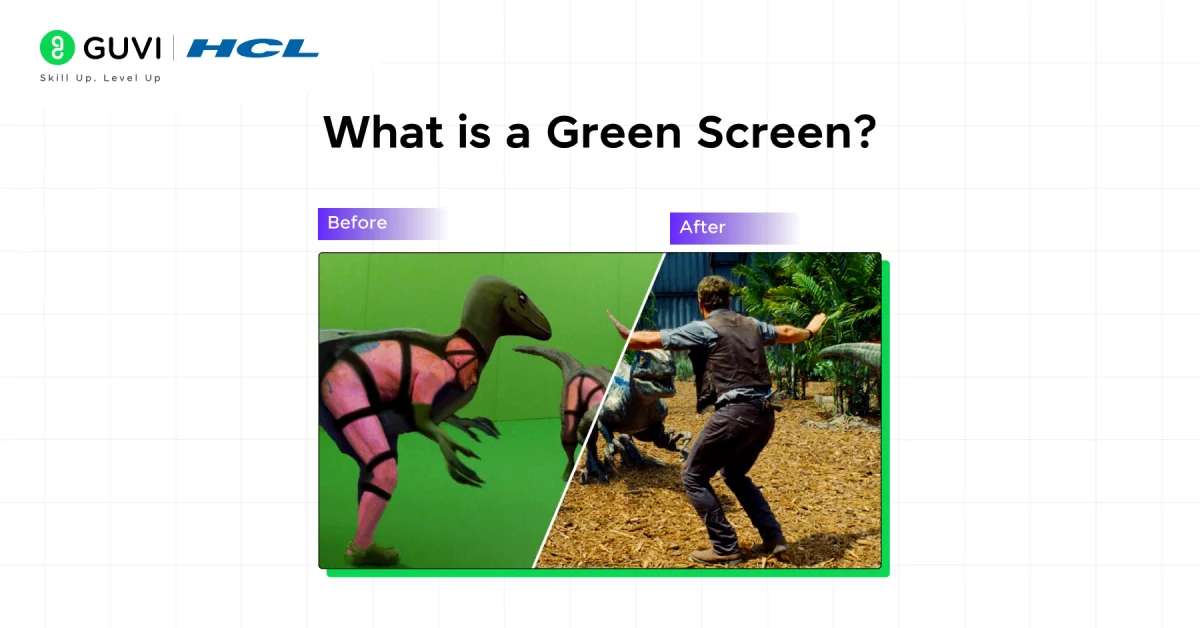
For example, a filmmaker could record an actor in front of a green screen and later place that actor inside a digitally created city, spaceship, battlefield, or fantasy environment.
This allows creators to produce environments that may be expensive, dangerous, difficult, or impossible to film in real life.
The first famous chroma-key screen was actually blue, not green. In 1940, Lawrence W. Butler used a blue-screen travelling matte technique for The Thief of Bagdad. The film went on to win the Academy Award for Best Special Effects. Green screen later became more common as film and television technology evolved.
What Exactly Does a Green Screen Do, and How Does It Work?
A green screen facilitates the replacement of a physical background with a digital image or video, allowing for limitless creative possibilities.
The process hinges on chroma key technology, which digitally identifies and removes specific color values in this case, green, making the background transparent and enabling the addition of alternate imagery.
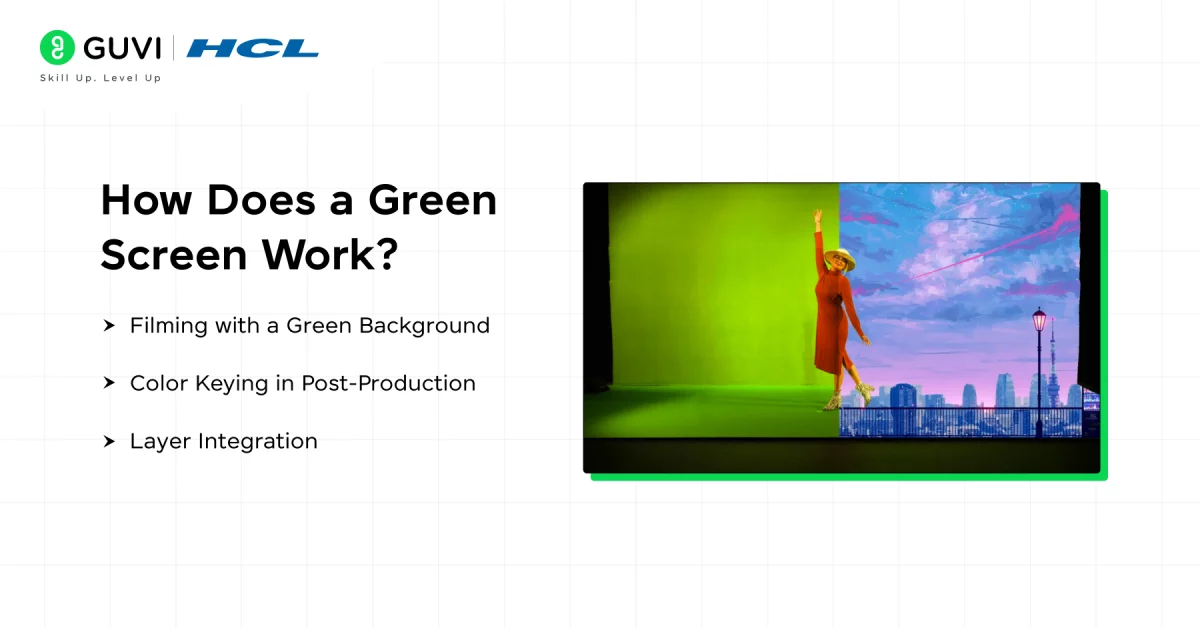
Here’s a step-by-step explanation of how it works:
- Filming with a Green Background:
- Subjects are filmed or photographed in front of a uniformly lit green screen.
- The screen’s uniform color ensures that software can easily isolate it without interference from the subject.
- Even lighting is also important because shadows and bright spots can make the green background inconsistent.
- Color Keying in Post-Production:
- Chroma key software identifies the green hue and renders it transparent, revealing an underlying digital layer.
- Advanced algorithms handle edge details and color spill, preserving the integrity of the subject.
- Modern editing tools can also help refine difficult areas such as hair, edges, lighting, contrast, brightness, shadows, color, and small details.
- Layer Integration:
- Background images, CGI elements, or dynamic video sequences are layered behind the subject.
- Tools like edge blending and color correction ensure the composite looks realistic.
This process underscores the importance of precise lighting, high-resolution equipment, and specialized software to achieve seamless results.
Why Is Green Used for Green Screens?
Green is commonly used because it provides strong color separation from many subjects, particularly human skin tones.
It is also highly visible to digital cameras, making it easier for chroma key software to identify and remove.
However, green is not always the best choice.
If a subject is wearing green clothing or contains green objects, those areas can also be affected during the keying process. In such situations, a blue screen may be more suitable.
Green Screen vs Blue Screen
Green and blue screens work using the same basic chroma key principle, but the choice depends on the subject, lighting, camera setup, and production requirements.
| Feature | Green Screen | Blue Screen |
| Basic technology | Chroma key | Chroma key |
| Background color | Green | Blue |
| Common use | Film, streaming, broadcasting, VFX | Film, VFX, scenes requiring blue separation |
| Clothing consideration | Avoid green clothing | Avoid blue clothing |
| Main purpose | Background removal | Background removal |
| Best choice | Depends on the scene | Depends on the scene |
The important point is that green is not automatically better than blue. The right choice depends on the production setup and the colors present in the scene.
Not sure whether to use a blue or green screen? Check out our guide on Blue Screen and Green Screen: 12 Key Differences To Consider to compare both and understand when to use each.
Where is a Green Screen Used, and For What?
Green screen technology has transformed numerous industries by enabling creative possibilities that were once impractical. Here are key applications:
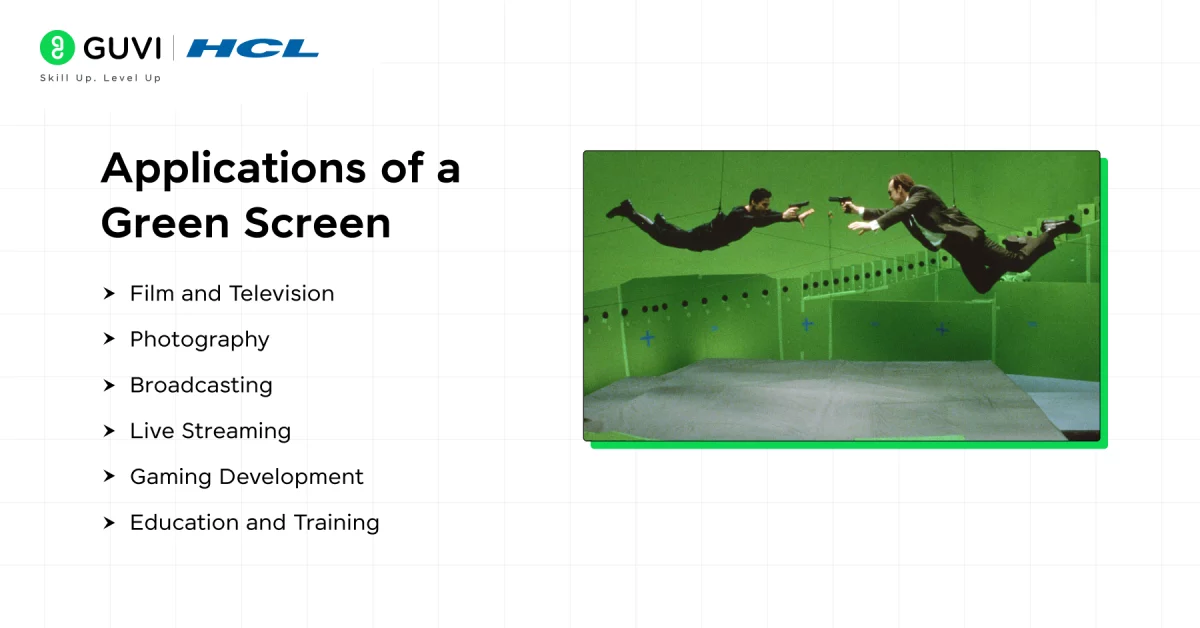
| Industry | Use Case |
| Film and Television | Enables the creation of fantastical worlds, action sequences, and VFX-intensive scenes. |
| Photography | Used for customizable backgrounds in commercial, portrait, or fashion shoots. |
| Broadcasting | Integral to virtual newsrooms and weather reports with real-time compositing. |
| Live Streaming | Allows streamers to craft personalized virtual settings for gaming or webinars. |
| Gaming Development | Used in motion capture and CGI integration for creating realistic game environments. |
| Education and Training | Facilitates immersive e-learning experiences with virtual classrooms or simulation scenarios. |
How to Set Up a Green Screen
Using a green screen effectively requires a combination of proper setup, filming techniques, and post-production workflows. Below is a step-by-step guide:
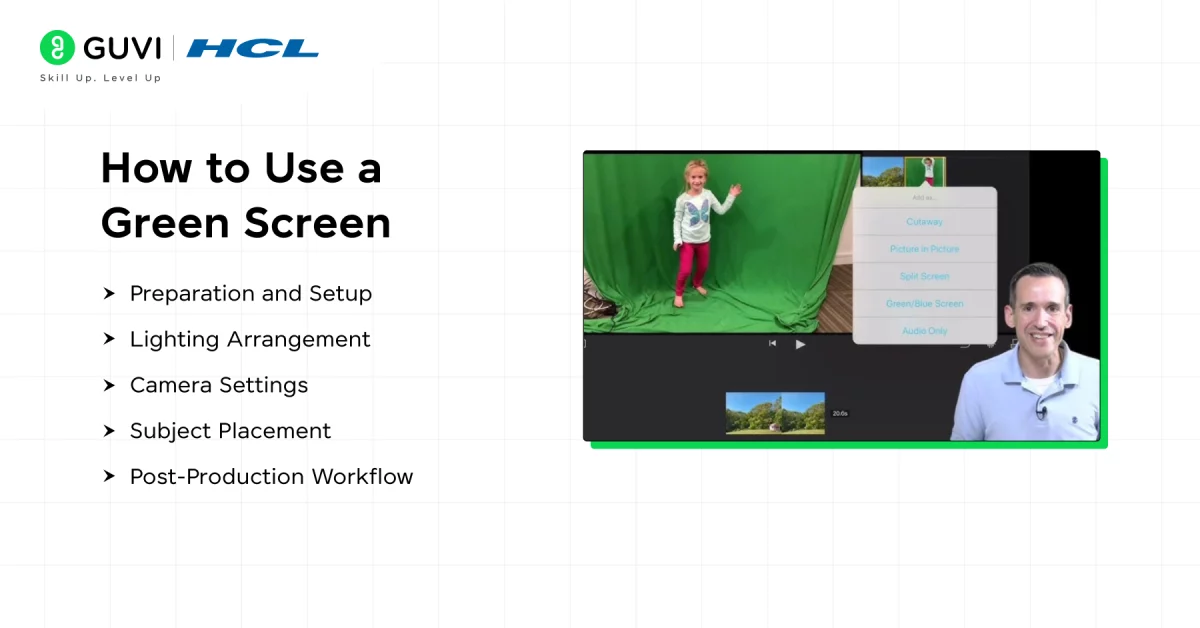
- Preparation and Setup:
- Choose a high-quality green screen material, such as non-reflective fabric or chroma paint, for optimal results.
- Ensure the screen is taut, wrinkle-free, and evenly lit to avoid shadows or inconsistencies.
- Lighting Arrangement:
- Use soft, diffused lighting to illuminate the screen uniformly, minimizing hotspots or dark areas.
- Position separate lighting for the subject to prevent green spill (light reflecting onto the subject from the screen).
- Camera Settings:
- Use a camera capable of capturing sufficient detail for the intended production.
- Pay attention to resolution, white balance, exposure, focus, and frame rate.
- Consistent camera settings can make the post-production process easier.
- Subject Placement:
- Maintain a distance of 6–10 feet between the subject and the screen to reduce green spill.
- Avoid clothing or accessories in shades of green to prevent unintentional blending.
- Post-Production Workflow:
- Import footage into professional compositing software (e.g., Adobe After Effects or DaVinci Resolve).
- Use chroma keying tools to remove the green background and refine the edges with masking and spill suppression.
- Integrate the subject with the desired digital background, applying color grading and lighting adjustments for seamless blending.
The Future of Green Screen Technology
Green screen technology has been a cornerstone of visual effects for decades, but its evolution is far from complete. As the demands for immersive storytelling and efficient production grow, green screen techniques are poised to undergo significant advancements, ensuring their relevance in the future of content creation.
1. Integration with Virtual and Augmented Reality
- Mixed Reality Studios: Green screens are finding a place in mixed reality setups, where real-world actors are seamlessly integrated with virtual environments. This is especially impactful in gaming, VR simulations, and training applications.
- AR and Live Interactions: In broadcasting and live streaming, green screens are being combined with augmented reality (AR) to create dynamic, interactive visual elements.
2. High-Resolution and HDR Adaptations
- With the proliferation of 4K, 8K, and HDR (High Dynamic Range) content, green screens are adapting to ensure seamless integration with high-resolution visuals. Advanced keying techniques are required to match the intricate lighting and color details in these formats.
3. Enhanced Accessibility and Democratization
- Low-Cost Software: Open-source and affordable chroma keying software is making green screen technology accessible to independent filmmakers and small businesses.
- Simplified Tutorials and Tools: Platforms like YouTube and TikTok are leveraging green screen technology to empower everyday users with tools that were once exclusive to professionals.

4. Sustainable Practices
- The future of green screen technology is also being shaped by the industry’s push for sustainability. Digital effects reduce the need for location shoots, lowering the carbon footprint associated with on-site production.
5. Widespread Applications in Non-Entertainment Sectors
- Education and Training: Virtual classrooms and simulations powered by green screens are making education more engaging and accessible.
- Corporate Presentations: Professionals are using green screens for visually compelling presentations and remote conferences.
Inside Llewyn Davis had around 400 visual-effects shots, including many driving scenes that were filmed using green-screen techniques instead of shooting on the road.
Common Green Screen Mistakes To Avoid
A green screen can produce poor results if the filming setup is not handled carefully.
Some common problems include:
- Uneven lighting: Different shades of green make keying more difficult.
- Wrinkled screens: Wrinkles create shadows and inconsistent colors.
- Subject standing too close: This can increase green spill and shadows.
- Green clothing: Clothing can disappear along with the background.
- Poor edge separation: Fine details such as hair can become difficult to isolate.
- Incorrect color matching: The subject may look unnatural against the new background.
- Insufficient lighting: A poorly lit subject can make the final composite look unrealistic.
Advantages of Using a Green Screen
Green screen technology offers several practical benefits.
Creative Flexibility
Creators can place subjects in almost any digital environment without physically traveling there.
Cost Efficiency
Digital backgrounds can reduce the need to construct or travel to certain physical locations.
Production Flexibility
The same footage can potentially be combined with different backgrounds during editing.
Wide Range of Applications
Green screens are useful for everything from movies and photography to livestreams and educational content.
Disadvantages of Green Screens
Green screens also have limitations.
Lighting Requirements
The background needs to be lit consistently to achieve clean results.
Green Spill
Green light can reflect onto the subject, particularly when the subject is positioned too close to the screen.
Post-Production Work
Removing the background and refining the composite requires editing and compositing work.
Clothing and Props
Green objects can become difficult to distinguish from the background.
Edge Problems
Fine details such as hair, transparent objects, and motion can require additional editing.
Green Screen vs LED Wall: What’s the Difference?
Green screens and LED walls can both be used to create virtual environments, but they work differently.
| Feature | Green Screen | LED Wall |
| Background | Physical green surface | Large LED display |
| Background replacement | Usually done through chroma keying | Digital environment displayed directly |
| Post-production | Often required for background removal | Can reduce some compositing requirements |
| Reflections | Must be created or adjusted digitally | Can appear naturally on reflective surfaces |
| Lighting | Requires separate scene lighting | LED environment can contribute to scene lighting |
| On-set visualization | Limited | Allows actors and crew to see the digital environment |
LED walls and virtual production can be useful for certain productions, while green screens remain a practical option for many other workflows.
The Future of Green Screen Technology
Green screen technology has been a cornerstone of visual effects for decades, but its evolution is far from complete.
As the demands for immersive storytelling and efficient production grow, green screen techniques are poised to undergo significant advancements, ensuring their relevance in the future of content creation.
1. Integration with Virtual and Augmented Reality
- Mixed Reality Studios: Green screens are finding a place in mixed reality setups, where real-world actors are seamlessly integrated with virtual environments. This is especially impactful in gaming, VR simulations, and training applications.
- AR and Live Interactions: In broadcasting and live streaming, green screens are being combined with augmented reality (AR) to create dynamic, interactive visual elements.
2. High-Resolution and HDR Adaptations
- With the proliferation of 4K, 8K, and HDR (High Dynamic Range) content, green screens are adapting to ensure seamless integration with high-resolution visuals.
- Advanced keying techniques are required to match the intricate lighting and color details in these formats.
3. Enhanced Accessibility and Democratization
- Low-Cost Software: Open-source and affordable chroma keying software is making green screen technology accessible to independent filmmakers and small businesses.
- Simplified Tutorials and Tools: Platforms like YouTube and TikTok are leveraging green screen technology to empower everyday users with tools that were once exclusive to professionals.
4. Sustainable Practices
- The future of green screen technology is also being shaped by the industry’s push for sustainability. Digital effects reduce the need for location shoots, lowering the carbon footprint associated with on-site production.
5. Widespread Applications in Non-Entertainment Sectors
- Education and Training: Virtual classrooms and simulations powered by green screens are making education more engaging and accessible.
- Corporate Presentations: Professionals are using green screens for visually compelling presentations and remote conferences.

Take Your Digital Skills Further With HCL GUVI
Interested in building practical skills beyond visual effects and content creation? HCL GUVI’s Zen Class offers industry-focused learning with hands-on projects and mentorship to help learners build job-ready technical skills.
Concluding Thoughts…
Green screen technology stands as a cornerstone of modern content creation, offering unmatched versatility and cost-effectiveness.
By mastering its technical aspects from setup to post-production, creators can produce professional-grade visuals with ease.
This comprehensive guide has helped you know all there is to know about green screens, how they work, how and where they’re used, and how this information has been helpful to you.
If you have any doubts, reach out to us in the comments section below.
FAQs
1. What is a green screen used for?
A green screen is used in filmmaking, photography, and VFX to replace the background with digital or virtual imagery, enabling seamless integration of actors or objects into different settings.
2. What are the disadvantages of green screen?
Disadvantages of green screens include lighting challenges, color spill on subjects, the need for precise editing, and limitations when subjects wear green or reflective clothing.
3. What is green screen on phone?
Green screen on a phone refers to mobile apps or features that allow users to replace or edit backgrounds in photos and videos using chroma key technology.
4. Why does VFX use a green screen?
VFX uses green screens because green contrasts well with most skin tones and is easier to isolate digitally, making it ideal for replacing backgrounds in post-production.
5. What is better than a green screen?
LED walls and virtual production techniques are considered better than green screens for some applications, as they provide realistic lighting, reflections, and on-set visualization without post-production compositing.
6. Why is green used for green screens?
Green provides strong colour separation from many subjects and skin tones, making it relatively easy for cameras and chroma key software to identify and remove.
7. Is Green Screen better than Blue Screen?
Neither is universally better. The choice depends on the subject, clothing, lighting, scene, camera setup, and production requirements.
Success Stories

About the Author
Jaishree Tomar
A recent CS Graduate with a quirk for writing and coding, a Data Science and Machine Learning enthusiast trying to pave my own way with tech. I have worked as a freelancer with a UK-based Digital Marketing firm writing various tech blogs, articles, and code snippets. Now, working as a Technical Writer at GUVI writing to my heart’s content!
View all posts by Jaishree Tomar
Connect with me @













Did you enjoy this article?