


Artificial Intelligence and Machine Learning Articles
How to Evaluate LLM Outputs in Production Deployments
AI/ML Skills Gap 2026: Why Companies Can't Find Job-Ready Talent
20 AI/ML Interview Questions Recruiters Can Use Without a Tech Background - Best Guide
How Industry-Backed AI/ML Bootcamps Are Changing the AI/ML Hiring Pipeline - Best Guide 2026


Get In Touch For Details! Request More Information

The Complete CLAUDE.md Guide (2026): Set Up Claude Code to Think Like Your Team
Jul 02, 2026 5 Min Read 1262 Views
(Last Updated)
If you have ever opened Claude Code and had to re-explain your project rules from scratch, you need a CLAUDE.md file. This one file tells Claude everything about your project before you type a single message. It sets the stack, the rules, and the workflow so every session starts exactly where the last one left off.
Think of it as the onboarding document you wish every new developer had read before touching your codebase. Set it up once, and Claude Code behaves less like a generic AI tool and more like a teammate who already knows how your team works.
Quick Answer
A CLAUDE.md file is a plain text instruction file placed in your project folder. Claude Code reads it automatically at the start of every session and follows the rules inside it. You write it once, and it saves you from repeating yourself every time.
Table of contents
- What Is a CLAUDE.md File
- How the CLAUDE.md Hierarchy Works
- What Is CLAUDE.local.md
- What to Put in Your CLAUDE.md File
- Project Overview
- Tech Stack and Dependencies
- Folder Structure and Conventions
- Coding Style Rules
- Commands and Workflows
- Writing Rules the Right Way
- A Simple CLAUDE.md Template
- Claude Code Pricing in 2026
- Tips for Getting the Most Out of CLAUDE.md
- 💡 Did You Know?
- Conclusion
- FAQs
- Does Claude Code read CLAUDE.md automatically or do I have to mention it
- Can I have a CLAUDE.md file for each folder in my project?
- What is the difference between CLAUDE.md and CLAUDE.local.md?
- How long should my CLAUDE.md file be?
- Do I need a paid plan to use Claude Code?
What Is a CLAUDE.md File
A CLAUDE.md file is a simple text file that lives inside your project folder. Claude Code reads it automatically every time you start a new session. You do not need to paste it into the chat or type any special command.
Here is why it matters:
- Claude Code has no memory between sessions. Every new conversation starts completely fresh.
- Without CLAUDE.md, you waste time re-explaining your stack, rules, and preferences every session.
- With CLAUDE.md, Claude already knows your project before you type a single word.
- Teams commit it to Git so every developer gets the same consistent Claude behavior.
- New hires onboard faster because CLAUDE.md doubles as living documentation.
Do check out the HCL GUVI AI & ML Course if you want to build real-world AI applications and master tools like Claude, LLM workflows, prompt engineering, and AI automation. This industry-focused program covers machine learning, deep learning, NLP, Generative AI, and hands-on AI projects with live mentor support, helping you become job-ready for the fast-growing AI industry.
How the CLAUDE.md Hierarchy Works
Claude Code reads a layered stack of files from broad to specific. Here is how it works:
| Scope | File Location | Purpose | Committed to Git |
| Global | ~/.claude/CLAUDE.md | Rules for all your projects | No |
| Project root | /your-project/CLAUDE.md | Team-wide project rules | Yes |
| Subfolder | /your-project/src/CLAUDE.md | Rules for that folder only | Yes |
| Personal | /your-project/CLAUDE.local.md | Private notes and shortcuts | No |
How the layering works:
- Rules in a subfolder file apply only inside that folder
- Rules in the project root apply to the whole project
- Rules in the global file apply across every project you open
- Project-level rules always override global rules when there is a conflict
What Is CLAUDE.local.md
CLAUDE.local.md is a new file introduced in 2026. It is your personal layer on top of the team file.
- Use it for work-in-progress notes, your local DB port, personal shortcuts, and reminders about what you are currently working on
- Do not use it for team rules, stack info, or anything others need to know
- Always add it to .gitignore so it never gets committed
How Long Should Your CLAUDE.md Be
- Keep it under 200 lines. The entire file is injected as tokens into every Claude Code request. A bloated file slows things down and increases cost.
- Around 100 lines is the sweet spot most experienced teams land on.
- If a rule does not change Claude’s behavior, leave it out.
What to Put in Your CLAUDE.md File
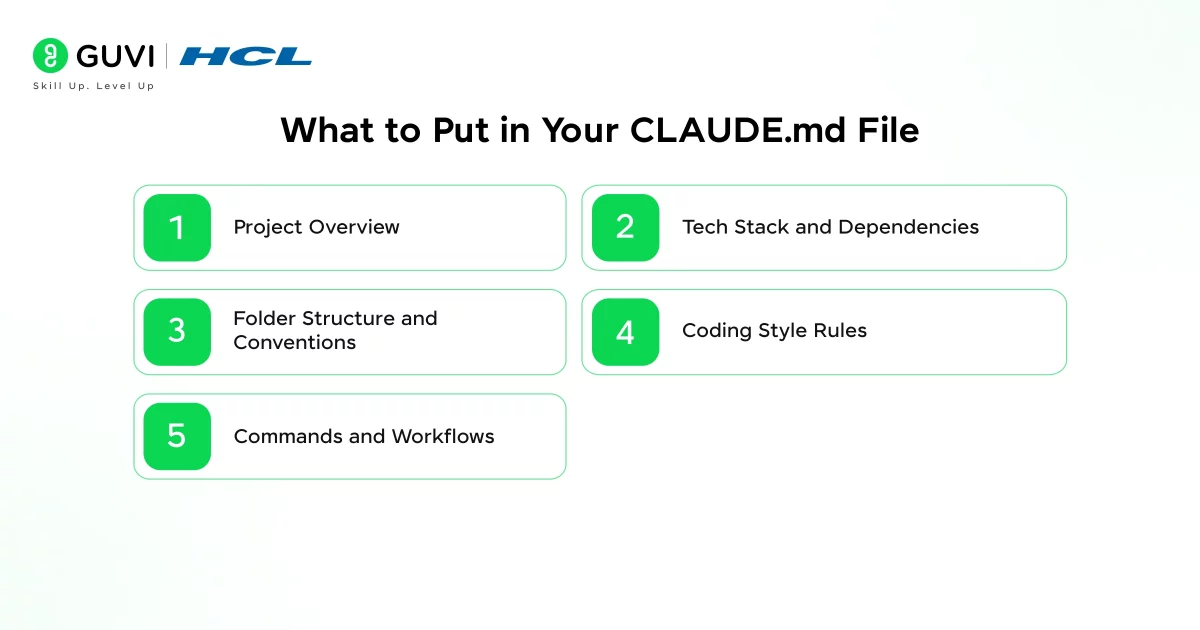
The best way to structure your CLAUDE.md is using the WHAT/WHY/HOW framework. For every rule, ask: What should Claude do? Why does this rule exist? How should it be carried out? If you leave out one of the three, Claude fills in the gap on its own.
1. Project Overview
- What does the project do?
- Who is it for?
- What is the main tech stack?
Two to three sentences is enough. Claude needs this to understand the purpose of every file it touches.
2. Tech Stack and Dependencies
List your main technologies clearly:
- Programming language and version (e.g., TypeScript 5.x)
- Framework (e.g., Next.js 14)
- Database and ORM (e.g., PostgreSQL via Prisma)
- Test runner (e.g., Vitest)
- Package manager (e.g., pnpm)
3. Folder Structure and Conventions
Tell Claude where things live:
- Where do components go?
- Where do tests go?
- Where do new utility functions belong?
4. Coding Style Rules
Be specific about:
- Tab size and indentation
- Single quotes or double quotes
- Semicolons yes or no
- Naming conventions (PascalCase for components, camelCase for utilities)
- Linting and formatting tools you use
5. Commands and Workflows
List the commands Claude should know:
- How do you run tests?
- How do you build for production?
- How do you lint?
- Is there a specific deployment script?
Writing Rules the Right Way
When you write “Do NOT use semicolons,” the word semicolons stays active in Claude’s attention. The negation does not erase the concept. Claude still thinks about it and sometimes includes it anyway. Always flip negative rules into positive ones:
| Instead of Writing This | Write This Instead |
| Do NOT use var | Always use const or let |
| Do NOT write inline styles | All styles go in CSS modules |
| Do NOT use console.log | Use the logger utility for all logging |
| Do NOT create files in /src directly | New files go in the appropriate subfolder |
| Do NOT use any type in TypeScript | Always define explicit types |
Community testing across multiple projects shows that flipping negations to positive instructions cuts rule violations roughly in half.
A Simple CLAUDE.md Template
Copy this into your project root and fill in your details:
## Project Overview
[Project name] is a [what it does] built with [stack]. It serves [who uses it].

## Tech Stack
- Language: TypeScript 5.x
- Framework: Next.js 14
- Database: PostgreSQL via Prisma
- Testing: Vitest
- Package manager: pnpm

## Folder Structure
- /src/components: Reusable UI components
- /src/lib: Utility functions and helpers
- /src/app: Next.js app router pages
- /tests: All test files mirror /src structure

## Code Style
- Use const by default, let when reassignment is needed
- All strings use single quotes
- CSS goes in .module.css files only
- Components use PascalCase, utilities use camelCase
- All functions must have explicit return types

## Commands
- pnpm dev: Start development server
- pnpm test: Run test suite
- pnpm lint: Run ESLint
- pnpm build: Production build

## Key Rules
- New API routes go in /src/app/api only
- All database queries go through Prisma client in /src/lib/db.ts
- Write tests for every new utility function
- Commit messages follow conventional commits format

Claude Code Pricing in 2026
Claude Code is not available on the free Claude.ai tier. You need at least a paid plan to get started:
| Plan | Monthly Cost (USD) | Monthly Cost (INR approx.) | Best For |
| Pro | $20 | ₹1,670 | Individual developers, light use |
| Max 5x | $100 | ₹8,350 | Heavy daily use, most popular |
| Max 20x | $200 | ₹16,700 | Power users and intensive workloads |
| Teams / Enterprise | Custom | Custom | Organizations needing admin and SSO |
All plans above Pro include Claude Code access. The Max 5x plan at $100 per month is the most popular choice among developers who use Claude Code daily.
Do check out HCL GUVI’s AI & ML 5-Day Email Course if you want a quick and beginner-friendly introduction to AI, machine learning, Generative AI, and modern AI tools like Claude. This free email course delivers practical lessons, real-world AI use cases, career guidance, and a clear roadmap to help you start building AI-powered projects with confidence.
Tips for Getting the Most Out of CLAUDE.md
- Update it after mistakes. When Claude does something wrong that a rule should have caught, add that rule. The best CLAUDE.md files are built from real sessions, not written perfectly on day one.
- Use WHAT/WHY/HOW for important rules. “Use the logger utility because console.log gets stripped in CI, by importing from /src/lib/logger.ts” is far more effective than just “use logger.”
- Split rules by folder in monorepos. A project with a frontend and a backend benefits from separate CLAUDE.md files in each package folder.
- Review it every two weeks. Your project evolves and your CLAUDE.md should too.
- Keep personal notes in CLAUDE.local.md. Anything specific to your machine or current task belongs in the local file, not the shared one.
💡 Did You Know?
- CLAUDE.md works across every Claude interface including VS Code, JetBrains, the desktop app, and the web app, not just the terminal.
- Boris Cherny, a Staff Engineer at Anthropic, created Claude Code and introduced the CLAUDE.md convention as part of the core workflow.
- Around 4% of all public GitHub commits in 2025 were made with Claude Code assistance.
- Teams that commit CLAUDE.md to Git report faster onboarding because the file doubles as living documentation for AI workflow expectations.
Conclusion
Most developers treat Claude Code like a smart autocomplete. They ask, Claude answers, they correct, and they repeat. Every correction is time you could have saved with a better instruction up front.
A good CLAUDE.md changes that. Instead of steering Claude back on track after every few messages, you define the track before the session even starts. The result is faster development, more consistent code, and a much shorter gap between what you ask for and what you get.
Start with 20 to 30 lines. Cover your stack, your style, and your three most important rules. Commit it to Git. Use it for a week. Add corrections as new rules. Review every two weeks. That is the entire workflow.
FAQs
1. Does Claude Code read CLAUDE.md automatically or do I have to mention it
Claude Code reads it automatically at the start of every session. As long as the file exists in the right location, Claude picks it up without any extra steps.
2. Can I have a CLAUDE.md file for each folder in my project?
Yes. You can place a CLAUDE.md in any subfolder and Claude Code applies its rules only inside that folder. The root-level file still applies everywhere. This is especially useful in monorepos.
3. What is the difference between CLAUDE.md and CLAUDE.local.md?
CLAUDE.md is for team-wide rules and gets committed to Git. CLAUDE.local.md is for personal notes and stays on your machine only. Always add CLAUDE.local.md to your .gitignore.
4. How long should my CLAUDE.md file be?
Keep it under 200 lines. The file is injected as tokens into every request, so a very long file adds cost and slows responses. Around 100 lines covers most projects well.
5. Do I need a paid plan to use Claude Code?
Yes. Claude Code is not available on the free Claude.ai tier. You need at minimum a Pro plan at $20 per month. For daily heavy use, the Max 5x plan at $100 per month offers the best value.
Success Stories

About the Author
Jebasta
I translate the language of data into stories that anyone can understand. As a writer with a data science background, I simplify analytics, AI, and decision-making so beginners and enthusiasts can confidently explore the world of data.
View all posts by Jebasta
Connect with me @













Did you enjoy this article?