


Java Articles
Kafka Streams Tutorial: Build Your First Data Pipeline
What is ArrayList in Java: A Complete Guide
What is HashMap in Java: How It Works, Methods, and Examples


Get In Touch For Details! Request More Information
Spring Boot vs Traditional Spring: 5 Important Features That Changed Java Development
Jun 16, 2026 3 Min Read 607 Views
(Last Updated)
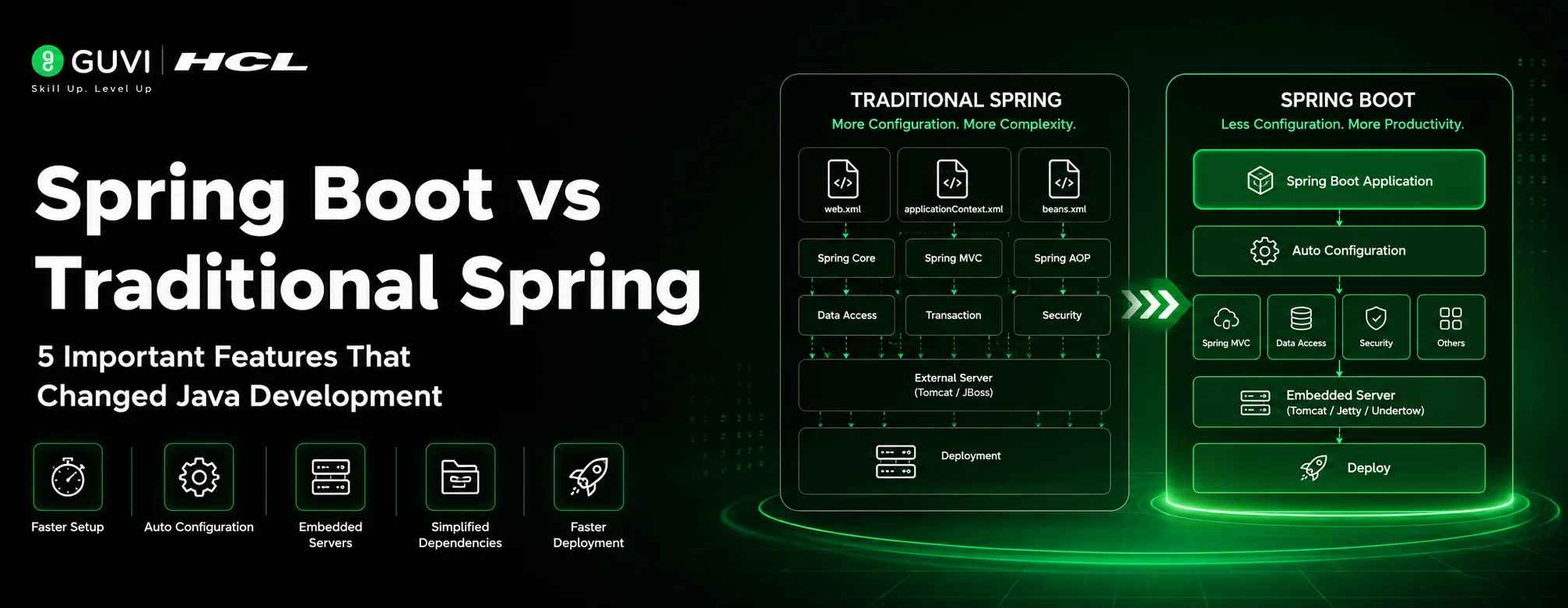
If you’ve been developing Java applications for over a decade, you’ve witnessed the evolution from traditional Spring Framework to Spring Boot. While both are built on the same core principles, Spring Boot represents a fundamental shift in how we build and deploy applications.
The difference is simple: Traditional Spring requires extensive manual configuration, while Spring Boot automates most of it through auto-configuration and sensible defaults.
Let’s explore what changed and why Spring Boot dominates modern Java development.
Table of contents
- Key Differences at a Glance
- Configuration: From Manual to Auto-Configuration
- Traditional Spring (The Old Way)
- Spring Boot (The New Way)
- Starter Dependencies: Simplified Project Setup
- Traditional Spring
- Spring Boot Starter Dependencies
- Embedded Servers: Standalone Deployment Made Simple
- Traditional Spring
- Spring Boot
- Production-Ready Features
- Traditional Spring
- Spring Boot
- Quick Setup: Spring Initializr
- Traditional Spring
- Spring Boot
- When to Use Which?
- Use Spring Boot When:
- Traditional Spring Still Works For:
- Final Verdict
- Further Reading
Key Differences at a Glance
| Feature | Traditional Spring | Spring Boot |
|---|---|---|
| Configuration | Manual XML/Java config app.studyraid | Manual XML/Java config app. studyraid |
| Setup Time | Hours to days | Minutes oreateai |
| Server | External (WAR deployment) app.studyraid | Embedded with JAR youtube |
| Dependencies | Manual version management app.studyraid | Pre-configured starters oreateai |
| Deployment | Complex WAR files oreateai | Simple executable JAR medium |
| Production Features | None (manual setup) | Actuator built-in medium |
| Learning Curve | Steep geeksforgeeks | Easy geeksforgeeks |
1. Configuration: From Manual to Auto-Configuration
Traditional Spring (The Old Way)
Traditional Spring demands explicit manual configuration for every component. Developers must write extensive XML files or Java configuration classes to define how beans interact, configure database connections, set up security, and wire together all application components. This approach is verbose, error-prone, and requires deep knowledge of Spring’s internals.
Key pain points:
- Writing and maintaining hundreds of lines of configuration
- Version compatibility issues between libraries
- Easy to make configuration mistakes
- Difficult to maintain as projects grow
Spring Boot (The New Way)
Spring Boot introduces auto-configuration, which automatically configures your application based on the dependencies present in your project. When you add a database library to your project, Spring Boot automatically configures the necessary data source without you writing any configuration code.
How it works:
- Spring Boot scans your classpath for dependencies
- Automatically configures beans based on detected libraries
- Applies sensible defaults for common settings
- Uses “convention over configuration” philosophy
Benefits:
- Massive reduction in boilerplate code
- Minimal decision-making required from developers
- Focus on business logic instead of infrastructure setup
- Intelligent defaults that work for most scenarios
2. Starter Dependencies: Simplified Project Setup
Traditional Spring
Setting up a traditional Spring project required manually selecting and managing dozens of dependencies. Developers had to research compatible library versions, download individual JAR files, and configure them in their build file. This version management was time-consuming and often led to compatibility issues.
Spring Boot Starter Dependencies
Spring Boot provides pre-configured starter modules that bundle compatible dependencies together. Instead of managing 50 individual dependencies, you simply add one starter dependency, and Spring Boot handles everything.
Popular starters include:
- Web application starter
- Database with JPA starter
- Security starter
- Testing starter
- Monitoring and metrics starter
Advantages:
- No version conflicts — all dependencies are compatible
- One-line setup for common application types
- Reduced complexity in build configuration
- Better documentation for each starter type
3. Embedded Servers: Standalone Deployment Made Simple
Traditional Spring
Traditional Spring applications required external server deployment. You had to build a WAR file, deploy it to a separately installed Tomcat, JBoss, or WebLogic server, and manage that server’s lifecycle. This approach added complexity to deployment and made cloud migration difficult.
Problems with external servers:
- Server must be installed and maintained separately
- Version compatibility between application and server
- Complex deployment process
- Additional infrastructure costs
- Harder for microservices and cloud environments

Spring Boot
Spring Boot includes embedded servers like Tomcat, Jetty, or Undertow, allowing your application to run as a standalone executable JAR file. No external server installation is needed.
Benefits of embedded servers:
- Single executable file — just run
java -jar app.jar - No external dependencies required
- Simplified deployment process
- Perfect for cloud and microservices
- Production-ready standalone applications
4. Production-Ready Features
Traditional Spring
Traditional Spring applications lacked built-in monitoring and production features. Developers had to manually implement health checks, metrics collection, logging configuration, security setups, and error handling. This added significant development time and complexity.
Spring Boot
Spring Boot includes production-ready features through Spring Boot Actuator. Monitoring endpoints, metrics, health checks, and environment information are automatically available without additional configuration.
What’s included automatically:
- Health check endpoints for monitoring
- Performance metrics collection
- Environment variable inspection
- Application information endpoints
- Auto-configured logging
- Graceful shutdown support
Additional features:
- Externalized configuration via properties files
- Development tools for automatic restarts
- Custom error page handling
- Built-in security with minimal setup
5. Quick Setup: Spring Initializr
Traditional Spring
Manual project setup required creating Maven or Gradle projects, adding dozens of dependencies manually, configuring XML files, setting up web deployment descriptors, configuring servlets, and then testing everything. This process typically took 2-4 hours minimum.
Spring Boot
Spring Initializr enables project setup in under 5 minutes. You visit a web interface, select your desired dependencies, generate the project, download it, and run it immediately. Your application is ready to use with minimal configuration.
Time savings:
When to Use Which?
Use Spring Boot When:
Traditional Spring Still Works For:
| Scenario | Why Traditional? |
|---|
| Scenario | Why Traditional? |
|---|---|
| Legacy systems | Already configured, avoid breaking changes |
| Very old projects | Pre-2014 Spring 3.x applications |
| Specialized requirements | Need complete configuration control |
| Learning Spring fundamentals | Understand core internals first |
Final Verdict
Spring Boot is not just an evolution — it’s a revolution in the Spring ecosystem.
It empowers developers by providing quick and efficient development, simplifying configuration, offering production-ready features out of the box, and reducing the decision-making burden with opinionated defaults.
For 2026 and beyond: If you’re building modern web applications or microservices, Spring Boot is the standard and the choice for most developers.
Further Reading
To deepen your understanding of Spring Boot and gain hands-on experience, explore these resources:
- Spring Boot Project Step-by-Step Guide – A practical guide to building a Spring Boot project from scratch, covering setup, configuration, and implementation.
- 50+ Spring Boot Interview Questions and Answers – A comprehensive collection of commonly asked Spring Boot interview questions covering core concepts, auto-configuration, REST APIs, security, caching, and more.
Success Stories

About the Author
Lavish Jain
A Professional Developer Mentor and Corporate Trainer with over 10 years of experience, I have contributed to technological advancements through comprehensive training and mentorship. My journey includes pivotal roles at Cluebix, Focus-4D,ThoughtWorks, and currently with Guvi -HCL Group, where I shape the careers of aspiring developers. I specialize in simplifying complex concepts, making them accessible to learners at all levels, and have successfully trained lakhs of budding developer through corporate and boot camp courses focused on full-stack development.
View all posts by Lavish Jain
Connect with me @



















Did you enjoy this article?