


Cloud Computing Articles
From Beginner to DevOps Engineer: How HCL GUVI Zen Class Helps You Get There
12 Important Azure Admin Roles and Responsibilities- Complete Guide


Get In Touch For Details! Request More Information
Routing and Switching: Meaning, Differences, Working, Protocols, and Use Cases
Aug 04, 2026 4 Min Read 6118 Views
(Last Updated)
Quick definitions: Routing is the process of moving data between different networks using IP addresses, and it works at Layer 3 of the OSI model. Switching is the process of moving data between devices inside the same local network using MAC addresses, and it works at Layer 2.
Every time you open a website, join a video call, or make a UPI payment, your data has to travel correctly from your device to a server, and often back through several networks. That journey depends on two things working together: routing and switching.
Think of switching as the traffic system inside one building, and routing as the highway system connecting different buildings. You need both, and confusing the two is one of the most common mix ups for anyone new to networking.
Table of contents
- TL;DR Summary
- What is Routing and Switching?
- Static Routing vs Dynamic Routing: When to Use Which
- Layer 2 Switching vs Layer 3 Switching: Difference Between Them
- Routing Protocols - OSPF, BGP, RIP: Comparison Table
- Where You'll Actually See This in the Real World
- Common mistakes beginners make
- Routing and Switching Interview Questions for Network Engineer Roles
- Conclusion
- FAQs
- What is the main difference between routing and switching?
- Which OSI layer does switching work at?
- Is BGP used inside a single company network?
- Can a switch replace a router?
- Do I need to know routing and switching for a cloud computing career?
- What is the easiest routing protocol to learn first?
TL;DR Summary
- Routing connects different networks. Switching connects devices within one network.
- Routers use IP addresses and routing tables. Switches use MAC addresses and MAC address tables.
- Routing works at Layer 3 (Network Layer). Switching works at Layer 2 (Data Link Layer).
- Common routing protocols include OSPF, BGP, and RIP.
- You need both to run a functional network, from a home Wi-Fi setup to an enterprise data centre.
| Feature | Routing | Switching |
|---|---|---|
| OSI Layer | Layer 3 (Network) | Layer 2 (Data Link) |
| Device | Router | Switch |
| Address used | IP address | MAC address |
| Data unit | Packet | Frame |
| Protocol examples | OSPF, BGP, RIP | STP, VLAN trunking (802.1Q) |
| Best for | Connecting different networks | Connecting devices in one LAN |
What is Routing and Switching?
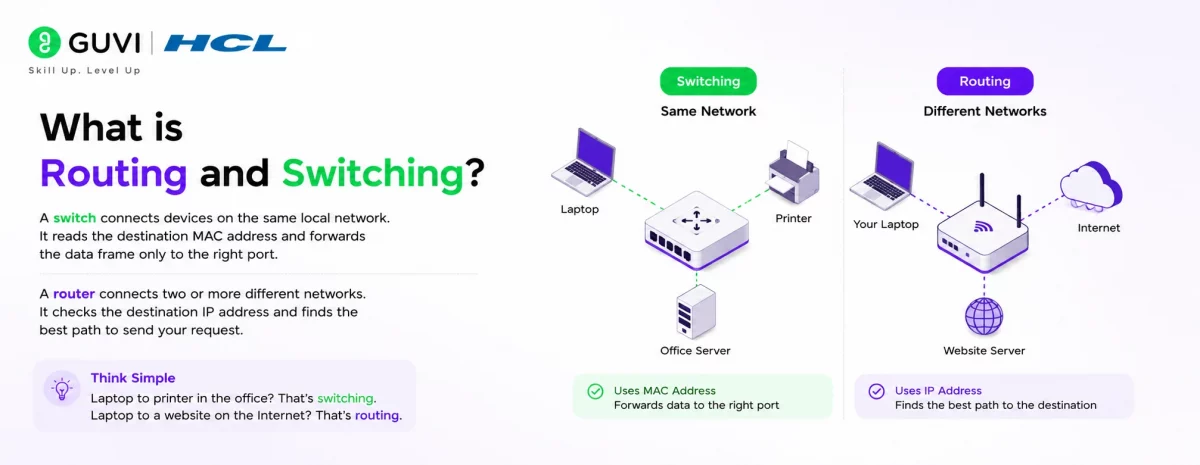
A switch connects devices on the same local network, things like your laptop, printer, or office server. It reads the destination MAC address on each data frame and forwards it only to the right port.
A router connects two or more different networks. When you open a website, your router checks the destination IP address and decides the best path to send that request out, often through your internet service provider.
Here’s a simple way to picture it. If your laptop sends a file to the office printer, that’s switching. If your laptop requests a page from a website hosted somewhere else, that’s routing.
Static Routing vs Dynamic Routing: When to Use Which
Not all routing works the same way, and this is a common interview topic too.
Static routing means a network admin manually enters every route into the routing table. It’s predictable and secure, but you have to update it by hand every time the network changes. This works fine for small, stable networks like a single branch office.
Dynamic routing uses protocols such as OSPF or BGP to let routers exchange information and update paths automatically. It reacts to outages and topology changes without manual work, which is why large enterprises, data centres, and ISPs rely on it.
- Choose static routing when your network is small and rarely changes.
- Choose dynamic routing when you’re managing multiple routers, redundant paths, or a network that grows often.
BGP, the protocol that runs most of the internet’s routing decisions, doesn’t always pick the shortest path. It picks the path based on policies and business agreements between networks, which is why two internet providers can route the same request very differently.
Layer 2 Switching vs Layer 3 Switching: Difference Between Them
A traditional Layer 2 switch only reads MAC addresses and forwards frames within one network. It has no idea what an IP address is.
A Layer 3 switch does everything a Layer 2 switch does, but it can also perform basic routing between VLANs using IP addresses, almost like a router built into the switch. Enterprises use Layer 3 switches to reduce the number of separate routers they need inside a large campus or data centre.
| Point | Layer 2 Switching | Layer 3 Switching |
|---|---|---|
| Works with | MAC addresses only | MAC and IP addresses |
| Can route between VLANs | No | Yes |
| Typical use | Small office LAN | Large campus or data centre |
| Speed | Very fast, hardware based | Slightly more processing, still fast |
Routing Protocols – OSPF, BGP, RIP: Comparison Table
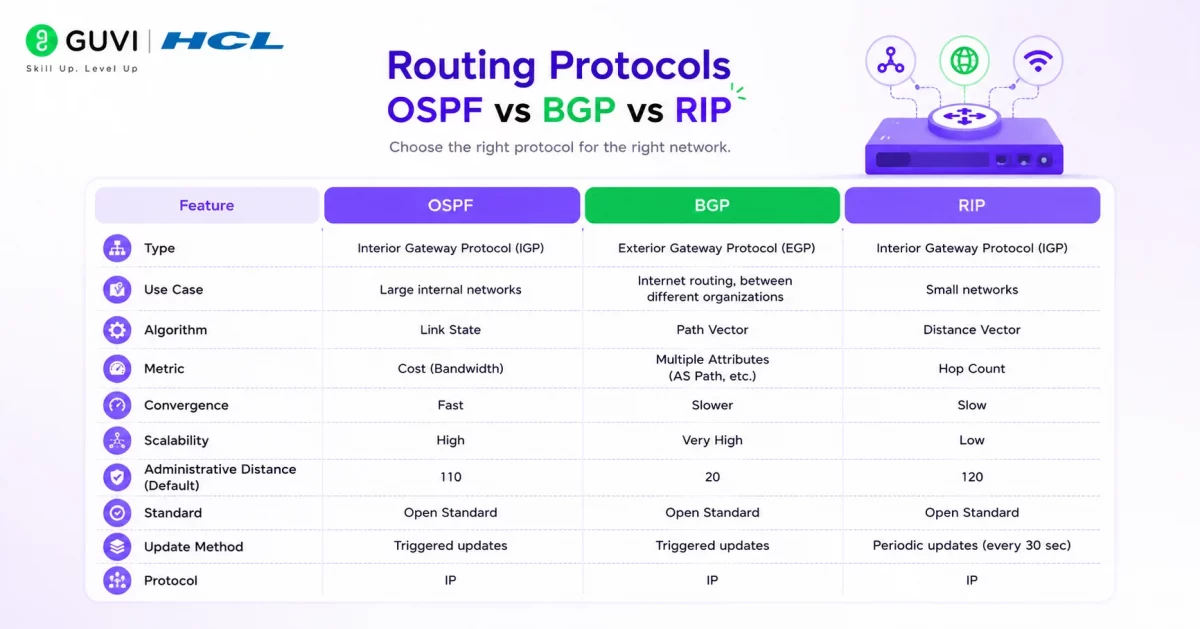
You’ll come across these three constantly once you start studying networking, so it helps to know exactly how they differ.
| Protocol | Type | Metric Used | Best For | Max Network Size |
|---|---|---|---|---|
| RIP | Distance vector | Hop count (max 15) | Small, simple networks | Small |
| OSPF | Link state | Cost (based on bandwidth) | Enterprise, internal networks | Medium to large |
| BGP | Path vector | Policy and AS path | Internet, ISPs, cloud providers | Very large / internet scale |
RIP is the oldest and simplest, but its 15 hop limit makes it unusable for anything but small networks. OSPF is the go to choice inside a single organisation because it converges fast and scales well. BGP is a different category altogether. It’s what allows independent networks, like your ISP and a cloud provider, to exchange routes and keep the internet connected.
If routing protocols interest you, HCL GUVI’s Introduction to Cloud Computing course covers networking fundamentals along with hands on practice on AWS, GCP, and Azure, and it’s free to start.
Where You’ll Actually See This in the Real World
- Office networks: switches connect employee systems and printers, while routers connect the whole office to the internet and to branch offices over VPN.
- Data centres: high speed switches connect servers and storage, while routers handle traffic to external networks and cloud regions.
- Home networks: your Wi-Fi router is doing both jobs at once, acting as a switch for your devices and a router to the internet.
- Cloud platforms: virtual switches connect your VMs and containers, while virtual routers manage traffic between subnets and VPCs.

Common mistakes beginners make
- Mixing up MAC and IP addresses. Remember, switches use MAC, routers use IP. This single mix up causes a lot of early confusion.
- Assuming a switch can connect to the internet. It can’t on its own. A switch only works within one local network.
- Ignoring VLAN mismatches. If a device and a trunk link are on different VLANs, they simply won’t talk to each other, even if the cables are fine.
- Skipping documentation. Not recording IP ranges, VLANs, and routing policies makes troubleshooting painfully slow later on.
Want to build real, hands on experience with networking and cloud infrastructure? HCL GUVI’s Zen Class Cloud and DevOps programme walks you through practical labs on routers, switches, and cloud networking from the ground up.
Routing and Switching Interview Questions for Network Engineer Roles
If you’re prepping for a network engineer interview, these are the questions that come up most often for freshers and early career roles.
- What is the difference between a router and a switch?
A switch connects devices within one network using MAC addresses at Layer 2. A router connects different networks using IP addresses at Layer 3. - What is a routing table?
It’s a database on a router that lists possible paths to different network destinations, used to decide where to forward each packet. - What is the difference between static and dynamic routing?
Static routes are entered manually and stay fixed. Dynamic routes are learned automatically through protocols like OSPF, and they update when the network changes. - What is a MAC address table?
It’s a table a switch builds automatically, mapping MAC addresses to the ports they’re connected to. - What is VLAN trunking?
It lets a single physical link carry traffic for multiple VLANs, using tags defined in the 802.1Q standard. - Why is OSPF preferred over RIP in larger networks?
OSPF converges faster, has no hop count limit, and calculates paths using link cost rather than just hop count. - What causes a switching loop, and how is it prevented?
Redundant switch links without loop prevention can cause broadcast storms. Spanning Tree Protocol (STP) blocks redundant paths to prevent this.
Conclusion
Routing and switching are the two building blocks behind every network you use, from your home Wi-Fi to global cloud infrastructure. Switching keeps local communication fast and organised, while routing connects those local networks to the wider internet. Once you’re comfortable with MAC addresses, IP addresses, and how protocols like OSPF and BGP make routing decisions, you have a genuinely solid foundation for a networking, cloud, or cybersecurity career.
FAQs
What is the main difference between routing and switching?
Switching connects devices within the same local network using MAC addresses, while routing connects different networks using IP addresses.
Which OSI layer does switching work at?
Traditional switching works at Layer 2, the Data Link Layer. Layer 3 switches can also perform basic routing.
Is BGP used inside a single company network?
Rarely. BGP is mainly used between independent networks like ISPs and cloud providers, while OSPF is more common inside one organisation.
Can a switch replace a router?
No. A switch only works within a local network and cannot connect you to the internet on its own.
Do I need to know routing and switching for a cloud computing career?
Yes. Cloud platforms use virtual versions of both, and understanding the fundamentals makes concepts like VPCs and subnets far easier to grasp.
What is the easiest routing protocol to learn first?
RIP, because it uses simple hop count based logic, though most real networks today use OSPF or BGP.
Success Stories

About the Author
Vaishali
I'm a seasoned writer with four years of experience across technical, non-technical, and just about every genre or niche you can imagine. Adaptable and curious, I enjoy exploring new topics and making information engaging and easy to understand. Fueled by a steady stream of tea, I approach each project with creativity, reliability, and genuine enthusiasm for storytelling.
View all posts by Vaishali
Connect with me @









Did you enjoy this article?